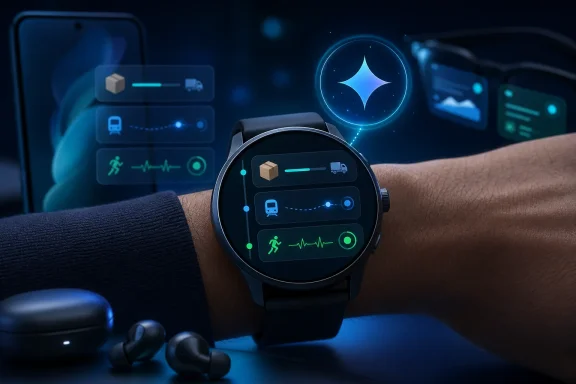
Google began rolling out Wear OS 7 to eligible Pixel Watch devices on June 16, 2026, bringing Android Live Updates, improved connected-device controls, promised Gemini Intelligence features later this year, and an advertised battery-life gain of up to 10 percent over Wear OS 6. The update is not just another version bump for Google’s watch platform. It is Google’s clearest attempt yet to turn the smartwatch from a notification mirror into a small, persistent control surface for the Android ecosystem. The real story is not that Pixel Watch owners get new software; it is that Google is trying to make the wrist matter again.
Wear OS has spent much of its life in a defensive crouch. It existed because Android needed an answer to Apple Watch, because fitness tracking became table stakes, and because notifications on the wrist were useful enough to justify a second screen for some people. But the platform often felt like a phone companion rather than a computing surface with its own logic.
Wear OS 7 is Google arguing that the watch earns its place when it is faster than the phone, not when it imitates one. Live Updates are the most obvious example. A delivery timer, workout progress, ride status, or sports score does not belong three taps deep in an app if the whole point is to glance and move on.
That design philosophy matters because watches punish friction more brutally than phones do. A smartwatch interaction that takes ten seconds feels long; one that asks for multiple screens feels broken. The best wearable software compresses a task until it becomes almost ambient.
Google’s pitch is therefore less about novelty than about placement. The same real-time information that Android has been pushing toward phones now arrives on a display designed for exactly that kind of persistent context. If developers use it well, Wear OS 7 could make the watch feel less like a shrunken launcher and more like a live instrument panel.
A food order approaching the door, a score changing during a meeting, an active workout metric, or a ride inching closer across town are all pieces of information that become less useful when they require a full phone interaction. The watch is well suited to this kind of data because it is already visible, already attached, and already expected to interrupt politely.
There is a practical elegance here. Wearables have long been sold with grand visions of health, productivity, and personal assistance, but many of their daily wins are mundane. A glance that saves a pocket reach is not glamorous, but it is repeatable, and repeatability is what makes a device feel indispensable.
The catch is that Live Updates will only be as strong as app support. Google can provide the system rail, but the train still has to be loaded by developers. If only a handful of showcase apps participate, the feature becomes another demo-friendly bullet point; if delivery, transit, sports, fitness, and messaging apps adopt it broadly, it becomes the kind of infrastructural improvement users stop noticing because it simply works.
But the modesty of the claim makes it worth taking seriously. Wearable battery life is a game of margins: display wake time, background sensors, radios, app polling, workout tracking, and the thousand small moments when software either sleeps correctly or does not. A 10 percent gain can be the difference between finishing the day with confidence and enabling battery saver before dinner.
For Pixel Watch owners, that matters more than a spec-sheet arms race. Smartwatches live or die by trust. If a user stops trusting the device to last through travel, a workout, or a long workday, the watch becomes something managed rather than something worn.
There is also a strategic dimension. Google is adding more live information, richer cross-device controls, and eventually more AI behavior. All of that risks making the watch busier. Battery optimization is not a side note; it is the permission structure for the rest of the product plan.
That is a much bigger claim than Live Updates. A custom dashboard created by voice or text could be genuinely useful if it allows users to assemble the exact information they want without hunting through settings, tiles, and app-specific complications. Multi-step automation could be even more powerful if it lets the watch become a lightweight command endpoint for everyday tasks.
But this is also where Google’s wearable pitch enters familiar AI territory: impressive in concept, dependent on execution, and likely constrained by device support, permissions, app integrations, latency, and user trust. Ordering food, booking a class, or navigating across apps from the wrist sounds convenient until the system misunderstands intent or asks for confirmation at every step.
The watch is a particularly unforgiving place for AI ambiguity. On a phone or PC, users can review a long response, correct a prompt, or inspect options. On a wrist, the interface is tiny and the interaction window is short. Gemini on Wear OS will need to be more than clever; it will need to be decisive, transparent, and easy to abort.
The modern device environment is messy. A user may have earbuds connected to a phone, a smart speaker playing in another room, a watch on the wrist, a tablet nearby, and eventually smart glasses in the mix. The more devices Google adds, the more valuable it becomes to have a simple place to see and redirect what is happening.
The watch is a plausible candidate for that role because it is always physically available. It is not necessarily the best device for browsing, composing, or configuring, but it can be the best device for switching, pausing, acknowledging, and confirming. That makes it less like a mini-phone and more like a remote control for personal computing.
The Android XR and smart-glasses angle sharpens the point. Google’s example of reviewing a photo captured by intelligent eyewear on the watch is a small interaction, but it sketches a broader model: glasses capture, the watch confirms, the phone edits, and cloud services organize. Wear OS 7 is one piece of that chain.
This is where WindowsForum readers should pay attention even if they do not care much about Pixel Watch hardware. Platform power increasingly comes from the handoff layer between devices. Microsoft has spent years trying to make Windows, Android phones, cloud identity, and peripheral experiences feel less fragmented. Google is pursuing a similar outcome from the opposite direction: start with Android, extend to the wrist, then make the watch a broker for whatever comes next.
That is good for Pixel Watch owners. They get the update, they get the marketing clarity, and they get the closest alignment between software roadmap and device support. It also gives developers a concrete target for testing Live Updates and eventual Gemini behavior.
But Wear OS is not only Pixel Watch. Samsung remains a major force in Android wearables, and other manufacturers have their own hardware cycles, skins, chips, and update commitments. The more Google ties headline features to “select devices,” the more consumers will need to parse which watches are truly part of the next generation and which are merely compatible with some of it.
This is the perennial Android trade-off. Openness and hardware variety expand the market, but they also complicate software certainty. Apple can present watchOS as a unified update story because it controls the stack. Google has to build momentum through partners while making Pixel the proof point.
The risk is that Wear OS 7 becomes two stories: a strong Pixel Watch update today and a hazier promise for the broader Wear OS market tomorrow. That does not doom the release, but it does mean buyers should treat feature availability as a device-specific question rather than a platform-wide assumption.
Live Updates offer a more realistic development target. Instead of asking every service to create a miniature version of its phone app, Google is asking developers to expose the part of the experience that benefits from being glanceable. That is a more disciplined model.
A restaurant app does not need to become a full ordering interface on the wrist to be useful. A transit app does not need every map feature. A fitness app does not need to replicate the phone dashboard. The watch layer can be narrow, timely, and valuable.
Gemini automation could complicate this in productive or chaotic ways. If Google gives developers clean APIs for structured actions, Wear OS could become a trigger surface for tasks that normally require opening an app. If the model depends too heavily on opaque assistant behavior, developers may struggle to predict how their services are invoked and users may struggle to understand what is happening.
The best version of Wear OS 7 for developers is not “build another app.” It is “make your most time-sensitive workflow visible and actionable.” That is a smaller ask, and it is much more aligned with how people actually use watches.
A watch is not just another screen. It sits on the body, collects health and activity signals, receives messages, handles payments in some contexts, tracks location-adjacent behavior, and now increasingly mediates AI assistance. The more proactive the system becomes, the more users will need clear controls over what data is being used and when.
This is not a theoretical concern for IT pros and security-minded users. Wearables are often personal devices, but they enter workplaces, connect to corporate phones, display sensitive notifications, and participate in authentication flows. A smarter watch can create convenience, but it can also create new leakage surfaces.
The enterprise angle is especially awkward because consumer wearable platforms usually move faster than corporate policy. A company may have strict controls around phones and laptops while barely addressing what appears on an employee’s wrist. As AI features creep into wearables, that gap will become harder to ignore.
Google can mitigate some of this with transparent settings, clear permission prompts, and admin-friendly documentation. But the core tension will remain: the more personal the assistant becomes, the more sensitive the assistant becomes.
Wear OS 7’s answer is very Google. It emphasizes live information, cross-device awareness, AI personalization, and ecosystem integration. Apple’s watch strategy has historically leaned heavily on health, fitness, safety, and tight iPhone integration. The overlap is obvious, but the emphasis differs.
Google has an opportunity because Android’s diversity creates use cases Apple does not have to handle in the same way. Multiple device makers, more varied accessories, emerging XR hardware, and Google’s service graph give Wear OS a different set of levers. The watch can become a control layer for a broader, messier device world.
But Apple’s advantage is consistency. Users know which watches get which software for a given cycle, developers know the target, and the ecosystem story is simpler. Google’s challenge with Wear OS 7 is to make its more flexible world feel just as coherent.
That is why Pixel Watch matters beyond its sales numbers. It gives Google a controlled demonstration of what Wear OS is supposed to feel like when hardware, software, and services line up. The question is whether that experience can travel.
Live Updates need developer adoption. Gemini Intelligence needs device clarity and real-world reliability. Battery gains need to show up outside lab language. Connected-device controls need to work consistently across the accessories people actually own.
This is where Google’s recent Android strategy is both encouraging and risky. The company has become more serious about tying its platforms together, but it is also increasingly comfortable shipping staged experiences: some features now, some later, some only on select devices, some dependent on regional or account conditions. Users can tolerate that if the baseline update is solid. They become cynical if the most exciting parts remain perpetually just ahead.
For Pixel Watch owners, the practical advice is simple: treat Wear OS 7 first as a usability and efficiency update, not as an AI revolution. The day-one value is in glanceable live information, better media controls, and a possible battery lift. The Gemini layer should be considered a second wave until it actually arrives on specific devices.
That sounds narrow, but narrow is not bad. The most successful technologies often win by becoming boringly reliable at a specific job. The wrist does not need to replace the phone, just as the phone did not replace the PC for every task. It needs to own moments where the phone is too much.
Google’s new update points in that direction. Live Updates give the watch time-sensitive awareness. Media switching and connected-device controls give it command value. Battery improvements protect the always-on premise. Gemini, if implemented carefully, could turn short spoken intent into structured action.
The danger is overreach. If Gemini turns the watch into another place where users must manage prompts, permissions, corrections, and hallucinated confidence, the product will feel heavier rather than smarter. Wear OS 7 succeeds only if intelligence reduces interaction, not if it relocates complexity to a smaller screen.
 Google Moves the Watch From Accessory to Command Post
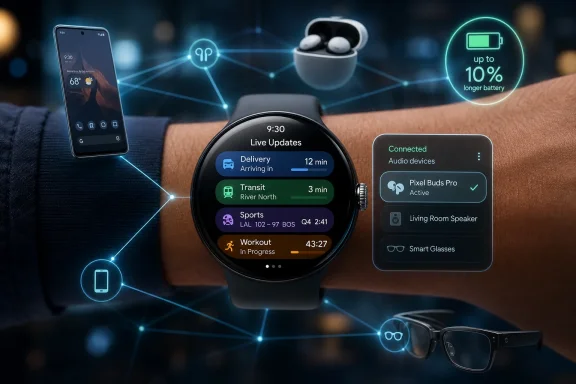
Wear OS has spent much of its life in a defensive crouch. It existed because Android needed an answer to Apple Watch, because fitness tracking became table stakes, and because notifications on the wrist were useful enough to justify a second screen for some people. But the platform often felt like a phone companion rather than a computing surface with its own logic.Wear OS 7 is Google arguing that the watch earns its place when it is faster than the phone, not when it imitates one. Live Updates are the most obvious example. A delivery timer, workout progress, ride status, or sports score does not belong three taps deep in an app if the whole point is to glance and move on.
That design philosophy matters because watches punish friction more brutally than phones do. A smartwatch interaction that takes ten seconds feels long; one that asks for multiple screens feels broken. The best wearable software compresses a task until it becomes almost ambient.
Google’s pitch is therefore less about novelty than about placement. The same real-time information that Android has been pushing toward phones now arrives on a display designed for exactly that kind of persistent context. If developers use it well, Wear OS 7 could make the watch feel less like a shrunken launcher and more like a live instrument panel.
Live Updates Are Small, but They Change the Job Description
The headline feature sounds almost too ordinary: real-time updates on your wrist. Yet that ordinariness is precisely why it has a better chance of mattering than many flashier smartwatch ideas.A food order approaching the door, a score changing during a meeting, an active workout metric, or a ride inching closer across town are all pieces of information that become less useful when they require a full phone interaction. The watch is well suited to this kind of data because it is already visible, already attached, and already expected to interrupt politely.
There is a practical elegance here. Wearables have long been sold with grand visions of health, productivity, and personal assistance, but many of their daily wins are mundane. A glance that saves a pocket reach is not glamorous, but it is repeatable, and repeatability is what makes a device feel indispensable.
The catch is that Live Updates will only be as strong as app support. Google can provide the system rail, but the train still has to be loaded by developers. If only a handful of showcase apps participate, the feature becomes another demo-friendly bullet point; if delivery, transit, sports, fitness, and messaging apps adopt it broadly, it becomes the kind of infrastructural improvement users stop noticing because it simply works.
The Battery Claim Is Modest Enough to Be Interesting
Google says average users moving from Wear OS 6 to Wear OS 7 can expect up to 10 percent better battery life. That is not the kind of number that sells a new device by itself. It will not turn a Pixel Watch into a multi-week endurance wearable, and it will not end the nightly-charging ritual for users who already push their watch hard.But the modesty of the claim makes it worth taking seriously. Wearable battery life is a game of margins: display wake time, background sensors, radios, app polling, workout tracking, and the thousand small moments when software either sleeps correctly or does not. A 10 percent gain can be the difference between finishing the day with confidence and enabling battery saver before dinner.
For Pixel Watch owners, that matters more than a spec-sheet arms race. Smartwatches live or die by trust. If a user stops trusting the device to last through travel, a workout, or a long workday, the watch becomes something managed rather than something worn.
There is also a strategic dimension. Google is adding more live information, richer cross-device controls, and eventually more AI behavior. All of that risks making the watch busier. Battery optimization is not a side note; it is the permission structure for the rest of the product plan.
Gemini Is the Future Feature, Not the Day-One Upgrade
The most ambitious part of Wear OS 7 is also the part users should treat with the most caution. Gemini Intelligence is slated for select devices later this year, with Google describing features such as natural-language widget creation and multi-step app automation from the wrist.That is a much bigger claim than Live Updates. A custom dashboard created by voice or text could be genuinely useful if it allows users to assemble the exact information they want without hunting through settings, tiles, and app-specific complications. Multi-step automation could be even more powerful if it lets the watch become a lightweight command endpoint for everyday tasks.
But this is also where Google’s wearable pitch enters familiar AI territory: impressive in concept, dependent on execution, and likely constrained by device support, permissions, app integrations, latency, and user trust. Ordering food, booking a class, or navigating across apps from the wrist sounds convenient until the system misunderstands intent or asks for confirmation at every step.
The watch is a particularly unforgiving place for AI ambiguity. On a phone or PC, users can review a long response, correct a prompt, or inspect options. On a wrist, the interface is tiny and the interaction window is short. Gemini on Wear OS will need to be more than clever; it will need to be decisive, transparent, and easy to abort.
Google Is Building the Wrist Into Its Device Mesh
Wear OS 7 also leans into connected-device control, including media output switching across headphones, speakers, and other devices. This may sound like a secondary convenience feature, but it reveals the larger ecosystem play.The modern device environment is messy. A user may have earbuds connected to a phone, a smart speaker playing in another room, a watch on the wrist, a tablet nearby, and eventually smart glasses in the mix. The more devices Google adds, the more valuable it becomes to have a simple place to see and redirect what is happening.
The watch is a plausible candidate for that role because it is always physically available. It is not necessarily the best device for browsing, composing, or configuring, but it can be the best device for switching, pausing, acknowledging, and confirming. That makes it less like a mini-phone and more like a remote control for personal computing.
The Android XR and smart-glasses angle sharpens the point. Google’s example of reviewing a photo captured by intelligent eyewear on the watch is a small interaction, but it sketches a broader model: glasses capture, the watch confirms, the phone edits, and cloud services organize. Wear OS 7 is one piece of that chain.
This is where WindowsForum readers should pay attention even if they do not care much about Pixel Watch hardware. Platform power increasingly comes from the handoff layer between devices. Microsoft has spent years trying to make Windows, Android phones, cloud identity, and peripheral experiences feel less fragmented. Google is pursuing a similar outcome from the opposite direction: start with Android, extend to the wrist, then make the watch a broker for whatever comes next.
The Pixel Watch Gets First-Class Treatment, but Wear OS Still Has an OEM Problem
The rollout to eligible Pixel Watch devices underscores a reality that has become familiar across Android: Google’s own hardware gets the cleanest story. Pixel phones and Pixel Watches are now the reference path for Android and Wear OS features, even when the broader ecosystem is supposed to benefit later.That is good for Pixel Watch owners. They get the update, they get the marketing clarity, and they get the closest alignment between software roadmap and device support. It also gives developers a concrete target for testing Live Updates and eventual Gemini behavior.
But Wear OS is not only Pixel Watch. Samsung remains a major force in Android wearables, and other manufacturers have their own hardware cycles, skins, chips, and update commitments. The more Google ties headline features to “select devices,” the more consumers will need to parse which watches are truly part of the next generation and which are merely compatible with some of it.
This is the perennial Android trade-off. Openness and hardware variety expand the market, but they also complicate software certainty. Apple can present watchOS as a unified update story because it controls the stack. Google has to build momentum through partners while making Pixel the proof point.
The risk is that Wear OS 7 becomes two stories: a strong Pixel Watch update today and a hazier promise for the broader Wear OS market tomorrow. That does not doom the release, but it does mean buyers should treat feature availability as a device-specific question rather than a platform-wide assumption.
Developers Now Have a Better Reason to Care About the Wrist
For app developers, Wear OS has often been a difficult proposition. The user base is smaller than phones, the interface is constrained, and many app categories do not translate well to a watch. A bad wearable app is worse than no wearable app because it teaches users not to bother.Live Updates offer a more realistic development target. Instead of asking every service to create a miniature version of its phone app, Google is asking developers to expose the part of the experience that benefits from being glanceable. That is a more disciplined model.
A restaurant app does not need to become a full ordering interface on the wrist to be useful. A transit app does not need every map feature. A fitness app does not need to replicate the phone dashboard. The watch layer can be narrow, timely, and valuable.
Gemini automation could complicate this in productive or chaotic ways. If Google gives developers clean APIs for structured actions, Wear OS could become a trigger surface for tasks that normally require opening an app. If the model depends too heavily on opaque assistant behavior, developers may struggle to predict how their services are invoked and users may struggle to understand what is happening.
The best version of Wear OS 7 for developers is not “build another app.” It is “make your most time-sensitive workflow visible and actionable.” That is a smaller ask, and it is much more aligned with how people actually use watches.
Privacy Becomes Harder When the Watch Gets Smarter
The move toward Gemini Intelligence and Personal Intelligence raises the privacy stakes. Google’s description points toward suggestions informed by Google apps, user history, and broader context. That may be useful, but on a wearable it also becomes unusually intimate.A watch is not just another screen. It sits on the body, collects health and activity signals, receives messages, handles payments in some contexts, tracks location-adjacent behavior, and now increasingly mediates AI assistance. The more proactive the system becomes, the more users will need clear controls over what data is being used and when.
This is not a theoretical concern for IT pros and security-minded users. Wearables are often personal devices, but they enter workplaces, connect to corporate phones, display sensitive notifications, and participate in authentication flows. A smarter watch can create convenience, but it can also create new leakage surfaces.
The enterprise angle is especially awkward because consumer wearable platforms usually move faster than corporate policy. A company may have strict controls around phones and laptops while barely addressing what appears on an employee’s wrist. As AI features creep into wearables, that gap will become harder to ignore.
Google can mitigate some of this with transparent settings, clear permission prompts, and admin-friendly documentation. But the core tension will remain: the more personal the assistant becomes, the more sensitive the assistant becomes.
Apple Is Still the Benchmark Google Is Trying Not to Name
No Wear OS release exists in a vacuum. Apple Watch remains the cultural and commercial benchmark for smartwatches, particularly in the United States. Google does not need to copy Apple feature-for-feature, but it does need to solve the same underlying problem: making the watch feel necessary rather than optional.Wear OS 7’s answer is very Google. It emphasizes live information, cross-device awareness, AI personalization, and ecosystem integration. Apple’s watch strategy has historically leaned heavily on health, fitness, safety, and tight iPhone integration. The overlap is obvious, but the emphasis differs.
Google has an opportunity because Android’s diversity creates use cases Apple does not have to handle in the same way. Multiple device makers, more varied accessories, emerging XR hardware, and Google’s service graph give Wear OS a different set of levers. The watch can become a control layer for a broader, messier device world.
But Apple’s advantage is consistency. Users know which watches get which software for a given cycle, developers know the target, and the ecosystem story is simpler. Google’s challenge with Wear OS 7 is to make its more flexible world feel just as coherent.
That is why Pixel Watch matters beyond its sales numbers. It gives Google a controlled demonstration of what Wear OS is supposed to feel like when hardware, software, and services line up. The question is whether that experience can travel.
The Update Is Also a Test of Google’s Patience
Google has a long history of ambitious platform ideas that arrive with fanfare and then drift. Wear OS itself has survived rebrands, strategy shifts, partner resets, and long stretches where it felt secondary to Android proper. Wear OS 7 will be judged not only by the update that lands this week, but by what happens after the press cycle ends.Live Updates need developer adoption. Gemini Intelligence needs device clarity and real-world reliability. Battery gains need to show up outside lab language. Connected-device controls need to work consistently across the accessories people actually own.
This is where Google’s recent Android strategy is both encouraging and risky. The company has become more serious about tying its platforms together, but it is also increasingly comfortable shipping staged experiences: some features now, some later, some only on select devices, some dependent on regional or account conditions. Users can tolerate that if the baseline update is solid. They become cynical if the most exciting parts remain perpetually just ahead.
For Pixel Watch owners, the practical advice is simple: treat Wear OS 7 first as a usability and efficiency update, not as an AI revolution. The day-one value is in glanceable live information, better media controls, and a possible battery lift. The Gemini layer should be considered a second wave until it actually arrives on specific devices.
The Wrist Finally Gets a Job Description
Wear OS 7 is most persuasive when it stops pretending the watch is a tiny general-purpose computer. The watch is at its best when it does a few things faster than everything else: show status, capture intent, control nearby devices, and confirm lightweight actions.That sounds narrow, but narrow is not bad. The most successful technologies often win by becoming boringly reliable at a specific job. The wrist does not need to replace the phone, just as the phone did not replace the PC for every task. It needs to own moments where the phone is too much.
Google’s new update points in that direction. Live Updates give the watch time-sensitive awareness. Media switching and connected-device controls give it command value. Battery improvements protect the always-on premise. Gemini, if implemented carefully, could turn short spoken intent into structured action.
The danger is overreach. If Gemini turns the watch into another place where users must manage prompts, permissions, corrections, and hallucinated confidence, the product will feel heavier rather than smarter. Wear OS 7 succeeds only if intelligence reduces interaction, not if it relocates complexity to a smaller screen.
The Pixel Watch Upgrade That Actually Matters
For users deciding how much attention to pay, the update’s importance depends less on the version number than on the workflows it touches. This is not a redesign story for the sake of redesign. It is a signal that Google wants the watch to become a more active participant in Android’s next phase.- Pixel Watch owners with eligible devices should watch for the Wear OS 7 rollout, but they should expect availability to phase in rather than appear everywhere at once.
- The most immediately useful feature is likely Live Updates, because delivery, fitness, sports, ride, and other real-time app states are naturally suited to a wrist display.
- Google’s advertised battery improvement of up to 10 percent is modest, but it could be meaningful for users who currently end long days near empty.
- Gemini Intelligence is not the same as the initial Wear OS 7 rollout, and its usefulness will depend on which devices receive it and how well third-party apps cooperate.
- Connected-device controls are a bigger strategic clue than they first appear, because Google is positioning the watch as a control layer for earbuds, speakers, phones, and eventually smart glasses.
- IT and security-minded users should pay attention to privacy controls as watches become more contextual, more proactive, and more deeply tied to personal data.
References
- Primary source: Tech My Money
Published: Wed, 17 Jun 2026 00:39:16 GMT
Wear OS 7 Pixel Watch Update Rolls Out
Wear OS 7 is rolling out to eligible Pixel Watches with Live Updates, better media controls, Gemini features later, and battery gains. techmymoney.com
- Independent coverage: Phandroid
Published: Tue, 16 Jun 2026 19:35:25 GMT
Wear OS 7 is Finally Official, and Arrives for Pixel Watch Users - Phandroid
Google claims that it's also improved battery performance.phandroid.com - Independent coverage: blog.google
Published: Tue, 16 Jun 2026 18:01:19 GMT
Wear OS 7 makes your smartwatch even smarter
Wear OS 7 brings new glanceable features — and select devices will get Gemini Intelligence later this year.blog.google