

A newly published industrial cybersecurity advisory has put the Weintek cMT3092X human-machine interface under renewed scrutiny, warning that older firmware and EasyWeb deployments may expose manufacturing environments to privilege escalation and credential disclosure. The advisory assigns the affected issue set a CVSS v3 score of 8.8, placing it firmly in the high-severity category and making it a priority for OT security teams responsible for operator panels, plant-floor networks, and engineering workstations.
The concern is not simply that a web-facing interface could contain a bug. The cMT3092X is a capable industrial HMI platform designed to bridge operators, PLCs, serial equipment, Ethernet-connected controllers, and, in some deployments, remote-access services. When authentication, account permissions, and password handling are weak on that kind of system, the possible impact extends beyond a single screen or user account.
Organizations using the Weintek cMT3092X should immediately identify installed firmware and EasyWeb versions, determine whether web management functions are reachable from shared networks, and assess whether the affected HMI is used to monitor or influence critical production processes.
The advisory identifies multiple weaknesses affecting the Weintek cMT3092X platform. Successful exploitation could enable a non-privileged user to escalate privileges or obtain credentials belonging to other users.
The affected version ranges are:
Industrial environments often retain HMI hardware well beyond the upgrade cycle familiar to enterprise IT. An operator panel that is stable, responsive, and still communicating correctly with a PLC may not receive attention unless it fails, a project is expanded, or an audit identifies the device. That operational reality can leave older firmware in service for extended periods.
The reported weaknesses include:
That position makes the HMI a high-value target.
An HMI may not execute the control logic that resides in a PLC or PAC, but it commonly gives operators the ability to:
A compromise of an HMI does not automatically mean an attacker can alter every process. Properly designed plants use controller-side interlocks, safety-rated controls, network segmentation, and role-based operational procedures. However, an HMI is often an attractive stepping stone because it can provide visibility into a process, access to live data, and a familiar route to high-impact operator functions.
Firmware Earlier Than
Any cMT3092X device running firmware earlier than
Industrial firmware management is complicated by legitimate constraints:
A site should confirm the exact HMI model, firmware revision, installed project version, and any related software dependencies before making changes. The difference between a successful remediation and an avoidable production disruption is often the quality of pre-upgrade testing.
EasyWeb Earlier Than
The advisory also identifies EasyWeb versions earlier than
Web management interfaces are useful. They reduce the need for physical access, simplify administration, and can make troubleshooting faster. Yet they also require mature session controls, secure credential storage, correct access restrictions, and careful network exposure management.
If an HMI web interface is reachable from a broad corporate network, a shared engineering subnet, an insecure wireless segment, or a remote-access environment without strong access controls, the consequences of application-level weaknesses can increase substantially.
The key question is not only whether EasyWeb is installed. It is also:
Cookies are often used by web applications to maintain a session after a user has signed in. In a secure design, a cookie should function as an opaque session reference or contain data that the server can validate reliably. A client must not be able to alter a cookie and gain higher privileges simply because the application trusts what the browser sends back.
When cookie data influences authentication or authorization without robust validation, an attacker may be able to manipulate it. The precise exploit conditions have not been publicly detailed in the advisory, so organizations should avoid assuming that the issue is limited to a particular login screen, browser, or account type.
The practical risk is that a low-privileged account, an existing user session, or another limited foothold could potentially be leveraged to access functions intended only for more privileged users.
For industrial environments, that distinction is crucial. A basic operator account and an administrative account may have dramatically different capabilities. The latter can sometimes modify user records, access sensitive system details, alter configurations, or reach functions that should be limited to trained administrators and engineers.
Authorization defects are frequently overlooked because systems may appear to require a username and password. Authentication alone is not enough. A system must also enforce which authenticated users can access each resource and execute each action.
For the cMT3092X, administrators should consider whether different local accounts can access:
Plaintext storage means a password is retained in a form that can be read directly rather than being protected through a properly designed one-way password hashing process. If an attacker gains access to the relevant storage location, account data, configuration export, backup, or administrative function, exposed passwords may be usable immediately.
The security impact can extend beyond the individual HMI.
If the same credentials are used for other Weintek units, engineering software, remote-access portals, VPN accounts, Windows workstations, or network equipment, one disclosure can become a pathway to broader compromise. That is why password resets should be considered as part of remediation where affected systems have been exposed or where the password-handling issue could plausibly have affected account secrets.
Organizations should pay particular attention to:
The advisory does not provide enough public technical detail to state exactly how this weakness manifests on every affected device. That uncertainty should encourage a defensive approach rather than narrow assumptions.
At minimum, administrators should review each local and remote account associated with the HMI environment. Accounts should have a defined owner, a necessary role, a strong unique password, and a documented reason to exist.
Public exploitation reporting has limits. OT incidents can remain private because of operational sensitivity, insurance obligations, legal concerns, or uncertainty about the root cause. In other cases, an attacker may use a weakness as one step in a larger intrusion without disclosing the technical route.
The most important exposure factors are likely to be local configuration and network architecture.
Even a device on an isolated subnet can be exposed to insiders, unauthorized physical access, infected removable media, or a compromised engineering workstation.
Network isolation reduces opportunity, but it cannot compensate for unpatched authentication and credential-handling flaws indefinitely. Defense in depth remains essential.
The key thresholds are clear:
Industrial updates should be downloaded, stored, and transferred through controlled procedures. Confirm file integrity where available and preserve the original package, version notes, and validation evidence in the change record.
At a minimum:
Recommended measures include:
Security teams should establish a baseline for normal activity and investigate anomalies such as:
It also identifies the nature of the weaknesses in enough detail to guide defensive priorities. Security teams know to focus on session integrity, authorization enforcement, password exposure, and user-account administration rather than treating the issue as a generic software defect.
The reported severity is another strength. A CVSS v3 score of 8.8 gives plant leadership a clear signal that the matter should enter formal risk tracking rather than being left as a routine maintenance item.
However, the public information also has important limits.
The absence of detailed exploit steps does not reduce the importance of patching. It means defenders must validate the full affected surface: firmware, EasyWeb, user roles, credential handling, remote access, and network reachability.
For organizations operating critical manufacturing systems, the appropriate standard is not whether an exploit has become widely publicized. It is whether a weakness could plausibly contribute to unauthorized control access, credential theft, process disruption, or lateral movement in the environment.
Coordination should include:
The immediate action is straightforward: identify all cMT3092X devices, confirm whether firmware is earlier than
Industrial HMI security cannot be reduced to whether a touchscreen is still functioning on the production floor. A panel can look healthy, communicate normally with a controller, and still carry years-old software weaknesses that expose the organization to avoidable risk. Treating the cMT3092X as a managed OT endpoint rather than a static appliance is the most important step toward reducing that risk.
The concern is not simply that a web-facing interface could contain a bug. The cMT3092X is a capable industrial HMI platform designed to bridge operators, PLCs, serial equipment, Ethernet-connected controllers, and, in some deployments, remote-access services. When authentication, account permissions, and password handling are weak on that kind of system, the possible impact extends beyond a single screen or user account.
Organizations using the Weintek cMT3092X should immediately identify installed firmware and EasyWeb versions, determine whether web management functions are reachable from shared networks, and assess whether the affected HMI is used to monitor or influence critical production processes.
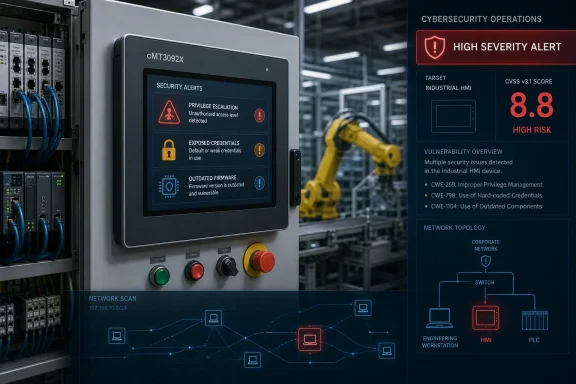 Overview of the Weintek cMT3092X Security Advisory
The advisory identifies multiple weaknesses affecting the Weintek cMT3092X platform. Successful exploitation could enable a non-privileged user to escalate privileges or obtain credentials belonging to other users.The affected version ranges are:
- cMT3092X firmware earlier than
20210218 - EasyWeb earlier than
v2.1.20
Industrial environments often retain HMI hardware well beyond the upgrade cycle familiar to enterprise IT. An operator panel that is stable, responsive, and still communicating correctly with a PLC may not receive attention unless it fails, a project is expanded, or an audit identifies the device. That operational reality can leave older firmware in service for extended periods.
The reported weaknesses include:
- Reliance on cookies without validation and integrity checking in a security decision
- Incorrect permission assignment for a critical resource
- Plaintext storage of a password
- Incorrect user management
Why an HMI Vulnerability Deserves Immediate Attention
The Weintek cMT3092X is not a lightweight consumer display. It is an advanced industrial HMI with a 9.7-inch touchscreen, dual Ethernet connectivity, serial communication capabilities, USB support, significant onboard storage, and support for industrial communication scenarios. Depending on configuration, the device may sit directly between plant personnel and control equipment.That position makes the HMI a high-value target.
An HMI may not execute the control logic that resides in a PLC or PAC, but it commonly gives operators the ability to:
- Start and stop machinery
- Change production settings
- Enter setpoints and recipes
- Acknowledge alarms
- Review production information
- Navigate diagnostic screens
- Manage users or access settings
- Communicate with multiple controllers or subsystems
A compromise of an HMI does not automatically mean an attacker can alter every process. Properly designed plants use controller-side interlocks, safety-rated controls, network segmentation, and role-based operational procedures. However, an HMI is often an attractive stepping stone because it can provide visibility into a process, access to live data, and a familiar route to high-impact operator functions.
The Most Important Technical Details
Firmware Earlier Than 20210218
Any cMT3092X device running firmware earlier than 20210218 falls within the identified affected range. In practice, administrators should not assume that a device is current because it has been operational for years without incident.Industrial firmware management is complicated by legitimate constraints:
- Production downtime may be difficult to schedule.
- An upgrade can alter device behavior, communication timing, or project compatibility.
- Older EasyBuilder Pro projects may require validation before deployment.
- Integrators may have restricted access to the original source project.
- Plants may lack a complete inventory of installed HMI firmware.
A site should confirm the exact HMI model, firmware revision, installed project version, and any related software dependencies before making changes. The difference between a successful remediation and an avoidable production disruption is often the quality of pre-upgrade testing.
EasyWeb Earlier Than v2.1.20
The advisory also identifies EasyWeb versions earlier than v2.1.20 as affected. EasyWeb functionality is especially important from a security perspective because web-based interfaces can expand the number of users, devices, and network paths that can interact with a system.Web management interfaces are useful. They reduce the need for physical access, simplify administration, and can make troubleshooting faster. Yet they also require mature session controls, secure credential storage, correct access restrictions, and careful network exposure management.
If an HMI web interface is reachable from a broad corporate network, a shared engineering subnet, an insecure wireless segment, or a remote-access environment without strong access controls, the consequences of application-level weaknesses can increase substantially.
The key question is not only whether EasyWeb is installed. It is also:
- Who can reach it?
- From which networks?
- Over which remote-access path?
- With which accounts?
- Under what logging and monitoring controls?
- With what separation from production-critical controls?
Understanding the Reported Weaknesses
Cookie Integrity Failures Can Undermine Authorization
One of the listed weaknesses concerns reliance on cookies without sufficient validation and integrity checking when making a security decision.Cookies are often used by web applications to maintain a session after a user has signed in. In a secure design, a cookie should function as an opaque session reference or contain data that the server can validate reliably. A client must not be able to alter a cookie and gain higher privileges simply because the application trusts what the browser sends back.
When cookie data influences authentication or authorization without robust validation, an attacker may be able to manipulate it. The precise exploit conditions have not been publicly detailed in the advisory, so organizations should avoid assuming that the issue is limited to a particular login screen, browser, or account type.
The practical risk is that a low-privileged account, an existing user session, or another limited foothold could potentially be leveraged to access functions intended only for more privileged users.
For industrial environments, that distinction is crucial. A basic operator account and an administrative account may have dramatically different capabilities. The latter can sometimes modify user records, access sensitive system details, alter configurations, or reach functions that should be limited to trained administrators and engineers.
Incorrect Permission Assignment Creates Dangerous Access Gaps
The advisory also identifies incorrect permission assignment for a critical resource. This type of weakness occurs when an application grants access more broadly than intended or fails to enforce restrictions around sensitive functions, files, configuration elements, or administrative actions.Authorization defects are frequently overlooked because systems may appear to require a username and password. Authentication alone is not enough. A system must also enforce which authenticated users can access each resource and execute each action.
For the cMT3092X, administrators should consider whether different local accounts can access:
- System configuration pages
- User-management functions
- Project upload or download capabilities
- Network settings
- Remote-access configuration
- Diagnostic functions
- Alarm history and data records
- Screens that write process values
- Functions reserved for supervisors or maintenance teams
Plaintext Password Storage Raises Credential-Reuse Risks
The presence of plaintext password storage is particularly concerning because credentials have a long operational life. Passwords are often reused across systems despite repeated warnings not to do so, especially in small plants, legacy deployments, and multi-site operations managed by contractors or integrators.Plaintext storage means a password is retained in a form that can be read directly rather than being protected through a properly designed one-way password hashing process. If an attacker gains access to the relevant storage location, account data, configuration export, backup, or administrative function, exposed passwords may be usable immediately.
The security impact can extend beyond the individual HMI.
If the same credentials are used for other Weintek units, engineering software, remote-access portals, VPN accounts, Windows workstations, or network equipment, one disclosure can become a pathway to broader compromise. That is why password resets should be considered as part of remediation where affected systems have been exposed or where the password-handling issue could plausibly have affected account secrets.
Organizations should pay particular attention to:
- Default or shared administrative accounts
- Generic maintenance accounts
- Contractor accounts retained after projects end
- Accounts reused across multiple panels
- Passwords documented in unprotected project files
- Credentials included in handover packages or backup folders
- Accounts tied to remote support arrangements
Incorrect User Management Magnifies the Other Issues
The fourth reported weakness, incorrect user management, reinforces the importance of a full account review. User-management flaws can take many forms: incorrect role assignment, incomplete account revocation, privilege inheritance problems, inadequate account lifecycle controls, or inconsistent handling of users after password or role changes.The advisory does not provide enough public technical detail to state exactly how this weakness manifests on every affected device. That uncertainty should encourage a defensive approach rather than narrow assumptions.
At minimum, administrators should review each local and remote account associated with the HMI environment. Accounts should have a defined owner, a necessary role, a strong unique password, and a documented reason to exist.
Assessing the Real-World Exposure
The advisory states that no known public exploitation specifically targeting these vulnerabilities has been reported. That is reassuring, but it should not be confused with proof that exploitation has not occurred or that the risk is theoretical.Public exploitation reporting has limits. OT incidents can remain private because of operational sensitivity, insurance obligations, legal concerns, or uncertainty about the root cause. In other cases, an attacker may use a weakness as one step in a larger intrusion without disclosing the technical route.
The most important exposure factors are likely to be local configuration and network architecture.
Higher-Risk Deployment Characteristics
The following conditions should raise the urgency of remediation:- The HMI runs firmware older than
20210218. - EasyWeb is installed at a version earlier than
v2.1.20. - The web interface is reachable from a corporate LAN.
- The panel is accessible through flat or poorly segmented OT networks.
- Remote access reaches the HMI directly without multi-factor authentication.
- Shared administrator accounts are in use.
- The same passwords are used across several machines or sites.
- The HMI manages sensitive recipes, setpoints, production batches, or alarm functions.
- Local user privileges have not been reviewed recently.
- The environment has little or no logging for HMI administration activity.
- Contractors, vendors, or temporary staff have retained access.
Lower Exposure Is Not Zero Exposure
A panel that is not exposed directly to the internet is still not automatically safe. Many industrial incidents begin through a phishing attack, a compromised laptop, stolen VPN credentials, a misconfigured remote-support tool, or lateral movement from a connected business network.Even a device on an isolated subnet can be exposed to insiders, unauthorized physical access, infected removable media, or a compromised engineering workstation.
Network isolation reduces opportunity, but it cannot compensate for unpatched authentication and credential-handling flaws indefinitely. Defense in depth remains essential.
A Practical Remediation Plan for OT Teams
The right response is structured, cautious, and fast enough to reduce unnecessary exposure. Production sites should not rush a firmware update blindly, but neither should they allow uncertainty to become a reason for indefinite delay.1. Build an Accurate Asset Inventory
Start by identifying every affected or potentially affected unit. Record:- Device model and hardware revision
- Physical location
- Production line or process supported
- Firmware version
- EasyWeb version
- Project file version
- IP addresses and VLAN assignments
- Connected PLCs and controllers
- Remote-access dependencies
- Account and role configuration
- Maintenance window availability
2. Confirm Version Status Before Changing Anything
Verify the current firmware revision directly on the device or through approved management procedures. Confirm the installed EasyWeb version as well.The key thresholds are clear:
- Firmware should not remain below
20210218. - EasyWeb should not remain below
v2.1.20.
3. Obtain Supported Updates Through Approved Channels
Use vendor-supported firmware and software packages appropriate for the exact cMT3092X deployment. Avoid firmware sourced from unofficial mirrors, archives of uncertain origin, or unverified third-party repositories.Industrial updates should be downloaded, stored, and transferred through controlled procedures. Confirm file integrity where available and preserve the original package, version notes, and validation evidence in the change record.
4. Test Before Production Deployment
A staged process is the safest route:- Back up the existing HMI project and settings.
- Document network settings, user roles, and remote-access configuration.
- Validate the upgrade in a lab or non-production environment where possible.
- Confirm PLC communications and protocol behavior.
- Test critical operator screens and writable objects.
- Verify alarms, recipes, historical data, and permissions.
- Schedule the production update within an approved maintenance window.
- Maintain a rollback plan if the upgrade introduces unexpected issues.
5. Reset and Reassess Credentials
Because plaintext password storage is among the reported issues, password hygiene deserves special attention.At a minimum:
- Change administrative passwords on affected systems.
- Remove default credentials.
- Eliminate shared accounts where practical.
- Disable unused user accounts.
- Assign unique credentials to individual administrators and maintenance users.
- Review whether exposed passwords were reused elsewhere.
- Rotate related credentials if reuse is identified.
- Record credential ownership in a secure password-management process.
6. Reduce Network Reachability
Until systems are validated and remediated, restrict access to the HMI and any associated web functionality as aggressively as operations permit.Recommended measures include:
- Place HMIs in dedicated OT VLANs or security zones.
- Block unnecessary traffic between enterprise and control networks.
- Permit administration only from approved engineering workstations.
- Restrict web management access to specific management hosts.
- Disable unused services.
- Prohibit direct inbound internet access.
- Require secure remote-access gateways for off-site support.
- Use multi-factor authentication for VPN and remote administration paths.
- Apply firewall rules based on business need, not broad network convenience.
7. Monitor for Suspicious Administrative Activity
HMI monitoring is often less mature than Windows server or network-device monitoring. That gap should be addressed.Security teams should establish a baseline for normal activity and investigate anomalies such as:
- Logins outside normal maintenance hours
- Unexpected administrator account creation
- Repeated failed authentication attempts
- Unauthorized configuration changes
- New or changed network settings
- Unexpected project transfers
- Unusual remote-access sessions
- Changes to user roles
- Unplanned reboots or service interruptions
Strengths of the Advisory and Its Limits
The advisory???s strongest feature is its clear identification of affected version boundaries. Firmware below20210218 and EasyWeb below v2.1.20 provide a concrete starting point for inventory and remediation activity.It also identifies the nature of the weaknesses in enough detail to guide defensive priorities. Security teams know to focus on session integrity, authorization enforcement, password exposure, and user-account administration rather than treating the issue as a generic software defect.
The reported severity is another strength. A CVSS v3 score of 8.8 gives plant leadership a clear signal that the matter should enter formal risk tracking rather than being left as a routine maintenance item.
However, the public information also has important limits.
Technical Exploit Details Remain Limited
The advisory does not publicly provide a full proof-of-concept exploit chain, exact vulnerable endpoints, or complete conditions required for each weakness. That is prudent from a defensive disclosure perspective, but it means defenders should avoid narrowing their response to only one suspected feature or account workflow.The absence of detailed exploit steps does not reduce the importance of patching. It means defenders must validate the full affected surface: firmware, EasyWeb, user roles, credential handling, remote access, and network reachability.
No Public Exploitation Does Not Mean No Operational Risk
The lack of known public exploitation should be interpreted carefully. It means there is no confirmed public reporting of attacks specifically targeting these vulnerabilities, not that the flaws are harmless or impossible to exploit.For organizations operating critical manufacturing systems, the appropriate standard is not whether an exploit has become widely publicized. It is whether a weakness could plausibly contribute to unauthorized control access, credential theft, process disruption, or lateral movement in the environment.
What Windows Administrators and OT Engineers Should Coordinate
This advisory is a reminder that IT and OT cannot operate as entirely separate security domains. A Windows administrator may not own the HMI firmware, but Windows systems commonly play a central role in engineering, project storage, backups, remote support, authentication workflows, and vendor access.Coordination should include:
- Mapping every Windows engineering workstation that can access the HMI.
- Ensuring those workstations are patched and protected.
- Restricting local administrator rights on engineering endpoints.
- Protecting HMI project files and backups from unauthorized access.
- Segmenting remote-support systems from general user networks.
- Reviewing service accounts and stored credentials.
- Monitoring VPN and remote desktop activity connected to OT operations.
- Ensuring backup repositories do not expose plaintext configuration data.
The Bottom Line
The Weintek cMT3092X advisory is a high-priority warning for industrial organizations still operating older firmware or outdated EasyWeb components. The combination of potential privilege escalation, credential disclosure, insecure cookie-based security decisions, permission problems, plaintext password storage, and user-management flaws creates a meaningful risk for plant environments that rely on these panels.The immediate action is straightforward: identify all cMT3092X devices, confirm whether firmware is earlier than
20210218 or EasyWeb is earlier than v2.1.20, and place affected systems into a controlled remediation plan. That plan should include tested upgrades, credential rotation, user-account review, network segmentation, restricted web access, and better monitoring of administrative activity.Industrial HMI security cannot be reduced to whether a touchscreen is still functioning on the production floor. A panel can look healthy, communicate normally with a controller, and still carry years-old software weaknesses that expose the organization to avoidable risk. Treating the cMT3092X as a managed OT endpoint rather than a static appliance is the most important step toward reducing that risk.
References
- Primary source: CISA
Published: 2026-07-23T12:00:00+00:00
Loading…
www.cisa.gov - Related coverage: weintek.com
Loading…
www.weintek.com - Related coverage: dl.weintek.com
Loading…
dl.weintek.com - Related coverage: weintek.net
Loading…
www.weintek.net - Related coverage: weintek-rus.com
Loading…
weintek-rus.com - Related coverage: katalog.arndt-automatic.com
Loading…
katalog.arndt-automatic.com