

Meta’s WhatsApp for Windows is being pulled away from a true native Windows 11 experience and folded into a Chromium-based web wrapper — a change that will log many users out and force a fresh sign-in flow, and that threatens to trade Windows integration and efficiency for development convenience and a single cross‑platform codebase.
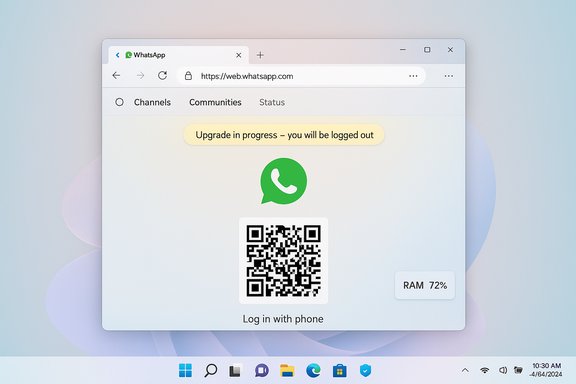
WhatsApp launched a native Windows client in recent years that relied on Windows UI frameworks and platform-specific optimizations to deliver fast startup, deeper OS integration, and efficient memory usage. In mid‑2025 Meta began testing a different approach in beta channels: instead of a Windows native app, the same WhatsApp web UI (web.whatsapp.com) would be presented inside a WebView container powered by Microsoft Edge’s Chromium runtime. That beta testing has now moved toward a broad rollout and, according to user reports, an in‑app notification telling Windows 11 users they will be logged out to complete an “upgrade.” This is part of a larger pattern at Meta: the company has standardized more desktop messaging experiences around web‑first clients and wrappers. Messenger’s desktop apps and other Meta properties have already faced a similar migration to PWAs and web wrappers, and Meta is citing engineering simplification and faster cross‑platform feature parity as the primary rationale.
Concretely:
For Windows specifically, the loss of a high‑quality native WhatsApp client is a symptom of two trends: a web‑first product strategy at major consumer internet companies, and the growing dominance of Chromium as the de‑facto embedded runtime on desktops. Windows users who value native performance may find themselves relying more on third‑party alternatives or taking extra steps to approximate native behavior via PWAs or specialized browser profiles.
Source: Windows Latest Meta hints WhatsApp for Windows 11 will switch to a Chromium web app starting Nov 5
 Background
WhatsApp launched a native Windows client in recent years that relied on Windows UI frameworks and platform-specific optimizations to deliver fast startup, deeper OS integration, and efficient memory usage. In mid‑2025 Meta began testing a different approach in beta channels: instead of a Windows native app, the same WhatsApp web UI (web.whatsapp.com) would be presented inside a WebView container powered by Microsoft Edge’s Chromium runtime. That beta testing has now moved toward a broad rollout and, according to user reports, an in‑app notification telling Windows 11 users they will be logged out to complete an “upgrade.” This is part of a larger pattern at Meta: the company has standardized more desktop messaging experiences around web‑first clients and wrappers. Messenger’s desktop apps and other Meta properties have already faced a similar migration to PWAs and web wrappers, and Meta is citing engineering simplification and faster cross‑platform feature parity as the primary rationale. What exactly is changing?
From native UWP/WinUI to a WebView2 (Chromium) wrapper
- The existing native Windows client — built with Windows platform UI frameworks — is being replaced by an app that hosts web.whatsapp.com inside a Chromium‐based runtime (Edge WebView2). That means the desktop app will essentially be the web interface packaged into a window, not a rebuilt native binary that speaks Windows APIs directly.
- The WebView2 approach uses the Chromium rendering engine (Blink + V8) under the hood, so many of the characteristics of Chromium browsers now apply to the desktop client: rendering and memory characteristics mirror a browser tab more than a native process.
What Meta is promising as “upgrades”
Meta’s in‑app notice (reported by outlets and captured in screenshots circulating on social channels) frames the change as an update that enables additional features — specifically, support for WhatsApp Communities, a refreshed Status page experience, and Channels. The message tells users they’ll be logged out to complete the upgrade and will need their phone to log back in. Multiple independent outlets confirm these feature priorities as part of the web‑first rollout. Important caveat: a specific logout date reported in some articles (for example, one report claiming a “logged out on November 5” prompt) appears to originate from a single site’s scoop and screenshots; that precise calendar date has not been universally confirmed by Meta’s official help pages at the time of reporting. Treat any date‑specific claim as likely accurate for planning if you saw an in‑app prompt, but verify it inside your own app notifications or Meta’s support pages before assuming an enforced cutoff.Why Meta is doing it (the official / likely rationale)
Meta’s public and industry explanation centers on these points:- Single codebase: managing one web codepath reduces engineering overhead, speeds feature parity across platforms (Windows, macOS, Linux, web), and simplifies QA and deployment. This matters when you’re shipping features such as Channels and Communities simultaneously to mobile and desktop.
- Faster feature rollout: web‑first clients let product teams iterate in the browser and deploy updates without platform store approvals or long rebuild cycles. That can accelerate release cadence for cross‑platform features.
User experience and performance: what you will likely notice
Resource usage and perceived performance
Early tests and community reports point to a measurable increase in memory usage compared with the native Windows client. Multiple outlets benchmarking the beta report roughly ~30% higher RAM usage for the WebView2/wrapped web client versus the native UWP/WinUI app. That’s consistent with expectations: Chromium (and its embedded runtimes) generally carry a larger memory and process overhead than tightly tuned native Windows code. Expect these practical impacts:- Longer cold startup time in some cases and higher baseline memory in Task Manager.
- The WhatsApp process may appear as one or more WebView2/Edge processes, similar to a browser tab.
Native Windows integration loss
Because the app will be the web UI in a container, native integrations that made the earlier client feel like a Windows app will be reduced or lost:- Native action center and some notification behaviors may differ — browser‑style notifications and different background throttling can change reliability.
- Features like jump lists, live previews, richer accessibility hooks, or deep file‑handler integrations may no longer behave the same way.
- Visual polish consistent with Windows 11 (WinUI, Mica, etc. will be reduced in favor of the website’s own styling.
New features coming with the web path
Meta highlights several features that the web UI already supports or adds more readily:- Channels: a broadcast‑style feed function.
- Communities: enhanced group/organization features.
- Status: a redesigned Status experience on desktop that mirrors the mobile UI more closely.
Security and privacy implications — what to check now
End‑to‑end encryption (E2EE) and Secure Storage
Meta’s migration guidance across its apps stresses Secure Storage or similar mechanisms to preserve E2EE history across devices. If you rely on E2EE chats, you should verify your Secure Storage settings and backup PINs now. Without those protections enabled, some encrypted histories might not be available after a device‑level migration or after a new client signs in. This has been emphasized in community advisories and in Meta’s migration flow documentation.Concretely:
- Enable Secure Storage (if available) and set a PIN from your mobile app or existing desktop client, following Meta’s in‑app or help guidance.
- Verify cross‑device restoration: once Secure Storage is enabled, confirm that an additional device can restore encrypted chats before tossing or uninstalling anything.
Re-authentication and key handling
The reported migration requires re‑authentication using your phone (scan QR code or the official sign‑in flow). When you re‑sign, the new client will pull available history per Meta’s encryption and synchronization rules. One widely circulated claim — that up to one year of chat history will be synced on re‑login — is reported by some outlets but has not been universally documented by Meta; treat such numeric caps as provisional until Meta’s help pages or the in‑app messaging confirm the exact retention window. Flag this as an actionable verification step: if you depend on longer archives, create your own exported backups where possible.Third‑party wrappers and trust
If users seek alternatives (third‑party wrappers or multi‑service “messenger hubs”), be cautious: wrappers that simply host web.whatsapp.com inside another container inherit the same browser‑level constraints and introduce new trust surfaces — you must trust how those wrappers handle credentials, cookies, and local storage. For high‑sensitivity contexts, prefer Meta’s official web or mobile flows or privacy‑first alternatives.Practical checklist: prepare your Windows 11 device (recommended immediate steps)
- Enable Secure Storage in WhatsApp and set a recovery PIN; verify restoration on another device if possible.
- Export any chat data you absolutely need preserved outside Meta’s systems (download your account data where that meets your needs). Native exports may not include decrypted E2EE content unless Secure Storage was enabled — plan accordingly.
- Update Microsoft Edge and ensure WebView2 runtime is current (many web wrappers depend on the installed Edge WebView2 runtime). This can minimize compatibility issues with the new client.
- If you prefer a desktop “app” feel without the official wrapper, consider installing web.whatsapp.com as a PWA from Edge/Chrome — this is functionally equivalent to the wrapped web app but gives you a browser‑controlled install step with predictable update behavior.
- For power users and admins: audit how WhatsApp desktop was used in workflows (file handlers, notifications, automation) and update helpdesk documentation and runbooks. Expect differences in notification fidelity and background behaviors.
Enterprise and administrative concerns
- Compliance & eDiscovery: organizations that relied on a native desktop client for retention or local archiving must inventory affected endpoints and revalidate any retention workflows. Web clients complicate deterministic capture unless enterprise archiving tools are updated to track authenticated web sessions.
- Managed environments: for Windows fleets, consider policies that limit access to PWA installs, or document permitted browser versions for teams that require reliable desktop messaging. Encourage admins to test the new WebView2‑backed client in a pilot ring before broad rollouts.
- Accessibility: organizations serving users who rely on platform accessibility hooks should test the web wrapper to ensure assistive technologies behave acceptably. Where gaps exist, provide documented alternatives.
Alternatives and tradeoffs
- If you want to avoid the web wrapper entirely, use the web client in a dedicated browser profile and treat it like the official app — pin it to the taskbar, enable site notifications, and use an isolated browser profile for credentials. This approach gives control over the browser runtime and extension usage, but you still accept browser limits (service worker throttling, notification behavior).
- Consider privacy‑focused alternatives (Signal, Telegram) if you require a fully native, open‑source client with stronger guarantees around client behavior — but keep in mind network effects: your contacts may still live in WhatsApp. Signal maintains native clients and has a distinct trust and open‑source model that differs substantially from Meta’s web‑first strategy.
Critical analysis: strengths, risks, and what this means for Windows users
Strengths (what Meta gains)
- Faster cross‑platform parity: teams can ship Channels, Communities, and Status updates to mobile and desktop with less platform fragmentation. This reduces QA cycles and developer headcount per platform.
- Simpler release mechanics: web code can be updated continuously without store approvals, letting Meta fix UI bugs and security issues with less friction.
- Unified product experience: the UI and feature set will be consistent across desktop browsers and the wrapped app, which simplifies documentation and feature rollout planning.
Risks and downsides (what users lose)
- Performance and resource costs: higher RAM and potentially higher CPU use, especially visible on low‑memory devices and older hardware. Multiple reports document significant memory increases vs the native client.
- Eroded native polish: Windows‑specific integrations (notifications, jump lists, accessibility hooks) may regress, creating a less seamless experience for users who depended on those conveniences.
- Trust and privacy surface: relying on a browser runtime moves more of the client surface into web storage, cookies, and service workers — areas that are powerful but also increase the attack surface and change the assumptions privacy‑minded users held about local encrypted caches. The Secure Storage and PIN flows mitigate some of this risk but require user action and comprehension.
- Vendor lock and ecosystem effects: as more major apps standardize on WebView2/Chromium runtimes, Windows users are increasingly dependent on Chromium infrastructure (Edge/Chrome). That has ecosystem and platform competition implications beyond WhatsApp’s UX.
Long‑term implications
This move signals a broader industry reality: large cross‑platform services often prioritize single codebases and engineering efficiency over platform-optimized experiences. That’s a rational business choice for companies at Meta’s scale, but it shifts the burden onto OS vendors and independent developers to keep delivering elite native experiences where users still value them.For Windows specifically, the loss of a high‑quality native WhatsApp client is a symptom of two trends: a web‑first product strategy at major consumer internet companies, and the growing dominance of Chromium as the de‑facto embedded runtime on desktops. Windows users who value native performance may find themselves relying more on third‑party alternatives or taking extra steps to approximate native behavior via PWAs or specialized browser profiles.
Conclusion: what to do now
- Treat any in‑app logout notification as actionable: follow the steps above to ensure Secure Storage is enabled, export crucial data, and confirm cross‑device restorations before the app forces a re‑auth.
- Expect a more browser‑like WhatsApp on desktop: higher RAM use, fewer native integrations, but quicker arrival of mobile features like Channels and Communities.
- For IT admins and power users, pilot the new wrapper on a few machines first, update helpdesk scripts, and evaluate alternatives if your workflows require native behavior or stronger local archiving.
Source: Windows Latest Meta hints WhatsApp for Windows 11 will switch to a Chromium web app starting Nov 5
