

If WhatsApp on your Windows 11 PC suddenly feels sluggish — long startup times, choppy scrolling in busy chats, delayed message rendering, or sudden spikes in memory use — there’s a clear technical cause and a pragmatic mitigation path: Meta has moved the Windows desktop client away from the native WinUI/UWP implementation and adopted a WebView2 (Chromium) wrapper that loads web.whatsapp.com inside a Chromium-based runtime. That architecture change is the primary reason users are seeing heavier RAM use and a more browser-like, less responsive experience after the latest update.
WhatsApp’s Windows history is a sequence of platform choices: from web wrappers to Electron-like builds and, more recently, a true native Windows client built on WinUI/UWP that offered tight Windows 11 integration and relatively low resource consumption. In mid‑2025 Meta began shipping beta builds that instead host the web interface inside Microsoft Edge’s WebView2 control. That beta work is now rolling out more widely to stable users and, as a result, many Windows 11 systems are experiencing a distinctly different (and for some users worse) desktop experience. Multiple technology outlets and community testers document this transition: the app now behaves essentially like a miniature browser window, spawns WebView2 (msedgewebview2.exe) processes, and can use significantly more RAM than the previous native client. Early reports place idle memory footprints in the hundreds of megabytes and routine usage in the 1 GB range, with spikes toward 2–3 GB on media‑heavy or large‑chat workloads. Treat specific numbers as machine-dependent, but the direction — higher RAM and weaker OS integration — is consistently reported across sources.
If many major apps follow suit, the value proposition of building a truly native Windows client diminishes: fewer users and less third‑party investment, fewer flagship native apps to showcase Windows desktop strengths. That matters for Windows as a desktop platform: platform differentiation depends on standout native experiences. The broader ecosystem impact is a strategic risk for desktop platform vitality and for users who pay with degraded battery life, higher RAM use, and weaker OS-level features.
For users and IT managers, the immediate response is practical: adopt the browser PWA if you need smoother performance, keep WebView2/Edge patched, and control rollout on critical systems. For the Windows ecosystem, this move is another data point in an ongoing debate about native‑first versus web‑first desktop strategies — a debate that will determine whether Windows remains a platform for finely tuned native experiences or increasingly becomes a container for uniform web codebases.
Source: PiunikaWeb WhatsApp for Windows 11 very slow after latest update? Here's why
 Background / Overview
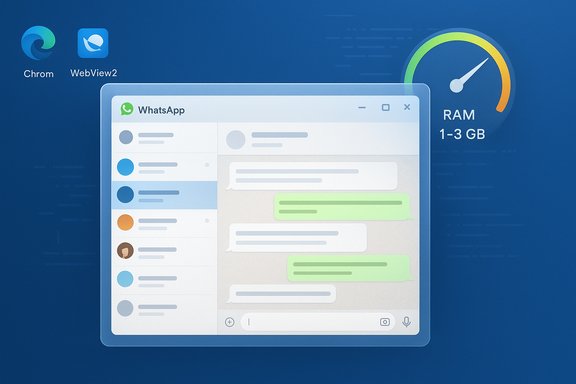
WhatsApp’s Windows history is a sequence of platform choices: from web wrappers to Electron-like builds and, more recently, a true native Windows client built on WinUI/UWP that offered tight Windows 11 integration and relatively low resource consumption. In mid‑2025 Meta began shipping beta builds that instead host the web interface inside Microsoft Edge’s WebView2 control. That beta work is now rolling out more widely to stable users and, as a result, many Windows 11 systems are experiencing a distinctly different (and for some users worse) desktop experience. Multiple technology outlets and community testers document this transition: the app now behaves essentially like a miniature browser window, spawns WebView2 (msedgewebview2.exe) processes, and can use significantly more RAM than the previous native client. Early reports place idle memory footprints in the hundreds of megabytes and routine usage in the 1 GB range, with spikes toward 2–3 GB on media‑heavy or large‑chat workloads. Treat specific numbers as machine-dependent, but the direction — higher RAM and weaker OS integration — is consistently reported across sources. What changed under the hood: native app → WebView2 wrapper
The technical pivot
- The previous WhatsApp Windows client used native Windows frameworks (WinUI/UWP), which rely on compiled platform APIs for rendering, notifications, and background management. That approach is optimized for Windows behavior and tends to consume less RAM for equivalent tasks.
- The new client packages web.whatsapp.com inside a WebView2 control. WebView2 embeds Microsoft Edge’s Chromium engine inside a desktop host; functionally it’s the same engine that powers the Edge browser. The result: the desktop app becomes a browser-like container rather than a native binary.
Why that matters for performance
- WebView2 uses a multi‑process Chromium model: a browser process, one or more renderer processes, a GPU process, and various utility processes. That process model is intentional — it improves isolation and security — but it also increases visible process count and aggregate memory use compared with a tightly optimized native client. Microsoft’s WebView2 documentation explains this multiprocess layout and how each active view and origin can produce additional renderer processes.
- The memory and CPU footprint of a WebView2 app depends heavily on the web content it renders. Modern single‑page apps (SPA) like WhatsApp Web load large JavaScript bundles and maintain in‑memory state for many conversations, media previews, and real‑time features — all of which increase RAM usage. Microsoft explicitly notes that “extra memory or CPU is due to how WebView2 is being used, not WebView2 itself.” That aligns with the empirical tests showing the new WhatsApp client using several hundred megabytes to multiple gigabytes depending on usage.
Evidence: what users and tests are reporting
Real-world symptoms
- Slower launches and repaints: Users report that opening the app, switching chats, and scrolling through message histories is perceptibly slower than the native client. Animations and transitions feel less smooth.
- Higher RAM use: Tests and user telemetry describe idle RAM around a few hundred MB, routine use near ~1 GB, and spikes to 2–3 GB when switching between large groups or media‑heavy chats. Numbers vary by machine and WebView2 runtime.
- Notification and integration regressions: Desktop notifications, Do Not Disturb/Focus interactions, and other Windows 11-specific behaviors appear degraded or inconsistent in many reports. The app no longer adheres closely to WinUI/Fluent design, producing a more “browser‑in‑a‑window” feel.
Cross‑checked reporting
Independent outlets that tested the updated client reach the same overall conclusion: the WebView2 transition simplifies engineering for Meta but creates a heavier, less native user experience on Windows. The Verge flagged the downgrade from native to web wrapper and the resulting performance and integration trade‑offs, while Windows‑focused outlets measured substantial RAM increases and user‑visible sluggishness. Use of the WebView2 runtime and the shift of responsibility for performance to the web layer are common threads across reporting.Why Meta did it — the engineering calculus
Shifting to a WebView2 wrapper is a pragmatic engineering trade:- One codebase to rule them all: Maintaining a single web code path lets feature teams ship Channels, Communities, and other rich features to Windows, macOS, Linux, and browsers simultaneously without parallel native implementations.
- Faster feature parity: Web updates and backend feature flags can propagate more uniformly; the company avoids divergent release schedules and platform‑specific QA.
- Lower maintenance cost: Native clients require platform specialists, platform CI, and separate test suites. Web-first development reduces duplication and streamlines bug fixes.
Security, privacy, and E2EE considerations
- The move to a WebView2 wrapper does not change WhatsApp’s end‑to‑end encryption model at the protocol level — messages remain E2EE between endpoints. However, the local storage semantics differ: web clients use browser storage, service workers, and web caches rather than the same native local stores used by WinUI apps. That changes how local encryption artifacts, caches, and backups are handled and affects forensic/archiving patterns for enterprises. Treat claims about retained E2EE history across the migration as needing user verification (enable Secure Storage and set a PIN if you rely on linked device history).
- Because the new client piggybacks on a shared WebView2 runtime, the security posture partly depends on keeping the runtime and Microsoft Edge updated. Microsoft’s documentation on WebView2 highlights runtime update hygiene as an important maintenance task for security and performance.
Practical impact: who wins and who loses
- Likely winners:
- Meta/WhatsApp product and web engineering teams that benefit from a single, unified web pipeline and faster feature parity.
- Users on modern desktops with abundant RAM who won’t notice the extra memory usage and prioritize feature parity over resource efficiency.
- Likely losers:
- Users on RAM‑constrained devices (older laptops, netbooks, low‑RAM tablets) who will see system slowdowns and possible battery penalties.
- IT administrators and enterprises that depend on predictable native behavior, reliable notifications, and efficient background resource usage.
- Windows enthusiasts and power users who value native responsiveness and deep OS integration.
Immediate workarounds and mitigation steps (for users)
If the new WhatsApp for Windows feels slow on your machine, these practical steps can reduce friction while waiting for a possible optimization release.- Quick checks and housekeeping
- Close other memory-hungry apps (browsers, virtual machines, large editors).
- Restart WhatsApp and log back in. A fresh session can clear inconsistent cache states.
- Make sure Microsoft Edge and the WebView2 runtime are fully updated — WebView2 gets runtime improvements from Edge updates that can reduce regressions.
- Short‑term alternatives that feel native
- Use WhatsApp Web (web.whatsapp.com) in a modern browser (Edge or Chrome). In many cases the browser’s own tab management and optimizations are superior to single-purpose WebView2 wrappers.
- Install the Progressive Web App (PWA) from Edge or Chrome: open web.whatsapp.com → browser menu → Apps → Install this site as an app. A PWA run by the browser often has better lifecycle management and lower memory than a custom WebView2 wrapper.
- If you must keep the desktop app
- Limit the number of large or media‑heavy chats you keep open.
- Clear or trim local caches if the app exposes that option, and avoid leaving dozens of long group histories loaded at once.
- Consider increasing system RAM on machines where WhatsApp is critical and always open.
- If the update is optional on your device: delay or block it
- On a personal machine, hold off on Microsoft Store updates for WhatsApp if the old native client still works for you.
- On managed devices, use MDM (Intune) or Store controls to block the new package while you pilot and test a small ring of machines.
Action checklist for IT admins and power users
- Inventory endpoints that rely on WhatsApp for workflows and identify low‑RAM machines.
- Pilot the new client in a controlled ring before broad deployment.
- Provide users with PWA installation instructions and helpdesk scripts to switch to the browser PWA if needed.
- Update support documentation to account for changed notification behavior and re‑authentication flows caused by the migration.
- Keep Edge/WebView2 runtimes patched centrally; runtime updates often include bug and performance fixes.
- If compliance or archiving depends on deterministic capture of WhatsApp traffic, revalidate retention workflows because a web‑first client may complicate desktop capture.
What Meta (and Microsoft) could do to reduce the pain
- Meta can invest in WebView2 optimizations or reduce client-side in-memory state by employing more aggressive paging, smaller JS bundles, or server‑side offloading of chat renders.
- Meta can add a low‑memory mode that limits pre‑loading and reduces simultaneous renderer count.
- Microsoft’s WebView2 runtime can continue evolving performance features (e.g., memory usage targets, suspended states) that host apps can leverage to limit resource use. Microsoft already provides APIs to suspend WebView2 instances and control memory targets; widespread adoption by app vendors would help.
Long‑term implications for the Windows app ecosystem
This shift is symptomatic of a larger industry pattern: large consumer internet firms prioritize a single web code path to reduce fragmentation and engineering cost. The immediate effect is neutral or beneficial for engineering and cross‑platform consistency; the longer‑term effect is a gradual erosion of native, platform‑optimized experiences on Windows.If many major apps follow suit, the value proposition of building a truly native Windows client diminishes: fewer users and less third‑party investment, fewer flagship native apps to showcase Windows desktop strengths. That matters for Windows as a desktop platform: platform differentiation depends on standout native experiences. The broader ecosystem impact is a strategic risk for desktop platform vitality and for users who pay with degraded battery life, higher RAM use, and weaker OS-level features.
Verifiable facts, what we confirmed, and what remains unverified
- Confirmed and cross‑verified:
- WhatsApp for Windows is being shipped as a WebView2-wrapped client in recent updates and betas; multiple independent outlets documented this change.
- WebView2 uses a Chromium multiprocess model (browser process, renderer(s), GPU, utilities), and memory impact depends on the web content being rendered. Microsoft documentation describes this architecture.
- Independent testing and user reports show materially higher RAM usage and weaker Windows integration compared with the native WinUI client; numbers vary by machine and workload.
- Unverified or machine‑specific claims (flagged with caution):
- Exact universal RAM numbers (e.g., “always 1 GB idle” or “2 GB peak for everyone”) are not universal truths; reported figures come from particular tests or user machines and will vary by hardware, number of open chats, media previews cached, and which WebView2 runtime is installed. Treat precise megabyte figures as indicative, not absolute.
- Any specific internal Meta staffing or personnel narratives linked causally to the technical decision are speculative unless confirmed by Meta; they provide plausible context but should not be treated as verified causation.
Best practical recommendations (short summary)
- If you depend on WhatsApp on Windows for productivity and you run on constrained hardware:
- Delay the store update where possible.
- Install web.whatsapp.com as a browser PWA (Edge/Chrome) and pin it instead of the Store app.
- Keep Edge/WebView2 runtime updated and limit other memory‑heavy apps while using WhatsApp.
- For managed fleets, pilot and then either block the new package via MDM or push the PWA configuration via group policies and user guides.
Conclusion
The recent WhatsApp update that replaces the native Windows client with a WebView2 wrapper is a clear, deliberate trade: Meta gains faster cross‑platform parity and smaller engineering overhead, while Windows users lose a degree of native performance, tighter OS integration, and memory efficiency. The end result is a more browser‑like WhatsApp on the desktop — in many cases functionally identical to WhatsApp Web but heavier on system resources.For users and IT managers, the immediate response is practical: adopt the browser PWA if you need smoother performance, keep WebView2/Edge patched, and control rollout on critical systems. For the Windows ecosystem, this move is another data point in an ongoing debate about native‑first versus web‑first desktop strategies — a debate that will determine whether Windows remains a platform for finely tuned native experiences or increasingly becomes a container for uniform web codebases.
Source: PiunikaWeb WhatsApp for Windows 11 very slow after latest update? Here's why
