

Meta’s latest WhatsApp update has quietly swapped the native Windows client for a WebView2 wrapper that simply loads the web interface — and early tests show a dramatic hit to memory use, responsiveness, and tight Windows 11 integration.
WhatsApp’s Windows client has come full circle. The app started out as a web-wrapped Electron client, later evolved into a purpose-built native UWP/WinUI application that ran leaner and integrated more closely with Windows 11, and as of a recent update the client has been replaced with a WebView2-based wrapper that hosts web.whatsapp.com inside a Chromium engine. This change is rolling out through the Microsoft Store and is already visible to a subset of users. The switch is significant not just cosmetically but architecturally: a native WinUI/UWP binary calls Windows platform APIs directly and can be optimized for memory, background behaviour, and notification handling; a WebView2 wrapper embeds the Chromium-based Edge runtime and inherits its multi-process model and memory profile. Microsoft’s WebView2 documentation explains that WebView2 uses a browser-style process model (browser process, renderer processes, GPU and utility processes), which naturally increases the number of OS processes and the working set visible in Task Manager.
WebView2 uses the Edge runtime, which is updated independently; using the shared WebView2 runtime means security fixes are delivered centrally, while a bundled runtime could lag. Administrators should ensure the WebView2 runtime is kept current. Microsoft’s documentation explains the update and runtime models for WebView2 and highlights how process groups are tied to user data folders, which has operational implications for isolation and cleanup. Also, the presence of multiple renderer and helper processes increases the visibility of per-site heuristics and potential attack surface for browser-based exploits, though these are mitigated by Chromium’s sandboxing model and Microsoft’s update cadence. Still, considering the wider runtime and multiple processes is prudent when evaluating desktop security postures.
Product teams often accept this trade when they prioritize shipping the same features everywhere and reducing the cost of maintaining several codebases. For end users, the practical result is a less efficient client with a web-like feel that may disappoint those who valued the previous native experience. Multiple outlets and testers have reached the same conclusion in independent analyses.
For the Windows community and power users who prize a lean desktop experience, this is a clear step backward. The practical advice is to delay the update where possible, use the browser version if you’re affected, and for enterprise customers to weigh the deployment and support implications. The long-term picture depends on whether Meta will invest in optimizing the WebView2 wrapper or revert to a native client strategy for desktop — both outcomes are possible, but neither is guaranteed.
This development is a useful reminder: web-first strategies simplify engineering but often trade away platform-specific advantages that matter on resource-limited devices and in tightly managed enterprise contexts. Expect more debate and community feedback as the rollout continues and as Meta, Windows power users, and IT admins react to the real-world consequences of this architectural decision.
Conclusion
The WhatsApp for Windows swap to a WebView2-wrapped web client is already reshaping the desktop experience — increasing memory consumption, compromising some Windows integration, and forcing users to choose between convenience and performance. The shift is technically understandable and operationally economical, but for many Windows users it will feel like a downgrade. The best course for affected users is to monitor updates closely, defer the new client where feasible, and prefer the web browser as an interim solution while the ecosystem stabilizes.
Source: Новини Live Meta has completely “broken” WhatsApp for Windows 11 — what has changed
 Background
WhatsApp’s Windows client has come full circle. The app started out as a web-wrapped Electron client, later evolved into a purpose-built native UWP/WinUI application that ran leaner and integrated more closely with Windows 11, and as of a recent update the client has been replaced with a WebView2-based wrapper that hosts web.whatsapp.com inside a Chromium engine. This change is rolling out through the Microsoft Store and is already visible to a subset of users. The switch is significant not just cosmetically but architecturally: a native WinUI/UWP binary calls Windows platform APIs directly and can be optimized for memory, background behaviour, and notification handling; a WebView2 wrapper embeds the Chromium-based Edge runtime and inherits its multi-process model and memory profile. Microsoft’s WebView2 documentation explains that WebView2 uses a browser-style process model (browser process, renderer processes, GPU and utility processes), which naturally increases the number of OS processes and the working set visible in Task Manager. What changed (technical overview)
UWP/WinUI vs WebView2: the architecture difference
- The old native WhatsApp used WinUI/UWP, which compiled to a native binary and leveraged Windows APIs for rendering, notifications, and lifecycle management.
- The new client uses Microsoft Edge WebView2, embedding the web client inside a native window but delegating rendering, network, and many background tasks to the WebView2 runtime (Chromium).
Why companies choose WebView2 wrappers
There are clear operational reasons for moving to a WebView2 wrapper:- Single codebase: web clients update on the server and can be packaged for desktop with minimal platform-specific work.
- Faster feature parity: product teams push web features once and have them available across platforms nearly instantly.
- Lower engineering overhead: maintaining a bespoke native codebase across multiple desktop platforms costs more than managing one web codebase.
Measured impact: memory, responsiveness, and system integration
Reported memory and performance figures
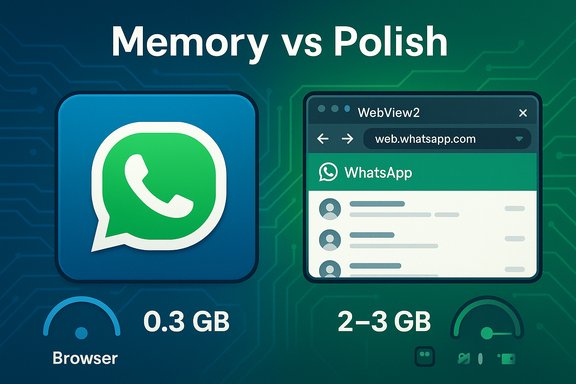
Independent testing and reporting from multiple outlets show the new WebView2-wrapped WhatsApp uses substantially more RAM than the native WinUI client. Summary of reported figures:- On the login screen, the new WebView2 client has been observed using about ~300 MB of RAM idle, compared with ~18 MB for the old native build (and below 10 MB when truly idle in some tests).
- After signing in and loading chats, the new client has spiked to ~2 GB while loading conversations and averaged around 1.2 GB while backgrounded; heavy chat volumes pushed observed usage toward 3 GB in worst-case tests. The native client typically stayed under ~300 MB even under load and often remained below 100–200 MB.
Real-world UX issues beyond memory
Memory is the headline, but the rollout also surfaced several functional regressions:- Sluggish interface: animations, chat opening, and scroll responsiveness feel slower than the native client.
- Notification problems: reports include delayed notifications, inconsistent toast behaviour, and conflicts with Windows 11 features like Do Not Disturb and Active Hours.
- Background reliability: WebView2’s process model and the web client’s reliance on an active network connection can produce different background behaviour compared to native code that can cache and manage state more tightly.
Why Meta may have made the change — and what’s speculative
Several outlets link this technical decision to Meta’s broader cost-cutting and prioritization choices. Moving to a single web codebase is cheaper: updates roll out once, fewer platform-specific engineers are required, and testing surfaces shrink. Industry reporting and analysis suggest the native Windows team may have been reduced or reprioritized, making continued investment in a bespoke WinUI app unlikely. That explanation is plausible and consistent with the observed behaviour, but it remains an informed inference rather than an official, confirmed reason from Meta. Declare such links as informed but speculative unless Meta explicitly confirms the staffing or product strategy change. It’s also worth noting that other Meta desktop clients have seen similar changes in the past year, which strengthens the plausibility of a cross-product strategy to consolidate around web-first desktop packages. However, the presence of reported corporate restructuring should be treated as contextual evidence, not definitive proof of the engineering reasoning behind every product decision.User-facing consequences: what Windows users should expect
Immediate effects
- Existing users who allow the update may be logged out and asked to re-link their devices; chat sync and re-linking can take time and, for large accounts, consume bandwidth and background resources during the initial sync. Early adopters reported being prompted to log in again after the switch.
- Notification behaviour may change: delayed or missing toasts, conflicts with Do Not Disturb, and mismatches in Action Center behaviour are being reported. That undermines one of the key conveniences of a desktop messaging client.
- Memory and CPU usage will rise noticeably on many systems, especially machines with limited RAM or those running many background apps. The WebView2 runtime creates multiple helper processes that add to the task list and working set.
Longer-term implications
- For users on older or lower-spec laptops (4–8 GB RAM), the change could degrade system responsiveness and battery life.
- Enterprise environments that rely on low-overhead desktop clients may find themselves forced to accommodate the increased resource demands or block the update — although blocking Store updates is not trivial in many managed environments.
- Power users who depend on tight Windows integration (fast notifications, reliable background sync, and accessibility features) will find the wrapped web client a regression relative to the native app.
Workarounds and mitigation
- Stay on the native client for now: If you control updates, avoid installing the new Store update while you evaluate the trade-offs. Be aware this may only be temporary — reports indicate some users will eventually be forced to migrate by a forced logout.
- Use WhatsApp Web in a browser: Running web.whatsapp.com directly in the browser can be more efficient than the WebView2 wrapper in some cases, because browsers share a single Edge/Chrome runtime across tabs and can benefit from better resource sharing and site isolation heuristics.
- Monitor WebView2 processes: Use Windows Task Manager or Process Explorer to understand msedgewebview2.exe processes; in some cases closing and re-opening the app can reclaim RAM, and choosing the shared WebView2 runtime over a bundled runtime may reduce duplication. Microsoft provides guidance on WebView2 process behavior for administrators.
- Alternative clients: Some third-party wrappers and multi-messaging apps exist, but they come with security and privacy trade-offs. For enterprise and privacy-focused users, caution is advised when using non-official clients.
Security and privacy considerations
Embedding the official WhatsApp web client inside a WebView2 runtime does not automatically change the encryption or server-side behaviour of WhatsApp’s end-to-end messaging. Messages remain end-to-end encrypted between endpoints as implemented by WhatsApp. However, the desktop runtime’s integration points — such as how notifications are rendered, how temporary files or caches are stored, and which runtime updates are applied — do expand the system components that must be trusted and patched.WebView2 uses the Edge runtime, which is updated independently; using the shared WebView2 runtime means security fixes are delivered centrally, while a bundled runtime could lag. Administrators should ensure the WebView2 runtime is kept current. Microsoft’s documentation explains the update and runtime models for WebView2 and highlights how process groups are tied to user data folders, which has operational implications for isolation and cleanup. Also, the presence of multiple renderer and helper processes increases the visibility of per-site heuristics and potential attack surface for browser-based exploits, though these are mitigated by Chromium’s sandboxing model and Microsoft’s update cadence. Still, considering the wider runtime and multiple processes is prudent when evaluating desktop security postures.
The trade-off: faster feature parity vs. desktop polish
Meta’s decision reflects a common tension in modern app development: one web codebase that ships everywhere is cheaper and faster to iterate, but it can compromise platform-specific polish. The Windows-native WhatsApp had stronger integration with Windows UI, lighter memory footprint, and more predictable background behaviour. The WebView2 build gains rapid parity with web features and reduces per-platform engineering work, but at the cost of native feel and sometimes performance.Product teams often accept this trade when they prioritize shipping the same features everywhere and reducing the cost of maintaining several codebases. For end users, the practical result is a less efficient client with a web-like feel that may disappoint those who valued the previous native experience. Multiple outlets and testers have reached the same conclusion in independent analyses.
What vendors and admins should do
- IT administrators should inventory which devices have WhatsApp installed from the Microsoft Store and prepare guidance for users who rely on the native client’s low overhead.
- Consider blocking or deferring the update in managed environments until the implications are fully assessed, and check whether centralized Store update policies or endpoint management tools can control the rollout.
- Educate users about the trade-offs and offer alternatives such as using the browser version on managed systems where resource conservation is critical.
What remains unverified or evolving
- Internal staffing and the exact business decision-making process at Meta have not been officially disclosed; public reporting links the change to cost-cutting and team reorganizations, which is plausible but not confirmed by Meta. Present these explanations as likely but not definitive.
- The precise Store package version and rollout schedule can vary by region and channel; reports commonly cite version 2.2584.3.0 for affected builds, but Microsoft Store metadata may show different build numbers depending on your device and update channel. Check your Microsoft Store listing for the exact package you receive.
Verdict and outlook
The move to a WebView2-wrapped WhatsApp for Windows is a pragmatic corporate choice that prioritizes development efficiency and feature parity. For Meta, it reduces the burden of supporting a Windows-native client and enables quicker, centralized updates. For many users, though, the cost is a demonstrable degradation in memory footprint, responsiveness, and Windows integration.For the Windows community and power users who prize a lean desktop experience, this is a clear step backward. The practical advice is to delay the update where possible, use the browser version if you’re affected, and for enterprise customers to weigh the deployment and support implications. The long-term picture depends on whether Meta will invest in optimizing the WebView2 wrapper or revert to a native client strategy for desktop — both outcomes are possible, but neither is guaranteed.
This development is a useful reminder: web-first strategies simplify engineering but often trade away platform-specific advantages that matter on resource-limited devices and in tightly managed enterprise contexts. Expect more debate and community feedback as the rollout continues and as Meta, Windows power users, and IT admins react to the real-world consequences of this architectural decision.
Conclusion
The WhatsApp for Windows swap to a WebView2-wrapped web client is already reshaping the desktop experience — increasing memory consumption, compromising some Windows integration, and forcing users to choose between convenience and performance. The shift is technically understandable and operationally economical, but for many Windows users it will feel like a downgrade. The best course for affected users is to monitor updates closely, defer the new client where feasible, and prefer the web browser as an interim solution while the ecosystem stabilizes.
Source: Новини Live Meta has completely “broken” WhatsApp for Windows 11 — what has changed
