

Microsoft’s consumer-app problem is newly visible because Satya Nadella told investors in late April 2026 that Microsoft is doing “foundational work” to win back fans across Windows, Xbox, Bing, and Edge. The trouble is that Windows users do not experience a strategy deck; they experience the apps that open when they click a file, answer a message, save a password, sync a note, or browse their photos. PCMag’s blunt inventory of ten Microsoft apps that have lost mindshare to rivals is less a rant than a product audit. If Microsoft wants Windows loyalty to mean something again, it has to stop treating default apps as distribution channels for subscriptions, AI, and account funnels.
Windows remains the operating system that hundreds of millions of people use because they need to, because their games run there, because their workplace standardizes on it, or because the PC ecosystem still offers unmatched hardware choice. That is not the same thing as affection. Nadella’s “win back fans” language is revealing because it admits the emotional contract has frayed.
For years, Microsoft could lean on Windows as the gravitational center of personal computing. Internet Explorer was there, Office was there, MSN Messenger was there, Windows Media Player was there, and for many people the default experience was the experience. The company’s software did not merely ship with the PC; it defined what using a PC felt like.
That is no longer true. A modern Windows 11 machine can boot into a desktop where the browser is Firefox or Chrome, documents live in Google Docs, chat happens in Discord or Signal, notes sync through Keep or Obsidian, photos sit in Google Photos or iCloud, and games launch from Steam. Windows is still the floor, but Microsoft’s own consumer apps are increasingly furniture people drag to the curb.
PCMag’s piece lands because it identifies the quiet humiliation in Microsoft’s consumer position. The company is not failing because it lacks apps. It is failing because many of those apps are technically present, aggressively promoted, and still not trusted enough to become daily habits.
Then Microsoft did what Microsoft too often does with a promising consumer product: it over-managed the relationship. Edge accumulated sidebars, shopping tools, rewards prompts, Copilot hooks, default-browser nags, and “helpful” affordances that make the browser feel less like a window to the web and more like a sales floor with tabs. The result is not merely clutter. It is a trust problem.
The browser is the most intimate general-purpose app on a PC. It sees banking, health portals, work documents, private searches, passwords, and late-night anxieties. Users are willing to tolerate complexity in a creative suite or an admin console, but a browser has to feel calm. When Microsoft markets Edge as an AI browser and keeps pushing Windows users toward it, the company is asking for more trust at the exact moment many users want fewer intermediaries.
The recent reporting around Edge keeping saved passwords in cleartext in memory while the browser is running adds another layer to that discomfort. Microsoft can argue, with some technical basis, that a compromised user session is already dangerous and that browser password managers inevitably decrypt credentials at some point. But the consumer question is simpler: why does the browser that keeps asking to be my default appear to make password exposure easier than it needs to be?
That distinction matters because Edge is not just competing with Chrome, Firefox, Brave, or Arc on benchmark charts. It is competing against the feeling that Microsoft will use every foothold to advance Bing, Copilot, Microsoft Rewards, shopping recommendations, or account sign-ins. Users who remember when Edge was appealingly minimal now see a browser that seems to have forgotten why people liked it.
But consumer loyalty is not decided by the heaviest use case. It is decided by the everyday one. For a huge class of users, the document is now a collaborative browser object, not a file attachment. Google Docs won that mental shift by making sharing feel native, real-time editing ordinary, and pricing invisible for personal use.
Microsoft has web versions of Office, and Microsoft 365 is a strong subscription if someone needs Word, Excel, PowerPoint, OneDrive storage, and the desktop apps. But that bundle logic cuts both ways. To the user who only wants to draft a letter, collaborate on a school document, or maintain a simple spreadsheet, Microsoft 365 can feel like paying rent on a mansion to use the kitchen table.
This is the deeper issue behind PCMag’s comparison between Word and Google Docs. Word did not become weak because it lost features. It became weaker in consumer life because the job changed. The default expectation is now instant sharing, zero install friction, and good-enough formatting, not a heavyweight native app with a subscription gate around its best experience.
Microsoft’s challenge is awkward because Word’s strengths are real. The company cannot simply turn it into Google Docs without alienating the customers who need advanced layout, references, mail merge, legal review, and offline power. But if the consumer version feels slower, heavier, and more expensive than the alternative people already use, Word becomes less an icon of productivity than a legacy requirement.
Teams is not that. Teams is, by reputation and design, a work app. It is where meetings happen, managers appear, calendar invites multiply, and people toggle mute while wondering why the screen share is still blank. That does not make Teams bad. It makes it emotionally wrong for the role Microsoft wants it to play in consumer messaging.
The free personal version of Teams has existed for years, and Windows 11 even tried to give it taskbar real estate through the now-retired Chat button. But Microsoft appeared to confuse availability with desire. People already had WhatsApp, iMessage, Discord, Telegram, Signal, Google Chat, SMS, and a dozen community-specific tools. A Teams icon on the taskbar did not create a social graph.
The missed opportunity is painful because Microsoft once had consumer messaging credibility. MSN Messenger had personality. Skype had ubiquity. Xbox Live had identity and presence. Teams has enterprise competence, but competence is not the same as warmth. A consumer chat app needs to feel like a room people want to enter, not a conference room they have been scheduled into.
This is the pattern that keeps recurring. Microsoft often has the infrastructure, the accounts, the clients, and the scale. What it lacks is a convincing reason for ordinary people to move their personal lives into Microsoft’s version of the same category.
At home, the equation is different. Gmail and Google Calendar are fast, familiar, and deeply integrated with Android. A user who has lived in Gmail since the mid-2000s does not need a new email identity, a new calendar habit, or another app that syncs mail through another company’s servers. They need their existing system to keep working.
Microsoft’s new Outlook for Windows has been controversial precisely because it collapses the distinction between a local desktop client and a cloud-mediated web-style experience. For some users, that is fine. For others, especially those who liked the old Mail and Calendar apps because they were simple and local-feeling, the new Outlook feels like Microsoft replacing a utility with a service.
The Gmail comparison hurts because Google’s consumer mail experience is coherent. Gmail, Calendar, Tasks, Keep, Drive, Docs, and Android all reinforce one another. Microsoft has equivalent or near-equivalent pieces, but they often feel like neighboring departments rather than one consumer system.
That is why an app-by-app defense misses the point. Outlook can be good and still fail to pull a Gmail user back. The switching cost is not the download. It is the accumulated trust that the phone, browser, calendar, reminders, contacts, and shared documents will behave as one predictable fabric.
For a while, that was plausible. To Do was clean, approachable, and recognizably descended from the app Microsoft had acquired. It had enough structure for lists and enough simplicity for groceries, errands, and personal tasks. It looked like the kind of consumer app Microsoft needed more of.
The problem is that task management does not live in isolation. Tasks matter because they collide with calendars, email, notifications, voice assistants, and shared household routines. Google Tasks is not the world’s most ambitious task manager, but its advantage is proximity. It sits beside Google Calendar and Gmail in the places many people already plan their day.
Microsoft To Do’s weaker calendar story is therefore not a small missing feature. It is evidence of a broader failure to make Microsoft’s consumer productivity apps feel like one system. The company has task surfaces in Outlook, Planner, Loop, Teams, Microsoft 365, and To Do, but consumers do not want a taxonomy. They want the thing they typed on their phone to appear where they make decisions about time.
This is where Microsoft’s enterprise instincts can undermine consumer product design. In the workplace, separate apps can be justified by roles, permissions, compliance needs, and organizational structures. At home, the user is the whole organization. If a reminder cannot naturally meet a calendar appointment, the system feels unfinished.
But the most common note is not a thesis chapter. It is a grocery list, a gift idea, a parking spot, a fleeting thought, a recipe tweak, or a number copied from a phone call. For that job, speed and sync reliability beat structural richness. If a note app makes the user wonder whether the latest version is on the other device, it has already failed the moment.
Google Keep succeeds not because it is deep, but because it is light. It opens quickly, syncs predictably for many users, and maps cleanly onto the sticky-note mental model. That makes it more useful for casual capture than a more powerful app that asks the user to think in notebooks.
OneNote’s challenge is partly architectural and partly perceptual. Microsoft has spent years consolidating OneNote versions and improving the experience, but the scars of sync trouble linger. A notes app is an act of faith: users put half-formed thoughts there precisely because they do not want to manage them yet. Any friction becomes a reason to defect.
The broader lesson is that consumer software often rewards restraint. Microsoft’s instinct is to offer more capability, more integration, and more surfaces. But the winning note app for many people is the one that disappears fastest after the thought is captured.
But photos are not merely files. They are memories, search problems, editing opportunities, sharing events, and emotional objects. A great photo product understands that people want to find “the beach trip with the red umbrella,” clean up an image, share an album, revisit a year, or scroll without waiting for thumbnails to catch up.
Google Photos became dominant because it treated the photo library as a consumer experience rather than a folder tree. Search, face grouping, object recognition, editing tools, memories, and mobile-first polish all made the app feel purpose-built. OneDrive Photos, by contrast, can feel like a photo viewer grafted onto a storage service whose native language is files.
Windows 11’s File Explorer Gallery does not solve that problem if the experience feels slow or clunky. It may expose images, but it does not necessarily turn Windows into a satisfying place to live with a photo library. The same distinction haunted earlier Microsoft media efforts: having the content and presenting the content are not the same craft.
For Microsoft, this is a particularly strange miss because the company has the AI resources to make photo search and organization remarkable. Yet users judge what ships, not what could be inferred from Azure demos. If the consumer experience is slower, less polished, or less joyful than Google Photos, OneDrive’s storage advantage becomes a staging area for eventual migration.
When Phone Link works, it points to a Windows advantage Microsoft has never fully exploited. Apple’s Continuity features make Macs and iPhones feel like parts of a single product. Microsoft cannot control Android the same way Apple controls iOS, but it can still make the Windows-Android bridge feel essential, especially given Android’s enormous global footprint.
The problem is that reliability is not a luxury feature for cross-device integration. It is the feature. A texting bridge that drops, stalls, or needs periodic coaxing is worse than a narrower web app that works every time. Google Messages for Web may do less, but if it dependably handles the thing a user actually needs, it wins the daily habit.
Phone Link also suffers from uneven expectations. The best experience historically depended on certain Android devices, particularly Samsung phones, while iPhone support has been more constrained by Apple’s platform limits. That reality may not be entirely Microsoft’s fault, but consumers do not grade ecosystem friction on a curve.
This is where Microsoft’s “foundational work” rhetoric should become practical. The company does not need Phone Link to become a flashy AI assistant. It needs connection persistence, transparent troubleshooting, low-latency messaging, predictable clipboard behavior, and fewer mystery failures. Win the boring layer, and the magic layer has something to stand on.
But consumer AI adoption is not simply a matter of putting a button everywhere. People need to understand what the assistant can see, what it remembers, how to turn it off, and whether the feature exists to help them or to train a corporate growth narrative. The more personal the assistant becomes, the more these questions matter.
Mustafa Suleyman’s comments about Copilot developing a persistent identity, presence, and long-term memory point toward Microsoft’s desired future: an AI companion that follows users across contexts. There is a version of that future that could be useful, especially for accessibility, productivity, and continuity across devices. There is also a version that feels like Clippy with a surveillance budget.
The tension is sharpened by Microsoft’s habit of making AI feel mandatory before it feels beloved. Edge becomes an AI browser. Windows gets Copilot entry points. Office gains generative writing and summarization. Search, settings, and productivity surfaces become experiments in assistant placement. Some users will welcome that; others will see one more layer between them and the task.
The comparison with Claude in PCMag’s piece is telling because it frames the issue as trust and control, not just model quality. Users who choose a chatbot directly are making an intentional tool decision. Users who encounter Copilot as an ambient layer inside Windows may feel that Microsoft is choosing for them.
If Copilot is to help Microsoft win back fans, it has to behave less like a corporate mandate and more like a respectful optional tool. That means clear memory controls, meaningful off switches, transparent data boundaries, and restraint in surfaces where users simply want the operating system to get out of the way.
Steam’s advantage is not just catalog size. It is accumulated trust, social infrastructure, mod support, library permanence, cloud saves, controller support, Linux and Steam Deck momentum, refund norms, community features, and the sense that purchased games belong to a durable collection. Valve has turned the launcher into a gaming operating layer that happens to run on Windows and beyond.
Xbox Game Pass changed the economics of discovery for a while. It made sampling games easy and turned a rotating library into a value proposition. But subscription fatigue is real, and the appeal weakens when prices rise, catalogs shift, or users decide they would rather own the specific games they care about. Renting access can be wonderful until the game you wanted leaves or the monthly bill stops feeling incidental.
The Xbox app on Windows has improved over the years, but it still fights a reputation built during the Microsoft Store and UWP era, when PC gamers associated Microsoft’s distribution model with locked-down folders, missing features, awkward mod support, and platform constraints. Even when those problems improve, reputations lag. Steam, meanwhile, benefits from being the place PC gamers already are.
Microsoft’s strategic conflict is obvious. It wants Xbox to be a service that spans console, PC, cloud, and subscriptions. Many PC gamers want a store that respects ownership, modding, portability, and platform independence. Steam Deck and Linux compatibility make that last point sharper: buying on Steam can feel like buying into optionality, while buying through the Xbox app can feel like staying inside Microsoft’s fence.
For WindowsForum readers, the irony is hard to miss. Windows is still the best-supported PC gaming platform. But the most beloved PC gaming experience on Windows is not Microsoft’s. That should bother Redmond more than any console-war chart.
These successes share a pattern. They solve local problems with relatively modest demands on the user. They do not require a social graph. They do not ask users to migrate their identity. They do not feel like Trojan horses for a subscription, a cloud storage upsell, or an AI strategy. They earn trust by doing the job.
PowerToys is especially instructive because it speaks to enthusiasts without trying to domesticate them. It gives users more control over Windows rather than less. FancyZones, PowerToys Run, Image Resizer, Keyboard Manager, and the rest are not consumer-growth funnels. They are capabilities that make the PC feel more personal and more powerful.
That spirit is missing from too many first-party consumer apps. Edge tells users what Microsoft wants them to use. Copilot tells users where Microsoft thinks computing is going. OneDrive Photos tells users their memories fit inside a storage product. Teams tells former Skype users that personal communication now wears a work badge.
The apps that inspire goodwill tend to respect the PC as the user’s machine. The apps that generate resentment tend to treat the PC as Microsoft’s distribution surface. That difference is the heart of the “win back fans” problem.
But coherence has its own power. A Chromebook’s default experience is narrow but legible: Google account, Chrome, Drive, Docs, Gmail, Photos, Android apps where supported, and a web-first workflow. A Mac’s default experience is similarly integrated: Safari, Mail, Messages, Photos, Notes, iCloud, AirDrop, Continuity, and an iPhone-aware ecosystem. Users may replace pieces, but the out-of-box story makes sense.
Windows often feels more like an argument among product teams. Some apps are legacy Win32. Some are web wrappers. Some are Store apps. Some are Microsoft 365 surfaces. Some are AI entry points. Some are consumer versions of enterprise products. The account model crosses local accounts, Microsoft accounts, work or school accounts, OneDrive, Xbox, and Microsoft 365 in ways that can confuse even experienced users.
This is not merely aesthetic. Coherence reduces anxiety. When default apps share design principles, sync expectations, privacy controls, and account behavior, users stop thinking about the seams. When every app seems to have its own logic, users learn to route around the platform.
Windows’ historical strength was that it did not force one way of working. That openness remains valuable. But openness is not an excuse for first-party incoherence. Microsoft can preserve choice while still making its own defaults feel polished, consistent, and worthy of staying.
That is the nightmare scenario for Microsoft: not mass abandonment of Windows overnight, but emotional abstraction. The user still buys a Windows laptop, still updates Windows, still launches apps, and still plays games. But the center of gravity moves elsewhere. The meaningful identity is Google, Steam, Discord, Apple, or an independent password manager. Windows becomes the interchangeable shell.
This is why default-app quality matters more than it might appear. Defaults are Microsoft’s best chance to demonstrate that Windows is not merely a compatibility layer. If the built-in browser, mail client, notes app, photo experience, phone bridge, and gaming hub are excellent, Windows feels like a home. If they are compromised, users construct a home out of third-party services and leave Windows as the foundation slab.
Microsoft cannot solve that by nagging users to switch defaults. Default prompts, account prompts, and Edge promotions may produce short-term engagement metrics, but they corrode the exact trust Nadella says the company wants to rebuild. A user who chooses Firefox after being badgered to use Edge is not just picking a browser. They are voting against the tone of the platform.
The better path is harder and slower. Build defaults so good that users feel less need to replace them. Make off switches real. Keep AI optional until it is indispensable. Treat privacy and local control as product features, not compliance footnotes. Make Windows apps feel like they belong to the user.
Microsoft does not need nostalgia to win back Windows fans. It needs discipline. The next phase of Windows loyalty will not be secured by another Copilot button, another default-browser prompt, or another subscription bundle; it will be earned when the apps that ship with the PC feel fast, coherent, optional, trustworthy, and better than the tab users were about to open instead.
Source: PCMag Microsoft Wants You Back. These 10 Broken Windows Apps Say Otherwise
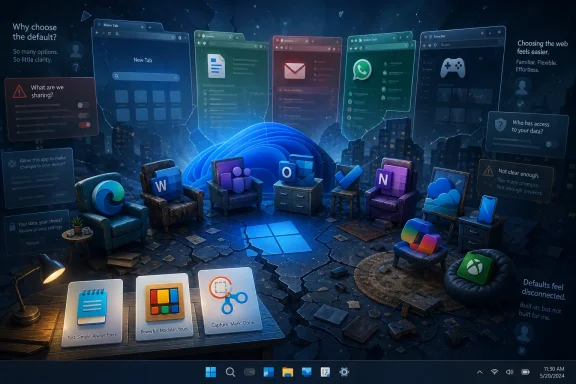 Microsoft’s Fan Problem Starts After the Boot Logo
Windows remains the operating system that hundreds of millions of people use because they need to, because their games run there, because their workplace standardizes on it, or because the PC ecosystem still offers unmatched hardware choice. That is not the same thing as affection. Nadella’s “win back fans” language is revealing because it admits the emotional contract has frayed.For years, Microsoft could lean on Windows as the gravitational center of personal computing. Internet Explorer was there, Office was there, MSN Messenger was there, Windows Media Player was there, and for many people the default experience was the experience. The company’s software did not merely ship with the PC; it defined what using a PC felt like.
That is no longer true. A modern Windows 11 machine can boot into a desktop where the browser is Firefox or Chrome, documents live in Google Docs, chat happens in Discord or Signal, notes sync through Keep or Obsidian, photos sit in Google Photos or iCloud, and games launch from Steam. Windows is still the floor, but Microsoft’s own consumer apps are increasingly furniture people drag to the curb.
PCMag’s piece lands because it identifies the quiet humiliation in Microsoft’s consumer position. The company is not failing because it lacks apps. It is failing because many of those apps are technically present, aggressively promoted, and still not trusted enough to become daily habits.
Edge Shows How Microsoft Turns a Good Default Into a Negotiation
Edge should have been the easiest win in the portfolio. The original Project Spartan pitch was understandable: a cleaner, faster browser to replace the baggage of Internet Explorer. The later Chromium rebuild gave Microsoft the compatibility base it needed. For a brief moment, Edge looked like a pragmatic answer to Chrome’s dominance.Then Microsoft did what Microsoft too often does with a promising consumer product: it over-managed the relationship. Edge accumulated sidebars, shopping tools, rewards prompts, Copilot hooks, default-browser nags, and “helpful” affordances that make the browser feel less like a window to the web and more like a sales floor with tabs. The result is not merely clutter. It is a trust problem.
The browser is the most intimate general-purpose app on a PC. It sees banking, health portals, work documents, private searches, passwords, and late-night anxieties. Users are willing to tolerate complexity in a creative suite or an admin console, but a browser has to feel calm. When Microsoft markets Edge as an AI browser and keeps pushing Windows users toward it, the company is asking for more trust at the exact moment many users want fewer intermediaries.
The recent reporting around Edge keeping saved passwords in cleartext in memory while the browser is running adds another layer to that discomfort. Microsoft can argue, with some technical basis, that a compromised user session is already dangerous and that browser password managers inevitably decrypt credentials at some point. But the consumer question is simpler: why does the browser that keeps asking to be my default appear to make password exposure easier than it needs to be?
That distinction matters because Edge is not just competing with Chrome, Firefox, Brave, or Arc on benchmark charts. It is competing against the feeling that Microsoft will use every foothold to advance Bing, Copilot, Microsoft Rewards, shopping recommendations, or account sign-ins. Users who remember when Edge was appealingly minimal now see a browser that seems to have forgotten why people liked it.
Office Is Still Mighty, but Word No Longer Owns the Document
Microsoft Word is not a broken product in the ordinary sense. It remains a deep, capable, battle-tested application with decades of institutional gravity. In law firms, universities, government offices, enterprises, and publishing workflows, Word is still difficult to dislodge because it carries a universe of templates, macros, review processes, and formatting expectations.But consumer loyalty is not decided by the heaviest use case. It is decided by the everyday one. For a huge class of users, the document is now a collaborative browser object, not a file attachment. Google Docs won that mental shift by making sharing feel native, real-time editing ordinary, and pricing invisible for personal use.
Microsoft has web versions of Office, and Microsoft 365 is a strong subscription if someone needs Word, Excel, PowerPoint, OneDrive storage, and the desktop apps. But that bundle logic cuts both ways. To the user who only wants to draft a letter, collaborate on a school document, or maintain a simple spreadsheet, Microsoft 365 can feel like paying rent on a mansion to use the kitchen table.
This is the deeper issue behind PCMag’s comparison between Word and Google Docs. Word did not become weak because it lost features. It became weaker in consumer life because the job changed. The default expectation is now instant sharing, zero install friction, and good-enough formatting, not a heavyweight native app with a subscription gate around its best experience.
Microsoft’s challenge is awkward because Word’s strengths are real. The company cannot simply turn it into Google Docs without alienating the customers who need advanced layout, references, mail merge, legal review, and offline power. But if the consumer version feels slower, heavier, and more expensive than the alternative people already use, Word becomes less an icon of productivity than a legacy requirement.
Teams Inherited Skype’s Address Book, Not Its Soul
Microsoft’s retirement of Skype in 2025 was more than product housekeeping. It was the end of one of the most recognizable consumer communication brands of the internet era. Skype had been a verb, a lifeline for international calls, a family tool, a long-distance relationship tool, and a symbol of video chat before video chat became ambient.Teams is not that. Teams is, by reputation and design, a work app. It is where meetings happen, managers appear, calendar invites multiply, and people toggle mute while wondering why the screen share is still blank. That does not make Teams bad. It makes it emotionally wrong for the role Microsoft wants it to play in consumer messaging.
The free personal version of Teams has existed for years, and Windows 11 even tried to give it taskbar real estate through the now-retired Chat button. But Microsoft appeared to confuse availability with desire. People already had WhatsApp, iMessage, Discord, Telegram, Signal, Google Chat, SMS, and a dozen community-specific tools. A Teams icon on the taskbar did not create a social graph.
The missed opportunity is painful because Microsoft once had consumer messaging credibility. MSN Messenger had personality. Skype had ubiquity. Xbox Live had identity and presence. Teams has enterprise competence, but competence is not the same as warmth. A consumer chat app needs to feel like a room people want to enter, not a conference room they have been scheduled into.
This is the pattern that keeps recurring. Microsoft often has the infrastructure, the accounts, the clients, and the scale. What it lacks is a convincing reason for ordinary people to move their personal lives into Microsoft’s version of the same category.
Outlook’s Gmail Problem Is Really an Ecosystem Problem
Outlook is another case where the product name carries enormous weight. In business, Outlook is not merely an email client; it is the front end for work itself. Calendar, contacts, meetings, rooms, delegation, rules, retention, compliance, and Exchange all live in its orbit. For many organizations, Outlook is less an app than office plumbing.At home, the equation is different. Gmail and Google Calendar are fast, familiar, and deeply integrated with Android. A user who has lived in Gmail since the mid-2000s does not need a new email identity, a new calendar habit, or another app that syncs mail through another company’s servers. They need their existing system to keep working.
Microsoft’s new Outlook for Windows has been controversial precisely because it collapses the distinction between a local desktop client and a cloud-mediated web-style experience. For some users, that is fine. For others, especially those who liked the old Mail and Calendar apps because they were simple and local-feeling, the new Outlook feels like Microsoft replacing a utility with a service.
The Gmail comparison hurts because Google’s consumer mail experience is coherent. Gmail, Calendar, Tasks, Keep, Drive, Docs, and Android all reinforce one another. Microsoft has equivalent or near-equivalent pieces, but they often feel like neighboring departments rather than one consumer system.
That is why an app-by-app defense misses the point. Outlook can be good and still fail to pull a Gmail user back. The switching cost is not the download. It is the accumulated trust that the phone, browser, calendar, reminders, contacts, and shared documents will behave as one predictable fabric.
To Do Is What Happens When Microsoft Buys Taste and Then Loses Interest
Wunderlist was beloved because it felt designed around the ordinary mess of remembering things. Microsoft bought it in 2015, launched To Do in 2017, and eventually shut Wunderlist down. The official story was continuity: Microsoft To Do would carry the spirit forward with deeper Microsoft integration.For a while, that was plausible. To Do was clean, approachable, and recognizably descended from the app Microsoft had acquired. It had enough structure for lists and enough simplicity for groceries, errands, and personal tasks. It looked like the kind of consumer app Microsoft needed more of.
The problem is that task management does not live in isolation. Tasks matter because they collide with calendars, email, notifications, voice assistants, and shared household routines. Google Tasks is not the world’s most ambitious task manager, but its advantage is proximity. It sits beside Google Calendar and Gmail in the places many people already plan their day.
Microsoft To Do’s weaker calendar story is therefore not a small missing feature. It is evidence of a broader failure to make Microsoft’s consumer productivity apps feel like one system. The company has task surfaces in Outlook, Planner, Loop, Teams, Microsoft 365, and To Do, but consumers do not want a taxonomy. They want the thing they typed on their phone to appear where they make decisions about time.
This is where Microsoft’s enterprise instincts can undermine consumer product design. In the workplace, separate apps can be justified by roles, permissions, compliance needs, and organizational structures. At home, the user is the whole organization. If a reminder cannot naturally meet a calendar appointment, the system feels unfinished.
OneNote Has Power, but Keep Has the Moment
OneNote is one of Microsoft’s most interesting consumer-adjacent products because it has genuine depth. It can handle notebooks, sections, handwriting, embedded files, audio, ink, clipping, research, and long-running personal archives. For students, researchers, planners, and digital notebook devotees, it can be excellent.But the most common note is not a thesis chapter. It is a grocery list, a gift idea, a parking spot, a fleeting thought, a recipe tweak, or a number copied from a phone call. For that job, speed and sync reliability beat structural richness. If a note app makes the user wonder whether the latest version is on the other device, it has already failed the moment.
Google Keep succeeds not because it is deep, but because it is light. It opens quickly, syncs predictably for many users, and maps cleanly onto the sticky-note mental model. That makes it more useful for casual capture than a more powerful app that asks the user to think in notebooks.
OneNote’s challenge is partly architectural and partly perceptual. Microsoft has spent years consolidating OneNote versions and improving the experience, but the scars of sync trouble linger. A notes app is an act of faith: users put half-formed thoughts there precisely because they do not want to manage them yet. Any friction becomes a reason to defect.
The broader lesson is that consumer software often rewards restraint. Microsoft’s instinct is to offer more capability, more integration, and more surfaces. But the winning note app for many people is the one that disappears fastest after the thought is captured.
OneDrive Photos Proves Storage Is Not the Same as a Photo Product
OneDrive is a solid cloud storage service, especially as part of Microsoft 365. A terabyte of storage bundled with Office apps is a compelling value on paper. For years, that bundle has persuaded many users to send their phone photos to OneDrive even if they preferred Google Photos or iCloud as experiences.But photos are not merely files. They are memories, search problems, editing opportunities, sharing events, and emotional objects. A great photo product understands that people want to find “the beach trip with the red umbrella,” clean up an image, share an album, revisit a year, or scroll without waiting for thumbnails to catch up.
Google Photos became dominant because it treated the photo library as a consumer experience rather than a folder tree. Search, face grouping, object recognition, editing tools, memories, and mobile-first polish all made the app feel purpose-built. OneDrive Photos, by contrast, can feel like a photo viewer grafted onto a storage service whose native language is files.
Windows 11’s File Explorer Gallery does not solve that problem if the experience feels slow or clunky. It may expose images, but it does not necessarily turn Windows into a satisfying place to live with a photo library. The same distinction haunted earlier Microsoft media efforts: having the content and presenting the content are not the same craft.
For Microsoft, this is a particularly strange miss because the company has the AI resources to make photo search and organization remarkable. Yet users judge what ships, not what could be inferred from Azure demos. If the consumer experience is slower, less polished, or less joyful than Google Photos, OneDrive’s storage advantage becomes a staging area for eventual migration.
Phone Link Is the Right Idea in the Wrong Reliability Class
Phone Link may be the most frustrating app on PCMag’s list because the concept is exactly right. Windows should be able to talk naturally to the phone in your pocket. Texting from a PC keyboard, copying one-time codes, seeing notifications, moving photos, and taking calls from the desktop are the kinds of cross-device conveniences that make an ecosystem feel modern.When Phone Link works, it points to a Windows advantage Microsoft has never fully exploited. Apple’s Continuity features make Macs and iPhones feel like parts of a single product. Microsoft cannot control Android the same way Apple controls iOS, but it can still make the Windows-Android bridge feel essential, especially given Android’s enormous global footprint.
The problem is that reliability is not a luxury feature for cross-device integration. It is the feature. A texting bridge that drops, stalls, or needs periodic coaxing is worse than a narrower web app that works every time. Google Messages for Web may do less, but if it dependably handles the thing a user actually needs, it wins the daily habit.
Phone Link also suffers from uneven expectations. The best experience historically depended on certain Android devices, particularly Samsung phones, while iPhone support has been more constrained by Apple’s platform limits. That reality may not be entirely Microsoft’s fault, but consumers do not grade ecosystem friction on a curve.
This is where Microsoft’s “foundational work” rhetoric should become practical. The company does not need Phone Link to become a flashy AI assistant. It needs connection persistence, transparent troubleshooting, low-latency messaging, predictable clipboard behavior, and fewer mystery failures. Win the boring layer, and the magic layer has something to stand on.
Copilot Has an Adoption Problem Masquerading as an AI Strategy
Copilot is Microsoft’s most ambitious consumer push, and also the one most likely to intensify the distrust surrounding the rest of the portfolio. The company has put Copilot branding across Windows, Edge, Microsoft 365, Bing, and developer tools. It wants AI to be the new connective tissue.But consumer AI adoption is not simply a matter of putting a button everywhere. People need to understand what the assistant can see, what it remembers, how to turn it off, and whether the feature exists to help them or to train a corporate growth narrative. The more personal the assistant becomes, the more these questions matter.
Mustafa Suleyman’s comments about Copilot developing a persistent identity, presence, and long-term memory point toward Microsoft’s desired future: an AI companion that follows users across contexts. There is a version of that future that could be useful, especially for accessibility, productivity, and continuity across devices. There is also a version that feels like Clippy with a surveillance budget.
The tension is sharpened by Microsoft’s habit of making AI feel mandatory before it feels beloved. Edge becomes an AI browser. Windows gets Copilot entry points. Office gains generative writing and summarization. Search, settings, and productivity surfaces become experiments in assistant placement. Some users will welcome that; others will see one more layer between them and the task.
The comparison with Claude in PCMag’s piece is telling because it frames the issue as trust and control, not just model quality. Users who choose a chatbot directly are making an intentional tool decision. Users who encounter Copilot as an ambient layer inside Windows may feel that Microsoft is choosing for them.
If Copilot is to help Microsoft win back fans, it has to behave less like a corporate mandate and more like a respectful optional tool. That means clear memory controls, meaningful off switches, transparent data boundaries, and restraint in surfaces where users simply want the operating system to get out of the way.
Xbox on PC Still Lives in Steam’s Shadow
Microsoft’s PC gaming story should be stronger than it is. The company owns Windows, Xbox, DirectX, major studios, the Game Pass subscription, and a long history of PC gaming technology. Yet the default PC gaming store for enthusiasts remains Steam, and not by accident.Steam’s advantage is not just catalog size. It is accumulated trust, social infrastructure, mod support, library permanence, cloud saves, controller support, Linux and Steam Deck momentum, refund norms, community features, and the sense that purchased games belong to a durable collection. Valve has turned the launcher into a gaming operating layer that happens to run on Windows and beyond.
Xbox Game Pass changed the economics of discovery for a while. It made sampling games easy and turned a rotating library into a value proposition. But subscription fatigue is real, and the appeal weakens when prices rise, catalogs shift, or users decide they would rather own the specific games they care about. Renting access can be wonderful until the game you wanted leaves or the monthly bill stops feeling incidental.
The Xbox app on Windows has improved over the years, but it still fights a reputation built during the Microsoft Store and UWP era, when PC gamers associated Microsoft’s distribution model with locked-down folders, missing features, awkward mod support, and platform constraints. Even when those problems improve, reputations lag. Steam, meanwhile, benefits from being the place PC gamers already are.
Microsoft’s strategic conflict is obvious. It wants Xbox to be a service that spans console, PC, cloud, and subscriptions. Many PC gamers want a store that respects ownership, modding, portability, and platform independence. Steam Deck and Linux compatibility make that last point sharper: buying on Steam can feel like buying into optionality, while buying through the Xbox app can feel like staying inside Microsoft’s fence.
For WindowsForum readers, the irony is hard to miss. Windows is still the best-supported PC gaming platform. But the most beloved PC gaming experience on Windows is not Microsoft’s. That should bother Redmond more than any console-war chart.
The Utilities Microsoft Gets Right Reveal the Apps It Gets Wrong
It is worth noting that Microsoft can still make Windows utilities people like. Notepad’s modernization has been broadly sensible. Snipping Tool is useful. PowerToys is one of the company’s clearest goodwill generators among enthusiasts. File Explorer remains imperfect, but it is still central enough that most people do not immediately replace it.These successes share a pattern. They solve local problems with relatively modest demands on the user. They do not require a social graph. They do not ask users to migrate their identity. They do not feel like Trojan horses for a subscription, a cloud storage upsell, or an AI strategy. They earn trust by doing the job.
PowerToys is especially instructive because it speaks to enthusiasts without trying to domesticate them. It gives users more control over Windows rather than less. FancyZones, PowerToys Run, Image Resizer, Keyboard Manager, and the rest are not consumer-growth funnels. They are capabilities that make the PC feel more personal and more powerful.
That spirit is missing from too many first-party consumer apps. Edge tells users what Microsoft wants them to use. Copilot tells users where Microsoft thinks computing is going. OneDrive Photos tells users their memories fit inside a storage product. Teams tells former Skype users that personal communication now wears a work badge.
The apps that inspire goodwill tend to respect the PC as the user’s machine. The apps that generate resentment tend to treat the PC as Microsoft’s distribution surface. That difference is the heart of the “win back fans” problem.
ChromeOS and macOS Make Coherence Look Easy
PCMag’s comparison to ChromeOS and macOS is not about raw capability. Windows can do far more than ChromeOS, and the PC hardware ecosystem is broader than Apple’s. For tinkerers, gamers, developers, sysadmins, and power users, Windows remains uniquely flexible.But coherence has its own power. A Chromebook’s default experience is narrow but legible: Google account, Chrome, Drive, Docs, Gmail, Photos, Android apps where supported, and a web-first workflow. A Mac’s default experience is similarly integrated: Safari, Mail, Messages, Photos, Notes, iCloud, AirDrop, Continuity, and an iPhone-aware ecosystem. Users may replace pieces, but the out-of-box story makes sense.
Windows often feels more like an argument among product teams. Some apps are legacy Win32. Some are web wrappers. Some are Store apps. Some are Microsoft 365 surfaces. Some are AI entry points. Some are consumer versions of enterprise products. The account model crosses local accounts, Microsoft accounts, work or school accounts, OneDrive, Xbox, and Microsoft 365 in ways that can confuse even experienced users.
This is not merely aesthetic. Coherence reduces anxiety. When default apps share design principles, sync expectations, privacy controls, and account behavior, users stop thinking about the seams. When every app seems to have its own logic, users learn to route around the platform.
Windows’ historical strength was that it did not force one way of working. That openness remains valuable. But openness is not an excuse for first-party incoherence. Microsoft can preserve choice while still making its own defaults feel polished, consistent, and worthy of staying.
The Real Competition Is the Browser Tab
One reason Microsoft’s consumer problem is so difficult is that many of its rivals are no longer traditional desktop apps. They are services that live in the browser, on the phone, and across platforms. Google Docs, Gmail, Google Photos, Discord, Slack, Todoist, Obsidian Sync, Steam, and web-based messaging tools are not trying to win Windows integration contests. They are trying to make Windows irrelevant to the user’s habit.That is the nightmare scenario for Microsoft: not mass abandonment of Windows overnight, but emotional abstraction. The user still buys a Windows laptop, still updates Windows, still launches apps, and still plays games. But the center of gravity moves elsewhere. The meaningful identity is Google, Steam, Discord, Apple, or an independent password manager. Windows becomes the interchangeable shell.
This is why default-app quality matters more than it might appear. Defaults are Microsoft’s best chance to demonstrate that Windows is not merely a compatibility layer. If the built-in browser, mail client, notes app, photo experience, phone bridge, and gaming hub are excellent, Windows feels like a home. If they are compromised, users construct a home out of third-party services and leave Windows as the foundation slab.
Microsoft cannot solve that by nagging users to switch defaults. Default prompts, account prompts, and Edge promotions may produce short-term engagement metrics, but they corrode the exact trust Nadella says the company wants to rebuild. A user who chooses Firefox after being badgered to use Edge is not just picking a browser. They are voting against the tone of the platform.
The better path is harder and slower. Build defaults so good that users feel less need to replace them. Make off switches real. Keep AI optional until it is indispensable. Treat privacy and local control as product features, not compliance footnotes. Make Windows apps feel like they belong to the user.
The Apps Named in PCMag’s Complaint Point to One Microsoft Failure
The useful way to read PCMag’s list is not as a demand that Microsoft beat every competitor in every category. No company owns every consumer habit forever. The point is that Microsoft’s defaults too often fail at the emotional and practical jobs that make users stick.- Edge needs to become calmer, more privacy-respecting, and less visibly shaped around Microsoft’s desire to push AI, Bing, shopping, and account services.
- Word remains powerful, but consumer document work has moved toward fast, free, browser-native collaboration where Google Docs feels more natural to many users.
- Teams may replace Skype on Microsoft’s roadmap, but it has not replaced Skype in consumer imagination because it still feels like work.
- Outlook, To Do, OneNote, and OneDrive Photos show that Microsoft has many pieces of a consumer productivity ecosystem but not enough seamless day-to-day coherence.
- Phone Link proves that Windows-to-phone integration is valuable, but unreliable connections can make a narrower web tool feel better.
- Copilot and Xbox show the same strategic tension in different markets: Microsoft wants recurring engagement, while many users want control, ownership, portability, and restraint.
Microsoft does not need nostalgia to win back Windows fans. It needs discipline. The next phase of Windows loyalty will not be secured by another Copilot button, another default-browser prompt, or another subscription bundle; it will be earned when the apps that ship with the PC feel fast, coherent, optional, trustworthy, and better than the tab users were about to open instead.
Source: PCMag Microsoft Wants You Back. These 10 Broken Windows Apps Say Otherwise