

Windows 11 continues to lag Windows 10 in several basic, day‑to‑day interactions—opening File Explorer and showing the right‑click context menu among them—despite multiple updates, Microsoft’s own fixes in Insider builds, and new preload experiments intended to narrow the gap.
Windows 11 launched as a visual and architectural evolution of Microsoft’s desktop platform, with a focus on security primitives, modern UI, and new features such as Copilot integrations and DirectStorage. Those changes brought trade‑offs: a larger idle memory footprint, additional background services, and increased default feature sets that together can change how quickly routine UI actions complete. Independent lab and community testing shows Windows 11 often uses more RAM and storage after a fresh install and enables extra services by default—differences that help explain perceived sluggishness on some machines.
Microsoft has iterated aggressively since launch: patches addressing File Explorer reliability and title‑bar delays have been pushed through Insider channels, and new features such as File Explorer preloading and a reworked, more compact context menu are being trialed to improve the feel of everyday use. These changes are visible in recent Dev/Beta builds and in early coverage by major outlets reporting Microsoft’s direct acknowledgement of the issues. This article examines the eTeknix claim that “Windows 11 is still slower than Windows 10,” verifies the core technical points, summarizes independent test evidence, and provides a practical assessment for enthusiasts, power users, and IT teams deciding between staying on Windows 10 or moving to Windows 11.
Independent hands‑on reports and slow‑motion capture comparisons used by reviewers corroborate the visual experience: on many machines the UI elements in Windows 11 “pop in” sequentially rather than appearing instantaneously, and context menu items, particularly those tied to cloud services or Copilot actions, can introduce millisecond to multi‑millisecond delays that are perceptible as a less fluid experience.
Yet the full picture is nuanced. Windows 11’s higher baseline resource use is the trade‑off for a platform designed to deliver modern security, on‑device AI, and future driver/feature investments. For users on older or resource‑constrained hardware who prioritize immediate snappiness, Windows 10 remains a defensible choice for the near‑term; for those chasing new features, hardware‑assisted security, and long‑term support, Windows 11 remains the logical destination—provided devices are eligible and IT teams plan migrations carefully.
The pragmatic takeaway: expect incremental, perceptible improvements to Windows 11 Explorer performance over the next releases, but also plan upgrades and deployments with measured pilots, telemetry‑driven tuning, and a clear rollback or compatibility plan—because the OS trade‑offs that created the problem are partly architectural and will take time to fully resolve.
Source: eTeknix Windows 11 Is Still Slower Than Windows 10
 Background / Overview
Windows 11 launched as a visual and architectural evolution of Microsoft’s desktop platform, with a focus on security primitives, modern UI, and new features such as Copilot integrations and DirectStorage. Those changes brought trade‑offs: a larger idle memory footprint, additional background services, and increased default feature sets that together can change how quickly routine UI actions complete. Independent lab and community testing shows Windows 11 often uses more RAM and storage after a fresh install and enables extra services by default—differences that help explain perceived sluggishness on some machines.Microsoft has iterated aggressively since launch: patches addressing File Explorer reliability and title‑bar delays have been pushed through Insider channels, and new features such as File Explorer preloading and a reworked, more compact context menu are being trialed to improve the feel of everyday use. These changes are visible in recent Dev/Beta builds and in early coverage by major outlets reporting Microsoft’s direct acknowledgement of the issues. This article examines the eTeknix claim that “Windows 11 is still slower than Windows 10,” verifies the core technical points, summarizes independent test evidence, and provides a practical assessment for enthusiasts, power users, and IT teams deciding between staying on Windows 10 or moving to Windows 11.
What the tests and community reporting actually show
Basic task comparisons: File Explorer and right‑click
Multiple controlled tests that install Windows 10 and Windows 11 cleanly on the same hardware show a persistent pattern: Windows 10 exhibits faster responsiveness in several UI micro‑interactions, notably:- Opening a new File Explorer window (cold starts).
- The initial render of the navigation pane and Home view.
- The appearance of the right‑click context menu for files and desktop.
Independent hands‑on reports and slow‑motion capture comparisons used by reviewers corroborate the visual experience: on many machines the UI elements in Windows 11 “pop in” sequentially rather than appearing instantaneously, and context menu items, particularly those tied to cloud services or Copilot actions, can introduce millisecond to multi‑millisecond delays that are perceptible as a less fluid experience.
Why those differences exist (technical reasons)
- Higher baseline services and features: Windows 11 ships with more background services and tighter integration with cloud and AI features, increasing idle memory and process counts. The design choice improves security and enables new features but consumes additional runtime resources.
- UI modernization and rendering layers: File Explorer and other UI surfaces are transitioning toward WinUI and the Windows App SDK in places, introducing additional rendering layers compared to the leaner Win32 path used more heavily in Windows 10. Those layers can change the timing of element painting and interaction readiness.
- Dynamic context menu construction: The newer right‑click menu often builds its content by querying shell extensions, cloud providers, and Copilot hooks on demand, which can introduce per‑click overhead that older static menus avoided. Several community posts explain how dynamic loading of menu items can delay appearance.
- Third‑party shell extensions and preview handlers: Slowdowns are exacerbated by third‑party context‑menu extensions and heavy preview handlers (for example, thumbnail generators or cloud sync providers). These are non‑Microsoft elements that can still influence Explorer performance on both OSes but show up more when the OS is already doing additional work.
How big is the real‑world impact?
The impact is primarily perceptual for a majority of users—microseconds accumulating to a less “snappy” feel—yet it becomes important for power users who perform thousands of file navigation operations daily. In some cases, the delay is measured in visible fractions of a second; in other, rare cases, bugs in test builds produced multi‑second delays (e.g., slow‑to‑close issues reported to Insiders). Microsoft has acknowledged and fixed some of these, but others require architectural work.Microsoft’s response: patches, preload toggle, and context‑menu declutter
Microsoft has not been silent. The company has:- Publicly acknowledged the File Explorer slow‑closing bug and pushed fixes through Insider Beta/Dev releases. Release notes explicitly mention fixes for slow close and a set of reliability updates.
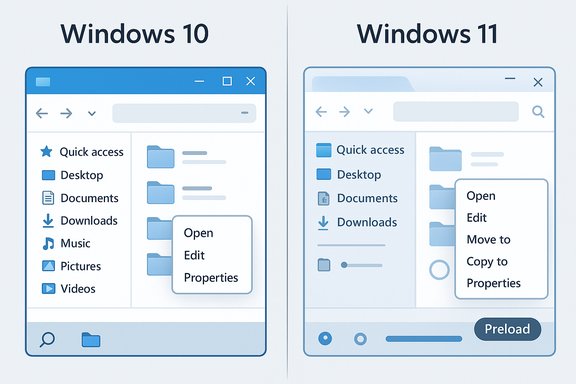
- Introduced an experimental File Explorer preload option in recent Dev/Beta builds, which warms File Explorer at boot to reduce first‑open latency. The feature is exposed as a toggle in Folder Options so users and IT administrators can test and opt out. Early tests show preload reduces cold‑open times at the expense of a modest, device‑dependent memory reservation.
- Begun reworking the context menu, grouping infrequently used commands into a “Manage file” flyout and separating cloud provider actions—both choices aimed at reducing menu height and rendering overhead, and at improving perceived responsiveness. Early Insider builds show a more compact right‑click menu in testing.
Cross‑checking the eTeknix claim: what’s verified, what’s contextual
The eTeknix assertion that Windows 11 remains slower in core tasks like opening File Explorer and right‑clicking is supported by multiple, independent data points:- Hands‑on, like‑for‑like tests on a single device show Windows 11 delivering slower cold‑start behavior and higher idle memory use.
- Community reports and forum threads document real user experiences of sluggish File Explorer interactions and slow context menus, and Microsoft has publicly acknowledged and addressed some symptoms via Insider builds and release notes.
- Major outlets covering Microsoft’s Insider builds report that Microsoft is testing preload and context‑menu improvements precisely because these interactions were flagged as slower by users.
- Not every system shows the same gap. On modern machines with NVMe storage, abundant RAM (16+ GB), and up‑to‑date drivers, the difference can be negligible or feel purely stylistic. Microsoft’s own marketing comparisons often pair newer Windows 11 machines against older Windows 10 hardware; such comparisons conflate hardware gains with OS changes. Readers should distinguish device‑level differences (new CPU, newer drivers) from pure OS‑level regressions.
- Some reported slowdowns were bugs tied to specific Insider builds and have since been mitigated; other slowdowns remain architectural and require longer‑term fixes. Where Microsoft has issued fixes, improvements are real but incremental.
Strengths of Windows 11 despite the performance headwinds
It’s important to balance the critique with what Windows 11 does well:- Modern security baseline: TPM/Secure Boot and virtualization‑assisted security are more consistently enforced, improving the long‑term risk posture for modern fleets. These features influence background services and resource use but also harden devices.
- Platform for future features: Windows 11 is the delivery vehicle for on‑device AI, Copilot integrations, and gaming technologies (DirectStorage, Auto HDR) that rely on the newer platform and newer driver models. Organizations and consumers wanting these features will naturally need Windows 11.
- Ongoing attention: Microsoft’s active patching and trials via Insider channels show responsiveness; fixes such as the slow‑close remedy and the preload toggle are evidence the company is listening and shipping mitigations.
Risks and long‑term considerations
- Perception and adoption friction: For mainstream users and enterprises, perceived regression in core experience can delay migration and complicate lifecycle planning, increasing cost for organizations that must support mixed‑OS fleets.
- Complexity of fixes: Preload and menu declutter are helpful but do not fully address root causes—rendering layers, code refactors, and the integration of cloud/AI hooks will take sustained engineering effort and careful testing. Expect incremental improvements rather than a single “fix everything” release.
- Driver and ecosystem drift: Vendors are prioritizing Windows 11 for new drivers and utilities. Over time, Windows 10 will remain supported only in limited channels (or via ESU), making prolonged reliance on the older OS costly and risky.
Practical guidance for users and IT administrators
If you prioritize raw snappiness on older hardware
- Stay on Windows 10 while support and ESU options exist—Windows 10 generally has a lower idle footprint and can feel faster on constrained devices. Plan a staged migration well before support ends and test critical apps.
If you need security, AI features, or new driver optimizations
- Move to Windows 11 on eligible hardware and test the target hardware with your core apps in pilot rings. Expect to tune settings such as Memory Integrity, background telemetry, and File Explorer preload based on device class.
If you’re already on Windows 11 and feel lag
- Enable the latest cumulative updates and Insider fixes if comfortable, or wait for staged production rollouts that incorporate fixes.
- Try the File Explorer preload toggle in preview builds to reduce first‑open latency; measure memory impact on low‑RAM devices before enabling fleet‑wide.
- Audit and disable unnecessary third‑party shell extensions and heavy preview handlers using tools like ShellExView for persistent improvements.
For IT teams
- Pilot preload and new Group Policy/ADMX controls in test images before broad deployment.
- Validate that security settings (VBS, Memory Integrity) do not conflict with critical third‑party drivers or plugins that could cause performance or compatibility regressions.
- Factor in driver availability and hardware eligibility when creating procurement or refresh cycles; expect Windows 11 to be the primary target for new drivers and utilities.
Longer‑term outlook: what to expect from Microsoft
Microsoft’s recent Insider build work—preload experiments and context‑menu decluttering—indicates a pragmatic roadmap: short‑term UX fixes that reduce surface pain and medium‑to‑longer‑term architectural investments to harmonize Win32 and WinUI rendering. Early signals from major tech outlets and Insider release notes show Microsoft is testing changes that should narrow the day‑to‑day feel gap between the OSes, especially for users on lower‑end devices. However, many of the heavier fixes require careful refactoring and cannot be rushed without risking regressions. Two practical expectations:- Continued incremental improvements in Explorer responsiveness and menu load times via staged updates and preloading tweaks.
- A gradual reduction in hardware/driver support for Windows 10 features as vendors focus QA and new driver work on Windows 11, which will push more users to migrate over time.
Conclusion
The headline in eTeknix—that Windows 11 is still slower than Windows 10 in basic interactions like opening File Explorer and right‑clicking—is supportable in the measured sense: on identical hardware and in many real‑world configurations, Windows 10 still feels leaner and can respond faster for core file management tasks. That gap is real enough that Microsoft has publicly acknowledged specific Explorer bugs and is trialing both pragmatic workarounds (preloading) and UI simplifications (menu declutter) to improve the experience.Yet the full picture is nuanced. Windows 11’s higher baseline resource use is the trade‑off for a platform designed to deliver modern security, on‑device AI, and future driver/feature investments. For users on older or resource‑constrained hardware who prioritize immediate snappiness, Windows 10 remains a defensible choice for the near‑term; for those chasing new features, hardware‑assisted security, and long‑term support, Windows 11 remains the logical destination—provided devices are eligible and IT teams plan migrations carefully.
The pragmatic takeaway: expect incremental, perceptible improvements to Windows 11 Explorer performance over the next releases, but also plan upgrades and deployments with measured pilots, telemetry‑driven tuning, and a clear rollback or compatibility plan—because the OS trade‑offs that created the problem are partly architectural and will take time to fully resolve.
Source: eTeknix Windows 11 Is Still Slower Than Windows 10
