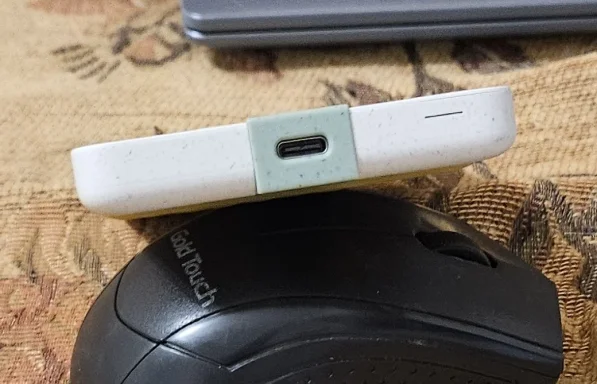
Given what you’ve just observed with
Seagate #2 (STMS2000400):
- LED stays on
- Nothing new appears in Disk Management
- Nothing changes in Device Manager when you plug/unplug
…that pattern is
much more consistent with a “no data connection / no USB enumeration” problem than a Windows 11 update problem.
If Windows 11 were the cause, you’d almost always still see
something in Device Manager (even as
Unknown USB Device), and you’d usually see it on one PC but not the other. You’re seeing
no enumeration at all.
What that usually means
One of these is happening:
1)
Cable is power-only or has failed data lines
- Very common with USB‑C cables (some charge-only).
- Also common with worn cables: power still works, data doesn’t.
2)
Bad connector/contact at the drive’s port (or internal USB-bridge board)
- The LED can light even if the data pins aren’t making contact.
3)
Port is supplying power but USB handshake never starts (less common, but can happen with a failing bridge board).
So:
it’s unlikely to be a new Win11 update issue based on your “no Device Manager change” observation.
Things you can do now (before the new cables arrive)
1) Confirm whether the cable can pass data (quick test)
Use the
same cable on something you know supports data, e.g. your phone:
- Plug phone into PC with that cable.
- If the phone charges but does not appear in File Explorer / Device Manager as a portable device, that cable is very likely charge-only or data-bad.
2) Try any known-good “data” cable you already have (even temporarily)
If your Seagate uses
USB‑C, try
any known-good USB‑C data cable (phone/laptop cable). Many are data-capable, some are not.
If your Seagate uses
Micro‑B USB 3.0 (the wider micro connector), you must use the proper
USB 3.0 Micro‑B cable—other “micro USB” cables won’t work.
3) Try a powered USB hub (good diagnostic)
If you can borrow a
powered USB hub (one with its own power adapter), try the drive through that hub. It’s a good test for borderline power/current situations.
4) Listen for the Windows connect sound and watch Device Manager “live”
Open Device Manager → keep it open → plug the drive in.
- If nothing at all changes, Windows is not seeing a USB device handshake.
About Seagate #1 with the broken port
If the physical connector is broken, Seagate may consider it physical damage (sometimes not covered), but it’s still worth contacting them—especially since the drive is < 6 months old.
Do not keep trying to insert cables into a damaged port, because it can short pins and make recovery harder.
Two quick questions (so I can be precise)
1) What
connector is on STMS2000400:
USB‑C or
Micro‑B USB 3.0?
2) When you plug it in, do you hear the
Windows device connect sound (yes/no)?
If you answer those, I can tell you whether waiting for cables is the right plan or whether it’s more likely the drive/enclosure electronics (RMA time).