

Someone took Windows 8’s Metro/Modern UI and rebuilt it as a Wayland desktop shell for Linux — and it is somehow weirder and more useful than it had any right to be.
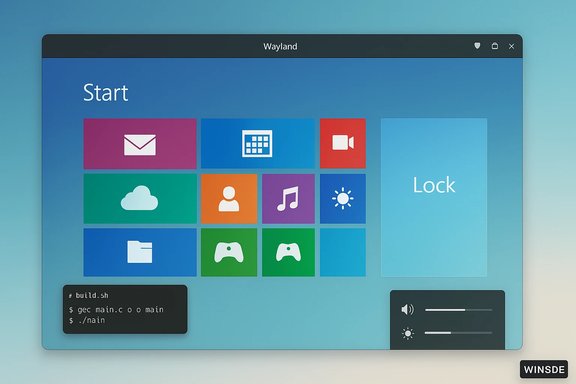
Microsoft's Windows 8 famously rewired the desktop in 2012, replacing the old Start menu with a full-screen, tile-based Start screen and pushing a touch-first design onto PCs that still mostly used keyboard and mouse. The move triggered a cascade of developer and OEM complaints about a locked-down application model (the Windows Store), a fractured user experience, and a rapid user retreat back toward Windows 7 and later revisions. Those controversies — and Gabe Newell’s blunt prediction that “Windows 8 is a catastrophe for everyone in the PC space” — helped push some parts of the gaming and developer ecosystems toward Linux around the same time. Fast forward to January 2026: a small open-source project called Win8DE recreates the look, the tile grid, the lock screen and the OSD flourishes of Windows 8 as a userland shell that runs on modern Wayland compositors like Labwc and Hyprland. The project is published on GitHub by developer er-bharat and goes beyond a mere theme; it bundles a start shell, lock screen, wallpaper utility, OSD components and a settings app — and ships with build and install scripts to make trying it fairly straightforward.
The safe path Win8DE follows is to recreate the spirit (tile grid, animations, color system) using original assets and not to distribute Microsoft code or resources. That approach reduces but does not eliminate risk; it’s sensible to treat this as fanwork and not commercial branding. If commercial distribution is planned, consult legal counsel.
Win8DE’s GitHub repository and the recent coverage are the best starting points for anyone curious to explore this tiny, idiosyncratic revival; the code is open, the install scripts are simple, and the result is a surprisingly coherent — if intentionally quirky — desktop experience.
Source: PC Gamer An absolute madman has recreated the Windows 8 UI—for Linux
 Background / Overview
Microsoft's Windows 8 famously rewired the desktop in 2012, replacing the old Start menu with a full-screen, tile-based Start screen and pushing a touch-first design onto PCs that still mostly used keyboard and mouse. The move triggered a cascade of developer and OEM complaints about a locked-down application model (the Windows Store), a fractured user experience, and a rapid user retreat back toward Windows 7 and later revisions. Those controversies — and Gabe Newell’s blunt prediction that “Windows 8 is a catastrophe for everyone in the PC space” — helped push some parts of the gaming and developer ecosystems toward Linux around the same time. Fast forward to January 2026: a small open-source project called Win8DE recreates the look, the tile grid, the lock screen and the OSD flourishes of Windows 8 as a userland shell that runs on modern Wayland compositors like Labwc and Hyprland. The project is published on GitHub by developer er-bharat and goes beyond a mere theme; it bundles a start shell, lock screen, wallpaper utility, OSD components and a settings app — and ships with build and install scripts to make trying it fairly straightforward. What Win8DE is — and what it isn’t
A full shell for Wayland compositors
Win8DE is not a full desktop environment in the KDE/GNOME sense — it’s a shell layer: a desktop experience that runs atop Wayland compositors and exposes a Windows 8–style Start screen, lock screen and OSD elements. It’s implemented with QML/C++ (according to the repository language breakdown) and ships as a set of small binaries you can compile locally or install system‑wide. The repo includes build.sh, install.sh and uninstall.sh to ease testing.- The core components listed in the repository include Win8Start (start screen), Win8Lock (lock screen), Win8OSD (on‑screen display), Win8Wall (wallpaper utility) and Win8Settings (settings).
Features that recreate the Windows 8 vibe
Win8DE aims squarely at aesthetics plus some workflow imitation rather than a carbon copy of every Microsoft API or behavior. Notable elements:- A tile-based Start screen with drag‑and‑drop tile arrangement and multiple tile sizes (small/medium/large/xlarge).
- A horizontally scrolling desktop “pages” metaphor to flip between groups of tiles, similar to Windows 8’s orientation.
- An animated lock screen with slide transitions (but simplified so you click instead of dragging).
- A lightweight OSD system that handles volume, brightness and battery icons with smooth overlays.
- A settings app allowing wallpaper and accent color changes across Start, Lock and desktop.
Who the project is for
This is niche software: not for users who need a production-grade, feature‑complete desktop replacement, but for people who want a touch‑optimized, high‑contrast, tile-first experience or who feel sentimental about Windows 8’s particular brand of polished, typographic UI. It’s also a useful demo-case for how far Wayland‑based shells can go with a relatively small codebase. Coverage from outlets like PC Gamer and German tech press picked up the project quickly because it’s both funny and technically interesting.Under the hood: Wayland, compositors and pragmatic choices
Why Wayland?
Win8DE targets Wayland rather than X11. That’s an explicit design choice and makes sense: Wayland is the modern display server protocol for Linux desktops, and it gives better control for overlays and composited animations without the legacy cruft of X11. The project expects to run against compositors that expose convenient hooks — Labwc and Hyprland are explicitly mentioned as proven targets. Wayland is mature enough now that many mainstream desktops use it by default; at the same time the Linux graphics stack still has vendor and protocol rough edges that affect some users (more on that below).The compositor story: Labwc and Hyprland
Win8DE doesn’t try to replace the compositor; it integrates with them. That means:- On Labwc (a lightweight Wayland compositor inspired by Openbox) users get a very light footprint, while Win8DE provides the visual shell.
- On Hyprland (a more experimental compositor with rich animation support), Win8DE’s transitions and overlays can be very smooth.
Implementation notes
The codebase mixes QML and C++ and ships modular binaries for the various UI components. OSD functionality is split into a server and a client (Win8OSD-server and Win8OSD-client), designed to let keybindings and external events trigger the client to draw overlays. These pragmatic choices keep complexity manageable and let the shell lean on compositor features for input and window composition.Why this exists: nostalgia, UX experiments, and the long tail of interfaces
Windows 8 was widely reviled, but it also left a recognizable visual vocabulary: bold color blocks, typographic hierarchy, a predictable tile grid and swift micro-animations. Those design choices resonated with a subset of users who appreciated:- Clarity of information density (live tiles were an information‑at‑a‑glance model).
- Consistency across touch devices, and a design that prioritized large hit targets and legibility.
- Aesthetic confidence — the saturated flat colors still read as bold and practical compared with the semi‑transparent visuals that dominated later trends.
Strengths: what Win8DE gets right
- Faithful visual reproduction: The tiles, colors and animations capture the Windows 8 vibe without shipping Microsoft assets. That’s an important distinction for both technical clarity and legal safety.
- Modular, compositing‑friendly design: Splitting OSD into client/server and keeping Start/Lock as separate binaries makes the project adaptable and easier to debug.
- Low barrier to try: Build scripts and an install script mean curious users can test locally or install system‑wide with minimal manual configuration. The repository explicitly documents both workflows.
- Niche value: For anyone who actually liked Windows 8’s approach, Win8DE is a rare chance to run that style on a modern, up‑to‑date stack instead of on a 2012 OS that no longer runs recent apps. The project fills a tiny but real demand.
Risks and trade-offs you should know about
Wayland and GPU vendor compatibility
Wayland is the right modern target, but the Linux graphics stack still varies by GPU vendor. Historically, NVIDIA’s proprietary drivers lagged behind in some Wayland features and protocol parity, resulting in flicker, XWayland odor issues and other corner‑cases for users who rely on the proprietary stack. Even as NVIDIA and compositors have improved things recently, a Wayland‑based shell layered over compositors can expose those hard limits (especially on multi‑monitor or hybrid GPU laptops). If you run an NVIDIA GPU and care about rock‑solid behavior, plan to test carefully and consider swapping to a driver/configuration combination that is known to work on your distro.Not a desktop replacement — compatibility and tooling
Win8DE is a shell; it won’t substitute for the deep choices modern desktop environments solve. Expect:- Incomplete settings integration (system settings, power profiles and distribution‑specific features are still handled by the underlying compositor / distro).
- Edge cases with classic X11 apps that run under XWayland — sometimes these can misbehave on Wayland sessions.
- No official packaging for major distributions yet; you’ll likely run from source or use the provided install script.
Security and maintenance risk
Small community projects are great for experimentation, but they carry maintenance risk. Win8DE is maintained by a tiny team (the repo lists two contributors and a modest star count). If you adopt it in a daily environment, understand that future compatibility with new compositor changes, Wayland protocol tweaks or distro updates may require you to fix things yourself or wait for upstream contributions. The repo’s public activity and recent media coverage suggest momentum today, but that can change quickly for small projects.Legal gray areas: “look and feel” and trade dress
Recreating a user interface’s look and feel exists in a legal gray area. Historically, GUI litigation (and trade‑dress cases) shows courts scrutinize whether visual elements are functional or ornamental, whether they signal source to consumers, and whether a particular design duplicates copyrighted or patented artifacts. In practice, fan skins and UI remakes are common and tolerated, but striking too close to an explicit trademark or proprietary asset (logos, copyrighted artwork, exact iconography) could invite legal attention.The safe path Win8DE follows is to recreate the spirit (tile grid, animations, color system) using original assets and not to distribute Microsoft code or resources. That approach reduces but does not eliminate risk; it’s sensible to treat this as fanwork and not commercial branding. If commercial distribution is planned, consult legal counsel.
How to try Win8DE safely (practical steps)
- Clone the repository and inspect the source. Build scripts are provided; read them before running.
- Test in a separate Wayland session or a disposable VM. The repo describes how to create a separate session configuration so your main desktop remains untouched.
- Prefer compositors with proven Wayland support for your GPU (Hyprland for experimental setups, Labwc for lighter rigs). If you use NVIDIA hardware, research driver versions and known Wayland issues for your distro before committing.
- Back up compositor configs and create a restore point, or use a separate user account to avoid breaking your primary workflow.
Community, momentum and longevity
Win8DE has attracted rapid media attention because of its novelty and the oddball appeal of resurrecting Windows 8 in 2026. The GitHub repo shows stars and a handful of contributors, and multiple tech outlets and blogs have covered it in the two weeks after the repository gained traction. That coverage tends to amplify both upstream contributions and user testing, which is a positive sign for short‑term maintenance and bug reporting. Still, the project remains small and experimental; adoption by a broader set of users or packaging for distributions would significantly strengthen its staying power.Deeper implications: what Win8DE says about the Linux desktop ecosystem in 2026
Win8DE’s media pickup reflects two broader trends in the Linux desktop landscape:- Design pluralism is valued. The large mainstream desktops (GNOME, KDE Plasma, Cinnamon) serve general audiences, but there’s a healthy appetite for distinct UI philosophies — whether retro, touch‑first, or minimalist. Projects like Win8DE are proof that a small, focused team can ship uniquely opinionated experiences that find an audience.
- Wayland as a platform for experimentation. Wayland provides compositing and overlay primitives that let developers implement distinct shells without hacking X11 internals. This reduces engineering friction for small projects to experiment with novel UX models — an advantage for innovation even if the ecosystem still has vendor quirks.
Final analysis: laugh, tinker, or adopt — what to take away
Win8DE succeeds as a tasteful, faithful and technically modern homage to Windows 8: it captures the visual language and interaction patterns while using modern Linux infrastructure. For tinkerers, UI curators, and anyone who actually remembers Windows 8 fondly, it’s an immediately enjoyable experiment that’s easy to try. However, it is not a production‑grade desktop replacement. Users who need integration with distribution services, robust hardware driver support (especially for NVIDIA), or long‑term maintenance should treat Win8DE as a playful overlay or hobby project rather than a mission‑critical environment. The legal landscape around “look and feel” remains nuanced; the safest path for community developers is to use original assets and avoid implying official endorsement. For WindowsForum readers who enjoy desktop archaeology or are interested in experimenting with alternative shells on Wayland, Win8DE is a delightful curiosity worth trying in a VM or a disposable session. It’s a reminder that user interfaces have cultural afterlives: even a famously polarizing UI can become a source of nostalgia and technical inspiration.Win8DE’s GitHub repository and the recent coverage are the best starting points for anyone curious to explore this tiny, idiosyncratic revival; the code is open, the install scripts are simple, and the result is a surprisingly coherent — if intentionally quirky — desktop experience.
Source: PC Gamer An absolute madman has recreated the Windows 8 UI—for Linux
