

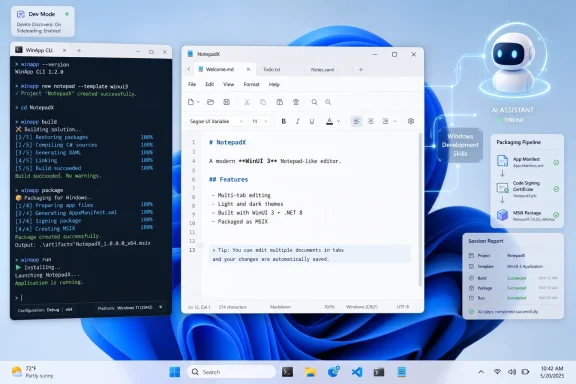
On June 3, 2026, Paul Thurrott published an account of using Microsoft’s new Windows Development Skills and the WinApp CLI with Claude Code to generate a native Windows 11 WinUI 3 app from a plain-language prompt. The result was not a miracle, but it was more important than a demo: it showed Microsoft trying to make native Windows development legible to AI agents. That is a very different project from simply adding Copilot buttons to an IDE. It is Microsoft quietly admitting that the future of Windows apps may depend less on persuading humans to learn WinUI than on teaching agents not to get it wrong.
For years, “build native Windows apps” has sounded less like a strategy than a plea. Microsoft has had the platform, the APIs, the design language, the Store, the documentation, and the installed base, yet developers have kept making the same rational calculation: if a web app gets you Windows, macOS, Linux, and maybe mobile with one codebase, native Windows becomes a luxury.
The Build 2026 pitch changes the shape of that argument. Microsoft is no longer merely telling developers that WinUI 3 and the Windows App SDK are the right way to build modern Windows software. It is building tooling that lets AI agents scaffold, inspect, test, package, and iterate on those apps from the command line.
That matters because AI coding tools are not nostalgic for Visual Studio. They like terminals, repeatable commands, machine-readable errors, and documentation they can query at the moment of need. The WinApp CLI and Windows Development Skills are therefore not just conveniences for developers who dislike IDEs. They are an adapter layer between Windows’ historically messy app platform and the agentic coding systems now becoming part of everyday software work.
Thurrott’s experiment is useful precisely because it was not polished into a keynote clip. He asked an AI coding agent to build a Windows 11 Notepad-like app using WinUI 3. After installing prerequisites, enabling Developer Mode, adding templates, and grinding through errors, the agent produced a working multi-tab text editor in under an hour. Imperfect, incomplete, and occasionally odd — but unmistakably native.
That is the hook. Microsoft does not need AI to produce perfect software from a single prompt tomorrow. It needs AI to make Windows app development feel less like a private club with a decade of abandoned signage on the walls.
The WinApp CLI gives developers and agents a single command-line interface for Windows app tasks that have historically sprawled across SDKs, templates, MSBuild files, Visual Studio project settings, certificates, manifests, packaging workflows, and Store submission processes. That sprawl is one reason Windows development has so often felt more complicated than it should. It is also exactly the kind of sprawl that makes AI agents hallucinate.
When a human developer hits an unfamiliar Windows packaging error, they search, remember, debug, and swear. When an AI agent hits the same error without the right affordances, it may invent a property name, use a stale UWP API, confuse WinUI namespaces, or wander into Stack Overflow archaeology. Windows has too much historical surface area for a general-purpose model to infer the right thing reliably.
Microsoft’s answer is to make the workflow more explicit. The WinUI agent plugin includes specialized skills for setup, development workflow, design, code review, UI testing, packaging, WPF migration, and session reporting. In plain English, it tries to keep the agent inside the modern Windows lane.
That is why the CLI matters. A command such as “build,” “run,” “package,” or “publish” gives an agent something concrete to do and a result it can inspect. The more Windows development becomes scriptable, the more it becomes agent-compatible.
This is also why the move should not be dismissed as merely another developer tool. Windows has always had powerful command-line infrastructure, but modern Windows app development has often remained emotionally tied to Visual Studio as the center of the universe. Build 2026 suggests Microsoft finally understands that the IDE is no longer the only serious interface for software creation.
Microsoft’s own documentation now acknowledges a problem Windows developers have felt for years: AI models have absorbed far more historical UWP and WPF material than clean, current WinUI 3 guidance. That means a generic coding assistant may confidently generate code that looks plausible but belongs to an older era of Windows development. The failure mode is not ignorance; it is temporal confusion.
That is a serious issue for Windows because Microsoft’s app story has been through so many branding and framework transitions. Win32, .NET, WPF, UWP, WinRT, WinUI, Windows App SDK, Project Reunion, MAUI, React Native, WebView2 — each has its place, but together they create a fog bank. Human developers learn to navigate that fog through experience. AI agents need guardrails.
Windows Development Skills are therefore an attempt to encode not just API knowledge, but platform taste. Use Microsoft.UI.Xaml, not Windows.UI.Xaml. Use the Windows App SDK patterns that apply today. Prefer current controls and packaging flows. Do not reach for an old answer just because the internet contains a thousand examples of it.
This is where Microsoft’s AI story becomes unusually practical. The company is not promising that Copilot will understand your business, replace your engineering team, or turn every accountant into a software architect. It is saying something narrower and more credible: Windows development has enough sharp edges that an agent needs Windows-specific context to be useful.
Thurrott’s Notepad-like app shows both sides of that bargain. The agent could set up a project, create a structure, build views and view models, and eventually run the application. It also made decisions that a seasoned Windows developer would revisit, including missing printing support, a non-persistent font choice, and a Find/Replace UI that may be functional without feeling entirely like modern Notepad.
That is not failure. That is the new baseline for AI-assisted native development: fast first draft, human-directed refinement, and a tooling layer that prevents the draft from being built on obsolete assumptions.
The web-app turn was not irrational. Web technologies are familiar, cross-platform, easier to deploy, and easier to align with cloud services. For companies with large web engineering teams, a native Windows client can look like an expensive detour. Microsoft made the same calculation many other vendors made.
The cost is that Windows began to feel less like the best place to run PC software and more like a shell for service front ends. Enthusiasts notice the lag, memory overhead, inconsistent controls, missing offline behavior, and uncanny mismatch between “Windows 11 design” and what appears on screen. Enterprise users notice when supposedly modern clients behave worse than the applications they replaced.
That is why the native-app push has emotional force. It is not just about WinUI 3. It is about whether Windows still has a distinctive application model worth targeting.
At Build 2026, Microsoft appears to be arguing that the answer is yes — but with an agentic twist. The company is not only saying native apps are better for performance, integration, accessibility, offline work, and system features. It is trying to reduce the cost of building them by making agents productive inside the Windows stack.
If that works, the trade-off changes. A developer who once saw native Windows as too much platform-specific effort might instead see it as a target that an AI agent can scaffold, maintain, test, and package with less manual pain. That does not erase the value of cross-platform frameworks, but it gives Windows a better counterargument than nostalgia.
A human uses a GUI because visual interfaces are good for humans. An AI agent does not need a ribbon, a context menu, or a settings dialog in the same way. It needs a structured way to discover what actions are available, what inputs they require, what permissions they need, and what state they produce.
Microsoft’s App Actions work fits into that larger transition. So do command-line tools, MCP servers, structured documentation, and plugin-based development skills. They are all attempts to expose software capability in a form agents can consume without pretending to be a person moving a mouse.
For Windows developers, this has two consequences. First, apps may increasingly need to present two faces: a polished human interface and a structured agent interface. Second, development tools themselves need to be operable by agents, because the workflow is becoming part of the product.
The WinApp CLI is a good example of this inversion. A human may prefer Visual Studio, designer surfaces, property panels, and integrated debugging. An agent prefers commands, logs, project files, and deterministic outputs. Microsoft does not have to pick one audience, but it does have to stop assuming the human-first toolchain is sufficient.
That is a larger philosophical change than it may appear. Windows development has long revolved around empowering a person at a workstation. Agentic development assumes the workstation may be shared with software that reads, writes, builds, tests, and reports at high speed. The platform that makes those actions reliable wins more developer attention.
AI systems are strongest when the requested application resembles software that already exists in many forms. Text editors, Markdown tools, weather dashboards, file browsers, calculators, note apps, media libraries, and CRUD front ends are ideal candidates. The model can infer the shape of the app because the shape is already culturally and technically well represented.
The harder question is what happens when the application is not a familiar consumer utility. Line-of-business Windows apps often contain domain-specific workflows, legacy integrations, strange data rules, hardware dependencies, compliance requirements, and user habits that are not obvious from a prompt. In those cases, AI can still accelerate development, but it cannot replace the painstaking work of understanding the job the software is supposed to do.
That distinction matters for IT pros. The near-term promise is not that a help desk manager can describe a replacement ERP client over lunch and deploy it by dinner. It is that small internal tools, admin utilities, migration helpers, log viewers, configuration front ends, and workflow-specific companions may become much cheaper to build.
This is where Windows could benefit disproportionately. Many organizations still run on Windows because their work happens around Windows: file shares, Active Directory, endpoint management, Office documents, local peripherals, VPN clients, device drivers, and specialized desktop software. If AI-assisted WinUI development makes it easier to build polished tools around that reality, Windows gains a new kind of local relevance.
The app in Thurrott’s test was not production software. But it was the kind of prototype that might once have required a developer to spend a day just reacquainting themselves with templates, package identity, XAML conventions, and build errors. Compressing that frustration into an agent-guided session is not magic. It is leverage.
Windows developers have lived through enough Microsoft client-platform resets to be skeptical of any fresh commitment. Silverlight, Windows Phone, Metro, UWP, Centennial bridges, Project Reunion branding, Store policy changes, and shifting design systems have all left residue. Even when the underlying technologies are defensible, the story has often felt unstable.
That history makes the 2026 native-app push both welcome and fragile. Developers do not merely need a plugin. They need confidence that WinUI 3, the Windows App SDK, and the associated tooling will be maintained, documented, and used by Microsoft itself. The fastest way to kill the message would be for Microsoft to keep telling outsiders to build native while shipping its own flagship experiences as sluggish web shells.
This is why first-party apps matter so much. Notepad, Paint, Photos, Terminal, PowerToys, and the Microsoft Store each send a signal about what Microsoft believes Windows software should feel like. Outlook sends a signal too, and not the same one. Developers notice contradictions.
There is also the question of whether the tooling will remain coherent after the Build spotlight moves on. AI-assisted development tools are evolving quickly, and today’s plugin can become tomorrow’s abandoned sample if it is not tied to a durable product commitment. Microsoft’s best move would be to treat these skills less like a novelty and more like core developer infrastructure.
That means versioned guidance, current samples, fast fixes when SDK changes break agent workflows, and clear separation between recommended patterns and legacy compatibility. The agent era makes stale documentation more dangerous, not less. A human may notice that an article is old. An agent may simply absorb the wrong pattern and multiply it.
If Microsoft is serious, Windows Development Skills should become a living expression of how Microsoft wants Windows apps built now. Not how they were built in 2015. Not how a migration guide hedges every option. Now.
Developers want agents to be less annoying. Administrators want them to be less dangerous. Those goals are not naturally aligned.
A coding agent that can manipulate a Windows development environment needs access to source files, package managers, SDKs, terminals, documentation, and sometimes system settings such as Developer Mode. In an enterprise context, each of those capabilities intersects with policy, auditing, endpoint protection, data-loss prevention, and supply-chain risk.
This does not mean AI-assisted Windows development is uniquely unsafe. Traditional development already involves downloading packages, running scripts, trusting build tools, and granting broad local permissions. The difference is velocity and opacity. An agent can make many changes quickly, and even when it produces a session report, the human may not understand every choice that led there.
Microsoft’s broader work on consent, transparency, and agent permissions will eventually collide with this developer story. Windows cannot become an agent-native runtime by relying solely on “approve all edits” as a social contract. It will need permission scopes that make sense, logs that administrators can inspect, and defaults that distinguish a harmless project edit from a system-level change.
For individual enthusiasts, the answer may be simple: use disposable projects, source control, and common sense. For enterprises, the answer has to be policy-driven. AI coding agents will need to fit into managed developer workstations, not route around them.
The irony is that native Windows development may ultimately become more secure because of this pressure. If Microsoft has to make app creation, packaging, signing, and Store submission more explicit for agents, humans will benefit too. A more deterministic toolchain is easier to audit than a pile of tribal knowledge in an IDE.
That does not eliminate expertise. It changes where expertise enters the loop. The expert becomes less of a typist and more of an editor, reviewer, debugger, and architect. The beginner gets a runnable artifact sooner, then learns by interrogation: why this control, why this pattern, why this package, why this error?
For Windows, that could be enormously valuable. The platform has needed a better on-ramp for years. Visual Studio is powerful, but it can be intimidating. Documentation is broad, but fragmented. Samples are useful, but often too narrow or too old to answer the real question: “What is the current blessed way to build a modern Windows app?”
A well-behaved agent, grounded in current Microsoft documentation and constrained by Windows-specific skills, can serve as an interactive on-ramp. It can scaffold the app, explain the structure, run the build, fix the first wave of errors, and produce a report. That is not a substitute for learning, but it is a far better starting point than a blank solution and a search engine.
This also broadens who can build Windows software. Power users, sysadmins, support engineers, and hobbyists have always created scripts and utilities to scratch local itches. If WinUI app generation becomes reliable enough, some of those scripts will grow interfaces. Some internal tools will become less ugly. Some workflows currently trapped in spreadsheets may become small desktop apps.
That is a healthier Windows ecosystem than one where only large vendors can justify polished native clients.
Printing was absent. Settings were incomplete. Font choices were not persistent. Some UI decisions reflected patterns that worked around framework limitations rather than matching the modern app being imitated. These are not trivial details; they are the difference between a demo and software someone relies on every day.
This is the central misunderstanding around AI-generated apps. The first 80 percent can arrive shockingly fast, especially when the target is familiar. The last 20 percent still contains product judgment, platform nuance, accessibility, localization, error handling, persistence, performance tuning, deployment, supportability, and all the small decisions that make software feel trustworthy.
For Windows enthusiasts, that should be reassuring rather than disappointing. Native app development is not being reduced to a toy. The tedious parts are being compressed. The craft remains.
The most productive way to view these tools is as a force multiplier for people who already care about the result. A developer can ask for a first draft, then review whether the XAML is sensible, whether the MVVM structure is appropriate, whether the app uses current APIs, whether the UI respects Windows conventions, and whether the generated code will be maintainable six months later.
That review step is not optional. It is the job.
The danger is that low-effort software becomes easier to ship. The opportunity is that high-effort software becomes easier to start. Windows has seen enough bad desktop apps to know the difference.
Boring means predictable commands. Boring means current templates. Boring means clear errors. Boring means documentation that says “do this” instead of preserving every historical branch equally. Boring means packaging and signing workflows that can be automated without turning into a scavenger hunt.
That kind of boring is underrated. It is how ecosystems scale.
The old Windows development story often assumed that complexity was acceptable because professional developers would absorb it. The agentic development story assumes complexity must be translated into structured workflows because the agent cannot rely on folklore. That translation helps everyone.
It also puts pressure on Microsoft to simplify rather than merely wrap. If the WinApp CLI becomes a thin layer over persistent chaos, agents will still stumble. If Windows Development Skills become a prompt library that compensates for confusing APIs, the improvement will be real but limited. The deeper win is to make the underlying platform more consistent.
That is why this moment is bigger than one Notepad clone. Microsoft is being forced by AI to make Windows development more machine-readable, and machine-readable systems tend to become more human-manageable too.
 Microsoft Has Found a New Way to Sell Native Windows
For years, “build native Windows apps” has sounded less like a strategy than a plea. Microsoft has had the platform, the APIs, the design language, the Store, the documentation, and the installed base, yet developers have kept making the same rational calculation: if a web app gets you Windows, macOS, Linux, and maybe mobile with one codebase, native Windows becomes a luxury.The Build 2026 pitch changes the shape of that argument. Microsoft is no longer merely telling developers that WinUI 3 and the Windows App SDK are the right way to build modern Windows software. It is building tooling that lets AI agents scaffold, inspect, test, package, and iterate on those apps from the command line.
That matters because AI coding tools are not nostalgic for Visual Studio. They like terminals, repeatable commands, machine-readable errors, and documentation they can query at the moment of need. The WinApp CLI and Windows Development Skills are therefore not just conveniences for developers who dislike IDEs. They are an adapter layer between Windows’ historically messy app platform and the agentic coding systems now becoming part of everyday software work.
Thurrott’s experiment is useful precisely because it was not polished into a keynote clip. He asked an AI coding agent to build a Windows 11 Notepad-like app using WinUI 3. After installing prerequisites, enabling Developer Mode, adding templates, and grinding through errors, the agent produced a working multi-tab text editor in under an hour. Imperfect, incomplete, and occasionally odd — but unmistakably native.
That is the hook. Microsoft does not need AI to produce perfect software from a single prompt tomorrow. It needs AI to make Windows app development feel less like a private club with a decade of abandoned signage on the walls.
The Command Line Becomes the New Windows Development Surface
The most revealing part of the story is not the generated app. It is the machinery required to produce it.The WinApp CLI gives developers and agents a single command-line interface for Windows app tasks that have historically sprawled across SDKs, templates, MSBuild files, Visual Studio project settings, certificates, manifests, packaging workflows, and Store submission processes. That sprawl is one reason Windows development has so often felt more complicated than it should. It is also exactly the kind of sprawl that makes AI agents hallucinate.
When a human developer hits an unfamiliar Windows packaging error, they search, remember, debug, and swear. When an AI agent hits the same error without the right affordances, it may invent a property name, use a stale UWP API, confuse WinUI namespaces, or wander into Stack Overflow archaeology. Windows has too much historical surface area for a general-purpose model to infer the right thing reliably.
Microsoft’s answer is to make the workflow more explicit. The WinUI agent plugin includes specialized skills for setup, development workflow, design, code review, UI testing, packaging, WPF migration, and session reporting. In plain English, it tries to keep the agent inside the modern Windows lane.
That is why the CLI matters. A command such as “build,” “run,” “package,” or “publish” gives an agent something concrete to do and a result it can inspect. The more Windows development becomes scriptable, the more it becomes agent-compatible.
This is also why the move should not be dismissed as merely another developer tool. Windows has always had powerful command-line infrastructure, but modern Windows app development has often remained emotionally tied to Visual Studio as the center of the universe. Build 2026 suggests Microsoft finally understands that the IDE is no longer the only serious interface for software creation.
Vibe Coding Exposes Windows’ Documentation Debt
The phrase vibe coding still annoys a lot of professional developers, partly because it can sound like a license to abdicate judgment. But in the Windows context, vibe coding is less interesting as a lifestyle trend than as a diagnostic tool. It reveals where the platform is coherent and where it has accumulated too many overlapping answers.Microsoft’s own documentation now acknowledges a problem Windows developers have felt for years: AI models have absorbed far more historical UWP and WPF material than clean, current WinUI 3 guidance. That means a generic coding assistant may confidently generate code that looks plausible but belongs to an older era of Windows development. The failure mode is not ignorance; it is temporal confusion.
That is a serious issue for Windows because Microsoft’s app story has been through so many branding and framework transitions. Win32, .NET, WPF, UWP, WinRT, WinUI, Windows App SDK, Project Reunion, MAUI, React Native, WebView2 — each has its place, but together they create a fog bank. Human developers learn to navigate that fog through experience. AI agents need guardrails.
Windows Development Skills are therefore an attempt to encode not just API knowledge, but platform taste. Use Microsoft.UI.Xaml, not Windows.UI.Xaml. Use the Windows App SDK patterns that apply today. Prefer current controls and packaging flows. Do not reach for an old answer just because the internet contains a thousand examples of it.
This is where Microsoft’s AI story becomes unusually practical. The company is not promising that Copilot will understand your business, replace your engineering team, or turn every accountant into a software architect. It is saying something narrower and more credible: Windows development has enough sharp edges that an agent needs Windows-specific context to be useful.
Thurrott’s Notepad-like app shows both sides of that bargain. The agent could set up a project, create a structure, build views and view models, and eventually run the application. It also made decisions that a seasoned Windows developer would revisit, including missing printing support, a non-persistent font choice, and a Find/Replace UI that may be functional without feeling entirely like modern Notepad.
That is not failure. That is the new baseline for AI-assisted native development: fast first draft, human-directed refinement, and a tooling layer that prevents the draft from being built on obsolete assumptions.
Native Apps Are Suddenly a Strategic Issue Again
Microsoft’s renewed emphasis on native Windows apps would be easier to dismiss if the company had not spent years undermining the premise with its own products. Windows users have watched Microsoft ship or promote web-wrapped experiences for tasks that once would have been obvious candidates for rich native clients. New Outlook became the symbol of that frustration, but it was hardly the only example.The web-app turn was not irrational. Web technologies are familiar, cross-platform, easier to deploy, and easier to align with cloud services. For companies with large web engineering teams, a native Windows client can look like an expensive detour. Microsoft made the same calculation many other vendors made.
The cost is that Windows began to feel less like the best place to run PC software and more like a shell for service front ends. Enthusiasts notice the lag, memory overhead, inconsistent controls, missing offline behavior, and uncanny mismatch between “Windows 11 design” and what appears on screen. Enterprise users notice when supposedly modern clients behave worse than the applications they replaced.
That is why the native-app push has emotional force. It is not just about WinUI 3. It is about whether Windows still has a distinctive application model worth targeting.
At Build 2026, Microsoft appears to be arguing that the answer is yes — but with an agentic twist. The company is not only saying native apps are better for performance, integration, accessibility, offline work, and system features. It is trying to reduce the cost of building them by making agents productive inside the Windows stack.
If that works, the trade-off changes. A developer who once saw native Windows as too much platform-specific effort might instead see it as a target that an AI agent can scaffold, maintain, test, and package with less manual pain. That does not erase the value of cross-platform frameworks, but it gives Windows a better counterargument than nostalgia.
The Agent Needs APIs, Not Just Screens
One of the most important shifts in Microsoft’s broader Windows strategy is the move from GUI-only interaction toward agent-readable capabilities. The industry has spent the last two years teaching AI systems to use computers by looking at screens and clicking around. That approach is impressive, brittle, and fundamentally backward.A human uses a GUI because visual interfaces are good for humans. An AI agent does not need a ribbon, a context menu, or a settings dialog in the same way. It needs a structured way to discover what actions are available, what inputs they require, what permissions they need, and what state they produce.
Microsoft’s App Actions work fits into that larger transition. So do command-line tools, MCP servers, structured documentation, and plugin-based development skills. They are all attempts to expose software capability in a form agents can consume without pretending to be a person moving a mouse.
For Windows developers, this has two consequences. First, apps may increasingly need to present two faces: a polished human interface and a structured agent interface. Second, development tools themselves need to be operable by agents, because the workflow is becoming part of the product.
The WinApp CLI is a good example of this inversion. A human may prefer Visual Studio, designer surfaces, property panels, and integrated debugging. An agent prefers commands, logs, project files, and deterministic outputs. Microsoft does not have to pick one audience, but it does have to stop assuming the human-first toolchain is sufficient.
That is a larger philosophical change than it may appear. Windows development has long revolved around empowering a person at a workstation. Agentic development assumes the workstation may be shared with software that reads, writes, builds, tests, and reports at high speed. The platform that makes those actions reliable wins more developer attention.
The Demo Worked Because the Task Was Familiar
There is a temptation to look at Thurrott’s experiment and declare the arrival of instant Windows app development. That would be the wrong lesson. A Notepad clone is a useful test because it exercises real UI, file handling, menus, tabs, dialogs, and application structure, but it is also a deeply familiar pattern with a vast amount of prior art.AI systems are strongest when the requested application resembles software that already exists in many forms. Text editors, Markdown tools, weather dashboards, file browsers, calculators, note apps, media libraries, and CRUD front ends are ideal candidates. The model can infer the shape of the app because the shape is already culturally and technically well represented.
The harder question is what happens when the application is not a familiar consumer utility. Line-of-business Windows apps often contain domain-specific workflows, legacy integrations, strange data rules, hardware dependencies, compliance requirements, and user habits that are not obvious from a prompt. In those cases, AI can still accelerate development, but it cannot replace the painstaking work of understanding the job the software is supposed to do.
That distinction matters for IT pros. The near-term promise is not that a help desk manager can describe a replacement ERP client over lunch and deploy it by dinner. It is that small internal tools, admin utilities, migration helpers, log viewers, configuration front ends, and workflow-specific companions may become much cheaper to build.
This is where Windows could benefit disproportionately. Many organizations still run on Windows because their work happens around Windows: file shares, Active Directory, endpoint management, Office documents, local peripherals, VPN clients, device drivers, and specialized desktop software. If AI-assisted WinUI development makes it easier to build polished tools around that reality, Windows gains a new kind of local relevance.
The app in Thurrott’s test was not production software. But it was the kind of prototype that might once have required a developer to spend a day just reacquainting themselves with templates, package identity, XAML conventions, and build errors. Compressing that frustration into an agent-guided session is not magic. It is leverage.
Microsoft Still Has to Earn Back Developer Trust
The obstacle is not just technical. It is historical.Windows developers have lived through enough Microsoft client-platform resets to be skeptical of any fresh commitment. Silverlight, Windows Phone, Metro, UWP, Centennial bridges, Project Reunion branding, Store policy changes, and shifting design systems have all left residue. Even when the underlying technologies are defensible, the story has often felt unstable.
That history makes the 2026 native-app push both welcome and fragile. Developers do not merely need a plugin. They need confidence that WinUI 3, the Windows App SDK, and the associated tooling will be maintained, documented, and used by Microsoft itself. The fastest way to kill the message would be for Microsoft to keep telling outsiders to build native while shipping its own flagship experiences as sluggish web shells.
This is why first-party apps matter so much. Notepad, Paint, Photos, Terminal, PowerToys, and the Microsoft Store each send a signal about what Microsoft believes Windows software should feel like. Outlook sends a signal too, and not the same one. Developers notice contradictions.
There is also the question of whether the tooling will remain coherent after the Build spotlight moves on. AI-assisted development tools are evolving quickly, and today’s plugin can become tomorrow’s abandoned sample if it is not tied to a durable product commitment. Microsoft’s best move would be to treat these skills less like a novelty and more like core developer infrastructure.
That means versioned guidance, current samples, fast fixes when SDK changes break agent workflows, and clear separation between recommended patterns and legacy compatibility. The agent era makes stale documentation more dangerous, not less. A human may notice that an article is old. An agent may simply absorb the wrong pattern and multiply it.
If Microsoft is serious, Windows Development Skills should become a living expression of how Microsoft wants Windows apps built now. Not how they were built in 2015. Not how a migration guide hedges every option. Now.
The Security Story Is Waiting in the Wings
Any time software agents gain the ability to install tools, modify files, enable system settings, generate code, and run applications, security stops being a footnote. Thurrott’s experiment included repeated permission prompts before he allowed broader edits for the session. That is familiar to anyone using modern coding agents, but it is also a preview of the trust problem Windows will have to solve.Developers want agents to be less annoying. Administrators want them to be less dangerous. Those goals are not naturally aligned.
A coding agent that can manipulate a Windows development environment needs access to source files, package managers, SDKs, terminals, documentation, and sometimes system settings such as Developer Mode. In an enterprise context, each of those capabilities intersects with policy, auditing, endpoint protection, data-loss prevention, and supply-chain risk.
This does not mean AI-assisted Windows development is uniquely unsafe. Traditional development already involves downloading packages, running scripts, trusting build tools, and granting broad local permissions. The difference is velocity and opacity. An agent can make many changes quickly, and even when it produces a session report, the human may not understand every choice that led there.
Microsoft’s broader work on consent, transparency, and agent permissions will eventually collide with this developer story. Windows cannot become an agent-native runtime by relying solely on “approve all edits” as a social contract. It will need permission scopes that make sense, logs that administrators can inspect, and defaults that distinguish a harmless project edit from a system-level change.
For individual enthusiasts, the answer may be simple: use disposable projects, source control, and common sense. For enterprises, the answer has to be policy-driven. AI coding agents will need to fit into managed developer workstations, not route around them.
The irony is that native Windows development may ultimately become more secure because of this pressure. If Microsoft has to make app creation, packaging, signing, and Store submission more explicit for agents, humans will benefit too. A more deterministic toolchain is easier to audit than a pile of tribal knowledge in an IDE.
Windows Developers May Get Their On-Ramp Back
One of the underappreciated consequences of AI coding is that it changes what “learning a platform” means. A developer no longer has to begin by memorizing the correct project template, namespace, threading model, packaging path, and control library. They can begin with intent, then inspect and correct what the agent produces.That does not eliminate expertise. It changes where expertise enters the loop. The expert becomes less of a typist and more of an editor, reviewer, debugger, and architect. The beginner gets a runnable artifact sooner, then learns by interrogation: why this control, why this pattern, why this package, why this error?
For Windows, that could be enormously valuable. The platform has needed a better on-ramp for years. Visual Studio is powerful, but it can be intimidating. Documentation is broad, but fragmented. Samples are useful, but often too narrow or too old to answer the real question: “What is the current blessed way to build a modern Windows app?”
A well-behaved agent, grounded in current Microsoft documentation and constrained by Windows-specific skills, can serve as an interactive on-ramp. It can scaffold the app, explain the structure, run the build, fix the first wave of errors, and produce a report. That is not a substitute for learning, but it is a far better starting point than a blank solution and a search engine.
This also broadens who can build Windows software. Power users, sysadmins, support engineers, and hobbyists have always created scripts and utilities to scratch local itches. If WinUI app generation becomes reliable enough, some of those scripts will grow interfaces. Some internal tools will become less ugly. Some workflows currently trapped in spreadsheets may become small desktop apps.
That is a healthier Windows ecosystem than one where only large vendors can justify polished native clients.
The Notepad Clone Is a Warning as Much as a Win
The app produced in Thurrott’s test is impressive because it exists. It is also instructive because of what it lacks.Printing was absent. Settings were incomplete. Font choices were not persistent. Some UI decisions reflected patterns that worked around framework limitations rather than matching the modern app being imitated. These are not trivial details; they are the difference between a demo and software someone relies on every day.
This is the central misunderstanding around AI-generated apps. The first 80 percent can arrive shockingly fast, especially when the target is familiar. The last 20 percent still contains product judgment, platform nuance, accessibility, localization, error handling, persistence, performance tuning, deployment, supportability, and all the small decisions that make software feel trustworthy.
For Windows enthusiasts, that should be reassuring rather than disappointing. Native app development is not being reduced to a toy. The tedious parts are being compressed. The craft remains.
The most productive way to view these tools is as a force multiplier for people who already care about the result. A developer can ask for a first draft, then review whether the XAML is sensible, whether the MVVM structure is appropriate, whether the app uses current APIs, whether the UI respects Windows conventions, and whether the generated code will be maintainable six months later.
That review step is not optional. It is the job.
The danger is that low-effort software becomes easier to ship. The opportunity is that high-effort software becomes easier to start. Windows has seen enough bad desktop apps to know the difference.
The Real Build 2026 Message Is That Agents Need Windows to Be Boring
Microsoft loves grand language at Build, but the practical lesson here is almost humble. For AI agents to build Windows apps well, Windows development has to become more boring.Boring means predictable commands. Boring means current templates. Boring means clear errors. Boring means documentation that says “do this” instead of preserving every historical branch equally. Boring means packaging and signing workflows that can be automated without turning into a scavenger hunt.
That kind of boring is underrated. It is how ecosystems scale.
The old Windows development story often assumed that complexity was acceptable because professional developers would absorb it. The agentic development story assumes complexity must be translated into structured workflows because the agent cannot rely on folklore. That translation helps everyone.
It also puts pressure on Microsoft to simplify rather than merely wrap. If the WinApp CLI becomes a thin layer over persistent chaos, agents will still stumble. If Windows Development Skills become a prompt library that compensates for confusing APIs, the improvement will be real but limited. The deeper win is to make the underlying platform more consistent.
That is why this moment is bigger than one Notepad clone. Microsoft is being forced by AI to make Windows development more machine-readable, and machine-readable systems tend to become more human-manageable too.
The Small App on Thurrott’s Screen Points to a Bigger Windows Bet
The concrete lesson from this experiment is not that everyone should immediately ask Claude Code to clone Notepad. It is that Microsoft has found a plausible mechanism for making native Windows development feel approachable again, if it keeps the tooling current and resists the urge to treat Build demos as strategy.- Windows Development Skills are designed to keep AI coding agents grounded in current WinUI 3 and Windows App SDK patterns.
- The WinApp CLI matters because agents work best with repeatable command-line workflows rather than manual IDE rituals.
- Thurrott’s generated Notepad-style app shows that AI can now produce a credible native Windows prototype, but not a finished product without human review.
- Microsoft’s native-app push will be judged partly by whether its own Windows apps stop contradicting the message.
- Enterprises should see the promise in faster internal tooling, but they will need governance around agent permissions, code review, and supply-chain risk.
- The long-term benefit may be a cleaner Windows development platform, because agents punish ambiguity that human developers have tolerated for years.
References
- Primary source: thurrott.com
Published: 2026-06-03T20:10:34.507278
Loading…
www.thurrott.com - Related coverage: windowscentral.com
Loading…
www.windowscentral.com - Official source: learn.microsoft.com

Windows App Development CLI (winapp CLI) - Windows apps
The Windows App Development CLI (winapp CLI) is a command-line interface for managing Windows SDKs, packaging, generating app identity, manifests, certificates, and using build tools with any app framework.learn.microsoft.com - Official source: blogs.windows.com

Announcing winapp, the Windows App Development CLI
We are excited to announce the public preview of the Windows App Development CLI (winapp), a new open-source c blogs.windows.com
- Official source: developer.microsoft.com

Developing Apps for Windows | Microsoft Developer
Create exceptional desktop experiences for Windows with the latest tools and frameworks.developer.microsoft.com - Related coverage: winbuzzer.com
Loading…
winbuzzer.com
- Official source: devblogs.microsoft.com
Loading…
devblogs.microsoft.com - Related coverage: techradar.com
Windows 12 at Build 2026: What to expect
What Build 2026 signals about the future of the Windowswww.techradar.com