

WinBoat’s promise is simple but bold: give Linux users a way to run real Windows applications with the convenience of native windows on the desktop, without forcing them to wrestle with Wine, dual‑booting, or a full-blown manual VM setup.
WinBoat is an open‑source project that packages a KVM/QEMU Windows guest inside a container and exposes individual Windows program windows to the Linux host using FreeRDP and Windows’ RemoteApp protocol. That combination — a management layer (Electron app), a virtualization layer (QEMU/KVM inside Docker or Podman), and a compositing layer (FreeRDP/RemoteApp) — is the core architectural idea that sets WinBoat apart from compatibility layers such as Wine or Proton. The project reached a notable milestone with the v0.9.0 release in late November 2025, which brought Podman support, UWP (Microsoft Store) app visibility, UI refinements, and several security hardenings. The release notes and independent coverage confirm the changes and the project’s MIT license and active development cadence.
WinBoat’s trajectory is worth watching: the team is iterating quickly, the community is active, and the architecture solves a real pain point. For Linux users who need dependable Windows compatibility without a lot of VM administration, WinBoat already offers a useful toolset; for power users dependent on GPU acceleration, the project points to a future direction but does not yet change the recommendation to use purpose‑built passthrough VMs.
Source: GIGAZINE WinBoat is an open source tool that lets you seamlessly run Windows applications on Linux.
 Background
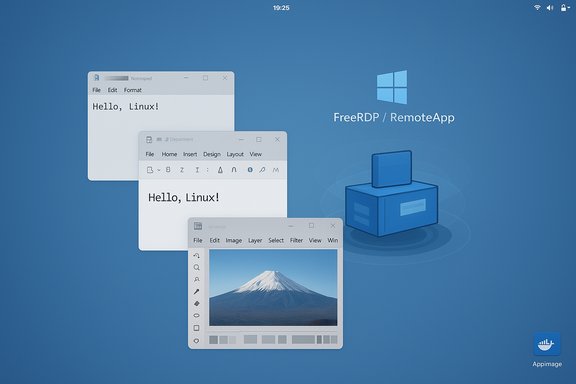
WinBoat is an open‑source project that packages a KVM/QEMU Windows guest inside a container and exposes individual Windows program windows to the Linux host using FreeRDP and Windows’ RemoteApp protocol. That combination — a management layer (Electron app), a virtualization layer (QEMU/KVM inside Docker or Podman), and a compositing layer (FreeRDP/RemoteApp) — is the core architectural idea that sets WinBoat apart from compatibility layers such as Wine or Proton. The project reached a notable milestone with the v0.9.0 release in late November 2025, which brought Podman support, UWP (Microsoft Store) app visibility, UI refinements, and several security hardenings. The release notes and independent coverage confirm the changes and the project’s MIT license and active development cadence. What WinBoat actually does — concise technical overview
- WinBoat runs a real Windows installation (Windows 10/11) inside a QEMU/KVM virtual machine.
- The VM is launched and managed from within a container runtime (Docker or Podman) so the VM artefacts, images and networking are containerized and reproducible.
- A small “guest server” runs inside the Windows VM to cooperate with the host tooling.
- On the Linux desktop, WinBoat uses FreeRDP + RemoteApp to present each Windows program window as a separate, resumable window rather than a single remote desktop session. This makes apps appear and behave like native Linux windows.
Installation and first‑run flow (practical)
The WinBoat project publishes prebuilt Linux artifacts (AppImage, .deb, .rpm, and an unpacked binary) and an installer that automates almost all VM provisioning steps. In practice the steps look like this:- Download the AppImage (or the distro package) from the project releases.
- Make the AppImage executable: chmod +x winboat-0.9.0-x86_64.AppImage.
- Run the AppImage (example): ./winboat-0.9.0-x86_64.AppImage --appimage-extract-and-run --no-sandbox. The GUI installer then guides you through Windows version selection, account creation, and hardware allocation (cores, RAM, disk).
- WinBoat downloads or accepts a Windows ISO, provisions the VM/container, and performs an unattended/automated installation. When finished, the WinBoat dashboard lists discovered Windows apps and provides a resource monitor for the running guest.
Why the AppImage + container approach?
- AppImage gives a portable front end that runs on many distributions without system packaging friction.
- Docker/Podman containerization confines the VM and its dependencies and makes the runtime reproducible across systems.
- FreeRDP/RemoteApp avoids the overhead of streaming an entire desktop by returning individual windows to the compositor.
Key features and UX highlights
- Seamless per‑app windows — Windows apps appear as native windows on the host desktop via FreeRDP & RemoteApp, including window decorations and independent resizing. This is the main end‑user convenience win.
- Automatic VM provisioning — The installer automates downloading or accepting a Windows ISO and performs an unattended install with options to pick CPU cores, memory and disk. This hides most of the manual QEMU/libvirt complexity.
- Filesystem integration — Your Linux home directory can be bind‑mounted into the Windows guest so copy/paste and file access feel natural.
- USB & peripheral passthrough (experimental) — USB passthrough is supported when using Docker, allowing certain USB devices to be controlled from inside Windows. Podman support was added in v0.9.0, but USB passthrough under Podman remains unsupported for now.
- Resource monitoring — WinBoat’s UI includes a basic resource monitor that shows the VM’s CPU, RAM and disk usage.
- UWP / Microsoft Store visibility — With the 0.9.0 release, UWP apps are discoverable and can be launched directly. This expands the catalog of supported programs beyond legacy Win32.
- Podman support — Users who prefer Podman over Docker can now pick Podman at install time; the project still notes feature differences and limitations compared with Docker.
Performance and compatibility — what to realistically expect
- For CPU and memory bound productivity apps (Office suites, editors, many utilities), WinBoat is often perfectly usable and offers faithful behavior because the apps run on actual Windows. Several hands‑on tests and community reports confirm good compatibility for common desktop applications.
- For GPU‑heavy workloads — modern AAA games, GPU-accelerated creative features (hardware encoders, Direct3D heavy tasks) — WinBoat currently falls short. There is no general, stable, production‑grade GPU acceleration or passthrough in mainstream WinBoat releases as of the late‑2025 v0.9.0 cycle; maintainers have discussed paravirtualized drivers and indirect display approaches, but these are complex efforts and not ready for general use. Expect CPU fallbacks, poor frame rates, or outright failures when GPU access is essential.
- Productivity tools like Microsoft Office, Adobe Photoshop (some features), Notepad++ and various vendor utilities are commonly reported to work.
- Demanding games — especially those using kernel‑level anti‑cheat — will not run reliably. Kernel anti‑cheat systems block virtualization for security reasons, and WinBoat can’t circumvent that.
Security, licensing and operational considerations
- Windows licensing: WinBoat automates the Windows install but does not provide licenses. You must use a valid Windows license to activate and operate the guest per Microsoft’s terms. WinBoat uses trial ISOs by default when automating downloads.
- Host security surface: Running rootful Docker with direct KVM access increases the host’s privilege surface. In multi‑user or managed corporate environments, rootful container runtimes and KVM exposure may be disallowed or need additional review. The project binds ports to 127.0.0.1 by default (a deliberate hardening added in recent releases), but administrators should audit container privileges, bind mounts, and group membership.
- Filesystem mount caution: Sharing your home directory into Windows is convenient but effectively exposes host data to the guest. Treat that mount like any network share and follow appropriate backup and access‑control practices.
- Podman vs Docker: Podman offers rootless security advantages for many Linux users, and v0.9.0 added Podman support. However, feature parity is not perfect — USB passthrough and some compose semantics differ between Docker and Podman. Administrators must validate the tradeoffs for their environment.
Installation gotchas and common troubleshooting
- Docker must be the non‑rootful or correctly provisioned daemon that WinBoat expects; Docker Desktop is unsupported and commonly causes issues. Add your user to the docker group and ensure the Docker daemon is accessible. The installer will check for these preconditions and refuse to proceed until they are met.
- FreeRDP version mismatches can break audio or RemoteApp behavior — the project recommends FreeRDP v3.x for sound support.
- If Edge or another app freezes on launch, community threads report various causes (RDP flags, insufficient VM RAM/cores, or local compositor interactions). Increasing VM resources, checking FreeRDP args in configuration, or switching RDP flags can resolve many cases. These are supported troubleshooting steps found in the project docs and the community.
Where WinBoat sits in the ecosystem — comparisons
WinBoat vs Wine / Bottles / Proton
- Wine and Proton reimplement Windows APIs, offering low overhead and no Windows license requirement, but compatibility is imperfect for complex or proprietary Windows apps. WinBoat trades that low overhead for true compatibility by running the genuine Windows OS in a VM. For apps that Wine can’t run (vendor installers, COM server interactions, some Adobe/Office features), WinBoat often succeeds where Wine fails. Conversely, Wine wins for games and GPU‑accelerated workloads where native or paravirtualized GPU support (Proton/Steam) is more mature, and for users who explicitly need to avoid Windows licensing.
WinBoat vs traditional VMs (Virt‑Manager, libvirt, VFIO passthrough)
- A manually configured QEMU/KVM VM with VFIO GPU passthrough will beat WinBoat on raw performance and full GPU access, but setting that up is complex and often requires a second GPU or advanced host configuration. WinBoat’s value is the automation, per‑app RemoteApp experience, and containerized reproducibility that shrink the setup time and daily friction for running Windows apps. If you need maximum GPU performance, dedicated passthrough VMs remain the recommended route.
WinBoat vs WinApps (and similar automation projects)
- WinApps and similar projects are smaller, more manual toolkits that wrap a VM + RDP stack to present apps. WinBoat invests heavily in a polished GUI, automation of image download/unattended install, and distribution artifacts like AppImage, making it friendlier for users who want fewer command‑line steps. The tradeoff remains host prerequisites and the limits of containerized virtualization.
Community feedback and early adopter reports
Community threads and early hands‑on pieces report a mix of enthusiasm and realistic caveats:- Positive: Many users praise the ability to run previously incompatible apps (some Adobe suite workflows, Office, proprietary vendor tools) and appreciate the per‑app window integration. Reports confirm UWP visibility and Podman support introduced in v0.9.0.
- Negative / caveats: Multiple reports cite occasional freezes (e.g., Microsoft Edge), rough edges in audio or scaling, and the continued absence of general GPU acceleration. Several testers also emphasize the friction of preparing Docker/Podman and enabling KVM on varied distributions.
- Hacker News and Reddit commentary often frames WinBoat as “a Windows VM with polish,” which is fair: the novelty is the automation and seamless compositing experience rather than a new virtualization primitive. That said, for users who need the highest compatibility for user‑space Windows programs without manual VM setup, WinBoat is a practical middle ground.
Roadmap and technical directions (what to watch)
- GPU acceleration / paravirtualized drivers: The project has publicly discussed exploring paravirtualized drivers and indirect display techniques (for example, concepts similar to Looking Glass with an Indirect Display Driver). These approaches are technically challenging — they require kernel/hypervisor level engineering and Windows driver work — and the maintainers warn they are experimental and long‑term. Expect incremental progress, but do not assume GPU acceleration is imminent or production‑ready until a clear stable release announces it.
- Podman parity: v0.9.0 added Podman support; closing the feature gap (USB passthrough, port management parity) remains an area of active work.
- Flatpak packaging and system integration: WinBoat maintainers have discussed Flatpak packaging as a future distribution option, but Flatpak’s sandbox model complicates exposing container runtimes and the host Docker/Podman socket; this will take engineering tradeoffs to solve.
Practical recommendations for Windows-first workflows on Linux
- Inventory your applications and classify them:
- A. User-space only, CPU-bound (Office, editors) — good candidate for WinBoat.
- B. GPU‑accelerated or kernel-level drivers (modern AAA games, kernel anti‑cheat) — prefer a dedicated passthrough VM or native Windows.
- C. Lightweight utilities — consider Wine/Bottles first for zero‑license, lower‑overhead runs.
- These classifications will help you pick WinBoat, Wine, or a custom VM.
- Validate host prerequisites before committing:
- Ensure VT‑x/AMD‑V is enabled in firmware.
- Install and test Docker or Podman and confirm Compose support.
- Install FreeRDP v3.x and verify audio if you need sound.
- Reserve at least 32 GB free and 8 GB RAM for comfortable usage.
- Use the AppImage or the official distro package for initial trials to reduce packaging surprises. The installer’s GUI will enforce checks and walk you through VM provisioning.
- Treat the Windows guest as a managed resource: stop or suspend it when not in use to reclaim host resources, and keep snapshot/backups of important data stored on the host rather than relying solely on the VM.
Strengths, risks, and final verdict
- Strengths:
- High compatibility for user‑space Windows apps because they run on a real Windows guest.
- Convenience and UX: automatic install, per‑app windows, and an Electron dashboard reduce the barrier to running Windows apps.
- Open source and actively developed: MIT licensing, GitHub activity, and community contributions drive rapid feature evolution (Podman, UWP support, etc..
- Risks and limitations:
- No general GPU acceleration yet — a hard blocker for games and many creative workflows.
- Host privilege surface — rootful Docker + KVM has security and compliance implications for corporate or multi‑user environments.
- Operational friction — preflight checks, Docker/Podman configuration, and distribution-specific quirks mean WinBoat isn’t zero‑setup for all users.
WinBoat’s trajectory is worth watching: the team is iterating quickly, the community is active, and the architecture solves a real pain point. For Linux users who need dependable Windows compatibility without a lot of VM administration, WinBoat already offers a useful toolset; for power users dependent on GPU acceleration, the project points to a future direction but does not yet change the recommendation to use purpose‑built passthrough VMs.
Source: GIGAZINE WinBoat is an open source tool that lets you seamlessly run Windows applications on Linux.
