

Microsoft’s formal removal of vendor servicing for the original Windows 10 release—commonly known as version 1507 or the “original release”—is the latest, definitive milestone in a decade-long lifecycle that has shaped how businesses and consumers manage Windows upgrades, security, and device procurement. The technical deadline is clear: Microsoft’s public lifecycle pages and support notices confirm that routine support and cumulative security updates for mainstream Windows 10 editions ended on October 14, 2025, and the company published a time‑boxed Extended Security Updates (ESU) bridge for eligible devices through October 13, 2026.
Windows 10 launched in July 2015 as a reimagining of Microsoft’s desktop strategy—promising a continuously serviced platform rather than the old boxed‑major‑release cadence. The platform evolved through a succession of named feature updates (1507, 1511, 1607, 1703, and so on) that eventually stabilized under the annual/semi‑annual servicing model. The original release, Windows 10, version 1507, is the build that shipped in July 2015 and is the one referenced when outlets note Microsoft “ending support for the original version.” BetaNews’ coverage at the time captured this exact transition, noting that Microsoft ceased updates for 1507 as it moved to support a narrower set of active servicing branches. Microsoft’s lifecycle decision is not an abrupt technical shutdown of devices—PCs still boot and run—but a policy decision that stops vendor‑provided OS‑level updates: monthly cumulative security patches, quality rollups, and new feature servicing. The practical meaning is this: newly discovered kernel‑ or platform‑level vulnerabilities discovered after the cutoff will not receive routine vendor fixes for unenrolled devices. That shift changes risk profiles for households, small businesses, and regulated organizations alike.
Microsoft’s original Windows 10 helped define desktop computing for a decade. The move to end vendor servicing for its earliest builds and to sunset mainstream Windows 10 support on October 14, 2025, marks the close of a chapter—and the opening of a practical one for IT planners and users faced with real choices about upgrades, security, and cost.
Source: BetaNews https://betanews.com/article/microsoft-ends-windows-10-support-1507/]
 Background
Windows 10 launched in July 2015 as a reimagining of Microsoft’s desktop strategy—promising a continuously serviced platform rather than the old boxed‑major‑release cadence. The platform evolved through a succession of named feature updates (1507, 1511, 1607, 1703, and so on) that eventually stabilized under the annual/semi‑annual servicing model. The original release, Windows 10, version 1507, is the build that shipped in July 2015 and is the one referenced when outlets note Microsoft “ending support for the original version.” BetaNews’ coverage at the time captured this exact transition, noting that Microsoft ceased updates for 1507 as it moved to support a narrower set of active servicing branches. Microsoft’s lifecycle decision is not an abrupt technical shutdown of devices—PCs still boot and run—but a policy decision that stops vendor‑provided OS‑level updates: monthly cumulative security patches, quality rollups, and new feature servicing. The practical meaning is this: newly discovered kernel‑ or platform‑level vulnerabilities discovered after the cutoff will not receive routine vendor fixes for unenrolled devices. That shift changes risk profiles for households, small businesses, and regulated organizations alike. What “ending support for the original version” actually means
The timeline in plain terms
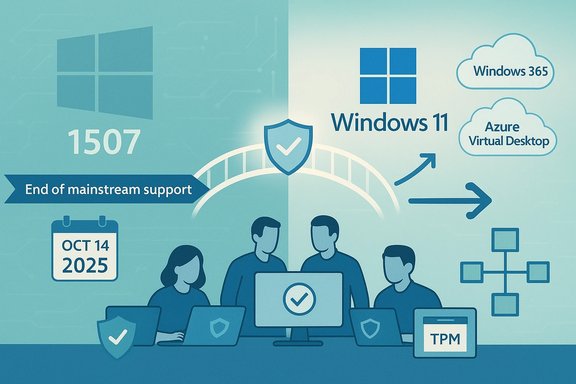
- Microsoft stopped updating the original Windows 10 release (1507) several years ago as part of its normal servicing cadence; the broader, formal end of mainstream support for the Windows 10 servicing stream occurred on October 14, 2025.
- To ease migration, Microsoft offered a consumer Extended Security Updates (ESU) option running from October 15, 2025 through October 13, 2026 for eligible devices, while enterprise customers could obtain paid ESU under volume licensing for up to three additional years.
Two important distinctions
- End of support ≠ end of function. Machines on Windows 10 continue to boot, run apps, and access data after the cutover. What stops is vendor servicing—the flow of security and quality fixes that reduce future exposure.
- App-level updates may continue on a separate timetable. Microsoft decoupled some application servicing (for example, Microsoft Defender security intelligence and certain Microsoft 365 app updates) from the OS lifecycle. These continuations help reduce some risk but do not replace OS‑level kernel and driver patches.
The immediate practical effects for users and IT
For typical consumers and many small organizations, the effects break down into security, compliance, and functional risks.- Security risk: Without regular OS security rollups, unpatched Windows 10 devices are increasingly susceptible to new exploits, ransomware, and privilege‑escalation vectors. Application signature updates (like Defender definitions) can reduce immediate exposure, but kernel and platform vulnerabilities remain unpatched.
- Compliance and procurement: Regulated industries that require supported software for audit and compliance will need to upgrade or enroll devices in ESU to maintain vendor‑backed patching records. For many organizations, the cost and logistics of ESU or device replacement are nontrivial.
- User experience: Microsoft 365 apps and Office servicing scenarios are affected; Microsoft warned that Office and Microsoft 365 apps would align with the Windows lifecycle changes and urged customers to transition to Windows 11. Real‑world support and reliability may degrade over time if platform incompatibilities accumulate.
The Extended Security Updates (ESU) bridge — details and caveats
Microsoft’s ESU program is intentionally a time‑boxed, security‑only lifeline—not a long‑term support model. Key points to understand:- Scope: ESU supplies security‑only fixes (Critical and Important) selected by Microsoft; it does not deliver feature updates, general quality fixes, or the same level of technical support.
- Consumer vs enterprise: Consumers were offered a single‑year ESU window (through October 13, 2026) with multiple enrollment paths, while enterprises can procure multi‑year ESU under volume licensing with escalating annual pricing.
- Enrollment mechanics and policies: Consumer ESU enrollment was presented with several options (link device to a Microsoft Account with Windows Backup sync, redeem Microsoft Rewards points, or purchase a one‑time license). Some outlets reported that Microsoft requires a Microsoft account for ESU eligibility, which has become a flashpoint around privacy and local‑account users. These account‑linked enrollment routes are policy—they simplify licensing but may be unwelcome to privacy‑minded users.
- ESU is effective at reducing immediate risk, but it is expensive and temporary—designed as a migration runway. Enterprises face steep per‑device escalation if they rely on ESU for multiple years; consumers effectively get one year of breathing room.
- Because ESU covers only security‑critical fixes, it does not protect against degradation caused by hardware driver incompatibility or third‑party software that expects a newer platform. Long‑term operational continuity often requires migration to a supported OS.
Migration options and recommended paths
Organizations and savvy consumers should evaluate the following migration routes in order of recommended priority.- Upgrade eligible devices to Windows 11 (free for qualifying Windows 10, version 22H2 devices). Verify hardware compatibility with the PC Health Check tool and test critical apps on Windows 11 before wide deployment.
- For devices that cannot meet Windows 11 requirements, consider ESU enrollment as a short‑term bridge while planning hardware refresh or cloud migration. ESU buys time, not permanence.
- Explore cloud desktop alternatives—Windows 365 or Azure Virtual Desktop—where Microsoft’s cloud licensing and remediation can sometimes absorb ESU costs or offer longer support windows through centralized management. This is especially useful for legacy applications tied to old hardware.
- For small businesses and households on tight budgets, use ESU free enrollment routes if available (account sync or Rewards redemption) and prioritize hardening: enable multi‑layer security, use reputable third‑party endpoint protection, isolate legacy devices on segmented networks, and avoid high‑risk activities on unsupported machines.
- Audit device inventory and identify Windows 10, version 22H2 vs older builds (1507 still exists in some long‑tail deployments).
- Categorize devices by upgradeability (TPM 2.0, UEFI secure boot, CPU generation) and application criticality.
- Estimate the cost of ESU vs hardware replacement vs cloud migration for each cohort.
- Implement compensating controls (network segmentation, EDR/EDR‑MSP, restricted administrative rights) where immediate upgrade is impossible.
- Document a firm sunset timeline: ESU is temporary—plan to be off ESU well before the program expires.
Hardware and OEM realities
One of the core frictions in migration planning is the Windows 11 hardware baseline: a subset of older devices will not meet Microsoft’s requirements (notably TPM 2.0 and certain CPU families), forcing organizations either to buy new hardware or accept extended support costs. This reality drives a significant portion of ESU uptake in the enterprise and complicates consumer decisions where privacy preferences (local accounts) clash with enrollment rules for ESU. OEMs and retailers saw this as a sales opportunity: refresh cycles are being accelerated, but budget constraints often make staged rollouts or cloud alternatives more practical.Strengths of Microsoft’s approach — what the company gets right
- Clarity and predictability: Microsoft published firm lifecycle dates well in advance and documented the cadence and special ESU provisions, giving customers a clear window to plan. For large enterprises, predictable sunsets are vital for procurement and compliance.
- Time‑boxed safety net: The ESU program—especially consumer‑facing enrollment options—recognizes that not every user or SMB can upgrade on day one. The bridge lowers immediate risk and buys planning time.
- Separation of application servicing: Keeping certain application and signature updates separate from OS lifetime extends practical usability for many users and reduces immediate catastrophe risks.
Risks, trade‑offs, and contested choices
- Perception of forced obsolescence: For end users and organizations with significant legacy fleets, the combined effect of hardware requirements and personal‑account enrollment pathways for ESU looks like a nudge toward new purchases—fuel for criticism of planned obsolescence. Independent coverage and community forums have highlighted this concern repeatedly.
- Privacy and account policy friction: Requiring a Microsoft account or account linking for consumer ESU pushes users into Microsoft’s identity plane, which raises privacy concerns for local‑account advocates. This policy choice can alienate certain user segments.
- ESU is expensive and temporary: For enterprises, ESU pricing escalates steeply year‑over‑year; the program is expressly a migration incentive, not a permanent solution. Overreliance on ESU can delay modernization and increase total cost of ownership.
- Operational complexity: The realities of mixed OS fleets—some on Windows 11, some on Windows 10 plus ESU, others legacy—introduce patching complexity and testing fatigue for IT teams. The community‑level conversation shows admins grappling with KB rollups, driver support, and test matrices.
Tactical recommendations for WindowsForum readers
- Immediate (0–30 days):
- Run a full inventory of devices and tag upgrade‑eligible machines.
- Enable Windows Update telemetry and check for "Upgrade to Windows 11" availability via Settings or the PC Health Check tool.
- If using local accounts on critical devices, evaluate whether ESU enrollment paths apply and plan accordingly.
- Short term (30–180 days):
- Prioritize high‑risk and high‑value endpoints for upgrade or replacement.
- For non‑upgradable but critical systems, enroll in ESU where economically and technically justified.
- Harden remaining Windows 10 machines: enable EDR, restrict admin privileges, and apply network segmentation.
- Medium term (6–18 months):
- Execute staged hardware refresh plans or cloud migration pilots (Windows 365 / AVD).
- Update procurement and lifecycle policies to reduce future friction—factor in longer lifecycles and compatibility checks at buy time.
What to watch next
- The end‑of‑support baton often triggers secondary lifecycle events: third‑party vendors withdraw testing and new driver releases, hardware partners produce upgrade programs, and security vendors publish targeted mitigations for lingering vulnerabilities. Monitor vendor advisories and Microsoft’s lifecycle pages for any changes or clarifications.
- Community and industry reporting will continue to debate Microsoft’s account policy for ESU and whether consumer enrollment mechanics will be tweaked in response to privacy feedback and regulatory scrutiny. Forum threads already show strong sentiment on both sides of the debate.
Final analysis — balancing facts, fairness, and reader guidance
Microsoft’s decision to end support for the original Windows 10 release (and to set a firm end‑of‑support date for the platform) is a predictable and defensible part of product lifecycle management. The company provided a limited ESU program, clear dates, and migration guidance—measures that reduce abrupt disruption and supply a defined migration runway. Those facts are grounded in Microsoft’s official lifecycle and support documentation. At the same time, the practical burden falls on customers: ESU is intentionally temporary and, for many, costly; hardware compatibility rules for Windows 11 make the decision to buy new hardware or adopt cloud alternatives unavoidable for a significant minority of devices. The decision to require account‑linked enrollment paths for consumer ESU will amplify concerns among privacy‑conscious users and those preferring local‑account workflows. Independent reporting and community discussion reflect these real tensions. For WindowsForum readers—enthusiasts, IT pros, and home users—the sensible posture is pragmatic and proactive: inventory now, prioritize migration for critical endpoints, use ESU sparingly and temporarily, and treat this lifecycle moment as an opportunity to modernize device management and procurement policies. The era of indefinite OS servicing is over; the new normal is planned lifecycles, cloud migration options, and a more explicit trade‑off between hardware longevity and vendor‑backed security.Microsoft’s original Windows 10 helped define desktop computing for a decade. The move to end vendor servicing for its earliest builds and to sunset mainstream Windows 10 support on October 14, 2025, marks the close of a chapter—and the opening of a practical one for IT planners and users faced with real choices about upgrades, security, and cost.
Source: BetaNews https://betanews.com/article/microsoft-ends-windows-10-support-1507/]
