

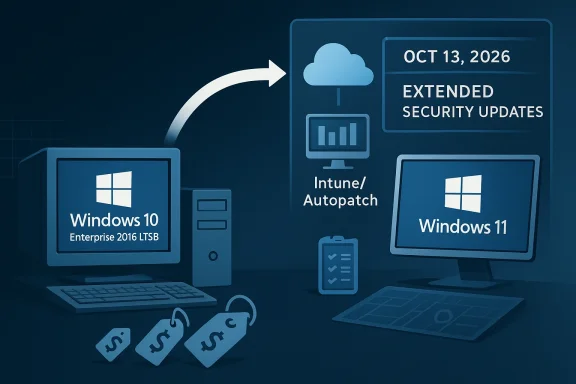
Microsoft’s latest Extended Security Updates move is less a simple pricing tweak than a clear signal about how long the company expects enterprises to keep aging Windows fleets alive. By extending Windows 10 ESU coverage to Windows 10 Enterprise 2016 LTSB, Microsoft is acknowledging a stubborn reality in corporate IT: some systems are too embedded, too expensive, or too risky to replace on a fast timetable. The catch is that the bridge is now becoming more explicit, more expensive, and more tightly aligned with Microsoft’s modern management stack.
That matters because the 2016 LTSB branch sits in an awkward but important place in the Windows lifecycle. It was designed for stability above all else, which is exactly why it still exists in regulated environments, factory floors, medical systems, and other places where feature churn is a liability. At the same time, Microsoft’s current posture is unmistakable: stay on legacy Windows if you must, but pay for the privilege, and preferably manage those devices through Intune or Autopatch rather than older tooling.
The modern Windows servicing story has been moving in this direction for years. Microsoft has steadily narrowed the gap between mainstream consumer Windows and the enterprise servicing model, while also preserving special cases for organizations that genuinely need long-lived, low-change platforms. The Long-Term Servicing Branch model, later renamed LTSC in newer releases, was created for that purpose: to provide a stable OS baseline with minimal feature disruption over long periods.
Windows 10 Enterprise 2016 LTSB is one of the most consequential examples of that philosophy. Microsoft’s lifecycle page shows that the release began in 2016, left mainstream support in 2021, and reaches extended support on October 13, 2026. Microsoft’s own support and lifecycle pages now state the same end date for both Windows 10 Enterprise LTSB 2016 and Windows 10 IoT Enterprise 2016 LTSB.
What has changed now is not the end-of-support date itself, but the commercial structure around what happens after that date. Microsoft’s licensing update on March 27, 2026 says it is introducing a standardized pricing approach for Extended Security Updates for Windows and SQL Server, explicitly naming Windows 10 Enterprise 2016 LTSB among the covered products. That is a meaningful shift because it makes the ESU program look less like an ad hoc exception and more like a repeatable, normalized business model.
For Microsoft, that model serves two goals at once. First, it helps organizations delay migrations without leaving them completely exposed. Second, it creates a monetary and operational incentive to move to supported Windows 11 devices or to manage remaining systems using Microsoft’s preferred cloud-based administration stack. Microsoft’s own Windows 10 ESU page recommends upgrading eligible PCs to Windows 11 using Autopatch or Intune, which shows where the company wants the management conversation to go.
The larger strategic point is that ESU is no longer just a technical safety net. It is becoming part of Microsoft’s broader platform discipline: a way to keep customers inside the Microsoft ecosystem while they finish the long, expensive work of modernization.
The practical implication is straightforward: organizations that cannot retire these machines by October 2026 can continue receiving critical security fixes, but only through the paid ESU path. Microsoft’s Windows 10 ESU documentation confirms that business customers can buy the program through the Volume Licensing Program, with coverage extending for up to three years and prices doubling each year.
The move also confirms that Microsoft still sees value in supporting customers who run specialized legacy systems rather than forcing immediate replacement. That is especially relevant in sectors where Windows 10 LTSB 2016 has been embedded into certified appliances, production stations, and vendor-locked industrial endpoints.
That pricing ladder is important because it changes the economics of waiting. A one-year delay is still manageable for many organizations. A two- or three-year delay becomes increasingly punitive, especially if the business joins late and must pay retroactively for prior years. Microsoft has designed the structure to make procrastination expensive by design.
Microsoft’s model mirrors the logic it has used in previous ESU programs: buy time now, but do not confuse time with permanence. That is a useful discipline for IT departments that need to keep the lights on, but it also creates a predictable financial drag that CFOs will not ignore.
This matters because enterprise and IoT customers do not behave like consumer Windows users. Many of them are locked into vendor-certified hardware, compliance requirements, or line-of-business applications that were validated against a specific OS build years ago. Those environments are not often upgraded because they are old; they are old because changing them can break something mission-critical.
That said, the same challenge applies: ESU is still temporary. Microsoft’s own lifecycle documents make clear that the extended end date is finite. Once support ends, the updates stop, and the risk profile changes sharply. That makes asset inventory and device classification absolutely critical.
The lifecycle page for Windows 10 2016 LTSB provides the plain facts: the release started in August 2016, mainstream support ended in October 2021, and extended support ends in October 2026. Microsoft’s release-health pages repeat the same endpoint and warn that devices running the version will no longer receive security updates after that date.
This standardization is useful for buyers who need budgeting clarity. It is less friendly for customers who had hoped different channels or deployment environments would create arbitrage opportunities. Microsoft seems intent on removing those gaps.
For IT administrators, the chief concern is operational overhead. ESU does not remove the need to track device eligibility, enforce update cadence, or validate whether systems remain within licensing terms. It simply buys a longer patch window. In mature environments, that can be incredibly valuable; in poorly governed ones, it can become a false sense of security.
Microsoft’s guidance around Windows 365, Intune, and Autopatch suggests a future in which the update story is increasingly automated and subscription-based. That is attractive to large organizations that want fewer moving parts, but it also means IT teams have to adapt their processes to Microsoft’s preferred control plane.
That pressure is subtle but real. Enterprises that remain on legacy Windows because they cannot move fast enough may also begin modernizing their management stack at the same time, which deepens Microsoft’s operational footprint. In other words, ESU can serve as both a support product and a customer-retention mechanism.
There is also a compliance dimension. Security teams are often judged on whether they maintained patch coverage, even if the underlying platform is old. ESU gives them a defensible position while they complete a migration plan. That is one reason these programs remain popular despite the rising cost curve.
The next phase will probably be defined by three behaviors. Some organizations will accelerate hardware refreshes. Some will lean into virtual desktops and cloud-managed endpoints. A smaller but significant group will buy ESU and ride the old platforms for as long as budget or compliance permits, even if that creates more technical debt later.
Source: Windows Report https://windowsreport.com/microsoft-expands-windows-10-esu-to-2016-ltsb-with-new-pricing-model/
That matters because the 2016 LTSB branch sits in an awkward but important place in the Windows lifecycle. It was designed for stability above all else, which is exactly why it still exists in regulated environments, factory floors, medical systems, and other places where feature churn is a liability. At the same time, Microsoft’s current posture is unmistakable: stay on legacy Windows if you must, but pay for the privilege, and preferably manage those devices through Intune or Autopatch rather than older tooling.
 Background
The modern Windows servicing story has been moving in this direction for years. Microsoft has steadily narrowed the gap between mainstream consumer Windows and the enterprise servicing model, while also preserving special cases for organizations that genuinely need long-lived, low-change platforms. The Long-Term Servicing Branch model, later renamed LTSC in newer releases, was created for that purpose: to provide a stable OS baseline with minimal feature disruption over long periods.Windows 10 Enterprise 2016 LTSB is one of the most consequential examples of that philosophy. Microsoft’s lifecycle page shows that the release began in 2016, left mainstream support in 2021, and reaches extended support on October 13, 2026. Microsoft’s own support and lifecycle pages now state the same end date for both Windows 10 Enterprise LTSB 2016 and Windows 10 IoT Enterprise 2016 LTSB.
What has changed now is not the end-of-support date itself, but the commercial structure around what happens after that date. Microsoft’s licensing update on March 27, 2026 says it is introducing a standardized pricing approach for Extended Security Updates for Windows and SQL Server, explicitly naming Windows 10 Enterprise 2016 LTSB among the covered products. That is a meaningful shift because it makes the ESU program look less like an ad hoc exception and more like a repeatable, normalized business model.
For Microsoft, that model serves two goals at once. First, it helps organizations delay migrations without leaving them completely exposed. Second, it creates a monetary and operational incentive to move to supported Windows 11 devices or to manage remaining systems using Microsoft’s preferred cloud-based administration stack. Microsoft’s own Windows 10 ESU page recommends upgrading eligible PCs to Windows 11 using Autopatch or Intune, which shows where the company wants the management conversation to go.
The larger strategic point is that ESU is no longer just a technical safety net. It is becoming part of Microsoft’s broader platform discipline: a way to keep customers inside the Microsoft ecosystem while they finish the long, expensive work of modernization.
What Microsoft Actually Changed
The biggest headline is the expansion of ESU eligibility to include Windows 10 Enterprise 2016 LTSB. Microsoft’s March 2026 licensing notice says the revised pricing model applies to ESU for Windows and SQL Server products, including this release, and it specifically names all the major purchasing routes customers may use. That includes Enterprise Agreements, the Cloud Solution Provider channel, and related licensing programs.The practical implication is straightforward: organizations that cannot retire these machines by October 2026 can continue receiving critical security fixes, but only through the paid ESU path. Microsoft’s Windows 10 ESU documentation confirms that business customers can buy the program through the Volume Licensing Program, with coverage extending for up to three years and prices doubling each year.
Why This Matters
This is not just about patch delivery. It is about keeping old Windows builds in a tolerable risk state long enough to execute a migration plan. In enterprise IT, that distinction is huge, because risk reduced is not the same as problem solved. Microsoft is essentially selling time, and time is often the scarcest resource in large desktop and server estates.The move also confirms that Microsoft still sees value in supporting customers who run specialized legacy systems rather than forcing immediate replacement. That is especially relevant in sectors where Windows 10 LTSB 2016 has been embedded into certified appliances, production stations, and vendor-locked industrial endpoints.
- ESU is a bridge, not a rescue.
- Support ends on October 13, 2026 for Windows 10 Enterprise LTSB 2016.
- Critical security fixes continue, but feature updates do not.
- Administrative discipline becomes more important, not less.
- Migration planning still remains the real endgame.
The Pricing Model: More Than Just $61
Microsoft’s official Windows 10 ESU page says year one costs $61 per device for business customers, and the price doubles every consecutive year for a maximum of three years. The same page also explains that customers using Windows 365 Cloud PCs may be entitled to ESU for up to three years under active subscription licenses, and that organizations need an active support plan for technical assistance related to ESU issues.That pricing ladder is important because it changes the economics of waiting. A one-year delay is still manageable for many organizations. A two- or three-year delay becomes increasingly punitive, especially if the business joins late and must pay retroactively for prior years. Microsoft has designed the structure to make procrastination expensive by design.
The Economics of Delay
There is a behavioral message embedded in the cost curve. The first year can be justified as insurance. The second year begins to look like a budgetary warning. By the third year, ESU becomes a strong indicator that the organization is carrying a deeper modernization debt.Microsoft’s model mirrors the logic it has used in previous ESU programs: buy time now, but do not confuse time with permanence. That is a useful discipline for IT departments that need to keep the lights on, but it also creates a predictable financial drag that CFOs will not ignore.
- Year 1 is the cheapest entry point.
- Year 2 and Year 3 are progressively harder to defend.
- Late enrollment can mean retroactive charges.
- The cost structure nudges organizations toward earlier migration.
- For many firms, ESU may be cheaper than emergency replacement, but not cheaper than planning.
The Intune and Autopatch Angle
The Windows Report claim that organizations using Intune or Autopatch can lower ESU cost to $45 per device is plausible in the broad commercial sense of Microsoft rewarding modern management, but Microsoft’s own public materials in the sources reviewed here do not explicitly state that exact figure. What Microsoft does clearly state is that it wants customers to move to Windows Autopatch or Microsoft Intune for the “best, most secure computing experience,” which suggests that management alignment is part of the pricing logic even if the precise discount is delivered through channel rules rather than a headline public list price.Enterprise, IoT, and Server Implications
The extension to Windows 10 Enterprise 2016 LTSB is only part of the story. Microsoft’s support pages also say Windows 10 IoT Enterprise 2016 LTSB ends support on the same date, and Windows Server 2016 reaches end of support on January 12, 2027. That creates a wider legacy-services runway problem across endpoint, embedded, and server infrastructure.This matters because enterprise and IoT customers do not behave like consumer Windows users. Many of them are locked into vendor-certified hardware, compliance requirements, or line-of-business applications that were validated against a specific OS build years ago. Those environments are not often upgraded because they are old; they are old because changing them can break something mission-critical.
Enterprise vs. Embedded Use Cases
For standard enterprises, ESU is mainly a migration cushion. For IoT and embedded deployments, it can be a survival mechanism. The business logic is different because these systems are often tied to machine certification, safety validation, or third-party support contracts that cost more to replace than to keep alive.That said, the same challenge applies: ESU is still temporary. Microsoft’s own lifecycle documents make clear that the extended end date is finite. Once support ends, the updates stop, and the risk profile changes sharply. That makes asset inventory and device classification absolutely critical.
- Enterprise laptops and desktops can often move faster.
- Embedded systems usually require vendor coordination.
- Legacy server estates bring backup, application, and identity dependencies.
- Compliance-driven organizations may need documented compensating controls.
- ESU purchases should be paired with a decommissioning roadmap.
How This Fits Microsoft’s Lifecycle Strategy
Microsoft has been remarkably consistent in how it handles aging platforms. First comes notice. Then comes guidance. Then comes an ESU bridge. Finally, support sunsets and the organization is expected to be on a current platform. The 2016 LTSB expansion fits that playbook neatly, but the commercial framing has become more polished and more assertive.The lifecycle page for Windows 10 2016 LTSB provides the plain facts: the release started in August 2016, mainstream support ended in October 2021, and extended support ends in October 2026. Microsoft’s release-health pages repeat the same endpoint and warn that devices running the version will no longer receive security updates after that date.
The End-Game Is Standardization
What Microsoft appears to be doing now is standardizing the way legacy support is sold across products and channels. The March 2026 licensing note is especially revealing because it emphasizes price consistency across Azure, on-premises, and other public clouds, and across purchasing channels. That is a subtle but important signal: Microsoft wants the economics of extended support to look uniform, predictable, and centrally governed.This standardization is useful for buyers who need budgeting clarity. It is less friendly for customers who had hoped different channels or deployment environments would create arbitrage opportunities. Microsoft seems intent on removing those gaps.
Why That Strategy Works for Microsoft
The company benefits in at least three ways. It protects customers from abrupt exposure, preserves revenue from legacy estates, and accelerates movement toward Microsoft 365-centric management. Those are all commercially rational outcomes, and they are especially valuable when Windows 10 hardware is still present in large enterprise inventories.- Legacy support becomes a predictable subscription-like expense.
- Channel fragmentation is reduced.
- Customers are nudged toward cloud-managed endpoints.
- The upgrade path becomes part of the same commercial relationship.
- Microsoft avoids the perception of abandoning enterprises overnight.
Consumer, Enterprise, and IT Admin Impact
The consumer angle is largely separate from the enterprise one, but the contrast is instructive. Microsoft’s Windows 10 ESU materials still frame the business offering around annual per-device pricing, while consumer support paths remain different. That means home users and enterprise customers are being managed through distinct policy and licensing mechanisms, even though they are ultimately facing the same operating system sunset.For IT administrators, the chief concern is operational overhead. ESU does not remove the need to track device eligibility, enforce update cadence, or validate whether systems remain within licensing terms. It simply buys a longer patch window. In mature environments, that can be incredibly valuable; in poorly governed ones, it can become a false sense of security.
What Admins Need to Think About
The real work is not buying ESU. The real work is identifying which devices truly need it, which devices should be retired, and which devices can be moved to Windows 11 or to a managed virtual environment. That triage process is where modern endpoint programs succeed or fail.Microsoft’s guidance around Windows 365, Intune, and Autopatch suggests a future in which the update story is increasingly automated and subscription-based. That is attractive to large organizations that want fewer moving parts, but it also means IT teams have to adapt their processes to Microsoft’s preferred control plane.
- Identify every Windows 10 Enterprise 2016 LTSB asset.
- Separate production-critical devices from replaceable ones.
- Decide which systems need ESU and for how long.
- Tie each device to a migration owner and deadline.
- Verify whether Intune, Autopatch, or other management tools can reduce friction.
- Track compliance documentation and license entitlements carefully.
Competitive and Market Implications
This ESU expansion does more than help Microsoft customers. It also shapes the competitive environment around endpoint management, virtualization, and lifecycle support. By tying the update story to Intune, Autopatch, and Windows 365, Microsoft is reinforcing the value of staying in its ecosystem rather than outsourcing management to third-party tools.That pressure is subtle but real. Enterprises that remain on legacy Windows because they cannot move fast enough may also begin modernizing their management stack at the same time, which deepens Microsoft’s operational footprint. In other words, ESU can serve as both a support product and a customer-retention mechanism.
The Market Signal
The market reads this as a reaffirmation that Microsoft prefers managed continuity over abrupt forced migration. Rival platforms and third-party endpoint vendors may see opportunity in the dissatisfaction that comes from paying more to keep old systems alive. But Microsoft’s scale, licensing leverage, and install base make it difficult to dislodge.- Endpoint competitors must compete on management simplicity.
- Hardware partners benefit when customers finally refresh fleets.
- Virtualization vendors may gain from Cloud PC and VDI migration.
- Security vendors can pitch compensating controls, not replacements.
- Systems integrators will see more demand for transition planning.
Why Organizations Will Still Buy ESU
The strongest argument for ESU is not that it is cheap. It is that it is often cheaper than the alternatives. For a regulated manufacturer, a hospital network, or a large enterprise with custom applications, replacing hundreds or thousands of devices can cost far more than paying for one or two years of extended support.There is also a compliance dimension. Security teams are often judged on whether they maintained patch coverage, even if the underlying platform is old. ESU gives them a defensible position while they complete a migration plan. That is one reason these programs remain popular despite the rising cost curve.
The Hidden Value
ESU can be most valuable when used surgically. Organizations that treat it as a blanket solution will likely overspend. Organizations that reserve it for the few systems that truly cannot move quickly may get substantial value from it.- It preserves security posture during transition.
- It buys time for application remediation.
- It reduces the risk of rushed hardware refreshes.
- It helps with audit narratives and compliance discussions.
- It allows phased migration by business unit or site.
Strengths and Opportunities
Microsoft’s approach has a number of real strengths, especially for customers facing complex, heterogeneous fleets. The big opportunity here is that enterprises can avoid a panic migration while still maintaining a defensible security baseline. The move also gives Microsoft a cleaner commercial story around lifecycle support and modern device management.- Predictable bridge: ESU gives organizations a defined path after support ends.
- Security continuity: Critical fixes keep flowing for legacy systems.
- Budget flexibility: Annual pricing can be planned around migration windows.
- Channel choice: Volume Licensing and CSP offer procurement flexibility.
- Modernization leverage: Intune and Autopatch can simplify operations.
- Cloud alignment: Windows 365 and virtual machines create migration alternatives.
- Operational calm: IT teams can phase work instead of forcing a big-bang replacement.
Risks and Concerns
The downside is that ESU can easily become a crutch. If leadership sees it as a substitute for modernization, the organization may end up paying more each year to preserve technical debt. There is also the risk that enterprises underestimate the complexity of managing aging infrastructure, especially when legacy devices sit deep inside business-critical workflows.- Rising costs: The doubling structure punishes delay.
- Retroactive charges: Late entry can be financially painful.
- False security: Patch coverage is not the same as platform health.
- Inventory gaps: Untracked devices can fall out of compliance.
- Vendor lock-in: Microsoft’s preferred tools may narrow strategic options.
- Legacy drift: Old apps and old OSes can persist far too long.
- Migration fatigue: Teams may postpone real upgrades because ESU feels sufficient.
Looking Ahead
The key question now is how quickly enterprises use this extra runway. Microsoft has made the terms very clear: Windows 10 Enterprise LTSB 2016 reaches end of support on October 13, 2026, and the ESU model is there to cushion the landing, not change the destination.The next phase will probably be defined by three behaviors. Some organizations will accelerate hardware refreshes. Some will lean into virtual desktops and cloud-managed endpoints. A smaller but significant group will buy ESU and ride the old platforms for as long as budget or compliance permits, even if that creates more technical debt later.
Signals to Watch
- Whether Microsoft expands or adjusts the ESU pricing structure again.
- How aggressively enterprises adopt Intune and Autopatch to lower operational burden.
- Whether Windows 365 becomes a more common escape hatch for aging physical devices.
- How many organizations move from ESU purchasing to outright migration in 2026.
- Whether vendors serving industrial and embedded customers push new certified hardware fast enough.
Source: Windows Report https://windowsreport.com/microsoft-expands-windows-10-esu-to-2016-ltsb-with-new-pricing-model/
