

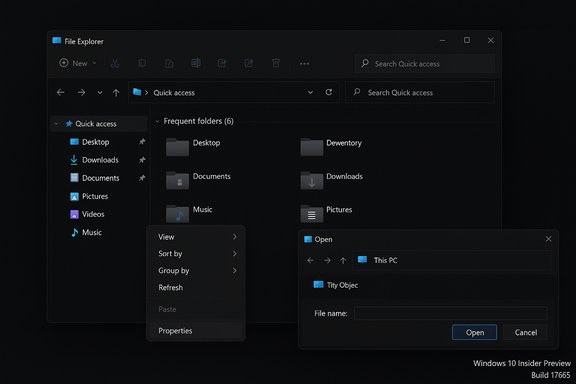
Microsoft has finally given File Explorer the dark treatment many Windows users have begged for, but the long-awaited cosmetic fix arrives as both a delightful quality‑of‑life upgrade and a cautionary lesson in platform-wide rollouts. In Insider Preview Build 17666 Microsoft officially added a dark theme to File Explorer — including the context menu and the Common File Dialog — while warning that early flights could still show unexpected light elements. That mixed reality — genuine progress paired with preview-stage rough edges — captures the company's approach: ship the change to testers quickly, gather feedback, and iterate.
Windows introduced a system-level dark mode years ago, but the ecosystem of legacy Win32 dialogs and shell components resisted full adoption. The result was a recurring annoyance for users who prefer low-luminance desktops: modern UI elements would respect a system dark theme while key file-operation dialogs and certain shell surfaces remained bright white, producing frequent and jarring “flash” moments during everyday tasks.
That gap is what Microsoft targeted with Build 17666. The company’s Insider blog notes that dark theme support was extended to File Explorer, the File Explorer context menu, and Common File Dialogs as part of a broader set of user-driven changes. The announcement comes alongside other small but useful updates — for example, Notepad gained improved line-ending support and new search options — but File Explorer’s dark option was the one most users noticed.
This delivery pattern shows Microsoft’s engineering tradeoffs. Rolling out a change that touches legacy Win32 rendering paths — code paths with enormous hardware and driver variability — risks exposing compositor timing or driver interactions that aren’t visible in small lab samples. Staging mitigates that risk but also creates variability for testers. Several community threads and Microsoft’s own release notes documented both the staged enablement and the reasoning behind it.
A notable example occurred in late 2025 when a preview cumulative update intended to expand dark theming deeper into File Explorer produced a different, more disruptive regression: a visible white flash when opening File Explorer or when certain Explorer UI states changed. Microsoft included the known issue in the update’s release notes and worked on a remediation, while media outlets and community threads reproduced and documented the problem in detail. The flash was short in duration but severe in perceived impact, especially on OLED screens and for users working at night. That incident demonstrates the fragility that can accompany visual-system work at scale: small compositor timing differences or driver interactions can create very visible, user-affecting failures. This later regression is not the same as the early preview inconsistencies in Build 17666; it’s an illustration of the risk inherent in modifying critical visual code paths. The lesson is simple and enduring: a cosmetic change that touches millions of machines must be validated across a wide matrix of hardware and accessibility scenarios before broad deployment.
However, the path to a polished, consistent dark theme is iterative and fraught with platform compatibility challenges. The company’s decision to use staged flags, Insiders, and public preview updates shows a pragmatic risk management approach: gather telemetry, tune contrast and semantics, and only then widen the rollout. The tradeoff is temporary fragmentation, but the benefit — a more cohesive desktop — is plainly visible.
For users who value a polished dark desktop, this change is welcome news; for administrators and accessibility advocates, it’s a reminder to validate across devices, drivers, and assistive workflows. Microsoft’s staged rollout and public notes make the company’s intent clear: finish the job, but do it carefully. That balance — between shipping improvements and guarding against regressions — will determine whether the long-awaited dark File Explorer becomes merely a pleasant novelty or a genuinely finished feature for the millions who use Windows daily.
Source: Mashable Microsoft finally launches dark theme for File Explorer
 Background
Windows introduced a system-level dark mode years ago, but the ecosystem of legacy Win32 dialogs and shell components resisted full adoption. The result was a recurring annoyance for users who prefer low-luminance desktops: modern UI elements would respect a system dark theme while key file-operation dialogs and certain shell surfaces remained bright white, producing frequent and jarring “flash” moments during everyday tasks.That gap is what Microsoft targeted with Build 17666. The company’s Insider blog notes that dark theme support was extended to File Explorer, the File Explorer context menu, and Common File Dialogs as part of a broader set of user-driven changes. The announcement comes alongside other small but useful updates — for example, Notepad gained improved line-ending support and new search options — but File Explorer’s dark option was the one most users noticed.
Why this matters now
A cohesive dark theme is more than a cosmetic preference. For users in dim environments or on OLED screens, consistent low-luminance surfaces reduce eye strain and eliminate abrupt contrast shocks that interrupt focus. On OLED displays, darker UIs can also reduce display power draw in many real‑world scenarios, though the magnitude of savings varies by brightness, content, and hardware. These practical benefits are a big reason why File Explorer’s dark theme was the top community request for years.What Build 17666 actually delivered
Build 17666 was the first public Insider flight to bring a nearly complete dark File Explorer to testers. In practice the update included the following:- Dark theme for File Explorer's main UI — the primary file list and chrome adopt a dark background that matches the system dark mode.
- Context menu dark styling — right‑click menus in Explorer were themed so the popups no longer forced a white rectangle on dark desktops.
- Common File Dialogs — Open and Save dialogs followed the system theme, reducing the number of bright interruptions when opening or saving files.
- Preview paint for Common UI touches — other small shell surfaces received dark treatments in early form, with Microsoft noting that some elements might still appear light while the work matured.
Hands‑on experience: strengths and the current rough edges
The wins
- Perceived polish: For users who primarily work in dark environments, the new File Explorer removes one of the most visible mismatches in Windows’ UI. The experience feels more consistent and complete.
- Comfort for low-light work: Thematic consistency reduces the frequency of bright interruptions when copying, moving or deleting files.
- Potential battery benefits on OLED: When large areas of the screen are dark (especially near-black), OLED panels can draw substantially less power than they would for bright backgrounds. Although actual savings depend on brightness and content, there’s a defensible battery argument for dark full‑screen surfaces.
The problems still visible in preview
- Inconsistent light elements: Microsoft warned that “unexpected light colors” could appear in File Explorer and the Common File Dialog in early builds; testers saw exactly that — pockets of UI that still rendered in light palettes. That inconsistency hurts accessibility and can be jarring for users who rely on dark themes.
- Pure black vs. dark gray: Some early screenshots and hands‑on commentary noted that the main Explorer background was almost pitch black. Many users prefer dark grays because pure black can crush contrast and make dense content harder to scan. This is a design tradeoff Microsoft may adjust during iteration.
- Feature gating and fragmentation: The company used staged, server-side flags and Insider channels to enable the feature progressively. That meant two Insiders on identical builds could see different visuals — great for controlled telemetry but confusing for testers trying to reproduce issues.
How Microsoft shipped the change (and why it matters)
This work was not a single code flip. Microsoft integrated the dark‑theming binaries into Insider builds and then enabled the visuals for subsets of devices via server-side feature flags. The staged rollout served two goals: collect real-world telemetry and limit the blast radius of regressions. The downside is fragmentation during preview: behavior could differ across devices, drivers, and Insiders.This delivery pattern shows Microsoft’s engineering tradeoffs. Rolling out a change that touches legacy Win32 rendering paths — code paths with enormous hardware and driver variability — risks exposing compositor timing or driver interactions that aren’t visible in small lab samples. Staging mitigates that risk but also creates variability for testers. Several community threads and Microsoft’s own release notes documented both the staged enablement and the reasoning behind it.
Verification and cross‑checks
The core claims about the dark File Explorer are verified by Microsoft’s own announcement on the Windows Insider Blog (Build 17666), which explicitly lists File Explorer, the context menu, and Common File Dialog as receiving dark theming. Independent coverage from Windows Central and technology outlets corroborated the content and the behavior seen in hands‑on tests. Those independent confirmations show the change was real and deliberate, not a rumor or a partial hack. At the same time, reviewers and testers repeatedly noted that elements could still appear unexpectedly light in early flights — a detail Microsoft itself acknowledged in the announcement. That mixed reality — shipped but incomplete — is the honest, verifiable state of the feature in that flight.The longer arc: iterating, regressions, and hard lessons
The 17666 milestone was a meaningful step, but the story didn’t stop there. Years later, Microsoft continued the same grinding process of extending dark theming into legacy surfaces — and occasionally that work introduced regressions.A notable example occurred in late 2025 when a preview cumulative update intended to expand dark theming deeper into File Explorer produced a different, more disruptive regression: a visible white flash when opening File Explorer or when certain Explorer UI states changed. Microsoft included the known issue in the update’s release notes and worked on a remediation, while media outlets and community threads reproduced and documented the problem in detail. The flash was short in duration but severe in perceived impact, especially on OLED screens and for users working at night. That incident demonstrates the fragility that can accompany visual-system work at scale: small compositor timing differences or driver interactions can create very visible, user-affecting failures. This later regression is not the same as the early preview inconsistencies in Build 17666; it’s an illustration of the risk inherent in modifying critical visual code paths. The lesson is simple and enduring: a cosmetic change that touches millions of machines must be validated across a wide matrix of hardware and accessibility scenarios before broad deployment.
UX and accessibility: design tradeoffs worth debating
Dark themes are complex when you expand them beyond fresh WinUI surfaces into decades‑old Win32 code. Key design choices have outsized consequences:- Black vs. dark gray: Pure black reduces OLED power draw the most, but it makes UI elements harder to separate and can reduce readability. Many designers prefer a palette of dark grays with measured contrast increases to preserve legibility.
- Accent colors and semantic states: Preview flights showed different state colors in dark mode — for example, a blue transfer accent instead of the long‑standing green, and new colors for paused or failed transfers. Those semantic choices affect recognition and must be validated with users and accessibility tools.
- Contrast and assistive tech: Dark theming must maintain contrast ratios and screen‑reader semantics. If the initial pass reduces contrast or breaks contrast-based assumptions in automation, users who depend on high‑contrast or assistive software will be hurt.
Practical guidance: how to try it, how to test safely
For enthusiasts and IT teams who want to preview File Explorer’s dark theme, follow these steps and precautions:- Enroll a non‑critical device or virtual machine in the Windows Insider Program (Settings > Update & Security > Windows Insider Program). Choose the Dev or Fast ring to see early flights.
- Set system theme to Dark: Settings > Personalization > Colors > Choose your mode > Dark.
- Trigger common file operations that previously produced light dialogs (copy/move a large folder, provoke replace/skip prompts, open Save/Open dialogs).
- If you encounter regressions, include detailed reproduction steps and screenshots when filing Feedback Hub reports.
- Treat preview builds as test material only — don’t deploy them on production machines.
- Back up important data before applying optional preview updates.
- For enterprise pilots, include accessibility users and automation/RPA owners in testing to validate visual and semantic stability.
What this change signals about Microsoft’s priorities
Applying dark theming to File Explorer is small in code but large in user impact. It signals that Microsoft is listening to long-standing community requests and is willing to invest engineering cycles into tidying legacy UX gaps rather than focusing solely on new features.However, the path to a polished, consistent dark theme is iterative and fraught with platform compatibility challenges. The company’s decision to use staged flags, Insiders, and public preview updates shows a pragmatic risk management approach: gather telemetry, tune contrast and semantics, and only then widen the rollout. The tradeoff is temporary fragmentation, but the benefit — a more cohesive desktop — is plainly visible.
Strengths, risks, and the balanced verdict
Strengths- Meaningful UX improvement: Closing the dark‑theme gap in File Explorer removes a high-frequency annoyance for users.
- Potential power and comfort benefits: OLED owners and low‑light workers get immediate, perceivable wins.
- Responsive product management: Microsoft publicly acknowledged the work and asked for testing feedback, showing a collaborative posture with the Insider community.
- Preview regressions are real: The later white‑flash regression shows how visual updates can surface platform-level timing issues that are visible and disrupting.
- Fragmented testing experience: Feature gating means testers may struggle to reproduce issues consistently.
- Accessibility and contrast concerns: Early palettes and accent choices can inadvertently reduce legibility or break assistive workflows if not validated thoroughly.
Looking ahead: what to watch for
- Wider enablement across channels: expect the feature to graduate from Dev/Beta to Release Preview and general availability after telemetry and accessibility feedback are addressed.
- Color and contrast refinements: the current pure‑black implementations may soften into dark‑gray palettes with better semantic accent handling.
- Further legacy coverage: Microsoft will likely continue theming more Win32 dialog surfaces — Run prompt, certain Property sheets, and other leftover legacy UI panels — in subsequent flights, with attention to system accent compatibility.
- Regressions and rollbacks: keep an eye on known‑issues notes for preview updates. If a severe regression appears, Microsoft’s public advisory and a quick rollback path are the sensible defense for production environments.
Conclusion
The dark theme for File Explorer is one of those rare product changes that feels small in engineering scope yet large in everyday impact. Microsoft’s Build 17666 marked a visible step toward a coherent, modern desktop where theme consistency no longer feels half-finished. The implementation landed in preview — useful, sometimes imperfect, and actively iterated — which is exactly what the Insider Program is for.For users who value a polished dark desktop, this change is welcome news; for administrators and accessibility advocates, it’s a reminder to validate across devices, drivers, and assistive workflows. Microsoft’s staged rollout and public notes make the company’s intent clear: finish the job, but do it carefully. That balance — between shipping improvements and guarding against regressions — will determine whether the long-awaited dark File Explorer becomes merely a pleasant novelty or a genuinely finished feature for the millions who use Windows daily.
Source: Mashable Microsoft finally launches dark theme for File Explorer
