

Microsoft’s calendar says Windows 10’s support ended on October 14, 2025, but real-world usefulness will be decided by the software ecosystem — and particularly by the maintainers of the Chromium engine that powers browsers and an enormous swath of desktop apps.
Microsoft set a hard lifecycle cutoff for Windows 10: after October 14, 2025 the company will stop delivering routine security updates, quality rollups and standard technical support for mainstream Windows 10 editions. Microsoft’s guidance is explicit — upgrade eligible devices to Windows 11, enroll qualifying systems in the time‑boxed Extended Security Updates (ESU) program, or replace unsupported devices. The company also clarified a small number of app‑level exceptions: some Microsoft 365 app security updates and Microsoft Defender definition updates are scheduled to continue on separate timetables into the coming years, but those continuations do not substitute for OS‑level patching. That calendar milestone is the formal, vendor-side definition of “end of life.” In practice, however, the date you can no longer use your PC for everyday tasks is set by whether the apps and runtimes you rely on continue to run and receive updates on that OS. Over the last decade, the most consequential of those runtimes has been Chromium — the open‑source engine maintained by Google that sits behind Chrome and a raft of other projects.
A few grounded points to weigh:
The remedy is practical, not rhetorical: inventory devices, verify upgrade paths, use ESU only as a bridge, and plan migrations carefully. Developers and vendors should communicate compatibility roadmaps early. Policymakers and industry groups can help by promoting reuse, repair and responsible refresh policies to reduce the environmental and economic harm of enforced hardware churn.
Windows 10’s official obituary is signed; its functional obituary will be written in commit logs, release notes and the upgrade prompts of the browsers and apps users rely on — and in that sense, the “when” could well be decided outside Redmond.
Source: How-To Geek Google Will Decide When Windows 10 Is Truly Dead
 Background / Overview
Microsoft set a hard lifecycle cutoff for Windows 10: after October 14, 2025 the company will stop delivering routine security updates, quality rollups and standard technical support for mainstream Windows 10 editions. Microsoft’s guidance is explicit — upgrade eligible devices to Windows 11, enroll qualifying systems in the time‑boxed Extended Security Updates (ESU) program, or replace unsupported devices. The company also clarified a small number of app‑level exceptions: some Microsoft 365 app security updates and Microsoft Defender definition updates are scheduled to continue on separate timetables into the coming years, but those continuations do not substitute for OS‑level patching. That calendar milestone is the formal, vendor-side definition of “end of life.” In practice, however, the date you can no longer use your PC for everyday tasks is set by whether the apps and runtimes you rely on continue to run and receive updates on that OS. Over the last decade, the most consequential of those runtimes has been Chromium — the open‑source engine maintained by Google that sits behind Chrome and a raft of other projects.Why Chromium controls so much of the Windows experience
Chromium is more than just a browser engine
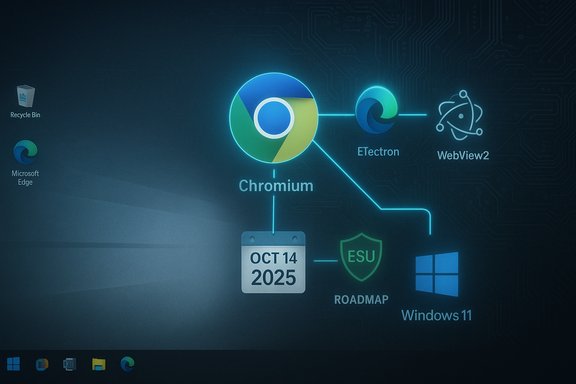
Chromium (Blink render engine + V8 JavaScript engine) is not simply a single browser’s guts; it’s the rendering and runtime layer used by:- Google Chrome and many other Chromium‑based browsers.
- Microsoft Edge (Chromium‑based).
- WebView runtimes such as WebView2 (which itself is an Evergreen distribution of an Edge/Chromium runtime).
- Electron, the desktop app framework that wraps Chromium with Node.js and lets developers build native apps using web technologies.
What happens when Chromium drops platform support?
When Chromium stops supporting an OS, three immediate technical consequences usually follow:- New Chromium security and feature releases will not be built or tested for that OS. Upstream fixes won’t appear in later browser/app releases for the old platform.
- Developers who depend on the latest Chromium features or security fixes are forced to choose between maintaining a fork/backport (far less common) or raising their minimum supported OS.
- Applications that bundle Chromium (Electron apps) must either keep shipping an older, insecure Chromium build or move their users off the OS to keep receiving updates.
The Windows 7 precedent: when Google’s timelines mattered more than Microsoft’s
A useful precedent arrived in 2023. Google ended Chrome support for Windows 7 and Windows 8.1 in early 2023 (Chrome 109/110 timeframe). When Chromium‑based browsers and runtimes formally stopped supporting those older Windows versions, the practical ability of users to run modern web apps and desktop apps on Windows 7 evaporated for many real‑world uses. Large swaths of software — browsers, Electron apps, and WebView‑backed clients — either stopped receiving updates on those platforms or required developers to maintain brittle, old builds. Google had previously extended enterprise support windows for Windows 7 in the face of customer migration challenges, showing the company will sometimes shift dates — but the overall effect was the same: Chromium’s support decisions materially shortened the usable life of Windows 7. That experience is why observers argue that the “real” death of a Windows release is defined by third‑party software makers’ support, not by Microsoft calendar entries alone.Technical facts confirmed
- Microsoft’s official Windows 10 end‑of‑support date is October 14, 2025. After that date: no regular security patches, feature updates, or standard Microsoft support for most mainstream Windows 10 SKUs.
- Microsoft announced the last cumulative Windows 10 public update distributed on the October 14, 2025 Patch Tuesday (a final Patch Tuesday cumulative package). Systems not enrolled in ESU will not receive further monthly cumulative OS patches.
- Google ended Chrome support for Windows 7/8.1 at the Chrome 110 transition in early 2023, demonstrating how Chromium vendor decisions can precipitate wide app‑level breakage. Google has also shown it can extend enterprise support windows in response to migration realities, but that was a temporary accommodation.
- Electron and WebView2 are built from the Chromium source (or a Chromium fork) and therefore inherit Chromium’s platform scope and security lifecycle; Electron apps bundle or track Chromium versions and must be actively updated by developers to remain secure.
What this means for Windows 10 users today
Short term (months after Microsoft’s EOL)
- Many Windows 10 devices will still run fine for basic tasks. They will boot and run legacy apps, email, office documents and local files.
- But risk increases over time as new OS‑level vulnerabilities are found and go unpatched on non‑ESU systems. Microsoft’s limited continuations (Defender signature updates and certain Microsoft 365 app fixes through 2028) reduce some risk, but they do not cover kernel/driver/platform vulnerabilities.
- App compatibility is the practical trigger: most users will upgrade not because of abstract security warnings, but because their daily apps stop working or stop receiving updates.
Medium term (1–3 years)
- If Chrome, other Chromium browsers or major Electron‑based apps decide to shift their minimum supported OS from Windows 10 to Windows 11 (or later), the pressure to migrate will spike. This is the same mechanism that effectively ended widespread practical use of Windows 7 once Chromium moved on.
- Enterprises with large fleets will feel this acutely: application certification matrices, vendor contracts, and compliance requirements often depend on vendor‑supported OS stacks. In many organizations, moving off an unsupported app or OS requires long testing cycles and staged rollouts.
Long term
- The OS becomes increasingly brittle: new hardware drivers will be optimized for newer OS releases, new security features (like virtualization‑based security in Windows 11) become default assumptions in software builds, and third‑party vendors slowly prune support for legacy platforms.
- The vendor ecosystem — not just Microsoft — shapes the life expectancy of a Windows version.
Strengths and mitigations Microsoft and the ecosystem provide
- Extended Security Updates (ESU): Microsoft offers a one‑year consumer ESU window and paid multi‑year enterprise ESU, which can buy time for migrations. ESU is explicitly security‑only and does not restore full support.
- App‑level servicing windows: Microsoft has committed to security updates for some Microsoft 365 apps and Defender definitions into 2028 — useful but partial.
- Third‑party remediation providers: Services like on‑device hotpatching and vendor‑backports exist (some commercial, some open‑source), but relying on them increases operational complexity and is not a substitute for vendor OS patches.
- Developer options: App authors can choose to continue shipping older builds for unsupported systems, or they can adopt shared runtimes (e.g., WebView2 evergreen) that help centralize updates. Electron apps that bundle Chromium must proactively update the embedded Chromium; that is possible but requires ongoing engineering investment.
Risks and costs
- Security risk — the primary and most immediate: unpatched OS vulnerabilities are the largest single exposure for connected systems.
- Operational cost — migration, testing, and possible hardware replacement for Windows 11’s minimum requirements (TPM 2.0, UEFI/Secure Boot, 4 GB RAM, 64 GB storage, compatible 64‑bit CPU). Microsoft’s Windows 11 system requirements are firm and can mean new hardware for many users.
- Application compatibility — vendors may stop shipping new versions for an unsupported OS, or new features will assume APIs available only on newer Windows builds.
- E‑waste and budget strain — enforced hardware refreshes create environmental and financial impacts. Consumer groups and repair advocates have flagged this as a social and policy concern.
- Vendor lock‑in dynamics — when a small set of platform maintainers (Google, Microsoft, Apple) control the runtimes most apps rely on, their packaging and platform support decisions effectively gatekeep the capabilities available to end users.
Scenarios: will Google really “pull the plug” on Windows 10?
This is the key speculative question raised by the How‑To‑Geek piece: could Google decide to stop upstream Chromium support for Windows 10 in a way that leaves Windows 10 functionally unusable?A few grounded points to weigh:
- Precedent exists: Google did stop support for Windows 7/8.1 when the security posture demanded it, and it extended enterprise support windows temporarily when migration was slow. That shows Google will balance engineering constraints against market realities.
- Chromium is a global, multi‑vendor project with many downstream stakeholders. Google manages the primary upstream, but WebKit, Blink, V8, and Chromium are part of a broad ecosystem. Decisions to drop platform builds are expensive and visible; they will be taken only after internal review of usage, security, and engineering cost.
- Microsoft’s Windows 10 end date and Windows 11 adoption trajectory matter: if Windows 11 adoption continues to grow and Windows 10 market share declines over 12–24 months, Chromium vendors will have less incentive to continue building for Windows 10. But if large enterprises or regions continue to run Windows 10 in significant numbers, vendors may extend support windows again.
- Importantly: no public evidence (as of this writing) shows Google has scheduled a Windows 10 deprecation analogous to the Windows 7/8.1 move. Predicting that Google will do so — and precisely when — is speculative. Any claims that “Google will decide when Windows 10 is truly dead” are plausible based on history, but they must be framed as scenario‑based analysis rather than an established timetable. Flagged as speculative: Google dropping Chromium builds for Windows 10 is possible, but not guaranteed or scheduled.
Practical recommendations — what to do now
These are prioritized, actionable steps for different audiences.For home users (practical checklist)
- Verify your PC’s eligibility for Windows 11 with Microsoft’s PC Health Check or by checking the Windows 11 system requirements (TPM 2.0, Secure Boot, CPU). If eligible, plan the free upgrade and a full backup first.
- If you cannot upgrade, consider consumer ESU as a short bridge (one year) while you plan replacement hardware or an alternate OS. ESU is a stopgap, not a permanent fix.
- Isolate high‑risk Windows 10 machines: keep them behind network segmentation, apply strong endpoint protection, enforce MFA, and minimize exposure to email attachments and untrusted web content.
- Explore alternatives — ChromeOS Flex, Linux distributions, or buying a refurbished Windows 11‑capable device — where appropriate.
For IT teams and organizations
- Inventory and prioritize endpoints by criticality, regulatory exposure and compatibility risk. Use telemetry to find devices that cannot be upgraded and isolate them.
- Pilot Windows 11 upgrades on high‑value devices while mapping apps and peripherals that need vendor certification. Create rollback plans.
- Budget ESU strategically: use commercial ESU only when necessary to avoid business disruption. ESU is expensive and explicitly temporary.
- Coordinate with app vendors: find out their Windows 10 support plans (especially for Chromium‑based clients and Electron apps). Plan remediation or replacement for deprecated apps.
For developers
- Track your Chromium/Electron/WebView2 dependency and decide whether to bundle updates, adopt shared runtimes, or otherwise centralize runtime updates to reduce per‑install churn. Electron apps should plan a clear Chromium update cadence and communicate OS compatibility changes to customers early.
Critical analysis — strengths, weaknesses, and the realpolitik of platform lifecycles
Strengths:- Microsoft’s lifecycle policy is transparent and gives clear, dated milestones that organizations can plan against. The ESU program provides a documented, time‑boxed bridge for those who cannot migrate immediately.
- The Chromium ecosystem, while powerful, is relatively predictable: vendor roadmaps (Google, Microsoft, Electron) allow admins and developers to anticipate and prepare.
- The decisive power of a small number of runtime maintainers (e.g., Google for Chromium) means platform lifetimes can be truncated by third‑party technical decisions outside Microsoft’s control. That creates a fragile dependency model where hardware lifecycles, software vendors and platform maintainers interact in unpredictable ways.
- Microsoft’s push to Windows 11 — with enforced TPM and UEFI requirements — raises hardware upgrade costs and environmental concerns. Users forced to replace functioning hardware face financial and e‑waste consequences.
- The use of ESU as a policy instrument is pragmatic but redistributive: organizations with budgets can buy time; others may be left exposed.
Conclusion
Microsoft’s October 14, 2025 cutoff is a formal calendar milepost: Windows 10 is officially past mainstream support. But calendar dates and day‑to‑day usability are different things. The more immediate determinant of whether Windows 10 remains viable for a given user will be whether the apps and runtimes they depend on — chiefly Chromium and the many projects built on it — continue to run and receive updates on Windows 10. That ecosystem control is precisely why many observers say Google and other runtime maintainers have outsized influence over how long older Windows releases remain practical choices. The historical precedent of Chromium’s 2023 end of support for Windows 7 shows that when the runtime vendors move, the platform’s usable life often follows.The remedy is practical, not rhetorical: inventory devices, verify upgrade paths, use ESU only as a bridge, and plan migrations carefully. Developers and vendors should communicate compatibility roadmaps early. Policymakers and industry groups can help by promoting reuse, repair and responsible refresh policies to reduce the environmental and economic harm of enforced hardware churn.
Windows 10’s official obituary is signed; its functional obituary will be written in commit logs, release notes and the upgrade prompts of the browsers and apps users rely on — and in that sense, the “when” could well be decided outside Redmond.
Source: How-To Geek Google Will Decide When Windows 10 Is Truly Dead
