

Windows 10 reached end of support on October 14, 2025, which means antivirus software may still detect malware on the operating system, but it no longer restores the missing layer Microsoft removed: free Windows 10 security updates, technical assistance, and security fixes.
The practical answer is blunt: do not treat antivirus as your Windows 10 escape plan. Your first job is to determine whether the PC can move to Windows 11; if it cannot, the decision becomes replacement, isolation, or accepting unsupported risk. Microsoft has already said Windows 10 version 22H2 is the final Windows 10 release, so there is no “next Windows 10” waiting to soften the landing.
For years, the consumer version of this debate sounded simple: which antivirus should I run on Windows 10? That was a product-choice question. After October 14, 2025, it became an operating-system-support question.
The immediate checklist is straightforward. Open Settings, go to Update & Security, select Windows Update, and check whether the machine is being offered an upgrade path to Windows 11. If it is, your next step is not to shop for another antivirus brand; it is to plan the upgrade, confirm backups, and test the applications and peripherals that matter to you.
If the PC is not offered a Windows 11 upgrade, that is the real fork in the road. You should verify whether the device is compatible with Windows 11 using Microsoft’s own compatibility tooling or system requirements guidance, then decide whether the machine has a supported future. If it does not, the responsible answer is to replace the device or remove it from roles where it touches sensitive accounts, business data, or exposed networks.
That is the part many antivirus discussions blur. Antivirus can help detect malicious files, suspicious behavior, and known threats. It cannot convert an unsupported OS into a supported one, and it cannot make Microsoft resume free Windows 10 security fixes.
Before the deadline, a Windows 10 machine with a current antivirus product could still rely on the operating system vendor to repair supported Windows flaws. After the deadline, that foundation is gone. The antivirus layer may still operate, but the platform beneath it is no longer receiving the same free repair path from Microsoft.
That distinction matters because endpoint security is layered. Antivirus is one layer. OS servicing is another. Browser updates, application patching, identity controls, backups, network segmentation, and user privileges all sit around those layers. Removing the OS servicing layer does not make the other layers useless, but it does make the whole structure weaker.
Microsoft’s position is also not ambiguous. Windows 10 version 22H2 is the final Windows 10 release, and customers are being directed to upgrade to Windows 11 or replace the device to remain supported. That is the vendor telling users the migration question has outrun the maintenance question.
That is not what it means. Microsoft Defender Antivirus can still exist on Windows, but Microsoft’s own guidance says it is built for supported Windows versions and should not be treated as a substitute for OS support. In plain English: a working security app is not a lifecycle extension.
This is not a semantic distinction. Security software runs on top of the operating system, depends on operating-system components, and is constrained by the platform it is defending. If the platform is no longer receiving free security fixes from Microsoft, Defender or any other antivirus product is operating in a degraded strategic environment.
The same logic applies to third-party antivirus suites. A vendor may continue supporting its own product on Windows 10 for some period, and it may continue shipping signatures, engines, dashboards, or policy controls. But that support belongs to the antivirus product, not to Windows 10 itself. It does not obligate Microsoft to fix Windows 10.
Now the same advice is incomplete. Keeping antivirus installed is still better than running naked, but it no longer answers the central question. The central question is whether the machine should remain in daily use at all.
That is especially true for PCs used for banking, email, password management, remote work, tax records, family photos, or account recovery. Those machines are not just endpoints; they are identity hubs. Once a device becomes unsupported, the blast radius is not limited to files stored locally. It can extend to every account that trusts that PC.
Enthusiasts often have a higher tolerance for risk than ordinary users, and that is part of the culture. Old ThinkPads, garage desktops, lab machines, media boxes, and retro rigs all have their place. But the line between a fun unsupported box and a daily-driver security liability is bright. If the machine signs in to primary accounts, stores credentials, or handles work data, it deserves a supported operating system.
The first move for administrators is discovery. Identify every Windows 10 device, confirm whether it is on version 22H2, determine whether it can move to Windows 11, and classify what it actually does. A PC used for a conference-room display is not the same risk as a payroll workstation, even if both are running the same unsupported OS.
The second move is ownership. Someone has to decide whether each machine is upgraded, replaced, retired, isolated, or temporarily tolerated with compensating controls. Antivirus status is a data point in that process, not the decision itself.
The third move is communication. Users need to understand that “my antivirus says I’m protected” is not the same as “this PC is supported.” That phrase should be on the lips of every help desk technician dealing with Windows 10 remnants this year.
That does not mean antivirus is useless. It means buyers need to be clear about what they are buying. They are buying malware detection, behavioral monitoring, web protection, management tooling, or incident visibility. They are not buying a supported Windows 10 lifecycle.
This is where the consumer market becomes particularly muddy. A user may see a paid antivirus product that advertises Windows 10 compatibility and assume that compatibility equals safety. It does not. It only means the product is intended to run on that operating system under the vendor’s terms.
The same caution applies to performance claims and “lightweight” security bundles. A lighter antivirus can be useful on older PCs, but if the reason the PC is still on Windows 10 is that it cannot move forward, the performance story may be distracting from the support story. A faster unsupported machine is still unsupported.
The first outcome is the cleanest. If the PC can upgrade to Windows 11 and your software and hardware still work, that is the path Microsoft wants and the one that restores the supported Windows servicing model. There may still be annoyances, retraining, and compatibility testing, but those are migration problems rather than end-of-support problems.
The second outcome is often the most rational. If the PC cannot move to Windows 11, replacement may feel wasteful, especially when the hardware still performs adequately. But from a security and support standpoint, a machine that cannot follow the supported Windows line has crossed from asset to liability in many environments.
The third outcome is sometimes unavoidable, at least temporarily. A lab instrument, legacy application, old peripheral, or niche workflow may keep a Windows 10 system alive. In that case, the adult response is not to pretend antivirus solves it. The adult response is to reduce what the machine can access, reduce who can use it, reduce how often it touches the internet, and put a date on the exception.
The risk is cumulative. Over time, supported platforms continue receiving vendor fixes while unsupported platforms do not receive the same free repair stream. That gap tends to widen as months pass, as software ecosystems move on, and as administrators stop testing old configurations with the same seriousness.
This is why the right answer is not theatrical. You do not need to unplug every Windows 10 machine from the wall in a single dramatic afternoon. You do need to stop treating those machines as normal. They belong on an exception list, not in the standard fleet.
For home users, that may mean using the Windows 10 machine for offline tasks while moving email, banking, and password management to a supported PC. For enthusiasts, it may mean turning the box into a project machine rather than a primary endpoint. For businesses, it means documented risk acceptance, migration scheduling, and reducing exposure until the machine is gone or upgraded.
If the device can run Windows 11, plan the upgrade like a real change rather than a cosmetic patch. Back up data, check business-critical software, confirm recovery options, and schedule the work when downtime is acceptable. The important point is not that every upgrade will be painless; it is that a supported destination exists.
If the device cannot run Windows 11, decide whether it deserves replacement. That decision should be based on what the machine does, what data it touches, and what accounts it can compromise. A low-value offline machine is one thing. A daily-use PC with saved passwords and remote-work access is another.
Only after that should antivirus selection come back into the picture. On a supported Windows PC, choosing a reputable endpoint protection setup is part of normal hygiene. On unsupported Windows 10, it is a compensating control for a temporary exception, not a strategy.
Those are the cases where enthusiasts and sysadmins can add real value. Inventory the weird hardware. Document the legacy dependencies. Test replacements before the old box fails. Capture installation media, license records, configuration notes, and recovery procedures while the machine is still alive.
For managed environments, the sharper question is whether Windows 10 is still present because of a deliberate exception or because nobody knows. The former is a risk decision. The latter is negligence disguised as normal operations.
For home labs and hobby rigs, the question is whether the system is isolated enough for its role. A retro gaming PC, a scanner workstation, or a test bench may be acceptable if it does not carry primary credentials or sensitive data. The moment it becomes a general-purpose internet machine again, the antivirus conversation becomes a fig leaf.
That does not make every old PC worthless. It does make every old Windows 10 installation a decision point. The operating system is no longer something you can quietly leave alone while the antivirus subscription renews in the background.
The PC industry has always had a tension between hardware that still works and software support that moves on. Windows 10’s end of support makes that tension visible again. A functioning processor, screen, keyboard, and SSD are not the same thing as a supported computing environment.
That distinction will irritate users who dislike waste, and fairly so. But irritation is not a security model. If a PC cannot remain supported on Windows, the honest options are to change the operating system, change the hardware, change the workload, or accept the risk with eyes open.
Here is the compressed version WindowsForum readers should keep handy:
The practical answer is blunt: do not treat antivirus as your Windows 10 escape plan. Your first job is to determine whether the PC can move to Windows 11; if it cannot, the decision becomes replacement, isolation, or accepting unsupported risk. Microsoft has already said Windows 10 version 22H2 is the final Windows 10 release, so there is no “next Windows 10” waiting to soften the landing.
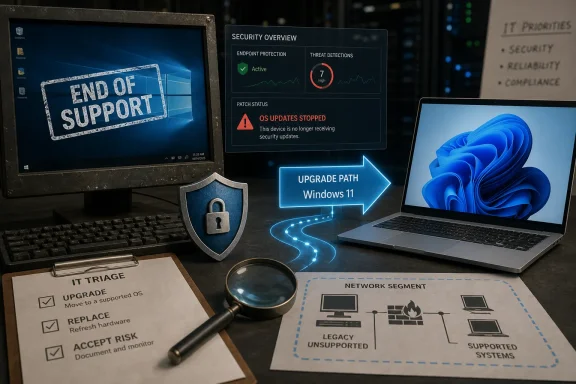 The antivirus question is really a hardware question now
For years, the consumer version of this debate sounded simple: which antivirus should I run on Windows 10? That was a product-choice question. After October 14, 2025, it became an operating-system-support question.The immediate checklist is straightforward. Open Settings, go to Update & Security, select Windows Update, and check whether the machine is being offered an upgrade path to Windows 11. If it is, your next step is not to shop for another antivirus brand; it is to plan the upgrade, confirm backups, and test the applications and peripherals that matter to you.
If the PC is not offered a Windows 11 upgrade, that is the real fork in the road. You should verify whether the device is compatible with Windows 11 using Microsoft’s own compatibility tooling or system requirements guidance, then decide whether the machine has a supported future. If it does not, the responsible answer is to replace the device or remove it from roles where it touches sensitive accounts, business data, or exposed networks.
That is the part many antivirus discussions blur. Antivirus can help detect malicious files, suspicious behavior, and known threats. It cannot convert an unsupported OS into a supported one, and it cannot make Microsoft resume free Windows 10 security fixes.
Microsoft ended more than a date on a lifecycle page
October 14, 2025 was not just a symbolic retirement party for a beloved operating system. After that date, Microsoft stopped providing free security updates, technical assistance, and security fixes for Windows 10. That changes the risk model underneath every Windows 10 PC still in use.Before the deadline, a Windows 10 machine with a current antivirus product could still rely on the operating system vendor to repair supported Windows flaws. After the deadline, that foundation is gone. The antivirus layer may still operate, but the platform beneath it is no longer receiving the same free repair path from Microsoft.
That distinction matters because endpoint security is layered. Antivirus is one layer. OS servicing is another. Browser updates, application patching, identity controls, backups, network segmentation, and user privileges all sit around those layers. Removing the OS servicing layer does not make the other layers useless, but it does make the whole structure weaker.
Microsoft’s position is also not ambiguous. Windows 10 version 22H2 is the final Windows 10 release, and customers are being directed to upgrade to Windows 11 or replace the device to remain supported. That is the vendor telling users the migration question has outrun the maintenance question.
Defender still existing is not the same as Windows 10 still being supported
One of the easiest traps for Windows 10 holdouts is the presence of Microsoft Defender Antivirus. If Defender still appears in Windows Security, receives some form of intelligence, or reports a reassuring green check, it is tempting to read that as a quiet extension of Windows 10’s safety net.That is not what it means. Microsoft Defender Antivirus can still exist on Windows, but Microsoft’s own guidance says it is built for supported Windows versions and should not be treated as a substitute for OS support. In plain English: a working security app is not a lifecycle extension.
This is not a semantic distinction. Security software runs on top of the operating system, depends on operating-system components, and is constrained by the platform it is defending. If the platform is no longer receiving free security fixes from Microsoft, Defender or any other antivirus product is operating in a degraded strategic environment.
The same logic applies to third-party antivirus suites. A vendor may continue supporting its own product on Windows 10 for some period, and it may continue shipping signatures, engines, dashboards, or policy controls. But that support belongs to the antivirus product, not to Windows 10 itself. It does not obligate Microsoft to fix Windows 10.
The old consumer advice now undersells the risk
For much of Windows 10’s supported life, the advice for home users was familiar: keep Windows Update on, use reputable antivirus, avoid suspicious downloads, and do not run as an administrator unless necessary. That was decent mainstream guidance because Windows 10 still had Microsoft’s servicing machinery behind it.Now the same advice is incomplete. Keeping antivirus installed is still better than running naked, but it no longer answers the central question. The central question is whether the machine should remain in daily use at all.
That is especially true for PCs used for banking, email, password management, remote work, tax records, family photos, or account recovery. Those machines are not just endpoints; they are identity hubs. Once a device becomes unsupported, the blast radius is not limited to files stored locally. It can extend to every account that trusts that PC.
Enthusiasts often have a higher tolerance for risk than ordinary users, and that is part of the culture. Old ThinkPads, garage desktops, lab machines, media boxes, and retro rigs all have their place. But the line between a fun unsupported box and a daily-driver security liability is bright. If the machine signs in to primary accounts, stores credentials, or handles work data, it deserves a supported operating system.
For IT shops, the problem is inventory, not ideology
In business environments, the end of Windows 10 support is not primarily a debate about whether Windows 11 is aesthetically pleasing. It is an asset-management problem with security consequences. The machines that matter most are not the obvious ones on the help desk’s radar; they are the forgotten endpoints that still authenticate, print, scan, run line-of-business software, or sit under someone’s desk because “it still works.”The first move for administrators is discovery. Identify every Windows 10 device, confirm whether it is on version 22H2, determine whether it can move to Windows 11, and classify what it actually does. A PC used for a conference-room display is not the same risk as a payroll workstation, even if both are running the same unsupported OS.
The second move is ownership. Someone has to decide whether each machine is upgraded, replaced, retired, isolated, or temporarily tolerated with compensating controls. Antivirus status is a data point in that process, not the decision itself.
The third move is communication. Users need to understand that “my antivirus says I’m protected” is not the same as “this PC is supported.” That phrase should be on the lips of every help desk technician dealing with Windows 10 remnants this year.
Security suites are selling comfort into a support gap
The antivirus market is very good at selling reassurance. Dashboards are green, subscription pages are polished, and product names tend to promise total protection in one form or another. But no endpoint security vendor can sell you Microsoft’s missing Windows 10 support after the fact.That does not mean antivirus is useless. It means buyers need to be clear about what they are buying. They are buying malware detection, behavioral monitoring, web protection, management tooling, or incident visibility. They are not buying a supported Windows 10 lifecycle.
This is where the consumer market becomes particularly muddy. A user may see a paid antivirus product that advertises Windows 10 compatibility and assume that compatibility equals safety. It does not. It only means the product is intended to run on that operating system under the vendor’s terms.
The same caution applies to performance claims and “lightweight” security bundles. A lighter antivirus can be useful on older PCs, but if the reason the PC is still on Windows 10 is that it cannot move forward, the performance story may be distracting from the support story. A faster unsupported machine is still unsupported.
The migration decision has three honest outcomes
Once you strip away brand names and subscription pages, a Windows 10 owner has three honest outcomes. The machine moves to Windows 11, the machine is replaced, or the machine remains on Windows 10 with acknowledged risk.The first outcome is the cleanest. If the PC can upgrade to Windows 11 and your software and hardware still work, that is the path Microsoft wants and the one that restores the supported Windows servicing model. There may still be annoyances, retraining, and compatibility testing, but those are migration problems rather than end-of-support problems.
The second outcome is often the most rational. If the PC cannot move to Windows 11, replacement may feel wasteful, especially when the hardware still performs adequately. But from a security and support standpoint, a machine that cannot follow the supported Windows line has crossed from asset to liability in many environments.
The third outcome is sometimes unavoidable, at least temporarily. A lab instrument, legacy application, old peripheral, or niche workflow may keep a Windows 10 system alive. In that case, the adult response is not to pretend antivirus solves it. The adult response is to reduce what the machine can access, reduce who can use it, reduce how often it touches the internet, and put a date on the exception.
Unsupported does not mean instantly compromised, but it does mean increasingly alone
There is a difference between “unsupported” and “already breached.” A Windows 10 PC did not become malware the morning after October 14, 2025. Existing protections did not all evaporate at midnight. Users should avoid panic as much as complacency.The risk is cumulative. Over time, supported platforms continue receiving vendor fixes while unsupported platforms do not receive the same free repair stream. That gap tends to widen as months pass, as software ecosystems move on, and as administrators stop testing old configurations with the same seriousness.
This is why the right answer is not theatrical. You do not need to unplug every Windows 10 machine from the wall in a single dramatic afternoon. You do need to stop treating those machines as normal. They belong on an exception list, not in the standard fleet.
For home users, that may mean using the Windows 10 machine for offline tasks while moving email, banking, and password management to a supported PC. For enthusiasts, it may mean turning the box into a project machine rather than a primary endpoint. For businesses, it means documented risk acceptance, migration scheduling, and reducing exposure until the machine is gone or upgraded.
The checklist starts with migration, not malware scans
The concrete move now is to evaluate the PC’s future before you evaluate antivirus renewals. Start in Windows Update and determine whether the machine is being offered a supported path forward. Then confirm whether your applications, drivers, and peripherals can survive that move.If the device can run Windows 11, plan the upgrade like a real change rather than a cosmetic patch. Back up data, check business-critical software, confirm recovery options, and schedule the work when downtime is acceptable. The important point is not that every upgrade will be painless; it is that a supported destination exists.
If the device cannot run Windows 11, decide whether it deserves replacement. That decision should be based on what the machine does, what data it touches, and what accounts it can compromise. A low-value offline machine is one thing. A daily-use PC with saved passwords and remote-work access is another.
Only after that should antivirus selection come back into the picture. On a supported Windows PC, choosing a reputable endpoint protection setup is part of normal hygiene. On unsupported Windows 10, it is a compensating control for a temporary exception, not a strategy.
WindowsForum readers should watch the edge cases
The most interesting Windows 10 stories from here will not be about antivirus brands. They will be about the edge cases: the machines that cannot upgrade, the workflows that cannot move, the peripherals with abandoned drivers, and the small businesses that discover too late that one old PC is holding a process together.Those are the cases where enthusiasts and sysadmins can add real value. Inventory the weird hardware. Document the legacy dependencies. Test replacements before the old box fails. Capture installation media, license records, configuration notes, and recovery procedures while the machine is still alive.
For managed environments, the sharper question is whether Windows 10 is still present because of a deliberate exception or because nobody knows. The former is a risk decision. The latter is negligence disguised as normal operations.
For home labs and hobby rigs, the question is whether the system is isolated enough for its role. A retro gaming PC, a scanner workstation, or a test bench may be acceptable if it does not carry primary credentials or sensitive data. The moment it becomes a general-purpose internet machine again, the antivirus conversation becomes a fig leaf.
The lesson Microsoft is forcing onto every old PC
This is the part that gets lost when the story is framed as antivirus shopping: Microsoft has made Windows 10’s future binary. Version 22H2 is the final Windows 10 release. The supported Windows client path moves to Windows 11, and machines that cannot take that path need a different plan.That does not make every old PC worthless. It does make every old Windows 10 installation a decision point. The operating system is no longer something you can quietly leave alone while the antivirus subscription renews in the background.
The PC industry has always had a tension between hardware that still works and software support that moves on. Windows 10’s end of support makes that tension visible again. A functioning processor, screen, keyboard, and SSD are not the same thing as a supported computing environment.
That distinction will irritate users who dislike waste, and fairly so. But irritation is not a security model. If a PC cannot remain supported on Windows, the honest options are to change the operating system, change the hardware, change the workload, or accept the risk with eyes open.
The decision tree hiding behind the antivirus renewal
The most useful way to think about Windows 10 after support is as a triage exercise. Antivirus remains part of the picture, but it is no longer the first branch in the tree. The first branch is whether the machine can leave Windows 10.Here is the compressed version WindowsForum readers should keep handy:
- If Windows Update offers a Windows 11 upgrade and the machine supports your required apps and peripherals, plan the upgrade before spending energy on a new antivirus subscription.
- If the PC cannot move to Windows 11, treat replacement as the default answer for any machine used with sensitive accounts, work data, financial activity, or password storage.
- If a Windows 10 system must remain in service temporarily, document why it exists, what it can access, and when it will be retired or replaced.
- If Microsoft Defender Antivirus still appears to be working, do not mistake that for continued Windows 10 operating-system support.
- If a third-party antivirus product advertises Windows 10 compatibility, read that as product compatibility, not as a substitute for Microsoft security fixes.
- If the facts of a specific machine are unclear, inventory it first; unsupported devices you do not know about are more dangerous than unsupported devices you have deliberately contained.
References
- Primary source: learn.microsoft.com
Microsoft Defender Antivirus security intelligence and product updates and support - Microsoft Defender for Endpoint | Microsoft Learn
Learn about security intelligence updates, platform updates, and engine updates for Microsoft Defender Antivirus, including rollback and support options.learn.microsoft.com - Independent coverage: support.microsoft.com
Consumer antivirus software providers for Windows | Microsoft Support
Consumer antivirus software providers for Windowssupport.microsoft.com
