

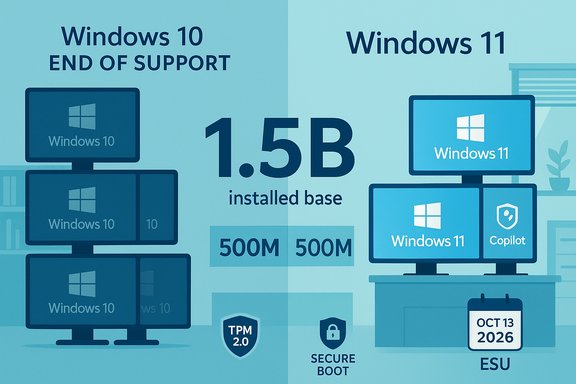
Microsoft’s official end-of-support for Windows 10 has made an already awkward transition into a full-blown market story: tens — if not hundreds — of millions of PCs remain un-upgraded, and Dell’s COO has put a stark number on the problem. On a recent earnings call Dell executive Jeffrey Clarke described an installed base of roughly 1.5 billion PCs, saying about 500 million devices are capable of running Windows 11 but haven’t upgraded, while another 500 million are too old to meet Windows 11’s hardware requirements — a split that leaves roughly one billion machines effectively stranded on an unsupported operating system.
Microsoft ended mainstream support for Windows 10 on October 14, 2025. That formal cutoff means Microsoft no longer provides feature updates, routine technical support, or the normal cadence of security fixes for consumer editions of Windows 10. Microsoft promoted migration to Windows 11 as the secure path forward, but also offered a time-limited Extended Security Updates (ESU) consumer program to cushion the blow for users who cannot immediately migrate. Dell’s comments — repeated by multiple outlets and paraphrased on the company’s investor call — reframed the post-EOL landscape into a quantifiable business opportunity for OEMs: a large installed base with a mix of upgrade-ready machines and older hardware that will require replacement. Those numbers are not Microsoft’s; they’re Dell’s assessment of the installed base and the upgrade opportunity. Multiple independent reporting outlets picked up Clarke’s remarks, and the statement has now become the de facto frame for how many PCs remain "left behind" by Windows 11’s stricter hardware gate.
The strengths of Microsoft’s approach are clear: Windows 11 raises the security baseline, modernizes the platform for on-device AI, and gives OEMs a coherent message for new device generations. The risks and downsides are equally clear: a split installed base fragments security and compliance, the cash cost of replacement is non-trivial for many users, and the policy decisions (TPM/processor restrictions; Microsoft account requirements for ESU enrollment) steer users toward Microsoft’s ecosystem even as they alienate a subset of privacy- or budget-conscious buyers.
For end users and IT decision-makers the prudent path is a rational mix of triage and action: inventory devices, test compatibility, enroll in ESU if needed, and plan hardware refreshes where replacement is the only viable long-term option. Time is finite: ESU is a bridge, not a destination — and the next October 13 deadline will be the hard reckoning point for devices still running Windows 10.
Source: TweakTown Microsoft has left behind nearly 1 billion PCs on Windows 10
 Background / Overview
Microsoft ended mainstream support for Windows 10 on October 14, 2025. That formal cutoff means Microsoft no longer provides feature updates, routine technical support, or the normal cadence of security fixes for consumer editions of Windows 10. Microsoft promoted migration to Windows 11 as the secure path forward, but also offered a time-limited Extended Security Updates (ESU) consumer program to cushion the blow for users who cannot immediately migrate. Dell’s comments — repeated by multiple outlets and paraphrased on the company’s investor call — reframed the post-EOL landscape into a quantifiable business opportunity for OEMs: a large installed base with a mix of upgrade-ready machines and older hardware that will require replacement. Those numbers are not Microsoft’s; they’re Dell’s assessment of the installed base and the upgrade opportunity. Multiple independent reporting outlets picked up Clarke’s remarks, and the statement has now become the de facto frame for how many PCs remain "left behind" by Windows 11’s stricter hardware gate. What Microsoft actually stopped doing — and what it still offers
Windows 10’s end of support has three, practical consequences for users:- Microsoft will no longer ship regular security updates for Windows 10 consumer editions after October 14, 2025. Machines will continue to boot and run, but they become progressively more vulnerable as newly discovered security issues are no longer patched in the normal channel.
- Microsoft offered a consumer ESU pathway that supplies security-only updates for an additional year — coverage runs through October 13, 2026 for devices enrolled in the program. Enrollment requires Windows 10 version 22H2 and a small set of prerequisites.
- Enterprises have the legacy ESU route (commercial licensing) that can extend support longer but at escalating per-device costs; the enterprise ESU program for businesses begins at roughly $61 per device in Year One and doubles in subsequent years under typical Microsoft enterprise ESU pricing rules.
- Free option: enroll if you sign into Windows with a Microsoft account and enable device syncing (this can provide free ESU access for the consumer window in many markets).
- Paid option: a one-time purchase (approximately $30 USD) or redemption of Microsoft Rewards points for the ESU entitlement.
- Business option: volume licensing ESU priced per device and available through Microsoft enterprise channels.
Why roughly one billion PCs is now headline news
Dell’s arithmetic — 1.5 billion installed PCs, split into roughly 500 million upgrade-capable but un-upgraded devices and 500 million too old for Windows 11 — makes several implicit points about the market:- The installed base remains enormous. Even with a steady rate of refresh, billions of devices remain active in homes and businesses worldwide. Dell used that installed-base figure to justify continued PC upgrade demand for AI-capable machines and new OEM product cycles.
- A substantial slice of that base is being held back by two factors: strict Windows 11 hardware rules and user inertia. Some machines physically cannot meet the Windows 11 baseline without hardware changes; others meet the baseline but haven’t upgraded because Windows 10 still works, and organizations prioritize stability over migration.
- For OEMs and retailers, that mix represents both a sales opportunity and a timing challenge: upgrade demand is real, but it is not uniform and can be delayed by macro factors like component costs and consumer spending cycles.
The technical gate: Why many PCs can’t run Windows 11
Windows 11 enforces a higher baseline of hardware security and modern CPU features compared with Windows 10. The most consequential system requirements are:- TPM 2.0 (Trusted Platform Module): Microsoft has treated TPM 2.0 as non-negotiable for Windows 11’s security baseline; TPM provides hardware-rooted key storage for BitLocker, Windows Hello, secure boot flows, and other virtualization-based protections.
- Supported processor generations: Windows 11 requires relatively recent Intel, AMD, or Arm processors. Microsoft maintains explicit lists of supported CPU families and models for Windows 11; older mainstream processors (many shipped pre-2018) are excluded.
- Secure Boot and modern firmware: Windows 11 expects Unified Extensible Firmware Interface (UEFI) with Secure Boot, and a modern driver model (DCH drivers) for reliability and security.
The immediate security and compliance implications
For consumers, the risk is straightforward: staying on an unsupported OS increases exposure. Without regular security patches, new vulnerabilities discovered in system components, drivers, or bundled software can remain unpatched on Windows 10 machines, increasing the chance of malware, ransomware, or exploit-driven compromise. For end-users, good antivirus software helps but is not a replacement for timely OS security updates. For organizations the calculus is starker:- Regulatory and compliance risks: Organizations in regulated industries may face compliance violations by running unsupported software where timely patching is required.
- Operational risk: Critical applications, browsers, or enterprise tools may gradually lose compatibility, and helpdesk burden rises as teams support a mixed fleet.
- Economic risk: The economics of ESU for enterprises are explicit — it’s a bridge, not a long-term plan. ESU buys time but increases per-device cost and complexity.
What owners of the stranded ~1 billion PCs can do right now
There’s no single “right” response — the correct path depends on device capability, user needs, and budget — but the following prioritized checklist covers practical options:- Check upgrade eligibility with Microsoft’s PC Health Check and the OEM. Confirm whether your CPU is on the supported list and whether firmware settings (TPM, Secure Boot) can be enabled. If your PC is listed as compatible but shows an error, check for a BIOS or firmware update.
- If compatible, plan a controlled upgrade to Windows 11: back up data, confirm application compatibility, and roll out upgrades in phases if multiple devices are involved. If you have business-critical apps, test in a sandbox or pilot group first.
- If not compatible and you need time, enroll in consumer ESU or an enterprise ESU. Consumer ESU options include a free enrollment route via a Microsoft account and syncing settings, a one-time purchase (roughly $30 USD), or redemption of Microsoft Rewards points; enterprise ESU pricing starts higher. ESU coverage runs through October 13, 2026 for consumer enrollments.
- Consider hardware refresh: For older devices where Windows 11 is impossible, evaluate replacing the machine. The current PC market has seen elevated shipments to meet EOL-driven refresh demand; there are also options for lower-cost Windows 11-capable models or refurbished units with supported CPUs.
- Evaluate alternatives: If migration to Windows 11 or ESU isn’t viable, alternatives include Linux distributions (which can breathe new life into older hardware), Chrome OS Flex for web-centric use, or moving to managed virtual desktops and cloud-based Windows instances. These are viable but require planning and training.
The OEM and Microsoft strategies — what’s working and what’s not
From Microsoft’s perspective, pushing users to Windows 11 aligned with a desire to raise the security baseline (TPM, virtualization protections) and to make a platform that more naturally supports on-device AI, Copilot integrations, and new hardware capabilities. The company has also invested in messaging and migration tooling. Microsoft has claimed Windows 11 is rapidly growing and has used milestone language such as “nearly a billion people rely on Windows 11,” though such phrasing lacks granular public definitions and should be treated as corporate framing rather than a precise metric. OEMs like Dell are reading the market differently. Dell’s public framing turned the problem into a sales narrative: a large installed base that either needs replacement or conversion to Windows 11-capable hardware represents a tangible addressable market for new systems — especially AI-capable “Copilot+” machines with NPUs. That market view helps explain OEM product pushes and bundled offers, but it also puts pressure on consumer and SMB budgets at a time when component costs and inflation remain concerns. What’s clearly not working: a friction-free mass migration. Where previous transitions (notably to Windows 10) moved quickly, Windows 11 adoption has been slower, hampered by the hardware gate, conservative enterprise upgrade practices, and in some cases consumer resistance. That slowdown is now visible in both market research and vendor commentary.Risks and second-order effects
- Fragmentation and shadow IT: Mixed fleets increase the complexity of patch management, endpoint security posture, and helpdesk operations. Organizations may create risky exceptions or rely on shadow solutions to keep legacy systems functional.
- Attack surface growth: Unsupported OS instances become hunting grounds for exploit kits and targeted attackers. Once automatic updates stop, even lower-severity flaws can be chained into impactful compromises.
- Policy and procurement churn: Governments, regulated industries, and large enterprises may accelerate refresh cycles — driving channel demand but straining budgets and procurement timelines. Vendors must balance channel volumes, supply constraints, and the desire to upsell AI-capable hardware.
- User backlash and market shifts: Some users will migrate to Linux or other OS alternatives rather than comply with hardware or account requirements for ESU. This dynamic could reduce Windows’ straightforward dominance in certain segments and create long-term churn.
Practical migration blueprint for Windows users and IT managers
- Inventory: run a device inventory and sort machines by Windows 11 eligibility, business criticality, and warranty status.
- Triage: categorize devices into (A) immediate upgrade to Windows 11, (B) enroll in ESU and plan replacement, (C) migrate to an alternative OS or cloud VM, (D) retire decommissioned devices.
- Pilot and test: for applications and drivers, use a pilot cohort to surface issues, test vendor drivers, and measure user impact.
- Budget and procurement: align refresh waves with commercial cycles (holiday promotions, OEM business cycles) to lower refresh cost and spread spend.
- Security hygiene: regardless of migration choice, enforce endpoint protection, network segmentation, MFA, backup and ransomware readiness, and prompt patching of third-party software that remains supported.
- Communication: clearly explain to users why migration is necessary, what the paths are, and what the timelines will be; provide training and data-migration assist tools.
Where the market may go from here
- OEMs will target replacement cycles and position AI-capable laptops as a value-add to help justify refresh spend.
- Microsoft may keep the Windows 11 hardware posture firm — TPM and CPU expectations are core to its security story — while tweaking consumer enrollment or migration experience to reduce friction. Expect Microsoft to continue emphasizing Copilot, AI features, and device security as migration drivers.
- Channel timing matters: seasonal promotions (holiday sales) and component-price swings will determine how fast businesses and consumers can economically refresh devices.
- The ESU bridge is finite. October 13, 2026 is the last guaranteed consumer-ESU patch date; organizations that intend to remain on Windows 10 after that date should plan for a supported enterprise path or alternative OS strategies well before then.
Bottom line — a pragmatic verdict
Microsoft’s end-of-support for Windows 10 and Dell’s investor-call framing have placed an uncomfortable new reality in front of users and organizations: a very large installed base of PCs will require active decisions, not passive optimism. The choices are raw and binary in many cases — upgrade hardware and move to Windows 11, buy a temporary ESU life raft, or adopt an alternate operating system and risk short-term friction.The strengths of Microsoft’s approach are clear: Windows 11 raises the security baseline, modernizes the platform for on-device AI, and gives OEMs a coherent message for new device generations. The risks and downsides are equally clear: a split installed base fragments security and compliance, the cash cost of replacement is non-trivial for many users, and the policy decisions (TPM/processor restrictions; Microsoft account requirements for ESU enrollment) steer users toward Microsoft’s ecosystem even as they alienate a subset of privacy- or budget-conscious buyers.
For end users and IT decision-makers the prudent path is a rational mix of triage and action: inventory devices, test compatibility, enroll in ESU if needed, and plan hardware refreshes where replacement is the only viable long-term option. Time is finite: ESU is a bridge, not a destination — and the next October 13 deadline will be the hard reckoning point for devices still running Windows 10.
Source: TweakTown Microsoft has left behind nearly 1 billion PCs on Windows 10
