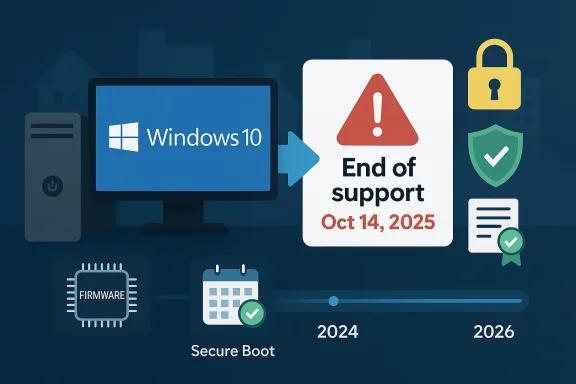
Microsoft’s Windows 10 shutdown has moved from a distant lifecycle notice to a practical security and migration problem, and the pressure is now intensifying in ways many users did not expect. The WindowsForum material shows a clear pattern: after the October 14, 2025 end-of-support date, users are no longer just debating upgrades—they are weighing Extended Security Updates, compatibility, and the growing risk of staying put. That shift is particularly acute because Microsoft’s support changes are no longer limited to Windows itself; related platform issues such as Secure Boot certificate renewal and Microsoft 365 feature support are now part of the same broader transition.
Windows 10 arrived in 2015 and became the default desktop operating system for much of the world’s PC market. For years, it offered the kind of broad compatibility that made IT departments comfortable and home users complacent: it was familiar, stable, and supported across a huge ecosystem of hardware and software. Microsoft’s original support timeline gave the platform a long runway, but that runway has now ended, and the consequences are more layered than many people first assumed.
The first and most visible deadline was October 14, 2025, when Microsoft ended mainstream support for Windows 10. That means no routine free security fixes for the base operating system, which immediately changes the risk calculation for consumers and enterprises. In the WindowsForum coverage, the tone is unmistakable: upgrade, enroll in ESU, or accept increasing exposure. There is no “wait and see” option anymore.
But the Windows 10 story does not stop at the operating system’s end-of-support date. Microsoft has also extended some Microsoft 365 security support on Windows 10 into 2028 while ending new feature additions sooner, which creates a split between basic safety and product evolution. That is a classic Microsoft pattern: preserve continuity where necessary, but tilt every strategic incentive toward the newer platform. For users, the result is a gradual squeeze rather than a single cliff edge.
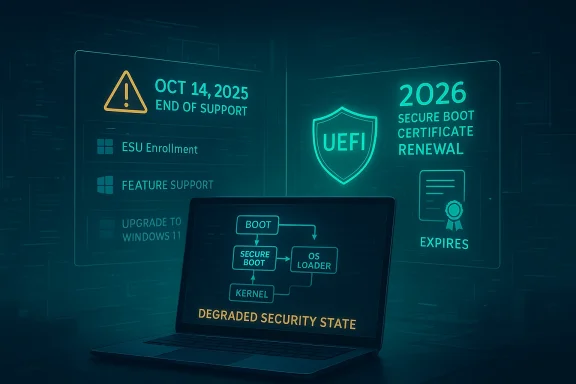
A second layer of urgency comes from the Secure Boot certificate renewal scheduled for 2026. That matters because it affects the trust chain that starts before Windows even loads. In practical terms, the WindowsForum discussions emphasize that a machine can still boot while falling into a degraded security state if it does not receive updated certificates or cannot persist them properly in firmware. That is an especially uncomfortable prospect for older Windows 10 systems, many of which are already out of routine support.
The key point is that “Windows 10 end of life” is no longer just a licensing or patching issue. It is now a broader ecosystem migration, touching firmware trust, application feature delivery, enterprise compliance, and device refresh decisions all at once. For readers trying to decide whether this is a normal product sunset or a more serious platform reset, the evidence strongly points to the latter.
The WindowsForum threads repeatedly frame the issue as one of operational reality rather than abstract policy. Once support ends, the system does not suddenly stop functioning; instead, the risk profile changes quietly and steadily. That makes the transition harder, because users often interpret continued booting and normal app behavior as proof that nothing has changed, when in fact the security baseline has already shifted.
That is why the WindowsForum coverage treats Extended Security Updates as a bridge rather than a solution. ESU may buy time, but it does not restore the old relationship between Microsoft and the user. The platform is still aging out, and the core decision is whether that time is being used to migrate, to replatform, or simply to delay the inevitable.
Key consequences include:
That hardware split has wider implications than support status. It changes procurement, repair, sustainability, and replacement planning. In effect, Microsoft has moved the Windows ecosystem from a universal platform model to a tiered one, where newer hardware gets the full experience and older hardware gets only limited runway, if any.
That matters because pre-boot compromise is one of the hardest security problems to remediate after the fact. Once the firmware layer is not properly updated, revocation lists and replacement certificates become harder to deploy, especially across old or lightly managed machines. The WindowsForum threads make the point bluntly: the device may appear usable, but it has fallen behind on the trust infrastructure that modern Windows depends on.
The WindowsForum discussion also makes clear that Microsoft and OEMs are already pushing replacement certificates, but the rollout depends on both Windows servicing and firmware cooperation. That means success is not just a software question. It is a coordination problem across Microsoft, hardware vendors, device firmware, and end-user maintenance practices.
That makes the issue particularly relevant to unmanaged devices, older laptops, and small-business PCs that rarely see proactive firmware maintenance. For those systems, the risk is not only missing an update; it is missing the update mechanism for a core security layer. In the WindowsForum framing, that is a degraded security state by design, not by accident.
That split matters because productivity software is often the last reason people resist an OS migration. Many users do not care whether the desktop shell is current; they care whether their Office apps, sync services, and collaboration tools work reliably. By preserving security updates while ending feature growth, Microsoft preserves business continuity but quietly narrows the future of the platform. This is migration by subtraction.
For enterprises, the stakes are stricter. Feature freezes and lifecycle deadlines affect change management, validation cycles, and support tickets. Once the productivity stack stops evolving on Windows 10, IT teams must decide whether to pin users to a stable but aging environment or move them onto Windows 11 before compatibility debt accumulates.
That divide creates a strategic fork for consumers and IT departments alike. If the device can run Windows 11, the decision is mainly about timing, backup discipline, and change management. If it cannot, the decision becomes far more expensive and complicated, because the options narrow to replacement, workaround, or accepting risk.
The environmental implications are equally serious. When large numbers of still-functional PCs are replaced early, e-waste rises, and the sustainability argument for faster platform churn gets weaker. The WindowsForum posts capture this concern directly, treating forced obsolescence as a real social cost rather than a rhetorical complaint. That critique is not trivial; it is one of the strongest counterarguments to Microsoft’s hardware-forward strategy.
Users should think in terms of decision bands:
The WindowsForum coverage reflects this by repeatedly framing Windows 10’s retirement alongside ESU, Windows 11 migration, and risk narrowing. That is exactly how enterprise IT thinks about it: not as a single date, but as a sequence of gates. Patch coverage, app compatibility, device readiness, and user training all have to line up or the migration stalls.
The Microsoft 365 support changes deepen the load because application support and OS support no longer move in lockstep. That means IT may be required to manage a hybrid environment in which some users are on Windows 11, some remain on Windows 10 with security-only continuity, and some sit outside the preferred support envelope entirely. That kind of fleet fragmentation increases complexity and makes standardization harder.
That is also why many businesses are likely to adopt a two-track strategy: immediate migration for compatible devices, and tightly controlled exceptions for legacy hardware. The exceptions will likely be narrower than users expect, because every exception adds cost and risk. In enterprise terms, Windows 10 is quickly becoming a special case rather than a default.
The WindowsForum posts suggest that this misunderstanding is now becoming expensive. People often think they can postpone the transition because “nothing has happened yet,” but the transition is already underway. Once support ends, the absence of an immediate failure is not evidence of safety; it is evidence that the delay has not yet been punished.
The third trap is assuming that a machine that still boots will continue to be trusted in the same way. Secure Boot renewal shows why that is a dangerous assumption. A PC can appear healthy while quietly losing the ability to receive new boot-chain protections, and that is exactly the kind of state consumers are least likely to notice.
There is also the alternative operating system angle. When users conclude that their hardware is still adequate but Microsoft’s requirements are not, some will explore Linux or other platforms instead of buying a new Windows PC. The WindowsForum material hints at exactly this kind of spillover, which is a reminder that lifecycle decisions can have competitive consequences beyond the Windows ecosystem.
Independent repair and refurbishment ecosystems may benefit as users attempt to extend the life of existing hardware. That helps blunt e-waste, but it also underscores how much latent value remains in the installed base. When a machine is still physically functional but commercially deprecated, the market begins to split between technical capability and policy eligibility.
The danger is that many users mistake “works for my tasks” for “good enough indefinitely.” That may hold for a while, but it becomes a weaker argument each time Microsoft extends the rest of the Windows ecosystem further away from Windows 10. The platform is no longer where Microsoft is investing its future effort. That is the real message behind every deadline, update, and transition notice.
The most important thing to watch is whether the industry absorbs the transition as a normal refresh cycle or treats it as a broader warning about software dependency, device longevity, and the cost of platform consolidation. If Secure Boot renewal and Windows 10 end-of-support both proceed smoothly, many users will barely notice the infrastructure work behind the scenes. If they do not, the current “alarm” around Windows 10 will look mild compared with what comes next.
Source: Fathom Journal Fathom - For a deeper understanding of Israel, the region, and global antisemitism
 Overview
Windows 10 arrived in 2015 and became the default desktop operating system for much of the world’s PC market. For years, it offered the kind of broad compatibility that made IT departments comfortable and home users complacent: it was familiar, stable, and supported across a huge ecosystem of hardware and software. Microsoft’s original support timeline gave the platform a long runway, but that runway has now ended, and the consequences are more layered than many people first assumed.The first and most visible deadline was October 14, 2025, when Microsoft ended mainstream support for Windows 10. That means no routine free security fixes for the base operating system, which immediately changes the risk calculation for consumers and enterprises. In the WindowsForum coverage, the tone is unmistakable: upgrade, enroll in ESU, or accept increasing exposure. There is no “wait and see” option anymore.
But the Windows 10 story does not stop at the operating system’s end-of-support date. Microsoft has also extended some Microsoft 365 security support on Windows 10 into 2028 while ending new feature additions sooner, which creates a split between basic safety and product evolution. That is a classic Microsoft pattern: preserve continuity where necessary, but tilt every strategic incentive toward the newer platform. For users, the result is a gradual squeeze rather than a single cliff edge.
A second layer of urgency comes from the Secure Boot certificate renewal scheduled for 2026. That matters because it affects the trust chain that starts before Windows even loads. In practical terms, the WindowsForum discussions emphasize that a machine can still boot while falling into a degraded security state if it does not receive updated certificates or cannot persist them properly in firmware. That is an especially uncomfortable prospect for older Windows 10 systems, many of which are already out of routine support.
The key point is that “Windows 10 end of life” is no longer just a licensing or patching issue. It is now a broader ecosystem migration, touching firmware trust, application feature delivery, enterprise compliance, and device refresh decisions all at once. For readers trying to decide whether this is a normal product sunset or a more serious platform reset, the evidence strongly points to the latter.
Why Windows 10’s End Matters More Than Past Windows Retirements
Microsoft has ended support for older Windows releases before, but Windows 10 is different because of scale and inertia. It was not a niche edition that only a small subset of enthusiasts still ran; it became the default environment for consumers, small businesses, schools, and corporate fleets. That means the support cutoff affects every layer of the PC ecosystem at once, from home users to enterprise admins to OEMs and software vendors.The WindowsForum threads repeatedly frame the issue as one of operational reality rather than abstract policy. Once support ends, the system does not suddenly stop functioning; instead, the risk profile changes quietly and steadily. That makes the transition harder, because users often interpret continued booting and normal app behavior as proof that nothing has changed, when in fact the security baseline has already shifted.
The security model changes first
The biggest misunderstanding around end-of-support is that people assume the OS is either “safe” or “unsafe.” In reality, security degrades in layers. Once patching stops, attackers gain time, defenders lose coverage, and any new exploit discovered afterward becomes more valuable against unpatched systems. The result is not instant catastrophe, but a widening window of exposure.That is why the WindowsForum coverage treats Extended Security Updates as a bridge rather than a solution. ESU may buy time, but it does not restore the old relationship between Microsoft and the user. The platform is still aging out, and the core decision is whether that time is being used to migrate, to replatform, or simply to delay the inevitable.
Key consequences include:
- No routine free fixes for mainstream Windows 10 editions after the cutoff.
- Rising exposure to newly discovered vulnerabilities.
- Greater compliance risk for business environments with audit obligations.
- More pressure to test Windows 11 compatibility sooner rather than later.
- A shrinking support runway for ancillary Microsoft software on Windows 10.
End-of-support is also a hardware story
Windows 10’s retirement is inseparable from the Windows 11 hardware bar. Machines that cannot meet Windows 11’s requirements do not simply “miss out” on a feature update; they are pushed into a separate lifecycle category altogether. That divide is what makes the transition politically and economically difficult, because it creates a large class of still-functional PCs that are no longer aligned with Microsoft’s future roadmap.That hardware split has wider implications than support status. It changes procurement, repair, sustainability, and replacement planning. In effect, Microsoft has moved the Windows ecosystem from a universal platform model to a tiered one, where newer hardware gets the full experience and older hardware gets only limited runway, if any.
Secure Boot Renewal Turns a Support Story Into a Trust Story
The Secure Boot certificate refresh is one of the most technically important developments in the Windows transition, even if it sounds more obscure than Windows 10 end-of-support. Secure Boot is part of the UEFI platform trust model, and it governs what code is allowed to run before the operating system starts. If that trust chain becomes stale, the machine can still boot, but the platform loses the ability to receive future pre-boot protections in the same way.That matters because pre-boot compromise is one of the hardest security problems to remediate after the fact. Once the firmware layer is not properly updated, revocation lists and replacement certificates become harder to deploy, especially across old or lightly managed machines. The WindowsForum threads make the point bluntly: the device may appear usable, but it has fallen behind on the trust infrastructure that modern Windows depends on.
Why the certificate issue is so disruptive
Certificate expirations are not the kind of event most consumers notice until they are already affected. That is why this issue is so easy to underestimate. Unlike a visible app change or a new interface prompt, Secure Boot renewal happens below the surface, and any failure there can leave organizations with a platform that looks fine while silently aging out of its security guarantees. That is precisely the kind of problem enterprises hate most.The WindowsForum discussion also makes clear that Microsoft and OEMs are already pushing replacement certificates, but the rollout depends on both Windows servicing and firmware cooperation. That means success is not just a software question. It is a coordination problem across Microsoft, hardware vendors, device firmware, and end-user maintenance practices.
What users actually need to understand
The main practical takeaway is that Secure Boot renewal creates a second deadline behind the Windows 10 support cutoff. Users who assumed that staying on Windows 10 with an ESU-style bridge would insulate them from platform changes are likely mistaken. The boot chain itself is evolving, and legacy systems that are not serviced appropriately may lose important protections even if Windows still starts normally.That makes the issue particularly relevant to unmanaged devices, older laptops, and small-business PCs that rarely see proactive firmware maintenance. For those systems, the risk is not only missing an update; it is missing the update mechanism for a core security layer. In the WindowsForum framing, that is a degraded security state by design, not by accident.
Microsoft 365 Support: The Soft Transition With Hard Consequences
Microsoft’s handling of Microsoft 365 on Windows 10 shows a more nuanced version of the company’s migration strategy. Rather than cutting everything off at once, Microsoft is phasing support so that security updates continue longer than feature updates. This is a deliberate compromise: it keeps users safe enough to stay operational, while removing the incentive to remain on Windows 10 for new capabilities.That split matters because productivity software is often the last reason people resist an OS migration. Many users do not care whether the desktop shell is current; they care whether their Office apps, sync services, and collaboration tools work reliably. By preserving security updates while ending feature growth, Microsoft preserves business continuity but quietly narrows the future of the platform. This is migration by subtraction.
Consumer and enterprise effects are not identical
For consumers, the Microsoft 365 change mostly means that Windows 10 may continue to feel familiar longer than expected, even as the platform becomes less future-proof. That can create false confidence. A system that still opens Word, Outlook, and Teams can seem “fine,” even when its underlying operating system is no longer receiving the full attention modern Microsoft intends.For enterprises, the stakes are stricter. Feature freezes and lifecycle deadlines affect change management, validation cycles, and support tickets. Once the productivity stack stops evolving on Windows 10, IT teams must decide whether to pin users to a stable but aging environment or move them onto Windows 11 before compatibility debt accumulates.
Why this matters strategically
Microsoft’s approach here is classic platform leverage. Windows is not being retired in isolation; it is being surrounded by increasingly compelling adjacent services, from feature-rich Microsoft 365 apps to modern security expectations and new hardware capabilities. The company is making the old path functional, but progressively less attractive. That is a subtler, and arguably more effective, form of pressure than a hard cutoff.- Security updates continue longer than feature updates.
- New functionality becomes a Windows 11 advantage.
- IT teams face a longer validation burden on older systems.
- Consumers may misread “works today” as “safe tomorrow.”
- The productivity stack becomes part of the upgrade decision.
The Upgrade Divide: Capable PCs, Ineligible PCs, and the Cost of Waiting
One of the most important themes in the WindowsForum material is the divide between PCs that can upgrade to Windows 11 and PCs that cannot. This is not a minor compatibility footnote; it is the core market story. A very large number of devices remain technically usable but fall short of Microsoft’s modern hardware requirements, which turns the Windows 10 sunset into a hardware lifecycle problem as much as a software one.That divide creates a strategic fork for consumers and IT departments alike. If the device can run Windows 11, the decision is mainly about timing, backup discipline, and change management. If it cannot, the decision becomes far more expensive and complicated, because the options narrow to replacement, workaround, or accepting risk.
The economic reality behind the upgrade pressure
The most obvious impact is cost. Replacing a working PC because the operating system has moved on is a hard sell, especially in households and small businesses where hardware budgets are constrained. That is why Windows 10’s end-of-support has generated so much frustration: the issue is not that the machines are broken, but that the ecosystem no longer wants to keep treating them as first-class citizens.The environmental implications are equally serious. When large numbers of still-functional PCs are replaced early, e-waste rises, and the sustainability argument for faster platform churn gets weaker. The WindowsForum posts capture this concern directly, treating forced obsolescence as a real social cost rather than a rhetorical complaint. That critique is not trivial; it is one of the strongest counterarguments to Microsoft’s hardware-forward strategy.
What this means for planning
For organizations, the upgrade divide requires segmentation. Some fleets can be migrated in place. Others need refresh programs, new imaging, or even complete application revalidation. That is why so many IT leaders prefer to treat end-of-support dates as project launch dates rather than deadlines, because the actual work begins well before the cutoff.Users should think in terms of decision bands:
- Upgrade now if the machine fully supports Windows 11.
- Enroll in ESU if you need short-term breathing room.
- Replace the device if the hardware is not eligible.
- Isolate or restrict the machine if it must remain on Windows 10 temporarily.
Enterprise Reality: Compliance, Testing, and Fleet Management
Enterprises experience Windows 10 retirement as a governance issue, not just a technical one. A large organization cannot simply “upgrade when convenient,” because support status affects audit posture, software validation, incident response, and vendor relationships. Once mainstream support ends, every endpoint decision becomes more defensible if it is documented, scheduled, and risk-assessed.The WindowsForum coverage reflects this by repeatedly framing Windows 10’s retirement alongside ESU, Windows 11 migration, and risk narrowing. That is exactly how enterprise IT thinks about it: not as a single date, but as a sequence of gates. Patch coverage, app compatibility, device readiness, and user training all have to line up or the migration stalls.
The hidden work behind a successful migration
A smooth upgrade is rarely just an operating system install. Enterprises need to validate drivers, peripheral support, line-of-business software, identity tooling, disk encryption, and recovery procedures. If any of those break, the problem grows from a desktop refresh into an availability issue. That is why “just upgrade” is bad advice at scale.The Microsoft 365 support changes deepen the load because application support and OS support no longer move in lockstep. That means IT may be required to manage a hybrid environment in which some users are on Windows 11, some remain on Windows 10 with security-only continuity, and some sit outside the preferred support envelope entirely. That kind of fleet fragmentation increases complexity and makes standardization harder.
Why compliance teams are watching closely
Compliance teams care less about how long a machine can boot and more about whether the environment is supportable, patchable, and auditable. Unsupported platforms can trigger insurance, regulatory, and vendor-contract concerns long before a security incident occurs. In that context, Windows 10’s retirement is not a product lifecycle event; it is a control failure if unmanaged.That is also why many businesses are likely to adopt a two-track strategy: immediate migration for compatible devices, and tightly controlled exceptions for legacy hardware. The exceptions will likely be narrower than users expect, because every exception adds cost and risk. In enterprise terms, Windows 10 is quickly becoming a special case rather than a default.
Consumer Reality: Confusion, Friction, and False Confidence
Consumers face a very different psychological challenge. Most home users do not track lifecycle policy, certificate expirations, or platform trust chains. They notice whether their PC turns on, whether their apps open, and whether updates appear to still “work.” That gap between visible function and hidden risk is where the biggest misunderstanding around Windows 10 lives.The WindowsForum posts suggest that this misunderstanding is now becoming expensive. People often think they can postpone the transition because “nothing has happened yet,” but the transition is already underway. Once support ends, the absence of an immediate failure is not evidence of safety; it is evidence that the delay has not yet been punished.
The most common consumer traps
The first trap is assuming that ESU is the same as regular support. It is not. ESU is a bridge, not a restoration of the old Windows 10 lifecycle. The second trap is assuming that a working Microsoft 365 app stack means the OS is still broadly healthy. Again, not true; support tiers now diverge.The third trap is assuming that a machine that still boots will continue to be trusted in the same way. Secure Boot renewal shows why that is a dangerous assumption. A PC can appear healthy while quietly losing the ability to receive new boot-chain protections, and that is exactly the kind of state consumers are least likely to notice.
What home users should prioritize
For most consumers, the practical priorities are simple: back up data, check Windows 11 eligibility, and decide whether the device is a short-term bridge or a long-term holdout. If the machine is incompatible with Windows 11, the next decision is whether to buy time, replace hardware, or reduce the device’s role to low-risk tasks. That is not as dramatic as a forced shutdown, but it is still a meaningful change in how the PC should be used.- Back up personal files before making changes.
- Confirm whether the PC meets Windows 11 requirements.
- Understand whether ESU applies and for how long.
- Keep firmware and security settings current where possible.
- Reduce exposure on aging hardware if migration must wait.
Market Implications: OEMs, Repair Shops, and Linux Alternatives
Windows 10’s retirement is reshaping adjacent markets, not just Microsoft’s own product line. PC makers benefit from replacement demand, but they also inherit the pressure of explaining why a still-usable machine has suddenly become a migration candidate. Repair shops and independent technicians may see more business as users seek upgrades, firmware support, and compatibility checks before replacing hardware.There is also the alternative operating system angle. When users conclude that their hardware is still adequate but Microsoft’s requirements are not, some will explore Linux or other platforms instead of buying a new Windows PC. The WindowsForum material hints at exactly this kind of spillover, which is a reminder that lifecycle decisions can have competitive consequences beyond the Windows ecosystem.
Why this pressure can work both ways
For OEMs, the transition can be a sales opportunity, particularly for AI-capable Copilot+ machines and newer Windows 11 devices. But it can also create resistance, especially if users interpret the hardware bar as artificial or wasteful. In other words, Microsoft’s upgrade pressure may stimulate new-device demand while simultaneously strengthening the case for non-Windows alternatives among a subset of users. That is a delicate balance.Independent repair and refurbishment ecosystems may benefit as users attempt to extend the life of existing hardware. That helps blunt e-waste, but it also underscores how much latent value remains in the installed base. When a machine is still physically functional but commercially deprecated, the market begins to split between technical capability and policy eligibility.
The competitive angle
Microsoft’s broader bet is that most users will remain inside the Windows world and move forward with new hardware or supported upgrades. That is plausible, especially in enterprise settings where software compatibility matters. But every hard lifecycle decision gives rivals an opening, whether that is Linux on the desktop, ChromeOS in education, or simply longer PC refresh cycles outside Microsoft’s preferred rhythm.Practical Decision Framework for Windows 10 Holdouts
The best way to think about the Windows 10 transition is to break it into decisions rather than emotions. Users who are still on Windows 10 need a plan, not a slogan. The WindowsForum coverage repeatedly points toward the same conclusion: the right answer depends on hardware age, business need, and how much risk the user is willing to carry.A sensible sequence
A disciplined response usually looks like this:- Inventory the devices still on Windows 10.
- Determine which are eligible for Windows 11.
- Separate business-critical systems from low-risk systems.
- Decide whether ESU is a bridge worth paying for.
- Schedule replacement for the devices that cannot reasonably be migrated.
When “wait” is defensible
There are a few cases where temporary waiting makes sense. A system might be isolated from the internet, used for a narrow purpose, or tied to a legacy application that cannot yet move. In those cases, the risk calculation is different, but the decision should still be explicit and documented. Silence is not a strategy.The danger is that many users mistake “works for my tasks” for “good enough indefinitely.” That may hold for a while, but it becomes a weaker argument each time Microsoft extends the rest of the Windows ecosystem further away from Windows 10. The platform is no longer where Microsoft is investing its future effort. That is the real message behind every deadline, update, and transition notice.
Strengths and Opportunities
The Windows 10 transition is disruptive, but it also gives users and organizations a rare chance to clean up old assumptions about fleet management, app support, and device security. It can be painful in the short term and beneficial in the long term if handled deliberately. The upside is not that Microsoft has made the change easy; it is that the change forces better planning.- Cleaner security posture across supported devices.
- Better hardware alignment with modern Windows features.
- Opportunity to rationalize fleets and retire junk systems.
- Improved lifecycle discipline for patches and firmware.
- More deliberate app testing before new deployments.
- Potential productivity gains from newer hardware platforms.
- A chance to reduce hidden risk in legacy endpoints.
Risks and Concerns
The downsides are equally clear. Windows 10’s retirement can increase costs, create uncertainty, and leave users with a false sense of security if they continue using aging systems without a formal plan. The risk is not just malware; it is the cumulative effect of unsupported software, incomplete firmware transitions, and fragmented support promises.- Unpatched vulnerabilities on unsupported devices.
- Firmware update failures during Secure Boot renewal.
- E-waste growth from premature hardware replacement.
- Budget pressure on households and small businesses.
- User confusion about ESU versus full support.
- Compliance exposure for organizations that delay too long.
- Application fragmentation as support tiers diverge.
Looking Ahead
The next phase of this story will be defined by execution, not announcements. Microsoft has already drawn the lines, but the real test is whether users, OEMs, and IT departments can move devices, firmware, and applications through those lines without creating new security gaps or unnecessary waste. In that sense, Windows 10’s retirement is not over; it is entering its most operationally difficult stage.The most important thing to watch is whether the industry absorbs the transition as a normal refresh cycle or treats it as a broader warning about software dependency, device longevity, and the cost of platform consolidation. If Secure Boot renewal and Windows 10 end-of-support both proceed smoothly, many users will barely notice the infrastructure work behind the scenes. If they do not, the current “alarm” around Windows 10 will look mild compared with what comes next.
- Secure Boot certificate rollout success or failure.
- Uptake of ESU among consumers and enterprises.
- Windows 11 migration speed on eligible hardware.
- Replacement demand for ineligible Windows 10 PCs.
- Growth in alternative OS experimentation.
- Microsoft 365 feature and support milestones on Windows 10.
Source: Fathom Journal Fathom - For a deeper understanding of Israel, the region, and global antisemitism