

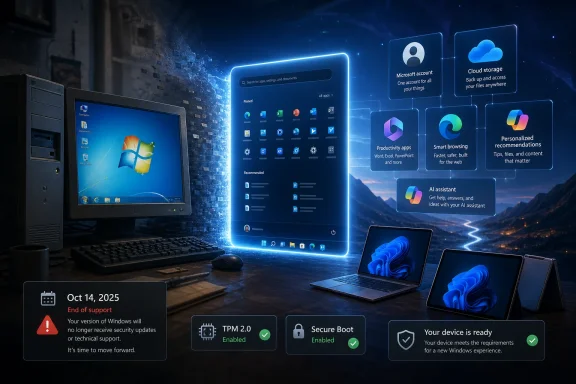
Microsoft ended mainstream Windows 10 support on October 14, 2025, leaving users of unsupported Windows 10 PCs to choose among Windows 11, paid or limited extended updates, new hardware, or a different operating system. That deadline did not create the frustration around modern Windows, but it made the frustration harder to ignore. The larger story is not that Windows suddenly became bad. It is that Windows has gradually changed from a neutral PC operating system into the front door of Microsoft’s services business.
The nostalgia around Windows 7 is often dismissed as the usual aging-user resistance to change, but that explanation is too easy. Windows 7 was not loved because it was flawless. It was loved because it behaved like infrastructure: it loaded, stayed mostly out of the way, and treated the local PC as the center of the user’s work.
That distinction matters. The Start menu was not merely a launcher; it was a compact expression of the desktop PC’s logic. Files lived locally, programs behaved like programs, and the operating system’s job was to make the machine usable rather than to reinterpret the machine as a storefront, cloud terminal, or engagement surface.
Windows 7 also arrived after Vista, which gave it the advantage of feeling like a correction. It refined rather than reinvented. Jump Lists, Libraries, better taskbar behavior, and a generally more coherent desktop made the system feel modern without asking users to relearn the basic grammar of personal computing.
The reason Windows 7’s emotional lifespan outlasted its official support lifecycle is that it represented a bargain many users still want. Microsoft could improve the platform, patch the platform, and sell software for the platform, but the PC itself still felt like the user’s domain. That bargain is what later versions of Windows began to renegotiate.
Microsoft completed Windows 8 in August 2012 and released it broadly on October 26, 2012, at the height of the tablet boom. The company saw the iPad, saw touchscreens, saw a consumer market moving away from beige-box assumptions, and decided that Windows needed to become something more aggressively modern. The result was a system that treated the traditional desktop not as the foundation of Windows, but as one environment among others.
The full-screen Start screen was the symbol of that miscalculation. On a tablet, large tiles and touch-first navigation had a kind of logic. On a desktop with a mouse, keyboard, multiple windows, and decades of muscle memory, the design felt like a hostile takeover by a product strategy deck.
This is where the current Windows debate really begins. Windows 8 was not just an unpopular interface experiment; it was the first mass-market signal that Microsoft was willing to subordinate the classic PC experience to a broader platform ambition. The company wanted one Windows across devices, one app model, one store, one design language, and one strategic answer to mobile disruption.
The problem was that desktop users had not asked to be rescued from the desktop. They had asked for faster boot times, better security, cleaner updates, less cruft, and fewer interruptions. Windows 8 gave them a new metaphysics of computing instead.
But Windows 10 was also the point at which the business model shifted into the foreground. Microsoft stopped treating Windows as a boxed product that users bought every few years and started treating it as a continually serviced platform. That change brought benefits, including faster security fixes and more regular feature delivery. It also changed the operating system’s incentives.
A product you buy once has a natural reason to satisfy you at the moment of purchase. A platform that serves as a channel for subscriptions, search, cloud storage, app distribution, advertising, and AI has reasons to keep nudging you after the purchase. Those nudges may be individually small, but collectively they change the feel of the machine.
This is why so many Windows 10-era arguments became arguments about consent. Telemetry, upgrade prompts, Microsoft account pressure, OneDrive integration, recommended apps, Start menu suggestions, Edge prompts, and web-connected search were not all the same issue technically. Psychologically, though, they landed in the same place: users felt Windows was no longer simply helping them operate the PC, but steering them through Microsoft’s preferred funnel.
Satya Nadella’s early “mobile-first, cloud-first” framing made strategic sense for Microsoft. The old Windows monopoly could no longer be the company’s entire center of gravity. Azure, Microsoft 365, identity, cloud storage, security services, and eventually AI would become the growth story. Windows, in that world, remained important not only as an operating system but as prime real estate.
That is the crucial shift. Windows did not stop mattering to Microsoft. It started mattering differently.
The complaint is not that Windows is useless. The complaint is that it has become increasingly talkative.
A clean Windows installation now has to be interpreted. Why is this being recommended? Why is that cloud service preselected? Why is a local search field showing web results? Why is an email client becoming Outlook? Why is OneDrive woven into folder setup? Why is Copilot being placed near system workflows? Why does the OS keep reminding users that Microsoft has an account, browser, storage plan, office suite, and AI assistant it would like them to adopt?
Some of these integrations are defensible in isolation. Cloud backup can save people from losing files. Microsoft accounts simplify license recovery and cross-device sync. Security features tied to modern identity can reduce real-world risk. AI tools may eventually become useful in routine administrative work.
The trouble is that Windows increasingly struggles to distinguish help from acquisition. A helpful operating system offers a capability and lets the user decide. A growth-oriented operating system keeps returning to the same pitch until the user accepts, disables, ignores, or works around it.
That is why the phrase “ads in Windows” can be both too crude and emotionally accurate. Not every prompt is an advertisement in the old banner-ad sense. But many users experience the accumulated recommendations, cross-promotions, service defaults, and subscription pathways as advertising because they interrupt the older expectation that the OS is a neutral layer.
Microsoft’s security argument is not imaginary. TPM-backed features can support stronger device encryption, credential protection, Windows Hello, measured boot, and other defenses that matter in a world of ransomware, phishing, and increasingly automated attacks. Enterprise administrators understand the appeal of a cleaner hardware baseline.
But users do not experience requirements as white papers. They experience them as a working PC being told it is no longer invited.
That tension is especially sharp because Windows has historically been the operating system of messy continuity. One of Microsoft’s great strengths was that it supported sprawling combinations of old software, commodity hardware, strange peripherals, and long-lived business workflows. Windows was the place where the old thing probably still worked.
Windows 11 narrowed that promise. It did not end backward compatibility, but it made clear that the future of Windows would be built around a more curated definition of acceptable hardware. For buyers of new PCs, that may be invisible. For households, small businesses, nonprofits, schools, hobbyists, and anyone running older but usable machines, it feels like software policy turning into hardware churn.
After October 14, 2025, ordinary Windows 10 users no longer receive the same free stream of security updates, feature updates, and technical assistance that defined the supported lifecycle. The PC still boots. The applications still run. But the risk profile changes, especially as newly discovered vulnerabilities accumulate outside the normal patch channel.
This is where Microsoft’s lifecycle model collides with the physical reality of the PC market. Many Windows 10 systems are not broken. They are not incapable of browsing the web, writing documents, joining video calls, playing games, managing photos, or running line-of-business software. Their problem is that they fall outside Microsoft’s chosen future.
For IT departments, the deadline has been both predictable and painful. Large organizations have had years to plan, but “years to plan” does not magically upgrade specialty hardware, validate old applications, rewrite procurement budgets, or solve compatibility issues in industrial, medical, educational, or municipal environments. A support deadline is simple on a lifecycle page and complicated everywhere else.
For consumers, the deadline is even murkier. Many people do not think in operating-system lifecycles. They think in terms of whether the laptop still works. When the machine works but the vendor says it should be replaced, the result is not gratitude for security discipline. It is suspicion that the software industry has found another way to shorten the life of hardware.
Microsoft can fairly respond that insecure old PCs are bad for everyone. That is true. But the company also benefits when the answer to an unsupported PC is a new Windows 11 device tied more closely to Microsoft accounts, Microsoft 365, OneDrive, Edge, Bing, Store apps, and Copilot. Security may be the stated rationale, but ecosystem gravity is the business outcome.
There are reasonable product arguments for consolidation. Maintaining multiple mail clients is expensive. Outlook is a stronger brand. Web-backed clients can be updated more quickly. Microsoft wants a consistent experience across consumer, business, and Microsoft 365 environments.
But the user’s experience is again one of substitution rather than simple improvement. A local-feeling utility becomes a service-shaped app. Basic communication becomes another doorway into account identity, cloud integration, advertising distinctions, and paid Microsoft 365 positioning.
This is why the Mail-to-Outlook transition irritated users beyond its raw technical importance. It fit a pattern they already recognized. A simple Windows component disappears, and the replacement is more aligned with Microsoft’s revenue architecture.
To be clear, this is not unique to Microsoft. Apple uses macOS and iOS to reinforce iCloud, Apple Music, Apple TV+, the App Store, and Apple ID. Google uses Android and ChromeOS to reinforce Search, Gmail, Drive, Play services, and Gemini. The entire industry has moved toward operating systems as service ecosystems.
The difference is that Windows carries a particular historical expectation. It was the general-purpose PC platform, the messy neutral zone, the place where users could assemble their own computing life from local files, third-party programs, odd utilities, and personal habits. When Windows behaves more like a managed commercial entry point, the sense of betrayal is sharper.
Microsoft keeps trying to modernize Windows without fully replacing the administrative logic that made Windows powerful. The result is an operating system with two voices. One voice says the PC is a consumer device with simplified settings and guided defaults. The other voice says the PC is a configurable machine whose owner may need precise control.
Power users are not nostalgic for ugly dialog boxes because they enjoy visual clutter. They are attached to older management surfaces because those surfaces often expressed a relationship of agency. They exposed options. They assumed the user or administrator might know what they were doing. They did not always try to optimize the user into a vendor-preferred path.
Settings, by contrast, often feels like a curated corridor. It is cleaner, but not always more capable. It is friendlier, but sometimes less direct. It is modern, but frequently more connected to account status, cloud features, and recommendation flows.
This is why UI consolidation alone will not fix the complaint. Microsoft could finally move every Control Panel applet into Settings and still leave users dissatisfied if the destination feels less like control and more like compliance. The real issue is trust: whether Windows is exposing the machine or managing the user.
That does not make AI inherently bad for Windows. A genuinely useful local assistant could help users find obscure settings, summarize system events, explain errors, automate repetitive tasks, and assist administrators with policy analysis. If Microsoft built AI as a respectful power tool, Windows could become easier without becoming more patronizing.
The risk is that AI becomes the most sophisticated recommendation engine Windows has ever had. If the assistant’s job is partly to guide users toward Microsoft services, cloud workflows, Microsoft 365 subscriptions, Edge, Bing, or paid AI tiers, then the operating system’s role changes again. It stops merely displaying prompts and starts mediating intent.
That is a profound shift. The operating system has always shaped behavior through defaults, but AI can shape behavior through conversation. It can suggest, summarize, prioritize, and decide what context matters. Users who already worry that Windows is too eager to steer them will not be reassured by a more intelligent steering wheel.
Enterprise IT will be especially cautious here. Administrators want automation, but they also want auditability, policy control, data boundaries, and predictable failure modes. Consumer enthusiasm for AI features does not erase corporate anxiety about where prompts, telemetry, documents, and system context may travel.
Microsoft knows this, which is why it has spent so much effort packaging AI in security and productivity language. But the credibility problem remains. Windows users have spent a decade watching helpful features arrive wrapped in ecosystem incentives. They will judge AI in Windows not only by what it can do, but by whose interests it appears to serve first.
But Linux is not a universal escape hatch. Gaming has improved dramatically thanks to Proton, Steam Deck momentum, and better driver support, yet it remains uneven for some multiplayer titles, anti-cheat systems, creative tools, and niche peripherals. Professional software ecosystems still bind many users to Windows. Businesses often have line-of-business applications, device management assumptions, and vendor support contracts that make wholesale migration unrealistic.
The better argument for Linux is not that everyone should switch tomorrow. It is that Microsoft’s choices make alternatives more credible than they used to be. Every unwanted prompt, forced migration, hardware cutoff, and cloud-first substitution teaches a fraction of users to ask whether they still need Windows for everything.
That matters even if most people stay. Platform power is not only about market share; it is about the absence of plausible alternatives. The more Windows feels like an ecosystem tollbooth, the more value users will place on platforms that feel boring, local, and user-governed.
Microsoft should worry less about the mythical “year of the Linux desktop” and more about the slow erosion of goodwill among the exact people who used to defend Windows in homes, offices, schools, and forums. Enthusiasts are not the whole market, but they are often the people who tell everyone else what to buy, what to disable, and what to avoid.
Both positions have logic. Microsoft operates in a world where one-time OS licensing cannot carry the company’s consumer ambitions. Users operate in a world where subscriptions, accounts, telemetry, and recommendations have invaded nearly every screen they own. Windows sits at the point of collision.
This explains why seemingly small changes generate outsized anger. A new default app is not just a new default app. A Microsoft account prompt is not just a sign-in screen. A Start menu recommendation is not just a tile. Each one becomes evidence in a larger case about whether the PC is still personal.
The tragedy for Microsoft is that much of modern Windows is technically good. Windows 11 is more secure than Windows 7. Hardware-backed protections matter. Driver reliability is better than in the old days. Gaming support is excellent. Windows Terminal, WSL, winget, virtualization improvements, and developer tooling show that Microsoft can still serve demanding users well.
But trust is not earned only through kernel hardening and feature checklists. It is earned through restraint. The best operating system features often disappear into the user’s intent. They make the work easier without turning the work into an opportunity for conversion.
Modern Windows too often fails that test. It keeps reminding users that Microsoft’s priorities are present in the room.
The practical choices are now familiar. Upgrade to Windows 11 if the hardware supports it. Use extended security options where available and appropriate. Replace the PC. Move some workloads to Linux, macOS, ChromeOS, or the cloud. Keep running unsupported Windows 10 and accept increasing risk, which is the least defensible option for any internet-connected machine that handles sensitive information.
What makes this moment different from earlier Windows transitions is the depth of resistance among users whose hardware still feels adequate. Windows XP holdouts often clung to a beloved but visibly aging world. Windows 7 holdouts resisted Windows 10’s servicing and telemetry model, but hardware replacement eventually made the transition easier. Windows 10 users are being pushed toward Windows 11 in an era when many PCs have fast SSDs, enough RAM, decent CPUs, and no obvious everyday performance crisis.
That is why the upgrade pressure feels less like progress and more like policy. The user can see that the computer still works. Microsoft can see that the computer no longer fits the company’s security and ecosystem baseline. The gap between those perspectives is where resentment grows.
For administrators, the lesson is blunt: Windows lifecycle planning can no longer be separated from hardware lifecycle planning, identity planning, cloud policy, and user-communications strategy. The OS is not a passive layer beneath the business environment. It is an active participant in Microsoft’s broader platform agenda.
Users will ask whether AI features can be removed, disabled, audited, or run locally. Administrators will ask whether Microsoft account and Entra ID assumptions can be separated from basic device use. Privacy-minded users will ask what diagnostic data is collected, how it is used, and whether personalization settings are meaningful. Hardware owners will ask why a machine that works well enough must be retired because a support matrix says so.
Microsoft will answer in the language of security, productivity, simplicity, and modern management. Sometimes it will be right. The threat landscape is worse than it was in the Windows 7 era, and pretending otherwise is not serious. The PC installed base is too large and too targeted for Microsoft to ignore hardware-backed security forever.
But Microsoft’s correct arguments will land badly if they arrive bundled with unnecessary coercion. The company cannot preach trust while using every surface to promote its own stack. It cannot frame Windows as empowering while making local-first use feel like an exception path. It cannot ask users to accept stricter requirements while also making the supported future feel more commercialized.
The Windows franchise has survived bad releases before because the underlying platform remained indispensable. The danger now is subtler. Windows may remain indispensable while becoming less beloved, less trusted, and less instinctively recommended by the people who understand it best.
The movement from Windows 7 to Windows 11 is not a straight line from good to bad. It is a line from tool to gateway. Windows 7 represented the PC as a place where the user began. Windows 11 increasingly represents the PC as a place where Microsoft begins: with identity, cloud storage, productivity subscriptions, search, recommendations, and AI.
That framing explains why the anger is so durable. Users are not merely complaining about change. They are objecting to a changed relationship. The operating system used to feel like it belonged to the machine’s owner; now it more often feels like a negotiated space between the owner’s intent and Microsoft’s commercial agenda.
The company can still change the tone without abandoning its strategy. It could make local accounts more straightforward, reduce promotional surfaces, separate security guidance from service upsells, give administrators cleaner controls, and treat opt-outs as durable choices rather than temporary obstacles. It could remember that restraint is not the enemy of monetization; it is the condition that makes platform power tolerable.
Windows does not need to become Windows 7 again. That world is gone, and not all of it deserves revival. But Windows does need to recover some of the humility that made Windows 7 feel trustworthy: the sense that the operating system’s highest purpose is to serve the user’s work, not to continuously reinterpret that work as an opportunity.
 Windows 7 Became a Memory Because It Knew Its Place
The nostalgia around Windows 7 is often dismissed as the usual aging-user resistance to change, but that explanation is too easy. Windows 7 was not loved because it was flawless. It was loved because it behaved like infrastructure: it loaded, stayed mostly out of the way, and treated the local PC as the center of the user’s work.That distinction matters. The Start menu was not merely a launcher; it was a compact expression of the desktop PC’s logic. Files lived locally, programs behaved like programs, and the operating system’s job was to make the machine usable rather than to reinterpret the machine as a storefront, cloud terminal, or engagement surface.
Windows 7 also arrived after Vista, which gave it the advantage of feeling like a correction. It refined rather than reinvented. Jump Lists, Libraries, better taskbar behavior, and a generally more coherent desktop made the system feel modern without asking users to relearn the basic grammar of personal computing.
The reason Windows 7’s emotional lifespan outlasted its official support lifecycle is that it represented a bargain many users still want. Microsoft could improve the platform, patch the platform, and sell software for the platform, but the PC itself still felt like the user’s domain. That bargain is what later versions of Windows began to renegotiate.
Windows 8 Was the Moment Microsoft Stopped Trusting the Desktop
The sharpest break was not Windows 11. It was Windows 8.Microsoft completed Windows 8 in August 2012 and released it broadly on October 26, 2012, at the height of the tablet boom. The company saw the iPad, saw touchscreens, saw a consumer market moving away from beige-box assumptions, and decided that Windows needed to become something more aggressively modern. The result was a system that treated the traditional desktop not as the foundation of Windows, but as one environment among others.
The full-screen Start screen was the symbol of that miscalculation. On a tablet, large tiles and touch-first navigation had a kind of logic. On a desktop with a mouse, keyboard, multiple windows, and decades of muscle memory, the design felt like a hostile takeover by a product strategy deck.
This is where the current Windows debate really begins. Windows 8 was not just an unpopular interface experiment; it was the first mass-market signal that Microsoft was willing to subordinate the classic PC experience to a broader platform ambition. The company wanted one Windows across devices, one app model, one store, one design language, and one strategic answer to mobile disruption.
The problem was that desktop users had not asked to be rescued from the desktop. They had asked for faster boot times, better security, cleaner updates, less cruft, and fewer interruptions. Windows 8 gave them a new metaphysics of computing instead.
Windows 10 Apologized With One Hand and Repositioned Windows With the Other
Windows 10 looked, at first, like Microsoft had learned the obvious lesson. The Start menu returned. Windowed apps behaved more normally. Virtual desktops, Snap Assist, and improved system plumbing gave power users real reasons to upgrade. For many Windows 7 and Windows 8.1 users, the free upgrade beginning July 29, 2015 felt like an apology wrapped in a migration campaign.But Windows 10 was also the point at which the business model shifted into the foreground. Microsoft stopped treating Windows as a boxed product that users bought every few years and started treating it as a continually serviced platform. That change brought benefits, including faster security fixes and more regular feature delivery. It also changed the operating system’s incentives.
A product you buy once has a natural reason to satisfy you at the moment of purchase. A platform that serves as a channel for subscriptions, search, cloud storage, app distribution, advertising, and AI has reasons to keep nudging you after the purchase. Those nudges may be individually small, but collectively they change the feel of the machine.
This is why so many Windows 10-era arguments became arguments about consent. Telemetry, upgrade prompts, Microsoft account pressure, OneDrive integration, recommended apps, Start menu suggestions, Edge prompts, and web-connected search were not all the same issue technically. Psychologically, though, they landed in the same place: users felt Windows was no longer simply helping them operate the PC, but steering them through Microsoft’s preferred funnel.
Satya Nadella’s early “mobile-first, cloud-first” framing made strategic sense for Microsoft. The old Windows monopoly could no longer be the company’s entire center of gravity. Azure, Microsoft 365, identity, cloud storage, security services, and eventually AI would become the growth story. Windows, in that world, remained important not only as an operating system but as prime real estate.
That is the crucial shift. Windows did not stop mattering to Microsoft. It started mattering differently.
The Operating System Became a Surface for Persuasion
Modern Windows still runs the applications people need. It still supports an enormous hardware ecosystem. It still carries backward compatibility that other platforms would envy. For businesses, gamers, engineers, developers, and ordinary home users, Windows remains deeply practical.The complaint is not that Windows is useless. The complaint is that it has become increasingly talkative.
A clean Windows installation now has to be interpreted. Why is this being recommended? Why is that cloud service preselected? Why is a local search field showing web results? Why is an email client becoming Outlook? Why is OneDrive woven into folder setup? Why is Copilot being placed near system workflows? Why does the OS keep reminding users that Microsoft has an account, browser, storage plan, office suite, and AI assistant it would like them to adopt?
Some of these integrations are defensible in isolation. Cloud backup can save people from losing files. Microsoft accounts simplify license recovery and cross-device sync. Security features tied to modern identity can reduce real-world risk. AI tools may eventually become useful in routine administrative work.
The trouble is that Windows increasingly struggles to distinguish help from acquisition. A helpful operating system offers a capability and lets the user decide. A growth-oriented operating system keeps returning to the same pitch until the user accepts, disables, ignores, or works around it.
That is why the phrase “ads in Windows” can be both too crude and emotionally accurate. Not every prompt is an advertisement in the old banner-ad sense. But many users experience the accumulated recommendations, cross-promotions, service defaults, and subscription pathways as advertising because they interrupt the older expectation that the OS is a neutral layer.
Windows 11 Turned Security Into a Hardware Boundary
Windows 11 continued the same strategic trajectory, but it added a new source of friction: eligibility. Microsoft released Windows 11 on October 5, 2021 as a free upgrade for supported Windows 10 PCs, but the word “supported” did a great deal of work. TPM 2.0, newer CPU requirements, Secure Boot expectations, and Microsoft’s security baseline excluded many machines that were still perfectly competent for everyday computing.Microsoft’s security argument is not imaginary. TPM-backed features can support stronger device encryption, credential protection, Windows Hello, measured boot, and other defenses that matter in a world of ransomware, phishing, and increasingly automated attacks. Enterprise administrators understand the appeal of a cleaner hardware baseline.
But users do not experience requirements as white papers. They experience them as a working PC being told it is no longer invited.
That tension is especially sharp because Windows has historically been the operating system of messy continuity. One of Microsoft’s great strengths was that it supported sprawling combinations of old software, commodity hardware, strange peripherals, and long-lived business workflows. Windows was the place where the old thing probably still worked.
Windows 11 narrowed that promise. It did not end backward compatibility, but it made clear that the future of Windows would be built around a more curated definition of acceptable hardware. For buyers of new PCs, that may be invisible. For households, small businesses, nonprofits, schools, hobbyists, and anyone running older but usable machines, it feels like software policy turning into hardware churn.
The End of Windows 10 Made the Strategy Concrete
For years, complaints about Microsoft’s direction could be dismissed as aesthetic or ideological. The Windows 10 end-of-support deadline made them practical.After October 14, 2025, ordinary Windows 10 users no longer receive the same free stream of security updates, feature updates, and technical assistance that defined the supported lifecycle. The PC still boots. The applications still run. But the risk profile changes, especially as newly discovered vulnerabilities accumulate outside the normal patch channel.
This is where Microsoft’s lifecycle model collides with the physical reality of the PC market. Many Windows 10 systems are not broken. They are not incapable of browsing the web, writing documents, joining video calls, playing games, managing photos, or running line-of-business software. Their problem is that they fall outside Microsoft’s chosen future.
For IT departments, the deadline has been both predictable and painful. Large organizations have had years to plan, but “years to plan” does not magically upgrade specialty hardware, validate old applications, rewrite procurement budgets, or solve compatibility issues in industrial, medical, educational, or municipal environments. A support deadline is simple on a lifecycle page and complicated everywhere else.
For consumers, the deadline is even murkier. Many people do not think in operating-system lifecycles. They think in terms of whether the laptop still works. When the machine works but the vendor says it should be replaced, the result is not gratitude for security discipline. It is suspicion that the software industry has found another way to shorten the life of hardware.
Microsoft can fairly respond that insecure old PCs are bad for everyone. That is true. But the company also benefits when the answer to an unsupported PC is a new Windows 11 device tied more closely to Microsoft accounts, Microsoft 365, OneDrive, Edge, Bing, Store apps, and Copilot. Security may be the stated rationale, but ecosystem gravity is the business outcome.
The New Outlook Shows the Pattern in Miniature
The retirement of Windows Mail, Calendar, and People at the end of 2024 is not the biggest Windows story, but it is one of the cleanest examples of the direction of travel. A set of relatively simple built-in apps gave way to the new Outlook for Windows, a client more visibly connected to Microsoft’s broader web-service and subscription strategy.There are reasonable product arguments for consolidation. Maintaining multiple mail clients is expensive. Outlook is a stronger brand. Web-backed clients can be updated more quickly. Microsoft wants a consistent experience across consumer, business, and Microsoft 365 environments.
But the user’s experience is again one of substitution rather than simple improvement. A local-feeling utility becomes a service-shaped app. Basic communication becomes another doorway into account identity, cloud integration, advertising distinctions, and paid Microsoft 365 positioning.
This is why the Mail-to-Outlook transition irritated users beyond its raw technical importance. It fit a pattern they already recognized. A simple Windows component disappears, and the replacement is more aligned with Microsoft’s revenue architecture.
To be clear, this is not unique to Microsoft. Apple uses macOS and iOS to reinforce iCloud, Apple Music, Apple TV+, the App Store, and Apple ID. Google uses Android and ChromeOS to reinforce Search, Gmail, Drive, Play services, and Gemini. The entire industry has moved toward operating systems as service ecosystems.
The difference is that Windows carries a particular historical expectation. It was the general-purpose PC platform, the messy neutral zone, the place where users could assemble their own computing life from local files, third-party programs, odd utilities, and personal habits. When Windows behaves more like a managed commercial entry point, the sense of betrayal is sharper.
The Control Panel Problem Is Really a Trust Problem
Windows’ split personality is still visible in the coexistence of Control Panel and Settings. One is old, dense, and sometimes cryptic. The other is modern, touch-friendly, searchable, and incomplete in ways that continue to send users back into the older layer. This has been true for so long that it has become a running joke, but it reveals something deeper than unfinished UI migration.Microsoft keeps trying to modernize Windows without fully replacing the administrative logic that made Windows powerful. The result is an operating system with two voices. One voice says the PC is a consumer device with simplified settings and guided defaults. The other voice says the PC is a configurable machine whose owner may need precise control.
Power users are not nostalgic for ugly dialog boxes because they enjoy visual clutter. They are attached to older management surfaces because those surfaces often expressed a relationship of agency. They exposed options. They assumed the user or administrator might know what they were doing. They did not always try to optimize the user into a vendor-preferred path.
Settings, by contrast, often feels like a curated corridor. It is cleaner, but not always more capable. It is friendlier, but sometimes less direct. It is modern, but frequently more connected to account status, cloud features, and recommendation flows.
This is why UI consolidation alone will not fix the complaint. Microsoft could finally move every Control Panel applet into Settings and still leave users dissatisfied if the destination feels less like control and more like compliance. The real issue is trust: whether Windows is exposing the machine or managing the user.
AI Raises the Stakes Because It Moves the Sales Floor Into the Workflow
Copilot and Microsoft’s broader AI push make the old complaints more consequential. A Start menu recommendation can be ignored. A browser prompt can be dismissed. A cloud-storage upsell can be disabled. AI, however, is being positioned not as an optional app but as a layer across productivity, search, system help, and eventually the user’s everyday interaction with the PC.That does not make AI inherently bad for Windows. A genuinely useful local assistant could help users find obscure settings, summarize system events, explain errors, automate repetitive tasks, and assist administrators with policy analysis. If Microsoft built AI as a respectful power tool, Windows could become easier without becoming more patronizing.
The risk is that AI becomes the most sophisticated recommendation engine Windows has ever had. If the assistant’s job is partly to guide users toward Microsoft services, cloud workflows, Microsoft 365 subscriptions, Edge, Bing, or paid AI tiers, then the operating system’s role changes again. It stops merely displaying prompts and starts mediating intent.
That is a profound shift. The operating system has always shaped behavior through defaults, but AI can shape behavior through conversation. It can suggest, summarize, prioritize, and decide what context matters. Users who already worry that Windows is too eager to steer them will not be reassured by a more intelligent steering wheel.
Enterprise IT will be especially cautious here. Administrators want automation, but they also want auditability, policy control, data boundaries, and predictable failure modes. Consumer enthusiasm for AI features does not erase corporate anxiety about where prompts, telemetry, documents, and system context may travel.
Microsoft knows this, which is why it has spent so much effort packaging AI in security and productivity language. But the credibility problem remains. Windows users have spent a decade watching helpful features arrive wrapped in ecosystem incentives. They will judge AI in Windows not only by what it can do, but by whose interests it appears to serve first.
Linux Benefits From Microsoft’s Overreach, but It Does Not Magically Replace Windows
The end of Windows 10 has predictably renewed interest in Linux, especially among users with unsupported hardware. That interest is rational. Many Linux distributions run well on older PCs, avoid Microsoft account pressure, offer strong package management, and restore the feeling that the machine belongs primarily to its operator.But Linux is not a universal escape hatch. Gaming has improved dramatically thanks to Proton, Steam Deck momentum, and better driver support, yet it remains uneven for some multiplayer titles, anti-cheat systems, creative tools, and niche peripherals. Professional software ecosystems still bind many users to Windows. Businesses often have line-of-business applications, device management assumptions, and vendor support contracts that make wholesale migration unrealistic.
The better argument for Linux is not that everyone should switch tomorrow. It is that Microsoft’s choices make alternatives more credible than they used to be. Every unwanted prompt, forced migration, hardware cutoff, and cloud-first substitution teaches a fraction of users to ask whether they still need Windows for everything.
That matters even if most people stay. Platform power is not only about market share; it is about the absence of plausible alternatives. The more Windows feels like an ecosystem tollbooth, the more value users will place on platforms that feel boring, local, and user-governed.
Microsoft should worry less about the mythical “year of the Linux desktop” and more about the slow erosion of goodwill among the exact people who used to defend Windows in homes, offices, schools, and forums. Enthusiasts are not the whole market, but they are often the people who tell everyone else what to buy, what to disable, and what to avoid.
The PC Is Still Personal, Even When the Business Model Is Not
The central conflict in modern Windows is that Microsoft’s best business model and the user’s preferred mental model are no longer the same. Microsoft wants Windows to be an intelligent, secure, cloud-connected entry point into recurring services. Many users still want Windows to be a stable, local-first operating system that runs their software and otherwise minds its own business.Both positions have logic. Microsoft operates in a world where one-time OS licensing cannot carry the company’s consumer ambitions. Users operate in a world where subscriptions, accounts, telemetry, and recommendations have invaded nearly every screen they own. Windows sits at the point of collision.
This explains why seemingly small changes generate outsized anger. A new default app is not just a new default app. A Microsoft account prompt is not just a sign-in screen. A Start menu recommendation is not just a tile. Each one becomes evidence in a larger case about whether the PC is still personal.
The tragedy for Microsoft is that much of modern Windows is technically good. Windows 11 is more secure than Windows 7. Hardware-backed protections matter. Driver reliability is better than in the old days. Gaming support is excellent. Windows Terminal, WSL, winget, virtualization improvements, and developer tooling show that Microsoft can still serve demanding users well.
But trust is not earned only through kernel hardening and feature checklists. It is earned through restraint. The best operating system features often disappear into the user’s intent. They make the work easier without turning the work into an opportunity for conversion.
Modern Windows too often fails that test. It keeps reminding users that Microsoft’s priorities are present in the room.
The Windows 10 Deadline Turned a Preference Into a Decision
For years, users could dislike Windows 11 in theory while continuing to run Windows 10 in practice. The end of support changed that equation. It turned a taste preference into a security decision, a procurement decision, and in many cases a hardware decision.The practical choices are now familiar. Upgrade to Windows 11 if the hardware supports it. Use extended security options where available and appropriate. Replace the PC. Move some workloads to Linux, macOS, ChromeOS, or the cloud. Keep running unsupported Windows 10 and accept increasing risk, which is the least defensible option for any internet-connected machine that handles sensitive information.
What makes this moment different from earlier Windows transitions is the depth of resistance among users whose hardware still feels adequate. Windows XP holdouts often clung to a beloved but visibly aging world. Windows 7 holdouts resisted Windows 10’s servicing and telemetry model, but hardware replacement eventually made the transition easier. Windows 10 users are being pushed toward Windows 11 in an era when many PCs have fast SSDs, enough RAM, decent CPUs, and no obvious everyday performance crisis.
That is why the upgrade pressure feels less like progress and more like policy. The user can see that the computer still works. Microsoft can see that the computer no longer fits the company’s security and ecosystem baseline. The gap between those perspectives is where resentment grows.
For administrators, the lesson is blunt: Windows lifecycle planning can no longer be separated from hardware lifecycle planning, identity planning, cloud policy, and user-communications strategy. The OS is not a passive layer beneath the business environment. It is an active participant in Microsoft’s broader platform agenda.
The Shape of the Next Windows Fight Is Already Visible
The next major argument over Windows will not be only about the Start menu, the taskbar, or whether a given app has been redesigned badly. Those arguments will continue, because Windows users are Windows users. But the larger fight will be over agency.Users will ask whether AI features can be removed, disabled, audited, or run locally. Administrators will ask whether Microsoft account and Entra ID assumptions can be separated from basic device use. Privacy-minded users will ask what diagnostic data is collected, how it is used, and whether personalization settings are meaningful. Hardware owners will ask why a machine that works well enough must be retired because a support matrix says so.
Microsoft will answer in the language of security, productivity, simplicity, and modern management. Sometimes it will be right. The threat landscape is worse than it was in the Windows 7 era, and pretending otherwise is not serious. The PC installed base is too large and too targeted for Microsoft to ignore hardware-backed security forever.
But Microsoft’s correct arguments will land badly if they arrive bundled with unnecessary coercion. The company cannot preach trust while using every surface to promote its own stack. It cannot frame Windows as empowering while making local-first use feel like an exception path. It cannot ask users to accept stricter requirements while also making the supported future feel more commercialized.
The Windows franchise has survived bad releases before because the underlying platform remained indispensable. The danger now is subtler. Windows may remain indispensable while becoming less beloved, less trusted, and less instinctively recommended by the people who understand it best.
The Evidence Points to a Portal, Not a Product
The igor’sLAB argument lands because it gives a name to something many users already feel. Windows has not collapsed. It has been repurposed.The movement from Windows 7 to Windows 11 is not a straight line from good to bad. It is a line from tool to gateway. Windows 7 represented the PC as a place where the user began. Windows 11 increasingly represents the PC as a place where Microsoft begins: with identity, cloud storage, productivity subscriptions, search, recommendations, and AI.
That framing explains why the anger is so durable. Users are not merely complaining about change. They are objecting to a changed relationship. The operating system used to feel like it belonged to the machine’s owner; now it more often feels like a negotiated space between the owner’s intent and Microsoft’s commercial agenda.
The company can still change the tone without abandoning its strategy. It could make local accounts more straightforward, reduce promotional surfaces, separate security guidance from service upsells, give administrators cleaner controls, and treat opt-outs as durable choices rather than temporary obstacles. It could remember that restraint is not the enemy of monetization; it is the condition that makes platform power tolerable.
Windows does not need to become Windows 7 again. That world is gone, and not all of it deserves revival. But Windows does need to recover some of the humility that made Windows 7 feel trustworthy: the sense that the operating system’s highest purpose is to serve the user’s work, not to continuously reinterpret that work as an opportunity.
The Deadline Leaves Users With Fewer Comfortable Escapes
The Windows 10 support cutoff is the moment when Microsoft’s long transition becomes impossible to treat as background noise. The old machine may still run, but the old bargain has expired. Users now have to make explicit choices about security, hardware, cost, and control.- Windows 10 reached end of support on October 14, 2025, which makes continued everyday use increasingly difficult to justify without extended security coverage or isolation.
- Windows 11’s hardware requirements are defensible as a security baseline, but they also turn functioning PCs into unsupported PCs by policy rather than by obvious failure.
- Microsoft’s replacement of classic built-in apps with service-oriented alternatives reinforces the perception that Windows is becoming an entry point into subscriptions and cloud workflows.
- The growing presence of recommendations, account prompts, OneDrive integration, Outlook, Edge, Microsoft 365, and Copilot makes Windows feel less neutral even when individual features have practical value.
- Linux and other alternatives will benefit from dissatisfaction, but Windows remains deeply entrenched because of applications, games, peripherals, enterprise tooling, and habit.
- Microsoft’s biggest Windows risk is not that users will leave overnight, but that enthusiasts and administrators will stop trusting the platform’s defaults.
References
- Primary source: igor´sLAB
Published: Sun, 24 May 2026 04:00:00 GMT
Windows in Transition: From Tool to Entry Point into the Microsoft Ec…
For a long time, Windows was the operating system that was expected to do one thing above all: run.www.igorslab.de - Official source: learn.microsoft.com
Windows 10 reaching end of support - Microsoft Lifecycle | Microsoft Learn
Announcing Windows 10 reaching end of support.learn.microsoft.com - Official source: microsoft.com
End of support for Windows 10, Windows 8.1, and Windows 7 | Microsoft Windows
Make a smooth transition to Windows 11 from your unsupported operating system with help from Microsoft. Enjoy the benefits of upgrading to a Windows 11 PC.www.microsoft.com - Official source: support.microsoft.com
Outlook for Windows: The Future of Mail, Calendar, and People on Windows 11 - Microsoft Support
Use the new Outlook for Windows for coordinated Mail, Calendar and People apps on Windows 11.support.microsoft.com - Official source: news.microsoft.com
- Official source: blogs.microsoft.com
Your free upgrade is here: Windows 10 launches with worldwide fan celebrations, #UpgradeYourWorld and more - The Official Microsoft Blog
On July 29, Microsoft will make Windows 10 available, across 190 countries, as a free upgrade or with new PCs and tablets. “We are excited to bring Windows 10 and its many innovations to the world,” Windows and Devices Group Corporate Vice President Yusuf Mehdi said in a blog post. “Windows 10...blogs.microsoft.com
- Related coverage: pcworld.com
Windows 10 is a free upgrade for Windows 7 and Windows 8 users | PCWorld
You read that right: Current Windows users will be able to snag Windows 10 for the low, low price of absolutely nothing. www.pcworld.com
- Related coverage: windowscentral.com
Microsoft explains Windows 11 requirement of TPM 2.0 | Windows Central
A new security blog post from Microsoft explains the importance of TPM 2.0. The technology has become a controversial topic since it was listed as a requirement for Windows 11.www.windowscentral.com - Related coverage: thurrott.com
Microsoft Reminds Customers That Windows Mail, Calendar, and People are EOL in December - Thurrott.com
Just a reminder that the Windows Mail, Calendar, and People apps will no longer be supported after December 31.www.thurrott.com - Related coverage: tomshardware.com
Windows 10 support ends today — here's who's affected and what you need to do | Tom's Hardware
Update if you can, upgrade if you can't, or at least get the extended support license.www.tomshardware.com - Official source: download.microsoft.com
- Related coverage: as.com
Cómo seguir usando Windows 10 después del fin del soporte en octubre de 2025: así funciona el programa ESU de Microsoft - Meristation
Microsoft continuará ofreciendo una alternativa para los usuarios de Windows 10 tras el cese del soporte oficial. Así funciona el programa ESU de W10.as.com - Related coverage: time.com
Microsoft Windows 10: Release Date, Features and More
Windows 10, Microsoft's new operating system, launches July 29.time.com - Related coverage: phys.org
- Related coverage: transparity.com
