

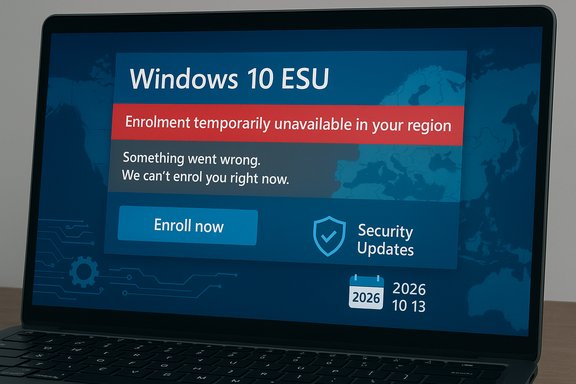
Microsoft’s consumer Extended Security Updates (ESU) for Windows 10 — the stopgap meant to protect devices after the operating system reached end of support — is failing to enroll for a meaningful number of users, producing opaque errors or region‑blocked messages that leave affected PCs at risk of missing security rollups. The problem shows up in two consistent failure modes: a clear “Enrolment for Windows 10 Extended Security Updates is temporarily unavailable in your region” banner for some users, and a non‑diagnostic “Something went wrong. We can’t enrol you in Extended Security Updates right now. Close this window and try again.” message for others. Both behaviors have been reported across community forums, Microsoft’s own Q&A boards and multiple technology news outlets, and they have produced confusion at a moment when many Windows 10 devices need those updates most.
Practical improvements Microsoft could make include:
For any user facing ESU enrolment errors, the prudent path is clear: confirm prerequisites, avoid risky registry or script fixes unless you fully understand them and have backups, attempt an in‑place repair if necessary, and escalate to Microsoft support if the enrolment UI continues to fail. Staying on an unpatched copy of Windows 10 without an immediate mitigation plan is the real risk — the ESU offer exists to reduce that danger, but it only helps if the enrolment completes.
Source: Club386 Windows 10 Extended Support Updates not working for some users | Club386
 Background
What Microsoft promised and the timing
Microsoft ended mainstream support for Windows 10 on October 14, 2025. To reduce the security exposure for users who cannot immediately upgrade to Windows 11, Microsoft introduced a one‑year consumer Extended Security Updates (ESU) programme that provides security‑only updates through October 13, 2026 for eligible Windows 10 devices. Enrollment for consumer ESU is designed to be delivered via a built‑in enrolment tool in Settings for eligible devices and, in many markets, at no additional cost when users sync their PC settings with a Microsoft account.Why this matters now
Security updates are the primary defense against newly disclosed vulnerabilities. For users who cannot or will not move to Windows 11 immediately, the ESU programme was intended as a predictable, low‑friction safety net. When enrolment fails, affected devices stop receiving Microsoft’s security rollups — they remain operational but progressively more exposed as new vulnerabilities are disclosed and attackers exploit unpatched systems. Given the end‑of‑support milestone and the scheduled post‑EOL security cadence, timely enrolment is critical for many households and small businesses.Overview of the failure modes
Two headline error patterns
The reports cluster into two primary categories:- Regional gating: clicking “Enroll now” opens the ESU dialogue but then shows “Enrolment for Windows 10 Extended Security Updates is temporarily unavailable in your region.” This appears to be a phased rollout or market‑specific gating mechanism rather than an explicit policy denial in many reported cases.
- Generic enrolment failure: users complete the flow up to a point and receive a non‑descriptive error such as “Something went wrong. We can’t enrol you in Extended Security Updates right now. Close this window and try again.” This version provides no actionable diagnostic and often leaves the device unprotected until the root cause is fixed or a workaround is found.
Technical and policy causes — what’s actually failing
1) Phased rollout and regional market settings
Microsoft explicitly deployed the consumer ESU offer in a phased manner, with regional differences and EEA‑specific concessions that affected how enrollment is presented in Settings. That staged enablement — combined with additional market logic for the EEA — explains many “temporarily unavailable in your region” messages: the backend switch that allows enrolment for a given locale has not been flipped uniformly across all devices. Microsoft acknowledged that regional variation and phased expansion could change the enrolment experience.2) Strict prerequisites: OS build and cumulative updates
Consumer ESU is strictly limited to devices running Windows 10, version 22H2 with required servicing updates installed. Microsoft’s enrolment flow relies on those prerequisites; devices missing the required monthly cumulative and servicing stack updates will either never show the enrolment option or will fail eligibility checks. Community and Microsoft Q&A threads point to an important cumulative patch (identified in community posts as necessary to fix earlier enrolment problems) that many users must have installed before enrolment is possible.3) Device classification — consumer vs commercial
The consumer ESU path is intended for individual, personal devices and is not available for devices that are domain‑joined, enrolled in MDM, or otherwise classed as commercial or managed devices. A common failure vector occurs when a PC is mistakenly classified as commercial or organizational due to prior Entra/Azure AD registration, an old work/school account, or lingering registry flags set by previous management. When Windows detects a commercial profile, the consumer enrolment path refuses to proceed — and the UI often provides the unhelpful generic error instead of a clear policy message.4) Transient backend/portal errors and sign‑in problems
Some failures appear caused by transient backend service faults in Microsoft’s enrolment endpoints or by the token/sign‑in handoff between the local Settings UI and Microsoft account verification. These errors manifest as the non‑diagnostic “Something went wrong” failure and are difficult to troubleshoot without Microsoft server logs. Users report repeating the flow multiple times with no success until a server‑side correction is applied or until the user escalates to support.Microsoft’s position and public responses
Microsoft’s public guidance reiterates the prerequisites and confirms the phased rollout model: consumer ESU is available for eligible devices running Windows 10, version 22H2, with the latest update installed, and the enrolment experience may vary by region based on local market factors. Microsoft noted that availability in the EEA began rolling out in mid‑October and that the company made some adjustments to the options offered in the EU — steps that can introduce rollout delays for some users. That messaging aligns with community reports of regional gating. At the same time, Microsoft’s documentation highlights the consumer ESU limitations: no feature updates, limited technical support (only for ESU activation and installation), and explicit exclusion for devices used in commercial scenarios. The interaction between these policy conditions and device state (e.g., residual enterprise markers) is the root cause for several of the consumer‑facing failures.Practical troubleshooting and fixes (detailed, step‑by‑step)
The following checklist orders steps from least intrusive to more advanced. Back up important data before performing system‑level changes or registry edits.- Confirm eligibility (first and non‑negotiable)
- Verify Windows version: Settings → System → About — ensure Windows 10, version 22H2.
- Install all pending Windows Updates and reboot. Ensure the device has the latest servicing stack and monthly cumulative installed. Community threads identify an August cumulative that corrected earlier enrolment bugs; ensure all recommended updates are present.
- Use a proper Microsoft Account with admin rights
- Enrolment requires signing into a full Microsoft Account (MSA) that is an administrator on the PC. Local accounts and child accounts are not eligible for the free consumer enrolment path. If you currently use a local account, sign in with an adult MSA before attempting enrolment.
- Wait if you see the regional gating message
- If the UI displays “temporarily unavailable in your region”, and you meet prerequisites, the most practical option is to wait 24–72 hours while Microsoft’s phased rollout reaches your device. Microsoft documented that availability in the EEA would expand over time and explained some EU options were adjusted, which can cause short delays.
- Check and clear residual enterprise status
- If enrolment fails with the generic error and you previously used the device with work/school accounts or joined it to Azure AD/Entra, remove any lingering work/school accounts, unregister the device from Entra/Azure AD, and check these locations:
- Settings → Accounts → Access work or school — disconnect any listed accounts.
- In some cases, residual registry keys indicate a commercial device; reversing those keys can restore consumer eligibility. Community troubleshooting and Microsoft Q&A posts show the registry values that flag device eligibility; these should be handled with caution and only after backing up the registry.
- Force an eligibility re‑evaluation (advanced)
- Community tools and utilities (shared in forums) can force the local ESU eligibility check to run against Microsoft’s endpoints. Running a vendor or community tool to evaluate eligibility has helped users trigger the enrolment UI after prerequisites were satisfied. These tools and scripts are community‑provided; they should be used carefully and only from trusted sources.
- Perform an in‑place upgrade / reapply 22H2
- Several users reported success by performing an in‑place repair or reinstallation of Windows 10 22H2 using official media. This action clears transient configuration problems and reapplies the OS image and required servicing components. After completing an in‑place upgrade, run Windows Update until you are fully patched and then attempt enrolment again. This is a heavier step but often resolves misclassification and token/sign‑in handoff problems.
- Region workaround (temporary)
- Some users reported switching their system region to a country where enrolment was already activated (for example, temporarily setting region to the United States) allowed them to complete enrolment and then revert to their original region. This is a brittle workaround and should be used with caution; it’s symptomatic and may not work depending on how Microsoft ties enrolment to account/locale.
- Escalate to Microsoft Support
- If you have tried prerequisites, account fixes, in‑place upgrades, and waiting, open a ticket with Microsoft support. Provide: Windows build number, installed KB numbers, error screenshots, account type (MSA), and confirmation that the device is not domain‑joined. Microsoft support can check server‑side logs and provide account‑specific guidance.
Why some suggested fixes can be risky
- Registry edits and third‑party scripts: community snippets or gists can fix the problem, but they also carry risk. Editing the registry or running unverified scripts can brick a system, disable updates, or expose credentials. Always backup the registry and full system image before attempting such fixes.
- In‑place upgrades: these usually preserve files and apps, but they take time and have a small risk of breaking third‑party drivers or software. Create a full backup and ensure you have recovery media before starting.
- Region changes: temporarily setting a different system region is a brittle workaround that may impact regional app availability, clocks, and locale‑sensitive behavior. It’s a troubleshooting step, not a long‑term solution.
The security risk calculus — what users should know now
- Immediate exposure: devices that aren’t enrolled in ESU stop receiving Microsoft security rollups; the risk increases with each Patch Tuesday that passes after support ends. Without ESU or an OS upgrade, systems will accumulate unpatched CVEs that attackers can weaponize.
- Short window to act: Microsoft’s consumer ESU is available through 13 October, 2026 — but you must enroll to receive updates. Missing the enrolment window or failing to resolve enrollment problems leaves a device permanently outside Microsoft’s security rollups for the rest of the ESU period.
- OEM and software compatibility: some OEM drivers and legacy software may stop receiving compatibility updates as vendors move on from Windows 10; plan for driver and app compatibility testing if you intend to stay on Windows 10 with ESU for months.
A note on Microsoft’s communications and transparency
The incidents expose a communications gap. A staged rollout is normal practice, but the enrolment UI gives too little diagnostic information when it fails. “Temporarily unavailable in your region” without an ETA or an explanation of the underlying gating conditions leaves users guessing. The generic “Something went wrong” provides no telemetry or error codes for users to act on.Practical improvements Microsoft could make include:
- Clearer on‑screen diagnostics that explain whether the issue is prerequisite, market rollout, device classification, or backend/service.
- A publicly visible rollout status page or a simple eligibility checker tool where users can verify why their device is blocked.
- Safer offline or manual enrolment alternatives for privacy‑sensitive users who do not want settings synced to the cloud but still require security patches.
Clear, prioritized recommendations for affected users
- Immediate: confirm Windows 10, version 22H2 is installed and that all pending cumulative updates are applied. Sign in to the device with an adult Microsoft Account that has local administrator permissions. Attempt enrolment again.
- If you see “temporarily unavailable in your region”: confirm prerequisites, wait 24–72 hours, and retry. If you must be patched immediately and enrolment still fails, consider an in‑place upgrade to reapply Windows 22H2 and required updates, then retry enrolment.
- If the generic “Something went wrong” appears and you previously used the device in a work/school context: check Settings → Accounts → Access work or school; remove any connected accounts, unregister the device from Entra/Azure AD, reboot, and retry enrolment. If registry values show a commercial flag, proceed carefully after backing up the registry.
- If you cannot resolve enrolment: consider migrating to Windows 11 if your hardware supports it, or plan an alternative OS strategy (supported Linux distributions, ChromeOS Flex, or managed cloud desktops) to ensure continued security. ESU is a temporary bridge, not a long‑term replacement for staying current.
What remains uncertain and where to be cautious
- Timing of regional enablement: Microsoft’s phased rollout and EEA adjustments make exact timing for individual locales unpredictable. If you are blocked with the regional notice, it’s reasonable to assume the issue is rollout timing — but there is no public per‑country schedule to confirm an ETA. Treat any ETA you hear in community posts as anecdotal unless Microsoft publishes it officially.
- Causes for generic failures: while the device classification explanation matches many reports (previous Entra/Azure AD or work/school association), some instances of the generic error appear to be transient backend faults. Without access to Microsoft’s server diagnostics, individual users may not know which case applies. Escalation to Microsoft support is the definitive path when local troubleshooting fails.
- Third‑party scripts and community fixes: many community posts and gists propose registry tweaks and small utilities that restore enrolment. These are a stopgap and carry risk; verify sources, understand what a script changes before running it, and back up system state first.
Final analysis — strengths, weaknesses and the overall risk picture
Microsoft designed a pragmatic consumer ESU programme that balances a no‑cost enrolment path with clear constraints (consumer devices only, limited support, and time‑boxed coverage). That approach reduces friction for many users and helps avoid the binary “upgrade or leave devices exposed” outcome. The programme’s strengths include a built‑in enrolment workflow, a free path for consumers who sync settings, and a predictable expiration date (October 13, 2026). However, the implementation exposed practical weaknesses:- The combination of a phased rollout and EEA‑specific adjustments without per‑region visibility created confusion and left many users uncertain whether they were blocked by policy or by a bug.
- The enrolment UI’s poor diagnostics (especially the generic “Something went wrong” failure) hindered self‑service troubleshooting and drove users toward risky community fixes or full OS reinstall.
- Device classification logic is brittle; residual enterprise markers from past device use can prevent legitimate consumer enrolment and force disruptive workarounds.
Conclusion
The Windows 10 consumer ESU programme is a necessary safety net for users who cannot move to Windows 11 immediately, but the initial rollout has exposed operational and UX problems that leave a non‑trivial subset of devices unable to enrol. The two dominant failure modes — regional gating and non‑diagnostic enrolment failures — are well documented in Microsoft’s support channels and across independent reporting. Many problems have straightforward remedies (installing required updates, using a Microsoft account, removing residual work/school associations), and some require waiting for Microsoft’s phased backend enablement or contacting support.For any user facing ESU enrolment errors, the prudent path is clear: confirm prerequisites, avoid risky registry or script fixes unless you fully understand them and have backups, attempt an in‑place repair if necessary, and escalate to Microsoft support if the enrolment UI continues to fail. Staying on an unpatched copy of Windows 10 without an immediate mitigation plan is the real risk — the ESU offer exists to reduce that danger, but it only helps if the enrolment completes.
Source: Club386 Windows 10 Extended Support Updates not working for some users | Club386
