

Microsoft’s Windows 10 Extended Security Updates (ESU) is a tightly scoped, paid lifeline — not a replacement for migration — and organisations that treat it as anything else risk rising costs, compliance headaches, and a false sense of security.
Background
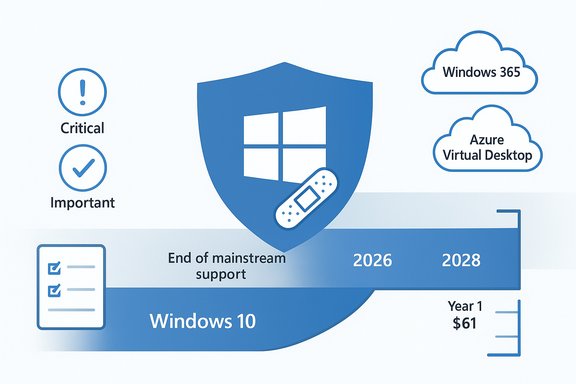
Microsoft set a firm end-of-support date for mainstream Windows 10: 14 October 2025. After that date, routine feature updates, non-security quality fixes and standard technical support for mainstream Windows 10 editions cease unless a device is enrolled in an ESU programme. This is a vendor lifecycle event, not a technical shutoff — affected machines will keep running, but without vendor-supplied OS-level patches their exposure to newly discovered vulnerabilities grows quickly. To bridge migration timelines, Microsoft offers two distinct ESU pathways: a consumer one‑year programme that extends only “Critical” and “Important” security updates through 13 October 2026, and a commercial/volume-licensing ESU available for up to three years (covering organisations through late 2028). Both tracks are deliberately narrow: ESU supplies only selected security patches and omits new features, non‑security fixes and routine product support.
What the Computer Weekly feature said — precise summary
- Windows 10 ESU is a paid subscription that provides only critical and important security patches once mainstream support ends; technical and non-security support is not included.
- The commercial ESU path can extend patching for up to three years (to 14 October 2028), but coverage is partial — vulnerabilities rated “moderate” or “low” may not be addressed.
- Microsoft 365 Apps will continue to receive some security updates on Windows 10 through 10 October 2028, while feature updates for those apps stop earlier. Organisations running business‑critical apps on Windows 10 must confirm vendor support before committing to ESU.
- Gartner (as quoted by the piece) recommends regulated organisations assess whether Windows 10 ESU satisfies regulatory definitions and requirements for end‑of‑life software. The article flags the risk that ESU’s limited scope may not meet compliance tests.
This Computer Weekly framing is accurate in scope: ESU is a measured, short-term patch stream designed to buy migration time — not to maintain a business-as-usual support posture.
The technical reality: what ESU actually delivers (and what it definitively does not)
What ESU provides
- Security-only updates: ESU delivers only the security updates classified as Critical and Important by Microsoft’s Security Response Center (MSRC). These are delivered through Windows Update to enrolled devices.
- Time-boxed windows: Consumer ESU covers one year (through 13 October 2026). Commercial ESU can be purchased annually for up to three years, with the final commercial coverage window ending in 2028 when measured from the 2025 cut-off.
- Selective technical assistance: Microsoft will provide support only for ESU licence activation, ESU installation and regressions directly caused by those ESU updates. General troubleshooting for unrelated Windows 10 problems is outside ESU.
What ESU does not provide
- No feature updates, enhancements or quality-of-life fixes. ESU does not include new OS features, performance enhancements or any non-security bug fixes. Your Windows 10 instance remains functionally the same except for the applied security patches.
- No broad technical support. The programme excludes general technical support — organisations must rely on internal teams, third‑party vendors, or paid support agreements for non-ESU issues.
- Partial coverage by severity. Patches for Moderate or Low severity vulnerabilities may not be released under ESU; only the MSRC‑classified Critical and Important updates are guaranteed. That makes ESU an incomplete risk mitigation tool.
Licensing, pricing and entitlements — the money and the fine print
Consumer ESU
- Consumers can enroll via three routes: sign in and enable Windows settings sync (no cash), redeem 1,000 Microsoft Rewards points, or make a one‑time purchase of roughly $30 (local equivalent plus tax). A single consumer ESU license can be applied to up to 10 devices associated with the same Microsoft account. Enrollment runs via Settings → Update & Security → Windows Update on eligible devices.
Commercial / Volume‑licensing ESU
- Published list pricing for commercial ESU starts at $61 per device for Year One. Microsoft’s public guidance indicates the price doubles each consecutive year (Year Two ≈ $122, Year Three ≈ $244) and licences are cumulative — if you buy in Year Two you must also acquire the prior year licence(s). This structure strongly incentivises early migration.
- Discounts and variations: Organisations that manage devices via Microsoft Intune or Windows Autopatch can receive discounts (for example, a 25% reduction was published for certain management scenarios, lowering Year‑1 list pricing in channel messaging). Educational customers and specific cloud scenarios also have different pricing mechanics.
Cloud entitlements and free coverage for virtual environments
- Microsoft has explicitly stated that Windows 10 virtual machines running in several Azure services receive ESU at no additional charge when using eligible Microsoft images. Eligible services include:
- Windows 365 Cloud PCs
- Azure Virtual Desktop
- Azure Virtual Machines and Azure Dedicated Host
- Azure VMware Solution and partner-hosted clusters on Azure infrastructures
- Azure Stack variants where supported
Physical endpoints used only to connect to a Windows 365 Cloud PC with an active subscription can also be entitled to ESU with the Cloud PC subscription in place. These entitlements push organisations toward cloud migration as a cost-avoidance lever.
Compliance, regulation and the Gartner warning
Many regulatory frameworks and contractual obligations treat vendor‑supported software as a baseline control. Because ESU is limited to selected security patches, excludes support and omits lower‑severity fixes, regulated entities need to verify whether using ESU meets specific compliance tests for “supported software.” The Computer Weekly piece cites Gartner’s guidance that organisations should assess whether Windows 10 ESU satisfies their regulatory definitions of end‑of‑life remediation and control acceptance. That caution is sound: regulatory and auditor interpretations vary by sector, and ESU’s partial coverage may not be acceptable for high‑assurance environments.
Key regulatory and procurement touchpoints to check:
- PCI DSS and card‑holder data in-scope systems — typically require supported, maintained platforms.
- HIPAA and healthcare data protections — expect timely patching and vendor updates.
- Government contracts and critical infrastructure — often mandate vendor support windows or explicitly forbid EOL products in scope.
- Cyber insurance policies — many require reasonable patching; running EOL systems could affect coverage or claims.
If auditability or contractual compliance is crucial, ESU should be treated as a temporary, compensating control rather than a compliance-first solution: document risk acceptance, compensating technical controls, and an explicit migration timeline.
Practical risk assessment — what IT leaders must know
- ESU protects against a subset of future OS vulnerabilities but leaves other classes and severities unaddressed. This creates asymmetric risk: attackers will likely weaponise unpatched vectors that ESU does not cover.
- Operational support burden increases. Microsoft will not troubleshoot unrelated incidents, which means internal teams or third‑party support must absorb more complex problem resolution. Plan vendor contracts and escalation paths accordingly.
- Costs compound quickly at scale. Commercial ESU’s year‑by‑year doubling and cumulative purchase model can make multi‑year ESU more expensive than staged migration or cloud rehosting for large estates. Do the math: Year‑one $61 can become $427 cumulative per device if an organisation purchases all three years (61+122+244).
- Third‑party app and driver support will erode over time as ISVs and vendors prioritise Windows 11 certification. Before buying ESU for business‑critical apps, confirm vendor support commitments on Windows 10 beyond October 2025. The Computer Weekly report emphasises this point.
Migration and mitigation strategies (practical playbook)
Short‑term (0–6 months)
- Inventory and classify: compile a fully auditable asset list of Windows 10 devices, tied to business criticality and regulatory scope. Prioritise systems that process sensitive data.
- Verify versions: ensure devices intended for ESU are on Windows 10 version 22H2 and have the latest cumulative updates; ESU eligibility requires the correct servicing baseline.
- Vendor confirmation: for every business‑critical third‑party app, obtain vendor confirmation of continuing Windows 10 support under ESU timelines. Document vendor statements.
- Short-term compensations: harden networks (segmentation, limited internet exposure), enforce strict EDR/IPS controls, and raise monitoring thresholds for unusual behaviour on ESU-covered endpoints.
Medium‑term (6–18 months)
- Cost vs. replacement modelling: compare cumulative ESU costs (including the doubling effect) against staged PC refresh, application remediation, or migration to Windows 365/virtual desktops. Use realistic TCO models, factoring in deployment, training and recycling costs.
- Pilot Windows 11 upgrades for eligible devices: expand autopatch/autopilot strategies. Where hardware prevents upgrade, evaluate Windows 365 or Azure Virtual Desktop as migration alternatives (these cloud paths may remove per-device ESU charges).
- Contract and insurance review: work with procurement and legal to ensure continued compliance, and engage cyber insurers to confirm how ESU usage affects policies.
Long‑term (18–36 months)
- Phase out ESU: do not plan to rely on ESU beyond achieving migration objectives. The pricing structure is designed to make long-term ESU financially unattractive compared to migration.
- Continuous lifecycle discipline: embed product lifecycle dates into procurement and refresh cycles to avoid future mass migrations. Establish KPIs for supported platform coverage.
Five hard truths for decision-makers
- ESU is emergency respirator, not life support. It buys time but does not restore full vendor servicing or product evolution.
- Partial patching leaves attack vectors. Critical and Important updates reduce exposure, but Moderate and Low vulnerabilities and non-security fixes can still be exploited in complex attack chains.
- Costs scale unfavorably at enterprise size. Cumulative, doubling pricing turns an inexpensive stopgap into a major multi‑year bill if you extend ESU across large fleets.
- Cloud offers a realistic escape hatch. Hosting Windows 10 workloads in qualifying Azure services or moving users to Windows 365 can remove per‑device ESU charges and simplify lifecycle management.
- Regulated organisations must validate compliance. Auditor and regulator acceptance is not guaranteed; document compensating controls and migration timelines if you adopt ESU.
Tactical checklist before you buy ESU
- Confirm device eligibility (Windows 10, version 22H2).
- Inventory business‑critical apps and obtain vendor support confirmation for Windows 10 under ESU timeframes.
- Calculate total cumulative ESU spend if you plan more than one year; include licence activation and management overhead.
- For any cloud‑hosted Windows 10 VMs, verify whether they are covered by Microsoft’s no‑additional‑charge ESU cloud entitlements.
- Prepare an exit/migration plan with concrete milestones tied to security KPIs and audit evidence.
Closing analysis — weighing strength against risk
Windows 10 ESU is a useful tactical tool: it preserves a vendor patch stream for critical OS vulnerabilities while organisations execute complex migrations, certify legacy applications, or manage constrained hardware refresh cycles. The programme’s strengths are clarity of scope, documented timelines and a predictable purchase path for organisations that need breathing room. Microsoft’s cloud entitlements also create clear incentives for modernisation via Azure and Windows 365. But those strengths come with commensurate trade-offs. ESU’s partial coverage means organisations will have to tolerate residual, unpatched vulnerabilities and internal knowledge gaps for platform issues excluded from ESU. The cumulative and doubling pricing model turns ESU from economical to punitive if used as a long‑term strategy, and the omission of general technical support forces firms to reallocate operational burden to internal or third‑party teams. Most critically, regulated organisations and those with strict compliance obligations must not assume ESU equals “supported” for audit purposes without explicit sign-off from auditors and legal teams. The Computer Weekly reporting and Gartner‑informed cautions highlight this exact risk scenario.
Conclusion
Windows 10 ESU should be treated as a time‑boxed, tactical bridge — a way to keep the most dangerous OS vulnerabilities patched while migration, testing and procurement decisions are executed. It is not a long‑term support strategy, a replacement for vendor support or a cure for application incompatibility. For organisations that must remain on Windows 10 briefly after 14 October 2025, ESU makes sense as a controlled, well-documented stopgap; for any enterprise with compliance obligations, tight budgets or a large device estate, the imperative is to quantify costs, confirm vendor app support, and plan migration now rather than defer to progressively more expensive ESU renewals.