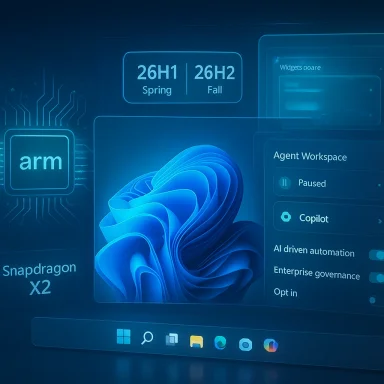
Microsoft is preparing a busy year for Windows 11 in 2026 — not just incremental polish, but a mix of platform-only updates for new Arm hardware, broad feature rollouts (Copilot-first search on the taskbar, a modern Run dialog, and a redesigned Widgets board), deeper Copilot integrations across the shell, and new session modes aimed squarely at gamers and creators. This first-look feature breaks down what’s landing, what’s confirmed vs. experimental, why it matters, and how users and IT teams should prepare for the changes ahead. ])
Windows 11 in 2026 is shaping up to be two-tiered: a spring platform release targeted at the newest Arm-based laptops and devices, and a fuller, feature-rich update later in the year that reaches the broader installed base. Microsoft’s decision to ship a special Windows 11 version for Qualcomm’s Snapdragon X2 systems (and similar next-gen silicon) in the spring — commonly referenced as 26H1 — is primarily about platform enablement for new hardware. The company then plans a general-purpose feature update, 26H2, for later in 2026 aimed at all Windows 11 PCs. This split mirrors previous practice when Microsoft shipped specialized builds for early Arm hardware before rolling features into the mainline annual update. Why this matters: 26H1 is largely a hardware-and-platform release; most users on existing Intel/AMD PCs will not see new behavior from that spring release. But many of the usability and AI-driven features being tested now in Insider channels — and gradually rolling to broader audiences — are expected to debut (or reach mass availability) with 26H2 later in the year.
Why it matters: The Run box is a high-frequency tool for admins, developers, and power users. Making it consistent with Windows 11’s UI reduces visual friction and adds convenient features (history, icons) without breaking existing workflows.
Conclusion
Windows 11’s 2026 roadmap is a careful mix of platform readiness for new Arm-based PCs and a broader push to make Copilot a native, capable assistant across the OS. The combination of an early, hardware-focused 26H1 and a later, feature-rich 26H2 means adoption will be staggered — and sensible organizations and users should prepare accordingly. Expect meaningful improvements for productivity and gaming, but also new governance and performance considerations as agentic AI, video wallpapers, and Copilot integrations become part of the everyday Windows experience.
Source: Windows Central What's next for Windows 11 in 2026? First look at new features coming soon
 Background / Overview
Windows 11 in 2026 is shaping up to be two-tiered: a spring platform release targeted at the newest Arm-based laptops and devices, and a fuller, feature-rich update later in the year that reaches the broader installed base. Microsoft’s decision to ship a special Windows 11 version for Qualcomm’s Snapdragon X2 systems (and similar next-gen silicon) in the spring — commonly referenced as 26H1 — is primarily about platform enablement for new hardware. The company then plans a general-purpose feature update, 26H2, for later in 2026 aimed at all Windows 11 PCs. This split mirrors previous practice when Microsoft shipped specialized builds for early Arm hardware before rolling features into the mainline annual update. Why this matters: 26H1 is largely a hardware-and-platform release; most users on existing Intel/AMD PCs will not see new behavior from that spring release. But many of the usability and AI-driven features being tested now in Insider channels — and gradually rolling to broader audiences — are expected to debut (or reach mass availability) with 26H2 later in the year. What’s coming: headline features you need to know
Ask Copilot on the Taskbar — a search pill that is also an assistant
Microsoft is adding an optional, opt-in taskbar entry called Ask Copilot that replaces (or augments) the static search box with a compact, chat-forward pill. The new entry surfaces local, indexed results first (apps, files, settings) and exposes Copilot’s conversational inputs — text, voice (“Hey, Copilot”), and Copilot Vision (attach a screenshot / window) — from a small floating panel above the taskbar. The experience is designed to be permissioned: local access remains controlled and Copilot won’t read files unless you grant the assistant access. Key points:- The pill is opt-in and off by default; Microsoft is using staged rollouts via the Insider program.
- It mixes fast local search results with one‑tap escalation to generative Copilot sessions for more complex tasks.
Modern Run dialog — Win+R gets Fluent treatment
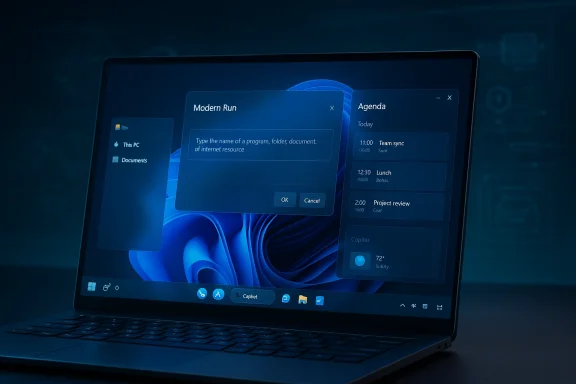
The decades-old Run dialog is being rebuilt as an optional Modern Run overlay that looks and behaves more like Windows 11: chromeless, larger input, Fluent visuals, inline icons for resolved commands, and a history of recent commands. It preserves the Win+R hotkey and the lightweight launcher workflow while improving touch, high‑DPI, and dark‑mode accessibility; Microsoft is exposing it as an opt‑in toggle so power users can revert to the legacy dialog if desired.Why it matters: The Run box is a high-frequency tool for admins, developers, and power users. Making it consistent with Windows 11’s UI reduces visual friction and adds convenient features (history, icons) without breaking existing workflows.
Agenda View on the Taskbar — your day, at a glance
Microsoft is restoring a compact Agenda view to the taskbar calendar flyout, giving a scrollable list of today's events and quick actions (Join meeting, copy link, create event) directly from the clock/calendar area. The feature will integrate with the Outlook app and Microsoft 365 calendars and is being previewed in Insider builds. The aim is to bring back the quick‑glance productivity convenience many users missed when Windows 11 first launched.Xbox Full Screen Experience (FSE) for PCs — console-style gaming on Windows
Originally tailored for handheld Windows devices, the Xbox Full Screen Experience (FSE) is being expanded to laptops, desktops, and tablets as a reversible, session-level shell. When enabled, FSE boots into a controller-first Xbox app UI, suppresses non-essential desktop services, and prioritizes games — offering a console-like “turn on and play” flow. Users can configure boot-to-console, whitelist startup apps, and switch back to the standard desktop easily. Gaming benefits:- Lower background noise (disabled/non-essential services) to reclaim RAM and reduce frame stutters.
- Controller-first navigation and a unified library that aggregates Game Pass, Microsoft Store, and discovered storefront installs.
- Boot-to-FSE mode for handheld/portable scenarios.
Redesigned Widgets Board — Copilot Discover feed and widget dashboards
The Widgets board is being reshaped: Microsoft is testing a Copilot Discover feed — an AI-curated news and story stream — and giving widgets their own dedicated dashboard. The Discover feed focuses on Copilot-curated summaries and media-rich cards, while a separate Widgets dashboard lets you arrange and resize widget tiles more freely. The update also brings enhancements for lockscreen widgets.Agentic AI and Copilot Actions — Windows becomes “agentic-ready”
Microsoft is building agentic capabilities into Windows, enabling AI agents that can perform multi‑step tasks on your behalf. The first implementation, Copilot Actions, will let Copilot take hand‑offs and execute tasks inside a sandboxed mini‑desktop inside the Copilot app. Agentic functions will be off by default and require explicit enablement, and developers will have APIs to register agents that can integrate with OS surfaces. This is a big shift from passive assistance to delegated action.Video wallpapers — DreamScene returns (experimental)
Insider builds have surfaced a video wallpaper option that allows common video files (MP4, MKV, etc. to be set as desktop backgrounds, a spiritual return of Vista’s DreamScene. The feature is experimental in Dev/Beta channels and requires opting into specific preview flags; Microsoft has not committed to a ship date or the final set of supported codecs. Expect battery and performance trade-offs on laptops.Copilot in File Explorer — chat without leaving the shell (work in progress)
Work-in-progress strings and experiments point to a Chat with Copilot integration inside File Explorer — likely a sidebar / chat view that lets you ask Copilot about documents, request summaries, or perform quick edits without launching separate apps. Microsoft has tested simple “Ask Copilot” right‑click actions for a while; this would be a deeper, more seamless integration. The feature is being explored in preview builds but is not yet confirmed for general release.Technical verification and rollout timeline
- Platform split: Microsoft has publicly acknowledged a special spring 2026 release (version 26H1) targeted at Snapdragon X2 systems and similar new silicon, with the broader 26H2 feature update arriving in the second half of 2026 for all devices. This is confirmed by Microsoft’s Insider notes and corroborated by multiple independent outlets. Expect OEMs shipping Snapdragon X2 systems to ship with 26H1 preinstalled in Q1–Q2 2026.
- Ask Copilot and Copilot Actions: the taskbar Copilot pill and the agentic plumbing are appearing in Insider preview builds and cumulative preview updates. Microsoft is gating visibility via server-side flags and licensing checks; installing an Insider build is necessary but not sufficient — features frequently arrive via entitlement toggles. The taskbar Copilot preview has been associated with builds in the 26220.x line.
- Xbox Full Screen Experience: Microsoft publicly announced FSE availability for handhelds and expanded the PC preview to Insiders in late 2025; guidance shows the feature will reach more PCs via Insider programs before a wider rollout. FSE is configurable under Settings → Gaming → Full screen experience and requires the Xbox PC app.
- Widgets, Run, File Explorer, and video wallpaper features are currently in Dev/Beta/Canary Insider builds; many are opt‑in or behind flags and may evolve significantly before general release. Treat timelines with caution: Microsoft often refines or abandons experimental plumbing based on feedback and telemetry.
Strengths: what to be excited about
- Improved productivity flows: The Agenda view on the taskbar, Modern Run, and deeper Copilot touches cut the number of app switches required for day-to-day tasks. These are practical, high-frequency quality-of-life wins.
- Smarter search and assistance: By folding local search and Copilot conversational flows into a single surface, Microsoft is reducing friction between “find a file” and “explain or transform this file” — a legitimate UX improvement for content-heavy workflows.
- Gaming posture improvements: The Xbox FSE’s resource-trimming and controller-first shell promises a better out-of-the-box experience for handheld and portable gamers, along with faster load times and fewer desktop interruptions during play.
- Tailored hardware support: The 26H1 release for Snapdragon X2 means OEMs can ship optimized drivers, power policies, and platform-level features tuned for new Arm silicon without forcing a mass upgrade to the entire Windows fleet. For early adopters, that’s a meaningful performance and battery advantage.
Risks, unknowns and enterprise considerations
- Fragmentation risk: The split between a platform-only spring release (26H1 for certain Arm devices) and a broader fall update (26H2) increases complexity for IT: image management, update testing, and compatibility validation now must account for multiple Windows 11 platform baselines. Organizations should inventory devices and clarify update paths before rolling changes into production.
- Privacy and agentic AI: Agentic features that can perform tasks autonomously introduce new privacy and governance requirements. Even though Microsoft intends agentic capabilities to be off by default and permissioned, enterprises must consider:
- Consent and data handling policies for Copilot and Copilot Actions.
- Whether agents are allowed to access sensitive repositories, corporate SharePoint, or local file systems.
- Audit and logging needs to track agent actions for compliance.
- Performance and battery impact: Video wallpaper and deeper Copilot background services have the potential to increase CPU/GPU load and background network traffic. Laptops and ARM devices will be particularly sensitive; OEMs and Microsoft need to tune power management to avoid noticeable battery regressions. Users should expect manual toggles and policies for enterprises to control animated backgrounds and heavy AI features.
- Security surface and supply chain: New platform changes for Bromine/26H1 and added agent APIs increase the attack surface that defenders must validate. Admins should apply standard controls: code signing enforcement, endpoint detection coverage on new device families, and testing of OS updates in isolated staging environments before enterprise-wide deployment.
- Feature uncertainty: Several items (Copilot inside File Explorer, final Widgets behavior, video wallpaper codec support) remain experimental in Insider builds. Microsoft has historically removed or changed features during preview. Treat today's previews as work in progress and avoid assuming final behavior until Microsoft announces a GA schedule. Caution is advised.
How to prepare — guidance for consumers, power users, and IT
Consumers and enthusiasts
- Join the Windows Insider Program if you want early access and can tolerate instability; choose Dev/Beta for the latest Copilot and UI previews, but back up before testing.
- If battery life is critical, avoid enabling experimental features like video wallpapers or agentic automation until they are validated on your hardware.
Power users and creators
- Learn the new toggles: the Modern Run (Win+R) opt-in toggle, Ask Copilot on the taskbar, and Full Screen Experience controls are user-facing settings that can be turned on/off in Settings → Personalization or Settings → Gaming. Familiarize yourself with them in Insider builds before they roll out broadly.
IT admins and enterprise teams
- Inventory endpoints to identify which devices will be eligible for 26H1 (Snapdragon X2/Arm64) vs. devices that will remain on 25H2 until 26H2.
- Update test policies: create isolated pilot rings for Copilot, agentic features, and Xbox FSE where relevant. Validate compliance tools (DLP, EDR) against preview builds.
- Draft policy controls: decide whether video wallpapers, Copilot agent actions, and taskbar AI entries are allowed by default or controlled by Group Policy / MDM. Microsoft provides management controls and is expected to expand them as features approach GA.
Practical tips and troubleshooting
- If you enable Ask Copilot but don’t see the pill on the taskbar, this usually indicates staged rollout gating: confirm you’re on a supported Insider build, signed into a Microsoft account, and that the Copilot app is installed. Server-side entitlements often control visibility.
- For FSE: if you want to try Full Screen Experience on a desktop/laptop, join Xbox Insider and enroll in the PC Gaming Preview as directed on Microsoft’s Xbox Wire guidance; the experience is reversible and configurable.
- Experimental video wallpapers typically require explicit feature flags and work only in Dev/Beta channels; don’t rely on them for production systems. Battery and performance regressions are a real possibility.
Final analysis — what to expect from Windows 11 in 2026
Windows 11’s 2026 roadmap is dominated by a pragmatic combination of platform enablement for next-generation Arm silicon and a staged roll-out of AI-first experiences that push Copilot from sidebar novelty to a pervasive assistant woven into the OS. The most immediate, visible changes for mainstream users will likely arrive with 26H2 later in the year: the revamped Widgets board with Copilot Discover, taskbar agenda restore, Modern Run as an opt‑in modernization, and fuller Copilot integrations in places like File Explorer. Early adopters and owners of Snapdragon X2 laptops will see platform-specific 26H1 builds in spring that prioritize hardware optimizations. This evolution brings clear benefits — less app switching, faster gaming sessions, and more capable local AI — but also new responsibilities for privacy, governance, and performance tuning. For consumers, that means being mindful of the opt‑in nature of most AI features and controlling what runs on your device. For IT teams, it means expanding testing windows and defining policy guardrails before agentic features and platform splits reach production. In short: expect Windows 11 in 2026 to be more AI-first and hardware-aware than ever, but also more complex to manage. The year will reward cautious experimentation, thorough testing, and clear policies — and it will leave plenty of room for Microsoft to pivot or refine features before they reach everyone’s desktops.Conclusion
Windows 11’s 2026 roadmap is a careful mix of platform readiness for new Arm-based PCs and a broader push to make Copilot a native, capable assistant across the OS. The combination of an early, hardware-focused 26H1 and a later, feature-rich 26H2 means adoption will be staggered — and sensible organizations and users should prepare accordingly. Expect meaningful improvements for productivity and gaming, but also new governance and performance considerations as agentic AI, video wallpapers, and Copilot integrations become part of the everyday Windows experience.
Source: Windows Central What's next for Windows 11 in 2026? First look at new features coming soon