

Microsoft’s Windows engineering teams are laying the groundwork for a two‑track 2026: a spring, device‑specific platform release for new Arm silicon, and a broader, consumer‑facing Windows 11 26H2 update slated for the second half of the year — evidence that the next major Windows feature wave is already being staged in Insider builds and service metadata.
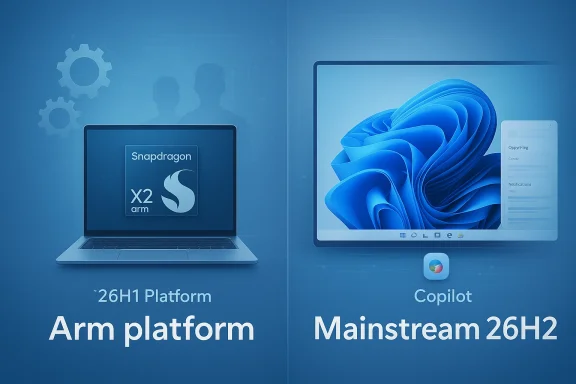
Microsoft’s public Insider channels and community sleuthing make one crucial point clear: 2026 will not be a single, monolithic Windows update year. Instead, Microsoft is running parallel streams — a narrow, Spring 26H1 platform build intended for select Arm devices (notably Qualcomm’s Snapdragon X2 family) and a general-purpose 26H2 feature update targeted at the wider Windows 11 installed base in the fall. This dual‑track approach explains recent jumps in buInsiders are seeing “enablement” clues in Windows Update metadata.
Independent trackers and community wikis corroborate the build identifier and its compile/revision details, and they show that metadata and uninstall/update pages for Dev builds are already rent package” for Windows 11 26H2 — the first public clue that a formal 26H2 branch is being prepared.
Why this matters: enablement packages are a servicing mechanism Microsoft uses to flip features on top of an existing binary baseline. Seeing a 26H2 enablement tag in update metadata suggests Microsoft is staging feature flips and that the label may surface in Windows Update before it shows in winver or Settings → About for broad audiences.
Community analysis and forums documenting Microsoft’s Insider posts show the operational consequences for IT: different servicing baselines, potentially distinct driver and management requirements, and the need to treat 26H1 devices as specialized images rather than fleet‑wide updates.
That said, the cost of this pragmatism is complexity. Enterprises and power users will face a larger test matrix: different baselines, entitlement‑driven feature visibility, and edge cases around WebView2 memory usage and Copilot’s local file access. Privacy and governance questions remain the single largest nontechnical risk; even with permissioning, the scale and convenience of Copilot interactions will force organizations to define firm boundaries and technical controls.
If you care about stability, security, and predictable behavior, my recommendation is simple:
In short: Windows 11 26H2 is on Microsoft’s roadmap for later in 2026, with enablement traces already visible in Insider builds and update metadata; expect Copilot to become a deeper, permissioned presence across key OS surfaces, and prepare for a two‑track year that will reward careful testing and clear policies as much as early adoption.
Source: FilmoGaz Windows 11 26H2 Update Confirmed for Release Later This Year
 Background / Overview
Microsoft’s public Insider channels and community sleuthing make one crucial point clear: 2026 will not be a single, monolithic Windows update year. Instead, Microsoft is running parallel streams — a narrow, Spring 26H1 platform build intended for select Arm devices (notably Qualcomm’s Snapdragon X2 family) and a general-purpose 26H2 feature update targeted at the wider Windows 11 installed base in the fall. This dual‑track approach explains recent jumps in buInsiders are seeing “enablement” clues in Windows Update metadata. - 26H1: A platform/enablement release for specific new silicon and OEM images — not a normal feature update for existing Intel/
- 26H2: The broader H2 feature update that will reach the majority of PCs later in 2026 and is where everyday user‑visible features are expected to consolidate.
What Microsoft has already shipped and what it signals
Build 26300.7674: the technical breadcrumb trail
On January 27, 2026 Microsoft pushed Windows Insider Preview Build 26300.7674 to the Dev Channel, and the release notes explicitly note that the Dev baseline is moving into the 26300 series. The blog post confirms that these 26300 builds will receive behind‑the‑scenes platform changes and that they contain the same visible features as earlier 26220‑series preview builds.Independent trackers and community wikis corroborate the build identifier and its compile/revision details, and they show that metadata and uninstall/update pages for Dev builds are already rent package” for Windows 11 26H2 — the first public clue that a formal 26H2 branch is being prepared.
Why this matters: enablement packages are a servicing mechanism Microsoft uses to flip features on top of an existing binary baseline. Seeing a 26H2 enablement tag in update metadata suggests Microsoft is staging feature flips and that the label may surface in Windows Update before it shows in winver or Settings → About for broad audiences.
Confirming the platform split: 26H1 is hardware‑gated
Microsoft and several reputable outlets have clarified that 26H1 is not a standard consumer feature update — it’s a platform-level release intended for a narrow set of devices using next‑generation Arm silicon (Snapdragon X2 and similar chips). That means most Intel/AMD PCs will remain on the established H2 cadence until 26H2 is broadly released.Community analysis and forums documenting Microsoft’s Insider posts show the operational consequences for IT: different servicing baselines, potentially distinct driver and management requirements, and the need to treat 26H1 devices as specialized images rather than fleet‑wide updates.
Key features appearing in previews and what they likely mean
Multiple independent sources and Insider changelogs point to a consistent set of user‑facing experiments and early features that are expected to land for mainstream users as part of the 26H2 wave. Below I summarize those items, the current state of verification, and practical implications.Copilot deeper in the shell: Ask Copilot and Copilot in File Explorer
- What’s happening: Microsoft is expanding Copilot beyond its standalone app and taskbar presence into contextual surfaces across Windows — notably an “Ask Copilot” search experience on the taskbar and a docked Copilot pane inside File Explorer. Early previews show an opt‑in taskbar pill that mixes indexed local results with generative answers, and File Explorer experiments suggest a right‑side pane (alongside Details and Preview) where users can ask Copilot to summarize or manipulate local documents.
- Verified facts: Microsoft’s Copilot on Windows update already added file search and vision capabilities to the Copilot app, and Microsoft’s documentation emphasizes explicit permissioning for file access. The new in‑shell integrations are currently gated and rolling out gradually to Insiders.
- Practical implications: If finalized, these integrations will reduce context switching — you can ask Copilot to summarize a document or extract action items without leaving File Explorer. But they also raise privacy and telemetry questions: local file access is permissioned, but the UX must clearly show when content is read, uploaded, or processed in the cloud. Microsoft’s c, with server‑side gating and per‑action consent.
“Ask Copilot” search — a new taskbar experience
- What it does: A compact, chat‑forward taskbar pill that replaces or augments the classic Windows Search UI. It blends local index results with Copilot responses, supports text/voice inputs and Copilot Vision screenshots, and is intended to be a low‑friction AI entry point. Previews emphasize that it is optional and gated.
- Why it matters: Search is a high‑frequency surface. Upgrading it into an AI composer could dramatically change how users find files, launch actions, and handle quick transformations. But because this surface accesses indexed local content, organizations will need clear controls and administrators will likely require policies to block or audit specific capabilities.
Agenda view returns to the notifications center
- What to expect: An Agenda view (similar in spirit to the old Windows 10 calendar/taskbar flyout) ated with Outlook calendar items and surfaced from the notification center for quick access to meetings and reminders. Early implementations reportedly use WebView2 to render Outlook content, which simplifies development but has measurable cost in memory and processes.
- Impact: It’s a high‑utility quality‑of‑life win for many users, but the WebView2 approach means additional Edge‑related processes will be active while Agenda is displayed — a nontrivial trade‑off for low‑RAM devices. Expect Microsoft to offe
Modern Run dialog and UI polish
- Modern Run: Microsoft is testing a WinUI‑based, chromeless replacement for Win+R with better visuals, history, and icons — an optional overlay for power users. Early reports show it’s available in preview channels as an opt‑in replacement.
- Visual and personalization tweaks: Support for .webp as wallpapers and more colorful system iconography have appeared in previews; these are small but visible polish items that historically ship in H2 updates.
Improved Xbox Full‑Screen Experience (FSE) for gaming
- What’s new: A full‑screen, console‑like posture for gaming that reduces desktop overhead and exposes a home app experience. Microsoft is previewing an Xbox FSE on PC and exposing controls under Settings > Gaming > Full screen experience. The mode is reversible and intended to improve resource availability for gaming sessions.
- Caveats: Early tests show complexity around overlays, multiwindow compatibility, and driver handshake with GPU stacks. Gamers should treat FSE as a preview feature until it matures.
Cross‑verifications and sources
A responsible read requires cross‑checking load‑beasome cross‑references I used while preparing this analysis:- Build 26300.7674 and the Dev Channel post: confirmed by Microsoft’s Windows Insider blog and independently mirrored in community trackers.
- The platform vs feature update split (26H1 platform, 26H2 mainstream): Microsoft’s public Insider messaging plus multiple independent outlets (Windows Central, Tom’s Hardware) and community analysis corroborate this characterization.
- Copilot expansions (File Explorer, Ask Copilot, permissioning): Microsoft’s Copilot on Windows update describes file search and vision features already rolling to Insiders; community reporting and preview artifacts indicate in‑shell Copilot panes and taskbar composer experiments.
- Agenda view and WebView2 memory concerns: independent reporting and community tests highlight the WebView2 dependency and its memory footprint.
- Community and enterprise guidance for admins: Windows Forum posts and operational notes emphasize caution around early Dev builds, enablement packages, and pilot programs.
Strengths: what to be optimistic about
- Practical productivity gains: Deeper Copilot integration in the search and file surfaces addresses a common pain point: moving between finding information and acting on it. For many knowledge workers, being able to summarize, extract, or transform a file without opening multiple apps is a genuine time saver.
- Hardware‑driven improvements: Shipping a platform release for Arm silicon lets OEMs deliver tuned experiences for devices that rely on NPUs and other specialized hardware. Early adopters of Snapdragon X2 devices can get validated, day‑one OS software optimized for their hardware.
- Safer feature rollout: The enablement package and server‑side gating model reduces the blast radius for risky experiments, letting Microsoft gather telemetry and refine UX before turning a feature on for everyone. This more cautious approach should reduce some of tsions Windows watchers saw in previous cycles.
Risks and unknowns — what to watch closely
- Fragmentation and enterprise complexity: Two simultaneous baselines (Bromine for 26H1 devices andlines for mainstream) increase testing surface area. Enterprises must consider different imaging, driver, and management needs for fleets that include 26H1 devices. Microsoft and OEMs need clear labeling to avoid confusion at the point of sale.
- Privacypilot integration that reads local files, captures screens, or uses “vision” inputs should be evaluated by privacy teams. Microsoft emphasizes permissioning, but organizations should insi, consent flows, and policy controls before enabling these features broadly.
- Performance and memory costs: WebView2‑backed features like Agenda add persistent Edge‑related processes; some community testing reports a meaningful RAM increase when Agenda is active. On low‑end devices, these costs matter. Microsoft may tune memory footprint, but admins and users should be prepared to toggle or disable features if necessary.
- Server‑side entitlements and fractured visibility: Installing a preview build won’t always expose all features — many are gated server‑side or by licensing entitlements. That complicates testing and reproducibility for IT, as a feature may appear on some devices and not others even with identical builds. Documented community workarounds (pausing updates to remain on Beta, etc.) are useful but brittle.
- Backporting and parity expectations: Some features that rely on NPU hardware may not have full parity on older devices and may fall back to cloud processing or reduced functionality. Organizations should not assume feature parity across hardware types.
Practical guidance for users, power‑users, and IT admins
- If you’re an everyday consumer:
- Wait for the Beta/Release Preview signal before upgrading production machines. Opt into new Copilot experiences only when you’re comfortable with the permissions model.
- Treat early Dev builds as experiments — don’t install them on primary devices.
- If you manage devices for an organization:
- Plan a pilot program: start with a small ring of representative machines (10–50) and test Copilot, Agenda, and any WebView2‑backed surfaces for memory, telemetry, and compatibility with security agents.
- Update imaging and update‑management policies to account for device‑specific images (26H1) vs broad servicing (26H2). Work with OEMs to confirm which SKUs ship with which baseline.
- Draft access and privacy policies for Copilot integrations: require explicit consent for file reads, and capture logs when Copilot performs actions that interact with corporate data.
- If you’re an enthusiast or Insider:
- Expect feature gating: you may not immediately see Ask Copilot or Copilot panes even if you install a Dev build. Use the Feedback Hub to report regressions and help shape permission flows.
The road ahead — what to expect and when
Microsoft’s pattern and the current evidence suggest a likely timeline:- Early 2026 (spring): 26H1 images ship preinstalled on qualifying Snapdragon X2 laptops and similar Arm devices; this is a platform, OEM‑centric rollout.
- Mid to late 2026 (typical H2 window, likely Sep–Oct): Windows 11 26H2 appears as the broad, consumer‑facing feature update that folds many Copilot UX changes and polish elements into the mainstream servicing stream; enablement packages and staged server gates will determine early visibility in Windows Update.
Final analysis and verdict
Windows 11’s 2026 roadmap is pragmatic and technically defensible: split platform enablement for cutting‑edge Arm devices from the mainstream feature cadence, and use enablement packages plus server gating to limit risk while iterating on ambitious Copilot integrations. This approach should make OEM launches more predictable and give Microsoft time to refine AI UX in high‑visibility surfaces before broad deployment.That said, the cost of this pragmatism is complexity. Enterprises and power users will face a larger test matrix: different baselines, entitlement‑driven feature visibility, and edge cases around WebView2 memory usage and Copilot’s local file access. Privacy and governance questions remain the single largest nontechnical risk; even with permissioning, the scale and convenience of Copilot interactions will force organizations to define firm boundaries and technical controls.
If you care about stability, security, and predictable behavior, my recommendation is simple:
- Treat 26H1 devices as specialized OEM images and evaluate them in lab pilots before procurement.
- Wait for Beta/Release Preview signs before broad 26H2 adoption.
- Create explicit Copilot governance and telemetry policies before enabling the assistant in managed environments.
In short: Windows 11 26H2 is on Microsoft’s roadmap for later in 2026, with enablement traces already visible in Insider builds and update metadata; expect Copilot to become a deeper, permissioned presence across key OS surfaces, and prepare for a two‑track year that will reward careful testing and clear policies as much as early adoption.
Source: FilmoGaz Windows 11 26H2 Update Confirmed for Release Later This Year
