

Windows 11’s 2026 update cycle is shaping up to be one of the most consequential in years: Microsoft is rolling AI deeper into the shell, streamlining long‑standing usability pain points, and splitting platform work across a targeted 26H1 release and a broader 26H2 feature wave later in the year. What insiders and public previews show today is an intentional push to make Copilot a first‑class interaction layer — not just an app — while also modernizing small, high‑frequency workflows like Run, the taskbar calendar, and the File Explorer context menu. m])
Windows in 2026 is being delivered as a continuous service rather than a single annual package. Microsoft has split the year into two engineering tracks: a spring platform release, Windows 11 version 26H1, intended primarily for new ARM silicon (notably Qualcomm’s Snapdragon X2 family), and a later, feature‑rich 26H2 that will reach the broad installed base. That separation allows Microsoft and OEM partners to ship silicon‑specific optimizationg the main consumer feature train on its usual cadence.
Insider builds across the Dev, Beta and Canary channels have exposed a consistent set of experiments and previews: an opt‑in “Ask Copilot” taskbar pill, a dockable Copilot pane in File Explorer, a modernized Win+R (Modern Run), an Agenda flyout returning to the taskbar calendar, and UI tidying for Explorer context menus and properties panes. Many of these are delivered via enablement packages and server‑that means installing a preview build is necessary but not always sufficient to see the features. Microsoft is proceeding cautiously, collecting telemetry and rolling out visibility in stages.
Why this matters
Security and privacy implicpreview notes emphasize that Copilot’s access to local files is opt‑in and session‑based, but embedding a conversational model into the shell increases the number of surface areas that require careful consent flows and DLP integration.
Potential benefits
Why this matters
Practical gains
Why this matters
The technical delivery is often handled via enablemr‑side flags rather than wholesale reimaging. That reduces on‑disk churn but increases the importance of entitlement control: features can be present in binaries but invisible unless Microsoft flips a server switch — a model that facilitates controlled experiments but complicates predictable fleet management.
That said, the new architecture raises real operational trade‑offs: servicing complexity from the 26Hnd performance costs when Copilot panes are active, and an enlarged privacy surface that requires lows and DLP integration. Administrators must treat the spring ARM‑centric rollout as an early‑adopter scenario and test thoroughly before broad deployment.
For Windows enthusiasts, 2026 is exciting — not because Windows is chasing buzz, but because Microsoft is focusing on the small UX primitives that matter every day and folding AI into places where it can remove repetitive steps. Foious users, the road ahead is manageable: validate, stage, and enforce clear policies. If Microsoft executes on its opt‑in promises and provides strong enterprise governance, the 2026 cycle could be a sensible step toward more helpful, context‑aware PCs without sacrificing control.
Concluding practical checklist
Source: FilmoGaz Windows 11 2026: Exciting New Features Beyond AI Copilot
 Background / Overview
Windows in 2026 is being delivered as a continuous service rather than a single annual package. Microsoft has split the year into two engineering tracks: a spring platform release, Windows 11 version 26H1, intended primarily for new ARM silicon (notably Qualcomm’s Snapdragon X2 family), and a later, feature‑rich 26H2 that will reach the broad installed base. That separation allows Microsoft and OEM partners to ship silicon‑specific optimizationg the main consumer feature train on its usual cadence. Insider builds across the Dev, Beta and Canary channels have exposed a consistent set of experiments and previews: an opt‑in “Ask Copilot” taskbar pill, a dockable Copilot pane in File Explorer, a modernized Win+R (Modern Run), an Agenda flyout returning to the taskbar calendar, and UI tidying for Explorer context menus and properties panes. Many of these are delivered via enablement packages and server‑that means installing a preview build is necessary but not always sufficient to see the features. Microsoft is proceeding cautiously, collecting telemetry and rolling out visibility in stages.
What’s new — feature by feature
1. Ask Copilot: Windows Search reimagined
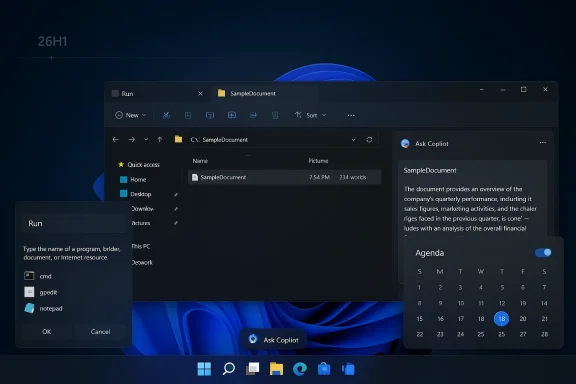
Microsoft is replacing (or augmenting) the traditional taskbar search with an opt‑in, chat‑forward Ask Copilot pill. When enabled, the pill opens a compact floating composer that blends the classic Windows Search index (apps, files, settings) with Copilot’s conversational layer, and supports multimodal inputs: text, voice (“Hey, Copilot”), and Copilot Vision (attach a screenshot or window region). Tcitly permissioned — local index results continue to come from the Windows Search APIs, and Copilot only reads full file contents after explicit consent.Why this matters
- It reduces the friction between “find a file” and “transform or summarize that file.” You can surface a document in search, then ask Copilot to extract action items without switching apps.
- For casual users, the taskbar becomes an intuitive place to ask natural‑language questions of the PC.
- For power users, Ask Copilot preserves a path back to the classic search UX and keeps the indexer intact for local hits.
Security and privacy implicpreview notes emphasize that Copilot’s access to local files is opt‑in and session‑based, but embedding a conversational model into the shell increases the number of surface areas that require careful consent flows and DLP integration.
- Administrators should verify how Copilot interacts with enterprise connectors and Data Loss Prevention (DLP) policies before broadly enabling the feature on managed fleets.
2. Copilot in File Ex assistant
Several Insider artifacts indicate a docked Copilot pane inside File Explorer is in test: a sidebar adjacent to Details and Preview that lets you summarize documents, extract tables, create action lists, and run contextual queries limited to selected folders. This is more than a “right‑click → Ask Copilot” shortcut; it’s a persistent assistant embedded in the file shell.Potential benefits
- Dramatically reduces context switching when triaging large document collections: quickly summarise a PDF or pull a meeting transcript’s key points without opening Word.
- Accessibility gains: concise summaries and descriptions could help users relying on assistive technologies.
- Performance: prt integrations increase memory usage when active; administrators should test impact on lower‑end devices.
- Privacy and telemetry: the design must ensure file reads are explicitly authorized and integrated with enterprise controls to avoid accidental cloud uploads. Microsoft’s current testing posture treats these features as opt‑in and gated by policy entitlements.
3. Decluttered Fileu
A perennial gripe with Windows has been the bloated, inconsistent Explorer right‑click menu. The 2026 previews show Microsoft consolidating less‑used options into submenus (for example, grouping file operations under a “Manage file” category) to present a cleaner primary surface. The aim is both visual coherence and improved discoverability.Why this matters
- Less noise for everyday file tasks: common actions appear immediately while secondary items live behind a single tap or submenu.
- Better contextual grouping reduces cognitive load and speeds up workflows.
- Shell extensions and third‑party context menu handlers have historically frustrated Microsoft’s attempts at simplification. Expect a staged rollout with compatibility checks so older extensions do not break workflows for power users.
4. Modern Run (Win+R) — WinUI meets a classic hotkey
The lightweight Run box (Win+R) — a high‑frequency tool f power users — is getting a WinUI‑based Modern Run overlay. It preserves the Win+R hotkey and the legacy command semantics while adding UI polish: history, inline icons, improved touch and high‑DPI support, and dark‑mode compatibility. The new overlay is optional; power users can revert to the classic dialog if desired.Practical gains
- Small but meaningful productivity wins for developers and admins who regularly launch commands, RegEdit, msinfo32, PowerShell snippets, and tools via Win+R.
- More discoverable history and icons reduces guessing and helps when long command names are involved.
5. Dark‑themed Properties tab and v builds have surfaced a dark‑mode Properties tab in File Explorer and other small UI updates designed to bring the legacy shell components into visual alignment with Windows 11’s Fluent design. These changes are cosmetic but important for visual coherence and accessibility. That said, some of these items are still in experimental state and have not been officially confirmed for the general release; treat sightings from Insider builds as provisional.
Cautionary note: until Microsoft explicitly lists the Properties tab as a supported change, expect variations between preview builds and the final public rollout.6. Agenda view returns to the Notifications Center
One of the most welcome restorations is the return of the **Agenda vbar calendar flyout. Once a beloved quick‑glance feature in earlier Windows versions, the new Agenda integrates Outlook calendar items and exposes join‑actions for meetings directly from the flyout — now with Copilot‑powered meeting briefs when tenant policies and licensing permit. Previews indicate the Agenda uses a light WebView2 integration and can add a measurable memory footprint when active, so Microsoft is testing trade‑offs.Why this matters
- Saves a context switch to Outlook or the Calendar app just to see the next meeting.
- Combined with Copilot, meeting summaries and quick actions (copy link, join) reduce friction in hybrid work environments.
Rollout strategy and timeline: 26H1 vs 26H2
Microsoft’s 26H1 release is unique: it’s a spring, device‑gated platform release intended to ship on new Snapdragon X2 devices and similar ARM hardware, while 26H2 remains the mainline annual feature update for the wider PC base later in the year.gon X2 laptops are expected to include 26H1 on their devices, with those machines later receiving 26H2 to reach parity with the rest of the ecosystem.The technical delivery is often handled via enablemr‑side flags rather than wholesale reimaging. That reduces on‑disk churn but increases the importance of entitlement control: features can be present in binaries but invisible unless Microsoft flips a server switch — a model that facilitates controlled experiments but complicates predictable fleet management.
Critical analysis — strengths, trade‑offs, and unknowns
Strengths and real user value
- Productivity wins are pragmatic. The return of Agenda, Modern Run, and a nu are high‑frequency wins that reduce clicks and context switches. These are tangible improvements that benefit most users immediately.
- Smarter, contextual discovery. By combining indexed local results with conversational escalation, Ask Copilot offers a natural flow from “farize, or act,” which is genuinely useful for content‑heavy workflows.
- Measured rollout. Microsoft’s use of opt‑in toggles, Insider testing, and server gating shows an awareness of the fragile balance between innovation and stability for a platform that runs mission‑critical workerformance and governance concerns
- Memory and performance overhead. Early previews show memory increases when Agenda or Copilot panes are active. Organizations should benchmark impact on representative hardware, especially older or resource‑constrained devices.
- Privacy and enterprise controls. Embedding Copilot into core surfaces expands the number of interactions that might involve locally or cloud‑smust validate DLP, compliance policies, and tenant‑level entitlements to ensure Copilot cannot access sensitive data without explicit control. Microsoft says many behaviors are opt‑in, but marketing defaults or OEM settings could expose surprises.
- Fragmentation for IT. The 26H1/rvicing complexity. Two baselines in the same year — a platform‑optimized image on new ARM hardware and a mainstream update later — will force IT teams to track different driver stacks, certification paths, and update channels. Enterprises with strict app certification cycleM devices as pilots rather than immediate fleet replacements.
- Third‑party extension compatibility. Context menu simplification and shell changes can break legacy shell extensions and deployment tooling. Microsoft will need compatibility modes or developer guidance to avoid regressions for power users who rely on custom shell integrations.
Practical guidance — what users and IT should do now
For home users and power users
- Join the Windows Insider program only on test devices if you want early access. Don’t install preview builds on your primary machine unless you’re prepared for instability.
- If Ask Copilot appears after installing a preview, confirm settings: the feature is opt‑in under Taskbar personalization, and Copilot’s access to files is permissioned per session. ([learn.microsoft.com](https://learn.microsoft.com/en-us/answers/questions/5683162/ask-copilot-does-not-show-up-in-the-taskbar?utm_sourivacy‑conscious users: use a local account if you prefer to delay server‑gated entitlements tied to Microsoft accounts, but be aware some Insider features require an MSA tn.micro
For IT admins and security teaevices as a separate platform baseline. Build a validation image and test driver, security agent, and endpoint protection compatibility before approving these devices for general use.
- Review DLP and EMM policies against Copilot behaviors. Confirm how file content access is controlled and whether Copilot integrations respect tenant policies gs. Require explicit admin opt‑in for any Copilot upload or cloud processing.
- Monitor memory and CPU telemetry if deploying Copilot panes or Agenda features; consider rollout phase gates that include performance thresholds and rollback criteria.
- Prepare guidance for users about opt‑revert to classic experiences (for example, how to toggle Ask Copilot off and return to classic taskbar search).
Developer and ISV implications
Independent software vendors should:- Test context menu handlers and shellhe decluttered menu and the Modern Run overlay.
- Validate any integrations that parse Explorer metadata or rely on the Details/Preview pane, because a docked Copilot pane may change UI layout assumptions.
- Watch Microsoft’s developer guidance for Copilot agent APIs and sandboxing models if your application needs to integrate with agentic workflows or offer Copilot‑aware commands.
What remains provisional and what to watch
- The dark‑mode Properties tab and some file‑shell visual tweaks are visible in Insider builds but not listed in Microsoft’s official public feature lists — consider these provisional until Microsoft confirms them in a release note.
- The Copilot Actions agentic model (small, delegated agents that can perform multi‑step tasks) is being tested but remains gated and experimental. It promises power but will demand rigorous governance and developer vetting.
- Timelines can shift. 26H1 is device‑gated and aimed at Snapdragon X2 machines shipping in spring 2026; most feature work intended for broad consumption will consolidate into 26H2 in the second half of 2026. Expect Microsoft to iterate aggressively in Insider channels before a mass rollout.
Final verdict — measured optimism with sensible caution
The 2026 Wnstrate a clear, pragmatic UI philosophy: modernize the small things that sap productivity while making AI a helpful, discoverable companion rather than an intrusive replacement for existing workflows. The return of Agenda, the Modern Run overlay, and a cleaned‑up context menu are the sort of incremental ergonomics that benefit millions daily. The Ask Copilot taskbar and Explorer integrations, when implemented with robust consent, telemetry transparency, and enterprise controls, could meaningfully reduce context switching for knowledge workers.That said, the new architecture raises real operational trade‑offs: servicing complexity from the 26Hnd performance costs when Copilot panes are active, and an enlarged privacy surface that requires lows and DLP integration. Administrators must treat the spring ARM‑centric rollout as an early‑adopter scenario and test thoroughly before broad deployment.
For Windows enthusiasts, 2026 is exciting — not because Windows is chasing buzz, but because Microsoft is focusing on the small UX primitives that matter every day and folding AI into places where it can remove repetitive steps. Foious users, the road ahead is manageable: validate, stage, and enforce clear policies. If Microsoft executes on its opt‑in promises and provides strong enterprise governance, the 2026 cycle could be a sensible step toward more helpful, context‑aware PCs without sacrificing control.
Concluding practical checklist
- Home users: back up, use a test device for Insiders, and opt in selectively.
- Power users: learn the new Modern Run and check context‑menu changes on your workflow tools.
- IT admins: pilot Snapdragon X2 devices separately, validate security/DLP, and prepare a staged rollout plan for 26H2.
Source: FilmoGaz Windows 11 2026: Exciting New Features Beyond AI Copilot
