

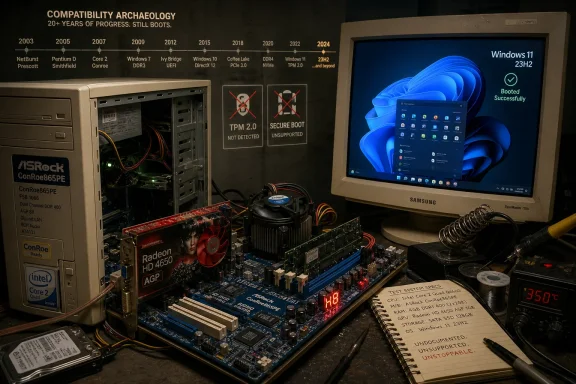
A retro-hardware enthusiast named Omores has demonstrated Windows 11 version 23H2 running on an Asrock ConRoe865PE motherboard from the Pentium 4 era, paired with a Core 2 Quad Q6600, DDR1 memory, and an AGP Radeon HD 4650 graphics card. The stunt works because much of Windows’ old hardware support is still buried in the operating system’s architecture, even when Microsoft’s official requirements say the machine has no business being there. It is not a practical upgrade path. It is a useful reminder that Windows 11’s hardware line is partly technical, partly policy, and increasingly a statement about what Microsoft wants the PC to become.
The surprise is not that Windows 11 can be bullied into booting on an old PC. Enthusiasts have been bypassing TPM checks, Secure Boot gates, CPU lists, and installer nags since the operating system launched in 2021. The surprise is how far back the chain of compatibility can be stretched before it finally snaps.
Omores’ build is not merely “old” in the way a sixth-generation Core i5 desktop is old. It reaches back into an era when motherboards still carried AGP slots, DDR1 memory was mainstream, and PCI Express had not yet finished taking over the consumer PC. The Asrock ConRoe865PE is an oddball bridge board: a 2003-class Intel i865PE chipset platform that can host later LGA775 Core 2 processors, including the four-core Core 2 Quad Q6600 released in 2007.
That combination makes the machine a museum piece with just enough 64-bit muscle to look dangerous. Four physical cores at 2.4GHz are unimpressive by modern standards, but the Q6600 was a landmark chip in its day and remains one of the most fondly remembered CPUs among overclockers and budget builders. The absurdity is that the processor is newer than the chipset, while the graphics path is older than both.
The result is a PC that looks, electrically and historically, like it should belong to Windows XP or Windows 7. Yet with enough driver archaeology, it can present itself to Windows 11 as a coherent system. That says something profound about the Windows codebase: Microsoft has spent decades keeping old assumptions alive, and those assumptions do not disappear the moment a marketing slide says “modern hardware.”
The graphics stack was trickier because AGP support had already been left behind during the Windows 10 generation. AGP, or Accelerated Graphics Port, was the dedicated graphics interface that preceded PCI Express. It was built for a different driver model, a different chipset world, and a very different understanding of what a Windows display pipeline needed to be.
Omores reportedly solved that problem by extracting Intel’s AGP440.sys driver from early Windows 10 builds and modifying the relevant INF files so Windows 11 could recognize the old AGP-compatible chipset path. That is not a normal installation. It is a salvage operation, the sort of driver-era necromancy that requires knowing not only which file is missing, but why Windows stopped looking for it.
Once the AGP bridge was revived, the Radeon HD 4650 AGP could enter the story. That card occupies its own strange place in PC history: a relatively late DirectX 10-era GPU adapted for a bus that was already obsolete. AMD’s last 64-bit Windows 7 driver package from 2012 reportedly provided enough of a foothold for Windows 11 to use the card properly.
This is where the build becomes more than a party trick. Windows 11 did not merely display a desktop in a fallback mode and collapse under load. According to the report, the system was stable, usable, and capable of running modern browsers, with Firefox even leaning on hardware acceleration for H.264 decoding. The RAM ceiling was the more obvious daily constraint: 3GB of DDR1 is the sort of limit that modern web pages punish immediately.
Yet the OS still ran. That is because minimum requirements serve two purposes, and Microsoft tends to talk more loudly about one than the other. They are a technical floor for reliability and security, but they are also a support fence that defines what Microsoft is willing to validate at scale.
Those are not the same thing. A single enthusiast can spend hours massaging drivers, editing configuration files, and accepting the risk of undefined behavior. Microsoft cannot treat that as a supported path for hundreds of millions of consumer and enterprise PCs. The company’s requirements have to account for servicing, security baselines, device encryption, crash telemetry, driver quality, OEM obligations, and the simple fact that unsupported machines generate support costs.
Still, the Q6600 build exposes an uncomfortable truth for Microsoft’s messaging. If a 2003-class motherboard can run Windows 11 23H2 in a stable state, then some of the operating system’s most controversial hardware limits are not strictly about whether the code can execute. They are about what Microsoft wants to guarantee, what it wants to stop testing, and what kind of PC ecosystem it wants to drag forward.
That distinction matters because Windows 11 arrived with unusually hard-edged hardware messaging. TPM 2.0 was framed as central to the security model. Supported CPU lists were treated as part of the reliability baseline. Secure Boot and UEFI were presented as table stakes for a modern PC. All of that may be defensible, but it becomes harder to sell as a pure engineering necessity when hobbyists keep demonstrating that the old machinery can still move.
Microsoft knows this better than anyone. The company’s dominance in desktop computing was built not just on Windows being everywhere, but on Windows being sticky. The old program probably runs. The old driver might still load. The old workflow can often be preserved long after a cleaner platform would have severed it.
The retro Windows 11 build is a cartoonishly extreme example of that institutional memory. AGP support is not a feature Microsoft wants to sell in 2026. DDR1 compatibility is not a roadmap item. Nobody in Redmond is optimizing Copilot experiences for a Core 2 Quad and a 2012-era Radeon driver.
But the Windows substrate is broad enough that pieces of the past can still be reassembled. Sometimes the obstacle is not that the operating system has forgotten, but that the installer, driver store, or support policy refuses to participate. Enthusiasts thrive in that gap between “impossible” and “unsupported.”
This is why Windows nostalgia has become more technically interesting than simple retro gaming. Running Windows 98 on a beige tower is preservation. Running Windows 11 on an AGP system is an argument. It asks where compatibility ends, who gets to decide, and whether “modern Windows” is a technological category or a managed ecosystem boundary.
That distinction is crucial. Many Windows 11 restrictions can be bypassed because they are checks imposed before or during installation. If the OS kernel and userland can still run after the check is removed, the unsupported PC may limp along happily. But when the running operating system itself expects CPU instructions that the silicon cannot execute, the game changes.
The Core 2 Quad Q6600 supports plenty of instruction sets for its era, but not SSE4.2. Intel’s Nehalem generation brought SSE4.2 into the mainstream after Core 2. That makes 24H2 a meaningful cutoff for truly old 64-bit PCs, because the barrier is no longer just Microsoft declining support. The code path depends on capabilities that the hardware lacks.
This is the point at which the enthusiast’s relationship with Windows 11 becomes less like trespassing and more like archaeology hitting bedrock. You can fake a compatibility report. You can patch an INF. You can borrow a forgotten driver from an early Windows 10 build. You cannot make a Q6600 decode an instruction it was never built to understand.
That hard wall also clarifies Microsoft’s direction. Windows 11’s early requirements were controversial because they excluded many systems that still felt fast and serviceable. The 24H2 instruction-set floor affects much older machines, but it is more technically defensible. It is the difference between “we will not support this” and “this binary now assumes a CPU feature you do not have.”
A retro Windows machine can boot quickly enough and idle at the desktop convincingly. That does not mean it can survive the modern web. Websites are heavy with JavaScript frameworks, media pipelines, tracking scripts, high-resolution assets, encrypted transport, sandboxing, and process isolation. A machine with 3GB of RAM is not merely constrained; it is under siege from the first tab.
That is why Firefox hardware acceleration for H.264 decoding is such an important detail. Video decode offload is the difference between a retro system feeling charming and feeling broken. Even then, the usable envelope is narrow. A few tabs, a light video stream, maybe an old game or two: that is success for a machine built from hardware spanning 2003 to 2007.
The experiment also shows why Windows itself is no longer the heaviest actor in the room. Microsoft can make Windows 11 boot on relatively modest hardware, and enthusiasts can make it boot on hardware that Microsoft rejects. But the software environment around Windows has moved on. Browsers, chat clients, security tools, launchers, cloud sync agents, and web apps are often what make an old PC feel old.
This is the practical lesson for anyone tempted to romanticize the build. Windows 11 running on a Q6600 does not mean Windows 11 is secretly lightweight. It means the core OS is resilient enough to start, the driver model is flexible enough to be coerced, and the modern application layer is still capable of crushing the experience.
Against that backdrop, the AGP Windows 11 build lands as a small act of rebellion. It is not useful because anyone should deploy Windows 11 on a 2003 motherboard. It is useful because it dramatizes the distance between what Windows can still do and what Microsoft wants Windows to represent.
The company’s platform strategy depends on renewal. OEMs want upgrades. Microsoft wants a security baseline it can defend. AI features need silicon that old systems cannot provide. Enterprises want predictable fleets. Developers want APIs that assume modern capabilities. There are legitimate reasons to move the floor upward.
But there is also a cultural cost. PC users have long valued the platform because it was not sealed, not singular, and not overly obedient to the vendor’s preferred lifecycle. If the hardware still works, someone will try to make it useful. If the OS says no, someone will ask whether the refusal is technical, commercial, or merely bureaucratic.
That tension has defined Windows 11 from the beginning. Microsoft wants to turn Windows into a cleaner, safer, more manageable platform. The enthusiast community keeps reminding everyone that the PC is also a pile of buses, drivers, firmware quirks, and stubborn users with screwdrivers. The AGP build is funny because it is excessive. It resonates because it is familiar.
Unsupported systems exist outside the assumptions Microsoft and hardware vendors test against. Driver bugs may never be fixed. Security features may be absent, disabled, or ineffective. Firmware may predate mitigations that modern Windows expects. Old graphics drivers may carry vulnerabilities that no vendor has any intention of patching.
That matters more now than it did during the Windows XP hobbyist era. A PC in 2026 is rarely isolated. It signs into cloud accounts, stores browser tokens, syncs passwords, joins messaging platforms, opens PDFs, streams media, and talks constantly to remote services. A retro machine used online is not just a curiosity; it is a participant in a threat model.
For a lab bench, a YouTube demo, a retro gaming corner, or an offline tinkering project, the risk is manageable. For daily use, it is harder to defend. The real danger is not that Windows 11 will instantly fail on the Q6600. The danger is that it will appear normal enough to encourage trust it has not earned.
This is where Microsoft’s support fence makes more sense. Enthusiasts can accept personal risk. Enterprises cannot. A sysadmin cannot build a compliance story around modified AGP support and decade-old GPU drivers. Even if the machine is stable, it is not governable in the way a modern Windows endpoint must be.
Retro projects sharpen that feeling. A machine this old is obviously outside any reasonable support window, yet it still works. Its motherboard initializes. Its CPU executes. Its GPU renders. Its memory, slow and limited as it is, holds enough of the modern world to open a browser. There is something satisfying about watching vendor timelines lose an argument to working silicon.
But ownership is not the same as entitlement to indefinite support. Microsoft is not obligated to carry AGP forever. AMD is not obligated to maintain Windows 11 drivers for a Radeon HD 4650 AGP. Intel is not obligated to preserve chipset support from the i865PE era in a modern OS. At some point, the user’s right to tinker diverges from the vendor’s obligation to validate.
The best version of the PC ecosystem allows both truths to coexist. Microsoft can draw a support line. Enthusiasts can cross it. The problem begins when either side pretends the line means more than it does. Unsupported does not mean impossible. Possible does not mean sensible.
That is why the Omores build is valuable as a demonstration rather than a recommendation. It does not invalidate Windows 11’s requirements wholesale. It exposes which parts are policy gates, which parts are practical limits, and which parts have finally become hard architectural boundaries.
 The unsupported PC still has a pulse
The surprise is not that Windows 11 can be bullied into booting on an old PC. Enthusiasts have been bypassing TPM checks, Secure Boot gates, CPU lists, and installer nags since the operating system launched in 2021. The surprise is how far back the chain of compatibility can be stretched before it finally snaps.Omores’ build is not merely “old” in the way a sixth-generation Core i5 desktop is old. It reaches back into an era when motherboards still carried AGP slots, DDR1 memory was mainstream, and PCI Express had not yet finished taking over the consumer PC. The Asrock ConRoe865PE is an oddball bridge board: a 2003-class Intel i865PE chipset platform that can host later LGA775 Core 2 processors, including the four-core Core 2 Quad Q6600 released in 2007.
That combination makes the machine a museum piece with just enough 64-bit muscle to look dangerous. Four physical cores at 2.4GHz are unimpressive by modern standards, but the Q6600 was a landmark chip in its day and remains one of the most fondly remembered CPUs among overclockers and budget builders. The absurdity is that the processor is newer than the chipset, while the graphics path is older than both.
The result is a PC that looks, electrically and historically, like it should belong to Windows XP or Windows 7. Yet with enough driver archaeology, it can present itself to Windows 11 as a coherent system. That says something profound about the Windows codebase: Microsoft has spent decades keeping old assumptions alive, and those assumptions do not disappear the moment a marketing slide says “modern hardware.”
The AGP slot was the real boss fight
The CPU was not the hardest part of the project. The Q6600 lacks every official blessing Windows 11 expects, but unsupported CPUs are a familiar problem. The old installer checks can be dodged, and Windows 11 23H2 can still run on many machines Microsoft does not certify.The graphics stack was trickier because AGP support had already been left behind during the Windows 10 generation. AGP, or Accelerated Graphics Port, was the dedicated graphics interface that preceded PCI Express. It was built for a different driver model, a different chipset world, and a very different understanding of what a Windows display pipeline needed to be.
Omores reportedly solved that problem by extracting Intel’s AGP440.sys driver from early Windows 10 builds and modifying the relevant INF files so Windows 11 could recognize the old AGP-compatible chipset path. That is not a normal installation. It is a salvage operation, the sort of driver-era necromancy that requires knowing not only which file is missing, but why Windows stopped looking for it.
Once the AGP bridge was revived, the Radeon HD 4650 AGP could enter the story. That card occupies its own strange place in PC history: a relatively late DirectX 10-era GPU adapted for a bus that was already obsolete. AMD’s last 64-bit Windows 7 driver package from 2012 reportedly provided enough of a foothold for Windows 11 to use the card properly.
This is where the build becomes more than a party trick. Windows 11 did not merely display a desktop in a fallback mode and collapse under load. According to the report, the system was stable, usable, and capable of running modern browsers, with Firefox even leaning on hardware acceleration for H.264 decoding. The RAM ceiling was the more obvious daily constraint: 3GB of DDR1 is the sort of limit that modern web pages punish immediately.
Microsoft’s requirements are both a floor and a fence
Microsoft’s official Windows 11 requirements are clear enough on paper. The company wants a supported 64-bit processor, UEFI firmware with Secure Boot capability, TPM 2.0, enough RAM and storage, and a graphics path aligned with modern Windows expectations. On the ConRoe865PE build, the official checklist might as well have been written for a different species of computer.Yet the OS still ran. That is because minimum requirements serve two purposes, and Microsoft tends to talk more loudly about one than the other. They are a technical floor for reliability and security, but they are also a support fence that defines what Microsoft is willing to validate at scale.
Those are not the same thing. A single enthusiast can spend hours massaging drivers, editing configuration files, and accepting the risk of undefined behavior. Microsoft cannot treat that as a supported path for hundreds of millions of consumer and enterprise PCs. The company’s requirements have to account for servicing, security baselines, device encryption, crash telemetry, driver quality, OEM obligations, and the simple fact that unsupported machines generate support costs.
Still, the Q6600 build exposes an uncomfortable truth for Microsoft’s messaging. If a 2003-class motherboard can run Windows 11 23H2 in a stable state, then some of the operating system’s most controversial hardware limits are not strictly about whether the code can execute. They are about what Microsoft wants to guarantee, what it wants to stop testing, and what kind of PC ecosystem it wants to drag forward.
That distinction matters because Windows 11 arrived with unusually hard-edged hardware messaging. TPM 2.0 was framed as central to the security model. Supported CPU lists were treated as part of the reliability baseline. Secure Boot and UEFI were presented as table stakes for a modern PC. All of that may be defensible, but it becomes harder to sell as a pure engineering necessity when hobbyists keep demonstrating that the old machinery can still move.
Backward compatibility remains Windows’ great contradiction
Windows is powerful because it remembers too much. That has always been the platform’s superpower and its burden. Businesses run ancient line-of-business applications, gamers preserve old libraries, industrial machines cling to vendor software that has not been touched in a decade, and home users expect files, peripherals, and workflows to survive across generations.Microsoft knows this better than anyone. The company’s dominance in desktop computing was built not just on Windows being everywhere, but on Windows being sticky. The old program probably runs. The old driver might still load. The old workflow can often be preserved long after a cleaner platform would have severed it.
The retro Windows 11 build is a cartoonishly extreme example of that institutional memory. AGP support is not a feature Microsoft wants to sell in 2026. DDR1 compatibility is not a roadmap item. Nobody in Redmond is optimizing Copilot experiences for a Core 2 Quad and a 2012-era Radeon driver.
But the Windows substrate is broad enough that pieces of the past can still be reassembled. Sometimes the obstacle is not that the operating system has forgotten, but that the installer, driver store, or support policy refuses to participate. Enthusiasts thrive in that gap between “impossible” and “unsupported.”
This is why Windows nostalgia has become more technically interesting than simple retro gaming. Running Windows 98 on a beige tower is preservation. Running Windows 11 on an AGP system is an argument. It asks where compatibility ends, who gets to decide, and whether “modern Windows” is a technological category or a managed ecosystem boundary.
The 24H2 wall is different
The story changes with Windows 11 version 24H2. Omores reportedly stayed on 23H2 because 24H2 introduced a harder CPU requirement around SSE4.2 and POPCNT support. For Core 2-era processors, that is not a missing registry key or an installer preference. It is an instruction-set problem.That distinction is crucial. Many Windows 11 restrictions can be bypassed because they are checks imposed before or during installation. If the OS kernel and userland can still run after the check is removed, the unsupported PC may limp along happily. But when the running operating system itself expects CPU instructions that the silicon cannot execute, the game changes.
The Core 2 Quad Q6600 supports plenty of instruction sets for its era, but not SSE4.2. Intel’s Nehalem generation brought SSE4.2 into the mainstream after Core 2. That makes 24H2 a meaningful cutoff for truly old 64-bit PCs, because the barrier is no longer just Microsoft declining support. The code path depends on capabilities that the hardware lacks.
This is the point at which the enthusiast’s relationship with Windows 11 becomes less like trespassing and more like archaeology hitting bedrock. You can fake a compatibility report. You can patch an INF. You can borrow a forgotten driver from an early Windows 10 build. You cannot make a Q6600 decode an instruction it was never built to understand.
That hard wall also clarifies Microsoft’s direction. Windows 11’s early requirements were controversial because they excluded many systems that still felt fast and serviceable. The 24H2 instruction-set floor affects much older machines, but it is more technically defensible. It is the difference between “we will not support this” and “this binary now assumes a CPU feature you do not have.”
The browser is now the benchmark
The most telling part of the experiment is not the desktop appearing. It is the claim that the system could run current browsers and handle light use. In 2026, the browser is the real operating system for many users, and the browser is merciless.A retro Windows machine can boot quickly enough and idle at the desktop convincingly. That does not mean it can survive the modern web. Websites are heavy with JavaScript frameworks, media pipelines, tracking scripts, high-resolution assets, encrypted transport, sandboxing, and process isolation. A machine with 3GB of RAM is not merely constrained; it is under siege from the first tab.
That is why Firefox hardware acceleration for H.264 decoding is such an important detail. Video decode offload is the difference between a retro system feeling charming and feeling broken. Even then, the usable envelope is narrow. A few tabs, a light video stream, maybe an old game or two: that is success for a machine built from hardware spanning 2003 to 2007.
The experiment also shows why Windows itself is no longer the heaviest actor in the room. Microsoft can make Windows 11 boot on relatively modest hardware, and enthusiasts can make it boot on hardware that Microsoft rejects. But the software environment around Windows has moved on. Browsers, chat clients, security tools, launchers, cloud sync agents, and web apps are often what make an old PC feel old.
This is the practical lesson for anyone tempted to romanticize the build. Windows 11 running on a Q6600 does not mean Windows 11 is secretly lightweight. It means the core OS is resilient enough to start, the driver model is flexible enough to be coerced, and the modern application layer is still capable of crushing the experience.
The AI PC pitch makes the old box look political
Microsoft’s current Windows message is increasingly tied to AI hardware. Copilot+ PCs, NPUs, local inference, Recall-style experiences, background agents, and on-device generative features all point toward a new hardware narrative: the best Windows PC is not just secure and modern, but AI-accelerated.Against that backdrop, the AGP Windows 11 build lands as a small act of rebellion. It is not useful because anyone should deploy Windows 11 on a 2003 motherboard. It is useful because it dramatizes the distance between what Windows can still do and what Microsoft wants Windows to represent.
The company’s platform strategy depends on renewal. OEMs want upgrades. Microsoft wants a security baseline it can defend. AI features need silicon that old systems cannot provide. Enterprises want predictable fleets. Developers want APIs that assume modern capabilities. There are legitimate reasons to move the floor upward.
But there is also a cultural cost. PC users have long valued the platform because it was not sealed, not singular, and not overly obedient to the vendor’s preferred lifecycle. If the hardware still works, someone will try to make it useful. If the OS says no, someone will ask whether the refusal is technical, commercial, or merely bureaucratic.
That tension has defined Windows 11 from the beginning. Microsoft wants to turn Windows into a cleaner, safer, more manageable platform. The enthusiast community keeps reminding everyone that the PC is also a pile of buses, drivers, firmware quirks, and stubborn users with screwdrivers. The AGP build is funny because it is excessive. It resonates because it is familiar.
Unsupported does not mean harmless
There is a temptation to treat these projects as proof that Microsoft’s requirements are overblown. That is only half right. The fact that Windows 11 can run on ancient hardware does not mean it should be trusted there for ordinary use, especially on the open internet.Unsupported systems exist outside the assumptions Microsoft and hardware vendors test against. Driver bugs may never be fixed. Security features may be absent, disabled, or ineffective. Firmware may predate mitigations that modern Windows expects. Old graphics drivers may carry vulnerabilities that no vendor has any intention of patching.
That matters more now than it did during the Windows XP hobbyist era. A PC in 2026 is rarely isolated. It signs into cloud accounts, stores browser tokens, syncs passwords, joins messaging platforms, opens PDFs, streams media, and talks constantly to remote services. A retro machine used online is not just a curiosity; it is a participant in a threat model.
For a lab bench, a YouTube demo, a retro gaming corner, or an offline tinkering project, the risk is manageable. For daily use, it is harder to defend. The real danger is not that Windows 11 will instantly fail on the Q6600. The danger is that it will appear normal enough to encourage trust it has not earned.
This is where Microsoft’s support fence makes more sense. Enthusiasts can accept personal risk. Enterprises cannot. A sysadmin cannot build a compliance story around modified AGP support and decade-old GPU drivers. Even if the machine is stable, it is not governable in the way a modern Windows endpoint must be.
The old hardware debate is really about ownership
The Windows 11 requirements fight has always had an emotional layer. Users with perfectly functional PCs were told their machines were unfit for the next Windows era, even when those machines could run Windows 10 well. For many, the issue was not only cost. It was the feeling that Microsoft had moved the goalposts on what PC ownership meant.Retro projects sharpen that feeling. A machine this old is obviously outside any reasonable support window, yet it still works. Its motherboard initializes. Its CPU executes. Its GPU renders. Its memory, slow and limited as it is, holds enough of the modern world to open a browser. There is something satisfying about watching vendor timelines lose an argument to working silicon.
But ownership is not the same as entitlement to indefinite support. Microsoft is not obligated to carry AGP forever. AMD is not obligated to maintain Windows 11 drivers for a Radeon HD 4650 AGP. Intel is not obligated to preserve chipset support from the i865PE era in a modern OS. At some point, the user’s right to tinker diverges from the vendor’s obligation to validate.
The best version of the PC ecosystem allows both truths to coexist. Microsoft can draw a support line. Enthusiasts can cross it. The problem begins when either side pretends the line means more than it does. Unsupported does not mean impossible. Possible does not mean sensible.
That is why the Omores build is valuable as a demonstration rather than a recommendation. It does not invalidate Windows 11’s requirements wholesale. It exposes which parts are policy gates, which parts are practical limits, and which parts have finally become hard architectural boundaries.
The Q6600’s last Windows victory is narrow but revealing
The concrete lessons from this build are smaller than the spectacle, but they are more useful. It shows that Windows 11 23H2 remains surprisingly tolerant below the official line, while also showing that the era of infinitely bypassable requirements is ending.- Windows 11 version 23H2 can still be made to run on hardware far older than Microsoft’s supported CPU, TPM, UEFI, and graphics requirements suggest.
- The AGP graphics path was the defining challenge, because restoring usable support required old Windows 10-era AGP components and modified driver installation files.
- The Radeon HD 4650 AGP worked only because legacy Windows 7-era AMD drivers could still be pressed into service on a modern Windows installation.
- The system’s practical ceiling was not just CPU performance, but the 3GB DDR1 memory limit and the weight of modern browsers and web applications.
- Windows 11 version 24H2 changes the nature of the problem, because CPUs without SSE4.2 and POPCNT support hit a hardware instruction-set wall rather than a simple installer policy block.
- The experiment is best understood as retro computing research, not as a safe or supportable way to keep obsolete PCs online.
References
- Primary source: TechSpot
Published: Tue, 30 Jun 2026 23:09:00 GMT
Loading…
www.techspot.com - Related coverage: tomshardware.com
RAM crisis provokes enthusiast to try Windows 11 on DDR1-era hardware — other key vintage components included the Core 2 Q6600 and ATI Radeon HD 4650 AGP | Tom's Hardware
'The best part,' says our hacky hero. 'It's completely stable.'www.tomshardware.com - Official source: microsoft.com
Windows 11 Specs and System Requirements | Microsoft Windows
View Windows 11 specs, system requirements, and features from Microsoft. Learn about the device specifications, versions, and languages available for Windows 11.www.microsoft.com - Official source: support.microsoft.com
Loading…
support.microsoft.com - Official source: learn.microsoft.com
Loading…
learn.microsoft.com - Related coverage: memstechtips.com
How To Check If Your PC Supports Windows 11 24H2 (SSE 4.2)
Windows 11 24H2 requires SSE 4.2 / POPCNT CPU support. Check with CPU-Z or FlyOOBE, and install 23H2 / 22H2 as a fallback on older CPUs.memstechtips.com
- Related coverage: windowscentral.com
Windows 11 will soon no longer boot on PCs that are too old to boot it anyway | Windows Central
The next version of Windows 11 will no longer boot on CPUs without the "POPCNT" instruction.www.windowscentral.com - Related coverage: itpro.com
Windows 11 minimum requirements: How to check your system | IT Pro
Your computer needs to meet several Windows 11 minimum requirements in order to upgrade and run the new OS effectivelywww.itpro.com - Related coverage: askwoody.com