

Kenyan Windows 11 users woke up to a small but conspicuous change on January 9, 2026: a colourful, larger battery icon has started appearing on the taskbar for some machines — while the much-promised redesigned Start menu remains gated behind Microsoft’s staggered server-side rollout.
Microsoft bundled the binaries for this suite of UI refinements into the November 2025 cumulative update (KB5068861), which was published on November 11, 2025. The KB and associated release notes confirm that the November rollup includes Start menu-related policy options and other usability improvements, even though not all features are enabled for every device immediately. The company’s delivery model for Windows 11 feature work in 2025 used a two-stage pattern: ship code into servicing branches via monthly updates and then enable features incrementally using server-side flags and enablement packages. That means a single patch can be installed on two identical PCs but surface different experiences until Microsoft flips a server-side switch or removes a safeguard hold. Security and enterprise guidance from Microsoft — and community analysis — describe this approach and its trade-offs.
Those competing priorities—faster user-facing improvements versus controlled, safe activation—are visible in how KB5068861 was published and how the Start menu and other features remain staggered across devices. Organizations and users should expect this cadence going forward: more frequent, smaller design wins rolled out carefully, and an occasional mismatch between code on disk and features you actually see.
Source: Techish Kenya Windows 11's revamped battery icon just arrived, but still no sign of the new Start menu - Techish Kenya
 Background
Microsoft bundled the binaries for this suite of UI refinements into the November 2025 cumulative update (KB5068861), which was published on November 11, 2025. The KB and associated release notes confirm that the November rollup includes Start menu-related policy options and other usability improvements, even though not all features are enabled for every device immediately. The company’s delivery model for Windows 11 feature work in 2025 used a two-stage pattern: ship code into servicing branches via monthly updates and then enable features incrementally using server-side flags and enablement packages. That means a single patch can be installed on two identical PCs but surface different experiences until Microsoft flips a server-side switch or removes a safeguard hold. Security and enterprise guidance from Microsoft — and community analysis — describe this approach and its trade-offs. What changed in the taskbar: hands-on with the colourful battery icon
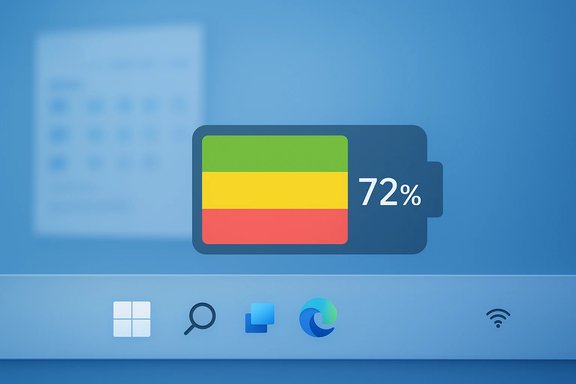
The new battery indicator is a modest but visible redesign that aims for faster at-a-glance comprehension. The practical adjustments are:- Larger glyph in the system tray so the level and color are easier to read.
- Color-coded states to communicate status without hovering:
- Green when charging or otherwise healthy.
- Yellow / orange when Energy Saver / low-power mode is active (reports place this cue at or around the 20% threshold in many preview builds).
- Red when battery is critical (several outlets observed red at a very low threshold, with some testing indicating a critical threshold as low as 6%).
- Persistent percentage option you can enable on the taskbar so you don’t have to hover to see the number. Toggle: Settings → System → Power & battery → Battery percentage.
Why Microsoft made this change (design and usability rationale)
Designers told press during preview testing that the old taskbar icon was too small and often static white, so it failed to convey useful information quickly. The new design is meant to reduce “micro-friction” — the small, repeated cognitive and mechanical steps users take just to check the battery. Industry coverage and Microsoft commentary during the preview period both emphasised user feedback and legibility as the key drivers for the change. From a usability standpoint, color + numeric value provide two independent cues: colour signals state quickly; the percentage gives precise remaining capacity. That redundancy improves accessibility for many users, although designers must avoid using colour alone as the only signal — more on accessibility risks below.The rollout reality: why some users see the battery icon but not the new Start menu
That staggered experience you’re seeing is by design. The binaries for the 25H2/24H2 changes were packaged into monthly servicing and the November cumulative (KB5068861), but visibility of many features has been gated by Microsoft’s controlled, server-side feature flags and enablement packages. In practice this means:- The update package (KB5068861) may install on your PC.
- Microsoft can still decide which devices should see which UI changes and when — flipping server-side flags for cohorts, regions, or telemetry criteria.
- Some features are also hardware- or license-gated (for example, certain Copilot-plus features depend on specific hardware or Microsoft 365 entitlements).
What Microsoft’s official KB actually lists (verified)
The November 11, 2025 KB page (KB5068861) is explicit about its scope: it’s a cumulative security and quality rollup that also includes specified new features and administrator controls, including a Boolean option for Start pin provisioning in enterprise policy. The KB page confirms the update is widely distributed, but it does not promise immediate visibility of every UI tweak on every device — a signpost that server-side gating is in play.How to check whether you have the feature and how to enable the percentage
If your PC received the code but the percentage is not visible by default, the toggle is available once the feature is enabled on your device:- Open Settings.
- Go to System → Power & battery.
- Toggle Battery percentage to On.
Strengths: why this matters for everyday users
- Immediate usability gain. Colour cues plus percentage give faster, clearer battery status at a glance — especially valuable for mobile and hybrid workers.
- Consistency across surfaces. The colored glyphs appear in the taskbar, quick settings, and (in previews) the lock screen and flyouts, improving parity across the OS.
- Less hovering, fewer interruptions. The persistent percentage option reduces the mouse-hover choreography that annoyed many users.
- Small changes, high impact. These are low-risk, user-focused polish items compared with bigger platform shifts, so they’re easy wins for Microsoft’s quality-of-life roadmap. Coverage and testing documentation from multiple outlets and communities corroborate these benefits.
Risks and caveats: what to watch for
- Fragmented experience from staged rollouts. Two identical machines in the same office can behave differently while Microsoft gates features — confusing end users and increasing helpdesk volume. Technical write-ups warn that the enablement-package + server-side flag model intentionally produces this temporary variance.
- Accessibility reliance on colour. If the UI relies primarily on colour to convey battery state, users with colour-vision deficiency could be disadvantaged. While Microsoft provides numeric readouts too, any designs that use colour as the single cue should be treated as accessibility hazards.
- Third-party shell or tray utilities may break. Utilities that hook into the system tray, taskbar, or shell can mis-render or conflict with the new larger glyph; administrators should validate third-party tools used in managed environments. Community testing reports and enterprise guidance flag compatibility as a common issue during major UI rollouts.
- Regional inconsistency and perception of bias. News reports from local outlets indicate that some regions receive feature flags earlier than others. While Microsoft frames rollout pacing as a stability measure, it feeds perceptions that certain geographies are deprioritised — a political and customer-relations risk if unaddressed. This claim is region-specific and not always verifiable from public Microsoft channels; treat such assertions as anecdotal until official region-by-region telemetry or statements are available. (This article flags regional claims as locally reported and potentially unverifiable.
Enterprise implications: admin controls, policy, and deployment advice
The KB explicitly added a policy Boolean for Start pin provisioning that lets administrators apply pins once during provisioning while allowing subsequent user changes to persist. That’s helpful for organizations that want predictable day‑zero configurations without permanently locking user personalization. Administrators should:- Validate the build family and confirm all prerequisite cumulative updates are installed before applying the enablement package in controlled rings. Microsoft’s guidance and community deployment threads both recommend this prerequisite validation step to avoid unexpected behaviour.
- Test third-party shell integrations, endpoint management agents, and accessibility tools on representative hardware before broad deployment.
- Prepare support documentation for the expected staggered rollout and tell helpdesks to check the Settings → System → Power & battery toggle if users report missing battery percentages.
Accessibility and design notes
The combined approach (colour + number + lengthened bar) is stronger than colour alone. That said, product teams must ensure:- The battery percentage and an alternative non‑colour cue (bar thickness or icon shape change) are always available for assistive tech users.
- Narrator, third-party screen readers, and UI automation continue to correctly expose the battery percentage in the system tray and quick settings.
- Changes are documented in the accessibility release notes and flagged for assistive-tech partners and enterprise IT teams.
What we can confirm, and what remains uncertain
Confirmed:- The November 11, 2025 cumulative update (KB5068861) published by Microsoft contains the binaries and documented feature-list items for the refreshed Start menu and battery UX.
- The battery icon redesign includes colour-coded states and a taskbar percentage toggle that can be enabled via Settings. Multiple independent outlets and hands-on reports observed the same.
- Microsoft uses staged, server-side gating and enablement packages; installing the cumulative does not guarantee immediate activation of all UI features. This delivery model is documented and analyzed by community and Microsoft-facing IT guidance.
- Precise regional timing on the server-side switch (for example, whether Kenyan users received the battery icon enablement specifically on January 9, 2026) comes from local reporting and user anecdotes and is not documented centrally by Microsoft in a region-by-region timeline. Treat region-specific “overnight flips” as plausible but not confirmed without Microsoft telemetry or an official regional statement. Local reports are valuable signals, but they should be labelled anecdotal unless corroborated by Microsoft or multiple independent telemetry sources.
Practical recommendations for readers
- Check your build and update status:
- Settings → Windows Update → View update history and confirm KB5068861 or a later cumulative is installed.
- If you’re on a managed device, check with IT to confirm patch levels and feature enablement policies.
- If you see the battery icon change and want the percentage:
- Settings → System → Power & battery → Battery percentage → Toggle On. If the toggle is absent, wait — the feature flag likely hasn’t reached your device yet.
- For IT administrators:
- Pilot the change on representative hardware and update support documentation to explain why experiences may differ among users.
- Validate third-party tray agents and shell extensions against the new taskbar visuals to avoid rendering or functional regressions.
- Accessibility teams:
- Verify Narrator and other assistive technologies expose the battery percentage and state correctly once the feature appears on target devices.
The bigger picture: small design wins, large operational trade-offs
The colourful battery icon is modest in scope but emblematic of Microsoft’s 2025 strategy: deliver iterative, human-centred improvements more frequently through servicing channels while using staged activation to preserve platform stability at scale. For end users, this is a welcome polish; for IT operations, it’s another instance of balancing rapid feature delivery with predictable, uniform behaviour across fleets.Those competing priorities—faster user-facing improvements versus controlled, safe activation—are visible in how KB5068861 was published and how the Start menu and other features remain staggered across devices. Organizations and users should expect this cadence going forward: more frequent, smaller design wins rolled out carefully, and an occasional mismatch between code on disk and features you actually see.
Conclusion
A subtle splash of green, orange and red on the taskbar is an easy win in everyday ergonomics: clearer, larger battery glyphs and an on‑tray percentage make working on battery power less stressful. The flip side is a rollout model that can feel opaque and uneven to users when one feature arrives and another — like the redesigned Start menu — remains server‑gated. KB5068861 is the packaging Microsoft used to carry these improvements; the staged, telemetry-driven enablement model explains why visibility varies across devices and regions. Users should check Settings to enable the new percentage when available, and administrators must plan for compatibility and support as Microsoft continues to flip these feature flags globally.Source: Techish Kenya Windows 11's revamped battery icon just arrived, but still no sign of the new Start menu - Techish Kenya
