

Microsoft’s June 8, 2026 Insider Program change creates separate Windows 11 26H1 Beta and Experimental build tracks for new platform-specific hardware, including Qualcomm Snapdragon X2 PCs, rather than turning 26H1 into the next broad feature update for existing Windows 11 machines. That distinction is the whole story. The build numbers are useful, but the message behind them is sharper: Windows is being split around silicon again. Microsoft is treating 26H1 less like an upgrade lane and more like an operating-system platform image for machines that need a different foundation.
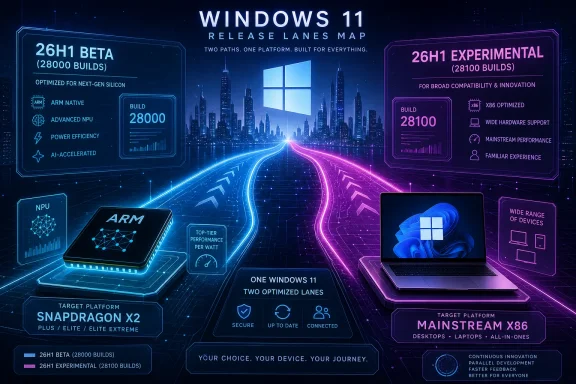
At first glance, this looks like routine Insider housekeeping. Experimental 26H1 testers move into the 28100 build series, while Microsoft introduces a Beta 26H1 track based on 28000-series builds. The familiar Insider logic is still there: Beta is the safer lane, Experimental is where Microsoft lets more platform work breathe in public.
But the important word is not Beta. It is 26H1. Microsoft is not merely carving up preview channels for the same Windows release everyone else will eventually receive. It is acknowledging that 26H1 sits on a different Windows core than 24H2, 25H2, and the next conventional annual feature update.
That makes the change more consequential than a version-number footnote. For years, Windows users have been trained to read a larger version number as a queue: wait long enough and the new thing comes to you. Here, Microsoft is telling people not to think that way. A normal x86 Windows 11 PC running 24H2 or 25H2 is not waiting in line for 26H1.
The result is a small but telling inversion of the Windows update story. Instead of asking whether a PC is “ready” for the next Windows release, Microsoft is saying that the release itself is scoped to a particular class of PC. That is a very different kind of compatibility claim.
That matters because Windows version names have become a kind of consumer weather report. 22H2, 23H2, 24H2, and 25H2 all sound like calendar-driven milestones in a single river. If you are an admin, enthusiast, or OEM developer, the naming convention implies continuity even when the plumbing underneath is changing.
With 26H1, continuity is precisely what Microsoft is downplaying. The company says the release is based on a different Windows core than the mainstream line. That does not mean the user-facing experience must be dramatically different, and Microsoft has an obvious incentive to keep 25H2 and 26H1 feeling aligned. It does mean the servicing and platform assumptions are not identical.
This is why the Insider split is useful. A Snapdragon X2 development system needs a preview lane that respects its platform base. A conventional Core or Ryzen laptop does not become more modern simply because it can be made to chase a higher build number. In this case, the higher number may be less a prize than a warning label.
That is what makes the 26H1 Beta and Experimental split interesting. Microsoft is effectively giving platform-specific hardware its own testing topology. Beta can serve developers, OEMs, and testers who need a more stable preview base. Experimental can absorb changes that are closer to the edge of internal development.
For a normal user, that sounds abstract. For OEMs, driver teams, enterprise pilot groups, and silicon vendors, it is not abstract at all. Power management, firmware behavior, sleep states, camera pipelines, NPUs, GPU drivers, virtualization, emulation, and security features are not decorative layers sitting above Windows. They are part of whether a machine feels finished.
ARM PCs make this more visible because they expose more of the bargain. Windows on Arm cannot rely entirely on the decades of x86 inertia that makes many rough edges survivable. If the driver stack, firmware, scheduler behavior, app compatibility story, and update model do not line up, the product feels experimental no matter how good the silicon looks on a slide.
The Insider split is therefore less about pleasing hobbyists and more about staging that integration work in public without pretending every tester is testing the same thing. Microsoft is not simply asking users to choose between “early” and “less early.” It is asking them to stay on the platform path their hardware actually belongs to.
The timing is not accidental. New laptop silicon does not arrive as a bare chip and then politely ask Windows to behave as before. It arrives with new CPU cores, new NPU capabilities, new power envelopes, new firmware demands, and new performance promises that only matter if the operating system can exploit them consistently.
That is why the old desktop mental model is increasingly misleading. In the classic Windows PC world, a new CPU generation was often something the OS tolerated. The kernel needed support, drivers needed updates, and firmware could cause pain, but the broad platform was stable enough that the chip usually entered an existing current.
Modern ARM laptops are closer to a negotiated product. The silicon vendor, OEM, firmware supplier, Microsoft, and app ecosystem all have to land the plane together. Apple proved the commercial value of that vertical coordination with its own silicon. Microsoft and Qualcomm are trying to approximate the benefits without owning the whole stack.
26H1 looks like one answer to that challenge. It gives Microsoft and its partners a platform branch that can be optimized, serviced, and validated around specific hardware without dragging the entire Windows installed base into the same channel. That may be less elegant than one Windows for every PC, but it may be more honest.
But feature parity should not obscure the architectural point. Two Windows releases can look similar at the desktop and still differ in servicing rules, core platform assumptions, supported processors, and upgrade paths. Windows has always had more internal complexity than its branding admits. 26H1 simply makes that complexity harder to ignore.
The risk is user confusion. Microsoft has spent years trying to make Windows updates feel simpler: annual feature updates, monthly cumulative updates, enablement packages, release health dashboards, and a cleaner lifecycle story. Then along comes a version number that looks like the next chronological release but is not meant for the vast majority of PCs.
That tension is not just cosmetic. Enterprises build operating-system plans around version names, support timelines, deployment rings, and hardware refresh cycles. If 26H1 is a platform-specific branch, IT teams need to know whether it changes imaging, compliance baselines, driver validation, security tooling, and future upgrade expectations.
Microsoft’s answer appears to be: only if you are buying the machines that ship with it. That is a defensible position, but it is also a tacit admission that Windows version names are no longer enough. The number tells you where a build sits in a chronology. It does not tell you whether your PC belongs there.
The new 26H1 Beta channel gives testers a 28000-series track. The Experimental channel moves to 28100-series builds. Switching between those channels is intended to be possible through Windows Update and the Windows Insider Program settings without a reinstall. That is useful, but it does not turn 26H1 into a general-purpose playground.
The more important audience is the ecosystem around the hardware. OEMs need stable-enough preview builds to validate devices before and after launch. Driver developers need a branch where regressions can be isolated against the platform they actually target. Microsoft needs telemetry from real hardware without confusing the entire Windows user base.
This is where the Insider Program has become a kind of semi-public supply chain. The build numbers are visible to enthusiasts, but the most consequential work may happen between Microsoft, Qualcomm, firmware teams, and device makers. Public builds provide oxygen for testing, but the real fire is platform readiness.
For end users, the sanest reading is boring and therefore correct: do not chase 26H1 unless you have a machine that is supposed to run it. The presence of an ISO or Insider option does not mean the branch is a sensible destination for your current PC. Windows has always allowed determined users to do unsupported things. That does not make those things wise.
The harder job belongs to Windows. A fast ARM CPU does not automatically solve app compatibility, driver availability, peripheral support, gaming friction, enterprise management confidence, or the subtle latency problems that make a premium laptop feel less premium. A great benchmark result can sell attention; a great platform experience sells repeat buyers.
That is why 26H1 should be read less as marketing and more as infrastructure. Microsoft is creating room for the dull, necessary work that decides whether Snapdragon X2 PCs feel like finished Windows machines or like another admirable experiment. The distinction matters because Windows on Arm has been “almost there” for a very long time.
The first wave of Copilot+ PCs helped normalize ARM laptops in the Windows market, but normalization is not victory. Users still compare these machines against Intel and AMD systems that run everything without explanation. IT departments still ask whether a device will behave predictably across VPN clients, endpoint protection, legacy utilities, accessibility tools, and line-of-business apps.
A platform-specific branch cannot answer all of those questions. But it can reduce one category of uncertainty: whether the operating system itself is being tuned around the silicon rather than merely made compatible with it. That is a meaningful difference, even if it is not a feature that fits neatly into a launch keynote.
There is also a less flattering reading: Windows is becoming more fragmented because Microsoft has to satisfy too many hardware futures at once. The company must support an enormous x86 installed base, court ARM vendors, keep OEMs happy, serve enterprises, and still tell consumers that Windows is one coherent product. Those goals do not always fit inside a single release train.
Apple can solve this by narrowing the problem. It controls the silicon roadmap, the operating system, much of the firmware story, and the hardware designs that matter most. Microsoft cannot and probably should not copy that model wholesale. The Windows ecosystem exists because it is broad, messy, competitive, and full of hardware variation.
But that breadth has costs. If Microsoft wants ARM PCs to compete seriously with MacBooks, it may need to treat some Windows releases more like platform-specific enablement layers than universal feature upgrades. 26H1 is evidence of that tradeoff becoming visible.
The danger is that users experience this as opacity. If one Windows 11 version is for new Snapdragon X2 systems, another is for the general installed base, and future updates realign later, the brand remains simple only at the surface. Underneath, administrators and power users must track which machines are on which core and why.
The immediate effect is likely limited. Most organizations are not replacing entire fleets with first-wave Snapdragon X2 machines. ARM PCs will enter through executive devices, developer pilots, mobility-focused teams, and specialized use cases where battery life and instant-on behavior matter more than maximum legacy compatibility.
Still, those pilots need rules. Can the device be imaged using existing tooling? Do endpoint agents support the platform cleanly? Are VPN clients native, emulated, or unsupported? Does the help desk know how to diagnose driver problems on this branch? Will the device move to a future mainstream release, remain on a separate servicing path, or require a later platform transition?
Microsoft has offered some clarity by saying 26H1 is not an in-place update from 24H2 or 25H2 and by limiting the processor list. But the long-term question remains more subtle: how many platform branches can Windows sustain before the management burden starts to look like fragmentation rather than flexibility?
That is where the 26H1 split should be watched carefully. If it remains a narrow accommodation for a new silicon generation, it may be a sensible engineering move. If it becomes a recurring pattern across ARM vendors, AI PC classes, and hardware-specific releases, Windows administrators may find themselves managing not just Windows versions, but Windows lineages.
Installing 26H1 on hardware that was not designed for it may answer interesting technical questions. It may also create problems that say more about the unsupported configuration than about the release itself. If performance improves, worsens, or merely changes, the result is not necessarily evidence that Microsoft is hiding an upgrade from existing users.
The same applies to Snapdragon X Elite owners from the previous generation. It is natural for those buyers to ask why a newer Windows branch is aimed at Snapdragon X2 rather than their still-modern ARM PCs. Microsoft’s answer appears to be that 26H1 is tied to specific next-generation platform requirements, not simply ARM as a category.
That will not satisfy everyone. Early adopters often absorb the cost of proving a market exists, only to watch cleaner platform support arrive with the next generation. The original Copilot+ PC wave helped Microsoft and Qualcomm make their case. The X2 wave may receive the more purpose-built branch.
That is frustrating, but not unusual. Platform transitions often reward the second or third generation more than the first. The first generation proves that the idea can ship. The next generation gets the boring infrastructure that should have existed from the start.
That is the dream. Platform-specific engineering underneath, common experience on top. If Microsoft can deliver that, 26H1 will be remembered only by release-note readers and sysadmins who had to understand the difference.
The failure mode is equally clear. If users begin to associate certain Windows versions with confusing eligibility rules, missing updates, unclear upgrade paths, or incompatible hardware expectations, then Microsoft’s neat split becomes another example of Windows complexity leaking into daily life. The company has spent years trying to make servicing boring. Platform forks make boredom harder to preserve.
There is also a communications trap. Microsoft likes to say that Windows 11 has a unified experience, and in many ways that is true. But a unified experience is not the same as a unified engineering base. The more Microsoft optimizes for specific silicon, the more carefully it must explain where the sameness ends.
That explanation cannot be left to build numbers. 28000 and 28100 mean something to Insiders, but not to buyers. The average user understands whether their PC gets an update, whether apps work, whether battery life is good, and whether the machine feels reliable. The platform strategy only matters if it changes those outcomes.
The arrival of separate 26H1 Insider tracks is a reminder that the future of Windows will not be decided only by features users can screenshot. It will be decided by whether Microsoft can make specialized hardware feel ordinary, dependable, and fully Windows without burying customers in compatibility caveats. If Snapdragon X2 machines ship with better battery life, stronger performance, and fewer platform excuses, 26H1 will have done its quiet job; if not, the build numbers will become just another layer of complexity in a Windows ecosystem already fluent in exceptions.
 Microsoft Turns a Build Notice Into a Silicon Map
At first glance, this looks like routine Insider housekeeping. Experimental 26H1 testers move into the 28100 build series, while Microsoft introduces a Beta 26H1 track based on 28000-series builds. The familiar Insider logic is still there: Beta is the safer lane, Experimental is where Microsoft lets more platform work breathe in public.But the important word is not Beta. It is 26H1. Microsoft is not merely carving up preview channels for the same Windows release everyone else will eventually receive. It is acknowledging that 26H1 sits on a different Windows core than 24H2, 25H2, and the next conventional annual feature update.
That makes the change more consequential than a version-number footnote. For years, Windows users have been trained to read a larger version number as a queue: wait long enough and the new thing comes to you. Here, Microsoft is telling people not to think that way. A normal x86 Windows 11 PC running 24H2 or 25H2 is not waiting in line for 26H1.
The result is a small but telling inversion of the Windows update story. Instead of asking whether a PC is “ready” for the next Windows release, Microsoft is saying that the release itself is scoped to a particular class of PC. That is a very different kind of compatibility claim.
26H1 Is Not the Next Stop for Your Current PC
The most practical detail is also the easiest to misunderstand: Windows 11 26H1 is not designed as an in-place upgrade from Windows 11 24H2 or 25H2. Existing devices are not supposed to see it arrive through Windows Update as the natural next step. Microsoft’s own positioning is unusually direct by Windows standards: 26H1 exists for selected new devices, not for the installed base.That matters because Windows version names have become a kind of consumer weather report. 22H2, 23H2, 24H2, and 25H2 all sound like calendar-driven milestones in a single river. If you are an admin, enthusiast, or OEM developer, the naming convention implies continuity even when the plumbing underneath is changing.
With 26H1, continuity is precisely what Microsoft is downplaying. The company says the release is based on a different Windows core than the mainstream line. That does not mean the user-facing experience must be dramatically different, and Microsoft has an obvious incentive to keep 25H2 and 26H1 feeling aligned. It does mean the servicing and platform assumptions are not identical.
This is why the Insider split is useful. A Snapdragon X2 development system needs a preview lane that respects its platform base. A conventional Core or Ryzen laptop does not become more modern simply because it can be made to chase a higher build number. In this case, the higher number may be less a prize than a warning label.
The Insider Program Is Becoming Less About Enthusiasm and More About Hardware Reality
The Windows Insider Program began life as a mass-feedback machine. It gave enthusiasts early access, gave Microsoft telemetry, and gave everyone a feeling that Windows development had become more open. Over time, however, the program has had to carry a heavier burden: different channels now map not only to risk appetite, but to product strategy.That is what makes the 26H1 Beta and Experimental split interesting. Microsoft is effectively giving platform-specific hardware its own testing topology. Beta can serve developers, OEMs, and testers who need a more stable preview base. Experimental can absorb changes that are closer to the edge of internal development.
For a normal user, that sounds abstract. For OEMs, driver teams, enterprise pilot groups, and silicon vendors, it is not abstract at all. Power management, firmware behavior, sleep states, camera pipelines, NPUs, GPU drivers, virtualization, emulation, and security features are not decorative layers sitting above Windows. They are part of whether a machine feels finished.
ARM PCs make this more visible because they expose more of the bargain. Windows on Arm cannot rely entirely on the decades of x86 inertia that makes many rough edges survivable. If the driver stack, firmware, scheduler behavior, app compatibility story, and update model do not line up, the product feels experimental no matter how good the silicon looks on a slide.
The Insider split is therefore less about pleasing hobbyists and more about staging that integration work in public without pretending every tester is testing the same thing. Microsoft is not simply asking users to choose between “early” and “less early.” It is asking them to stay on the platform path their hardware actually belongs to.
Snapdragon X2 Makes Windows More Like a Platform Partnership
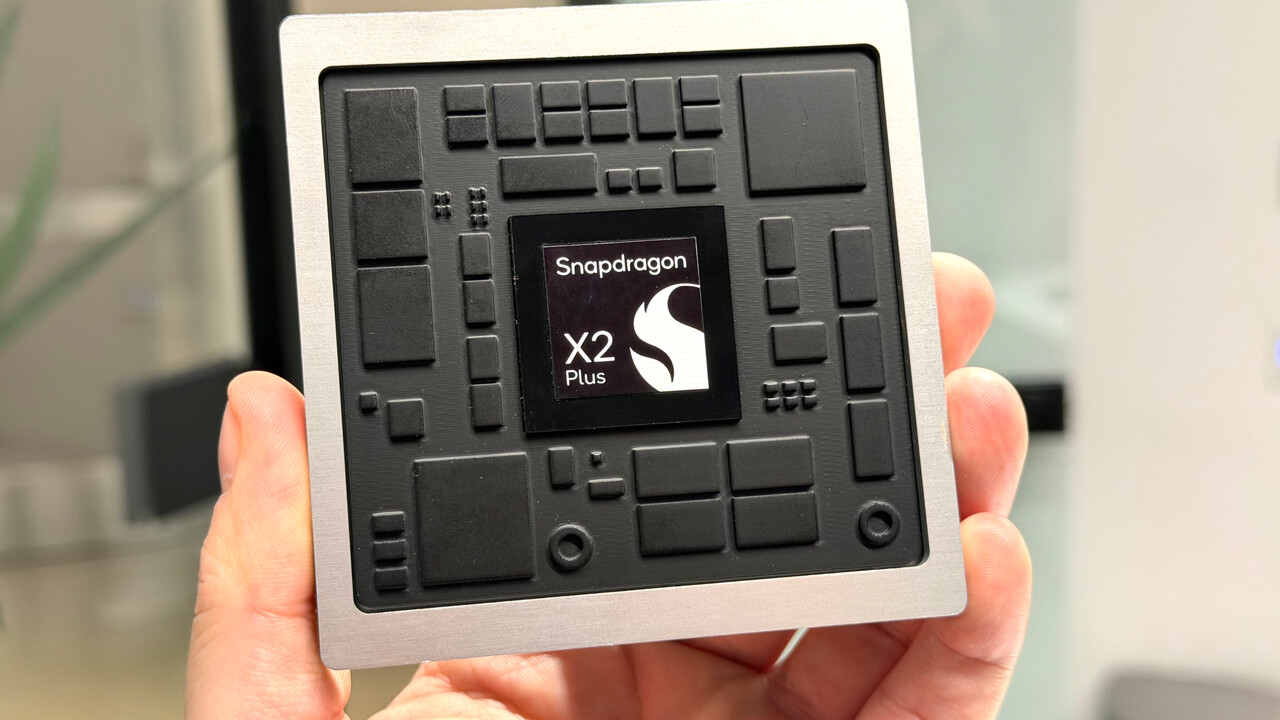
Qualcomm’s Snapdragon X2 family is the obvious anchor for 26H1. Microsoft’s official processor list for Windows 11 26H1 includes Snapdragon X2 Plus, Snapdragon X2 Elite, and Snapdragon X2 Elite Extreme. Qualcomm announced the higher-end X2 Elite platforms in September 2025 for Windows PCs, with devices expected in the first half of 2026.The timing is not accidental. New laptop silicon does not arrive as a bare chip and then politely ask Windows to behave as before. It arrives with new CPU cores, new NPU capabilities, new power envelopes, new firmware demands, and new performance promises that only matter if the operating system can exploit them consistently.
That is why the old desktop mental model is increasingly misleading. In the classic Windows PC world, a new CPU generation was often something the OS tolerated. The kernel needed support, drivers needed updates, and firmware could cause pain, but the broad platform was stable enough that the chip usually entered an existing current.
Modern ARM laptops are closer to a negotiated product. The silicon vendor, OEM, firmware supplier, Microsoft, and app ecosystem all have to land the plane together. Apple proved the commercial value of that vertical coordination with its own silicon. Microsoft and Qualcomm are trying to approximate the benefits without owning the whole stack.
26H1 looks like one answer to that challenge. It gives Microsoft and its partners a platform branch that can be optimized, serviced, and validated around specific hardware without dragging the entire Windows installed base into the same channel. That may be less elegant than one Windows for every PC, but it may be more honest.
Feature Parity Is the Sugar Coating on a Platform Fork
Microsoft’s softer message is that 26H1 and the mainstream Windows 11 line should remain broadly similar in user-facing features. That is important. Nobody buying a Snapdragon X2 laptop wants to discover that they have entered a Windows side universe where Settings panels, security controls, and Copilot-era features behave unpredictably.But feature parity should not obscure the architectural point. Two Windows releases can look similar at the desktop and still differ in servicing rules, core platform assumptions, supported processors, and upgrade paths. Windows has always had more internal complexity than its branding admits. 26H1 simply makes that complexity harder to ignore.
The risk is user confusion. Microsoft has spent years trying to make Windows updates feel simpler: annual feature updates, monthly cumulative updates, enablement packages, release health dashboards, and a cleaner lifecycle story. Then along comes a version number that looks like the next chronological release but is not meant for the vast majority of PCs.
That tension is not just cosmetic. Enterprises build operating-system plans around version names, support timelines, deployment rings, and hardware refresh cycles. If 26H1 is a platform-specific branch, IT teams need to know whether it changes imaging, compliance baselines, driver validation, security tooling, and future upgrade expectations.
Microsoft’s answer appears to be: only if you are buying the machines that ship with it. That is a defensible position, but it is also a tacit admission that Windows version names are no longer enough. The number tells you where a build sits in a chronology. It does not tell you whether your PC belongs there.
The Build Numbers Are a Signal to OEMs, Not a Prize for Insiders
The 28000 and 28100 build series distinction is the kind of thing Windows enthusiasts instinctively parse. Higher must be newer, newer must be better, and better must be worth installing. That instinct is exactly what Microsoft is trying to discipline here.The new 26H1 Beta channel gives testers a 28000-series track. The Experimental channel moves to 28100-series builds. Switching between those channels is intended to be possible through Windows Update and the Windows Insider Program settings without a reinstall. That is useful, but it does not turn 26H1 into a general-purpose playground.
The more important audience is the ecosystem around the hardware. OEMs need stable-enough preview builds to validate devices before and after launch. Driver developers need a branch where regressions can be isolated against the platform they actually target. Microsoft needs telemetry from real hardware without confusing the entire Windows user base.
This is where the Insider Program has become a kind of semi-public supply chain. The build numbers are visible to enthusiasts, but the most consequential work may happen between Microsoft, Qualcomm, firmware teams, and device makers. Public builds provide oxygen for testing, but the real fire is platform readiness.
For end users, the sanest reading is boring and therefore correct: do not chase 26H1 unless you have a machine that is supposed to run it. The presence of an ISO or Insider option does not mean the branch is a sensible destination for your current PC. Windows has always allowed determined users to do unsupported things. That does not make those things wise.
ARM PCs Need Better Windows, Not Just Faster Qualcomm Slides
Qualcomm has made ambitious claims for Snapdragon X2. That is the company’s job. Every new PC chip arrives wrapped in graphs showing better performance per watt, stronger AI throughput, smoother multitasking, and longer battery life.The harder job belongs to Windows. A fast ARM CPU does not automatically solve app compatibility, driver availability, peripheral support, gaming friction, enterprise management confidence, or the subtle latency problems that make a premium laptop feel less premium. A great benchmark result can sell attention; a great platform experience sells repeat buyers.
That is why 26H1 should be read less as marketing and more as infrastructure. Microsoft is creating room for the dull, necessary work that decides whether Snapdragon X2 PCs feel like finished Windows machines or like another admirable experiment. The distinction matters because Windows on Arm has been “almost there” for a very long time.
The first wave of Copilot+ PCs helped normalize ARM laptops in the Windows market, but normalization is not victory. Users still compare these machines against Intel and AMD systems that run everything without explanation. IT departments still ask whether a device will behave predictably across VPN clients, endpoint protection, legacy utilities, accessibility tools, and line-of-business apps.
A platform-specific branch cannot answer all of those questions. But it can reduce one category of uncertainty: whether the operating system itself is being tuned around the silicon rather than merely made compatible with it. That is a meaningful difference, even if it is not a feature that fits neatly into a launch keynote.
Fragmentation Is the Price of Competing With Integrated Platforms
There is a charitable way to read Microsoft’s move: Windows is adapting to a world where hardware specialization matters again. CPUs are no longer interchangeable performance rectangles. NPUs, heterogeneous cores, memory architectures, security processors, and power-management systems increasingly shape the operating-system experience.There is also a less flattering reading: Windows is becoming more fragmented because Microsoft has to satisfy too many hardware futures at once. The company must support an enormous x86 installed base, court ARM vendors, keep OEMs happy, serve enterprises, and still tell consumers that Windows is one coherent product. Those goals do not always fit inside a single release train.
Apple can solve this by narrowing the problem. It controls the silicon roadmap, the operating system, much of the firmware story, and the hardware designs that matter most. Microsoft cannot and probably should not copy that model wholesale. The Windows ecosystem exists because it is broad, messy, competitive, and full of hardware variation.
But that breadth has costs. If Microsoft wants ARM PCs to compete seriously with MacBooks, it may need to treat some Windows releases more like platform-specific enablement layers than universal feature upgrades. 26H1 is evidence of that tradeoff becoming visible.
The danger is that users experience this as opacity. If one Windows 11 version is for new Snapdragon X2 systems, another is for the general installed base, and future updates realign later, the brand remains simple only at the surface. Underneath, administrators and power users must track which machines are on which core and why.
Enterprise IT Will Care Less About the Name Than the Upgrade Path
For enterprise IT, the question is not whether 26H1 has a higher number. It is whether 26H1 devices fit into procurement, deployment, support, and retirement plans without becoming special-case burdens. A platform-specific Windows branch can be acceptable if its lifecycle and servicing behavior are clear. It becomes a problem when it requires exceptions everywhere.The immediate effect is likely limited. Most organizations are not replacing entire fleets with first-wave Snapdragon X2 machines. ARM PCs will enter through executive devices, developer pilots, mobility-focused teams, and specialized use cases where battery life and instant-on behavior matter more than maximum legacy compatibility.
Still, those pilots need rules. Can the device be imaged using existing tooling? Do endpoint agents support the platform cleanly? Are VPN clients native, emulated, or unsupported? Does the help desk know how to diagnose driver problems on this branch? Will the device move to a future mainstream release, remain on a separate servicing path, or require a later platform transition?
Microsoft has offered some clarity by saying 26H1 is not an in-place update from 24H2 or 25H2 and by limiting the processor list. But the long-term question remains more subtle: how many platform branches can Windows sustain before the management burden starts to look like fragmentation rather than flexibility?
That is where the 26H1 split should be watched carefully. If it remains a narrow accommodation for a new silicon generation, it may be a sensible engineering move. If it becomes a recurring pattern across ARM vendors, AI PC classes, and hardware-specific releases, Windows administrators may find themselves managing not just Windows versions, but Windows lineages.
Enthusiasts Should Resist the Version-Number Reflex
Windows enthusiasts are unusually good at finding ways around Microsoft’s intentions. Unsupported installs, registry edits, ISO upgrades, preview builds, and hardware-check bypasses are part of the culture. That curiosity has value. It also creates confusion when a release is not meant to be evaluated as a normal upgrade.Installing 26H1 on hardware that was not designed for it may answer interesting technical questions. It may also create problems that say more about the unsupported configuration than about the release itself. If performance improves, worsens, or merely changes, the result is not necessarily evidence that Microsoft is hiding an upgrade from existing users.
The same applies to Snapdragon X Elite owners from the previous generation. It is natural for those buyers to ask why a newer Windows branch is aimed at Snapdragon X2 rather than their still-modern ARM PCs. Microsoft’s answer appears to be that 26H1 is tied to specific next-generation platform requirements, not simply ARM as a category.
That will not satisfy everyone. Early adopters often absorb the cost of proving a market exists, only to watch cleaner platform support arrive with the next generation. The original Copilot+ PC wave helped Microsoft and Qualcomm make their case. The X2 wave may receive the more purpose-built branch.
That is frustrating, but not unusual. Platform transitions often reward the second or third generation more than the first. The first generation proves that the idea can ship. The next generation gets the boring infrastructure that should have existed from the start.
Microsoft’s Real Bet Is That Users Will Not Notice the Fork
The most successful version of this strategy is one where most people never care. A buyer walks into a store, buys a Snapdragon X2 laptop, and receives a fast, efficient Windows 11 machine. A Ryzen or Core user stays on the mainstream Windows 11 path and receives the next regular feature update. Both believe they are simply using Windows.That is the dream. Platform-specific engineering underneath, common experience on top. If Microsoft can deliver that, 26H1 will be remembered only by release-note readers and sysadmins who had to understand the difference.
The failure mode is equally clear. If users begin to associate certain Windows versions with confusing eligibility rules, missing updates, unclear upgrade paths, or incompatible hardware expectations, then Microsoft’s neat split becomes another example of Windows complexity leaking into daily life. The company has spent years trying to make servicing boring. Platform forks make boredom harder to preserve.
There is also a communications trap. Microsoft likes to say that Windows 11 has a unified experience, and in many ways that is true. But a unified experience is not the same as a unified engineering base. The more Microsoft optimizes for specific silicon, the more carefully it must explain where the sameness ends.
That explanation cannot be left to build numbers. 28000 and 28100 mean something to Insiders, but not to buyers. The average user understands whether their PC gets an update, whether apps work, whether battery life is good, and whether the machine feels reliable. The platform strategy only matters if it changes those outcomes.
The Fine Print Is the Product This Time
The practical reading of Microsoft’s 26H1 move is narrower than the version number suggests and more important than the announcement’s dry format implies. This is not a glittering feature release for the Windows faithful. It is Microsoft aligning preview channels, support language, and processor eligibility around a new ARM hardware generation.- Windows 11 26H1 is a targeted platform release for selected new devices, not the normal successor to Windows 11 24H2 or 25H2 on existing PCs.
- Microsoft’s Insider Program now separates 26H1 into a 28000-series Beta channel and a 28100-series Experimental channel.
- Snapdragon X2 Plus, Snapdragon X2 Elite, and Snapdragon X2 Elite Extreme are the named Qualcomm processors on Microsoft’s 26H1 support list.
- Existing Intel, AMD, and earlier Snapdragon Windows 11 systems should not treat 26H1 as an update they are missing.
- The split gives Microsoft, Qualcomm, OEMs, and driver developers a cleaner public testing structure for platform-specific work.
- The long-term risk is not this one branch, but a Windows roadmap that becomes harder for users and administrators to reason about.
The arrival of separate 26H1 Insider tracks is a reminder that the future of Windows will not be decided only by features users can screenshot. It will be decided by whether Microsoft can make specialized hardware feel ordinary, dependable, and fully Windows without burying customers in compatibility caveats. If Snapdragon X2 machines ship with better battery life, stronger performance, and fewer platform excuses, 26H1 will have done its quiet job; if not, the build numbers will become just another layer of complexity in a Windows ecosystem already fluent in exceptions.
References
- Primary source: igor´sLAB
Published: Wed, 10 Jun 2026 04:00:00 GMT

Windows 11 26H1: Microsoft separates the Insider tracks for new ARM p…
Microsoft is reorganizing Windows 11 26H1 in the Insider Program and introducing separate development branches for it. www.igorslab.de
- Related coverage: windowscentral.com
- Related coverage: windowslatest.com

Microsoft details Windows 11 26H1 support cycle, CPU requirements (just Snapdragon X2 for now), and more
Microsoft says Windows 11 26H1 is supported until March 2028 for consumers and is now rolling out on PCs with eligible CPUs. www.windowslatest.com
- Official source: blogs.windows.com

Announcing new builds 8 June 2026
Hello Windows Insiders, Announcing several new builds today across Beta and Experimental, including a new build train for 26H1! blogs.windows.com
- Related coverage: techradar.com
- Related coverage: pureinfotech.com

Windows 11 26H1 is official, but you can’t install it and here’s why
Windows 11 26H1 is official but exclusive to Snapdragon X2 devices. Here’s why you can’t download it and what 26H2 really means. pureinfotech.com
- Related coverage: pcworld.com

Uh oh! Not all Arm PCs are getting Windows 11 26H1 special update
Microsoft has quietly revealed in a support document which Arm PCs will actually receive the Windows 11 26H1 update. www.pcworld.com
- Related coverage: windowsreport.com
- Related coverage: techgenyz.com

Microsoft’s Bold Windows 11 Version 26H1 Launch Elevates Snapdragon X2 PCs
Microsoft announces Windows 11 Version 26H1 for new Snapdragon X2 PCs. Not available for existing users; regular updates continue until 26H2 in 2026. techgenyz.com
- Related coverage: techrepublic.com

Windows 11 26H1 to Debut This Spring, Exclusive to Snapdragon X2 PCs
Windows 11 version 26H1 launches this spring on Snapdragon X2 PCs only, bringing platform-level changes without new features for most users.www.techrepublic.com
- Related coverage: hardwareluxx.de

Windows 11 26H1: Vorerst exklusiv für Snapdragon-X2-Notebooks - Hardwareluxx
Windows 11 26H1: Vorerst exklusiv für Snapdragon-X2-Notebooks. www.hardwareluxx.de
- Related coverage: windowsforum.com

Windows 11 26H1 Platform Enablement for Snapdragon X2 Arm Laptops
Microsoft’s decision to ship a split Windows 11 release this spring — a platform-only build labeled Windows 11, version 26H1 that will appear exclusively on new Arm-based PCs powered by Qualcomm’s Snapdragon X2 series — marks a meaningful pivot in how Microsoft supports new silicon and how the... windowsforum.com
- Related coverage: computerbase.de
Exklusiv für Snapdragon X2: Microsoft schafft Klarheit bei Windows 11 26H1
Microsoft erklärt offiziell Details zum Frühjahrs-Update Windows 11 26H1. Es erscheint ausschließlich auf Modellen mit Snapdragon-X2-Chip.www.computerbase.de
- Related coverage: tomshardware.com
Microsoft confirms Windows 11 26H1 will be for Arm devices only at launch — Snapdragon X2-powered devices officially shipping with 26H1
It's 24H2 all over again, but with the caveat that 26H1 will only support specific hardware for its entire lifecycle. Devices running 26H1 will not be able to upgrade to 26H2.www.tomshardware.com
- Official source: support.microsoft.com
Windows 11, version 26H1 - Microsoft Support
 support.microsoft.com
- Official source: learn.microsoft.com

Windows processor requirements Windows 11, version 26H1 supported processors
This specification details the processors that can be used with Windows 11, version 26H1 customer systems that include Windows products, including custom images.learn.microsoft.com