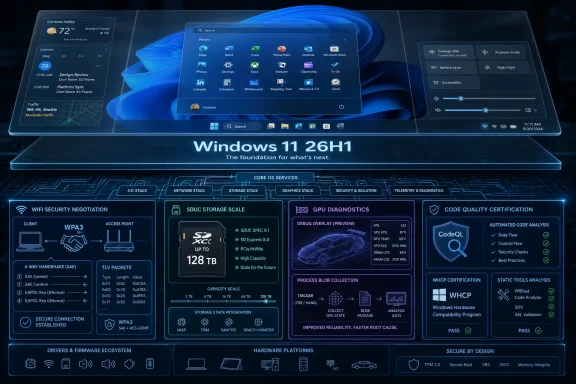
Microsoft’s updated Windows 11 26H1 driver documentation, published around the May 2026 WDK refresh, confirms that this release is aimed at platform support for specific new silicon rather than a broad feature upgrade for existing PCs. That distinction matters because the visible Windows story is not where the real engineering action is. In 26H1, Microsoft is moving the plumbing: the driver kit, Wi-Fi stack, SD storage path, GPU diagnostics, and static-analysis rules that determine whether future hardware behaves like a finished product or a prototype with a Start menu.
Windows 11 26H1 is easy to misread if you approach it like a normal Windows release. The name sounds like the next stop on the annual feature train, but Microsoft has repeatedly framed it as a hardware-focused platform release, not the successor that most 25H2 users should expect to install.
That makes the driver documentation more revealing than the usual feature roundup. There is no dramatic new desktop metaphor here, no taskbar reinvention, and no AI flourish begging for a launch video. Instead, the changes point toward the less glamorous contract between Windows, silicon vendors, OEMs, and independent hardware vendors.
For enthusiasts, that may feel anticlimactic. For IT departments and driver developers, it is the part of Windows that decides whether a machine sleeps correctly, roams between access points, mounts tomorrow’s removable storage, and produces useful crash data when the GPU stack goes sideways.
That separation is becoming a defining feature of modern Windows engineering. Microsoft can no longer treat every PC as a mostly interchangeable x86 box with a few vendor drivers stapled on after the fact. Arm PCs, NPUs, new power-management models, new graphics paths, and deeply integrated wireless platforms all force the operating system to meet hardware earlier in the design cycle.
The result is a Windows release that looks small from the outside but is strategically large underneath. 26H1 is not trying to persuade a user to click “Download and install” for new features. It is trying to make sure the next wave of devices has a kernel, driver model, and certification path that are not improvising at launch.
That is a sensible trade, but it also makes Microsoft’s messaging burden heavier. Windows users have learned to read version numbers as promises of features. With 26H1, the version number is closer to a manufacturing marker.
Driver development is unusually sensitive to version alignment. The SDK, WDK, Visual Studio integration, headers, libraries, static-analysis configuration, signing process, and Windows Hardware Compatibility Program expectations all have to line up. A driver that compiles cleanly with an older kit may still be using stale assumptions about interfaces, certification requirements, or target-platform behavior.
Microsoft’s documentation also points to Visual Studio 2026 support with the latest WDK. That matters less as a headline feature and more as a signal that the company expects driver shops to modernize their build and validation environments rather than bolt 26H1 support onto a legacy pipeline.
For large OEMs, that modernization is part of the normal cadence. For smaller IHVs, peripheral makers, industrial vendors, and niche hardware suppliers, it is where friction often appears. Windows hardware compatibility is not only a question of writing code; it is a question of proving that code behaves safely across the scenarios Microsoft now cares about.
Nobody buys a laptop because the TLV parser changed. But users absolutely return laptops, blame routers, or file tickets with the help desk when Wi-Fi cannot connect reliably to a network that looks ordinary from the outside. Wireless compatibility is one of those domains where standards, router firmware, enterprise access policies, client drivers, and operating-system assumptions collide in the most user-visible way possible: the internet simply does not work.
The removal of older WDI datapath definitions from WiFiCx headers also sounds like housekeeping, but it is the sort of housekeeping that keeps a driver model from becoming an archaeological site. Windows has spent years moving Wi-Fi development toward newer frameworks, and each cleanup is a reminder that compatibility is not the same thing as carrying every old abstraction forever.
For enterprise IT, the security angle is just as important as the connectivity angle. WPA3 transition and compatibility behavior can be the difference between a clean modernization plan and a mixed-mode wireless estate full of exceptions. Microsoft is not solving that problem alone, but it is giving driver developers a clearer path to participate in it.
That number sounds absurd until history catches up with it. Removable storage has a habit of becoming boring shortly after it becomes possible. The capacity that once belonged in a workstation eventually fits on a card small enough to lose in a coat pocket.
The immediate effect will be limited. Most users are not about to insert a 128TB SD card into a consumer laptop in 2026. But Windows needs to understand the bus, protocol, capacity reporting, and driver assumptions before the market makes those capacities routine enough for photographers, embedded systems, edge devices, and field-service workflows.
This is exactly the kind of change that is best made before it is exciting. If Microsoft waits until high-capacity SDUC cards are common, every incompatibility becomes a user-facing failure. If it prepares the stack early, the transition becomes uneventful, which is the highest compliment storage infrastructure can usually earn.
That may sound minor, but modern GPU behavior is a sprawling mix of display, compute, media, AI acceleration, browser workloads, game engines, virtualization paths, and vendor-specific scheduling logic. When something fails, the symptoms can be vague: a black screen, a device reset, a hung app, a stutter that only appears under a certain driver branch, or a crash dump that says too little too late.
Better debug collection does not guarantee better drivers. It does, however, make it more likely that Microsoft, GPU vendors, and application developers can reconstruct what happened when the failure is intermittent. In graphics debugging, reproducibility is often the rarest resource.
The broader trend is clear. Windows is demanding more observability from the components that sit closest to the hardware. As GPUs become general-purpose accelerators for more of the Windows experience, they also become harder to treat as a simple display subsystem.
That is a quiet but important pressure point. Kernel-adjacent code written in C and C++ has a long memory for old mistakes: unsafe APIs, memory lifetime bugs, integer issues, unchecked paths, and assumptions that survive until a malformed input or unusual device state turns them into a security problem.
Static analysis is not magic. It can miss defects, produce noise, and irritate developers who think they already understand their code better than a tool does. But when Microsoft ties certain checks to certification outcomes, the argument changes from taste to compliance.
This is good news for users and painful news for sloppy vendors. A driver is not just another application with higher privileges; it is software that can destabilize the whole machine. Raising the baseline for analysis is one of the few scalable ways to reduce avoidable failures before they leave the lab.
That is a more mature posture than pretending every Windows version must be a consumer event. The PC market is fragmenting in ways that make platform engineering more important, not less. Arm devices, AI PCs, new storage classes, Wi-Fi security transitions, and vendor-specific silicon paths all require boring work.
The danger is confusion. If users see 26H1 on one device and 25H2 or a later H2 release on another, they may assume one machine is ahead and the other is behind. In practice, the answer may be more complicated: one device may be on a silicon-specific branch while another follows the mainstream feature-update path.
Microsoft will need to keep explaining that distinction. Windows versioning has never been beloved for clarity, and 26H1 risks adding another layer of “it depends” to procurement, support, and forum troubleshooting.
That is manageable for disciplined vendors. It is less comfortable for organizations that already struggle with driver update cadence, BIOS coordination, or long-tail support for regional models. A device that ships on a specialized Windows branch cannot be treated as just another SKU with a different wallpaper and driver pack.
The support lifecycle implications are also practical. Help desks need to know whether a user’s device is on 26H1 because it was designed for that platform, not because it somehow missed an update. Imaging teams need to avoid flattening that distinction when building deployment processes.
This is where Windows enthusiasts often see the real-world cost of platform complexity. The engineering may be elegant, but the recovery USB, vendor driver page, and enterprise deployment share still have to tell the same story.
That should shape procurement conversations. If a vendor ships a 26H1 device, IT should ask how drivers will be serviced, how firmware updates will be delivered, what the rollback and recovery story looks like, and how long the device will remain aligned with Microsoft’s mainstream feature cadence or a separate platform path.
The Wi-Fi and storage changes also deserve attention in test plans. Enterprises with WPA3 transition environments, strict wireless authentication requirements, high-capacity removable media workflows, or GPU-heavy workloads should validate behavior on actual hardware rather than assuming the version number tells the whole story.
The best Windows administrators already think this way. Version labels are useful, but platform behavior is what matters. 26H1 makes that distinction unavoidable.
WiFiCx developers need to account for new WPA3 compatibility signaling. Storage developers dealing with SD paths need to understand SDUC-related interface changes. Graphics driver teams and GPU-adjacent developers need to pay attention to the new debug collection definitions. Everyone near WHCP needs to treat CodeQL not as optional hygiene but as part of the release gate.
That does not mean every driver must be rewritten. It does mean that 26H1 is a bad place for “we have always done it this way” engineering. Platform-specific releases exist because old assumptions are insufficient for new hardware.
This is the quiet bargain Microsoft is offering. If vendors follow the updated path, users get hardware that feels ordinary in the best way. If vendors cut corners, 26H1 will expose those shortcuts in the usual places: connectivity, sleep states, storage behavior, graphics stability, and certification failures.
 Microsoft Puts the Boring Layer Back in the Spotlight
Windows 11 26H1 is easy to misread if you approach it like a normal Windows release. The name sounds like the next stop on the annual feature train, but Microsoft has repeatedly framed it as a hardware-focused platform release, not the successor that most 25H2 users should expect to install.That makes the driver documentation more revealing than the usual feature roundup. There is no dramatic new desktop metaphor here, no taskbar reinvention, and no AI flourish begging for a launch video. Instead, the changes point toward the less glamorous contract between Windows, silicon vendors, OEMs, and independent hardware vendors.
For enthusiasts, that may feel anticlimactic. For IT departments and driver developers, it is the part of Windows that decides whether a machine sleeps correctly, roams between access points, mounts tomorrow’s removable storage, and produces useful crash data when the GPU stack goes sideways.
26H1 Is a Platform Branch Wearing a Consumer Version Number
The most important fact about 26H1 is also the easiest to ignore: it is not a general-purpose feature update to 25H2. Microsoft’s own positioning makes it a release for specific silicon support, with mainstream user-facing work still largely associated with the broader Windows 11 servicing path.That separation is becoming a defining feature of modern Windows engineering. Microsoft can no longer treat every PC as a mostly interchangeable x86 box with a few vendor drivers stapled on after the fact. Arm PCs, NPUs, new power-management models, new graphics paths, and deeply integrated wireless platforms all force the operating system to meet hardware earlier in the design cycle.
The result is a Windows release that looks small from the outside but is strategically large underneath. 26H1 is not trying to persuade a user to click “Download and install” for new features. It is trying to make sure the next wave of devices has a kernel, driver model, and certification path that are not improvising at launch.
That is a sensible trade, but it also makes Microsoft’s messaging burden heavier. Windows users have learned to read version numbers as promises of features. With 26H1, the version number is closer to a manufacturing marker.
The New WDK Is the Real Starting Gun
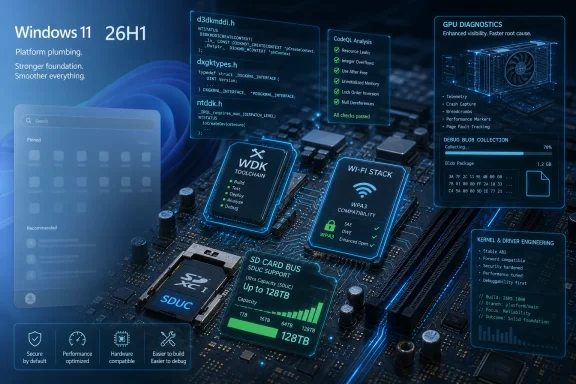
The core of the change is the Windows Driver Kit 10.0.28000.1839, identified for driver development targeting Windows 11 version 26H1 and released in early May 2026. That is not trivia for build engineers; it is the toolchain boundary line.Driver development is unusually sensitive to version alignment. The SDK, WDK, Visual Studio integration, headers, libraries, static-analysis configuration, signing process, and Windows Hardware Compatibility Program expectations all have to line up. A driver that compiles cleanly with an older kit may still be using stale assumptions about interfaces, certification requirements, or target-platform behavior.
Microsoft’s documentation also points to Visual Studio 2026 support with the latest WDK. That matters less as a headline feature and more as a signal that the company expects driver shops to modernize their build and validation environments rather than bolt 26H1 support onto a legacy pipeline.
For large OEMs, that modernization is part of the normal cadence. For smaller IHVs, peripheral makers, industrial vendors, and niche hardware suppliers, it is where friction often appears. Windows hardware compatibility is not only a question of writing code; it is a question of proving that code behaves safely across the scenarios Microsoft now cares about.
Wi-Fi Compatibility Is Where Small Header Changes Become Support Tickets
The Wi-Fi changes in 26H1 are a good example of how deeply technical driver work becomes a consumer experience without ever being advertised as one. Microsoft is extending WiFiCx support for networks that advertise WPA3 Compatibility Mode Security, raising the WiFiCx TLV parser to version 2.0.14 and adding capabilities so the operating system and driver can negotiate that mode during connection setup.Nobody buys a laptop because the TLV parser changed. But users absolutely return laptops, blame routers, or file tickets with the help desk when Wi-Fi cannot connect reliably to a network that looks ordinary from the outside. Wireless compatibility is one of those domains where standards, router firmware, enterprise access policies, client drivers, and operating-system assumptions collide in the most user-visible way possible: the internet simply does not work.
The removal of older WDI datapath definitions from WiFiCx headers also sounds like housekeeping, but it is the sort of housekeeping that keeps a driver model from becoming an archaeological site. Windows has spent years moving Wi-Fi development toward newer frameworks, and each cleanup is a reminder that compatibility is not the same thing as carrying every old abstraction forever.
For enterprise IT, the security angle is just as important as the connectivity angle. WPA3 transition and compatibility behavior can be the difference between a clean modernization plan and a mixed-mode wireless estate full of exceptions. Microsoft is not solving that problem alone, but it is giving driver developers a clearer path to participate in it.
SDUC Support Shows Windows Preparing for Storage Before Users Demand It
The storage update is similarly forward-looking. Microsoft’s SDBUS and SDSTOR stack now supports SD Ultra Capacity, or SDUC, for systems with native SD host controllers via the SDBUS driver. The relevant SD bus interfaces are being updated to enable SDUC operations for cards above 2TB and up to 128TB.That number sounds absurd until history catches up with it. Removable storage has a habit of becoming boring shortly after it becomes possible. The capacity that once belonged in a workstation eventually fits on a card small enough to lose in a coat pocket.
The immediate effect will be limited. Most users are not about to insert a 128TB SD card into a consumer laptop in 2026. But Windows needs to understand the bus, protocol, capacity reporting, and driver assumptions before the market makes those capacities routine enough for photographers, embedded systems, edge devices, and field-service workflows.
This is exactly the kind of change that is best made before it is exciting. If Microsoft waits until high-capacity SDUC cards are common, every incompatibility becomes a user-facing failure. If it prepares the stack early, the transition becomes uneventful, which is the highest compliment storage infrastructure can usually earn.
GPU Debugging Moves Closer to the Messy Reality of Modern Graphics
The graphics change in 26H1 is not a new DirectX feature for gamers. Microsoft is adding kernel header definitions in d3dkmddi.h for a “GPU Process Debug Blob Collection” function, which is infrastructure for diagnostics around GPU processes.That may sound minor, but modern GPU behavior is a sprawling mix of display, compute, media, AI acceleration, browser workloads, game engines, virtualization paths, and vendor-specific scheduling logic. When something fails, the symptoms can be vague: a black screen, a device reset, a hung app, a stutter that only appears under a certain driver branch, or a crash dump that says too little too late.
Better debug collection does not guarantee better drivers. It does, however, make it more likely that Microsoft, GPU vendors, and application developers can reconstruct what happened when the failure is intermittent. In graphics debugging, reproducibility is often the rarest resource.
The broader trend is clear. Windows is demanding more observability from the components that sit closest to the hardware. As GPUs become general-purpose accelerators for more of the Windows experience, they also become harder to treat as a simple display subsystem.
Static Analysis Becomes Part of the Certification Reality
Microsoft’s CodeQL guidance for 26H1 is another sign that the company wants driver quality to be measurable earlier in the pipeline. For this release, the mustrun and recommended CodeQL suites are described as identical, while mustfix includes checks whose failures matter for WHCP certification and the Static Tools Logo Test.That is a quiet but important pressure point. Kernel-adjacent code written in C and C++ has a long memory for old mistakes: unsafe APIs, memory lifetime bugs, integer issues, unchecked paths, and assumptions that survive until a malformed input or unusual device state turns them into a security problem.
Static analysis is not magic. It can miss defects, produce noise, and irritate developers who think they already understand their code better than a tool does. But when Microsoft ties certain checks to certification outcomes, the argument changes from taste to compliance.
This is good news for users and painful news for sloppy vendors. A driver is not just another application with higher privileges; it is software that can destabilize the whole machine. Raising the baseline for analysis is one of the few scalable ways to reduce avoidable failures before they leave the lab.
The Consumer Feature Drought Is the Point, Not the Problem
The lack of obvious end-user features in 26H1 will annoy some Windows watchers, but it is also the clearest sign that Microsoft is treating this branch differently. The company is not trying to sell 26H1 as the next “moment” update. It is trying to align the operating system with hardware that needs support below the level of Settings pages and shell features.That is a more mature posture than pretending every Windows version must be a consumer event. The PC market is fragmenting in ways that make platform engineering more important, not less. Arm devices, AI PCs, new storage classes, Wi-Fi security transitions, and vendor-specific silicon paths all require boring work.
The danger is confusion. If users see 26H1 on one device and 25H2 or a later H2 release on another, they may assume one machine is ahead and the other is behind. In practice, the answer may be more complicated: one device may be on a silicon-specific branch while another follows the mainstream feature-update path.
Microsoft will need to keep explaining that distinction. Windows versioning has never been beloved for clarity, and 26H1 risks adding another layer of “it depends” to procurement, support, and forum troubleshooting.
OEMs Get the Benefit and the Burden
For OEMs, 26H1 is both an enabling release and a new validation responsibility. A platform branch for specific silicon gives hardware makers access to the OS changes they need, but it also means their factory images, drivers, recovery media, firmware, and servicing plans must match the branch they ship.That is manageable for disciplined vendors. It is less comfortable for organizations that already struggle with driver update cadence, BIOS coordination, or long-tail support for regional models. A device that ships on a specialized Windows branch cannot be treated as just another SKU with a different wallpaper and driver pack.
The support lifecycle implications are also practical. Help desks need to know whether a user’s device is on 26H1 because it was designed for that platform, not because it somehow missed an update. Imaging teams need to avoid flattening that distinction when building deployment processes.
This is where Windows enthusiasts often see the real-world cost of platform complexity. The engineering may be elegant, but the recovery USB, vendor driver page, and enterprise deployment share still have to tell the same story.
Administrators Should Watch the Branch, Not Chase the Number
For sysadmins, the right lesson is restraint. 26H1 is not a prize to chase on existing hardware, and its driver changes do not mean every Windows fleet should pivot toward it. The relevant question is whether an organization is buying or supporting devices whose silicon actually depends on this platform branch.That should shape procurement conversations. If a vendor ships a 26H1 device, IT should ask how drivers will be serviced, how firmware updates will be delivered, what the rollback and recovery story looks like, and how long the device will remain aligned with Microsoft’s mainstream feature cadence or a separate platform path.
The Wi-Fi and storage changes also deserve attention in test plans. Enterprises with WPA3 transition environments, strict wireless authentication requirements, high-capacity removable media workflows, or GPU-heavy workloads should validate behavior on actual hardware rather than assuming the version number tells the whole story.
The best Windows administrators already think this way. Version labels are useful, but platform behavior is what matters. 26H1 makes that distinction unavoidable.
Developers Are Being Told to Modernize Their Assumptions
For driver developers, the message is sharper: update the toolchain, read the headers, run the analysis, and do not assume yesterday’s WDK tells the whole truth about tomorrow’s hardware. Microsoft’s changes are targeted, but they touch enough areas to punish inertia.WiFiCx developers need to account for new WPA3 compatibility signaling. Storage developers dealing with SD paths need to understand SDUC-related interface changes. Graphics driver teams and GPU-adjacent developers need to pay attention to the new debug collection definitions. Everyone near WHCP needs to treat CodeQL not as optional hygiene but as part of the release gate.
That does not mean every driver must be rewritten. It does mean that 26H1 is a bad place for “we have always done it this way” engineering. Platform-specific releases exist because old assumptions are insufficient for new hardware.
This is the quiet bargain Microsoft is offering. If vendors follow the updated path, users get hardware that feels ordinary in the best way. If vendors cut corners, 26H1 will expose those shortcuts in the usual places: connectivity, sleep states, storage behavior, graphics stability, and certification failures.
The 26H1 Story Is Written in Headers, Not Headlines
The concrete lesson from 26H1 is that Microsoft’s most meaningful Windows work is not always visible in the shell. In this case, the documentation points to a release built around enablement rather than spectacle.- Windows 11 26H1 is a platform-focused release for specific silicon, not a mainstream feature update for existing 25H2 PCs.
- The WDK 10.0.28000.1839 refresh and Visual Studio 2026 support are the clearest signals that driver developers are expected to move their build environments forward.
- WiFiCx changes target WPA3 Compatibility Mode Security, which matters for real-world wireless reliability even if users never see the underlying terminology.
- SDUC support in the SDBUS and SDSTOR stack prepares Windows for SD cards above 2TB and up to 128TB.
- GPU debug blob collection definitions add diagnostic plumbing for a graphics stack that now carries display, compute, media, and AI-adjacent workloads.
- CodeQL’s role in driver testing reinforces that certification is increasingly tied to demonstrable code quality, not just functional pass/fail testing.
References
- Primary source: igor´sLAB
Published: Sat, 23 May 2026 04:00:00 GMT
Windows 11 26H1: Microsoft's driver changes target platform, WLAN, st…
Microsoft has updated its driver documentation for Windows 11 version 26H1 and, rather than describing a major wave of new end-user features, it outlines targe…www.igorslab.de - Related coverage: pcworld.com
It's official: Windows 11 26H1 isn't for you | PCWorld
Microsoft's Build 28000 for Windows 11 is just for testing new silicon.www.pcworld.com - Official source: learn.microsoft.com
Windows 11, version 26H1 known issues and notifications | Microsoft Learn
View announcements and review known issues and fixes for Windows 11, version 26H1learn.microsoft.com - Related coverage: windowslatest.com
Microsoft releases Windows 11 26H1, but it's not for existing PCs. Windows 11 26H2 is coming for all PCs
Microsoft reached out to Windows Latest to confirm Windows 11 26H1 is real and rolling out. Existing PCs get version 26H2. www.windowslatest.com
- Related coverage: allthings.how
Windows 11 26H1 hits Canary as build 28000 — here’s what it actually is
Microsoft flips Canary to “26H1,” a platform-only release for new silicon, not a feature update you’ll install on 25H2.allthings.how - Related coverage: windowscentral.com
Microsoft confirms that Windows 11 version 26H1 will not be updated to version 26H2 this fall — won't get a new version until 2027 | Windows Central
Microsoft's special offshoot version of Windows 11 that's exclusive to Snapdragon X2 devices won't be getting an upgrade to version 26H2 this fall. Here's whywww.windowscentral.com
- Related coverage: pureinfotech.com
Microsoft officially reveals Windows 11 26H1 with build 28000 (Canary) - Pureinfotech
Microsoft announces Windows 11 26H1 with build 28000 in the Canary Channel, focusing on hardware support for Snapdragon X2 and NVIDIA N1X chips. pureinfotech.com
- Related coverage: tomshardware.com
Microsoft confirms Windows 11 26H1 will be for Arm devices only at launch — Snapdragon X2-powered devices officially shipping with 26H1 | Tom's Hardware
It's 24H2 all over again, but with the caveat that 26H1 will only support specific hardware for its entire lifecycle. Devices running 26H1 will not be able to upgrade to 26H2.www.tomshardware.com - Related coverage: tweakers.net
Windows 11-build 26H1 komt niet naar huidige gebruikers, voegt geen functies toe
De volgende grote release van Windows is geen update voor huidige gebruikers van dat besturingssysteem. De 26H1-release brengt geen nieuwe functionaliteit, meldt Microsoft, maar alleen ondersteuning voor specifieke chips. Een previewversie is nu beschikbaar voor testers.tweakers.net
- Related coverage: ngnpost.com
- Related coverage: techradar.com
Microsoft confirms Windows 11 26H1 update won't be coming to your current PC — here's why that's actually great news | TechRadar
It's all about avoiding another 24H2 disaster for existing PCs, which will stay on 25H2 and not get 26H1www.techradar.com - Official source: techcommunity.microsoft.com