

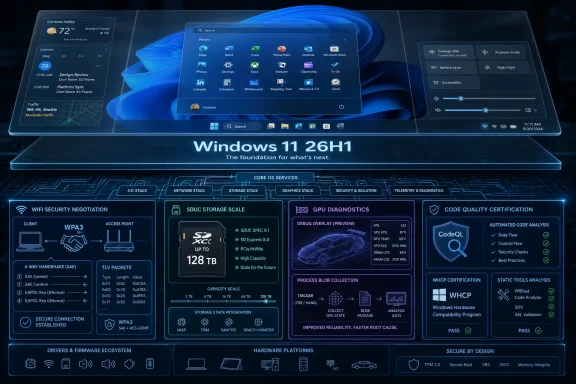
Microsoft’s updated Windows 11 26H1 driver documentation, refreshed in May 2026 around WDK 10.0.28000.1839, shows a release aimed at platform support, Wi-Fi security compatibility, SDUC storage, GPU diagnostics, and driver certification rather than visible consumer features. That is the real story hiding inside what looks like a dry developer note. Windows 11 26H1 is not Microsoft’s next big user-facing Windows moment; it is the plumbing work that decides whether the next wave of hardware behaves like a product or a prototype. For Windows users, the update may arrive invisibly, but for OEMs, IHVs, sysadmins, and anyone who has ever debugged a flaky driver, invisible is exactly where the stakes live.
Windows 11 26H1 is easy to misunderstand because the version number looks like an old-fashioned Windows milestone. For years, Windows users have been trained to treat “H1” and “H2” labels as shorthand for feature updates, UI changes, and the occasional Start menu controversy. Microsoft’s own positioning cuts against that instinct: 26H1 is not a feature update to 25H2, but a platform change for specific silicon.
That distinction matters because it changes who should care and why. A consumer looking for new Settings pages, Copilot affordances, or taskbar changes will mostly be looking in the wrong place. The interesting work is lower in the stack, where Windows negotiates with network adapters, storage buses, graphics drivers, firmware assumptions, toolchains, and certification gates.
This is the kind of release that will not make a laptop feel new on day one. It is also the kind of release that can determine whether a new laptop feels broken six months later. Driver infrastructure is rarely glamorous, but when it fails, it becomes the only part of the operating system anyone notices.
Microsoft’s 26H1 messaging is therefore unusually honest by Windows standards. The company is not pretending this is a broad consumer event. It is saying, in effect, that Windows needs a branch prepared for hardware that does not fit neatly into the existing 25H2 lane.
Driver development is uniquely unforgiving because the work sits at the boundary between software abstraction and electrical reality. A web app can fail gracefully, at least in theory. A bad kernel-mode driver can take the machine with it, corrupt data, break sleep states, or create security exposure in code that most users never knew existed.
The practical message to driver teams is simple: build against the kit that knows about the platform you are targeting. That sounds obvious, but the Windows ecosystem is full of long-lived build pipelines, cautious certification processes, internal forks, and vendor-specific workarounds. A new WDK becomes a forcing function because it updates not only headers and libraries, but also the implied contract between Microsoft and the hardware ecosystem.
The WDK also defines what “current” means for smaller independent hardware vendors. Large OEMs can absorb platform churn with dedicated validation teams. Smaller IHVs often live closer to the edge, relying on inherited project files, older Visual Studio configurations, and build automation assembled over years. For them, the 26H1 kit is less a convenience than a warning: the future platform lane is moving, and the old toolchain may not be enough to describe it correctly.
The phrase “it builds on my machine” has always been weak evidence in software. In driver development, it is almost meaningless unless the build can survive the certification and validation pipeline. A driver binary that compiles cleanly but misses current static-analysis expectations, uses stale interface definitions, or assumes old platform behavior is not ready for the Windows ecosystem.
This is where Microsoft’s quiet update becomes consequential for IT departments. Enterprise administrators rarely care which WDK version a vendor used until a fleet deployment starts producing blue screens, unreliable resume behavior, or erratic Wi-Fi roaming. By then, the tooling decision has already become an operational problem.
The most mature hardware vendors will treat 26H1 as an engineering alignment exercise, not a marketing checkbox. They will update projects, retest assumptions, rerun certification, and avoid claiming compatibility merely because an older driver appears to load. Windows compatibility is not a single moment; it is a maintenance habit.
This is not a flashy “faster Wi-Fi” announcement. It is a compatibility and reliability update for the messier reality of wireless networks, where routers, clients, security modes, enterprise policies, and consumer defaults do not all move in perfect synchrony. The industry has spent years transitioning from WPA2 to WPA3, and compatibility modes exist because the installed base refuses to transform overnight.
That makes driver-model support important. A network can advertise a capability, but the operating system and driver still need to understand how to represent it, negotiate it, and fail sensibly when conditions are imperfect. When that coordination breaks, users do not say “my TLV parser and wireless driver capability exchange are misaligned.” They say, “Wi-Fi is broken.”
Microsoft is also removing legacy WDI datapath definitions from the WiFiCx header. Header cleanup may sound like housekeeping, but it is a form of ecosystem discipline. Old definitions can encourage old assumptions, and old assumptions are where compatibility ghosts tend to live. Removing outdated interfaces is one way Microsoft nudges driver developers toward the model it wants them to use going forward.
For sysadmins, the Wi-Fi change is less about tomorrow morning’s help desk queue than about future procurement risk. As newer routers, access points, and security configurations become more common, the question is whether client hardware can handle the advertised modes without brittle vendor hacks. 26H1’s networking work suggests Microsoft is trying to close that gap before it becomes another round of “works at home, fails at the office” tickets.
Most users are not about to buy a 128 TB SD card for their laptop. That is not the point. Operating systems need to prepare for storage capacity curves before the hardware becomes ordinary, because the alternative is a familiar kind of embarrassment: the card exists, the slot exists, the user expects it to work, and the software stack discovers it was still thinking in yesterday’s limits.
The 2 TB boundary has the feel of an old mental model. It is large enough to seem expansive until the market moves past it, at which point it becomes a strange historical artifact. Photography, video production, field data capture, industrial systems, embedded devices, and portable workstations are all use cases where removable high-capacity storage can matter long before the average consumer cares.
This is also a reminder that “driver support” does not mean one thing. There is the physical slot, the controller, the bus driver, the storage driver, the file system, the firmware, and the vendor’s own validation matrix. SDUC support in Windows is a necessary platform condition, not a guarantee that every old laptop with an SD slot will suddenly behave like a future workstation.
Still, the direction is clear. Microsoft is making sure Windows has a path beyond today’s removable storage assumptions. That is what a platform release is supposed to do: remove the invisible ceiling before users hit their heads on it.
That complexity makes debugging harder. GPU failures are often intermittent, workload-sensitive, and maddeningly dependent on the interaction between firmware, driver version, application behavior, memory pressure, and power state. When a machine freezes during a game, crashes during video export, or stutters under a GPU-accelerated browser workload, the useful evidence may disappear with the reboot.
Better debug data is not a consumer feature, but it can become a consumer benefit. If vendors can collect richer process-related diagnostic blobs around GPU behavior, they have a better chance of reproducing and fixing problems that otherwise become folklore in forum threads. The best driver fixes often begin with boring instrumentation.
There is also an enterprise angle. GPU reliability is no longer a niche concern for gamers and CAD users. Video conferencing, browser rendering, endpoint security tooling, AI inference, remote desktop acceleration, and creative workloads all lean on graphics stacks in ways that make GPU instability a business problem. A better diagnostic path matters because the GPU is now part of the general productivity substrate.
Microsoft’s inclusion of this header work in the 26H1 WDK reinforces the theme of the release. This is not about dazzling the user. It is about giving developers the interfaces they need before the next class of failures arrives.
That is a bureaucratic sentence with security consequences. Drivers remain one of the most sensitive parts of the Windows attack surface because they often run with high privilege and are commonly written in C or C++. Memory unsafety, unchecked assumptions, unsafe APIs, and lifetime bugs are not theoretical issues in this world. They are the raw material of crashes, privilege escalation, and long-tail platform instability.
By folding CodeQL deeper into driver certification expectations, Microsoft is continuing a shift from trust-based driver quality to evidence-based driver quality. The vendor cannot merely assert that the code is fine. It has to run the analysis, produce the results, and fix the issues that Microsoft classifies as must-fix for certification purposes.
This will not eliminate bad drivers. Static analysis is not magic, and no query suite can prove a driver correct. But it changes the cost structure. Certain classes of mistakes become harder to ignore, and vendors that treat certification as an afterthought have less room to improvise late in the process.
For administrators, this is the security story inside the driver story. Windows hardening is not only about Defender, virtualization-based security, or patch Tuesday. It is also about raising the floor for the third-party code that Windows must load to make real hardware useful.
A driver platform update can affect procurement timing, pilot testing, image management, compatibility baselines, and vendor qualification. If new silicon ships with 26H1 expectations, organizations will need to understand which device families are on which Windows branch, which driver packages are certified for which targets, and whether existing deployment assumptions still hold.
This is especially important because Microsoft’s Windows release model has become more layered. Feature development, platform enablement, Insider channels, enablement packages, hardware-specific releases, and annual servicing all overlap in ways that can confuse even experienced Windows watchers. A version number alone no longer tells the whole story.
For IT pros, the practical response is not panic. It is inventory discipline. Know which devices are tied to which Windows base, watch OEM driver packages closely, and do not assume that a driver certified for a familiar Windows 11 branch is automatically the right answer for a silicon-specific 26H1 system.
That applies doubly to early adopters. New silicon is often attractive because it promises better battery life, better AI acceleration, better thermals, or better performance per watt. But the first months of a new platform are where driver maturity earns or loses trust. 26H1 is Microsoft’s attempt to give that platform a cleaner runway.
That framing matters because Windows is under renewed pressure to adapt to heterogeneous hardware. The old Wintel baseline still dominates much of the PC market, but the center of gravity is shifting. Arm laptops, neural processing units, hybrid GPU arrangements, advanced power states, and increasingly integrated SoC designs all ask more of Windows than a generic desktop abstraction can provide.
A platform release for specific silicon is therefore not an odd detour. It is a sign of how Windows must behave in a more fragmented hardware era. Microsoft wants Windows to remain a broad ecosystem OS, but that breadth now requires more targeted enablement beneath the surface.
The danger is complexity. If users, admins, and even vendors cannot easily tell which version of Windows applies to which device class, support becomes harder. Microsoft will need to keep the story clean: 25H2 remains the mainstream feature path, 26H1 exists for specific platform needs, and driver developers should use the correct kit for the correct target.
The opportunity is also obvious. If Microsoft gets this right, Windows can support new hardware without forcing every user into a platform transition they do not need. That is less dramatic than a universal feature update, but probably healthier for the ecosystem.
But Windows has always lived or died by hardware breadth. Its advantage is not just the shell, the app ecosystem, or backward compatibility in the abstract. It is the promise that a vast range of devices, peripherals, controllers, adapters, displays, docks, cards, and weird business-critical accessories can be made to work.
That promise is maintained through exactly the kind of work visible in the 26H1 WDK notes. Wi-Fi security negotiation, storage capacity support, GPU debug instrumentation, static analysis suites, and toolchain alignment are the connective tissue. Users only notice when the tissue tears.
Microsoft’s challenge is that every layer now carries more consequence. A Wi-Fi driver is part of the security posture. A storage driver is part of the data-loss story. A GPU driver is part of productivity, media, gaming, AI, and remote work. A certification rule is part of the supply chain.
Seen that way, 26H1 is less a minor release than a maintenance philosophy. Microsoft is acknowledging that the next hardware wave needs platform work before it needs marketing work.
 Microsoft Is Shipping a Platform Release, Not a Feature Parade
Windows 11 26H1 is easy to misunderstand because the version number looks like an old-fashioned Windows milestone. For years, Windows users have been trained to treat “H1” and “H2” labels as shorthand for feature updates, UI changes, and the occasional Start menu controversy. Microsoft’s own positioning cuts against that instinct: 26H1 is not a feature update to 25H2, but a platform change for specific silicon.That distinction matters because it changes who should care and why. A consumer looking for new Settings pages, Copilot affordances, or taskbar changes will mostly be looking in the wrong place. The interesting work is lower in the stack, where Windows negotiates with network adapters, storage buses, graphics drivers, firmware assumptions, toolchains, and certification gates.
This is the kind of release that will not make a laptop feel new on day one. It is also the kind of release that can determine whether a new laptop feels broken six months later. Driver infrastructure is rarely glamorous, but when it fails, it becomes the only part of the operating system anyone notices.
Microsoft’s 26H1 messaging is therefore unusually honest by Windows standards. The company is not pretending this is a broad consumer event. It is saying, in effect, that Windows needs a branch prepared for hardware that does not fit neatly into the existing 25H2 lane.
The WDK Version Number Is the Actual Headline
The center of gravity is the Windows Driver Kit. Microsoft’s WDK 10.0.28000.1839 release for Windows 11 version 26H1 is not just a download for developers who like fresh headers. It is a signpost telling hardware vendors what assumptions the platform now expects them to build against.Driver development is uniquely unforgiving because the work sits at the boundary between software abstraction and electrical reality. A web app can fail gracefully, at least in theory. A bad kernel-mode driver can take the machine with it, corrupt data, break sleep states, or create security exposure in code that most users never knew existed.
The practical message to driver teams is simple: build against the kit that knows about the platform you are targeting. That sounds obvious, but the Windows ecosystem is full of long-lived build pipelines, cautious certification processes, internal forks, and vendor-specific workarounds. A new WDK becomes a forcing function because it updates not only headers and libraries, but also the implied contract between Microsoft and the hardware ecosystem.
The WDK also defines what “current” means for smaller independent hardware vendors. Large OEMs can absorb platform churn with dedicated validation teams. Smaller IHVs often live closer to the edge, relying on inherited project files, older Visual Studio configurations, and build automation assembled over years. For them, the 26H1 kit is less a convenience than a warning: the future platform lane is moving, and the old toolchain may not be enough to describe it correctly.
Visual Studio Support Is a Supply-Chain Detail
Toolchain support is not the sexiest part of a Windows release, but it is one of the more revealing. Microsoft’s documentation around the current 26H1 driver stack ties driver development to modern Visual Studio support and the surrounding SDK and WDK machinery. That affects how vendors compile, test, package, sign, and certify the code that eventually ships on consumer and enterprise machines.The phrase “it builds on my machine” has always been weak evidence in software. In driver development, it is almost meaningless unless the build can survive the certification and validation pipeline. A driver binary that compiles cleanly but misses current static-analysis expectations, uses stale interface definitions, or assumes old platform behavior is not ready for the Windows ecosystem.
This is where Microsoft’s quiet update becomes consequential for IT departments. Enterprise administrators rarely care which WDK version a vendor used until a fleet deployment starts producing blue screens, unreliable resume behavior, or erratic Wi-Fi roaming. By then, the tooling decision has already become an operational problem.
The most mature hardware vendors will treat 26H1 as an engineering alignment exercise, not a marketing checkbox. They will update projects, retest assumptions, rerun certification, and avoid claiming compatibility merely because an older driver appears to load. Windows compatibility is not a single moment; it is a maintenance habit.
Wi-Fi Compatibility Is Where Users Will Feel the Invisible Work
The WiFiCx changes may be the most immediately practical part of the 26H1 driver update, even if users never see the acronym. Microsoft is extending the WiFiCx driver model so devices can connect to networks advertising WPA3 Compatibility Mode Security. The TLV parser moves to version 2.0.14, with capabilities added so Windows and the driver can negotiate that mode during connection setup.This is not a flashy “faster Wi-Fi” announcement. It is a compatibility and reliability update for the messier reality of wireless networks, where routers, clients, security modes, enterprise policies, and consumer defaults do not all move in perfect synchrony. The industry has spent years transitioning from WPA2 to WPA3, and compatibility modes exist because the installed base refuses to transform overnight.
That makes driver-model support important. A network can advertise a capability, but the operating system and driver still need to understand how to represent it, negotiate it, and fail sensibly when conditions are imperfect. When that coordination breaks, users do not say “my TLV parser and wireless driver capability exchange are misaligned.” They say, “Wi-Fi is broken.”
Microsoft is also removing legacy WDI datapath definitions from the WiFiCx header. Header cleanup may sound like housekeeping, but it is a form of ecosystem discipline. Old definitions can encourage old assumptions, and old assumptions are where compatibility ghosts tend to live. Removing outdated interfaces is one way Microsoft nudges driver developers toward the model it wants them to use going forward.
For sysadmins, the Wi-Fi change is less about tomorrow morning’s help desk queue than about future procurement risk. As newer routers, access points, and security configurations become more common, the question is whether client hardware can handle the advertised modes without brittle vendor hacks. 26H1’s networking work suggests Microsoft is trying to close that gap before it becomes another round of “works at home, fails at the office” tickets.
SDUC Support Moves Windows Past an Old Storage Ceiling
The storage change is similarly quiet and similarly important. Microsoft’s SDBUS and SDSTOR driver stack now supports SD Ultra Capacity cards on systems that use native SD host controllers through the SDBUS driver. The relevant interface updates enable operations for cards above 2 TB and up to 128 TB.Most users are not about to buy a 128 TB SD card for their laptop. That is not the point. Operating systems need to prepare for storage capacity curves before the hardware becomes ordinary, because the alternative is a familiar kind of embarrassment: the card exists, the slot exists, the user expects it to work, and the software stack discovers it was still thinking in yesterday’s limits.
The 2 TB boundary has the feel of an old mental model. It is large enough to seem expansive until the market moves past it, at which point it becomes a strange historical artifact. Photography, video production, field data capture, industrial systems, embedded devices, and portable workstations are all use cases where removable high-capacity storage can matter long before the average consumer cares.
This is also a reminder that “driver support” does not mean one thing. There is the physical slot, the controller, the bus driver, the storage driver, the file system, the firmware, and the vendor’s own validation matrix. SDUC support in Windows is a necessary platform condition, not a guarantee that every old laptop with an SD slot will suddenly behave like a future workstation.
Still, the direction is clear. Microsoft is making sure Windows has a path beyond today’s removable storage assumptions. That is what a platform release is supposed to do: remove the invisible ceiling before users hit their heads on it.
GPU Debugging Shows How Complex Graphics Drivers Have Become
The addition of kernel header definitions for the GPU Process Debug Blob Collection feature is a small item with a large subtext. Modern graphics drivers are no longer narrow pieces of code that put pixels on a panel. They are scheduling engines, memory managers, video accelerators, compute participants, display pipeline negotiators, power-management actors, and increasingly part of the AI PC story.That complexity makes debugging harder. GPU failures are often intermittent, workload-sensitive, and maddeningly dependent on the interaction between firmware, driver version, application behavior, memory pressure, and power state. When a machine freezes during a game, crashes during video export, or stutters under a GPU-accelerated browser workload, the useful evidence may disappear with the reboot.
Better debug data is not a consumer feature, but it can become a consumer benefit. If vendors can collect richer process-related diagnostic blobs around GPU behavior, they have a better chance of reproducing and fixing problems that otherwise become folklore in forum threads. The best driver fixes often begin with boring instrumentation.
There is also an enterprise angle. GPU reliability is no longer a niche concern for gamers and CAD users. Video conferencing, browser rendering, endpoint security tooling, AI inference, remote desktop acceleration, and creative workloads all lean on graphics stacks in ways that make GPU instability a business problem. A better diagnostic path matters because the GPU is now part of the general productivity substrate.
Microsoft’s inclusion of this header work in the 26H1 WDK reinforces the theme of the release. This is not about dazzling the user. It is about giving developers the interfaces they need before the next class of failures arrives.
CodeQL Turns Driver Quality Into a Certification Discipline
The CodeQL changes may be the least visible and most culturally important part of the story. Microsoft’s documentation indicates that for Windows 11 version 26H1, the mustrun and recommended CodeQL suites are identical, while the mustfix suite contains checks whose failures matter for WHCP certification and the Static Tools Logo Test.That is a bureaucratic sentence with security consequences. Drivers remain one of the most sensitive parts of the Windows attack surface because they often run with high privilege and are commonly written in C or C++. Memory unsafety, unchecked assumptions, unsafe APIs, and lifetime bugs are not theoretical issues in this world. They are the raw material of crashes, privilege escalation, and long-tail platform instability.
By folding CodeQL deeper into driver certification expectations, Microsoft is continuing a shift from trust-based driver quality to evidence-based driver quality. The vendor cannot merely assert that the code is fine. It has to run the analysis, produce the results, and fix the issues that Microsoft classifies as must-fix for certification purposes.
This will not eliminate bad drivers. Static analysis is not magic, and no query suite can prove a driver correct. But it changes the cost structure. Certain classes of mistakes become harder to ignore, and vendors that treat certification as an afterthought have less room to improvise late in the process.
For administrators, this is the security story inside the driver story. Windows hardening is not only about Defender, virtualization-based security, or patch Tuesday. It is also about raising the floor for the third-party code that Windows must load to make real hardware useful.
The Consumer Non-Event Is the Enterprise Event
The temptation is to dismiss 26H1 because it does not promise a new desktop experience. That is exactly backwards for the audience that has to support Windows at scale. Enterprise pain rarely begins with the absence of a new feature. It begins with the presence of a broken interaction between hardware, firmware, drivers, and policy.A driver platform update can affect procurement timing, pilot testing, image management, compatibility baselines, and vendor qualification. If new silicon ships with 26H1 expectations, organizations will need to understand which device families are on which Windows branch, which driver packages are certified for which targets, and whether existing deployment assumptions still hold.
This is especially important because Microsoft’s Windows release model has become more layered. Feature development, platform enablement, Insider channels, enablement packages, hardware-specific releases, and annual servicing all overlap in ways that can confuse even experienced Windows watchers. A version number alone no longer tells the whole story.
For IT pros, the practical response is not panic. It is inventory discipline. Know which devices are tied to which Windows base, watch OEM driver packages closely, and do not assume that a driver certified for a familiar Windows 11 branch is automatically the right answer for a silicon-specific 26H1 system.
That applies doubly to early adopters. New silicon is often attractive because it promises better battery life, better AI acceleration, better thermals, or better performance per watt. But the first months of a new platform are where driver maturity earns or loses trust. 26H1 is Microsoft’s attempt to give that platform a cleaner runway.
The Silicon Story Is Bigger Than the Version Label
Microsoft’s language around “specific silicon” is deliberately narrower than the speculation around it. Industry reporting has linked 26H1 to next-generation Arm PCs and new hardware platforms, but Microsoft’s core public point is simpler: this is a platform-support release, not the annual feature update for the general Windows installed base.That framing matters because Windows is under renewed pressure to adapt to heterogeneous hardware. The old Wintel baseline still dominates much of the PC market, but the center of gravity is shifting. Arm laptops, neural processing units, hybrid GPU arrangements, advanced power states, and increasingly integrated SoC designs all ask more of Windows than a generic desktop abstraction can provide.
A platform release for specific silicon is therefore not an odd detour. It is a sign of how Windows must behave in a more fragmented hardware era. Microsoft wants Windows to remain a broad ecosystem OS, but that breadth now requires more targeted enablement beneath the surface.
The danger is complexity. If users, admins, and even vendors cannot easily tell which version of Windows applies to which device class, support becomes harder. Microsoft will need to keep the story clean: 25H2 remains the mainstream feature path, 26H1 exists for specific platform needs, and driver developers should use the correct kit for the correct target.
The opportunity is also obvious. If Microsoft gets this right, Windows can support new hardware without forcing every user into a platform transition they do not need. That is less dramatic than a universal feature update, but probably healthier for the ecosystem.
The Boring Parts Are Where Windows Wins or Loses
There is a reason driver changes make for awkward headlines. They do not photograph well. They do not give Microsoft a glossy launch video. They do not let a user point to a button and say, “this is new.”But Windows has always lived or died by hardware breadth. Its advantage is not just the shell, the app ecosystem, or backward compatibility in the abstract. It is the promise that a vast range of devices, peripherals, controllers, adapters, displays, docks, cards, and weird business-critical accessories can be made to work.
That promise is maintained through exactly the kind of work visible in the 26H1 WDK notes. Wi-Fi security negotiation, storage capacity support, GPU debug instrumentation, static analysis suites, and toolchain alignment are the connective tissue. Users only notice when the tissue tears.
Microsoft’s challenge is that every layer now carries more consequence. A Wi-Fi driver is part of the security posture. A storage driver is part of the data-loss story. A GPU driver is part of productivity, media, gaming, AI, and remote work. A certification rule is part of the supply chain.
Seen that way, 26H1 is less a minor release than a maintenance philosophy. Microsoft is acknowledging that the next hardware wave needs platform work before it needs marketing work.
What the Driver Notes Say Before the Devices Arrive
The concrete lesson from 26H1 is that Microsoft is preparing the substrate before the mainstream story catches up. That does not mean every Windows user should chase the release. It means the people who build, validate, buy, and support Windows hardware should treat the driver documentation as an early map of where the ecosystem is heading.- Windows 11 26H1 is a platform-focused release for specific silicon rather than the broad feature successor to Windows 11 25H2.
- WDK 10.0.28000.1839 is the key developer artifact, because it defines the current driver-facing assumptions for this platform lane.
- WiFiCx changes target WPA3 compatibility behavior, which should matter as mixed wireless security environments continue to spread.
- SDUC support in the SDBUS and SDSTOR stack prepares Windows for removable SD storage above 2 TB and up to 128 TB on supported native-controller systems.
- GPU Process Debug Blob Collection definitions are developer infrastructure, but they point to the growing need for better diagnostics in increasingly complex graphics stacks.
- CodeQL’s role in WHCP and the Static Tools Logo Test shows Microsoft continuing to turn driver quality into a measurable certification requirement.
References
- Primary source: igor´sLAB
Published: Sat, 23 May 2026 04:00:00 GMT
Loading…
www.igorslab.de - Related coverage: pcworld.com

It's official: Windows 11 26H1 isn't for you
Microsoft's Build 28000 for Windows 11 is just for testing new silicon. www.pcworld.com
- Official source: blogs.windows.com
Loading…
blogs.windows.com - Related coverage: windowscentral.com
Loading…
www.windowscentral.com - Related coverage: techrepublic.com
Loading…
www.techrepublic.com - Related coverage: allthings.how

Windows 11 26H1 hits Canary as build 28000 — here’s what it actually is
Microsoft flips Canary to “26H1,” a platform-only release for new silicon, not a feature update you’ll install on 25H2. allthings.how
- Related coverage: tomshardware.com
Microsoft confirms Windows 11 26H1 will be for Arm devices only at launch — Snapdragon X2-powered devices officially shipping with 26H1
It's 24H2 all over again, but with the caveat that 26H1 will only support specific hardware for its entire lifecycle. Devices running 26H1 will not be able to upgrade to 26H2.www.tomshardware.com
- Related coverage: techspot.com
Loading…
www.techspot.com - Official source: learn.microsoft.com
Loading…
learn.microsoft.com - Related coverage: windowsforum.com
Loading…
windowsforum.com - Related coverage: pureinfotech.com
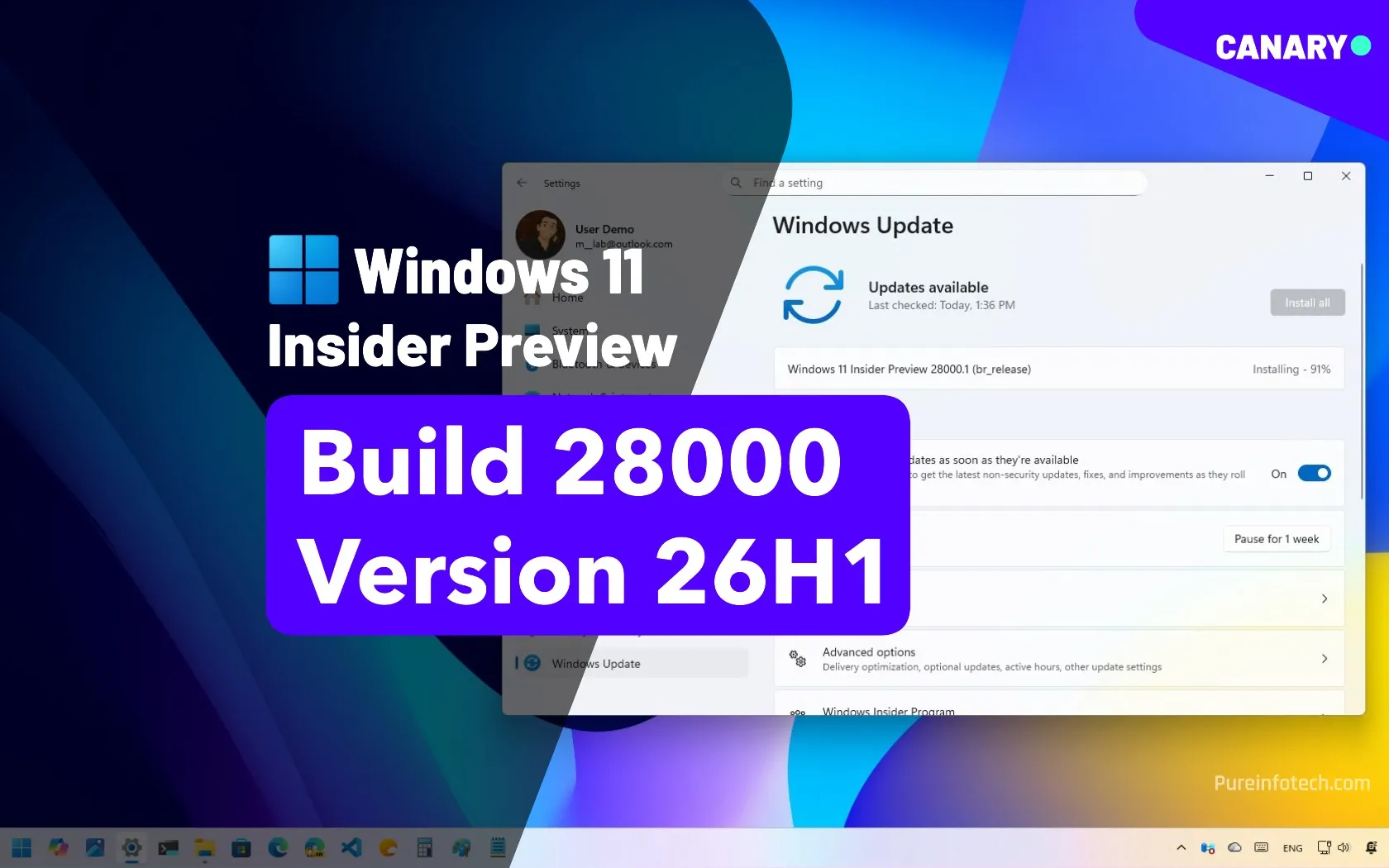
Microsoft confirms Windows 11 26H1, but it’s not a feature update
Microsoft announces Windows 11 26H1 with build 28000 in the Canary Channel, focusing on hardware support for Snapdragon X2 and NVIDIA N1X chips. pureinfotech.com
- Related coverage: ngnpost.com
Loading…
www.ngnpost.com - Related coverage: techradar.com
Loading…
www.techradar.com