

Windows 11’s next big milestone is shaping up to be less about flashy visual rewrites and more about a strategic, AI-first consolidation: version 26H2 looks set to be delivered as an enablement package in late 2026, turning on months of work already rolled into preview and cumulative updates. The most visible changes put Copilot — Microsoft’s AI assistant — into everyday places: a conversational “Ask Copilot” composer on the taskbar, deeper Copilot hooks inside File Explorer, and a new class of long‑running, background AI agents. At the same time, Microsoft is adding pro‑grade tooling and security features — notably integrating Sysinternals System Monitor (Sysmon) as an optional, in‑box capability — and resetting servicing clocks that matter to IT teams and device managers. Early public previews and official documentation confirm many of these moves, but the package remains an enablement-style pivot rather than a full OS reinstall, and several details are still gated, staged, or subject to change.
Windows feature updates have increasingly taken the form of incremental, staged engineering: Microsoft ships capabilities via monthly cumulative updates and then ships small enablement packages that flip the collective state to a new version number. The practical benefit is quicker installs and fewer file-level changes; the operational impact is that a version bump resets the support lifecycle that organizations rely on for patch planning. For 26H2, early reporting and Microsoft’s own lifecycle documentation indicate the enablement package model will be applied again — the same pattern used with 25H2 — and Microsoft’s published lifecycle pages show the firm cadence for versions and retirement windows that IT must plan around.
Why this matters in practice:
Why this matters:
The strengths are clear:
Windows 11’s 26H2 update is therefore best understood as a consolidation: Microsoft is surfacing AI where people already search and manage files, adding professional security tooling, and nudging Windows toward an “agentic” future where background AI tasks can act on your behalf — if you choose to let them. The update will matter most to those who need to balance productivity wins against governance and security obligations, and to IT teams who must schedule testing and servicing around the enablement package’s lifecycle reset. Expect previews to continue through Insider channels and plan pilots now if you want to be ready by the likely late‑September / early‑October 2026 rollout window.
Source: thewincentral.com Windows 11 26H2: All New Features Coming in Late 2026
 Background / Overview
Windows feature updates have increasingly taken the form of incremental, staged engineering: Microsoft ships capabilities via monthly cumulative updates and then ships small enablement packages that flip the collective state to a new version number. The practical benefit is quicker installs and fewer file-level changes; the operational impact is that a version bump resets the support lifecycle that organizations rely on for patch planning. For 26H2, early reporting and Microsoft’s own lifecycle documentation indicate the enablement package model will be applied again — the same pattern used with 25H2 — and Microsoft’s published lifecycle pages show the firm cadence for versions and retirement windows that IT must plan around.Why this matters in practice:
- An enablement package does not require a full OS re‑image; it activates features already present in the installed bits.
- When you adopt the new version number, Microsoft’s servicing timeline restarts for that SKU — typically ~24 months for consumer editions and ~36 months for enterprise/education editions, which affects patch schedules and compliance baselines.
Ask Copilot: the taskbar becomes a conversational front door
What the new taskbar composer does
The single most visible UX change in previews is the Ask Copilot taskbar composer — a compact, natural‑language input that can be toggled on in Taskbar personalization settings and, when enabled, replaces the familiar search pill with a Copilot entry. It’s designed to merge two workflows:- Fast local search (apps, files, settings) using the existing Windows Search index.
- Natural‑language, multimodal assistance from Copilot for summaries, step‑by‑ste context via Copilot Vision and Copilot Voice.
What this changes about discovery and productivity
For everyday users, Ask Copilot shortens friction in routine tasks: instead of hunting through Settings, the taskbar becomes a place to ask conversational prompts and get direct links to actions. For example, the composer can return a local settings page while offering a one‑click suggestion to make the requested change. The integration of Copilot Vision adds a “show and tcan share an open window or region for OCR‑style context and have Copilot point you to a UI element or explain what’s visible.Privacy and consent guardrails
Microsoft has repeatedly framed this surface as permissioned and opt‑in: local indexing and search remain the source of file results; anything transmitted to Copilot’s cloud or shared with models is done only after explicit user action. The official messaging and Insider notes also show safeguards like visual indicators during screen sharing, session stop controls, and the option to disable Ask Copilot entirely. Still, organizations must treat the feature as an operational risk surface until they validate connector behaviours and telemetry flows.File Explorer: cleaner UI and AI in the file workflow
Interface cleanup and contextual actions
File Explorer previews for 26H2 emphasize decluttering and task‑oriented grouping. Context menus are being reorganized into grouped actions (file management, image edits, OneDrive actions, etc.), reducing the top‑level clutter that long annoyed power users. Properties dialogs and file previews gain expanded dark mode coverage to make the experience visually consistent for dark‑theme users. These are primarily UX refinements aimed at frequency and discoverability improvements.Copilot inside Explorer: the new file assistant
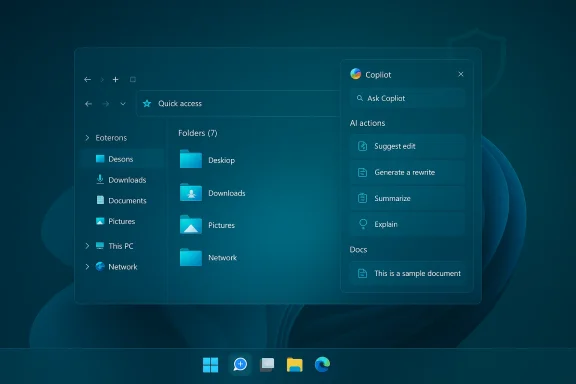
Beyond cosmetic cleanup, Microsoft is previewing Copilot‑assisted interactions inside File Explorer. Expect right‑click AI actions (summarize document, generate alt text for images, basic edits such as blur/remove background) and a potential dockable Copilot panel adjacent to the preview pane for dialog‑style file operations. The objective is to let users do small content tasks or extract insights without switching apps. That convenience, however, elevates data control questions: if Copilot summarizes a corporate document or edits an image, when and how is content shared with cloud models? Microsoft’s preview notes suggest session‑based prompts and enterprise controls, but IT teams must confirm the implementation details before broad enablement.Practical implications and gotchas
- Quick tasks like image cropping or summary generation can reduce app switching and save time.
- Document summarization or bulk file operations become audit points for compliance and DLP; organizations should plan policies and pilot groups.
- Some features rely on cloud connectors or model access; offline or GDPR‑sensitive environments may need to disable specific connectors or restrict Copilot usage by policy.
Built‑in Sysmon: a pro‑grade change for security teams
One of the more consequential additions in previews is bringing Sysinternals System Monitor (Sysmon) into Windows as an optional, in‑box feature. Microsoft’s Insider release notes explicitly document Sysmon as an Optional Feature that is disabled by default and must be enabled by administrators; the companion Microsoft documentation provides the familiar enablement and configuration paths (Settings or DISM/PowerShell plus the classic sysmon -i invocation). If you already run the standalone Sysmon, Microsoft requires uninstalling it before enabling the built‑in variant. (learn.microsoft.com)Why this matters:
- Sysmon has been a staple of endpoint telemetry and threat investigation for years, and embedding it simplifies deployment, management, and versioning across large fleets.
- Events are written to standard Event Log channels, and configuration remains XML‑based, so existing SIEM and EDR integrations can reuse established pipelines.
- The in‑box model reduces friction for defenders but also raises governance needs: default configurations may not align with hardened enterprise rules, and the arrival of privileged endpoint logging increases the need to secure event forwarders and telemetry endpoints.
- Plan a pilot to compare the built‑in Sysmon behaviour with your current standalone deployments and verify event parity.
- Confirm that uninstall of the standalone installer and migration to the in‑box feature is supported in your automation (SCCM/Intune/Autopatch images).
- Treat Sysmon configuration as code and store hardened templates in your configuration management system.
Productivity, UI and smaller but meaningful changes
26H2 previews bundle a set of pragmatic improvements that quietly improve daily flows:- Run dialog modernized: a refreshed WinUI look plus helpful prompts lowers friction for keyboard‑first users.
- Agenda in Notification Center: Outlook‑synced agenda view returns to the notification area (implemented with WebView2), offering one‑click meeting join actions. Community testing flagged memory and process footprint concerns for some WebView2 widgets in previews — a variable that should be tested on constrained devices.
- Camera controls: expanded pan/tilt settings for compatible webcams enter Settings, reducing reliance on OEM apps.
- Emoji 16.0: new symbols are included in the emoji panel.
- Quality fixes: taskbar auto‑hide glitches, desktop icon rearrangement regressions, and various File Explorer reliability items are addressed in Insider builds.
Gaming: full‑screen experience and performance prioritization
Microsoft is testing an Xbox‑style full‑screen gaming mode that replaces the standard desktop with a controller‑first UI and aggressively reduces background activity to prioritize performance and battery life. The underlying approach leverages the Xbox app stack and seeks to minimize background reandheld gaming PCs and laptop builds. Expect this to arrive as an optional mode you can toggle on in Gaming settings; it targets scenarios where latency, frame pacing, and controller navigation matter more than multitasking. Early previews show it appears behind an opt‑in setting and is being tested across a narrow set of hardware platforms.Enterprise planning: lifecycle, enablement, and image management
From an IT perspective the 26H2 release is less of a “big bang” and more of a planning checkpoint:- Enablement package implications: imaging strategies that depended on full reinstall cycles will need to account for the enablement approach; in many cases, a targeted cumulative update plus a feature flag is sufficient to move devices to the new version identifier. This simplifies mass rollouts but requires clear testing to ensure application compatibility.
- Servicing windows: adopting 26H2 resets the support clock — this is not academic for organizations that must satisfy regulatory or internal patch cadences. Plan pilot groups, test application compatibility, and schedule feature adoption to align with your extended servicing requirements (consumer vs enterprise SKUs differ).
- Governance for agentic features: agent frameworks and connectors that let Copilot act across apps raise new governance needs — identity, telemetry controls, and connector whitelists must be tested and enforced through policy.
Risks, unknowns, and what’s still gated
Several important caveats remain:- Release timing is not a hard date. Public reporting and the Windows Insider cadence suggest a late‑September to early‑October 2026 availability window for broad distribution, but Microsoft has not published a firm general availability date. Treat the window as planning guidance, not a committed ship date.
- Feature gating is real. Many items will be staged or account‑gated. Insiders may see functionality earlier than the general population, and some features (Copilot+ on‑device models) will require specific hardware or licensing.
- Telemetry and connector behaviours need verification. The preview messaging promises session‑scoped sharing and consent, but enterprise DLP and legal teams must validate where content goes, retention policies, and third‑party cloud interactions before enabling connectors.
- Performance footprint of web-backed widgets. WebView2‑based UI elements like the Agenda flyout have triggered community observations about memory usage; benchmark these components on representative devices.
Actionable recommendations for IT and power users
If you manage Windows fleets or care about reliability, the following steps will reduce risk and make adoption smoother:- Pilot early: enroll a controlled cross‑section of hardware into the Beta/Dev channels and validate Ask Copilot + File Explorer Copilot scenarios with realistic data and DLP policies.
- Test Sysmon integration: enable the in‑box Sysmon on a small set of test hosts, compare events with your standalone templates, and validate SIEe/retention impact.
- Validate WebView2 impact: run representative workloads with WebView2‑backed shell widgets to measure memory and process overhead on constrained devices.
- Define connector policy: draft a white list of acceptable cloud connectors and implement conditional access rules to control who can enable Copilot connectors or agentic features in production.
- Update documentation and helpdesk scripts: add Copilot controls to your standard onboarding and troubleshooting guides (how to disable Ask Copilot, pin/unpin Copilot, and configure Sysmon).
- Communicate with users: explain the consent model for Ask Copilot and how to share screen content safely; include instructions for opt‑out or limited use.
Verdict: strategic, incremental, consequential
Windows 11 26H2 is not a revolution in visual design but a strategic step: Microsoft is turning the taskbar and File Explorer into primary AI surfaces, baking Copilot into everyday discovery and file workflows while delivering better tooling for security practitioners through features like built‑in Sysmon. The enablement‑package model keeps installs quick and preserves organizational patching practices, but it also makes the version number an operational pivot that IT teams must plan for.The strengths are clear:
- Productivity gains from conversational search and contextual file assistance.
- Operational simplification for defenders via an in‑box Sysmon and incremental UI fixes.
- Minimal friction upgrades where a quick enablement flip is often sufficient.
- Governance and privacy: new connectors and agents expand attack surfaces and data movement pathways that must be audited and controlled.
- Performance implications: WebView2‑based widgets and some agent workloads increase memory and process footprints on certain devices.
- Feature gating and fragmentation: staged rollouts and hardware/licensing gates create inconsistent exposure across fleets and users.
Windows 11’s 26H2 update is therefore best understood as a consolidation: Microsoft is surfacing AI where people already search and manage files, adding professional security tooling, and nudging Windows toward an “agentic” future where background AI tasks can act on your behalf — if you choose to let them. The update will matter most to those who need to balance productivity wins against governance and security obligations, and to IT teams who must schedule testing and servicing around the enablement package’s lifecycle reset. Expect previews to continue through Insider channels and plan pilots now if you want to be ready by the likely late‑September / early‑October 2026 rollout window.
Source: thewincentral.com Windows 11 26H2: All New Features Coming in Late 2026
