
Microsoft said on June 19, 2026, that Windows 11 version 26H2 will ship in the second half of 2026 as a small enablement package for recent Windows 11 PCs, continuing the platform-and-servicing model established across versions 24H2 and 25H2. That sounds procedural, almost boring, which is precisely the point. The annual Windows feature update is no longer the main event; it is becoming a support-clock reset wrapped around a servicing baseline that changes continuously. For users, admins, and PC makers, the real story is not that 26H2 is small — it is that Windows itself is becoming less seasonal and more ambient.
For years, Windows version numbers carried a promise: install this release and something visible would happen. The Start menu might change, Settings might absorb another Control Panel page, security defaults might shift, or the desktop might acquire a new Microsoft-shaped opinion about how users should work. Windows 11 26H2 appears to break that expectation more decisively than any prior release.
Microsoft’s own framing is telling. The company describes 26H2 as building on the same platform and servicing approach introduced in prior releases, with eligible devices receiving a small enablement package instead of a full OS replacement. That is not the language of a showcase release. It is the language of logistics.
The practical effect is that a PC already running Windows 11 24H2 or 25H2 should not experience 26H2 as a traditional upgrade. The payload is expected to be small, the install path quick, and the desktop largely unchanged after the reboot. In the old Windows vocabulary, that would have sounded underwhelming. In the new Windows vocabulary, it is the selling point.
This is Microsoft admitting, without quite saying it that bluntly, that the operating system’s annual branding rhythm and its engineering rhythm have diverged. The version label still matters for lifecycle, inventory, compliance, and support policy. It just matters less as a signal of what features users actually receive.
Windows 11 25H2 made that visible. It arrived as an enablement package for 24H2 systems, effectively lighting up a new version identity on a shared codebase. Windows 11 26H2 now appears to repeat the move, advancing the version number and support lifecycle while leaving the underlying platform lineage intact.
That does not mean nothing changes in Windows. It means the changes no longer wait politely for the annual feature update. Microsoft has been pushing user-facing features, security hardening, app-management changes, and hardware support through cumulative monthly updates, optional previews, controlled feature rollouts, and Insider flights.
This matters because it changes the job of interpretation. A Windows version number used to answer a broad question: “What capabilities does this machine have?” Increasingly, it answers a narrower one: “Which servicing timeline and enablement state is this machine on?” That is a very different kind of metadata.
For enthusiasts, it makes release day less exciting. For administrators, it may be a relief. The Windows upgrade that does not feel like an upgrade is exactly what many enterprise teams have been asking for since the Windows-as-a-service era began.
That is why these packages can be measured in kilobytes rather than gigabytes. They are not replacing the OS image in the way a traditional feature update would. They are changing what is already present, supported, and exposed under a new version label.
The advantage is obvious. A full feature update behaves like an in-place OS upgrade, with more moving parts, more time offline, and more room for driver, firmware, app-compatibility, and rollback drama. An enablement package is closer to the tail end of a monthly update, with the hard work already absorbed into the servicing stream.
The trade-off is also obvious. Microsoft gets to say the annual update is less disruptive because much of the disruption, risk, and novelty has been spread across the months before it. That is not necessarily bad. But it does mean administrators must stop treating the annual feature update as the only moment when Windows changes in meaningful ways.
In other words, the big bang did not disappear. It was sliced into monthly portions.
This creates a more fluid Windows, but also a harder one to describe. Two machines may both say they are on Windows 11 25H2 and still differ in which experiences are enabled, depending on update timing, region, policy, hardware class, and whether the user or admin has opted into faster feature delivery. The version label becomes necessary but insufficient.
For consumers, the upside is that useful features can arrive without waiting for a ceremonial annual package. A movable taskbar, latency-related improvements, or new Settings experiences do not need to be held hostage until autumn. Windows can evolve while the version number sits still.
For IT, the upside is a steadier servicing cadence. The downside is governance. If new capabilities arrive through cumulative updates, then update rings, validation groups, release notes, roadmap tracking, and policy baselines become the real control plane. The “we will test the next feature update when it arrives” mindset is no longer enough.
This is where Microsoft’s low-disruption language deserves scrutiny. A small enablement package reduces one kind of disruption: the large annual upgrade event. It does not eliminate change. It changes the shape of change into something more continuous, more policy-driven, and sometimes easier to miss.
The lifecycle extension is not a footnote. Windows 11’s mainstream annual cadence gives Home, Pro, Pro Education, and Pro for Workstations editions 24 months of support, while Enterprise and Education editions receive 36 months. For 26H2, that means consumer and Pro-class devices should run into October 2028, while Enterprise, Education, and IoT Enterprise should extend into October 2029 under the standard model.
That is the strongest argument for installing 26H2 even if users see nothing new. The support window is the feature. A fleet on 24H2 is closer to its deadline. A fleet moved through 25H2 and then 26H2 buys more time without the disruption usually associated with buying time.
But this also means Windows versioning is becoming more bureaucratic. The most concrete benefit of 26H2 may be the date on the support matrix, not an icon on the taskbar. That is not a criticism so much as a recognition that Windows is now a mature platform whose biggest customers value predictability more than surprise.
The risk is complacency. If admins hear “small enablement package” and conclude that 26H2 needs no testing, they will be missing the point. The package may be small, but the cumulative servicing history beneath it is not.
That distinction matters. Windows 11 26H1 is based on a different Windows core from the 24H2, 25H2, and 26H2 track. It exists to support new silicon platforms rather than to deliver exclusive user-facing features. Microsoft has also said devices on 26H1 will not move to the second-half 2026 annual update, though they will have a future update path.
This creates two lanes. Most existing Windows 11 PCs remain on the 24H2/25H2/26H2 servicing lineage. Certain new Arm systems live on 26H1 because their hardware support needs are different. Feature parity may be the goal, but the platform baselines are not identical.
For PC buyers, the distinction will be nearly invisible unless something goes wrong. A Snapdragon X2 laptop that ships with 26H1 may look and behave like another Windows 11 PC. Underneath, however, it belongs to a different servicing branch with different upgrade mechanics.
For admins, that is a procurement and inventory issue. The Windows version string alone will not tell the whole story unless it is paired with hardware class, servicing channel, and update eligibility. The more Microsoft optimizes Windows for new silicon, the more fleet management becomes a matter of understanding platform lanes rather than just OS names.
That is important because Windows 11’s original hardware requirements are still a sore point for many users. TPM 2.0, supported CPUs, Secure Boot expectations, and the broader Windows 11 eligibility line created a long tail of technically usable Windows 10-era hardware that could not officially move forward. Microsoft does not need another hardware controversy attached to an annual release that mostly resets support dates.
At the same time, 26H1 shows that Microsoft is willing to use separate platform baselines for new silicon. That is a more surgical approach. Instead of raising the floor for everyone, Microsoft can create targeted releases for hardware that needs deeper OS support, especially in Arm, AI acceleration, power management, and device-specific optimization.
This may be the future shape of Windows hardware support. The mainstream PC base gets enablement releases on a shared platform, while new silicon gets specialized baselines until the broader OS catches up. It is less dramatic than a universal requirement change, but it is also more complex.
The practical advice is simple: do not treat “Windows 11” as a single technical state. A 26H1 Arm machine and a 26H2 x86 machine may be aligned in user-facing experience while differing meaningfully in servicing architecture. That is manageable, but only if organizations notice it.
That makes Windows feel more like the browsers, mobile operating systems, and cloud clients it increasingly resembles. Chrome users do not organize their computing lives around a single annual feature release. iOS still has major annual branding moments, but many experiences arrive through point updates, server-side flags, and app updates. Windows is moving in that direction, though with the added complication of decades of enterprise compatibility.
This is uncomfortable for enthusiasts because Windows version numbers once anchored the narrative. Windows 95, XP, 7, 10, and even early Windows 11 releases were identity shifts. They had aesthetics, requirements, campaigns, and arguments attached to them. Version 26H2 is not that kind of cultural object.
But it may be the kind of Windows release Microsoft needs. The company is trying to serve gamers who want low latency, developers who want Linux-like tooling and AI acceleration, enterprises that want fewer desk-side surprises, and security teams that need hardening changes to land faster than a yearly release allows. A monolithic annual feature dump is a poor fit for that world.
The price is clarity. Microsoft will need to communicate better about which changes are tied to monthly updates, which require enablement, which are controlled rollouts, which are Copilot+ PC-only, and which are silicon-specific. Otherwise, the quieter update model will reduce installation drama while increasing explanatory fog.
For sysadmins, the checklist is less about imaging and more about process discipline. Confirm update rings. Validate the cumulative baseline beneath the enablement package. Watch known issues and safeguard holds. Make sure reporting tools distinguish between 24H2, 25H2, 26H2, and 26H1 hardware-specific systems.
For security teams, the continuous model is even more consequential. Microsoft is using monthly updates not only to patch vulnerabilities but to change defaults, harden legacy protocols, modify authentication behavior, and prepare platform trust changes such as Secure Boot certificate transitions. Those are not cosmetic updates. They are operational events.
The enablement package may be small, but the surrounding Windows servicing ecosystem is increasingly busy. That is the paradox of 26H2. The release itself may be dull because the operating system around it is not standing still.
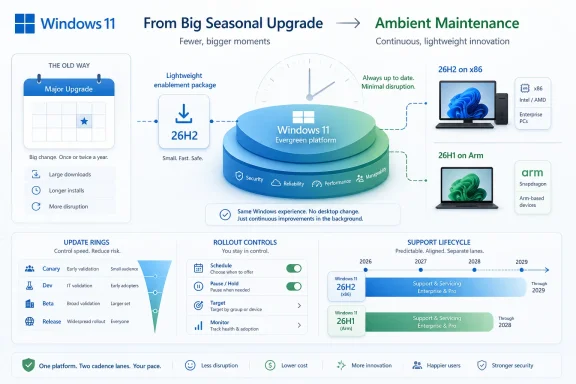 Microsoft Turns the Feature Update Into a Calendar Marker
For years, Windows version numbers carried a promise: install this release and something visible would happen. The Start menu might change, Settings might absorb another Control Panel page, security defaults might shift, or the desktop might acquire a new Microsoft-shaped opinion about how users should work. Windows 11 26H2 appears to break that expectation more decisively than any prior release.Microsoft’s own framing is telling. The company describes 26H2 as building on the same platform and servicing approach introduced in prior releases, with eligible devices receiving a small enablement package instead of a full OS replacement. That is not the language of a showcase release. It is the language of logistics.
The practical effect is that a PC already running Windows 11 24H2 or 25H2 should not experience 26H2 as a traditional upgrade. The payload is expected to be small, the install path quick, and the desktop largely unchanged after the reboot. In the old Windows vocabulary, that would have sounded underwhelming. In the new Windows vocabulary, it is the selling point.
This is Microsoft admitting, without quite saying it that bluntly, that the operating system’s annual branding rhythm and its engineering rhythm have diverged. The version label still matters for lifecycle, inventory, compliance, and support policy. It just matters less as a signal of what features users actually receive.
The Real Upgrade Already Arrived in 24H2
The hinge point remains Windows 11 24H2, released in October 2024, which served as the last broad platform shift in this cycle. That release moved the mainstream Windows 11 population onto a newer servicing foundation. Everything since has been more about enabling, incrementing, and extending that foundation than replacing it.Windows 11 25H2 made that visible. It arrived as an enablement package for 24H2 systems, effectively lighting up a new version identity on a shared codebase. Windows 11 26H2 now appears to repeat the move, advancing the version number and support lifecycle while leaving the underlying platform lineage intact.
That does not mean nothing changes in Windows. It means the changes no longer wait politely for the annual feature update. Microsoft has been pushing user-facing features, security hardening, app-management changes, and hardware support through cumulative monthly updates, optional previews, controlled feature rollouts, and Insider flights.
This matters because it changes the job of interpretation. A Windows version number used to answer a broad question: “What capabilities does this machine have?” Increasingly, it answers a narrower one: “Which servicing timeline and enablement state is this machine on?” That is a very different kind of metadata.
For enthusiasts, it makes release day less exciting. For administrators, it may be a relief. The Windows upgrade that does not feel like an upgrade is exactly what many enterprise teams have been asking for since the Windows-as-a-service era began.
The Enablement Package Is Small Because the Decision Was Made Earlier
The phrase enablement package can sound like marketing fog, but the concept is straightforward. Microsoft ships dormant or shared components ahead of time through cumulative updates, then uses a tiny package to switch the system into a new release identity when the company is ready to declare it supported.That is why these packages can be measured in kilobytes rather than gigabytes. They are not replacing the OS image in the way a traditional feature update would. They are changing what is already present, supported, and exposed under a new version label.
The advantage is obvious. A full feature update behaves like an in-place OS upgrade, with more moving parts, more time offline, and more room for driver, firmware, app-compatibility, and rollback drama. An enablement package is closer to the tail end of a monthly update, with the hard work already absorbed into the servicing stream.
The trade-off is also obvious. Microsoft gets to say the annual update is less disruptive because much of the disruption, risk, and novelty has been spread across the months before it. That is not necessarily bad. But it does mean administrators must stop treating the annual feature update as the only moment when Windows changes in meaningful ways.
In other words, the big bang did not disappear. It was sliced into monthly portions.
Monthly Updates Now Carry the Feature Burden
The new model makes Patch Tuesday and its surrounding preview releases more important than the annual Windows brand refresh. Features such as native monitoring improvements, camera behavior changes, app-removal policies, accessibility updates, and device-management refinements increasingly arrive through cumulative updates. Some appear first in optional previews, some are staged behind rollout controls, and some are restricted by hardware capability or edition.This creates a more fluid Windows, but also a harder one to describe. Two machines may both say they are on Windows 11 25H2 and still differ in which experiences are enabled, depending on update timing, region, policy, hardware class, and whether the user or admin has opted into faster feature delivery. The version label becomes necessary but insufficient.
For consumers, the upside is that useful features can arrive without waiting for a ceremonial annual package. A movable taskbar, latency-related improvements, or new Settings experiences do not need to be held hostage until autumn. Windows can evolve while the version number sits still.
For IT, the upside is a steadier servicing cadence. The downside is governance. If new capabilities arrive through cumulative updates, then update rings, validation groups, release notes, roadmap tracking, and policy baselines become the real control plane. The “we will test the next feature update when it arrives” mindset is no longer enough.
This is where Microsoft’s low-disruption language deserves scrutiny. A small enablement package reduces one kind of disruption: the large annual upgrade event. It does not eliminate change. It changes the shape of change into something more continuous, more policy-driven, and sometimes easier to miss.
Enterprises Win Fewer Upgrade Weekends and More Release-Note Homework
For many enterprise administrators, 26H2’s enablement model is still a net positive. A quick reboot and a support lifecycle reset are easier to sell than a full OS upgrade that monopolizes desks, clogs VPN links, and triggers anxious compatibility meetings. If the same cumulative update services both 24H2 and 25H2-era systems, packaging and deployment also become less fragmented.The lifecycle extension is not a footnote. Windows 11’s mainstream annual cadence gives Home, Pro, Pro Education, and Pro for Workstations editions 24 months of support, while Enterprise and Education editions receive 36 months. For 26H2, that means consumer and Pro-class devices should run into October 2028, while Enterprise, Education, and IoT Enterprise should extend into October 2029 under the standard model.
That is the strongest argument for installing 26H2 even if users see nothing new. The support window is the feature. A fleet on 24H2 is closer to its deadline. A fleet moved through 25H2 and then 26H2 buys more time without the disruption usually associated with buying time.
But this also means Windows versioning is becoming more bureaucratic. The most concrete benefit of 26H2 may be the date on the support matrix, not an icon on the taskbar. That is not a criticism so much as a recognition that Windows is now a mature platform whose biggest customers value predictability more than surprise.
The risk is complacency. If admins hear “small enablement package” and conclude that 26H2 needs no testing, they will be missing the point. The package may be small, but the cumulative servicing history beneath it is not.
26H1 Shows the Other Windows Roadmap Running in Parallel
The existence of Windows 11 26H1 complicates the neat story. Microsoft has already shipped 26H1 as a specialized release for select new hardware, notably next-generation Arm devices beginning with Qualcomm Snapdragon X2 systems. It is not a general feature update for existing PCs, and Microsoft has said it is not offered as an in-place update from 24H2 or 25H2.That distinction matters. Windows 11 26H1 is based on a different Windows core from the 24H2, 25H2, and 26H2 track. It exists to support new silicon platforms rather than to deliver exclusive user-facing features. Microsoft has also said devices on 26H1 will not move to the second-half 2026 annual update, though they will have a future update path.
This creates two lanes. Most existing Windows 11 PCs remain on the 24H2/25H2/26H2 servicing lineage. Certain new Arm systems live on 26H1 because their hardware support needs are different. Feature parity may be the goal, but the platform baselines are not identical.
For PC buyers, the distinction will be nearly invisible unless something goes wrong. A Snapdragon X2 laptop that ships with 26H1 may look and behave like another Windows 11 PC. Underneath, however, it belongs to a different servicing branch with different upgrade mechanics.
For admins, that is a procurement and inventory issue. The Windows version string alone will not tell the whole story unless it is paired with hardware class, servicing channel, and update eligibility. The more Microsoft optimizes Windows for new silicon, the more fleet management becomes a matter of understanding platform lanes rather than just OS names.
Hardware Requirements Stay Still While Platform Targeting Gets Smarter
One notable part of the 26H2 story is what does not appear to be changing. Microsoft has not signaled a new hardware requirement cliff for the broad 26H2 release. Systems already capable of running Windows 11 24H2 or 25H2 should remain in the target population for 26H2, assuming they are otherwise supported and not blocked by safeguard holds.That is important because Windows 11’s original hardware requirements are still a sore point for many users. TPM 2.0, supported CPUs, Secure Boot expectations, and the broader Windows 11 eligibility line created a long tail of technically usable Windows 10-era hardware that could not officially move forward. Microsoft does not need another hardware controversy attached to an annual release that mostly resets support dates.
At the same time, 26H1 shows that Microsoft is willing to use separate platform baselines for new silicon. That is a more surgical approach. Instead of raising the floor for everyone, Microsoft can create targeted releases for hardware that needs deeper OS support, especially in Arm, AI acceleration, power management, and device-specific optimization.
This may be the future shape of Windows hardware support. The mainstream PC base gets enablement releases on a shared platform, while new silicon gets specialized baselines until the broader OS catches up. It is less dramatic than a universal requirement change, but it is also more complex.
The practical advice is simple: do not treat “Windows 11” as a single technical state. A 26H1 Arm machine and a 26H2 x86 machine may be aligned in user-facing experience while differing meaningfully in servicing architecture. That is manageable, but only if organizations notice it.
The Version Number Is Becoming a Support Contract
The most important shift is conceptual. Windows 11 26H2 is not best understood as a feature bundle. It is a support contract renewal for PCs already living on the modern Windows 11 servicing base.That makes Windows feel more like the browsers, mobile operating systems, and cloud clients it increasingly resembles. Chrome users do not organize their computing lives around a single annual feature release. iOS still has major annual branding moments, but many experiences arrive through point updates, server-side flags, and app updates. Windows is moving in that direction, though with the added complication of decades of enterprise compatibility.
This is uncomfortable for enthusiasts because Windows version numbers once anchored the narrative. Windows 95, XP, 7, 10, and even early Windows 11 releases were identity shifts. They had aesthetics, requirements, campaigns, and arguments attached to them. Version 26H2 is not that kind of cultural object.
But it may be the kind of Windows release Microsoft needs. The company is trying to serve gamers who want low latency, developers who want Linux-like tooling and AI acceleration, enterprises that want fewer desk-side surprises, and security teams that need hardening changes to land faster than a yearly release allows. A monolithic annual feature dump is a poor fit for that world.
The price is clarity. Microsoft will need to communicate better about which changes are tied to monthly updates, which require enablement, which are controlled rollouts, which are Copilot+ PC-only, and which are silicon-specific. Otherwise, the quieter update model will reduce installation drama while increasing explanatory fog.
The Quiet Release Still Needs Loud Governance
For WindowsForum readers who manage their own machines, 26H2 should be a straightforward update when it becomes broadly available. If the machine is already healthy on 24H2 or 25H2, the experience should feel closer to a cumulative update than a new OS deployment. That does not mean it should be ignored, especially if the support clock matters.For sysadmins, the checklist is less about imaging and more about process discipline. Confirm update rings. Validate the cumulative baseline beneath the enablement package. Watch known issues and safeguard holds. Make sure reporting tools distinguish between 24H2, 25H2, 26H2, and 26H1 hardware-specific systems.
For security teams, the continuous model is even more consequential. Microsoft is using monthly updates not only to patch vulnerabilities but to change defaults, harden legacy protocols, modify authentication behavior, and prepare platform trust changes such as Secure Boot certificate transitions. Those are not cosmetic updates. They are operational events.
The enablement package may be small, but the surrounding Windows servicing ecosystem is increasingly busy. That is the paradox of 26H2. The release itself may be dull because the operating system around it is not standing still.
The Smallest 26H2 Details Are the Ones Worth Tracking
The shape of Windows 11 26H2 is now clear enough to draw practical conclusions, even before general availability. The release is not a desktop reinvention. It is a signpost for Microsoft’s broader servicing strategy.- Windows 11 26H2 is expected to arrive in the second half of 2026 as an enablement package for recent Windows 11 systems rather than as a full OS replacement.
- PCs already running Windows 11 24H2 or 25H2 should see a faster, less disruptive upgrade path than a traditional feature update.
- The most important benefit of moving to 26H2 may be the refreshed support lifecycle, not a visible feature set.
- New Windows capabilities are increasingly arriving through monthly cumulative updates, optional previews, staged rollouts, and hardware-specific enablement.
- Windows 11 26H1 remains a separate silicon-targeted release for select new devices, not the mainstream upgrade path for existing PCs.
- Administrators should treat 26H2 as low-friction, not no-risk, because the cumulative update baseline underneath it still deserves validation.
References
- Primary source: TechSpot
Published: Sat, 20 Jun 2026 15:28:00 GMT
Loading…
www.techspot.com - Related coverage: windowslatest.com
Microsoft details Windows 11 26H1 support cycle, CPU requirements (just Snapdragon X2 for now), and more
Microsoft says Windows 11 26H1 is supported until March 2028 for consumers and is now rolling out on PCs with eligible CPUs. www.windowslatest.com
- Related coverage: windowscentral.com
Windows 11 version 26H1: Everything you need to know about Microsoft's special OS release now shipping on new hardware | Windows Central
Microsoft has confirmed that Windows 11 version 26H1 is now shipping exclusively on new PCs that ship with Qualcomm's new Snapdragon X2 SoC. Here's what you need to know.www.windowscentral.com - Related coverage: tomshardware.com
Microsoft confirms Windows 11 26H1 will be for Arm devices only at launch — Snapdragon X2-powered devices officially shipping with 26H1 | Tom's Hardware
It's 24H2 all over again, but with the caveat that 26H1 will only support specific hardware for its entire lifecycle. Devices running 26H1 will not be able to upgrade to 26H2.www.tomshardware.com - Official source: learn.microsoft.com
Loading…
learn.microsoft.com - Related coverage: windowsreport.com
Windows 11 26H1 Targets Snapdragon X2 CPUs, Excludes Existing PCs
Microsoft confirms Windows 11 26H1 as a scoped Snapdragon X2 release, excluding 24H2 and 25H2 devices. windowsreport.com
- Related coverage: techradar.com
Microsoft confirms Windows 11 26H1 update won't be coming to your current PC — here's why that's actually great news | TechRadar
It's all about avoiding another 24H2 disaster for existing PCs, which will stay on 25H2 and not get 26H1www.techradar.com - Related coverage: computerbase.de
Exklusiv für Snapdragon X2: Microsoft schafft Klarheit bei Windows 11 26H1 - ComputerBase
Microsoft erklärt offiziell Details zum Frühjahrs-Update Windows 11 26H1. Es erscheint ausschließlich auf Modellen mit Snapdragon-X2-Chip.www.computerbase.de
- Related coverage: eol.wiki
Microsoft Windows End of Life (EOL) Dates & Support Status | EOL.Wiki
Microsoft Windows is the world's most widely used desktop operating system for personal computers. eol.wiki
- Related coverage: multiplayer.it
Windows 11 26H1: Microsoft conferma i PC con Snapdragon X2, ma i nuovi chip NVIDIA sembrano spariti dai radar - Multiplayer.it
Microsoft conferma che Windows 11 26H1 sarà preinstallato sui nuovi PC con Snapdragon X2 in arrivo nel 2026, mentre non fa nessuna menzione dei chip NVIDIA N1 e N1x.multiplayer.it
- Related coverage: pureinfotech.com
Windows 11 26H1 officially released, but it's not a feature update - Pureinfotech
Windows 11 26H1 is official but exclusive to Snapdragon X2 devices. Here’s why you can’t download it and what 26H2 really means. pureinfotech.com
- Related coverage: hardwareluxx.de
Windows 11 26H1: Vorerst exklusiv für Snapdragon-X2-Notebooks - Hardwareluxx
Windows 11 26H1: Vorerst exklusiv für Snapdragon-X2-Notebooks. www.hardwareluxx.de
- Related coverage: windowsforum.com
Loading…
windowsforum.com - Official source: techcommunity.microsoft.com