

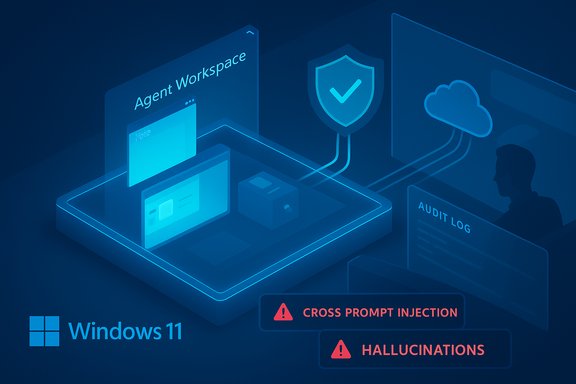
Microsoft’s own Windows documentation and preview notes make an unusually blunt admission: the new “agentic” AI features being added to Windows 11 introduce novel security risks that change the operating‑system threat model — and administrators and enthusiasts should treat enabling them as a risk decision, not a convenience toggle.
Background / Overview
Microsoft is shipping an experimental set of facilities for Windows 11 that move the platform from passive AI assistants (which only suggest text or actions) to agents that can act — opening apps, clicking UI elements, reading and writing files, and chaining multi‑step workflows on a user’s behalf. The preview is surfaced through features such as Copilot Actions, a runtime called Agent Workspace, and a plumbing layer (the Model Context Protocol) intended to let agents discover and call capabilities in apps. Microsoft updated its public support article on these features and explicitly signaled a November 17 update to the guidance as the preview rolled out to Insiders. Those architectural choices change the endpoint threat model: content that used to be passive — documents, rendered previews, UI text, and images (OCR) — becomes an instruction channel that an agent may act on. Microsoft names the central new risk class: cross‑prompt injection (XPIA), where malicious content embedded in UI elements or documents can override or corrupt an agent’s plan and cause unintended side effects, potentially including data exfiltration or software installation. The company also warns that agent‑driven models “may hallucinate and produce unexpected outputs,” and that those hallucinations turn into operational hazards when the model’s outputs lead directly to system actions. Independent reporting and community analysis have rapidly corroborated Microsoft’s posture: reviewers describe the toggle as off by default, admin‑gated, and experimental, and security analysts emphasize that the built‑in mitigations — while meaningful — reduce risk rather than eliminate it.What Microsoft shipped (technical snapshot)
Agent Workspace and agent accounts
- Agent Workspace: a contained, parallel Windows session where an agent runs. It provides a separate desktop and process space designed to be lighter than a VM but stronger than in‑process automation. The workspace is intended to limit visibility of the user’s interactive desktop while giving the agent enough context to perform multi‑step tasks.
- Agent accounts: each agent runs under a distinct, low‑privilege, non‑interactive local account provisioned when the experimental setting is enabled. This separates agent activity from the human user’s identity and enables ACLs, auditing, and revocation controls.
- Scoped folder access: during the initial preview, agents may request read/write access to a limited set of user known folders (Documents, Downloads, Desktop, Pictures, Music, Videos). Broader access must be granted explicitly and is subject to administrative controls.
- Model Context Protocol (MCP) and connectors: a structured bridge that lets agents discover app-provided capabilities and call them in a predictable, auditable JSON‑RPC style. Connectors extend agent capabilities to cloud services and third‑party integrations, widening the trust surface but also creating an enforcement point for permissions and logging.
What Microsoft warns about — the explicit risk model
Microsoft’s guidance is notable for its candor. The company calls out two interlocking hazards as first‑order problems:- Cross‑Prompt Injection (XPIA) — malicious or adversarial content embedded in documents, web previews, images (OCR), or UI elements could be interpreted by an agent as instructions and overrwrite its plan, producing harmful side effects (for example, packaging and exfiltrating files, invoking a connector to upload data, or fetching and running a binary).
- Hallucinations become operational hazards — large language models can generate confident but incorrect outputs. When an agent executes actions based on a hallucinated plan, the result can be destructive: wrong recipients in emails, incorrect edits, file deletions, or the execution of undesired installers. Microsoft explicitly warns that models “may hallucinate and produce unexpected outputs.”
Strengths and sensible mitigations Microsoft proposes
Microsoft has not left the preview as a free‑for‑all. The product and engineering notes reveal several clear design decisions intended to reduce exposure:- Opt‑in and admin gating: Experimental agentic features are disabled by default and require administrator enablement. This provides a conservative rollout path for enterprise fleets and power users.
- Identity separation: Per‑agent local accounts separate agent actions from the human user, enabling revocation and principal‑level auditing.
- Runtime isolation: The Agent Workspace is designed as a contained desktop session with its own process tree and memory boundaries, offering a stronger isolation surface than in‑process automation.
- Scoped access and least privilege: Agents are limited to specified known folders by default; broader permissions require explicit consent. This reduces the immediate blast radius.
- Signing and revocation: Microsoft expects agents and connectors to be cryptographically signed so administrators can vet publishers and revoke compromised agents. This integrates with familiar enterprise governance.
- Visibility and controls: Agents will surface planned steps and produce audit logs intended to be tamper‑evident, and the UI is designed to show running agent actions to allow human takeover, pause, or stop.
Why the warnings matter: practical attack scenarios
It’s useful to examine concrete failure modes to see why Microsoft sounded the alarm.- XPIA‑based exfiltration: an attacker embeds adversarial instructions inside a PDF or a rendered HTML preview (for example, hidden comments or image text). An agent asked to “summarize and send” the PDF might interpret the embedded instruction to “collect all invoices” and then upload those files to an attacker‑controlled endpoint via a connector, automating what would previously require human action. Because agents can call cloud connectors and execute multi‑step plans, this exfiltration can look like legitimate automation unless monitoring explicitly attributes and inspects agent origins.
- Automated malware installation: a poisoned webpage or document contains instructions that prompt the agent to fetch and run an installer. If the agent’s policy or human approval UX is unclear, or if the agent believes the step is harmless, the workflow could download a signed‑looking binary and run steps to install it. Microsoft’s materials explicitly call out malware installation as a possible unintended action in XPIA scenarios.
- UI automation mistakes: agents performing clicks and typing can misinterpret UI changes (layout, localization), resulting in accidental destructive actions — wrong recipients, deletion of files, or misconfigured edits. The absence of transactional rollback semantics exacerbates this risk.
- Supply‑chain and signing abuse: attackers can attempt to publish malicious connectors or compromise signing keys. Even with signing and revocation, historically these controls have had gaps — and signed artifacts have been abused in prior incidents. Microsoft acknowledges signing helps but isn’t a silver bullet.
Critical analysis — where Microsoft’s approach is strong, and where risk remains
Notable strengths
- Clear public acknowledgment of risk — Microsoft’s unusually explicit language about hallucinations and XPIA is responsible and rare among vendors. Making risk visible is the first step toward building mitigations that enterprises can evaluate.
- Architectural controls aligned with enterprise tooling — the use of distinct agent accounts, isolation primitives, signing/revocation, and planned Intune/Group Policy hooks aligns with existing enterprise governance models rather than inventing a parallel system. That makes practical enforcement more attainable.
- Conservative rollout — admin gating and disabled‑by‑default defaults give organizations time to plan telemetry, testing, and policy before broad enablement.
Glaring gaps and residual risks
- Isolation guarantees are currently underspecified — “Agent Workspace” is described as contained, but Microsoft’s documentation does not (yet) provide measurable, testable isolation semantics equivalent to a VMM or an attested enclave. Security teams need details: what isolation primitives (session boundaries, sandboxing, kernel hardening, hypervisor enforcement) are in play, and how can they be independently validated? Without provable guarantees, the containment claim remains operationally fuzzy.
- Human approval UX and consent fatigue — surfacing approvals for multi‑step plans is necessary, but frequent or ambiguous prompts create habituation. If the approval UI is confusing or overly verbose, users will click through and reduce the primary regime of human oversight to a perfunctory checkbox. Microsoft recognizes this as a risk, but solving UX-driven security erosion is notoriously difficult.
- Telemetry, logs, and forensic quality — Microsoft promises tamper‑evident logs, but enterprises require cryptographic attestation, robust export hooks to SIEMs, retention policy controls, and machine‑readable semantics to enable effective incident response. The documentation asserts these goals, but the exact mechanics and guarantees remain immature in preview.
- Agent-originated flows evade legacy telemetry — agent actions can use authorized cloud APIs or signed binaries to move data, a flow traditional EDR/IDS systems may not flag. Detecting malicious automation among legitimate agent activity requires new detections and DLP rules tailored to agent behavior. Endpoint vendors and SOC teams must update playbooks and alerts to incorporate agent telemetry.
- Supply‑chain risk remains nontrivial — signing and revocation help, but attackers can abuse legitimate signing pipelines, and revocation propagation is not instantaneous at enterprise scale. A compromised connector could be devastating if widely trusted.
Recommendations for administrators, IT teams, and enthusiasts
Microsoft’s stance makes the decision binary for most organizations: treat agentic features as experimental and only enable in controlled contexts. The following checklist provides a practical, prioritized approach.- Before enabling, run a pilot on isolated test hardware (not on production endpoints). Verify telemetry and logging export paths to your SIEM and EDR.
- Keep the master setting off by default for production fleets. Use Intune, Group Policy, or equivalent MDM tools to manage the toggle centrally.
- Validate and harden agent account policies:
- Ensure agent accounts are assigned least privilege.
- Harden ACLs on known folders (Documents, Downloads, Desktop, Pictures, Music, Videos) and monitor agent access.
- Instrument agent telemetry:
- Ensure agents’ audit logs are exported, indexed, and retained per compliance needs.
- Build detection rules for anomalous agent behavior (unexpected connectors used, large bulk reads of sensitive directories, unusual outbound flows).
- Update DLP and EDR coverage:
- Treat agent-originated flows as distinct telemetry sources.
- Enforce policies to block or alert on suspicious packaging and transfers initiated by agent accounts.
- Vet connectors and third‑party agents:
- Establish a review process for signed agent binaries and connectors.
- Use certificate pinning and strict publisher allowlists where possible.
- UX test and policy training:
- Pilot human‑in‑the‑loop prompts to ensure clarity; collect metrics on prompt acceptance to measure consent fatigue.
- Train helpdesk and SOC teams on agentic incident playbooks.
- Treat any device with agentic features enabled as a potential data‑exfiltration vector; perform regular audits and red‑team exercises that simulate XPIA to validate defenses.
Clarifications and cautionary notes (claims that need verification)
- Some community posts and headlines have condensed Microsoft’s language into statements such as “agents can download viruses themselves” or “agents remain running after you shut them down.” Those sharp summaries risk overstating the documented facts. Microsoft explicitly warns XPIA can lead to unintended actions such as malware installation if an agent is tricked into fetching and executing a payload — but the exact mechanics, persistence semantics, and runtime lifecycle guarantees are more nuanced in the documentation and should not be simplified into definitive claims without further technical evidence. Treat claims of agent persistence or unspecified lifecycle behaviors as unverified until Microsoft publishes more precise runtime guarantees and isolation semantics.
- The developer/editor note on Microsoft’s support page confirms an update on November 17 to reflect gradual rollout information and to add clarifications; that date anchors the public guidance, and subsequent changes can occur as the preview evolves. Administrators should therefore re-check the official documentation before making rollout decisions.
Broader implications: OS design, ecosystem, and standards
The agentic shift is structural. It reframes the desktop as an environment where agents are first‑class acting principals. That evolution demands changes across vendor and enterprise tooling:- Endpoint security vendors must develop agent‑aware detections (automation patterns, agent accounts, agent workspace artifacts).
- DLP systems must model agent‑originated flows and connectors as distinct channels with their own risk profiles.
- App developers should design app actions and connectors with explicit capability declarations and least‑privilege semantics.
- Auditors and regulators will likely require stronger non‑repudiation and verifiable audit trails for agent actions in regulated industries.
Conclusion — pragmatic posture for readers and IT teams
Microsoft’s explicit warning about agentic AI in Windows 11 is an important, responsible signal. The company is not pretending the features are risk‑free: it is making the risks explicit, gating the features behind administrative controls, and proposing architectural mitigations that align with enterprise governance. That candor matters because it reframes the launch as an operational decision rather than a consumer convenience.At the same time, the arrival of agentic capabilities changes the attack surface in a real way: content becomes command. That single shift — where rendered documents, previews, and UI elements can be interpreted as instructions by an executing agent — creates high‑value targets attackers will try to weaponize. Microsoft’s mitigations reduce probability and blast radius, but they do not fully remove the new classes of risk. Security teams, IT administrators, and cautious enthusiasts should treat the feature as experimental: enable only in test environments, validate logging and SIEM integration, prepare SOC playbooks for agent incidents, and only consider broader rollout after independent testing and ecosystem tools have matured.
For most users and organizations the sensible posture is conservative: keep the experimental agentic features off for production devices, pilot in isolated environments, and require complete telemetry, revocation, and response plans before wider enablement. Microsoft’s documentation and industry reporting make clear that the productivity promise is compelling — but the security bar must remain high.
Source: Inbox.lv AI in Windows 11 Declared Unsafe
