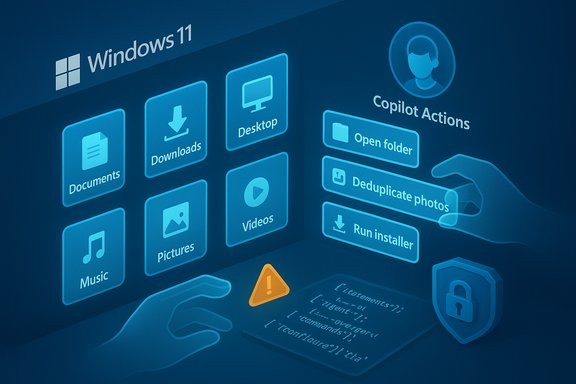
Microsoft’s latest documentation tweak has reignited a long-smoldering debate about AI in the operating system: the company now explicitly urges users to “read through this information and understand the security implications of enabling an agent on your computer,” a blunt admonition tucked into its support page for Experimental Agentic Features that accompanies the rollout of Copilot Actions and the agent workspace model in Windows 11. This update — part of preview build 26220.7262 released to the Dev and Beta Insider channels — makes clear that Microsoft is shipping new classes of automation that can access files, run UI actions, and operate under separate agent accounts, and it is warning that these capabilities introduce novel security vectors such as cross‑prompt injection and data exfiltration.
Microsoft’s push to make Windows an “agentic” OS is the next logical step in a multi-year strategy to bake generative AI into everyday workflows. Rather than presenting AI as a passive helper that suggests text, Copilot Actions and other agentic features are designed to perform multi-step tasks autonomously: open a folder, deduplicate photos, run installers, interact with dialogs, and produce outputs while the user continues other work. These features are being trialed initially with Windows Insiders and are implemented behind an “Experimental agentic features” toggle in Settings > System > AI Components. Microsoft says the toggle is off by default, requires an administrator to enable, and — while experimental — grants agents scoped access to six common user folders by design. This architectural shift is accompanied by two complementary narratives from Microsoft: (1) the company acknowledges the opportunity — automation, productivity gains, and richer local AI experiences without cloud round trips — and (2) it warns about the risks and the need for layered protections, including runtime isolation, scoped authorizations, logging, and human approval requirements for critical actions. The tension between capability and control is the heart of the current controversy.
There are two ways to read this:
Microsoft’s approach — phased rollouts, separate agent accounts, scoped folder access, and explicit warnings — is better than an all‑in or no‑guardrails strategy. However, those protections must be backed by operational rigor: adversarial testing, fast revocation, independent audits, and transparent controls that administrators can enforce without deep model expertise.
Where Microsoft must improve is in user empowerment and default resilience. Warnings in docs are necessary but not sufficient; safer defaults, finer permission controls, and simpler admin workflows would materially improve the security posture and public confidence.
The future of Windows as an agentic platform could be transformative — enabling routine work to be automated safely and locally — but only if safety and usability are advanced in lockstep. Until then, Microsoft’s admonition to “read through this information and understand the security implications” is not just legal boilerplate: it’s an invitation to test, verify, and keep cautious defaults in place while the industry builds the safeguards that will make this new era of OS‑level AI secure and trustworthy.
Source: TechRadar https://www.techradar.com/computing...1-im-worried-too-but-lets-not-panic-just-yet/
 Background
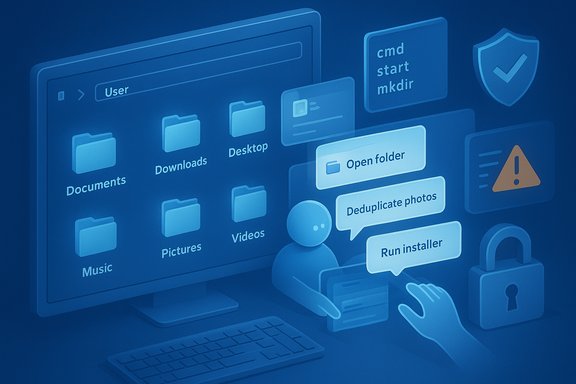
Microsoft’s push to make Windows an “agentic” OS is the next logical step in a multi-year strategy to bake generative AI into everyday workflows. Rather than presenting AI as a passive helper that suggests text, Copilot Actions and other agentic features are designed to perform multi-step tasks autonomously: open a folder, deduplicate photos, run installers, interact with dialogs, and produce outputs while the user continues other work. These features are being trialed initially with Windows Insiders and are implemented behind an “Experimental agentic features” toggle in Settings > System > AI Components. Microsoft says the toggle is off by default, requires an administrator to enable, and — while experimental — grants agents scoped access to six common user folders by design. This architectural shift is accompanied by two complementary narratives from Microsoft: (1) the company acknowledges the opportunity — automation, productivity gains, and richer local AI experiences without cloud round trips — and (2) it warns about the risks and the need for layered protections, including runtime isolation, scoped authorizations, logging, and human approval requirements for critical actions. The tension between capability and control is the heart of the current controversy. What Microsoft actually says — and what that means
Experimental agentic features: a quick technical summary
- Agents run in a dedicated agent workspace that is provisioned as a separate, low‑privilege user account on the device.
- Agents may request access to the following user profile folders: Documents, Downloads, Desktop, Music, Pictures, and Videos.
- The feature is off by default and can only be enabled by an administrative user; once enabled, it applies system‑wide.
- Microsoft frames the workspace as providing runtime isolation, scoped authorization, and activity logging — all intended to reduce the blast radius of any compromised agent.
Copilot Actions and the initial use cases
Copilot Actions is the first agentic capability being previewed; Microsoft describes narrow, example-driven scenarios such as file organization and photo deduplication, and it warns that these actions are experimental and can make mistakes. During preview, Copilot Actions will build an isolated Desktop environment to run tasks and will surface activity so users can inspect and intervene. This gradual, narrow rollout is deliberate: Microsoft is attempting to limit the agentic surface while it refines models and controls.The core security concerns
Cross‑prompt injection (XPIA): a new attack surface
One of the most serious technical risks Microsoft explicitly calls out is cross‑prompt injection (XPIA). In plain language, XPIA happens when maliciously crafted content — embedded in a document, image, or UI — is interpreted by an agent as a legitimate instruction and thereby subverts the agent’s intent or plan. Because agents are designed to parse content (and sometimes follow implicit instructions they find), an attacker can weaponize data to get the agent to perform actions it shouldn’t: fetch and upload files, run commands, or grant access to other resources. Microsoft and independent security writers have framed XPIA as a plausible, realistic threat for agentic systems. XPIA is not mere academic hand‑waving. When a model’s outputs are mapped into actions — clicking, typing, moving files — the cost of hallucinations or manipulations escalates from an accuracy problem to an operational compromise. A misinterpreted instruction may lead an agent to send a sensitive contract to an external server, or to execute leftovers from a supply‑chain installer that contain malware.Data exfiltration and UI‑automation pitfalls
Agents that can read key profile folders and interact with UI elements create a straightforward path for data leakage. Even with restricted access, an agent could be tricked into packaging and exfiltrating files, or persuaded to download and execute a payload if the model cannot reliably distinguish an adversarial instruction from user intent. UI automation, by definition, depends on consistent layout and trustworthy dialogs — both of which can be spoofed or subtly altered by malicious webpages or documents to induce erroneous clicks. Security teams now have to think about content as code in a new way.Supply‑chain, signing, and revocation realities
Microsoft plans to require agent binaries and connectors to be cryptographically signed and supports revocation mechanisms, but signature-based trust is only as strong as the private keys and the operational processes that protect them. Compromised signers, stolen keys, or malicious-but-signed third-party agents remain plausible vectors; revocation and telemetry must be rapid and comprehensive to mitigate damage. The practical effectiveness of signing depends on implementation, revocation latency, and how third-party ecosystems are managed.Why the documentation update set off alarm bells
When Microsoft added the explicit sentence recommending administrators read and understand the security implications before enabling an agent, the change was interpreted by many observers as a legalistic disclaimer or a warning sign that the company is shifting some responsibility to users and admins. Critics argue that a modern OS vendor should bake protections into defaults rather than asking users to perform detailed risk assessments.There are two ways to read this:
- A charitable interpretation: Microsoft is being transparent and pragmatic. It’s an experimental toggle; organizations and advanced users should evaluate the risks before enabling new automation that can touch important folders.
- A skeptical interpretation: That sentence is a partial liability shield and an acknowledgement that default protections may be insufficient once agentic features are broadly shipped.
Lessons from Recall: why past AI rollouts matter
Microsoft’s recent history with features like Recall looms large in the public reaction. Recall — a Copilot‑adjacent feature that takes periodic screenshots to enable timeline‑style search — provoked privacy outcry, criticism from browser vendors, and defensive moves (Brave, AdGuard, and others blocked or limited Recall by default). Recall’s perceived lack of granular controls, unencrypted local stores, and difficulty to uninstall prompted skepticism about Microsoft’s readiness to ship persistent, privacy‑sensitive agents broadly. For many users, this is a cautionary tale: powerful automation plus inadequate opt‑out controls is a risky combination. That history matters because trust is hard to earn and easy to lose. If an agentic capability mishandles data or is exploited at scale, it would damage the broader push for AI in Windows far more than a single security bug in a conventional app.Strengths in Microsoft’s current approach
Despite the hand‑wringing, Microsoft’s design choices show clear attention to containment and gradualism:- Agent Workspace Model: By designating a separate, low‑privilege account for agents and using a distinct desktop and runtime, Microsoft has created a clear containment boundary that, if implemented correctly, limits collateral damage and simplifies monitoring.
- Scoped Folder Access: Limiting default folder access to the six well-known user folders constrains the agent’s reach compared with granting blanket system access.
- Preview and Phased Rollout: Microsoft is testing in Windows Insiders, collecting feedback, and promising more granular controls before general availability — a sensible path for high‑risk features.
- Operational Safeguards: The company has signaled intent to require human approval for critical decisions, maintain tamper‑evident logs, and pair signing with revocation to manage trust. These are necessary controls for production‑grade automation.
Remaining gaps and real‑world worry points
Even with containment, the devil is in the details. The following are pragmatic weaknesses that could be exploited or fail in real deployments:- Default opt‑in vs opt‑out: The feature is off by default now — good — but future policy decisions about default configurations will determine exposure at scale.
- Folder access granularity: "Access to Documents" is broad; attackers only need a single path to exfiltrate sensitive content. Per‑file or per‑label controls would be safer.
- Model behavior at the UI boundary: Models are brittle when mapped to UI automation. Small layout changes, internationalization quirks, or adversarial UI overlays can cause incorrect actions that are indistinguishable from legitimate automation in logs.
- Telemetry and revocation latency: If signed connectors or agent binaries are compromised, slow revocation or incomplete telemetry could allow exploitation to continue unnoticed.
- User comprehension and admin burden: The explicit “read this” line in the docs places cognitive and legal burden on admins who must translate complex model‑risk considerations into policy — an unrealistic expectation for many organizations. (This is an analytical observation, not an admission of intent by Microsoft.
Practical guidance: what users and IT teams should do now
For individual users, power users, and enterprise administrators preparing for agentic Windows, a conservative, layered strategy is the prudent path.- For home users:
- Keep Experimental agentic features turned off unless you are comfortable with risk and understand how to monitor agent activity.
- If you enable Copilot Actions in testing, do so on a non-critical device and keep backups of important files.
- Use full‑disk encryption (BitLocker or Device Encryption) to reduce the risk surface should raw files be accessed by malicious processes.
- For IT and security teams:
- Treat agentic features as a new privilege: map business needs to a strict least‑privilege policy before enabling.
- Maintain strict code signing and supply‑chain controls for agent connectors and third‑party plugins. Require regular key rotation and rapid revocation procedures.
- Deploy Endpoint Detection and Response (EDR) rules tuned to agent‑workspace behaviors and anomalous upload or process spawning patterns.
- Use tamper‑evident logging and centralized monitoring to detect suspicious agent activity; enable alerts for unusual file access patterns involving Documents/Downloads/Desktop.
- Pilot in a segregated group and subject agents to adversarial testing — include XPIA-style content to verify resilience.
- Update acceptable use policies and user training to include agent hygiene: never attach unknown files to an agent request, and treat agent prompts with the same caution as macros or scripts.
What success looks like — and failure scenarios to watch
Success will be visible when agents provide measurable automation gains without increasing incident rates or data leakage events. Key signals:- Low rate of security incidents attributable to agent activity in pilot cohorts.
- Rapid, documented revocation and mitigation when vulnerabilities are discovered.
- Clear, usable UI for admins to control agent permissions at a granular level.
- Independent third‑party audits of agent sandboxing, logging, and telemetry.
The balance between innovation and safety
This is not a binary problem. Generative AI brings real productivity innovations that, if responsibly integrated, will change how work gets done. But models that produce free‑form text are fundamentally different from code that executes deterministically: they are probabilistic, context‑sensitive, and sometimes wrong. When the output of a model translates into file system changes and remote transfers, organizations must evaluate risk tolerance accordingly.Microsoft’s approach — phased rollouts, separate agent accounts, scoped folder access, and explicit warnings — is better than an all‑in or no‑guardrails strategy. However, those protections must be backed by operational rigor: adversarial testing, fast revocation, independent audits, and transparent controls that administrators can enforce without deep model expertise.
Where Microsoft must improve is in user empowerment and default resilience. Warnings in docs are necessary but not sufficient; safer defaults, finer permission controls, and simpler admin workflows would materially improve the security posture and public confidence.
What to watch next
- Will Microsoft deliver per‑file and per‑action permission granularity before general availability?
- How quickly will Microsoft iterate on agent telemetry, logging formats, and revocation mechanics once real‑world attacks are simulated or discovered?
- Will the company commission third‑party security audits and publish results that show the robustness of the agent workspace and signing/revocation model?
- How will enterprise configuration management platforms (Intune, Group Policy) expose agent controls at scale, and will they provide enforcement hooks to prevent risky behavior?
Conclusion
Microsoft’s explicit warning about the security implications of enabling AI agents in Windows 11 is a sobering, necessary reminder that adding autonomous capabilities to an OS changes the threat model fundamentally. The company has thoughtfully built containment mechanisms — agent workspaces, separate accounts, scoped folder access, and phased rollouts — and it is right to emphasize caution during the preview phase. But design intent is not a panacea. Cross‑prompt injection, UI automation brittleness, supply‑chain risks, and the residual public skepticism born from features like Recall are real obstacles. Administrators and users must treat agentic features as a new class of privilege, apply strict controls, and demand transparency, third‑party verification, and rapid incident response capabilities from vendors.The future of Windows as an agentic platform could be transformative — enabling routine work to be automated safely and locally — but only if safety and usability are advanced in lockstep. Until then, Microsoft’s admonition to “read through this information and understand the security implications” is not just legal boilerplate: it’s an invitation to test, verify, and keep cautious defaults in place while the industry builds the safeguards that will make this new era of OS‑level AI secure and trustworthy.
Source: TechRadar https://www.techradar.com/computing...1-im-worried-too-but-lets-not-panic-just-yet/