

Windows 11’s ambitious AI push has shifted from curiosity to controversy: a cluster of features — most notably Recall and the new “agentic” capabilities that let Copilot-style agents act on users’ behalf — have prompted security researchers, privacy-focused developers, and some journalists to warn that Windows 11 currently widens the desktop threat model in ways Windows 10 did not.
Microsoft set out to make Windows 11 an AI-first platform: Copilot was integrated across the shell, Copilot Actions and the Model Context Protocol (MCP) opened pathways for agents to automate multi-step workflows, and the Recall feature promised a searchable, on-device “photographic memory” of what you saw on the screen. Those moves aimed to compress time spent hunting for past content and to automate routine tasks, but the speed of rollout, early engineerin security failure modes created a misalignment between promise and trust.
Microsoft’s own documentation and engineering blog posts explicitly acknowledge the new risks: models may hallucinate and produce unexpected outputs, and content surfaces can be weaponized in ways the company calls cross‑prompt injection (XPIA). In short: content that agents ingest (documents, rendered previews, OCR’d images, UI text) can become a vector for adversaries to issue instructions to an agentic process. Microsoft fra experimental and gated for preview, but the architectural change is real — and it changes the way defenders must think about endpoint security.
Even with those mitigations, independent testers and privacy-focused app developers raised hard questions: can the encrypted store be accessed via a PIN fallback? Can a locally running malware or a compromised admin read the snapshots, or can gh connectors or poorly configured telemetry? Those questions prompted major apps — Signal, Brave, and AdGuard among them — to add explicit blocks or protective workarounds to prevent Recall from capturing sensitive windows. That ecosystem rejection is a concrete signal that several high‑trust app vendors do not feel the mitigations are yet sufficient.
Those warnings have merit in the narrow sense that Windows 10 (without Recall and agent features) presents a smaller local AI footprint. But staying on Windows 10 long-term carries substantial security risk: mainstream support for Windows 10 formally ended on October 14, 2025, and Microsoft’s consumer Extended Security Updates (ESU) program will provide limited, paid ugh October 13, 2026. After ESU ends, Windows 10 devices will no longer receive routine security updates, leaving them exposed to newly discovered vulnerabilities. Microsoft’s guidance is explicit: users should plan migrations or enroll in ESU if they cannot upgrade immediately.
So the calculus is transactional: short-term privacy protection vs. medium‑/long‑term security exposure. For many individuals and organizations the defensible posture is a transitional one: use Windows 10/ESU while you conduct a careful migration or deploy Windows 11 with agentic features disabled by policy until you can validate controls in your environment.
Two structural problems remain:
In short: Windows 11’s AI wave introduces new dangers relative to Windows 10 — but not because Microsoft set out to make a less secure OS; rather because the company moved the platform into unexplored territory where content becomes command. That shift requires new guardrails, rigorous independent testing, and clearer developer controls. Until those are demonstrably in place, cautious users and prudent IT teams are justified in delaying enablement, hardening configurations, and demanding independent verification before they treat agentic features as safe defaults.
Source: Inbox.lv Trust Eroded: Windows 11 Deemed More Dangerous than Windows 10 Due to AI
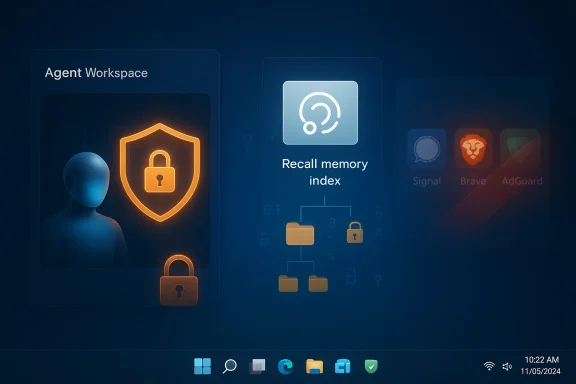 Background / Overview
Microsoft set out to make Windows 11 an AI-first platform: Copilot was integrated across the shell, Copilot Actions and the Model Context Protocol (MCP) opened pathways for agents to automate multi-step workflows, and the Recall feature promised a searchable, on-device “photographic memory” of what you saw on the screen. Those moves aimed to compress time spent hunting for past content and to automate routine tasks, but the speed of rollout, early engineerin security failure modes created a misalignment between promise and trust. Microsoft’s own documentation and engineering blog posts explicitly acknowledge the new risks: models may hallucinate and produce unexpected outputs, and content surfaces can be weaponized in ways the company calls cross‑prompt injection (XPIA). In short: content that agents ingest (documents, rendered previews, OCR’d images, UI text) can become a vector for adversaries to issue instructions to an agentic process. Microsoft fra experimental and gated for preview, but the architectural change is real — and it changes the way defenders must think about endpoint security.
What exactly are the new risks?
Recall: continuous on‑screen indexing
Recall is a capability that can capture frequent screenshots of what appears on a user’s screen, extract text via OCR, and build a local, searchable index so users can later query “where did I see that slide” or “find the chat where we discussed X.” The original design — shown at early demos — stored an index of snapshots on-device and toing to limit cloud exposure. After security researchers found an unencrypted index in early test builds, Microsoft pulled the initial rollout and reworked the design to add encryption, Windows Hello gating, and placement inside stronger isolation.Even with those mitigations, independent testers and privacy-focused app developers raised hard questions: can the encrypted store be accessed via a PIN fallback? Can a locally running malware or a compromised admin read the snapshots, or can gh connectors or poorly configured telemetry? Those questions prompted major apps — Signal, Brave, and AdGuard among them — to add explicit blocks or protective workarounds to prevent Recall from capturing sensitive windows. That ecosystem rejection is a concrete signal that several high‑trust app vendors do not feel the mitigations are yet sufficient.
Agentic AI: when assistants become actors
Beyond Recall, Microsoft introduced mechanisms for agents that don’t just advise but act. Key primitives include:- Agent Workspace — a contained session where an agent runs in parallel with the user, with its own desktop/process tree.
- Agent accounts — separate, non‑interactive Windows accounts provisioned for agents so actions are attributable and auditable.
- Model Context Protocol (MCP) — a JSON-RPC style bridge for agents to discover app capabilities and call them in a controlled way.
- Copilot Actions — user-facing automation flows that can open files, click UI elements, assemble documents and invoke connectors. ([support.microsoft.com](Experimental Agentic Features - Microsoft Support problem is simple in concept but messy in practice: when an autonomous agent can open a document, read it, and then act (for example, download a file or move content), an adversary who controls the content the agent reads has a new way to make the agent do harmful things. Microsoft explicitly calls this cross‑prompt injection (XPIA) and warns administrators that agentic features “may hallucinate and produce unexpected outputs.” That re among platform vendors — but it’s also a recognition that the attack surface changed materially.
Why some outlets recommend “stay on Windows 10” — and why that advice has limits
A number of articles and commentators framed a short-term mitigation strategy: if you prioritize immediate, local data privacy and want to avoid the wider AI surface, retaining or downgrading to Windows 10 feels, at first glance, safer because it lacks Recall and the agentic primitives. That recommendation was echoed in some reporting and social posts.Those warnings have merit in the narrow sense that Windows 10 (without Recall and agent features) presents a smaller local AI footprint. But staying on Windows 10 long-term carries substantial security risk: mainstream support for Windows 10 formally ended on October 14, 2025, and Microsoft’s consumer Extended Security Updates (ESU) program will provide limited, paid ugh October 13, 2026. After ESU ends, Windows 10 devices will no longer receive routine security updates, leaving them exposed to newly discovered vulnerabilities. Microsoft’s guidance is explicit: users should plan migrations or enroll in ESU if they cannot upgrade immediately.
So the calculus is transactional: short-term privacy protection vs. medium‑/long‑term security exposure. For many individuals and organizations the defensible posture is a transitional one: use Windows 10/ESU while you conduct a careful migration or deploy Windows 11 with agentic features disabled by policy until you can validate controls in your environment.
What independent testing and third‑party developers found
- Early builds of Recall were shown to store index artifacts in an easily accessible SQLite database, prompting immediate alarm and a redesign. Microsoft subsequently added encryption and hardware‑backed isolation, but independent analysis continued to flag edge cases — including PIN fallback and app-exclusion gaps — that could allow access under some threat scenarios.
- Signal, Brave, and AdGuard deliberately blocked Recall from capturing their app windows or provided user-facing toggles to opt out. These vendor-level choices are meaningful: when multiple privacy-first developers implement deliberate blocks, it demonstrates a practical lack of confidence in the vendor-supplied controls.
- Tests conducted by security researchers and outlets reported that Recall could still capture passwords and sensitive fields in some situations unless the user and apps actively took steps to block captures — undermining the “safe by default” narrative Microsoft had to build. Those test findings are particularly important for threat modeling.
Practical mitigations for users and IT
The headlines make the risk feel intractable, but risk management is about layering controls. Here’s a prioritized, practical set of steps for consumers and organizations:- If you do not need Recall or agentic automation, keep both features off.
- For Recall: do not enable the feature in Settings → System → AI components (if your system exposes it). For agentic features: keep Experimental agentic features off (this toggle is off by default and requires an administrator to enable).
- For devices that must run Recall or agent experiments:
- Require Windows Hello with strong biometric enrollment and avoid PIN-only fallbacks where possible.
- Enable BitLocker or Device Encryption so on-disk snapshot stores remain encrypted at rest.
- Apply strict access controls and monitor audit logs for agent account activity.
- For enterprises:
- Treat agentic features as a governance decision: require pilot programs, signed connectors, attested connectors, and tamper‑evident audit trails before enabling on production devices.
- Use MDM/Intune policies to restrict who can toggle experimental features; require app vetting and connector signing.
- Add agent behavior to DLP and EDR playbooks: inspect agent connector calls, restrict sensitive folder access, and set policy-based quarantines for suspicious activity.
- For app developers:
- Provide an API or flag for apps to opt out of screen-capture and screenshot indexing. Where that’s not possible, adopt platform-provided DRM-like APIs (some apps use these workarounds today) to prevent unwanted snapshotting.
- For long-term planners:
- If you delay upgrading from Windows 10, enroll in ESU (if available) and set a migration roadmap to maintain security posture after ESU ends October 13, 2026.
Why Microsoft’s public admissions matter — and why they aren’t enough
It is notable that Microsoft has been unusually explicit about the possibility of hallucinations and cross‑prompt injection. That candor helps defenders define threat models: XPIA is a distinct attack class that rational security teams can prepare for. Microsoft’s published mitigations — agent accounts, Agent Workspace isolation, MCP, connector signing, and audit logs — are the right kinds of architectural defenses. But architectural promises must be validated by independent testing, accessible controls, and clear lifecycle guarantees (e.g., how quickly an agent’s rights can be revoked, how audit logs are protected, who can see agent plans).Two structural problems remain:
- Pace mismatch: the cadence of feature rollouts has sometimes outstripped representative security and adversarial testing across real-world configurations, producing high‑visibility regressions that erode confidence.
- Ecosystem trust shortfall: when developers of high‑trust apps (privacy messengers, ad‑blockers) implement their own blocks, it signals a trust deficit. Rebuilding that requires transparent third‑party audits, clear documentation, and simple, discoverable developer-facing privacy hooks.
Strengths and gains that must not be ignored
To keep this balanced: the technical ambitions here also produce tangible benefits. On‑device indexing and agentic automation can:- Save significant time for knowledge workers who frequently search across apps and windows.
- Automate repetitive, multi‑app workflows that currently require fragile macros or manual handoffs.
- Enable offline-capable assistants that can operate with better latency and fewer cloud dependencies if implemented correctly.
A checklist for assessing “Is Windows 11 safe enough for me?”
- Is your device personally managed or enterprise-managed? Enterprises should default to disabled for experimental agentic features until governance is in place.
- Does the device have full-disk encryption (BitLocker/Device Encryption) and Windows Hello enrolled?
- Are you comfortable that app vendors you trust (Signal, Brave, etc.) run on the device and have explicit hooks or protections against screen capture?
- Have you validated vendor claims with independent tests in your environment (especially for Recall’s redaction and protection behaviors)?
- Do you have a migration plan if you choose to stay on Windows 10 under ESU, and is that plan timed to the ESU end date (October 13, 2026)?
What Microsoft should do next (and what the community should demand)
- Publish independent‑friendly audit artifacts: make technical specs, threat models, and test harnesses available so third parties can reproduce privacy and security claims.
- Standardize app-level privacy flags: expose a simple API that lets any app declare “do not snapshot” semantics without breaking accessibility.
- Third‑party verification program: invite independent labs to certify Recall/agentic protections and publish attestation reports.
- Stronger default fallbacks: make PIN fallback behavior explicit and harden it against common threat scenarios — currently the PIN fallback is a credible weak point in some tests.
- Staged, measurable rollout: ship agentic features first in tightly controlled enterprise pilots with published metrics on incidents and false positives.
Final analysis and verdict
Labeling Windows 11 “more dangerous” than Windows 10 is a useful provocation: it focuses attention on trust and threat modeling. The reality is more nuanced.- Windows 11 introduces new classes of risk (Recall’s continuous indexing; agentic XPIA and hallucination-driven actions) that require defenders to rethink endpoint protections. Microsoft has acknowledged those risks publicly and built notable mitigations (Agent Workspace, agent accounts, encryption, hardware-backed keys).
- At the same time, Windows 10 is no long‑term safe harbor. Mainstream support ended on October 14, 2025, and ESU coverage — a temporary bridge — expires October 13, 2026. Remaining indefinitely on Windows 10 trades short-term privacy surface reduction for mid-term unpatched exposure.
- The immediate, pragmatic posture for most users and organizations is a middle path: avoid enabling Recall or experimental agentic features unless you have a clear, tested risk mitigation plan; if you must run Windows 10, enroll in ESU and maintain a migration roadmap; for enterprises, treat experimental agentic capabilities as governance-level decisions only to be enabled after pilot validation, connector signing, and audit capabilities are in place.
In short: Windows 11’s AI wave introduces new dangers relative to Windows 10 — but not because Microsoft set out to make a less secure OS; rather because the company moved the platform into unexplored territory where content becomes command. That shift requires new guardrails, rigorous independent testing, and clearer developer controls. Until those are demonstrably in place, cautious users and prudent IT teams are justified in delaying enablement, hardening configurations, and demanding independent verification before they treat agentic features as safe defaults.
Source: Inbox.lv Trust Eroded: Windows 11 Deemed More Dangerous than Windows 10 Due to AI
