

Windows 11 users choosing antivirus software in 2026 should start with Microsoft Defender as the baseline, then consider Bitdefender Total Security, Norton 360 Deluxe, ESET, or Kaspersky only if they need stronger bundled features, lighter tuning, family controls, identity monitoring, VPN service, or centralized protection beyond Windows’ defaults. The old consumer-security argument — that Windows is naked without a third-party suite — no longer survives contact with the evidence. The better question is whether you are buying malware protection, convenience, privacy packaging, or peace of mind. Those are related products, but they are not the same product.
For years, the reflexive advice was simple: install Windows, install antivirus, then get on with your life. That advice came from a real place. Windows was the world’s largest malware target, Internet Explorer was a punchline with consequences, and free built-in protection lagged behind commercial products badly enough that “just use Microsoft’s default” sounded irresponsible.
That era is gone. Microsoft Defender Antivirus is now built into Windows 11, enabled by default, updated automatically, and backed by Microsoft’s cloud protection systems. It is not merely a placeholder that keeps the warning icon quiet until you install something “real.” For many home users, it is the real antivirus.
That does not make the third-party market obsolete. It does make it harder to justify. A premium Windows 11 security suite now has to do more than detect malware in a lab test; it has to earn its place on a machine that already ships with competent, integrated protection. The winners are not simply the products that catch the most threats, but the ones that add value without turning the PC into a subscription kiosk.
That bundling is both the industry’s strength and its problem. A well-designed suite can protect a family of devices and reduce the number of separate subscriptions a user manages. A poorly designed one can duplicate Windows features, nag for upgrades, inject itself into the browser, and train users to click through security prompts just to make the product stop talking.
For Windows 11, that distinction matters. Microsoft has folded more security into the operating system itself: reputation checks, SmartScreen, exploit protections, Secure Boot, TPM-backed security assumptions, virtualization-based security on supported hardware, and app-control ideas that increasingly blur the line between operating system and endpoint security. Third-party antivirus now lives inside an OS that is much less passive than Windows once was.
So the right buying question is not “Which antivirus is best?” It is “Which security package solves a problem Defender does not solve well enough for me?”
Its strength is balance. Bitdefender is broad without feeling as bloated as some rivals, powerful without being tuned only for experts, and familiar without relying entirely on brand nostalgia. It is the kind of product that works for a single Windows laptop, a household with multiple devices, or a user who wants a premium suite but does not want to spend weekends reading firewall prompts.
The ransomware angle is particularly important. Windows 11’s built-in controls can help, but ransomware defense is where layered behavior monitoring, protected folders, rollback features, and malicious-site blocking become more than marketing terms. Bitdefender’s reputation is strongest when the threat is not a traditional virus file sitting politely on disk, but a malicious chain of events involving a browser, a download, a script, a credential prompt, and an encryption attempt.
The caveat is the same caveat that applies to almost every paid suite: subscription creep. Antivirus vendors have learned from streaming services and cloud storage providers. Introductory pricing can be attractive, renewals can be less so, and the difference between the tier you need and the tier being advertised is often hidden behind feature names designed by committee. Bitdefender is still a strong overall pick, but buyers should treat the checkout page as part of the security review.
This is Norton’s advantage. Its brand is old enough to have baggage, but the modern Norton 360 proposition is coherent: device security plus privacy tools plus identity-oriented features. For families, that may matter more than shaving a fraction of a percentage point off a lab result. A product that helps manage several devices and gives nontechnical users a visible sense of coverage can be worth paying for.
But Norton also represents the risk of the modern suite. The more jobs one product claims to do, the more users need to ask whether each component is genuinely good or merely convenient. A bundled VPN is not automatically the best VPN. A bundled password manager is not automatically the best password manager. Identity monitoring can be useful, but it cannot make leaked data unleak.
Norton is therefore best understood as a security bundle for people who value integration over minimalism. If your goal is to protect a Windows 11 gaming PC with the least possible friction, Norton may feel like too much. If your goal is to cover a family’s laptops, phones, browsing, passwords, and breach anxiety from one subscription, it becomes much easier to defend.
That makes it attractive for gamers, developers, power users, and professionals running older or more constrained Windows 11 hardware. These users do not want a security product that tries to become a lifestyle platform. They want low overhead, reliable detection, sane defaults, and enough advanced controls to tune the product without turning the interface into an enterprise console.
The trade-off is that ESET’s consumer story can feel less flashy. It may not offer the same all-in-one identity-and-privacy bundle that Norton pushes, and it may not be the first product that casual shoppers recognize. But that restraint is part of the appeal. Not every Windows 11 user wants a security suite that includes a VPN, a cleaner, a breach scanner, a browser extension, a parental dashboard, and a monthly reminder that a higher tier exists.
For users who already have a password manager, already trust a separate VPN, and already know how to keep Windows updated, ESET can be the cleaner choice. It is less a digital bodyguard with a branded uniform and more a competent lock on the door.
For a purely consumer buying guide, that tension cannot be brushed aside. Security software is unusually sensitive because it requires deep system access and high trust. An antivirus engine sees files, processes, network behavior, browser activity, and suspicious events across the machine. Users are not just buying detection rates; they are choosing whom to trust with privileged visibility.
That does not mean every home user will evaluate the risk the same way. Some will focus on test results and price. Others will reject the product categorically because the trust model feels wrong. Enterprises, government-adjacent organizations, regulated industries, and cautious administrators are more likely to treat vendor jurisdiction and supply-chain risk as part of the product evaluation, not as an unrelated political footnote.
Kaspersky can still be a compelling technical product for some Windows 11 users, especially where it remains available and supported. But it is no longer possible to recommend it as if the only variables are detection, performance, and price. In 2026, trust is a feature.
A paid antivirus suite can improve that stack. It cannot replace it. A user who disables updates, runs as administrator all day, reuses passwords, skips backups, installs cracked software, and clicks sponsored download buttons is not made safe by a premium badge in the system tray. The antivirus may save them sometimes, but it is being asked to compensate for a lifestyle.
The reverse is also true. A user who keeps Windows updated, uses Microsoft Defender, enables browser protections, uses a reputable password manager, maintains offline or cloud-versioned backups, and avoids dubious downloads is already in a much better position than the average Windows user of a decade ago. For that person, the incremental value of a paid suite may be real but modest.
This is why Microsoft’s “Defender is enough for many users” posture matters. It is not a declaration that third-party antivirus is useless. It is an admission that the baseline has moved. Paid vendors now compete above the baseline, not in place of one.
Windows 11 systems vary enormously. A new laptop with a fast NVMe SSD and a modern CPU may absorb almost any mainstream security suite without much visible pain. An older machine upgraded from Windows 10, a low-cost laptop with limited memory, or a work PC running heavy endpoint tools may feel every background scan and browser extension.
This is where independent performance testing is useful but incomplete. Lab benchmarks can show relative impact across common tasks, but they cannot fully model your machine, your software, your browser habits, your game library, your developer workloads, or your collection of vendor update agents. The best antivirus for a benchmark may still be the wrong fit for a specific PC.
That is why trial periods matter. Users should test not only malware scores and feature lists, but daily friction: boot time, browser speed, false positives, notification frequency, gaming mode behavior, VPN reliability, and how easily the product can be removed. Uninstall quality is an underrated security feature.
For home users, false positives are annoying. For developers and IT pros, they can be operationally expensive. A security product that quarantines build artifacts, blocks remote-management tools, interferes with unsigned utilities, or objects to internal scripts can turn into a workflow hazard. The vendor may be “protecting” the system, but from the user’s perspective it is breaking the job.
This is one reason ESET and Bitdefender often attract technically literate users. The best products combine strong detection with enough context to avoid panicking at every unfamiliar binary. Security software should be suspicious, but not hysterical.
Microsoft Defender has improved here as well, partly because it benefits from Windows telemetry and enormous deployment scale. That does not make it perfect. But it makes the decision to replace it less obvious than it used to be.
A VPN can help on untrusted networks and can reduce some forms of tracking, but it is not a magic privacy cloak. It shifts trust from one network operator to another. If the VPN is slow, capped, poorly integrated, or upsold as a premium add-on inside an already premium suite, users should ask whether a standalone provider would be better.
Password managers are similar. A built-in password manager is better than reused passwords in a text file, but the best standalone password managers often provide stronger cross-platform workflows, better sharing models, clearer security documentation, and faster feature development. Antivirus vendors are not automatically bad at password management, but it is not their historic center of gravity.
Identity monitoring is even more nuanced. Alerts about leaked credentials can be useful, but they do not erase breach exposure. The real protective action is changing passwords, enabling multifactor authentication, freezing credit where appropriate, and reducing reuse. Monitoring is a smoke alarm, not a fireproof house.
That does not mean every free product is bad. Some are competent. But Windows users should be careful about trading Microsoft’s integrated default for a free suite that monetizes attention, pushes browser extensions, collects more telemetry than expected, or spends too much time advertising an upgrade.
The case for free third-party antivirus is strongest when a specific product offers a feature a user needs and does so cleanly. The case is weakest when the user is installing it out of habit, because that was the advice in 2009. Habit is not a security model.
For most Windows 11 users who do not want to pay, the practical recommendation is simple: use Defender, keep Windows and browsers updated, turn on multifactor authentication for important accounts, and maintain backups. That combination beats the old ritual of installing a random free antivirus and assuming the job is done.
For organizations already invested in Microsoft 365 and Defender for Endpoint, the case for staying inside Microsoft’s ecosystem can be strong. Integration with identity, device management, conditional access, and endpoint detection workflows matters more than whether a consumer suite includes a prettier VPN tile. The security product is part of an operational fabric.
Small businesses are the awkward middle. They may not have dedicated security staff, but they face threats that look more like business threats than home threats: invoice fraud, credential theft, remote-access abuse, ransomware, and compromised email accounts. For them, a consumer antivirus suite may be better than nothing but still insufficient.
Managed detection and response, proper backup architecture, least-privilege access, email security, and multifactor authentication often matter more than switching from one top-rated antivirus engine to another. A small office running Windows 11 should not confuse buying five retail licenses with having an endpoint-security strategy.
Norton 360 Deluxe is the better fit for households that want an all-in-one subscription and value identity, VPN, and family-oriented extras. ESET is the better fit for users who want lightweight, quiet protection and fewer lifestyle features. Kaspersky remains technically capable, but users need to make an explicit trust decision before considering it.
Microsoft Defender is the answer for users who do not want another subscription and have ordinary risk. That category is larger than antivirus vendors would like and larger than old Windows habits admit. Defender is not perfect, but “not perfect” is different from “not enough.”
The real loser is the idea that every Windows 11 PC needs the same answer. A gaming rig, a family laptop, a developer workstation, a retiree’s browsing machine, and a small-business bookkeeping PC do not have identical threat models. Buying security without naming the threat model is how users end up with either too little protection or too much software.
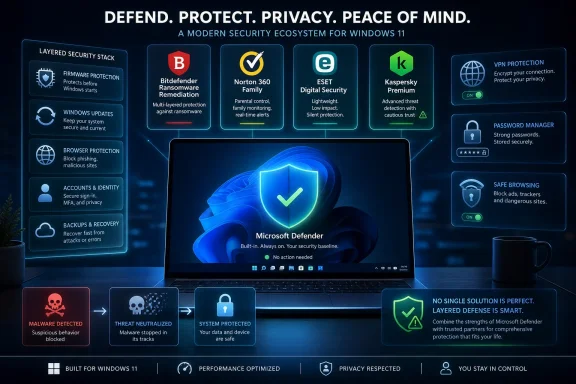 Defender Changed the Antivirus Market by Becoming Good Enough
For years, the reflexive advice was simple: install Windows, install antivirus, then get on with your life. That advice came from a real place. Windows was the world’s largest malware target, Internet Explorer was a punchline with consequences, and free built-in protection lagged behind commercial products badly enough that “just use Microsoft’s default” sounded irresponsible.That era is gone. Microsoft Defender Antivirus is now built into Windows 11, enabled by default, updated automatically, and backed by Microsoft’s cloud protection systems. It is not merely a placeholder that keeps the warning icon quiet until you install something “real.” For many home users, it is the real antivirus.
That does not make the third-party market obsolete. It does make it harder to justify. A premium Windows 11 security suite now has to do more than detect malware in a lab test; it has to earn its place on a machine that already ships with competent, integrated protection. The winners are not simply the products that catch the most threats, but the ones that add value without turning the PC into a subscription kiosk.
The Best Antivirus Is No Longer Just an Antivirus
The phrase antivirus software has become misleading. Bitdefender, Norton, McAfee, Kaspersky, ESET, Trend Micro, and their peers are not selling a single defensive engine so much as a consumer-security bundle. The modern paid suite often includes anti-phishing, ransomware rollback, firewall controls, password management, VPN access, parental controls, breach alerts, identity monitoring, webcam protection, file shredders, tune-up tools, and browser extensions of varying usefulness.That bundling is both the industry’s strength and its problem. A well-designed suite can protect a family of devices and reduce the number of separate subscriptions a user manages. A poorly designed one can duplicate Windows features, nag for upgrades, inject itself into the browser, and train users to click through security prompts just to make the product stop talking.
For Windows 11, that distinction matters. Microsoft has folded more security into the operating system itself: reputation checks, SmartScreen, exploit protections, Secure Boot, TPM-backed security assumptions, virtualization-based security on supported hardware, and app-control ideas that increasingly blur the line between operating system and endpoint security. Third-party antivirus now lives inside an OS that is much less passive than Windows once was.
So the right buying question is not “Which antivirus is best?” It is “Which security package solves a problem Defender does not solve well enough for me?”
Bitdefender Is the Safe Pick Because It Rarely Forces a Trade-Off
Bitdefender Total Security remains the easiest recommendation for most Windows 11 users who have already decided they want paid protection. It consistently performs well in independent testing, offers strong ransomware and phishing defenses, and generally avoids the worst sin of consumer security software: making the computer feel like it belongs to the antivirus vendor.Its strength is balance. Bitdefender is broad without feeling as bloated as some rivals, powerful without being tuned only for experts, and familiar without relying entirely on brand nostalgia. It is the kind of product that works for a single Windows laptop, a household with multiple devices, or a user who wants a premium suite but does not want to spend weekends reading firewall prompts.
The ransomware angle is particularly important. Windows 11’s built-in controls can help, but ransomware defense is where layered behavior monitoring, protected folders, rollback features, and malicious-site blocking become more than marketing terms. Bitdefender’s reputation is strongest when the threat is not a traditional virus file sitting politely on disk, but a malicious chain of events involving a browser, a download, a script, a credential prompt, and an encryption attempt.
The caveat is the same caveat that applies to almost every paid suite: subscription creep. Antivirus vendors have learned from streaming services and cloud storage providers. Introductory pricing can be attractive, renewals can be less so, and the difference between the tier you need and the tier being advertised is often hidden behind feature names designed by committee. Bitdefender is still a strong overall pick, but buyers should treat the checkout page as part of the security review.
Norton Sells the Security Suite as a Household Utility
Norton 360 Deluxe is not just competing with Bitdefender on malware detection. It is competing with password managers, VPN providers, credit-monitoring services, parental-control apps, and the general anxiety of being the family IT department. That makes Norton appealing to users who want one account, one dashboard, and one answer when someone in the house clicks something regrettable.This is Norton’s advantage. Its brand is old enough to have baggage, but the modern Norton 360 proposition is coherent: device security plus privacy tools plus identity-oriented features. For families, that may matter more than shaving a fraction of a percentage point off a lab result. A product that helps manage several devices and gives nontechnical users a visible sense of coverage can be worth paying for.
But Norton also represents the risk of the modern suite. The more jobs one product claims to do, the more users need to ask whether each component is genuinely good or merely convenient. A bundled VPN is not automatically the best VPN. A bundled password manager is not automatically the best password manager. Identity monitoring can be useful, but it cannot make leaked data unleak.
Norton is therefore best understood as a security bundle for people who value integration over minimalism. If your goal is to protect a Windows 11 gaming PC with the least possible friction, Norton may feel like too much. If your goal is to cover a family’s laptops, phones, browsing, passwords, and breach anxiety from one subscription, it becomes much easier to defend.
ESET Wins the Users Who Hate Security Theater
ESET occupies a different lane. It has long appealed to users who care about performance, configurability, and restraint. Where some suites behave as if every notification is a branding opportunity, ESET’s best quality is that it tends to get out of the way.That makes it attractive for gamers, developers, power users, and professionals running older or more constrained Windows 11 hardware. These users do not want a security product that tries to become a lifestyle platform. They want low overhead, reliable detection, sane defaults, and enough advanced controls to tune the product without turning the interface into an enterprise console.
The trade-off is that ESET’s consumer story can feel less flashy. It may not offer the same all-in-one identity-and-privacy bundle that Norton pushes, and it may not be the first product that casual shoppers recognize. But that restraint is part of the appeal. Not every Windows 11 user wants a security suite that includes a VPN, a cleaner, a breach scanner, a browser extension, a parental dashboard, and a monthly reminder that a higher tier exists.
For users who already have a password manager, already trust a separate VPN, and already know how to keep Windows updated, ESET can be the cleaner choice. It is less a digital bodyguard with a branded uniform and more a competent lock on the door.
Kaspersky Remains Technically Strong and Politically Complicated
Kaspersky is the hardest product to discuss cleanly because two things can be true at once. Technically, Kaspersky products have often performed very well in independent security testing, with strong malware detection and efficient performance. Politically and operationally, the company’s Russian origins and the restrictions or distrust it has faced in some markets make it a nonstarter for many organizations and users.For a purely consumer buying guide, that tension cannot be brushed aside. Security software is unusually sensitive because it requires deep system access and high trust. An antivirus engine sees files, processes, network behavior, browser activity, and suspicious events across the machine. Users are not just buying detection rates; they are choosing whom to trust with privileged visibility.
That does not mean every home user will evaluate the risk the same way. Some will focus on test results and price. Others will reject the product categorically because the trust model feels wrong. Enterprises, government-adjacent organizations, regulated industries, and cautious administrators are more likely to treat vendor jurisdiction and supply-chain risk as part of the product evaluation, not as an unrelated political footnote.
Kaspersky can still be a compelling technical product for some Windows 11 users, especially where it remains available and supported. But it is no longer possible to recommend it as if the only variables are detection, performance, and price. In 2026, trust is a feature.
Windows 11 Security Is a Stack, Not a Sticker on the Box
The most common mistake in antivirus shopping is treating protection as a single app decision. Windows 11 security is a stack. It starts with firmware assumptions and hardware-backed features, continues through Windows Update and Microsoft Defender, and extends into the browser, the user’s password habits, cloud accounts, backup strategy, and willingness to ignore suspicious prompts.A paid antivirus suite can improve that stack. It cannot replace it. A user who disables updates, runs as administrator all day, reuses passwords, skips backups, installs cracked software, and clicks sponsored download buttons is not made safe by a premium badge in the system tray. The antivirus may save them sometimes, but it is being asked to compensate for a lifestyle.
The reverse is also true. A user who keeps Windows updated, uses Microsoft Defender, enables browser protections, uses a reputable password manager, maintains offline or cloud-versioned backups, and avoids dubious downloads is already in a much better position than the average Windows user of a decade ago. For that person, the incremental value of a paid suite may be real but modest.
This is why Microsoft’s “Defender is enough for many users” posture matters. It is not a declaration that third-party antivirus is useless. It is an admission that the baseline has moved. Paid vendors now compete above the baseline, not in place of one.
Performance Still Matters Because Security That Slows the PC Gets Disabled
Antivirus performance is not vanity. If a product slows boot, drags down app launches, interrupts games, or makes development tools crawl, users will disable features or uninstall the suite entirely. A theoretically stronger product that annoys people into weakening it is not stronger in practice.Windows 11 systems vary enormously. A new laptop with a fast NVMe SSD and a modern CPU may absorb almost any mainstream security suite without much visible pain. An older machine upgraded from Windows 10, a low-cost laptop with limited memory, or a work PC running heavy endpoint tools may feel every background scan and browser extension.
This is where independent performance testing is useful but incomplete. Lab benchmarks can show relative impact across common tasks, but they cannot fully model your machine, your software, your browser habits, your game library, your developer workloads, or your collection of vendor update agents. The best antivirus for a benchmark may still be the wrong fit for a specific PC.
That is why trial periods matter. Users should test not only malware scores and feature lists, but daily friction: boot time, browser speed, false positives, notification frequency, gaming mode behavior, VPN reliability, and how easily the product can be removed. Uninstall quality is an underrated security feature.
False Positives Are the Quiet Tax on Aggressive Protection
Detection rates get attention because they are easy to compare. False positives are less glamorous, but they often determine whether security software becomes trusted or resented. If a product repeatedly flags legitimate tools, scripts, drivers, mods, or business apps, users learn to distrust it.For home users, false positives are annoying. For developers and IT pros, they can be operationally expensive. A security product that quarantines build artifacts, blocks remote-management tools, interferes with unsigned utilities, or objects to internal scripts can turn into a workflow hazard. The vendor may be “protecting” the system, but from the user’s perspective it is breaking the job.
This is one reason ESET and Bitdefender often attract technically literate users. The best products combine strong detection with enough context to avoid panicking at every unfamiliar binary. Security software should be suspicious, but not hysterical.
Microsoft Defender has improved here as well, partly because it benefits from Windows telemetry and enormous deployment scale. That does not make it perfect. But it makes the decision to replace it less obvious than it used to be.
The VPN and Password Manager Bundle Deserves Skepticism
Premium antivirus vendors love bundling VPNs and password managers because those features make a subscription feel larger. Sometimes they are useful. Sometimes they are adequate. Sometimes they are included mainly because a comparison table needed more checkmarks.A VPN can help on untrusted networks and can reduce some forms of tracking, but it is not a magic privacy cloak. It shifts trust from one network operator to another. If the VPN is slow, capped, poorly integrated, or upsold as a premium add-on inside an already premium suite, users should ask whether a standalone provider would be better.
Password managers are similar. A built-in password manager is better than reused passwords in a text file, but the best standalone password managers often provide stronger cross-platform workflows, better sharing models, clearer security documentation, and faster feature development. Antivirus vendors are not automatically bad at password management, but it is not their historic center of gravity.
Identity monitoring is even more nuanced. Alerts about leaked credentials can be useful, but they do not erase breach exposure. The real protective action is changing passwords, enabling multifactor authentication, freezing credit where appropriate, and reducing reuse. Monitoring is a smoke alarm, not a fireproof house.
Free Antivirus Has a Narrower Job Than It Used To
There is still a market for free antivirus on Windows 11, but it is squeezed from both sides. Microsoft Defender covers the basic job without ads, installation prompts, or renewal pricing. Paid suites justify themselves with bundled features and support. Free third-party tools often sit awkwardly in the middle, trying to beat Defender while also nudging users toward a paid tier.That does not mean every free product is bad. Some are competent. But Windows users should be careful about trading Microsoft’s integrated default for a free suite that monetizes attention, pushes browser extensions, collects more telemetry than expected, or spends too much time advertising an upgrade.
The case for free third-party antivirus is strongest when a specific product offers a feature a user needs and does so cleanly. The case is weakest when the user is installing it out of habit, because that was the advice in 2009. Habit is not a security model.
For most Windows 11 users who do not want to pay, the practical recommendation is simple: use Defender, keep Windows and browsers updated, turn on multifactor authentication for important accounts, and maintain backups. That combination beats the old ritual of installing a random free antivirus and assuming the job is done.
Business PCs Need Management More Than Mascots
The consumer antivirus debate often misses the enterprise point. Businesses do not merely need malware detection. They need policy, reporting, incident response, device inventory, compliance evidence, tamper protection, controlled exclusions, and the ability to understand what happened after something suspicious occurs.For organizations already invested in Microsoft 365 and Defender for Endpoint, the case for staying inside Microsoft’s ecosystem can be strong. Integration with identity, device management, conditional access, and endpoint detection workflows matters more than whether a consumer suite includes a prettier VPN tile. The security product is part of an operational fabric.
Small businesses are the awkward middle. They may not have dedicated security staff, but they face threats that look more like business threats than home threats: invoice fraud, credential theft, remote-access abuse, ransomware, and compromised email accounts. For them, a consumer antivirus suite may be better than nothing but still insufficient.
Managed detection and response, proper backup architecture, least-privilege access, email security, and multifactor authentication often matter more than switching from one top-rated antivirus engine to another. A small office running Windows 11 should not confuse buying five retail licenses with having an endpoint-security strategy.
The Best Choice Depends on the User, Not the Leaderboard
If there is a single winner for most paid Windows 11 users, Bitdefender Total Security is the safest answer. It combines strong protection, broad features, and relatively low friction. It is the recommendation least likely to require a long explanation.Norton 360 Deluxe is the better fit for households that want an all-in-one subscription and value identity, VPN, and family-oriented extras. ESET is the better fit for users who want lightweight, quiet protection and fewer lifestyle features. Kaspersky remains technically capable, but users need to make an explicit trust decision before considering it.
Microsoft Defender is the answer for users who do not want another subscription and have ordinary risk. That category is larger than antivirus vendors would like and larger than old Windows habits admit. Defender is not perfect, but “not perfect” is different from “not enough.”
The real loser is the idea that every Windows 11 PC needs the same answer. A gaming rig, a family laptop, a developer workstation, a retiree’s browsing machine, and a small-business bookkeeping PC do not have identical threat models. Buying security without naming the threat model is how users end up with either too little protection or too much software.
The Windows 11 Antivirus Shortlist Has Become a Trust Test
The practical buying advice is shorter than the marketing pages suggest. Start with the assumption that Windows 11 already includes competent protection, then pay only for a suite that adds something you will actually use. The best antivirus is the one that improves your security behavior rather than merely decorating your taskbar.- Bitdefender Total Security is the best overall paid choice for many Windows 11 users because it offers strong protection without demanding constant attention.
- Norton 360 Deluxe makes the most sense for families and users who want antivirus, VPN, password, and identity features under one subscription.
- ESET is the strongest fit for performance-sensitive users who prefer a lighter, quieter security product.
- Kaspersky should be evaluated not only on technical performance but also on the user’s tolerance for vendor-trust and jurisdiction concerns.
- Microsoft Defender is a credible default for ordinary Windows 11 users who keep their systems updated and do not need bundled privacy or identity tools.
- No antivirus suite substitutes for backups, multifactor authentication, patched software, and cautious handling of downloads, links, and attachments.
References
- Primary source: Analytics Insight
Published: 2026-06-08T07:10:09.119920
Loading…
www.analyticsinsight.net - Related coverage: windowscentral.com
Loading…
www.windowscentral.com - Official source: learn.microsoft.com

Microsoft Defender Antivirus in the Windows Security app - Microsoft Defender for Endpoint
With Microsoft Defender Antivirus now included in the Windows Security app, you can review, compare, and perform common tasks.learn.microsoft.com - Related coverage: av-test.org
Loading…
www.av-test.org - Related coverage: windowslatest.com
Loading…
www.windowslatest.com - Official source: support.microsoft.com
Loading…
support.microsoft.com
- Official source: microsoft.com
Loading…
www.microsoft.com - Related coverage: windowsreport.com
Loading…
windowsreport.com - Related coverage: techradar.com
Loading…
www.techradar.com - Related coverage: tomsguide.com
Loading…
www.tomsguide.com - Related coverage: tomshardware.com
Loading…
www.tomshardware.com