

Microsoft’s latest push to make Windows 11 feel less like an operating system and more like a personal assistant arrived in force this week with the rollout of Ask Copilot, system-wide AI agents, and deeper File Explorer integration—features that reshape how users will interact with files, settings, and the taskbar itself. The changes are not cosmetic: they introduce persistent, background-capable agents that you summon with an “@” from the taskbar, place Copilot-derived smarts directly into File Explorer for instant document summaries and context, and lean on a new platform layer—Model Context Protocol (MCP)—to mediate how agents talk to apps and services. For end users this promises productivity gains; for IT teams it raises new questions about security, governance, licensing, and performance. This article breaks down what’s new, what actually matters, and what organizations and power users need to plan for as Microsoft unfolds this next phase of Windows AI.
Microsoft has been steadily folding Copilot capabilities into Windows for more than a year, culminating in a shift from “Copilot as an app” to Copilot as a platform that can be summoned and embedded in multiple places. The current wave centers on three interlocking pieces:
These are being released through Windows Insider preview channels initially, with Microsoft stating the features will roll out more broadly in the coming weeks. Many of the richer behaviors—particularly those that synthesize information across mail, Teams, and OneDrive—are gated behind Microsoft 365 Copilot licensing and admin controls.
Administrators should expect iterative change: Microsoft is using Insiders to refine defaults and controls, and some features may be delayed or re-scoped before reaching general availability. Given the complexity, expect a phased enterprise-focused guidance pack from Microsoft that will include deployment best practices and admin controls.
But this capability is powerful precisely because it touches so many sensitive surfaces: files, mail, calendars, and admin-controlled connectors. Organizations should treat this rollout less like a Windows update and more like the introduction of a new platform service—with attendant governance, security review, and procurement decisions.
If you are an IT leader, your immediate priorities should be piloting, securing MCP connectors, clarifying licensing, and educating users. If you’re a power user, explore Ask Copilot cautiously: it will speed up simple tasks, but always verify the source behind confident‑sounding summaries. For everyone, the introduction of agents inside Windows 11 is a watershed moment—one that will deliver real productivity benefits, provided Microsoft, developers, and enterprise security teams enforce the guardrails needed to keep those benefits from becoming new liabilities.
Source: Windows Report https://windowsreport.com/microsoft...with-ai-agents-and-file-explorer-integration/
 Background and overview
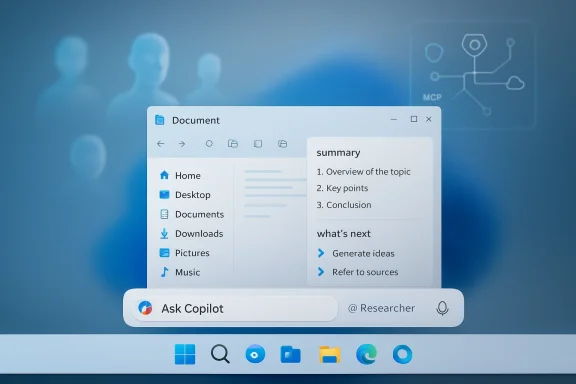
Microsoft has been steadily folding Copilot capabilities into Windows for more than a year, culminating in a shift from “Copilot as an app” to Copilot as a platform that can be summoned and embedded in multiple places. The current wave centers on three interlocking pieces:- Ask Copilot: an optional taskbar input that replaces the traditional Windows Search box when enabled and serves as a launchpad for agents, voice input, and visual prompts.
- AI agents: small, purpose-built assistants (examples shown by Microsoft include a “Researcher” and analysts) that can run in the background, report progress on the taskbar, and surface short, actionable results without forcing you to switch apps or browser tabs.
- File Explorer integration: Copilot controls inside File Explorer that provide document summaries, suggested next steps, and contextual insights for synced or shared files—intended to reduce friction for everyday file management and collaboration.
These are being released through Windows Insider preview channels initially, with Microsoft stating the features will roll out more broadly in the coming weeks. Many of the richer behaviors—particularly those that synthesize information across mail, Teams, and OneDrive—are gated behind Microsoft 365 Copilot licensing and admin controls.
What Ask Copilot changes about everyday Windows use
A search box that acts like an assistant
Ask Copilot is more than a rename of Windows Search. When you enable it, the familiar search area on the taskbar becomes a multimodal prompt for text, voice, and visual queries. You’ll be able to:- Ask natural-language questions that combine local and cloud data (for example, calendar entries, Teams meeting data, and local files).
- Start with an “@” to call a named agent (for example, @Researcher) and have it run a multi-step task in the background.
- Use voice or image input (Copilot Vision) directly from the taskbar without opening a separate Copilot app.
Agents from the taskbar: persistent, visible, and resumable
The most striking UX change is the introduction of persistent agents. Unlike ephemeral chat sessions or a single-run Copilot request, agents are designed to:- Be discoverable via the Ask Copilot box and the “@” shorthand.
- Run longer-lived tasks—demonstrations suggest research jobs that can take minutes (examples mention roughly ten minutes or longer for deeper research).
- Surface progress on the taskbar like download indicators; you can hover for quick previews, and a completion state is shown when the agent finishes.
- Produce concise summaries you can act on immediately, with the option to dive into a full Copilot context if you need more detail.
Copilot inside File Explorer: context where files live
Why File Explorer is a big deal
File Explorer is where most work artifacts live—documents, spreadsheets, presentations, and shared folders. Putting Copilot into File Explorer means Microsoft aims to reduce the number of times users must open apps just to glance at the content or author list. The integration introduces:- An Ask Microsoft 365 Copilot affordance for synced files (OneDrive and SharePoint locations) that can generate summaries, highlight action items, and indicate who last edited a file.
- Contextual prompts and “what’s next” suggestions directly in the UI, so you can quickly convert a document into meeting talking points or extract a 3-slide summary without launching PowerPoint.
- The ability to right‑click files for “AI actions” such as visual edits or summarization (subject to what connectors and licenses are enabled).
Licensing nuance: free vs. premium Copilot behaviors
Not all File Explorer Copilot features are equal. Basic local assistance—simple searches or on-device prompts—will be visible to consumer Windows users, but many of the deeper behaviours that synthesize across email, Teams messages, and tenant-shared documents are tied to Microsoft 365 Copilot licensing and tenant settings. That distinction matters for enterprise procurement and for security teams wanting to limit cloud-grounded agent behavior.Model Context Protocol (MCP) and Agent Launchers: the plumbing
MCP explained simply
At a technical level, Microsoft has introduced a platform layer called the Model Context Protocol (MCP) to standardize how agents discover and call “tools” and connectors. Think of MCP as a registry and lightweight RPC layer that:- Allows agents to enumerate available tools (for example, a File Explorer connector, a settings connector, or WinGet) and call those tools in a predictable way.
- Enforces capability declarations, access controls, and audit trails so agent actions can be tracked and limited.
- Provides a single surface for apps and third parties to expose functionality to agents without building custom bridges for each agent.
Agent Launchers and the discoverability problem
“Agent Launchers” are the part of the system that registers agents with the OS and makes them available in entry points like Ask Copilot, the Copilot app, and compatible apps. For developers this is a first-class way to make specialized assistants accessible system-wide without each developer re-implementing agent plumbing.Strengths: why this could be a genuine productivity leap
- Flow-preserving UI: Agents that run in the background and show taskbar progress address a real productivity pain—searching multiple sources, pulling notes together, and juggling browser tabs.
- Contextualized assistance: Putting summaries and next steps inside File Explorer reduces friction for quick checks and collaboration.
- Developer-friendly platform: MCP and Agent Launchers give ISVs and IT teams a clear, standardized path to expose tools for agents, speeding integration and encouraging interoperability.
- Administrative controls: Microsoft has prioritized admin governance—agent features are opt-in, experimental workspaces can be isolated, and some behaviors require tenant-level Copilot licensing—giving organizations levers to control exposure.
- Hybrid execution model: Microsoft’s strategy of combining on-device indexing with cloud reasoning helps balance privacy and capability, allowing light tasks to run locally while heavy reasoning goes to cloud models.
Risks, trade-offs, and the hard questions
Security and expanded attack surface
Agents that can chain tool calls and read files create a new class of attack vectors. The MCP layer is intended to gate what agents can do, but pitfalls remain:- Composability risks: A benign MCP tool combined with another could produce a dangerous chain. For example, a connector that exposes metadata paired with an agent that can reach external services raises exfiltration concerns.
- Prompt‑injection and tool‑chaining: Agents that follow multi-step influences can be manipulated by crafted inputs or documents, potentially triggering unintended operations.
- Third‑party MCP servers: If vendors ship poorly secured MCP implementations, attackers could exploit them; thorough vetting and secure-by-default settings are essential.
Hallucinations, trust and auditability
Generative summaries are persuasive but not infallible. If users treat agent outputs as authoritative without source traceability, mistakes can propagate quickly. Enterprises must demand:- Clear audit trails (what steps did the agent take, which sources were consulted).
- Source attribution for synthesized claims.
- Easy ways to verify agent results against raw documents.
Licensing complexity and user confusion
Microsoft’s mix of free Copilot features and Microsoft 365 Copilot premium capabilities creates a patchwork of behaviors. That raises practical issues for IT:- Which features are safe to enable for all users vs. which need tenant controls?
- How to prevent accidental Cloud-grounded processing of sensitive documents by unlicensed users?
- Training and documentation to prevent assumption that every Copilot suggestion is “official.”
Performance and UX regressions
Adding persistent agent runtimes and additional indexing can impact resource use, especially on older hardware. Some early reports flagged concerns about File Explorer performance when AI features are enabled. IT teams should validate:- Impact on boot times and Explorer responsiveness.
- Memory and CPU usage when agents run concurrently.
- Battery and thermal behavior on laptops when background agents are active.
What organizations should do now: practical recommendations
- Pilot and measure first.
- Run a controlled pilot with a representative set of users; collect telemetry around responsiveness, feature usage, and erroneous outputs.
- Establish policy guardrails.
- Use tenant admin controls to limit Copilot app exposure and gate MCP connectors until they’ve passed security review.
- Configure least privilege.
- Only grant agents the minimum capabilities required and ensure MCP servers declare and limit scope.
- Require auditability and source tracing.
- Insist on logging that captures agent steps and the sources referenced for synthesized outputs.
- Educate users.
- Train staff on how Copilot summaries are produced, the possibility of hallucinations, and verification best practices.
- Monitor performance.
- Baseline system performance with and without agent features enabled to catch regressions early.
- Plan licensing and procurement.
- Evaluate whether your organization needs Microsoft 365 Copilot licenses to get the desired File Explorer and tenant-grounded behaviors.
Developer and partner opportunities (and responsibilities)
For ISVs and integrators, MCP presents a major opportunity: a single, documented way to expose tools to any agent that knows how to talk MCP. That means:- New productivity extensions can be built once and appear across Copilot surfaces.
- Niche vertical applications (legal, healthcare, finance) can register domain-aware connectors to give agents safer, governed access to data.
Rollout timing and availability (what to expect next)
As of February 19, 2026, Microsoft has started shipping Ask Copilot, agent experiences, and File Explorer integration through Windows Insider preview channels, with a staged rollout to broader channels planned over the coming weeks. Many of the cross-tenant and work-data grounded behaviors require Microsoft 365 Copilot licensing and tenant configuration; consumer devices will see a subset of the functionality.Administrators should expect iterative change: Microsoft is using Insiders to refine defaults and controls, and some features may be delayed or re-scoped before reaching general availability. Given the complexity, expect a phased enterprise-focused guidance pack from Microsoft that will include deployment best practices and admin controls.
UX trade-offs and real-world use cases
Where agents shine
- Preparing meeting briefs: Ask a Researcher agent to scan recent emails, shared documents, and internal notes to produce a concise pre-meeting brief.
- Rapid document triage: Quickly get a one-paragraph summary of a long Word file or a list of action items without opening Office apps.
- Long-running research: Offload multi-step web and tenant searches to an agent that runs in the background and notifies you when done.
Where humans should stay in the loop
- Any legal, regulatory, or compliance-sensitive synthesis where an incorrect claim could create exposure.
- Final draft decisions based on agent-written analysis (agents are aids, not signatories).
- Complex data transformations or financial analysis where traceable calculations and provenance matter.
Final assessment: a meaningful shift with serious guardrails required
Ask Copilot, agent support, and File Explorer Copilot are not incremental UI polish—they mark a shift in how Microsoft imagines the operating system: less of a passive host for apps and more of an active orchestrator of agentic workflows. The productivity potential is real; the convenience of never leaving the File Explorer to extract a document’s gist or offloading research to a background agent could save hours each week for knowledge workers.But this capability is powerful precisely because it touches so many sensitive surfaces: files, mail, calendars, and admin-controlled connectors. Organizations should treat this rollout less like a Windows update and more like the introduction of a new platform service—with attendant governance, security review, and procurement decisions.
If you are an IT leader, your immediate priorities should be piloting, securing MCP connectors, clarifying licensing, and educating users. If you’re a power user, explore Ask Copilot cautiously: it will speed up simple tasks, but always verify the source behind confident‑sounding summaries. For everyone, the introduction of agents inside Windows 11 is a watershed moment—one that will deliver real productivity benefits, provided Microsoft, developers, and enterprise security teams enforce the guardrails needed to keep those benefits from becoming new liabilities.
What to watch next
- How Microsoft tightens admin controls and audit tooling for MCP and agent activities.
- Early performance telemetry from broad rollouts—especially on lower-end or battery-powered devices.
- Third-party MCP adoption: which enterprise applications appear first, and how securely they integrate.
- Microsoft’s approach to source attribution and traceability for agent-generated summaries.
- License and pricing clarifications for Microsoft 365 Copilot features exposed directly in File Explorer.
Source: Windows Report https://windowsreport.com/microsoft...with-ai-agents-and-file-explorer-integration/
