

Microsoft’s latest push is clear: turn Windows 11 from a passive operating system into a proactive, agent-driven workspace — a “canvas for AI” where intelligent agents live on the taskbar, operate in isolated workspaces, and can be asked to run multi‑step tasks on your behalf. The company’s previews and insider notes show an expanding set of features — taskbar agents, Copilot Actions, a centralized Windows Intelligence hub, an Agent Workspace, and tighter hardware and developer integrations via Copilot+ PCs and the Model Context Protocol — that together point toward an agentic OS vision that will reshape how people and enterprises interact with the desktop.
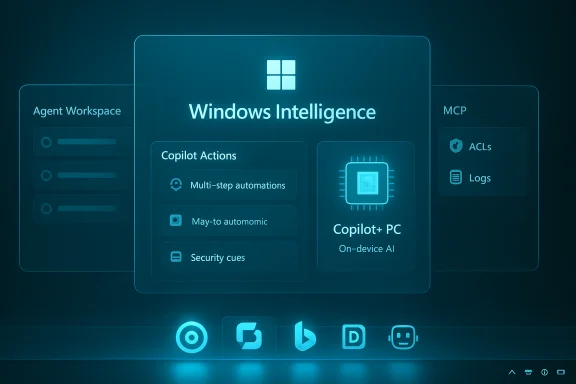
Microsoft’s AI strategy for Windows 11 has moved past experimental add‑ons and into platform-level architecture. Rather than just adding incremental smart features to specific apps, Microsoft is consolidating AI under a unified banner — Windows Intelligence — and surfacing agents directly in system UI elements like the taskbar and File Explorer. The stated aim is to make AI available where users already work while providing the governance and runtime isolation enterprises demand.
Key platform pieces that have surfaced in previews and briefings include:
This design prioritizes discoverability: putting agents in the taskbar drastically reduces the cognitive cost of invoking automation compared to opening separate apps or scripts.
The architecture is deliberately enterprise‑aware: by treating agents as principals the same way Windows treats user and service accounts, IT administrators can apply familiar governance and monitoring controls.
Microsoft is betting that the next evolution of personal computing is less about launching apps and more about delegating outcomes. The company’s agentic OS vision for Windows 11 — centering on taskbar agents, an Agent Workspace, MCP, Copilot Actions, and on‑device acceleration — is ambitious and likely to reshape workflows when broadly available. But the balance between convenience and control will determine whether users embrace agents as everyday collaborators or treat them as yet another set of features to be turned off.
The shift is underway; patience, scrutiny, and measured rollout will be the keys to making agents useful, safe, and trustworthy on the Windows desktop.
Source: GLITCHED Microsoft is Putting More AI and AI Researcher Tools Into Your Windows 11 Experience
 Background / Overview
Microsoft’s AI strategy for Windows 11 has moved past experimental add‑ons and into platform-level architecture. Rather than just adding incremental smart features to specific apps, Microsoft is consolidating AI under a unified banner — Windows Intelligence — and surfacing agents directly in system UI elements like the taskbar and File Explorer. The stated aim is to make AI available where users already work while providing the governance and runtime isolation enterprises demand.Key platform pieces that have surfaced in previews and briefings include:
- A centralized Windows Intelligence hub for toggles, permissions, and an activity overview.
- Taskbar agents and an Ask Copilot composer that make agents discoverable and low‑friction to invoke.
- An Agent Workspace — a constrained runtime where agents can perform UI automation and multi‑step workflows without destabilizing the user’s main session.
- Adoption of the Model Context Protocol (MCP) to standardize how agents discover and call tools and services.
- A hardware tier called Copilot+ PCs (devices with NPUs) intended to accelerate local inference and enable richer on‑device capabilities.
What Microsoft is Building — Feature by Feature
Taskbar Agents and Ask Copilot: AI Where You Already Look
Microsoft’s previews show agents becoming first‑class citizens on the taskbar: badges, hover previews, and progress indicators will give users immediate visibility into what an agent is doing. The taskbar Ask Copilot experience is being positioned as the low‑friction entry point for conversational queries, searches, and agent invocation. Users will be able to summon Copilot by text or voice and hand off outcomes to agents that run in the background.This design prioritizes discoverability: putting agents in the taskbar drastically reduces the cognitive cost of invoking automation compared to opening separate apps or scripts.
Agent Workspace and Agent Accounts: Containment and Auditability
A core security design is the Agent Workspace — a sandboxed runtime that’s stronger than simple script automation but lighter than a full virtual machine. Agents run under dedicated, non‑administrator agent accounts, enabling distinct access control lists (ACLs), logging, and enterprise policy application. Microsoft’s previews emphasize opt‑in gating and runtime isolation to make agent actions visible, auditable, and revocable.The architecture is deliberately enterprise‑aware: by treating agents as principals the same way Windows treats user and service accounts, IT administrators can apply familiar governance and monitoring controls.
Copilot Actions and Background Automation
“Copilot Actions” describe the set of capabilities that translate a natural‑language outcome into a sequence of UI actions and tool calls. Actions can execute in the Agent Workspace and are designed to be interruptible and auditable, surfacing progress so users can pause, stop, or take over mid‑run. This is the technical backbone of the promise that an agent can “go fetch” files, run a report, or reconcile data while you continue other work.File Explorer, Researcher Icons, and OS‑Level Delegation
Beyond the taskbar, Microsoft plans to surface AI prompts and controls across the shell — in File Explorer, search, and contextual UI. Some early previews and third‑party reports describe “Researcher” icons and new AI search prompts that let users delegate tasks to agents and hover to inspect agent activity. These UI affordances are meant to make delegation explicit: when an agent needs attention, icons will display exclamation badges and hover summaries. Note that some of the specific icon names and exact UX polish continue to appear in preview coverage and third‑party write‑ups and may still change before broad release. Treat precise labels and visuals from early videos as provisional.Model Context Protocol (MCP): A Standard for Agent‑to‑Tool Integration
To make agents interoperable and reduce ad‑hoc connectors, Microsoft is adopting the Model Context Protocol (MCP) as a standard that lets agents discover and securely call tools, apps, and services. MCP introduces a consistent way to surface capabilities and context to agents so they can compose multi‑tool workflows in a discoverable and auditable manner. For developers, MCP promises a clearer integration path; for enterprises, it aims to simplify governance.Copilot+ PCs and On‑Device AI
Microsoft is staking part of its roadmap on hardware differentiation. Copilot+ PCs, equipped with dedicated NPUs, are positioned to run accelerated local models for low‑latency features and offline capabilities. This hybrid model — cloud reasoning plus on‑device inference — is central to Microsoft’s pitch for responsive, privacy‑sensitive AI features that don’t always need a roundtrip to the cloud. However, the rollout will likely be tiered: more advanced on‑device features (super‑resolution, local image generation, heavy media processing) are being previewed on Copilot+ hardware first.Why This Matters: Productivity — and Platform Power
The potential productivity upside is real. Agents could automate repetitive, error‑prone tasks, allowing users to:- Delegate long searches and data collection to background agents while continuing work.
- Ask Copilot to perform multi‑step processes like consolidating email threads, extracting tables from documents, or preparing draft responses.
- Use on‑device super‑resolution and media enhancements without sending sensitive files to cloud services.
Security, Privacy, and Governance — What’s Been Promised (and What’s Still an Open Question)
Built‑in Controls and Opt‑In Defaults
Microsoft’s messaging centers on opt‑in deployment and controls: an AI hub with toggles, per‑app permissioning, and activity summaries are intended to give users visibility. Agent features previewed to Insiders have been gated under experimental toggles; Agent Workspace creation is not a silent, automatic action by default. Microsoft has emphasized runtime isolation, signed agent binaries, and per‑operation consent as cornerstone protections.Recall, Screenshots, and the Privacy Debate
One of the most controversial features discussed in recent updates is Recall — a capability that intermittently captures snapshots of the desktop to make previously viewed content searchable. Microsoft says Recall will be opt‑in, require Windows Hello unlock to access, and include sensitive‑data filters and app exclusions. Even with these safeguards, privacy advocates and users are rightly cautious: any automatic capture of on‑screen content expands the attack surface and raises questions about data storage, retention policies, and third‑party access. Microsoft’s mitigations are important, but real trust will depend on clear defaults, independent audits, and transparent retention controls.Enterprise Governance: Agent Accounts, Logs, and Administrative Controls
From an enterprise standpoint, agent accounts and sandboxing are promising because they map to existing identity and policy models. Agents as principals can be managed with the same ACLs and monitoring systems already in use. Microsoft’s previews indicate options for admin consent, telemetry gating, and policy application — which should help IT teams adopt agents while maintaining compliance obligations. That said, full enterprise readiness requires mature SIEM visibility, forensic tracing of agent actions, and documented incident response playbooks from Microsoft and partners.Unverified or Evolving Claims — Cautionary Flags
Several specific technical claims and product details remain in preview or reporting stages. Examples include precise hardware TOPS numbers for NPUs, specific on‑device model names, and the final user interface for Researcher icons and agent badges. These details may vary between previews and GA releases; readers should treat early demo visuals and third‑party writeups as provisional until Microsoft publishes formal documentation. Any highly specific performance numbers or architectural guarantees in preview write‑ups should be considered subject to change.Developer and Third‑Party Opportunities — A New Ecosystem
Microsoft’s adoption of MCP and the release of Windows AI APIs aim to make Windows an open canvas for both first‑ and third‑party agents. Expected developer opportunities include:- Creating MCP‑compatible connectors that expose app capabilities to agents.
- Shipping on‑device accelerators or optimized models for Copilot+ PCs.
- Building enterprise‑grade agents that implement least‑privilege principles and auditable workflows.
Risks, Trade‑Offs, and the User Backlash
Fragmentation and Hardware Segmentation
Not all users will access the same feature set. Microsoft’s emphasis on Copilot+ PCs means some advanced experiences will land first or only on NPU‑equipped hardware, creating potential buyer confusion and hardware‑based fragmentation. This hardware gating is logical for performance reasons, but it also raises equity and support questions for organizations with heterogeneous fleets.Surface for Social and Technical Problems
Introducing agents that can access files, open apps, and interact with the UI increases the potential for:- Misconfigurations that expose data.
- Malicious or poorly engineered third‑party agents acting with excessive privileges.
- Usability regressions where agents interrupt workflows or produce unexpected side effects.
User Sentiment: Too Much AI, Too Fast?
Public response to the previews has been mixed. Some users applaud the productivity promise; others criticize Microsoft for prioritizing eye‑catching AI features over fundamental polish and bug fixes in Windows 11. Privacy and security concerns are a recurring theme in user commentary. The perception that new AI features are being added to a platform already grappling with stability and usability issues has fueled some of the backlash. Microsoft appears to be responding by gating features behind opt‑in controls and moving slowly via the Windows Insider program, but skepticism remains in the community.Practical Guidance: What Users and IT Teams Should Do Now
- Understand the opt‑in model. Confirm whether Agent, Copilot, and Recall features are enabled by default on your systems and adjust policies accordingly.
- For enterprises: test agent features in controlled Insider or staging environments before broad deployment, and require admin consent for agent provisioning.
- Audit agent activities. Ensure logging, SIEM integration, and forensic tracing for agent accounts mirror those used for service accounts today.
- Educate users. Clear communication on what Recall, Copilot Actions, and agent access mean — and how to disable features — will reduce surprises and privacy concerns.
- Evaluate hardware strategy. Where on‑device latency, offline capability, or privacy are priority requirements, consider Copilot+ hardware for targeted users. Balance this against cost and fleet diversity.
The Enterprise Angle: Control vs. Convenience
For organizations, the agentic Windows model provides both a capability boost and a governance challenge. When agents can perform tasks like opening apps, transferring data, and interacting with enterprise systems, IT must have:- Clear policies for agent creation and signing.
- Role‑based access and least‑privilege enforcement for agent accounts.
- Observable telemetry and alerting for unusual agent behavior.
Final Analysis — Strengths, Weaknesses, and the Path Forward
Microsoft’s direction is strategically coherent: making agents discoverable (taskbar), controllable (Agent Workspace and Windows Intelligence), and interoperable (MCP) tackles many of the UX and governance issues that have limited usable automation for decades. If executed responsibly, this approach could:- Deliver genuine productivity gains by automating multi‑app workflows.
- Reduce cloud dependency for latency‑sensitive tasks through on‑device inference.
- Create a new developer ecosystem built around MCP and Copilot integrations.
- Privacy and data‑handling concerns (Recall and screenshotting) may erode user trust unless safeguards are transparent, well‑documented, and independently audited.
- Hardware segmentation (Copilot+ PCs) could fragment the user base and slow uniform adoption.
- The potential for misuse or poorly controlled third‑party agents emphasizes the need for robust signing, vetting, and enterprise policy capabilities.
Microsoft is betting that the next evolution of personal computing is less about launching apps and more about delegating outcomes. The company’s agentic OS vision for Windows 11 — centering on taskbar agents, an Agent Workspace, MCP, Copilot Actions, and on‑device acceleration — is ambitious and likely to reshape workflows when broadly available. But the balance between convenience and control will determine whether users embrace agents as everyday collaborators or treat them as yet another set of features to be turned off.
The shift is underway; patience, scrutiny, and measured rollout will be the keys to making agents useful, safe, and trustworthy on the Windows desktop.
Source: GLITCHED Microsoft is Putting More AI and AI Researcher Tools Into Your Windows 11 Experience
