

Windows 11 Home and Pro are not the whole Windows 11 product family in May 2026; Microsoft also ships Education, Enterprise, Enterprise LTSC, IoT Enterprise, and IoT Enterprise LTSC editions, with different servicing models, policy controls, setup behavior, licensing channels, and support timelines. That matters because the Windows edition is no longer a cosmetic SKU choice. It increasingly decides how much control the owner has over updates, consumer features, cloud sign-in pressure, and Microsoft’s expanding layer of AI-connected services. The uncomfortable truth is that the cleanest Windows 11 experience is often not the one sold to ordinary consumers.
The argument making the rounds among privacy-minded Windows users is simple: if Home and Pro feel like a shopping mall wrapped around an operating system, move to an edition built for classrooms, enterprises, or fixed-function devices. That argument has force, but it also needs guardrails. Windows 11 Education, Enterprise LTSC, and IoT Enterprise LTSC can reduce noise and restore administrative leverage, but they are not magic privacy switches, and the licensing gray market around them deserves far more skepticism than enthusiasm.
For years, Windows editions were mostly a feature matrix. Home lacked domain join, Pro added BitLocker and Hyper-V, Enterprise added management features, and LTSC existed for machines that should not change personality every quarter. That taxonomy still exists, but the lived experience of Windows 11 has changed the stakes.
The modern Windows desktop is no longer just a local shell and Win32 compatibility layer. It is a delivery vehicle for Microsoft accounts, Microsoft 365, OneDrive, Edge, Copilot, Store apps, Start menu recommendations, cloud search, telemetry, widgets, ads in settings-adjacent surfaces, and an update pipeline that can reinstall components many users thought they had removed. Some of this is defensible product integration. Some of it is the predictable behavior of a platform vendor that has discovered the desktop is also an audience.
That distinction matters because Microsoft does not describe most of this as advertising or surveillance. It talks about experiences, recommendations, connected features, diagnostics, productivity, safety, and AI assistance. The vocabulary is polished; the effect is not. Users who bought a PC to run local applications now spend an increasing amount of time declining services they never asked to evaluate.
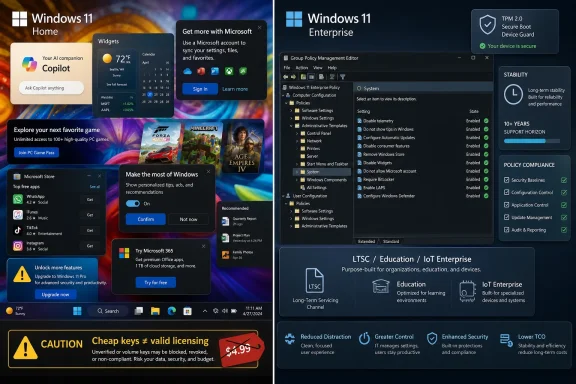
Windows 11 Home and Pro are the sharp end of this strategy. Home has the least administrative control and the strongest Microsoft account pressure. Pro gives power users more knobs, but not the full enterprise policy surface and not the same assumptions about managed deployment. The product names imply that Pro is the adult version of Windows. In 2026, that is only partly true.
Windows 11 Education is broadly aligned with Enterprise features but licensed for academic use. Windows 11 Enterprise LTSC is designed for stable enterprise deployments where feature churn is undesirable. Windows 11 IoT Enterprise LTSC is aimed at fixed-function and embedded scenarios such as kiosks, medical systems, industrial PCs, retail devices, and purpose-built appliances. Each edition lives closer to the managed-device world than the consumer-PC world.
That has practical consequences. These editions tend to expose more Group Policy controls, have less consumer-facing clutter by default, and are less aggressively tuned for the Microsoft account funnel during deployment. They also fit better with the tools administrators actually use: policy, provisioning, imaging, update deferral, telemetry configuration, device restrictions, and long-term servicing decisions.
But there is a trap here. A Windows edition can make unwanted behavior easier to suppress; it does not erase Microsoft’s platform incentives. Telemetry does not vanish because the Start menu is quieter. Cloud services do not stop being cloud services because the SKU says Enterprise. And if the license was bought from a suspicious key reseller for the price of lunch, the user may have solved one problem by creating another.
The practical appeal is straightforward. Education generally behaves like an enterprise-class desktop edition, runs normal Windows applications, and supports the administrative controls that Home lacks and Pro only partially exposes. It is therefore a better platform for users who want to disable consumer experiences through policy rather than by chasing reinstalled apps after every monthly update.
It is also the edition with the cleanest story for in-place movement from consumer Windows. Microsoft has long supported edition upgrades within the Windows family when the target edition and license are valid. In practice, moving from Home or Pro to Education is often far less disruptive than reinstalling the operating system, though a verified backup remains non-negotiable before any edition change.
The catch is eligibility. Education licensing is not simply “Enterprise, but cheap.” It exists for academic customers and affiliated users under specific programs. If a user has a legitimate school-provided entitlement, Education can be an excellent choice. If the license comes from a random marketplace offering five activations for pocket change, the question is not whether the key might activate. The question is whether the user actually has a license they can rely on.
The important word is intended. LTSC is not Microsoft’s secret “Windows without nonsense” edition for enthusiasts. It is a servicing channel for specialized enterprise scenarios: devices that need a stable base, predictable maintenance, and minimal feature movement. Think manufacturing lines, clinical systems, control rooms, and regulated environments, not gaming rigs whose owners dislike Widgets.
That does not mean LTSC is technically incapable of serving as a quieter daily driver. It often can. It runs conventional desktop software, provides deep policy control, and avoids much of the consumer app churn that defines Home and Pro. For administrators who know exactly what they are giving up, it can be attractive.
The trade-off is that LTSC can lag consumer Windows features by design, and some modern apps or hardware-adjacent experiences may assume a regular servicing channel. The Microsoft Store ecosystem, gaming stacks, app compatibility checks, vendor support scripts, and security tooling can all behave differently when they detect an LTSC environment. LTSC’s virtue is that it changes slowly. That is also its cost.
The hardware story is what draws attention. Windows 11’s mainstream desktop editions require TPM 2.0 and other modern platform capabilities, while the IoT Enterprise LTSC requirements are different and can be more forgiving in certain deployment contexts. For owners of older but still capable machines, that makes IoT Enterprise LTSC look like an official alternative to the registry hacks and installer bypasses that have defined unsupported Windows 11 installs.
But IoT is not just “Windows for old PCs.” It is a channel meant for OEMs and specialized systems. The license terms, distribution paths, and support expectations are different from retail Windows. A normal user can install many things that they are not properly licensed to use. Activation is not the same thing as entitlement.
There is also the matter of application support. Most Win32 applications will run because the core platform is still Windows. Yet some commercial software performs edition checks, support-policy checks, or environment validation. Accounting software, endpoint security agents, anti-cheat systems, VPN clients, device-management tools, and vendor installers may not all treat IoT Enterprise as a normal desktop target. Anyone planning to use it as a primary workstation should test the actual workload, not just admire the edition name.
On Home, the user is largely left with Settings toggles, registry edits, third-party tools, PowerShell scripts, and hope. On Pro, there is more control, but not every enterprise policy is honored in the same way across editions. On Education, Enterprise, and LTSC-class editions, the policy surface is far more complete, and that changes the maintenance model.
This is the difference between removing something and forbidding it. A script can uninstall a bundled app. A policy can prevent certain consumer experiences from being provisioned or reintroduced. A registry tweak can hide a nuisance. A policy can tell Windows Update, the shell, Edge integration, or cloud content features how the device is supposed to behave.
That is why administrators prefer policy over cleanup utilities. Cleanup tools are reactive. Policy is declarative. If Microsoft changes package names, provisioning behavior, or update logic, a brittle debloating script may need to be revised. A supported policy, when available and honored, is more likely to survive the next servicing event.
A good debloating approach starts with a boring question: what outcome is required? Removing Copilot surfaces is not the same as disabling web search. Removing Clipchamp is not the same as disabling consumer app provisioning. Disabling telemetry to the lowest supported level is not the same as blocking every Microsoft endpoint at the network layer. Each intervention has a blast radius.
The best pattern is layered. Use the right edition. Apply documented policies. Remove unneeded provisioned apps. Control feature updates. Audit startup tasks and scheduled tasks. Review privacy settings. Use DNS or firewall controls carefully. Then document what changed so the machine can be repaired later.
The worst pattern is emotional. Run an opaque script from a forum thread, reboot, celebrate a cleaner Start menu, and discover three weeks later that Windows Update fails, the Store cannot install dependencies, or a line-of-business app no longer launches. Windows is messy enough without turning the operating system into an undocumented crime scene.
As of recent Windows 11 releases, Home requires internet connectivity and a Microsoft account during initial setup, and Pro for personal use has moved in the same direction. Workarounds have existed, disappeared, reappeared, and changed names. Microsoft has also signaled in Insider builds that it is closing known bypass mechanisms because they can skip parts of setup the company considers necessary.
Enterprise and Education scenarios are different because organizations need deployment flexibility. Domain join, Entra ID join, provisioning packages, Autopilot, and local administrative workflows cannot be designed around the same consumer funnel as a retail laptop. That is another reason these editions feel less hostile to administrators: they are built for people who deploy many machines and cannot play whack-a-mole with setup screens.
Still, local account support should not be confused with privacy by itself. A local account can still run cloud-connected apps. A Microsoft account can be used selectively without surrendering every workflow to synchronization. The real issue is consent and defaults. Users should be able to choose an offline local account without pretending their network cable fell out.
Recall is the clearest example. Microsoft reworked the feature after intense criticism, adding opt-in flows and security changes, but the controversy showed how little patience users have left for “trust us” computing. A feature that periodically captures user activity for later semantic search may be useful to some people. It is also exactly the kind of feature that security teams, journalists, lawyers, clinicians, activists, and ordinary privacy-minded users will scrutinize intensely.
Education and Enterprise editions matter here because they offer administrative brakes. Organizations can disable or control AI experiences through management policies where Microsoft exposes them. That does not make every concern disappear, but it changes the power relationship. A feature governed by policy is different from a feature hidden behind a consumer toggle that may be renamed, reset, or reintroduced.
The AI shift also exposes why “bloatware” is no longer an adequate term. Clipchamp is bloatware if you do not edit video. Copilot is not merely bloatware; it is an identity-connected assistant layer. Recall is not bloatware; it is a local data architecture with security implications. Advertising is annoying. Context capture is something else.
This distinction is not pedantry. Windows activation is a technical state. Licensing is a legal entitlement. A key that passes activation servers does not necessarily mean the purchaser has obtained a valid license under Microsoft’s terms. Businesses understand this because audits are expensive. Home users often ignore it because the machine says “activated.”
For individuals, the risk is usually practical rather than dramatic. A gray-market key may be revoked, fail after hardware changes, or leave the user without a clean support story. For small businesses, consultants, and creators who rely on their systems professionally, the risk is bigger. Building a production environment on questionable licensing is not a privacy strategy. It is a liability with a nice desktop.
The cleanest routes are boring: use the license that came with the device, obtain Education through a legitimate institution, acquire Enterprise rights through appropriate business licensing, or use evaluation media only for evaluation. If the goal is to escape Microsoft’s consumer manipulation, it is strange to begin by trusting a reseller whose entire business model depends on nobody asking too many questions.
IoT Enterprise LTSC complicates that story because it can provide a more legitimate Windows 11 path for some older or specialized systems. That is valuable, especially for industrial and embedded scenarios where hardware lifecycles are longer than consumer refresh cycles. It is also attractive for enthusiasts who want security updates without installer hacks.
But there is no free lunch. Older systems may lack hardware-backed protections that modern Windows security features expect. Driver support may be weaker. Firmware may be abandoned. CPUs vulnerable to old classes of attacks may depend on mitigations that carry performance penalties or never arrive. A supported OS on unsupported-quality hardware is better than an unsupported OS, but it is not equivalent to a modern secured-core PC.
This is where the Linux comparison becomes honest. If a user’s priority is maximum control on older hardware, a mainstream Linux distribution may be a cleaner answer than forcing Windows 11 into a role Microsoft does not intend. If the priority is specific Windows software, then LTSC or IoT may be worth exploring. The right answer depends on workload, not ideology.
That does not mean Windows is about to disappear from the enterprise desktop. Migration is hard. Line-of-business applications, device drivers, Active Directory history, Office document workflows, Excel macros, endpoint management, procurement habits, and user training all keep Windows in place. Even organizations that want more sovereignty often move gradually, beginning with cloud policy, document formats, browser choice, email hosting, or selected Linux deployments.
For WindowsForum readers, the lesson is less dramatic but more useful. The fact that governments are questioning Microsoft should make individuals and small organizations more comfortable questioning defaults. You do not need a national digital sovereignty strategy to decide that your local account should remain local, your Start menu should not advertise apps, and your operating system should not reinstall consumer features after you remove them.
The Windows desktop still has enormous value. Its compatibility base is unmatched. Its management ecosystem is mature. Its hardware support remains broad. That is precisely why Microsoft’s consumerization of the desktop irritates so many people: users are not angry because Windows is irrelevant. They are angry because it is still necessary.
For a student or academic user with legitimate entitlement, Windows 11 Education may be the most balanced answer. For an enterprise or lab machine that requires stability and minimal feature churn, Enterprise LTSC deserves consideration. For a fixed-function device or specialized deployment, IoT Enterprise LTSC may be the right tool. For an ordinary home PC used for gaming, consumer apps, and general tinkering, Pro may still be the least troublesome legal path, even if it requires more policy work and cleanup.
The most important shift is mental. Windows users have been trained to think edition choice is about features they can see: BitLocker, Hyper-V, Remote Desktop, domain join. In 2026, edition choice is also about who gets to say no. Home says no badly. Pro says no inconsistently. Education and Enterprise-class editions say no with policy.
That is the difference between a PC that occasionally behaves and a PC that is governed.
Source: ProVideo Coalition Windows 11 versions beyond Home/Pro, to combat undesired advertising, bloat & espionage by Allan Tépper - ProVideo Coalition
The argument making the rounds among privacy-minded Windows users is simple: if Home and Pro feel like a shopping mall wrapped around an operating system, move to an edition built for classrooms, enterprises, or fixed-function devices. That argument has force, but it also needs guardrails. Windows 11 Education, Enterprise LTSC, and IoT Enterprise LTSC can reduce noise and restore administrative leverage, but they are not magic privacy switches, and the licensing gray market around them deserves far more skepticism than enthusiasm.
 Microsoft’s Consumer Windows Is Now a Negotiation You Keep Losing
For years, Windows editions were mostly a feature matrix. Home lacked domain join, Pro added BitLocker and Hyper-V, Enterprise added management features, and LTSC existed for machines that should not change personality every quarter. That taxonomy still exists, but the lived experience of Windows 11 has changed the stakes.The modern Windows desktop is no longer just a local shell and Win32 compatibility layer. It is a delivery vehicle for Microsoft accounts, Microsoft 365, OneDrive, Edge, Copilot, Store apps, Start menu recommendations, cloud search, telemetry, widgets, ads in settings-adjacent surfaces, and an update pipeline that can reinstall components many users thought they had removed. Some of this is defensible product integration. Some of it is the predictable behavior of a platform vendor that has discovered the desktop is also an audience.
That distinction matters because Microsoft does not describe most of this as advertising or surveillance. It talks about experiences, recommendations, connected features, diagnostics, productivity, safety, and AI assistance. The vocabulary is polished; the effect is not. Users who bought a PC to run local applications now spend an increasing amount of time declining services they never asked to evaluate.
Windows 11 Home and Pro are the sharp end of this strategy. Home has the least administrative control and the strongest Microsoft account pressure. Pro gives power users more knobs, but not the full enterprise policy surface and not the same assumptions about managed deployment. The product names imply that Pro is the adult version of Windows. In 2026, that is only partly true.
The Edition Choice Has Become a Privacy and Governance Choice
The central claim in Allan Tépper’s piece is that users who still need Windows should understand the editions beyond Home and Pro. That is right. The reason is not that Education or LTSC turns Windows into a privacy-respecting UNIX workstation. It is that these editions were built for environments where administrators, not consumer growth teams, are supposed to define the machine’s behavior.Windows 11 Education is broadly aligned with Enterprise features but licensed for academic use. Windows 11 Enterprise LTSC is designed for stable enterprise deployments where feature churn is undesirable. Windows 11 IoT Enterprise LTSC is aimed at fixed-function and embedded scenarios such as kiosks, medical systems, industrial PCs, retail devices, and purpose-built appliances. Each edition lives closer to the managed-device world than the consumer-PC world.
That has practical consequences. These editions tend to expose more Group Policy controls, have less consumer-facing clutter by default, and are less aggressively tuned for the Microsoft account funnel during deployment. They also fit better with the tools administrators actually use: policy, provisioning, imaging, update deferral, telemetry configuration, device restrictions, and long-term servicing decisions.
But there is a trap here. A Windows edition can make unwanted behavior easier to suppress; it does not erase Microsoft’s platform incentives. Telemetry does not vanish because the Start menu is quieter. Cloud services do not stop being cloud services because the SKU says Enterprise. And if the license was bought from a suspicious key reseller for the price of lunch, the user may have solved one problem by creating another.
Education Is the Plausible Escape Hatch for Normal PCs
Windows 11 Education is the most realistic alternative for many users because it sits closest to mainstream Windows while offering a richer management surface. It is not an obscure embedded SKU, and it is not tied to the special-purpose assumptions of IoT deployments. For students, faculty, staff, and institutions, it can be a legitimate and powerful edition.The practical appeal is straightforward. Education generally behaves like an enterprise-class desktop edition, runs normal Windows applications, and supports the administrative controls that Home lacks and Pro only partially exposes. It is therefore a better platform for users who want to disable consumer experiences through policy rather than by chasing reinstalled apps after every monthly update.
It is also the edition with the cleanest story for in-place movement from consumer Windows. Microsoft has long supported edition upgrades within the Windows family when the target edition and license are valid. In practice, moving from Home or Pro to Education is often far less disruptive than reinstalling the operating system, though a verified backup remains non-negotiable before any edition change.
The catch is eligibility. Education licensing is not simply “Enterprise, but cheap.” It exists for academic customers and affiliated users under specific programs. If a user has a legitimate school-provided entitlement, Education can be an excellent choice. If the license comes from a random marketplace offering five activations for pocket change, the question is not whether the key might activate. The question is whether the user actually has a license they can rely on.
LTSC Is a Scalpel, Not a Lifestyle Brand
Windows 11 Enterprise LTSC attracts power users because it promises what consumer Windows increasingly does not: stability, restraint, and a longer servicing horizon. LTSC avoids the constant churn of feature updates and is intended for systems where change itself is a risk. That makes it appealing to anyone tired of watching Windows evolve from operating system to engagement platform.The important word is intended. LTSC is not Microsoft’s secret “Windows without nonsense” edition for enthusiasts. It is a servicing channel for specialized enterprise scenarios: devices that need a stable base, predictable maintenance, and minimal feature movement. Think manufacturing lines, clinical systems, control rooms, and regulated environments, not gaming rigs whose owners dislike Widgets.
That does not mean LTSC is technically incapable of serving as a quieter daily driver. It often can. It runs conventional desktop software, provides deep policy control, and avoids much of the consumer app churn that defines Home and Pro. For administrators who know exactly what they are giving up, it can be attractive.
The trade-off is that LTSC can lag consumer Windows features by design, and some modern apps or hardware-adjacent experiences may assume a regular servicing channel. The Microsoft Store ecosystem, gaming stacks, app compatibility checks, vendor support scripts, and security tooling can all behave differently when they detect an LTSC environment. LTSC’s virtue is that it changes slowly. That is also its cost.
IoT Enterprise LTSC Is the Most Misunderstood Windows 11
The most provocative claim in the enthusiast conversation is that Windows 11 IoT Enterprise LTSC is the “best” Windows 11 because it is lean, long-supported, and friendlier to older hardware. There is a kernel of truth there, especially around Windows 11 IoT Enterprise LTSC 2024. Microsoft’s IoT line is built for specialized devices and has a long lifecycle, with the IoT LTSC branch receiving support far beyond ordinary consumer releases.The hardware story is what draws attention. Windows 11’s mainstream desktop editions require TPM 2.0 and other modern platform capabilities, while the IoT Enterprise LTSC requirements are different and can be more forgiving in certain deployment contexts. For owners of older but still capable machines, that makes IoT Enterprise LTSC look like an official alternative to the registry hacks and installer bypasses that have defined unsupported Windows 11 installs.
But IoT is not just “Windows for old PCs.” It is a channel meant for OEMs and specialized systems. The license terms, distribution paths, and support expectations are different from retail Windows. A normal user can install many things that they are not properly licensed to use. Activation is not the same thing as entitlement.
There is also the matter of application support. Most Win32 applications will run because the core platform is still Windows. Yet some commercial software performs edition checks, support-policy checks, or environment validation. Accounting software, endpoint security agents, anti-cheat systems, VPN clients, device-management tools, and vendor installers may not all treat IoT Enterprise as a normal desktop target. Anyone planning to use it as a primary workstation should test the actual workload, not just admire the edition name.
Group Policy Is the Real Prize
The most valuable difference between these editions is not the absence of a particular app. It is policy authority. Group Policy remains one of the major dividing lines between Windows as a consumer product and Windows as an administered platform.On Home, the user is largely left with Settings toggles, registry edits, third-party tools, PowerShell scripts, and hope. On Pro, there is more control, but not every enterprise policy is honored in the same way across editions. On Education, Enterprise, and LTSC-class editions, the policy surface is far more complete, and that changes the maintenance model.
This is the difference between removing something and forbidding it. A script can uninstall a bundled app. A policy can prevent certain consumer experiences from being provisioned or reintroduced. A registry tweak can hide a nuisance. A policy can tell Windows Update, the shell, Edge integration, or cloud content features how the device is supposed to behave.
That is why administrators prefer policy over cleanup utilities. Cleanup tools are reactive. Policy is declarative. If Microsoft changes package names, provisioning behavior, or update logic, a brittle debloating script may need to be revised. A supported policy, when available and honored, is more likely to survive the next servicing event.
The Debloating Script Is Not a Substitute for Governance
There is a thriving cottage industry of Windows debloating scripts, privacy tools, app removers, and post-install hardening utilities. Some are thoughtful and transparent. Some are blunt instruments that break search, Store dependencies, Windows Update, printing, gaming services, app installers, or future servicing. The problem is not that these tools exist; the problem is that users often run them with more trust than they give Microsoft itself.A good debloating approach starts with a boring question: what outcome is required? Removing Copilot surfaces is not the same as disabling web search. Removing Clipchamp is not the same as disabling consumer app provisioning. Disabling telemetry to the lowest supported level is not the same as blocking every Microsoft endpoint at the network layer. Each intervention has a blast radius.
The best pattern is layered. Use the right edition. Apply documented policies. Remove unneeded provisioned apps. Control feature updates. Audit startup tasks and scheduled tasks. Review privacy settings. Use DNS or firewall controls carefully. Then document what changed so the machine can be repaired later.
The worst pattern is emotional. Run an opaque script from a forum thread, reboot, celebrate a cleaner Start menu, and discover three weeks later that Windows Update fails, the Store cannot install dependencies, or a line-of-business app no longer launches. Windows is messy enough without turning the operating system into an undocumented crime scene.
Microsoft Account Pressure Is the Canary in the Coal Mine
The Microsoft account requirement during Windows setup has become a symbolic fight because it captures the larger direction of the platform. Microsoft wants Windows tied to identity, cloud services, backup, subscription upsell, device recovery, and AI features. Many users want a local account on a machine they own. Both positions are coherent. Only one controls the installer.As of recent Windows 11 releases, Home requires internet connectivity and a Microsoft account during initial setup, and Pro for personal use has moved in the same direction. Workarounds have existed, disappeared, reappeared, and changed names. Microsoft has also signaled in Insider builds that it is closing known bypass mechanisms because they can skip parts of setup the company considers necessary.
Enterprise and Education scenarios are different because organizations need deployment flexibility. Domain join, Entra ID join, provisioning packages, Autopilot, and local administrative workflows cannot be designed around the same consumer funnel as a retail laptop. That is another reason these editions feel less hostile to administrators: they are built for people who deploy many machines and cannot play whack-a-mole with setup screens.
Still, local account support should not be confused with privacy by itself. A local account can still run cloud-connected apps. A Microsoft account can be used selectively without surrendering every workflow to synchronization. The real issue is consent and defaults. Users should be able to choose an offline local account without pretending their network cable fell out.
The AI Layer Makes Old Windows Arguments New Again
Copilot, Recall, AI-enhanced search, AI-assisted inboxes, and local-plus-cloud inference have reignited old arguments about Windows privacy because AI features collapse several concerns into one interface. They touch files, screens, search indexes, application context, cloud identity, and user intent. Even when technically optional, they expand the amount of Windows surface area that users must understand.Recall is the clearest example. Microsoft reworked the feature after intense criticism, adding opt-in flows and security changes, but the controversy showed how little patience users have left for “trust us” computing. A feature that periodically captures user activity for later semantic search may be useful to some people. It is also exactly the kind of feature that security teams, journalists, lawyers, clinicians, activists, and ordinary privacy-minded users will scrutinize intensely.
Education and Enterprise editions matter here because they offer administrative brakes. Organizations can disable or control AI experiences through management policies where Microsoft exposes them. That does not make every concern disappear, but it changes the power relationship. A feature governed by policy is different from a feature hidden behind a consumer toggle that may be renamed, reset, or reintroduced.
The AI shift also exposes why “bloatware” is no longer an adequate term. Clipchamp is bloatware if you do not edit video. Copilot is not merely bloatware; it is an identity-connected assistant layer. Recall is not bloatware; it is a local data architecture with security implications. Advertising is annoying. Context capture is something else.
Cheap Keys Are the Weakest Link in the Escape Plan
The most dangerous part of the “move to a better edition” advice is the casual treatment of licenses. The internet is full of low-cost Windows keys for Education, Enterprise, LTSC, and IoT editions. Some will activate. Some will activate for a while. Some may be sourced from volume agreements, regional channels, developer programs, OEM arrangements, academic programs, or other paths that do not grant the buyer a legitimate right to use them.This distinction is not pedantry. Windows activation is a technical state. Licensing is a legal entitlement. A key that passes activation servers does not necessarily mean the purchaser has obtained a valid license under Microsoft’s terms. Businesses understand this because audits are expensive. Home users often ignore it because the machine says “activated.”
For individuals, the risk is usually practical rather than dramatic. A gray-market key may be revoked, fail after hardware changes, or leave the user without a clean support story. For small businesses, consultants, and creators who rely on their systems professionally, the risk is bigger. Building a production environment on questionable licensing is not a privacy strategy. It is a liability with a nice desktop.
The cleanest routes are boring: use the license that came with the device, obtain Education through a legitimate institution, acquire Enterprise rights through appropriate business licensing, or use evaluation media only for evaluation. If the goal is to escape Microsoft’s consumer manipulation, it is strange to begin by trusting a reseller whose entire business model depends on nobody asking too many questions.
Unsupported Hardware Is a Security Decision, Not Just a Compatibility Decision
One of Windows 11’s most contentious moves was its hardware floor. TPM 2.0, Secure Boot, supported CPUs, and modern graphics requirements pushed many functioning PCs outside the supported mainstream path. Users understandably resent throwing away hardware that still runs well, particularly when the performance demands of office work, browsing, media, and light development have not changed as dramatically as Microsoft’s compatibility list.IoT Enterprise LTSC complicates that story because it can provide a more legitimate Windows 11 path for some older or specialized systems. That is valuable, especially for industrial and embedded scenarios where hardware lifecycles are longer than consumer refresh cycles. It is also attractive for enthusiasts who want security updates without installer hacks.
But there is no free lunch. Older systems may lack hardware-backed protections that modern Windows security features expect. Driver support may be weaker. Firmware may be abandoned. CPUs vulnerable to old classes of attacks may depend on mitigations that carry performance penalties or never arrive. A supported OS on unsupported-quality hardware is better than an unsupported OS, but it is not equivalent to a modern secured-core PC.
This is where the Linux comparison becomes honest. If a user’s priority is maximum control on older hardware, a mainstream Linux distribution may be a cleaner answer than forcing Windows 11 into a role Microsoft does not intend. If the priority is specific Windows software, then LTSC or IoT may be worth exploring. The right answer depends on workload, not ideology.
Europe’s Microsoft Backlash Is a Warning Shot, Not Yet a Replacement Plan
Tépper’s broader argument gestures toward public-sector and European discomfort with Microsoft dependence. That is real. Governments, schools, and regulated organizations have become more skeptical of hyperscale cloud lock-in, data transfers, AI processing, and U.S. platform dependency. Microsoft remains deeply embedded, but the political climate around digital sovereignty has changed.That does not mean Windows is about to disappear from the enterprise desktop. Migration is hard. Line-of-business applications, device drivers, Active Directory history, Office document workflows, Excel macros, endpoint management, procurement habits, and user training all keep Windows in place. Even organizations that want more sovereignty often move gradually, beginning with cloud policy, document formats, browser choice, email hosting, or selected Linux deployments.
For WindowsForum readers, the lesson is less dramatic but more useful. The fact that governments are questioning Microsoft should make individuals and small organizations more comfortable questioning defaults. You do not need a national digital sovereignty strategy to decide that your local account should remain local, your Start menu should not advertise apps, and your operating system should not reinstall consumer features after you remove them.
The Windows desktop still has enormous value. Its compatibility base is unmatched. Its management ecosystem is mature. Its hardware support remains broad. That is precisely why Microsoft’s consumerization of the desktop irritates so many people: users are not angry because Windows is irrelevant. They are angry because it is still necessary.
The Sensible Escape Route Is Narrower Than the Rhetoric Suggests
The best response to Windows 11’s consumer excess is not panic, piracy, or superstition. It is edition-aware administration. Choose the edition that matches the job, understand the license, apply supported controls, and treat debloating as maintenance engineering rather than ritual purification.For a student or academic user with legitimate entitlement, Windows 11 Education may be the most balanced answer. For an enterprise or lab machine that requires stability and minimal feature churn, Enterprise LTSC deserves consideration. For a fixed-function device or specialized deployment, IoT Enterprise LTSC may be the right tool. For an ordinary home PC used for gaming, consumer apps, and general tinkering, Pro may still be the least troublesome legal path, even if it requires more policy work and cleanup.
The most important shift is mental. Windows users have been trained to think edition choice is about features they can see: BitLocker, Hyper-V, Remote Desktop, domain join. In 2026, edition choice is also about who gets to say no. Home says no badly. Pro says no inconsistently. Education and Enterprise-class editions say no with policy.
That is the difference between a PC that occasionally behaves and a PC that is governed.
The Windows 11 SKU Maze Rewards the Patient Administrator
The practical advice is not to chase the most exotic edition name. It is to make the Windows installation boring, licensed, documented, and resistant to surprise.- Windows 11 Home and Pro are not the only editions, and they are often the worst fit for users who want strong administrative control over consumer features.
- Windows 11 Education is the most plausible upgrade target for eligible users who want enterprise-style controls without adopting an embedded-device licensing model.
- Windows 11 Enterprise LTSC and IoT Enterprise LTSC can reduce feature churn, but they are designed for specialized managed environments rather than ordinary retail consumers.
- Group Policy and supported management controls are more durable than one-time app removal scripts, especially after cumulative updates and feature changes.
- Very cheap keys should be treated as activation artifacts, not proof of legitimate licensing.
- Older hardware support is useful, but it should be weighed against firmware, driver, TPM, Secure Boot, and long-term security realities.
Source: ProVideo Coalition Windows 11 versions beyond Home/Pro, to combat undesired advertising, bloat & espionage by Allan Tépper - ProVideo Coalition
