

Windows 11 is quietly restoring a small but meaningful bit of taskbar functionality, and the move says a lot about how Microsoft now designs the operating system. What began as a stripped-down, more rigid Windows 11 taskbar has steadily evolved back toward the flexibility users expected from Windows 10, with Microsoft now testing a weather-driven Widgets entry point on the taskbar and expanding related live content. The feature may look minor on the surface, but it reflects a larger shift: Windows 11 is no longer just a visual refresh, it is becoming a negotiated compromise between design purity and user demand.
When Windows 11 arrived, one of the first things longtime Windows users noticed was not what was added, but what was removed. The taskbar became more constrained, and several familiar behaviors from Windows 10 disappeared or were delayed, creating a sense that Microsoft had prioritized a cleaner aesthetic over practical workflow. That trade-off drew predictable criticism because the taskbar is not just decoration; it is one of the operating system’s most-used control surfaces, and even tiny changes can affect daily productivity.
Over time, Microsoft began reintroducing features in stages, often through Insider builds, signaling that the Windows 11 taskbar would not remain frozen in its original form. The return of drag and drop support, taskbar overflow, and other usability refinements showed a clear pattern: Microsoft was listening to feedback, but it was also moving carefully, using telemetry and staged rollouts rather than broad immediate reversals. That methodical approach matters because it keeps the company from looking indecisive, even when it is effectively correcting course.
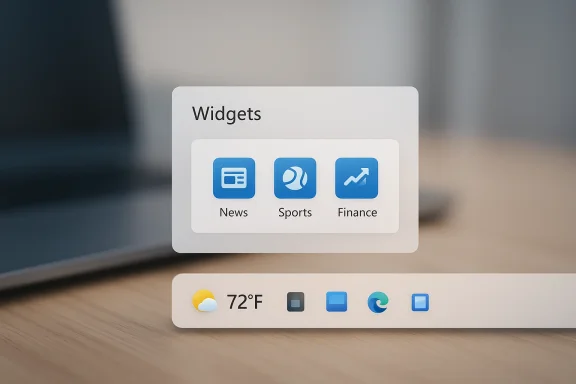
The feature discussed in the Digital Trends report fits neatly into that evolution. Microsoft has been testing an updated Widgets entry point that displays live weather content directly on the taskbar and can also surface sports, finance, and breaking news updates. In practical terms, that makes the taskbar once again a glanceable information strip, closer in spirit to Windows 10’s news-and-interests model, even if the implementation is wrapped in Windows 11’s Widgets branding. (blogs.windows.com)
This is not a brand-new idea for Microsoft, but rather a remix of one of its older ideas. Windows 10 had “News and interests,” while Windows 11 shifted the experience into Widgets, then gradually gave the taskbar more live content and more configuration controls. The company’s challenge has been to make the feature feel modern and helpful rather than cluttered, because the biggest criticism of taskbar news surfaces has always been that they can drift from useful context into distracting noise. (support.microsoft.com)
What makes this interesting is that Microsoft appears to be rebuilding the taskbar around contextual utility instead of static icons. That may seem subtle, but it is a major philosophical change. The original Windows 11 approach treated the taskbar as a cleaner workspace; the current direction treats it as a more responsive, information-rich dashboard, which is far closer to how many people actually use their PCs.
This matters because it restores a kind of ambient utility that many users missed when Windows 11 stripped the taskbar back. Instead of forcing the user to open a panel or launch a browser, the system now places useful information where the eye already lands. The design is glanceable by intent, and that is precisely why features like this can become sticky once they are done well.
It also acts as a gateway to richer content. Once users accept a weather tile on the taskbar, Microsoft can layer in adjacent feeds such as news, sports, and finance without making the experience feel like an abrupt leap into clutter. This is a classic product strategy: lead with something benign, then expand the surface area.
The staged release also allows Microsoft to gather behavioral data before committing to a wider rollout. If users hover too little, click too often, hide the button, or disable the feature entirely, that information helps determine whether the experience is useful or merely decorative. In other words, the rollout is not just a deployment mechanism; it is part of the product design process.
The company is also balancing consumer and enterprise expectations. Consumer users may like more dynamic surfaces, while IT departments often prefer predictability and control. A staged Insider rollout gives Microsoft room to do both without making a single irreversible decision.
That does not mean Microsoft is abandoning Windows 11’s design language. Rather, it suggests the company is slowly moving toward a more pragmatic version of that language. The initial launch version was comparatively spare; the current Windows 11 taskbar is becoming more functional, more informative, and more customizable.
Microsoft seems to be testing a middle path. It wants a modern, simplified visual frame, but it also knows that users judge productivity by whether common tasks remain obvious and quick. That is why features like Widgets and overflow are coming back in forms that are less old-fashioned but still familiar.
The difference is not just cosmetic. Windows 10 treated the taskbar feature as an inline news-and-weather extension, while Windows 11 wraps the same idea in a more modular Widgets board. That gives Microsoft more room to evolve the surface and personalize content, but it also creates a slightly less direct experience for users who just want the weather and nothing else.
In practical terms, the Windows 11 version is more extensible. In emotional terms, the Windows 10 version felt more straightforward. That distinction matters because users often interpret simplicity as speed, even when the actual technical implementation is more limited.
Microsoft’s own support language reflects that balance, noting that taskbar behavior can be adjusted and that Widgets can be toggled from Taskbar settings. That level of control is essential for organizations that want the productivity benefits of modern Windows without opening the door to distractions across the fleet. (support.microsoft.com)
That means Microsoft’s gradual rollout has another purpose: it makes the feature easier to fine-tune before it becomes a broader policy issue. If the experience becomes too busy or too persuasive, IT teams will likely disable it. If it stays lightweight, it may earn a place even in managed environments.
This is a meaningful shift because platform thinking changes how Microsoft monetizes and prioritizes the feature. A one-off weather widget is nice; a scalable content surface can become a distribution channel for Microsoft and its partners. That’s a much bigger business opportunity, even if it also carries obvious risks around attention economics and content quality.
The upside is obvious: a richer Widgets ecosystem could become one of the more useful native surfaces in Windows 11. The downside is equally obvious: if the board feels like a feed with too many competing demands, users will treat it as noise and disable it.
Glanceable information can be especially useful for users with mobility limitations or for anyone who prefers less interaction-heavy workflows. That said, accessibility only works if the feature remains readable, predictable, and configurable. If it animates too much, rotates too quickly, or hides critical information behind hover states, the benefit shrinks fast.
But there is always a risk when useful information is placed alongside promotional or algorithmic content. If the weather becomes a doorway to a broader feed that users do not trust, the accessibility benefit can be overshadowed by distraction. That is why simplicity is the real premium feature here.
That distinction matters because the PC remains fundamentally different from mobile. Desktop users often work in multiple windows, multiple displays, and multiple contexts at once. A successful taskbar feature has to respect that complexity rather than assume the user wants an always-on feed dominating their screen.
The competition here is really over attention and convenience. If Microsoft gets the balance right, it can keep users inside Windows longer and reduce their need to open separate apps or browser tabs for routine checks. If it gets the balance wrong, the feature becomes another thing users immediately disable.
It will also be worth watching how far Microsoft pushes live content before users push back. The line between helpful information and unwanted noise is thin, especially on desktop systems where users often already have their own preferred information sources. If Microsoft keeps the controls clear and the defaults sensible, the taskbar could become one of Windows 11’s best examples of practical modern design.
Source: Digital Trends Windows 11 is bringing back a feature users have wanted for years
 Background
When Windows 11 arrived, one of the first things longtime Windows users noticed was not what was added, but what was removed. The taskbar became more constrained, and several familiar behaviors from Windows 10 disappeared or were delayed, creating a sense that Microsoft had prioritized a cleaner aesthetic over practical workflow. That trade-off drew predictable criticism because the taskbar is not just decoration; it is one of the operating system’s most-used control surfaces, and even tiny changes can affect daily productivity.Over time, Microsoft began reintroducing features in stages, often through Insider builds, signaling that the Windows 11 taskbar would not remain frozen in its original form. The return of drag and drop support, taskbar overflow, and other usability refinements showed a clear pattern: Microsoft was listening to feedback, but it was also moving carefully, using telemetry and staged rollouts rather than broad immediate reversals. That methodical approach matters because it keeps the company from looking indecisive, even when it is effectively correcting course.
The feature discussed in the Digital Trends report fits neatly into that evolution. Microsoft has been testing an updated Widgets entry point that displays live weather content directly on the taskbar and can also surface sports, finance, and breaking news updates. In practical terms, that makes the taskbar once again a glanceable information strip, closer in spirit to Windows 10’s news-and-interests model, even if the implementation is wrapped in Windows 11’s Widgets branding. (blogs.windows.com)
This is not a brand-new idea for Microsoft, but rather a remix of one of its older ideas. Windows 10 had “News and interests,” while Windows 11 shifted the experience into Widgets, then gradually gave the taskbar more live content and more configuration controls. The company’s challenge has been to make the feature feel modern and helpful rather than cluttered, because the biggest criticism of taskbar news surfaces has always been that they can drift from useful context into distracting noise. (support.microsoft.com)
What makes this interesting is that Microsoft appears to be rebuilding the taskbar around contextual utility instead of static icons. That may seem subtle, but it is a major philosophical change. The original Windows 11 approach treated the taskbar as a cleaner workspace; the current direction treats it as a more responsive, information-rich dashboard, which is far closer to how many people actually use their PCs.
What Microsoft Is Bringing Back
The specific change at the center of this story is the return of a weather-driven taskbar entry point, a feature that gives users an at-a-glance view of current conditions and opens the Widgets board on hover or click. Microsoft first described this as an updated entry point for Widgets with live weather content, and later documentation confirmed that the taskbar can surface additional dynamic content from sports, finance, and breaking news widgets as well. (blogs.windows.com)This matters because it restores a kind of ambient utility that many users missed when Windows 11 stripped the taskbar back. Instead of forcing the user to open a panel or launch a browser, the system now places useful information where the eye already lands. The design is glanceable by intent, and that is precisely why features like this can become sticky once they are done well.
Why weather on the taskbar still matters
Weather may sound trivial, but for a desktop OS it is one of the most effective low-friction widgets possible. It is immediately understandable, always relevant, and easy to scan without mental overhead. That is why Microsoft keeps returning to it as the anchor for taskbar-based informational surfaces.It also acts as a gateway to richer content. Once users accept a weather tile on the taskbar, Microsoft can layer in adjacent feeds such as news, sports, and finance without making the experience feel like an abrupt leap into clutter. This is a classic product strategy: lead with something benign, then expand the surface area.
- Weather is easy to understand at a glance.
- It gives the taskbar a useful “living” quality.
- It can anchor broader Widgets adoption.
- It reduces the need to open separate apps for quick checks.
The Insider-First Rollout Strategy
Microsoft is, as usual, not shipping this as a sudden universal change. The updated Widgets entry point was introduced in Windows 11 Insider Preview Build 22518 and described as a gradual rollout, not something all Insiders would see immediately. That staging approach is important because Microsoft has learned that taskbar changes are disproportionately sensitive, and a rough rollout can create backlash far beyond the feature’s size. (blogs.windows.com)The staged release also allows Microsoft to gather behavioral data before committing to a wider rollout. If users hover too little, click too often, hide the button, or disable the feature entirely, that information helps determine whether the experience is useful or merely decorative. In other words, the rollout is not just a deployment mechanism; it is part of the product design process.
Why Microsoft tests taskbar changes so cautiously
The taskbar is one of the most opinionated parts of Windows. Users have muscle memory that stretches back years, and even small adjustments can feel like a break in trust. That is why Microsoft often pushes these changes through the Dev Channel first, then refines them in later builds.The company is also balancing consumer and enterprise expectations. Consumer users may like more dynamic surfaces, while IT departments often prefer predictability and control. A staged Insider rollout gives Microsoft room to do both without making a single irreversible decision.
- The taskbar affects everyday workflow more than most UI surfaces.
- User tolerance for change is low when muscle memory is involved.
- Enterprise customers need slower, more predictable updates.
- Insider testing reduces the cost of a bad UX decision.
The Bigger Taskbar Reversal
Viewed in isolation, a weather widget seems minor. Viewed alongside Microsoft’s broader Windows 11 updates, it is part of a pattern of soft reversals. The company has already brought back or improved features such as drag and drop on the taskbar and taskbar overflow behavior, and it has continued to refine Widgets visibility and configurability in later builds. (blogs.windows.com)That does not mean Microsoft is abandoning Windows 11’s design language. Rather, it suggests the company is slowly moving toward a more pragmatic version of that language. The initial launch version was comparatively spare; the current Windows 11 taskbar is becoming more functional, more informative, and more customizable.
The tension between minimalism and utility
There is an obvious tension here. Minimalist design can reduce clutter and improve focus, but it can also make the interface feel less capable. A taskbar that does too little becomes invisible in the wrong way, which is dangerous for an OS where discoverability matters.Microsoft seems to be testing a middle path. It wants a modern, simplified visual frame, but it also knows that users judge productivity by whether common tasks remain obvious and quick. That is why features like Widgets and overflow are coming back in forms that are less old-fashioned but still familiar.
- Windows 11 is softening its original minimalist stance.
- Usability is being added back without returning to Windows 10 wholesale.
- Microsoft is trying to preserve visual consistency while restoring power-user behaviors.
- The taskbar is becoming more informative, not just more decorative.
How This Compares With Windows 10
The clearest historical comparison is Windows 10’s News and interests feature, which placed weather directly in the taskbar and allowed users to access more information through hover or click. Microsoft’s support documentation still distinguishes that experience from Windows 11, noting that taskbar updates and reduced taskbar updates were a Windows 10 concept, while Windows 11 uses Widgets instead. (support.microsoft.com)The difference is not just cosmetic. Windows 10 treated the taskbar feature as an inline news-and-weather extension, while Windows 11 wraps the same idea in a more modular Widgets board. That gives Microsoft more room to evolve the surface and personalize content, but it also creates a slightly less direct experience for users who just want the weather and nothing else.
What changed in the philosophy
Windows 10’s approach was almost blunt: show the weather, offer some news, and let users turn down the noise if they wanted. Windows 11’s approach is more curated and more platform-centric, with Widgets acting as a reusable surface for multiple experiences. That makes sense for Microsoft’s ecosystem strategy, but it can also feel like a layer of abstraction inserted between the user and the information they want.In practical terms, the Windows 11 version is more extensible. In emotional terms, the Windows 10 version felt more straightforward. That distinction matters because users often interpret simplicity as speed, even when the actual technical implementation is more limited.
- Windows 10 was more direct and taskbar-native.
- Windows 11 is more modular and ecosystem-oriented.
- Widgets create room for future expansion.
- The trade-off is extra abstraction for simple information.
The Enterprise and Consumer Split
This feature will likely be received very differently depending on whether you are a home user or an IT-managed enterprise user. Consumers are more likely to appreciate a glanceable weather feed and live breaking news, especially on personal devices where convenience matters more than strict visual discipline. Enterprise users, by contrast, often see such features as something to standardize, hide, or control.Microsoft’s own support language reflects that balance, noting that taskbar behavior can be adjusted and that Widgets can be toggled from Taskbar settings. That level of control is essential for organizations that want the productivity benefits of modern Windows without opening the door to distractions across the fleet. (support.microsoft.com)
Consumer appeal versus IT policy
For consumers, the attraction is immediate: one look at the taskbar can tell you whether you need a coat, whether a storm is coming, or whether there is breaking news worth opening. For organizations, the question is not whether the content is useful, but whether it is appropriate to expose it by default on company-managed devices.That means Microsoft’s gradual rollout has another purpose: it makes the feature easier to fine-tune before it becomes a broader policy issue. If the experience becomes too busy or too persuasive, IT teams will likely disable it. If it stays lightweight, it may earn a place even in managed environments.
- Consumers value convenience and glanceability.
- Enterprises value consistency and policy control.
- Widgets need to stay unobtrusive to win trust.
- Taskbar configurability is a commercial necessity.
Widgets as a Platform, Not Just a Panel
Microsoft clearly wants Widgets to be more than a weather panel. Its documentation already frames Widgets as dynamic elements that can show weather, sports, finance, traffic, and breaking headlines, while Insider builds have expanded the feature in stages. That points to a deliberate platform strategy: make Widgets the flexible surface, then keep feeding it new content types. (support.microsoft.com)This is a meaningful shift because platform thinking changes how Microsoft monetizes and prioritizes the feature. A one-off weather widget is nice; a scalable content surface can become a distribution channel for Microsoft and its partners. That’s a much bigger business opportunity, even if it also carries obvious risks around attention economics and content quality.
Why platform thinking changes the stakes
Once a feature becomes a platform, it is no longer judged solely on its current usefulness. It is judged on whether it can support future features, third-party content, and varied user preferences without collapsing into clutter. That means Microsoft has to balance openness with restraint.The upside is obvious: a richer Widgets ecosystem could become one of the more useful native surfaces in Windows 11. The downside is equally obvious: if the board feels like a feed with too many competing demands, users will treat it as noise and disable it.
- Widgets can scale beyond simple weather.
- Platform features create ecosystem leverage.
- The more the surface expands, the more curation matters.
- User trust will depend on relevance, not just novelty.
Accessibility and Glanceability
There is also an accessibility angle here that should not be overlooked. A taskbar widget that shows weather or important alerts can reduce friction for users who benefit from simple, persistent visual cues rather than deeper navigation. Microsoft has repeatedly framed some Windows 11 additions as improving ease of use and accessibility, and that broader philosophy fits the taskbar-widget model well. (blogs.windows.com)Glanceable information can be especially useful for users with mobility limitations or for anyone who prefers less interaction-heavy workflows. That said, accessibility only works if the feature remains readable, predictable, and configurable. If it animates too much, rotates too quickly, or hides critical information behind hover states, the benefit shrinks fast.
Where the design can succeed or fail
A good glanceable widget should be visible without demanding attention. It should also be easy to dismiss or hide if it becomes irrelevant. Microsoft’s decision to keep group policy and show/hide controls intact is a sign it understands that balance.But there is always a risk when useful information is placed alongside promotional or algorithmic content. If the weather becomes a doorway to a broader feed that users do not trust, the accessibility benefit can be overshadowed by distraction. That is why simplicity is the real premium feature here.
- Accessible design depends on low interaction cost.
- Persistent cues can help users who want fewer clicks.
- Hover-based interfaces should not become mandatory.
- Readability and control are critical to legitimacy.
The Competitive Landscape
Microsoft is not building this in a vacuum. Every major platform now wants its own ambient information layer, whether that is Apple’s widgets, Google’s notification surfaces, or mobile-style content panels translated to desktop. Windows 11’s taskbar evolution should therefore be read as an attempt to make the PC feel more alive without fully turning it into a smartphone clone. (support.microsoft.com)That distinction matters because the PC remains fundamentally different from mobile. Desktop users often work in multiple windows, multiple displays, and multiple contexts at once. A successful taskbar feature has to respect that complexity rather than assume the user wants an always-on feed dominating their screen.
What rivals can learn from Microsoft’s approach
Microsoft’s biggest advantage is not novelty; it is proximity to the workflow. If the company can place relevant information in a way that respects desktop habits, it has a chance to make Widgets feel native rather than grafted on. That is harder than it sounds, because desktop users punish anything that feels like a mobile transplant.The competition here is really over attention and convenience. If Microsoft gets the balance right, it can keep users inside Windows longer and reduce their need to open separate apps or browser tabs for routine checks. If it gets the balance wrong, the feature becomes another thing users immediately disable.
- Desktop widgets must serve multitasking, not interrupt it.
- Competing platforms increasingly use ambient information surfaces.
- Windows has an opportunity to make these surfaces feel native.
- The battle is about convenience, trust, and relevance.
Strengths and Opportunities
Microsoft’s latest taskbar move has several clear strengths, especially if you view it as part of a long-term correction rather than a standalone feature. It brings back a familiar convenience while preserving the newer Windows 11 framework, and it gives Microsoft another way to make the OS feel dynamic without forcing users into separate apps. The opportunity is not just to show weather, but to create a useful glance layer that becomes genuinely habitual.- Restores a familiar, useful taskbar behavior.
- Makes Windows 11 feel more responsive and less static.
- Keeps the feature modular through Widgets.
- Opens the door to richer live content.
- Supports accessibility and low-friction information access.
- Gives Microsoft a platform for future surface expansion.
- Helps Windows 11 recover some of the practicality users felt was missing at launch.
Risks and Concerns
The risks are equally real, and they mostly stem from one issue: once a taskbar surface starts carrying live content, it can become noisy very quickly. Microsoft has to prove that the new Widgets entry point is a convenience, not a distraction, and that it can stay configurable enough for different user groups. There is also the reputational risk of appearing to “bring back” features only after users complained loudly enough, which can make Windows 11 feel reactive rather than intentional.- Too much live content could make the taskbar cluttered.
- Hover-based experiences can feel fragile or accidental.
- Users may perceive the feature as a distraction rather than a tool.
- Enterprise admins may disable it broadly if policy control is weak.
- The feature could feel like a compromise rather than a polished design.
- Over-reliance on weather/news content could limit long-term value.
- Microsoft must avoid making Widgets look like an attention feed first and a utility second.
Looking Ahead
The most important thing to watch is whether Microsoft continues treating the taskbar as a living surface rather than a fixed strip of icons. If the company keeps refining Widgets, taskbar overflow, and other usability features in parallel, Windows 11 will increasingly look like an OS that learned from its own launch missteps. That would be a healthier trajectory than simply chasing visual minimalism for its own sake.It will also be worth watching how far Microsoft pushes live content before users push back. The line between helpful information and unwanted noise is thin, especially on desktop systems where users often already have their own preferred information sources. If Microsoft keeps the controls clear and the defaults sensible, the taskbar could become one of Windows 11’s best examples of practical modern design.
- Watch for broader rollout beyond Insider builds.
- Watch whether Microsoft adds more customization controls.
- Watch how enterprise policy settings evolve.
- Watch whether live content becomes more diverse or more intrusive.
- Watch whether the taskbar remains glanceable or turns into a mini feed.
Source: Digital Trends Windows 11 is bringing back a feature users have wanted for years