

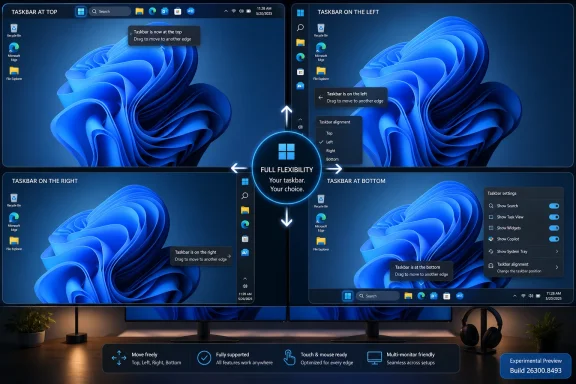
Microsoft began rolling out Windows 11 Experimental Preview Build 26300.8493 on May 15, 2026, giving Windows Insiders an official way to move the taskbar to the top, left, right, or bottom of the screen. The change sounds almost comically small until you remember that Windows 11 launched in 2021 by removing exactly this kind of long-standing desktop flexibility. For nearly five years, users have treated the missing movable taskbar as shorthand for a broader complaint: Windows 11 looked cleaner, but it often felt less like their PC. Now Microsoft is trying to prove that the operating system can become more personal without retreating entirely into the past.
The Windows taskbar has always been more than a strip of icons. It is muscle memory, workflow architecture, and, for many people, the single most visible contract between Windows and the user. When Microsoft fixed it to the bottom of the screen in Windows 11, the decision was framed as part of a modernized shell, but it landed like a downgrade for anyone who had spent years running a vertical taskbar or parking it at the top like a desktop control bar.
That is why this Insider change matters beyond the narrow mechanics of taskbar placement. Microsoft is not merely adding a setting. It is walking back one of the most symbolic losses in the Windows 11 transition, a loss that power users, accessibility-minded users, ultrawide monitor owners, and multi-monitor workers have been complaining about since launch.
The new setting lives where ordinary users would expect it: Settings, Personalization, Taskbar, Taskbar behaviors. From there, Insiders can choose the bottom, top, left, or right edge of the screen. Microsoft is also adapting tooltips, flyouts, animations, Start, Search, and related taskbar surfaces so the taskbar behaves like a supported feature rather than a registry trick held together by hope.
That distinction is important. Windows users have never lacked hacks, third-party utilities, and shell replacement tools. What they lacked was Microsoft’s blessing, and with it the reasonable expectation that core desktop behavior would survive updates, scale properly, and work consistently across monitors.
The old Windows 10 taskbar was not elegant, but it was flexible. Users could move it, resize it, stack it with decades of habits, and bend it to odd monitor setups. Windows 11 replaced much of that with a narrower design philosophy: fewer exposed choices, more controlled presentation, and fewer ancient affordances inherited from previous shell architectures.
That tradeoff was always going to alienate the people who treat the desktop as a toolbench. For them, taskbar placement is not decorative. A left-side taskbar on a wide display can preserve vertical space. A top taskbar can align with application menu bars and browser tabs. A right-side taskbar can make sense in multi-monitor setups where the inner edge is crowded or where a user wants the taskbar away from the primary interaction zone.
Microsoft’s defense, when the criticism first erupted, was that supporting every old taskbar mode in the new shell was not free. Flyouts, animations, app layout assumptions, notification positioning, touch behavior, and snapping all had to be reconciled with alternate edges. That was a real engineering argument, but it did not make the user experience feel any less reduced.
Experimental is also a convenient political space inside Windows development. Microsoft can say it is listening without promising that every implementation detail will ship unchanged. If a flyout misbehaves on a vertical taskbar, if an animation feels wrong, or if a multi-monitor edge case breaks expectations, the company can iterate before the feature reaches the more conservative channels.
Build 26300.8493 is based on Windows 11 version 25H2 via an enablement package, which suggests this work is tied to the current Windows 11 line rather than some distant reboot. That matters because users have heard many vague promises about “coming soon” personalization features. Seeing the setting arrive in an actual Insider build moves the story from roadmap theater to testable software.
Still, Experimental means what it says. Microsoft has repeatedly used Insider channels to test features that change, stall, or vanish. The correct reading is not “the movable taskbar is guaranteed for every Windows 11 PC next month.” The correct reading is that Microsoft has crossed the most important threshold: it is now shipping supported code to users outside the company.
That is a practical admission that density still matters. Windows 11 has often behaved as though every user is on a high-resolution display with plenty of screen real estate. In the real world, people use 13-inch laptops, remote desktops, virtual machines, budget monitors, and window-heavy workflows where every row of pixels counts.
The small taskbar also reinforces the larger theme of this update: Microsoft is no longer treating personalization as merely wallpaper, colors, and light-versus-dark mode. Placement, density, alignment, and interruption level are productivity settings. They determine how much the operating system demands attention and how much it gets out of the way.
The key challenge will be consistency. A small taskbar that works only at the bottom would feel like another half-measure. Microsoft says most customization settings, including small taskbar and never-combine taskbar icons, should work across taskbar locations. That is the right ambition, because power users are not asking for one restored checkbox; they are asking for a coherent desktop model.
This is where earlier hacks fell apart. Registry tweaks could force the taskbar to the top, but flyouts might animate from the wrong place, overlap awkwardly, or behave unpredictably after updates. Third-party tools could provide impressive workarounds, but they also sat in the blast radius of every shell change Microsoft shipped.
A supported movable taskbar requires Microsoft to revisit assumptions baked into the Windows 11 shell. If the taskbar is vertical, icon alignment needs different logic. If it is at the top, menus cannot blindly assume a bottom-origin animation. If users combine vertical placement with small icons and multiple displays, the shell has to remain boring in the best possible way.
That boringness is the product. Nobody wants to think about the taskbar once it is configured. The success condition is not that enthusiasts cheer on day one; it is that six months later a left-side taskbar feels so normal that users forget it was ever missing.
The company’s current messaging emphasizes listening to feedback, reducing distractions, and making Windows feel more personal. That is exactly the right language, but it collides with years of user experience choices that trained people to be skeptical. A movable taskbar helps, but it does not erase frustration over suggested content, account nudges, cloud-service promotion, and inconsistent settings migrations.
This is why the taskbar change is strategically useful for Microsoft. It is concrete. It is visible. It is a feature users can point to and say, “That thing I asked for is actually back.” In a platform where many changes feel abstract, AI-branded, or cloud-tethered, moving a taskbar is refreshingly mechanical.
But Microsoft should not mistake symbolic progress for full trust repair. The users who cared enough to demand top and side taskbars are often the same users who notice every unwanted recommendation, every reset default, and every feature that seems designed more for engagement metrics than productivity.
The movable taskbar became a credibility test precisely because it was so basic. If Microsoft would not restore a decades-old taskbar option after years of feedback, what did that say about the value of Feedback Hub votes, Insider complaints, and public criticism? The answer now appears to be that Microsoft did hear the demand, but only after a long and damaging delay.
For IT pros, the issue is less emotional but still relevant. Standardized layouts matter in managed environments, and not every organization wants users freely moving core shell elements. But the return of the feature could help certain accessibility, kiosk, remote work, and specialized workstation scenarios. The key enterprise question will be whether Microsoft exposes adequate policy controls and whether the setting behaves predictably under provisioning and profile migration.
Administrators will also want to know how this interacts with Start layout policies, taskbar pinning, multi-monitor setups, and shell stability across cumulative updates. Consumer enthusiasm is one thing; enterprise acceptance requires boring documentation, reliable controls, and no surprises after Patch Tuesday.
By restoring a Windows 10-era behavior, Microsoft is implicitly acknowledging that some of what it removed was not clutter. It was user agency. The Windows 11 design reset may have made the OS cleaner, but cleanliness is not the same as capability.
There is a lesson here for whatever Windows becomes next. Microsoft can modernize without flattening every sharp edge. A mature desktop OS should be able to hide complexity from casual users while leaving serious configuration available to those who know why they want it. The answer to legacy sprawl is not always deletion; sometimes it is better organization.
Windows has survived for decades because it can be made strange. It runs in labs, studios, schools, factories, trading desks, gaming rooms, medical offices, and improvised home setups with monitors mounted in ways no designer anticipated. A taskbar that moves is not a relic. It is a small concession to the fact that Windows lives in the real world.
There is also the question of discoverability. If Microsoft hides the feature too deeply, casual users who miss it may never find it. If Microsoft surfaces it too aggressively, it risks confusing users who do not need the option. Settings, Personalization, Taskbar, Taskbar behaviors is a reasonable compromise, but the company should make sure Windows Search can find the setting with plain-language queries like “move taskbar to top.”
Then there is the migration story. Users who relied on third-party tools may want to return to native behavior, but they will need confidence that Microsoft’s implementation is good enough. If the official feature is polished, it could reduce the need for shell utilities. If it is buggy or limited, it may simply create another split between supported settings and enthusiast workarounds.
Microsoft should resist the temptation to declare the job finished too early. The first version needs to work, but the broader restoration of taskbar confidence will require refinement over several releases.
That is healthy. Windows does not need to return to the chaotic peak of every option being exposed everywhere. But it also cannot afford to become a decorative launcher for Microsoft services. The most successful version of Windows 11 would be one that keeps the cleaner foundation while restoring the practical flexibility users lost in the transition.
This is also a reminder that AI is not the only story in Windows. Copilot may dominate Microsoft’s strategic narrative, but the daily experience of Windows is still shaped by taskbars, Start menus, File Explorer, updates, notifications, and performance. Users judge the platform less by keynote demos than by whether the machine behaves the way they expect when they sit down to work.
A movable taskbar will not sell a new PC. It will not make an NPU more useful. It will not change the economics of Microsoft 365 or Azure. But it can make Windows feel a little more like a personal computer again, and that is not a minor thing.
Source: Thurrott.com Windows 11 Taskbar on top - Thurrott.com
 Microsoft Finally Admits the Bottom Edge Was Not Sacred
The Windows taskbar has always been more than a strip of icons. It is muscle memory, workflow architecture, and, for many people, the single most visible contract between Windows and the user. When Microsoft fixed it to the bottom of the screen in Windows 11, the decision was framed as part of a modernized shell, but it landed like a downgrade for anyone who had spent years running a vertical taskbar or parking it at the top like a desktop control bar.That is why this Insider change matters beyond the narrow mechanics of taskbar placement. Microsoft is not merely adding a setting. It is walking back one of the most symbolic losses in the Windows 11 transition, a loss that power users, accessibility-minded users, ultrawide monitor owners, and multi-monitor workers have been complaining about since launch.
The new setting lives where ordinary users would expect it: Settings, Personalization, Taskbar, Taskbar behaviors. From there, Insiders can choose the bottom, top, left, or right edge of the screen. Microsoft is also adapting tooltips, flyouts, animations, Start, Search, and related taskbar surfaces so the taskbar behaves like a supported feature rather than a registry trick held together by hope.
That distinction is important. Windows users have never lacked hacks, third-party utilities, and shell replacement tools. What they lacked was Microsoft’s blessing, and with it the reasonable expectation that core desktop behavior would survive updates, scale properly, and work consistently across monitors.
Windows 11’s Clean Slate Had a Cost
Windows 11 arrived with a redesigned taskbar and Start menu that prioritized visual simplicity over legacy configurability. Centered icons, a simplified context menu, a reworked system tray, and a more touch-friendly posture all made sense if Microsoft’s objective was to produce a calmer, more modern desktop. The trouble was that Windows is not an appliance OS. It is the working surface for hundreds of millions of very different people doing very different things.The old Windows 10 taskbar was not elegant, but it was flexible. Users could move it, resize it, stack it with decades of habits, and bend it to odd monitor setups. Windows 11 replaced much of that with a narrower design philosophy: fewer exposed choices, more controlled presentation, and fewer ancient affordances inherited from previous shell architectures.
That tradeoff was always going to alienate the people who treat the desktop as a toolbench. For them, taskbar placement is not decorative. A left-side taskbar on a wide display can preserve vertical space. A top taskbar can align with application menu bars and browser tabs. A right-side taskbar can make sense in multi-monitor setups where the inner edge is crowded or where a user wants the taskbar away from the primary interaction zone.
Microsoft’s defense, when the criticism first erupted, was that supporting every old taskbar mode in the new shell was not free. Flyouts, animations, app layout assumptions, notification positioning, touch behavior, and snapping all had to be reconciled with alternate edges. That was a real engineering argument, but it did not make the user experience feel any less reduced.
The Experimental Channel Becomes Microsoft’s Apology Lab
The timing is not accidental. Microsoft has been reshaping the Windows Insider Program, and the Experimental channel is meant to be the place where unfinished, feedback-driven features appear before they are ready for broad deployment. That makes the movable taskbar a perfect candidate. It is highly visible, emotionally loaded, and technically risky enough that Microsoft needs real-world testing before it declares victory.Experimental is also a convenient political space inside Windows development. Microsoft can say it is listening without promising that every implementation detail will ship unchanged. If a flyout misbehaves on a vertical taskbar, if an animation feels wrong, or if a multi-monitor edge case breaks expectations, the company can iterate before the feature reaches the more conservative channels.
Build 26300.8493 is based on Windows 11 version 25H2 via an enablement package, which suggests this work is tied to the current Windows 11 line rather than some distant reboot. That matters because users have heard many vague promises about “coming soon” personalization features. Seeing the setting arrive in an actual Insider build moves the story from roadmap theater to testable software.
Still, Experimental means what it says. Microsoft has repeatedly used Insider channels to test features that change, stall, or vanish. The correct reading is not “the movable taskbar is guaranteed for every Windows 11 PC next month.” The correct reading is that Microsoft has crossed the most important threshold: it is now shipping supported code to users outside the company.
The Small Taskbar Is the Other Half of the Concession
The headline feature is placement, but the smaller taskbar mode may prove just as important in day-to-day use. Windows 11’s default taskbar has often felt oversized on laptops and cramped displays, especially when combined with thicker title bars, large spacing, and the OS’s broader preference for visual breathing room. Microsoft’s new small taskbar option gives users smaller icons, a shorter bar, and more vertical space for applications.That is a practical admission that density still matters. Windows 11 has often behaved as though every user is on a high-resolution display with plenty of screen real estate. In the real world, people use 13-inch laptops, remote desktops, virtual machines, budget monitors, and window-heavy workflows where every row of pixels counts.
The small taskbar also reinforces the larger theme of this update: Microsoft is no longer treating personalization as merely wallpaper, colors, and light-versus-dark mode. Placement, density, alignment, and interruption level are productivity settings. They determine how much the operating system demands attention and how much it gets out of the way.
The key challenge will be consistency. A small taskbar that works only at the bottom would feel like another half-measure. Microsoft says most customization settings, including small taskbar and never-combine taskbar icons, should work across taskbar locations. That is the right ambition, because power users are not asking for one restored checkbox; they are asking for a coherent desktop model.
Flyouts Are Where the Real Engineering Battle Lives
Moving the taskbar itself is not the hardest part. The harder work is making everything attached to it feel native wherever the taskbar goes. Start, Search, Quick Settings, notifications, jump lists, previews, Widgets, Copilot surfaces, overflow menus, and system tray interactions all have to appear from the correct edge and respect the user’s chosen layout.This is where earlier hacks fell apart. Registry tweaks could force the taskbar to the top, but flyouts might animate from the wrong place, overlap awkwardly, or behave unpredictably after updates. Third-party tools could provide impressive workarounds, but they also sat in the blast radius of every shell change Microsoft shipped.
A supported movable taskbar requires Microsoft to revisit assumptions baked into the Windows 11 shell. If the taskbar is vertical, icon alignment needs different logic. If it is at the top, menus cannot blindly assume a bottom-origin animation. If users combine vertical placement with small icons and multiple displays, the shell has to remain boring in the best possible way.
That boringness is the product. Nobody wants to think about the taskbar once it is configured. The success condition is not that enthusiasts cheer on day one; it is that six months later a left-side taskbar feels so normal that users forget it was ever missing.
The Start Menu Still Carries Windows 11’s Trust Problem
Taskbar placement arrives alongside broader Start and taskbar personalization work, and that pairing is revealing. Microsoft knows that Windows 11’s shell complaints are not isolated. The Start menu, recommendations, pinned apps, newly installed apps, account prompts, search behavior, widgets, and promotional surfaces have all contributed to the perception that Windows 11 sometimes serves Microsoft’s priorities before the user’s.The company’s current messaging emphasizes listening to feedback, reducing distractions, and making Windows feel more personal. That is exactly the right language, but it collides with years of user experience choices that trained people to be skeptical. A movable taskbar helps, but it does not erase frustration over suggested content, account nudges, cloud-service promotion, and inconsistent settings migrations.
This is why the taskbar change is strategically useful for Microsoft. It is concrete. It is visible. It is a feature users can point to and say, “That thing I asked for is actually back.” In a platform where many changes feel abstract, AI-branded, or cloud-tethered, moving a taskbar is refreshingly mechanical.
But Microsoft should not mistake symbolic progress for full trust repair. The users who cared enough to demand top and side taskbars are often the same users who notice every unwanted recommendation, every reset default, and every feature that seems designed more for engagement metrics than productivity.
The Power User Vote Still Matters
It is fashionable to dismiss desktop customization complaints as nostalgia from a loud minority. That is a mistake. Power users are not always numerically dominant, but they shape perception, support families and offices, write guides, administer fleets, file bugs, and decide whether Windows feels like a platform worth investing in.The movable taskbar became a credibility test precisely because it was so basic. If Microsoft would not restore a decades-old taskbar option after years of feedback, what did that say about the value of Feedback Hub votes, Insider complaints, and public criticism? The answer now appears to be that Microsoft did hear the demand, but only after a long and damaging delay.
For IT pros, the issue is less emotional but still relevant. Standardized layouts matter in managed environments, and not every organization wants users freely moving core shell elements. But the return of the feature could help certain accessibility, kiosk, remote work, and specialized workstation scenarios. The key enterprise question will be whether Microsoft exposes adequate policy controls and whether the setting behaves predictably under provisioning and profile migration.
Administrators will also want to know how this interacts with Start layout policies, taskbar pinning, multi-monitor setups, and shell stability across cumulative updates. Consumer enthusiasm is one thing; enterprise acceptance requires boring documentation, reliable controls, and no surprises after Patch Tuesday.
Windows 10’s Shadow Is Still Long
This change lands months before Windows 10’s consumer end-of-support milestone fades from memory, and that context is unavoidable. For many users, Windows 11 has not been a simple upgrade. It has been a negotiation: accept new hardware requirements, accept a different shell, accept changed defaults, and hope the benefits outweigh the annoyances.By restoring a Windows 10-era behavior, Microsoft is implicitly acknowledging that some of what it removed was not clutter. It was user agency. The Windows 11 design reset may have made the OS cleaner, but cleanliness is not the same as capability.
There is a lesson here for whatever Windows becomes next. Microsoft can modernize without flattening every sharp edge. A mature desktop OS should be able to hide complexity from casual users while leaving serious configuration available to those who know why they want it. The answer to legacy sprawl is not always deletion; sometimes it is better organization.
Windows has survived for decades because it can be made strange. It runs in labs, studios, schools, factories, trading desks, gaming rooms, medical offices, and improvised home setups with monitors mounted in ways no designer anticipated. A taskbar that moves is not a relic. It is a small concession to the fact that Windows lives in the real world.
The New Setting Will Be Judged by Its Rough Edges
The first wave of Insider testing should be watched carefully. The obvious bugs will involve flyout placement, animation direction, system tray overflow, notification alignment, and multi-monitor behavior. Less obvious issues may appear with touch, pen input, right-to-left languages, scaling, remote sessions, and accessibility tools.There is also the question of discoverability. If Microsoft hides the feature too deeply, casual users who miss it may never find it. If Microsoft surfaces it too aggressively, it risks confusing users who do not need the option. Settings, Personalization, Taskbar, Taskbar behaviors is a reasonable compromise, but the company should make sure Windows Search can find the setting with plain-language queries like “move taskbar to top.”
Then there is the migration story. Users who relied on third-party tools may want to return to native behavior, but they will need confidence that Microsoft’s implementation is good enough. If the official feature is polished, it could reduce the need for shell utilities. If it is buggy or limited, it may simply create another split between supported settings and enthusiast workarounds.
Microsoft should resist the temptation to declare the job finished too early. The first version needs to work, but the broader restoration of taskbar confidence will require refinement over several releases.
Microsoft’s Desktop Strategy Is Becoming Less Absolutist
The movable taskbar joins a broader pattern in Microsoft’s recent Windows messaging: fewer intrusive widgets, more flexible update behavior, performance and reliability work, and personalization features that respond to years of complaints. The company is not abandoning its Windows 11 design language, but it appears to be softening the absolutism of the original release.That is healthy. Windows does not need to return to the chaotic peak of every option being exposed everywhere. But it also cannot afford to become a decorative launcher for Microsoft services. The most successful version of Windows 11 would be one that keeps the cleaner foundation while restoring the practical flexibility users lost in the transition.
This is also a reminder that AI is not the only story in Windows. Copilot may dominate Microsoft’s strategic narrative, but the daily experience of Windows is still shaped by taskbars, Start menus, File Explorer, updates, notifications, and performance. Users judge the platform less by keynote demos than by whether the machine behaves the way they expect when they sit down to work.
A movable taskbar will not sell a new PC. It will not make an NPU more useful. It will not change the economics of Microsoft 365 or Azure. But it can make Windows feel a little more like a personal computer again, and that is not a minor thing.
The Top-Edge Taskbar Is a Small Fix With a Long Memory
The practical implications are straightforward, but the emotional ones explain why this story has traveled so far. Microsoft removed a familiar control, spent years hearing about it, and is now restoring it through the Insider pipeline. That chronology matters because it shows both the weakness and the strength of modern Windows development: user feedback can still win, but sometimes only after the damage becomes part of the product’s reputation.- Windows 11 Experimental Preview Build 26300.8493 adds supported taskbar placement at the bottom, top, left, and right edges of the screen.
- The setting is currently for Windows Insiders in the Experimental channel, so production users should wait rather than rely on hacks or assume immediate rollout.
- Microsoft is also testing a smaller taskbar mode that reduces icon size and gives applications more vertical space.
- The real test will be whether Start, Search, flyouts, animations, system tray behavior, and multi-monitor setups work reliably in every taskbar position.
- The change is significant because it reverses one of the most criticized Windows 11 shell regressions and signals a more flexible approach to desktop personalization.
Source: Thurrott.com Windows 11 Taskbar on top - Thurrott.com