

Microsoft is signaling a notable shift in how it wants Windows 11 to feel: less noisy, less promotional, and less like a billboard for the company’s services. The move follows years of complaints about Start menu suggestions, account prompts, Microsoft 365 upsells, OneDrive nudges, and other system-level recommendations that many users see as clutter rather than help. While the company is not abandoning promotion entirely, the direction is clear: scale back the most intrusive surfaces and make the desktop feel more restrained.
That matters because Windows is still the default computing layer for hundreds of millions of PCs, and every design choice carries outsized weight. A “calmer” Windows 11 could improve trust, reduce friction, and make the operating system feel more polished, but it also raises a hard question: can Microsoft soften the experience without giving up the commercial levers that have become deeply embedded in Windows?
Windows has always carried some degree of product promotion, but the balance changed significantly over the past decade as Microsoft leaned more heavily into subscriptions, cloud services, and AI. What used to be occasional suggestions became a broader pattern of prompts, recommendations, and account-based integration designed to move users toward Microsoft 365, OneDrive, Edge, Game Pass, and Copilot. In practice, that made Windows feel less like a neutral operating system and more like a distribution channel.
Windows 11 amplified that tension because its design language is cleaner on the surface, which makes every insertion of promotional content feel more conspicuous. Microsoft documents show that Windows can personalize the Start menu, suggestions, and offers based on device and account data, and that Windows 11 settings can surface tips, ads, and recommendations in multiple places. The company even describes these as “personalized offers,” which is a polite term for a much broader upsell system embedded into the OS.
That creates a familiar modern software dilemma. Consumers often accept some amount of guidance if it is truly useful, but they push back when the guidance becomes repetitive, manipulative, or difficult to dismiss. Windows 11’s problem is not that it has recommendations; it is that the recommendations often arrive at the exact moments when users are trying to finish setup, switch tasks, or change a basic setting. That timing makes the interface feel interrupted rather than assisted.
Microsoft’s public messaging in 2025 and 2026 suggests it understands the pressure. The company has repeatedly positioned Copilot and related features as part of a more personal, more helpful Windows experience, but the backlash to aggressive surface-level promotion has clearly made its way back into product planning. The latest signals around a calmer Windows experience suggest that Microsoft is now trying to recover some goodwill without sacrificing the business model that helped normalize all of this in the first place.
Scott Hanselman’s reported description of a “calmer and more chill” Windows matches that idea well. The phrase is telling because it does not imply a complete purge of promotional elements. Instead, it suggests a deliberate reduction in friction, where ads and offers may still exist but are shown less often, less aggressively, and in fewer high-visibility locations.
There is also a strategic benefit here. A calmer interface can make Windows 11 look more premium, more mature, and more coherent at a time when Microsoft is trying to position Windows as the best host for Copilot-era computing. A cleaner UX supports that narrative far better than a desktop covered in account reminders and upsell banners.
The most frustrating part for many users is that Windows 11 can feel like it is constantly negotiating on Microsoft’s behalf. A notification here, a Start recommendation there, a OneDrive setup reminder somewhere else — each one individually tolerable, but together they create an environment that feels like an endless sales funnel. That is a poor tradeoff for an OS whose primary job is to disappear into the background.
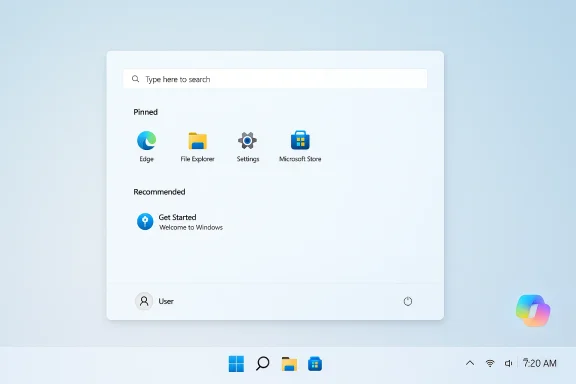
That architecture is especially visible in the Start menu, where recommendations can sit next to pinned apps and recent files. For a casual home user, that may not be a huge problem. For power users, administrators, and anyone managing multiple devices, though, it can feel like Microsoft is taking scarce screen space and spending it on monetization rather than utility.
For consumers, fewer ads would simply make the operating system feel more respectful. That is not a small thing. A desktop that does not constantly nudge users toward subscriptions or account sign-ins is easier to live with, easier to explain to family members, and easier to recommend to less technical buyers.
Businesses also tend to be wary of anything that changes the default behavior of onboarding and account flows. If Microsoft uses the same “calmer” language to make Windows more consumer-friendly without improving administrative controls, enterprise admins may not benefit much. But if the company pairs the visual cleanup with better policy enforcement, then the impact becomes more meaningful.
The biggest consumer win would be psychological. Windows 11 would feel less like a service funnel and more like a tool. In software design, that distinction is enormous, because a tool earns affection while a funnel earns tolerance.
Copilot is not just another app in Microsoft’s strategy; it is the company’s preferred interface layer for the next era of Windows. Microsoft has spent the past several years repositioning Windows around AI companion features, including system-level integration and broader visibility across the platform. That makes the promise of a cleaner UI somewhat ironic, because Copilot itself can become the new source of noise if Microsoft overcorrects elsewhere.
That said, Copilot could benefit from the calmer push if Microsoft makes it feel optional and contextually useful rather than omnipresent. A true assistant should surface when needed and stay out of the way otherwise. That philosophy would fit the company’s new messaging much better than the current “everywhere at once” style.
The taskbar issue is a perfect example. Microsoft has already faced criticism for limiting taskbar placement in Windows 11, and current Microsoft Q&A guidance still reflects that the taskbar is only officially supported at the bottom. That kind of rigidity is a small thing to the product team and a big thing to users who have spent years shaping their desktop around muscle memory.
There is a reason movable taskbar discussions recur so often: customization is not a luxury feature for many Windows users. It is part of how people build efficient workflows. When Microsoft removes flexibility, even in the name of simplification, it often creates frustration that dwarfs any benefit from a cleaner default design.
That is why reports about optimizing Windows for systems with 8GB of RAM matter. Millions of mainstream PCs still ship in that range, and performance complaints on those devices often define public perception more than benchmark charts do. If the OS feels sluggish, users will not credit Microsoft for making it prettier.
Microsoft also has a marketing incentive here. If Windows 11 can be presented as both cleaner and more efficient, that supports the company’s broader pitch for modern hardware and AI-capable PCs. But the more ambitious the pitch, the more important it becomes that the experience feels genuinely faster on everyday devices rather than just on flagship systems.
That does not mean Microsoft suddenly becomes a minimalism-first company. But even incremental improvements can alter perception. A less intrusive Windows shell helps defend the platform against the argument that the OS is becoming too commercial, too busy, or too self-referential.
For rivals, the change creates both pressure and opportunity. Pressure, because Microsoft may blunt one of the most common criticisms of Windows 11. Opportunity, because if the company only partially cleans things up, competitors can still argue that they offer a more respectful default experience.
What matters most is whether the company treats user attention as a finite resource. That would mean fewer interruptions, better defaults, and more respect for the fact that people do not install an operating system to be sold to by it. If Microsoft gets that right, Windows 11 could finally start to feel like a platform built for work first and promotion second.
Microsoft’s challenge is simple to state and hard to execute: make Windows feel calmer without making it weaker. If the company can do that, it may not just silence a complaint — it may also redefine what users expect from a modern desktop operating system.
Source: Tech Times Microsoft Plans 'Calmer' Windows 11 Update With Fewer Ads, Less Upselling, Cleaner UI
That matters because Windows is still the default computing layer for hundreds of millions of PCs, and every design choice carries outsized weight. A “calmer” Windows 11 could improve trust, reduce friction, and make the operating system feel more polished, but it also raises a hard question: can Microsoft soften the experience without giving up the commercial levers that have become deeply embedded in Windows?
 Background
Windows has always carried some degree of product promotion, but the balance changed significantly over the past decade as Microsoft leaned more heavily into subscriptions, cloud services, and AI. What used to be occasional suggestions became a broader pattern of prompts, recommendations, and account-based integration designed to move users toward Microsoft 365, OneDrive, Edge, Game Pass, and Copilot. In practice, that made Windows feel less like a neutral operating system and more like a distribution channel.Windows 11 amplified that tension because its design language is cleaner on the surface, which makes every insertion of promotional content feel more conspicuous. Microsoft documents show that Windows can personalize the Start menu, suggestions, and offers based on device and account data, and that Windows 11 settings can surface tips, ads, and recommendations in multiple places. The company even describes these as “personalized offers,” which is a polite term for a much broader upsell system embedded into the OS.
That creates a familiar modern software dilemma. Consumers often accept some amount of guidance if it is truly useful, but they push back when the guidance becomes repetitive, manipulative, or difficult to dismiss. Windows 11’s problem is not that it has recommendations; it is that the recommendations often arrive at the exact moments when users are trying to finish setup, switch tasks, or change a basic setting. That timing makes the interface feel interrupted rather than assisted.
Microsoft’s public messaging in 2025 and 2026 suggests it understands the pressure. The company has repeatedly positioned Copilot and related features as part of a more personal, more helpful Windows experience, but the backlash to aggressive surface-level promotion has clearly made its way back into product planning. The latest signals around a calmer Windows experience suggest that Microsoft is now trying to recover some goodwill without sacrificing the business model that helped normalize all of this in the first place.
What Microsoft Is Really Changing
The headline promise is straightforward: fewer ads, less upselling, and a cleaner UI. But the deeper change is more about tone than elimination. Microsoft appears to be acknowledging that the quantity and placement of promotional surfaces have become a product issue in their own right, not merely a marketing preference.Scott Hanselman’s reported description of a “calmer and more chill” Windows matches that idea well. The phrase is telling because it does not imply a complete purge of promotional elements. Instead, it suggests a deliberate reduction in friction, where ads and offers may still exist but are shown less often, less aggressively, and in fewer high-visibility locations.
The practical meaning of “calmer”
If Microsoft follows through, users should expect fewer interruptions during setup and fewer repeated recommendations in Settings, Start, and notification surfaces. That would be enough to make Windows feel noticeably less pushy, even if the company keeps some commercial content in the ecosystem. For many users, that alone would be an improvement because the current complaint is not the existence of offers, but their persistence.There is also a strategic benefit here. A calmer interface can make Windows 11 look more premium, more mature, and more coherent at a time when Microsoft is trying to position Windows as the best host for Copilot-era computing. A cleaner UX supports that narrative far better than a desktop covered in account reminders and upsell banners.
- Fewer interruptions during setup
- Reduced promotional density in Start and Settings
- Less repetition of Microsoft 365 and OneDrive nudges
- A more restrained visual tone across the shell
- Better alignment between OS polish and Microsoft’s premium branding
Why Windows 11 Ads Became a Problem
Microsoft did not stumble into this criticism by accident. The company built many of the controversial prompts into the operating system intentionally, and in some cases documents those experiences as featureful personalization. But the accumulation of these choices made the UX feel more crowded over time, especially for mainstream users who just want to start working.The most frustrating part for many users is that Windows 11 can feel like it is constantly negotiating on Microsoft’s behalf. A notification here, a Start recommendation there, a OneDrive setup reminder somewhere else — each one individually tolerable, but together they create an environment that feels like an endless sales funnel. That is a poor tradeoff for an OS whose primary job is to disappear into the background.
Where the clutter shows up
Microsoft’s support pages make clear that Windows and Edge can use browsing activity, account data, device usage data, and settings preferences to shape ads and recommendations. The company also documents suggested content in Settings and personalized offers in Windows, which means the behavior is not accidental or hidden. It is part of the product architecture.That architecture is especially visible in the Start menu, where recommendations can sit next to pinned apps and recent files. For a casual home user, that may not be a huge problem. For power users, administrators, and anyone managing multiple devices, though, it can feel like Microsoft is taking scarce screen space and spending it on monetization rather than utility.
- Start menu recommendations can crowd out user-pinned items
- Settings pages can surface account and subscription prompts
- Setup flows can steer users toward Microsoft services
- Edge and account data can feed personalized advertising systems
- Device usage settings can trigger tailored app and service suggestions
Enterprise vs Consumer Impact
A cleaner Windows 11 would land differently in consumer and enterprise environments, and that distinction matters. Home users generally care most about annoyance, while enterprises care about consistency, manageability, and the ability to lock down distractions across fleets of devices.For consumers, fewer ads would simply make the operating system feel more respectful. That is not a small thing. A desktop that does not constantly nudge users toward subscriptions or account sign-ins is easier to live with, easier to explain to family members, and easier to recommend to less technical buyers.
What businesses are likely to value
Enterprises are less interested in aesthetics and more interested in policy control. If Microsoft reduces the amount of built-in upsell content, IT departments gain a little breathing room because they will spend less time fielding complaints about user-facing prompts. That may not show up on a balance sheet, but it reduces support noise, which is often the hidden tax of a cluttered operating system.Businesses also tend to be wary of anything that changes the default behavior of onboarding and account flows. If Microsoft uses the same “calmer” language to make Windows more consumer-friendly without improving administrative controls, enterprise admins may not benefit much. But if the company pairs the visual cleanup with better policy enforcement, then the impact becomes more meaningful.
Consumer priorities are different
Consumers will likely judge the update on visible changes. Did the Start menu stop nagging? Are notifications less promotional? Is setup more straightforward? Those are easy questions to answer, which means Microsoft will get immediate feedback whether the effort worked.The biggest consumer win would be psychological. Windows 11 would feel less like a service funnel and more like a tool. In software design, that distinction is enormous, because a tool earns affection while a funnel earns tolerance.
- Consumers want fewer interruptions
- Enterprises want fewer support tickets
- Consumers judge by feel and visibility
- Enterprises judge by policy control and predictability
- Both groups benefit from lower distraction, but for different reasons
The Copilot Factor
The timing of this shift is notable because Microsoft is simultaneously trying to make Copilot more central to the Windows experience. That creates a tension the company will have to manage carefully: if users are tired of being upsold, they may also be wary of AI features that appear to be promoted too aggressively.Copilot is not just another app in Microsoft’s strategy; it is the company’s preferred interface layer for the next era of Windows. Microsoft has spent the past several years repositioning Windows around AI companion features, including system-level integration and broader visibility across the platform. That makes the promise of a cleaner UI somewhat ironic, because Copilot itself can become the new source of noise if Microsoft overcorrects elsewhere.
Less clutter, or just new clutter?
If Microsoft reduces classic ad placements while increasing Copilot prompts, the net effect may disappoint users. A cleaner Start menu means little if the OS simply replaces one form of upselling with another, especially if the prompts are tied to AI sign-ins, cloud features, or premium subscriptions. Users can tell the difference between a helpful assistant and a relabeled sales pitch.That said, Copilot could benefit from the calmer push if Microsoft makes it feel optional and contextually useful rather than omnipresent. A true assistant should surface when needed and stay out of the way otherwise. That philosophy would fit the company’s new messaging much better than the current “everywhere at once” style.
- Copilot should feel useful, not obligatory
- AI prompts should be contextual rather than repetitive
- The cleaner UI should not become a Trojan horse for new upsells
- Optional features work better than forced attention grabs
- Microsoft’s credibility depends on restraint
Taskbar, Setup, and the UI Wishlist
The reported discussion around a movable taskbar, easier setup, and lower-friction account requirements shows that users want more than fewer ads. They want Microsoft to revisit the structural choices that made Windows 11 feel less flexible than Windows 10 in the first place.The taskbar issue is a perfect example. Microsoft has already faced criticism for limiting taskbar placement in Windows 11, and current Microsoft Q&A guidance still reflects that the taskbar is only officially supported at the bottom. That kind of rigidity is a small thing to the product team and a big thing to users who have spent years shaping their desktop around muscle memory.
Usability is more than visual cleanup
A calmer OS should not just hide ads. It should also reduce the number of arbitrary constraints that force users to adapt to the operating system instead of the other way around. That means easier setup flows, fewer account wall interruptions, and better support for long-standing layout preferences.There is a reason movable taskbar discussions recur so often: customization is not a luxury feature for many Windows users. It is part of how people build efficient workflows. When Microsoft removes flexibility, even in the name of simplification, it often creates frustration that dwarfs any benefit from a cleaner default design.
- Movable taskbar support remains a high-demand request
- Setup should require fewer forced choices
- Account sign-in should be easier to defer when appropriate
- Power users value control as much as polish
- Simplification should not mean limitation
Performance and Device Reality
The promise of a smoother Windows experience also depends on performance. A quieter interface is only part of the equation if the system still feels heavy on modest hardware. Microsoft has already documented Windows 11 experiences around device usage and recommendations, and those same mechanisms can create a sense that the OS is doing too much in the background.That is why reports about optimizing Windows for systems with 8GB of RAM matter. Millions of mainstream PCs still ship in that range, and performance complaints on those devices often define public perception more than benchmark charts do. If the OS feels sluggish, users will not credit Microsoft for making it prettier.
Why lighter feels smarter
A calmer UI works best when paired with better responsiveness. Lower visual noise, fewer background prompts, and less resource drag all contribute to the impression that Windows is getting out of the way. In contrast, a beautiful interface that hesitates, stutters, or interrupts itself feels unfinished.Microsoft also has a marketing incentive here. If Windows 11 can be presented as both cleaner and more efficient, that supports the company’s broader pitch for modern hardware and AI-capable PCs. But the more ambitious the pitch, the more important it becomes that the experience feels genuinely faster on everyday devices rather than just on flagship systems.
- Better responsiveness matters as much as UI cleanup
- 8GB RAM remains a key mainstream baseline
- Background services should be less visible to users
- Performance gains are easier to notice than branding claims
- Hardware diversity makes optimization crucial
What This Means for Windows Rivalry
Any move to reduce ads and upselling also has competitive implications. Apple and ChromeOS both benefit when Windows looks cluttered, because simplicity becomes part of their value proposition. If Microsoft can honestly say Windows 11 is more restrained, it closes one of the emotional gaps that rivals have exploited for years.That does not mean Microsoft suddenly becomes a minimalism-first company. But even incremental improvements can alter perception. A less intrusive Windows shell helps defend the platform against the argument that the OS is becoming too commercial, too busy, or too self-referential.
The market signal
There is also a broader industry signal here. Operating systems are increasingly expected to be services platforms, but users are becoming less tolerant of that model when it bleeds into the core interface. Microsoft is not alone in this, yet it is one of the few companies large enough to change the standard if it chooses to. In that sense, a quieter Windows could influence expectations beyond Redmond.For rivals, the change creates both pressure and opportunity. Pressure, because Microsoft may blunt one of the most common criticisms of Windows 11. Opportunity, because if the company only partially cleans things up, competitors can still argue that they offer a more respectful default experience.
- Microsoft can narrow the usability gap with simpler platforms
- Rival operating systems may lose a key talking point
- The industry may reinterpret “service integration” standards
- User tolerance for OS-level promotion is declining
- Small interface wins can have large brand effects
Strengths and Opportunities
There is a real upside to this approach if Microsoft executes it with discipline. A calmer Windows 11 could improve satisfaction, reduce user resentment, and make the OS feel more mature at a time when platform trust matters more than ever. It also gives Microsoft a way to keep monetization alive while appearing to listen to feedback, which is often how large platforms evolve in practice.- Better user trust if promotional surfaces become less aggressive
- Cleaner first impressions for new Windows 11 users
- Lower support burden for IT teams and family administrators
- More premium feel that matches Microsoft’s design language
- Stronger Copilot positioning if AI feels additive rather than pushy
- Reduced backlash around Start, Settings, and setup prompts
- Room to improve performance alongside UX simplification
Risks and Concerns
The biggest risk is that Microsoft only trims the most visible annoyances while leaving the deeper monetization structure intact. If that happens, users will quickly realize that the company changed the packaging rather than the philosophy. That kind of half-step often buys time, not loyalty.- Cosmetic change without substance would disappoint users
- Copilot overload could replace old upsells with new ones
- Enterprise admins may see little benefit without stronger controls
- Revenue pressure could tempt Microsoft to re-expand prompts later
- Users may remain skeptical because the company has a history of aggressive promotion
- Performance promises may matter more than visual cleanup if hardware still feels taxed
- Customization gaps like taskbar limitations could overshadow ad reductions
Looking Ahead
The next few Windows 11 releases will tell us whether this is a genuine philosophical shift or just a temporary response to criticism. If Microsoft meaningfully reduces intrusive ads, loosens some UX restrictions, and stops overusing setup and Settings for upsells, the company could reclaim a more user-friendly reputation. If not, the “calmer” language will become another example of Microsoft saying the right thing while preserving the same incentives underneath.What matters most is whether the company treats user attention as a finite resource. That would mean fewer interruptions, better defaults, and more respect for the fact that people do not install an operating system to be sold to by it. If Microsoft gets that right, Windows 11 could finally start to feel like a platform built for work first and promotion second.
- Reduced Start menu recommendations
- Fewer pop-up ads and account nudges
- More control over setup and personalization
- Better taskbar flexibility, if Microsoft listens
- Cleaner Copilot integration with less coercion
Microsoft’s challenge is simple to state and hard to execute: make Windows feel calmer without making it weaker. If the company can do that, it may not just silence a complaint — it may also redefine what users expect from a modern desktop operating system.
Source: Tech Times Microsoft Plans 'Calmer' Windows 11 Update With Fewer Ads, Less Upselling, Cleaner UI
Last edited:
