

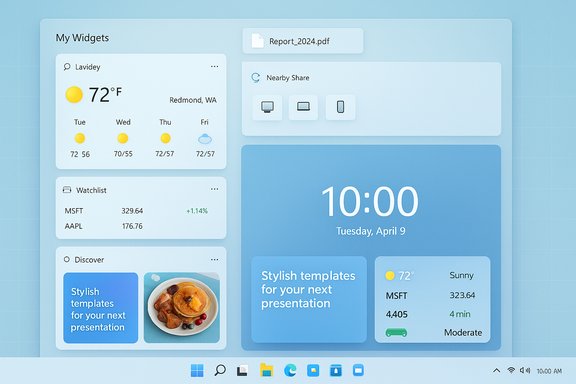
Microsoft’s latest Canary build for Windows Insiders, reported as Build 27982, continues the steady stream of UI and usability experiments in Windows 11 by expanding lock screen personalization, reworking the Widgets board with multiple dashboards and new left-side navigation, and bringing an evolved file-sharing workflow via a drag-to-share tray — changes that aim to make common tasks faster but also raise fresh questions about discoverability, workflow interference, and enterprise controls.
Windows Insider channels have long been Microsoft’s sandbox for interface experiments, API trials, and early previews of consumer-facing features. The Canary Channel in particular is where Microsoft flights very new platform work that may never ship as-is, so features there are often incomplete, server-gated, or rolled out in A/B fashion to gather telemetry and feedback before any broader release. This means experiences seen by some Insiders can differ from what others see, and behavior can change quickly as flags and server-side toggles are adjusted. What’s new in the 27xxx series (the set of Canary builds Microsoft has been iterating on throughout 2025) has tended to focus on refinements to the user surface — the bits people touch every day — rather than deep kernel changes. The recent feature experiments emphasize personalization and frictionless sharing: more flexible lock screen widgets, multiple widgets dashboards in the Widgets board, and a drag tray that surfaces sharing targets as you drag files. These are usability-first changes designed to reduce steps for the most common tasks.
Limitations and admin controls: Microsoft also added a group policy that lets administrators disable Widgets on the Lock Screen without turning off widgets everywhere — a sign the company is aware of enterprise and privacy concerns. That policy is accessible via the Local Group Policy Editor under Computer Configuration → Administrative Templates → Windows Components → Widgets.
These changes are being rolled out as a mix of client updates and server-driven switches: Microsoft’s developer documentation and multiple outlet reports show that the Widgets host now supports dashboards and programmatic widget hosting for PWAs, and that a left-hand navigation model is part of the updated visual design. The idea is to make Widgets act more like a modular, home-screen-like surface where you can create areas for productivity widgets separate from news and curated content. User-facing benefits include:
The concept — drag a file, point it at the app you want to use, drop — mimics smartphone sharing flows and aims to reduce the number of clicks to move content between apps. This has been visible in Insider flights for a while and was first widely documented when tinkerers and journalists discovered the feature and methods to enable it (including via Vivetool flags for early access). Importantly, Microsoft has been rolling the Drag Tray through multiple builds and channels, tuning how many apps it shows and whether it supports multi-file drags. Practical details:
At the same time, these conveniences present legitimate trade-offs. The drag tray’s intercept of drag gestures can conflict with existing workflows, lock screen widgets can leak information on unattended screens, and the staged Canary rollout model means support and documentation will lag what users see on-device. Administrators and power users should weigh these trade-offs and make use of the group policy controls and testing channels Microsoft provides.
If you run Canary builds and enjoy trying new workflows, these features are worth experimenting with — but do so on non-critical hardware and be prepared to roll back if compatibility or workflow interference appears. For the broader Windows 11 user base, expect these changes to become more polished and potentially opt-in before they reach stable channels. In the meantime, those evaluating whether the Windows 11 desktop is getting more usable will find in these refinements both smart ideas and reminders that subtle desktop gestures still demand careful tuning.
Conclusion
Windows 11’s iterative improvements to lock screen personalization, Widgets, and file sharing demonstrate Microsoft’s continuing push to blend convenience with control. The practical benefits are clear: faster sharing, cleaner widget management, and richer developer support for widget-style functionality. The risks are manageable but real: accidental triggers, privacy exposure, and enterprise policy overlap. As these features make their way from Canary experiments to wider availability, the balance between discoverability and user control will determine whether they become welcome enhancements or nuisance features.
Source: Neowin Windows 11 gets customizable lock screen, widgets improvements, and more in build 27982
 Background
Windows Insider channels have long been Microsoft’s sandbox for interface experiments, API trials, and early previews of consumer-facing features. The Canary Channel in particular is where Microsoft flights very new platform work that may never ship as-is, so features there are often incomplete, server-gated, or rolled out in A/B fashion to gather telemetry and feedback before any broader release. This means experiences seen by some Insiders can differ from what others see, and behavior can change quickly as flags and server-side toggles are adjusted. What’s new in the 27xxx series (the set of Canary builds Microsoft has been iterating on throughout 2025) has tended to focus on refinements to the user surface — the bits people touch every day — rather than deep kernel changes. The recent feature experiments emphasize personalization and frictionless sharing: more flexible lock screen widgets, multiple widgets dashboards in the Widgets board, and a drag tray that surfaces sharing targets as you drag files. These are usability-first changes designed to reduce steps for the most common tasks. What Build 27982 reportedly adds
The Neowin summary of Build 27982 describes three headline changes: lock screen widget customization, Widgets board improvements (multiple dashboards and left-side navigation), and the drag-to-share tray. Those items fit into a clear theme: surface the things you care about earlier and make passing content between apps easier. Independent reporting and prior Insider blog entries show the pieces of this story have been in motion for months, with Microsoft gradually expanding availability and surfacing new controls. Because Canary rollouts can be staged, not every Insider will see all parts of this experience immediately.Lock screen: choose the widgets you want
The most obvious user-facing change is the lock screen’s widget controls. Where the setting used to be labeled “Weather and more,” Microsoft has been rolling out the ability to add, remove, and reorder individual lock screen widgets (Weather, Watchlist, Sports, Traffic, etc.. This is surfaced in Settings → Personalization → Lock screen and applies to widgets that support the small sizing option. Microsoft previously introduced this customization in Beta and Dev rollouts and later broadened availability; Build 27982 appears to continue that push into the Canary Channel. Why this matters: the old approach was all-or-nothing — you enabled “Weather and more” and got whatever Microsoft decided to show. Allowing users to curate the lock screen reduces noise, helps conserve screen real-estate on smaller devices, and can reduce unwanted network calls for content you don’t want to see.Limitations and admin controls: Microsoft also added a group policy that lets administrators disable Widgets on the Lock Screen without turning off widgets everywhere — a sign the company is aware of enterprise and privacy concerns. That policy is accessible via the Local Group Policy Editor under Computer Configuration → Administrative Templates → Windows Components → Widgets.
Widgets board: multiple dashboards and left-side navigation
The Widgets board is getting a multi-dashboard makeover. Instead of one static feed, Widgets will support separate dashboards (for example, a dedicated “My Widgets” dashboard and a separate Discover/Feed dashboard), and a left-side navigation bar makes switching between those contexts faster and clearer.These changes are being rolled out as a mix of client updates and server-driven switches: Microsoft’s developer documentation and multiple outlet reports show that the Widgets host now supports dashboards and programmatic widget hosting for PWAs, and that a left-hand navigation model is part of the updated visual design. The idea is to make Widgets act more like a modular, home-screen-like surface where you can create areas for productivity widgets separate from news and curated content. User-facing benefits include:
- More space for favored widgets (calendar, tasks, trackers) without mixing in news articles.
- Easier discovery of additional dashboards or feeds.
- Better separation between utility widgets and content feeds (news, Discover).
Sharing: drag-to-share tray at the top of the screen
On the sharing front, Build 27982 reportedly includes the now-familiar “drag tray” (also called the Drag Tray or Share Drag Tray) that appears when you start dragging a file from File Explorer or the Desktop toward the top of the screen. The tray surfaces a short list of app targets and a More… option that opens the full Windows share UI.The concept — drag a file, point it at the app you want to use, drop — mimics smartphone sharing flows and aims to reduce the number of clicks to move content between apps. This has been visible in Insider flights for a while and was first widely documented when tinkerers and journalists discovered the feature and methods to enable it (including via Vivetool flags for early access). Importantly, Microsoft has been rolling the Drag Tray through multiple builds and channels, tuning how many apps it shows and whether it supports multi-file drags. Practical details:
- The drag tray is triggered by dragging a local file from File Explorer or the Desktop.
- It appears near the top of the desktop and shows a small selection of likely targets.
- Choosing More… opens the full Windows share sheet, where Nearby Share and other targets are available.
- The tray supports touch drags and is progressively being refined (multi-file sharing, move-to-folder, etc., have been added to later builds).
Verified technical details and where they came from
Because Canary builds are experimental, it’s important to cross-check claims against multiple sources. The lock screen widget customization and the new Widgets dashboards are documented by Microsoft in Insider blog posts and feature notes that first appeared across Beta and Dev releases, and then expanded to the Canary Channel in subsequent flights. The exact Settings path for lock screen widgets is Settings → Personalization → Lock screen, and the group policy to disable lock screen widgets for managed devices is real — both are present in Microsoft’s Insider notes. The Drag Tray has been independently documented by multiple press outlets and community researchers. Journalists at XDA and Tom’s Hardware captured the behavior, showed the Vivetool flags used to expose the feature in early builds, and reported on server-side gating and subsequent refinements (multi-file sharing, move-to-folder, and on/off toggles in Settings). Community forums and how-to sites later documented registry keys and other methods to disable or adjust the feature for users who found it intrusive. Because the drag tray is a UX surface that directly intercepts drag gestures, those community conversations are a valuable source of practical experience. Important note on build-level confirmation: while multiple independent outlets and Microsoft’s earlier Insider posts confirm each of the three feature categories described above, a formal Windows Insider blog post specifically titled “Announcing Build 27982” was not found in public Microsoft blog listings at the time of writing. That doesn’t mean the build and features aren’t rolling out — Canary updates are often accompanied by shorter announcements, staged flights, or channel-only release notes — but it does mean that the most authoritative, canonical public Microsoft blog item for that exact build number wasn’t available to cite. Treat references to “Build 27982” as a current Canary-channel report that reflects feature trends Microsoft has been rolling out across multiple builds.What’s fixed and known issues (practical summary)
Reported fixes in the early notes for recent Canary flights (and echoed in independent reporting) address a mix of app hangs, IME-related freezes, and some gaming crashes on Arm64 devices. Canary updates have also included multiple UI-related fixes — for example, rendering issues in multiline text boxes and stability improvements when machines run without reboot for long periods. Known issues often include Start menu scrolling oddities and sleep/shutdown oddities for some configurations; that’s expected in the Canary channel, where sanity checks are intentionally lenient to make room for fast iteration. Because these lists move quickly, users participating in the Canary Channel should always read the build-specific notes in the Feedback Hub and the Windows Insider blog for the latest fixes and advisories. If you depend on a stable system for work, consider Dev/Beta channels or avoid Canary altogether.Deep analysis: strengths, trade-offs, and risks
Strengths — practical gains for everyday workflows
- Reduced friction for common tasks. Letting users place important widgets directly on the lock screen and enabling drag-to-share removes several taps or clicks from everyday flows like sharing photos or glancing at the weather.
- Better personal organization. Multiple Widgets dashboards let users separate tools (calendar, tasks, note widgets) from consumption (news/discover feeds), improving focus and reducing cognitive load.
- Developer extensibility. The Widgets host increasingly supports PWAs and WinAppSDK-based widgets, giving web developers a clear path into the Widgets ecosystem and enabling enterprise PWAs to surface lightweight functionality.
Risks and usability friction
- Accidental triggers and workflow interruptions. The drag tray’s placement at the top of the screen can interfere with normal drag-and-drop tasks — for example, dragging a file into a floating app window or a docked canvas. Community feedback shows some users find the tray intrusive, and several have sought registry toggles or Vivetool flags to disable it. This is a classic trade-off where a feature designed to speed simple sharing can slow complex drag interactions.
- Privacy and lock screen exposure. Lock screen personalization is convenient, but any content surfaced there is visible to whoever can physically see your screen. Microsoft’s group policy to disable lock screen widgets alleviates some enterprise concerns, but end users and admins must still consider whether showing finance or watchlist snippets on an unattended device is acceptable.
- Discoverability vs. control. Server-driven rollouts can mean inconsistent experiences across devices: one Insider sees a new dashboard while another does not. That variability complicates writing documentation or advising non-technical users and can make troubleshooting confusing for support teams.
- Accessibility considerations. New UI metaphors like drag trays must be keyboard- and assistive-technology-friendly. Reports so far focus on mouse and touch; formal accessibility documentation and keyboard equivalents are still being refined or observed in the field.
Security implications
- The drag tray integrates with the Windows sharing surface, which means any misconfiguration in Nearby Share or file association could surface unexpected targets. Enterprises should validate that sharing endpoints exposed by the tray obey organizational data-handling policies. The presence of Group Policy controls for lock screen widgets is a positive sign that Microsoft is considering policy management, but administrators should monitor how the drag tray interacts with existing DLP (Data Loss Prevention) and sharing governance.
How to test or enable the features today (for Insiders and enthusiasts)
Because these features are frequently gated, there are two practical paths to try them:- Join the Windows Insider Program and set your device to the Canary Channel (under Settings → Windows Update → Windows Insider Program). Be prepared for instability.
- If a feature is hidden but present in a build you have, community tools like ViVeTool have historically been used to expose flags (for testing purposes only). For the drag tray, early Vivetool flags documented in the press included ids such as 45624564 and 53397005; enabling those flags required a restart to take effect. This approach carries risk and is not supported by Microsoft; it’s intended for experienced testers only.
- Open Settings → Personalization → Lock screen.
- Look for the “Your widgets” or a similar widgets toggle and a list of available small widgets.
- Add, remove, or reorder as desired.
- Select a file from File Explorer or the Desktop.
- Drag the file upward toward the top edge of the screen and pause; a tray should appear if the feature is active.
- Drop the file onto an app target in the tray or choose More… to open the full share sheet.
Enterprise considerations
- Policy controls: Administrators have a Group Policy to disable Widgets on the Lock Screen without disabling widgets overall — useful for managed devices in public spaces or shared kiosks. IT teams should test these policies in a lab before broad deployment.
- DLP and sharing governance: The drag tray elevates common sharing destinations to the foreground. Organizations using DLP solutions or conditional access policies should validate how the drag tray interacts with those controls and whether the tray can surface blocked targets.
- Rollout strategy: Because features may be server-gated and A/B tested, IT teams should track Insider channel notes and Flight Hub entries for their tenant and consider pilot populations before broad adoption.
Final assessment
Build 27982 — as reported across community and tech outlets — is part of a coherent UX direction: make everyday tasks faster, more discoverable, and more contextual. Allowing users to curate lock screen widgets and to split the Widgets host into multiple dashboards are clear, positive steps toward a less cluttered, more useful glance experience. The drag tray brings a smartphone-like sharing paradigm to the desktop, which will delight many casual users and reduce friction for simple share flows.At the same time, these conveniences present legitimate trade-offs. The drag tray’s intercept of drag gestures can conflict with existing workflows, lock screen widgets can leak information on unattended screens, and the staged Canary rollout model means support and documentation will lag what users see on-device. Administrators and power users should weigh these trade-offs and make use of the group policy controls and testing channels Microsoft provides.
If you run Canary builds and enjoy trying new workflows, these features are worth experimenting with — but do so on non-critical hardware and be prepared to roll back if compatibility or workflow interference appears. For the broader Windows 11 user base, expect these changes to become more polished and potentially opt-in before they reach stable channels. In the meantime, those evaluating whether the Windows 11 desktop is getting more usable will find in these refinements both smart ideas and reminders that subtle desktop gestures still demand careful tuning.
Conclusion
Windows 11’s iterative improvements to lock screen personalization, Widgets, and file sharing demonstrate Microsoft’s continuing push to blend convenience with control. The practical benefits are clear: faster sharing, cleaner widget management, and richer developer support for widget-style functionality. The risks are manageable but real: accidental triggers, privacy exposure, and enterprise policy overlap. As these features make their way from Canary experiments to wider availability, the balance between discoverability and user control will determine whether they become welcome enhancements or nuisance features.
Source: Neowin Windows 11 gets customizable lock screen, widgets improvements, and more in build 27982
