

Microsoft released a small but focused Canary-channel maintenance flight today — Windows 11 Insider Preview Build 28020.1371 (KB5073097) — that addresses a handful of high‑feedback UI and stability issues in Start, File Explorer, input settings and an elevated Windows Terminal hang, while calling out a cosmetic watermark mismatch as a known issue.
Canary is Microsoft’s earliest Insider ring: a rapid testbed for platform plumbing, silicon enablement and experimental UX changes that may never ship broadly. The current Canary build series surfaces the visible OS version Windows 11, version 26H1, which Microsoft has repeatedly described as a platform enablement branch rather than a conventional consumer feature update for the 25H2 servicing baseline. That means many Canary changes focus on kernel/driver/runtime compatibility for specific hardware and are staged behind server-side feature flags. This flight is intentionally small: the public notes list six corrective items and a single cosmetic known issue. The changes are surgical rather than feature‑driven, targeting high‑volume pain points Insiders reported after prior Canary flights. The release is packaged as KB5073097 and bumps eligible Canary systems to Build 28020.1371.
Be mindful of a key operational point: Canary builds frequently deploy features via server‑side gating (Control Feature Rollout). Installing a Canary build does not guarantee exposure to every experimental change; many features are enabled only for subsets of Insiders while Microsoft observes telemetry. That makes symptom‑based testing more useful than build‑number checking alone.
Source: Windows Report https://windowsreport.com/kb5073097...releases-with-start-menu-file-explorer-fixes/
 Background
Canary is Microsoft’s earliest Insider ring: a rapid testbed for platform plumbing, silicon enablement and experimental UX changes that may never ship broadly. The current Canary build series surfaces the visible OS version Windows 11, version 26H1, which Microsoft has repeatedly described as a platform enablement branch rather than a conventional consumer feature update for the 25H2 servicing baseline. That means many Canary changes focus on kernel/driver/runtime compatibility for specific hardware and are staged behind server-side feature flags. This flight is intentionally small: the public notes list six corrective items and a single cosmetic known issue. The changes are surgical rather than feature‑driven, targeting high‑volume pain points Insiders reported after prior Canary flights. The release is packaged as KB5073097 and bumps eligible Canary systems to Build 28020.1371. What Microsoft shipped in Build 28020.1371 (KB5073097)
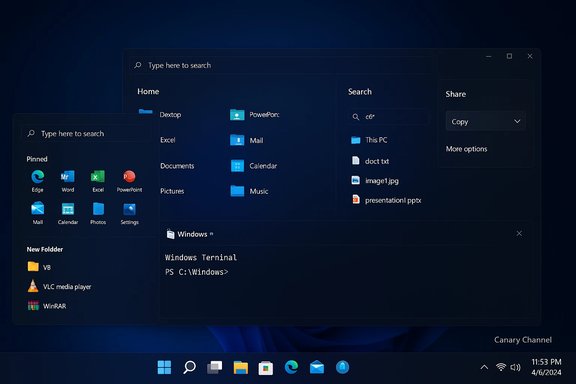
At a glance the flight notes list the following fixes:- Start menu: fixed an issue where selecting an item in a folder of pinned Start items could cause the entire folder to become invisible.
- File Explorer: fixed a white flash that could appear when navigating between pages for some Insiders after the prior flight.
- Input (Keyboard): fixed an inversion where the keyboard character repeat delay shown in Settings did not match the backend setting.
- Windows Terminal: fixed a root cause that could freeze a PC when attempting to run Windows Terminal elevated from a non‑admin account.
- Share dialog: removed an incorrect Share target entry that pointed at Shell Experience Host.
- Known issue: the desktop watermark can show the wrong build number (cosmetic).
Deep dive: Start menu pinned‑folder invisibility
Symptom and user impact
Insiders reported that after interacting with a pinned folder in Start (for example, opening the folder and launching an app inside), the folder could become invisible even though the pinned items still existed in the layout data. That creates an impression of lost pins and drives repeated re‑pinning and support requests. For daily users who rely on pinned Start items for fast access, discoverability of apps is critically affected.Likely cause and technical analysis
The behavior is consistent with a UI state‑management race or layout invalidation bug: the pinned‑folder component either fails to redraw or an internal visibility flag gets flipped after a selection event. Complex shell components often have race windows between input handling, layout recalculation and model updates; a small change in the redraw gating or input event ordering can make UI elements appear to vanish. Because this is a render/state issue, the fix is probably localized to the Start shell’s compositor or the pinned folder control’s state transitions.Risk and validation
This is low‑risk from a kernel or security standpoint but high in perceived reliability and user frustration. Insiders should validate the fix by creating or locating a pinned folder, launching an item inside it repeatedly, and verifying the folder remains visible across sessions. If pins still appear missing, sign out or reboot to force a UI refresh and file detailed repro steps with screenshots via Feedback Hub.Deep dive: File Explorer white flash
Symptom and user impact
Some Insiders observed a bright white flash when moving between File Explorer pages (for example, Home to Search or changing tabs) after a previous Canary flight. The effect is non‑destructive but jarring and potentially accessibility‑unfriendly for users sensitive to flashes.Likely cause and technical analysis
This class of artifact typically points to a render‑state or theme composition regression: an interim background (white) renders before the final themed UI surface completes, or an animation/timing mismatch displays an out‑of‑order frame. Dark‑mode coverage and theme transitions are frequent culprits because unfinished themed brushes can momentarily fall back to defaults during page swaps. The fix likely ensures the themed background is ready before swapping in content or corrects the composition order.Risk and validation
The change is cosmetic and low risk for system stability, but it matters for polish and accessibility. Test across light/dark themes, multiple displays and mixed‑DPI setups. Capture short video repros when possible to attach to Feedback Hub entries so telemetry can be correlated with visual traces.Deep dive: Input (keyboard character repeat delay inversion)
Symptom and user impact
The slider or control under Settings > Bluetooth & devices > Keyboard could display a delay value that was inverted relative to the backend behavior (for example, a UI selection labeled “short delay” producing a longer repeat interval). This discrepancy breaks user trust in settings and causes confusion when troubleshooting typing or game sensitivity issues.Likely cause and technical analysis
This is a classic front‑end / back‑end mapping error: a unit mismatch, enumeration inversion or incorrect value translation between the Settings UI and the input subsystem API. The fix probably corrects the translation logic so UI values align with system behavior. Because the change only corrects a mapping, risk to system stability is low; however, validate across range values and after sign‑in to ensure persisted preferences match runtime behavior.Deep dive: Windows Terminal elevation freeze (from non‑admin account)
Symptom and user impact
Attempting to run Windows Terminal elevated (Run as Administrator) from a non‑admin account could freeze the PC. A freeze is a severe stability issue — it can require a hard reset and risk data loss. Microsoft identifies this as a root cause fix in KB5073097.Likely cause and technical analysis
Elevation involves several moving parts: UAC handoff, token creation, session switching, and communication between parent and child processes. A deadlock or a problematic interaction with credential providers, third‑party security hooks, or Terminal’s process model could lead to hangs. The fix likely hardens the elevation handshake and guards against the deadlock state. Because this touches elevation and process creation, the patch requires careful validation across different corporate configurations and machines that use custom sign‑in or credential providers.Risk and validation
This is the highest‑risk fix in the flight because it addresses a freeze. Insiders and IT teams should:- Test elevation of Windows Terminal from non‑admin accounts in a controlled lab environment.
- Reproduce with common third‑party security agents installed (AV, credential provider tools).
- Ensure data is backed up before testing on production or critical devices.
Deep dive: Share dialog showing Shell Experience Host
The Share dialog erroneously presented Shell Experience Host as a share target — a system component not intended for general content sharing. This is mostly a cosmetic/UX bug but confusing for users. Microsoft removed the spurious share option in this flight.Known issue: desktop watermark shows wrong build number
Microsoft flagged a cosmetic known issue where the desktop watermark displays an incorrect build number for some Insiders. This is visual only and does not affect functionality, but it’s an example of the kinds of minor regressions that can accompany rapid Canary flighting.Platform context: why 26H1 and what it means for Insiders
Multiple community trackers and reporting summarize the larger Canary context: the visible version jump to 26H1 is primarily a platform baseline — often referred to internally and in reporting as a Bromine‑class branch — intended to enable next‑generation silicon (notably high‑end Arm/NPU designs such as Qualcomm’s Snapdragon families). Microsoft’s messaging has emphasized that 26H1 is not a consumer feature update for the 25H2 servicing branch and is focused on under‑the‑hood work that can’t be safely backported to the mainstream servicing stream. Canary remains the experimental lane where such plumbing is validated alongside selected UX experiments.Be mindful of a key operational point: Canary builds frequently deploy features via server‑side gating (Control Feature Rollout). Installing a Canary build does not guarantee exposure to every experimental change; many features are enabled only for subsets of Insiders while Microsoft observes telemetry. That makes symptom‑based testing more useful than build‑number checking alone.
Cross‑verification and reliability of claims
The load‑bearing claims in Microsoft’s public notes — the build number (28020.1371), KB identifier (KB5073097), and the listed fixes — are confirmed by the Windows Insider Blog entry announcing the flight and by multiple independent community trackers and technical outlets that captured and expanded the same notes. Use the Windows Insider Blog as the authoritative changelog; community pieces provide context and reproduction guidance. A few claims reported elsewhere — for example, that Windows 11 version 26H1 will first ship on Snapdragon X2 PCs “this spring” — remain community reporting and are not an explicit shipping commitment in the official Canary notes. Treat such deployment timing and OEM‑first statements as plausible industry reporting until confirmed by Microsoft or the OEM. Flag any such timing as speculative in internal planning.Practical guidance: testing, rollout and risk controls
For Insiders- If you rely on your device for daily work, avoid installing Canary builds on production machines.
- Back up data before enrolling and test in a lab or VM where possible.
- Use Feedback Hub to file actionable repro steps (include screenshots, videos and ETW traces for freezes/hangs).
- Verify fixes manually:
- Start menu: open pinned folders, launch contained apps, and confirm folder visibility.
- File Explorer: switch between Home/Search/This PC and record transitions in both light and dark themes.
- Keyboard repeat: change repeat delay in Settings and confirm the observed repeat rate in a text editor.
- Windows Terminal: attempt elevation from a non‑admin account in a controlled test environment and observe for hangs.
- Keep Canary confined to test devices and imaging labs.
- Focus pilot testing on the Windows Terminal elevation scenario due to the freeze risk; gather minidumps and event logs when reproing hangs.
- Consider a targeted pilot with machines that mirror your production credential provider and security stack (third‑party AV, SSO hooks).
- Do not use Canary as a proxy for mainstream servicing updates — 26H1 changes are platform‑level and may not reflect what will appear on broadly serviced devices.
- Enroll the test device in the Windows Insider Program (Canary channel).
- Run Windows Update and install KB5073097 when offered.
- Confirm build via winver (should show Build 28020.1371).
- Execute the validation steps above and capture logs for anomalies.
- Report any unlisted regressions to Feedback Hub with diagnostic data.
Strengths of this flight
- Targeted fixes for high‑signal problems. The release addresses usability regressions and a severe elevation hang; both are high‑value fixes for day‑to‑day usability and stability.
- Low surface area. Because this is not a broad feature push, the limited scope reduces the chance of introducing unrelated regressions.
- Transparency in Canary’s remit. Microsoft continues to call out that Canary is platform‑first and often device‑gated; that helps Insiders and enterprises calibrate expectations.
Risks and remaining concerns
- Elevation hang sensitivity. Fixing freezes related to elevation touches privileged flows and can interact with enterprise hooks; thorough validation is essential.
- Server‑side gating causes testing blind spots. Installing the build may not surface gate‑hidden features; tests that rely on feature exposure can produce false negatives. Insiders must focus on reproducible symptoms rather than assuming feature presence by build number.
- Speculative supply‑chain timing. Industry reporting about OEM‑first rollouts (for example, Snapdragon X2 PCs receiving 26H1 earlier) remains unconfirmed in Microsoft’s public notes and should not be treated as definitive. Flag these items as unverified when planning.
Bottom line for Windows power users and admins
KB5073097 (Build 28020.1371) is a focused Canary maintenance flight that cleans up visible UX regressions and eliminates a serious Windows Terminal elevation freeze. For Insiders who encountered the pinned‑folder or Explorer flash issues, this flight delivers meaningful pain relief. Enterprises and IT pros should restrict Canary to test labs, prioritize validation of the Terminal elevation fix, and treat the 26H1 label as a platform‑enablement signal rather than a mainstream feature release. Use the Windows Insider Blog as the authoritative changelog and submit detailed Feedback Hub reports for any lingering or new regressions.Quick reference — actions and tests (copyable)
- Enroll a test machine in Windows Insider → Canary.
- Install KB5073097 via Settings → Windows Update (or pick up the patch if offered).
- Verify winver shows Build 28020.1371.
- Validate fixes:
- Start: open a pinned folder, launch items, confirm visibility.
- Explorer: navigate Home ↔ Search ↔ This PC repeatedly in light/dark themes; record any flashes.
- Keyboard: change repeat delay and verify actual behavior in Notepad.
- Terminal: attempt elevation from a non‑admin account in a sandboxed test VM.
- Collect logs: Feedback Hub entry + event logs + screenshots/video; attach ETW/minidumps for freezes.
- If you rely on production systems, don’t apply Canary builds to critical devices.
Source: Windows Report https://windowsreport.com/kb5073097...releases-with-start-menu-file-explorer-fixes/
