A Windows 11 storage bug tied to the Capability Access Manager database can cause the
Microsoft did not announce a dramatic storage-corruption crisis. It wrote, in the understated dialect of Windows servicing, that the update “improves disk space usage” for the
Windows Latest reported that the bug can make Windows’ System & reserved storage category balloon and that affected users may not see an obvious culprit in the Settings app. Windows Central’s coverage then put the story in front of a broader consumer audience, emphasizing reports of machines losing dozens or hundreds of gigabytes to a single file. PCWorld, TechRadar, and others have since followed with the same practical warning: if your C: drive is mysteriously full, do not assume Steam, OneDrive, or Windows Update cleanup is the villain.
The file itself is not random junk. The
That distinction matters. This is not a case of users discovering an obscure cache and deciding it looks suspicious. It is a legitimate Windows component apparently failing to keep its own bookkeeping under control.
That is why this bug is more interesting than a swollen temp folder. The bloated file sits inside the machinery that supports Windows’ modern permission model, the same model Microsoft uses to reassure users that Store apps, desktop apps, and system components are not free to rummage through private device capabilities without oversight. A permissions database is exactly the kind of thing that should be boring, compact, and reliable.
According to Windows Latest’s investigation and user reports on Reddit, the failure appears to involve repeated or inefficient logging of access-related events. That explanation fits the symptom: a write-ahead log that keeps absorbing entries without being compacted, checkpointed, or otherwise constrained. Microsoft has not provided a full root-cause analysis, so the precise trigger remains murky.
The lack of specificity is not a minor annoyance for IT departments. If a bug depends on a specific app, driver, Insider build, permission pattern, or service state, administrators need to know that. Without that detail, the advice collapses into “check your disks and install the update,” which is practical but not satisfying.
For enthusiasts, the answer is obvious enough: use TreeSize, WizTree, WinDirStat, PowerShell, or another disk-usage tool to inspect
That opacity is part of the indictment. Windows has spent years adding richer storage dashboards, cleanup recommendations, and reserved-storage explanations, but when a system database grows to pathological size, the user-facing story can still stop at a vague category. A PC with a 512GB SSD can be pushed into crisis by a single system file while the owner is left deleting downloads and uninstalling apps in the wrong place.
The reports vary widely. Some users have seen 12GB, 50GB, 70GB, 110GB, or 200GB. The headline-grabbing figure is roughly 500GB, apparently from a Reddit user’s disk-usage scan. That highest number should be treated as an extreme case, not the median outcome, but it is still damning because the design should make such a case difficult to reach at all.
This is where Windows servicing logic collides with real-world urgency. Microsoft generally does not want everyone installing preview updates unless they need a specific fix or are comfortable being early adopters. Yet the people hit by this bug may need the optional update precisely because storage exhaustion can break downloads, app updates, Windows Update itself, browser caches, game saves, paging behavior, and routine file operations.
The practical recommendation is therefore conditional. If the
Administrators will also have to decide how aggressively to hunt for the issue. In managed fleets, a silent file-growth bug on the system partition can create helpdesk noise long before it registers as a security incident. Disk-free-space monitoring, endpoint inventory scripts, or remote file-size checks may be more useful than waiting for users to report that Outlook, Teams, Visual Studio, or Windows Update has started behaving strangely.
That does not mean the file is sacred. It means manual surgery inside a live Windows service database is a bad default recommendation. Capability Access Manager is not a throwaway browser cache; it is a system component with relationships to app permissions, services, and database state. Removing a write-ahead log without understanding what the database engine expects can leave Windows reconciling missing pieces.
The safer path is to install the update and reboot, then reassess disk usage. If emergency cleanup is unavoidable, experienced admins will stop relevant services, back up the folder, and make changes with a rollback plan rather than mashing Delete in File Explorer. Casual users should not be encouraged to improvise inside
There is also a subtler risk: focusing only on reclaiming space can obscure whether the bug is still active. If the file is deleted and immediately starts growing again, the machine has not been fixed; it has merely been reset to the beginning of the failure. That is why Microsoft’s servicing fix matters more than any one-time cleanup recipe.
Storage is not an abstract resource. It is where users keep photos, virtual machines, game installs, source trees, mail caches, Hyper-V disks, and the working room Windows itself needs to breathe. On many modern laptops, the SSD is soldered and expensive to replace at purchase time. Losing 100GB to a runaway database is not just untidy engineering; it is a direct hit to the value of the machine.
The timing does Microsoft no favors. Windows 11 is now the default consumer and enterprise client OS, while remaining Windows 10 holdouts face increasing pressure to move. At the same time, Microsoft is asking users to accept more cloud integration, more AI features, more background services, and more trust in opaque system behavior. A bug like this feeds the suspicion that Windows is doing too much behind the curtain and explaining too little when it goes wrong.
That suspicion is not always fair, but it is understandable. A privacy permissions broker should be one of the most carefully bounded services in the OS. When its bookkeeping can become a storage sink, the problem looks less like a quirky edge case and more like a failure of guardrails.
There are legitimate reasons companies avoid overexplaining every bug. Root causes may still be under investigation, exploitability may be irrelevant but easily misunderstood, and support teams do not want to create panic around rare conditions. Still, Microsoft could say more without saying too much. It could identify whether the issue affects all supported Windows 11 versions or only particular builds. It could state whether the update prevents future growth, compacts existing logs, or both. It could warn against manual deletion if that is known to cause side effects.
This matters because Windows enthusiasts and sysadmins act as the translation layer for everyone else. They read release notes, correlate Reddit reports, test optional updates, and turn vague vendor language into workable guidance. When Microsoft leaves too much unsaid, that translation layer fills the gaps with guesswork, anecdotes, and sometimes dangerous cleanup commands.
Windows Central’s consumer-friendly write-up and Windows Latest’s deeper investigation are useful precisely because Microsoft’s own wording is so compressed. But users should not have to triangulate a storage bug through news sites, Reddit threads, and changelog archaeology to understand why their C: drive is full.
A fleet script that checks the size of
Change management also matters. Optional cumulative updates are often held back in business environments, and for good reason. But if KB5095093 contains a fix for a storage-consuming defect, organizations with confirmed cases may need an exception process rather than waiting for the July 14 cumulative release.
The risk calculation is different for every environment. A heavily locked-down enterprise might prefer to wait a week for Patch Tuesday validation. A school district with 128GB student laptops may decide the storage risk is more immediate. A developer shop with Windows 11 workstations and large local toolchains may quietly deploy the preview update to affected machines only.
That distinction should prevent panic but not complacency. A disk-full condition can be surprisingly destructive in practice. Applications fail mid-write, updates stall, databases complain, sync clients get confused, and users start deleting things under pressure. Even if Windows itself has not destroyed user data, the environment it creates can lead users into risky decisions.
The reports also suggest that not every Windows 11 machine is affected. Windows Latest noted a normal file size on one test system while documenting much larger cases elsewhere. That variability points to a trigger Microsoft has not publicly described, which is another reason blanket advice is difficult.
The strongest conclusion is narrower and firmer: Windows 11 has had a real defect involving the Capability Access Manager write-ahead log, Microsoft has shipped a servicing fix in KB5095093, and users with unexplained System & reserved bloat should check that specific path before blaming their own files.
CapabilityAccessManager.db-wal file under C:\ProgramData\Microsoft\Windows\CapabilityAccessManager to grow from a normally tiny log into tens, hundreds, and in one widely circulated case more than 500GB, with Microsoft’s fix already present in the June 2026 optional update KB5095093 and due for broader rollout on July 14, 2026. Windows Central amplified the issue after Windows Latest traced the bloat to the permissions subsystem and spotted Microsoft’s terse changelog note. The story is not merely that Windows has another weird file-growth bug; it is that a privacy-control component designed to track app access can become invisible storage debt until the system drive is gasping. For admins and power users, the lesson is familiar but uncomfortable: Windows’ most damaging failures increasingly hide behind bland release-note language.
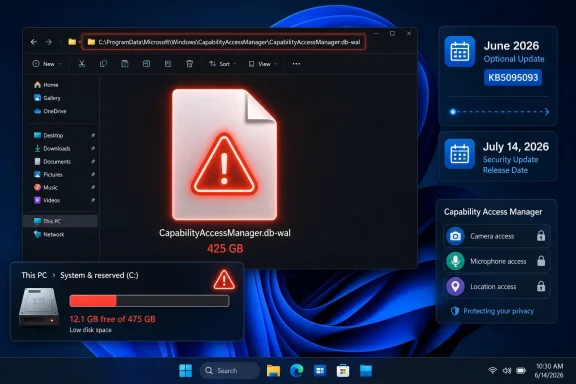 Microsoft’s Smallest Changelog Line Carries the Biggest Warning
Microsoft did not announce a dramatic storage-corruption crisis. It wrote, in the understated dialect of Windows servicing, that the update “improves disk space usage” for the CapabilityAccessManager.db-wal file. That phrasing is technically useful and journalistically maddening, because it confirms the pressure point without saying how many users are affected, what triggers the runaway growth, or whether the file will shrink automatically after the fix lands.Windows Latest reported that the bug can make Windows’ System & reserved storage category balloon and that affected users may not see an obvious culprit in the Settings app. Windows Central’s coverage then put the story in front of a broader consumer audience, emphasizing reports of machines losing dozens or hundreds of gigabytes to a single file. PCWorld, TechRadar, and others have since followed with the same practical warning: if your C: drive is mysteriously full, do not assume Steam, OneDrive, or Windows Update cleanup is the villain.
The file itself is not random junk. The
db-wal suffix indicates a database write-ahead log, a normal mechanism used to stage or preserve database changes before they are committed. The trouble is that normal here should mean megabytes, not a storage-devouring ledger big enough to compete with a modern game library.That distinction matters. This is not a case of users discovering an obscure cache and deciding it looks suspicious. It is a legitimate Windows component apparently failing to keep its own bookkeeping under control.
The Privacy Broker Became the Storage Hog
Capability Access Manager is one of those Windows subsystems most people never name but constantly rely on. It helps govern app access to sensitive capabilities such as location, camera, microphone, screen capture, and other privacy-sensitive resources. Every time Windows mediates whether an app can touch one of those capabilities, the operating system needs a record of decisions, requests, or state.That is why this bug is more interesting than a swollen temp folder. The bloated file sits inside the machinery that supports Windows’ modern permission model, the same model Microsoft uses to reassure users that Store apps, desktop apps, and system components are not free to rummage through private device capabilities without oversight. A permissions database is exactly the kind of thing that should be boring, compact, and reliable.
According to Windows Latest’s investigation and user reports on Reddit, the failure appears to involve repeated or inefficient logging of access-related events. That explanation fits the symptom: a write-ahead log that keeps absorbing entries without being compacted, checkpointed, or otherwise constrained. Microsoft has not provided a full root-cause analysis, so the precise trigger remains murky.
The lack of specificity is not a minor annoyance for IT departments. If a bug depends on a specific app, driver, Insider build, permission pattern, or service state, administrators need to know that. Without that detail, the advice collapses into “check your disks and install the update,” which is practical but not satisfying.
Windows Settings Tells Users Something Is Wrong, Not What Is Wrong
One reason this issue spread quickly is that it can masquerade as generic Windows bloat. Users may see System & reserved consuming an absurd amount of space, but the Settings app does not necessarily point atCapabilityAccessManager.db-wal as the offender. That makes the bug feel like vanishing storage rather than a diagnosable file-growth problem.For enthusiasts, the answer is obvious enough: use TreeSize, WizTree, WinDirStat, PowerShell, or another disk-usage tool to inspect
C:\ProgramData\Microsoft\Windows\CapabilityAccessManager. For ordinary users, that path is already past the edge of the map. ProgramData is hidden by default, access permissions can be intimidating, and the filename looks like something one should not touch.That opacity is part of the indictment. Windows has spent years adding richer storage dashboards, cleanup recommendations, and reserved-storage explanations, but when a system database grows to pathological size, the user-facing story can still stop at a vague category. A PC with a 512GB SSD can be pushed into crisis by a single system file while the owner is left deleting downloads and uninstalling apps in the wrong place.
The reports vary widely. Some users have seen 12GB, 50GB, 70GB, 110GB, or 200GB. The headline-grabbing figure is roughly 500GB, apparently from a Reddit user’s disk-usage scan. That highest number should be treated as an extreme case, not the median outcome, but it is still damning because the design should make such a case difficult to reach at all.
The Fix Is Here, But Windows Servicing Makes “Here” Complicated
Microsoft’s fix is included in the June 2026 optional Windows 11 update KB5095093, with the broader Patch Tuesday rollout scheduled for July 14, 2026. That sequencing is typical: optional preview updates carry non-security fixes early, while the next cumulative security update distributes them to the general population. For users already affected, however, the distinction between optional and mandatory is the difference between reclaiming a working machine now and waiting another week with a nearly full drive.This is where Windows servicing logic collides with real-world urgency. Microsoft generally does not want everyone installing preview updates unless they need a specific fix or are comfortable being early adopters. Yet the people hit by this bug may need the optional update precisely because storage exhaustion can break downloads, app updates, Windows Update itself, browser caches, game saves, paging behavior, and routine file operations.
The practical recommendation is therefore conditional. If the
CapabilityAccessManager.db-wal file is small, there is no reason to panic; wait for the cumulative update. If the file is tens or hundreds of gigabytes and your system drive is under pressure, KB5095093 is the official path before Patch Tuesday.Administrators will also have to decide how aggressively to hunt for the issue. In managed fleets, a silent file-growth bug on the system partition can create helpdesk noise long before it registers as a security incident. Disk-free-space monitoring, endpoint inventory scripts, or remote file-size checks may be more useful than waiting for users to report that Outlook, Teams, Visual Studio, or Windows Update has started behaving strangely.
Deleting the File Is Tempting, Which Is Exactly Why It Is Risky
The ugliest part of this bug is that the obvious fix is not necessarily the safe one. A giant file is sitting on disk. The user wants the space back. The user deletes the file. Sometimes that works; sometimes, according to reports highlighted by Windows Central, it can break things such as Wi-Fi connectivity until the folder or service state is repaired by a restart or a broader cleanup.That does not mean the file is sacred. It means manual surgery inside a live Windows service database is a bad default recommendation. Capability Access Manager is not a throwaway browser cache; it is a system component with relationships to app permissions, services, and database state. Removing a write-ahead log without understanding what the database engine expects can leave Windows reconciling missing pieces.
The safer path is to install the update and reboot, then reassess disk usage. If emergency cleanup is unavoidable, experienced admins will stop relevant services, back up the folder, and make changes with a rollback plan rather than mashing Delete in File Explorer. Casual users should not be encouraged to improvise inside
ProgramData\Microsoft\Windows because the path looks technical enough to inspire confidence and dangerous enough to punish it.There is also a subtler risk: focusing only on reclaiming space can obscure whether the bug is still active. If the file is deleted and immediately starts growing again, the machine has not been fixed; it has merely been reset to the beginning of the failure. That is why Microsoft’s servicing fix matters more than any one-time cleanup recipe.
A 500GB Log File Is a Product Trust Problem
Windows bugs are inevitable. A system as broad as Windows 11, spanning consumer laptops, gaming rigs, enterprise fleets, embedded scenarios, hybrid identity, and decades of compatibility baggage, will produce strange failures. But some failures damage trust more than others, and a hidden system log consuming half a terabyte sits near the top of that list.Storage is not an abstract resource. It is where users keep photos, virtual machines, game installs, source trees, mail caches, Hyper-V disks, and the working room Windows itself needs to breathe. On many modern laptops, the SSD is soldered and expensive to replace at purchase time. Losing 100GB to a runaway database is not just untidy engineering; it is a direct hit to the value of the machine.
The timing does Microsoft no favors. Windows 11 is now the default consumer and enterprise client OS, while remaining Windows 10 holdouts face increasing pressure to move. At the same time, Microsoft is asking users to accept more cloud integration, more AI features, more background services, and more trust in opaque system behavior. A bug like this feeds the suspicion that Windows is doing too much behind the curtain and explaining too little when it goes wrong.
That suspicion is not always fair, but it is understandable. A privacy permissions broker should be one of the most carefully bounded services in the OS. When its bookkeeping can become a storage sink, the problem looks less like a quirky edge case and more like a failure of guardrails.
The Changelog Culture Still Underserves Power Users
Microsoft’s release notes have improved over the years, but this incident shows the ceiling of that improvement. “Improves disk space usage” is clear enough to be searchable after the fact, yet too vague to convey urgency before users understand the symptom. It is a sentence designed for a changelog, not for risk communication.There are legitimate reasons companies avoid overexplaining every bug. Root causes may still be under investigation, exploitability may be irrelevant but easily misunderstood, and support teams do not want to create panic around rare conditions. Still, Microsoft could say more without saying too much. It could identify whether the issue affects all supported Windows 11 versions or only particular builds. It could state whether the update prevents future growth, compacts existing logs, or both. It could warn against manual deletion if that is known to cause side effects.
This matters because Windows enthusiasts and sysadmins act as the translation layer for everyone else. They read release notes, correlate Reddit reports, test optional updates, and turn vague vendor language into workable guidance. When Microsoft leaves too much unsaid, that translation layer fills the gaps with guesswork, anecdotes, and sometimes dangerous cleanup commands.
Windows Central’s consumer-friendly write-up and Windows Latest’s deeper investigation are useful precisely because Microsoft’s own wording is so compressed. But users should not have to triangulate a storage bug through news sites, Reddit threads, and changelog archaeology to understand why their C: drive is full.
Admins Should Treat This as a Disk-Pressure Incident, Not a Curiosity
For home users, the immediate playbook is simple: check storage, install the update if affected, avoid reckless deletion. For IT teams, the issue deserves a more disciplined response. Disk exhaustion can trigger cascading failures, especially on devices with small system partitions, heavy Microsoft 365 caches, developer workloads, or aggressive endpoint security logging.A fleet script that checks the size of
C:\ProgramData\Microsoft\Windows\CapabilityAccessManager\CapabilityAccessManager.db-wal is low-effort and high-signal. So is alerting on sudden growth in System & reserved storage or free-space drops on the OS volume. The bug may not be widespread, but the cost of checking is small compared with the cost of diagnosing dozens of “my computer is slow” tickets.Change management also matters. Optional cumulative updates are often held back in business environments, and for good reason. But if KB5095093 contains a fix for a storage-consuming defect, organizations with confirmed cases may need an exception process rather than waiting for the July 14 cumulative release.
The risk calculation is different for every environment. A heavily locked-down enterprise might prefer to wait a week for Patch Tuesday validation. A school district with 128GB student laptops may decide the storage risk is more immediate. A developer shop with Windows 11 workstations and large local toolchains may quietly deploy the preview update to affected machines only.
The Evidence Points to a Narrow Bug With Broad Lessons
There is no evidence so far that this is a data-loss bug in the conventional sense. It does not appear to delete user files, corrupt documents, or expose private permission records. The damage is indirect: storage disappears, and the system becomes less reliable as free space collapses.That distinction should prevent panic but not complacency. A disk-full condition can be surprisingly destructive in practice. Applications fail mid-write, updates stall, databases complain, sync clients get confused, and users start deleting things under pressure. Even if Windows itself has not destroyed user data, the environment it creates can lead users into risky decisions.
The reports also suggest that not every Windows 11 machine is affected. Windows Latest noted a normal file size on one test system while documenting much larger cases elsewhere. That variability points to a trigger Microsoft has not publicly described, which is another reason blanket advice is difficult.
The strongest conclusion is narrower and firmer: Windows 11 has had a real defect involving the Capability Access Manager write-ahead log, Microsoft has shipped a servicing fix in KB5095093, and users with unexplained System & reserved bloat should check that specific path before blaming their own files.
The Folder Windows Users Should Check Before They Start Deleting Games
The immediate guidance is not glamorous, but it is concrete. The point is to verify before acting, update before operating, and avoid turning a storage bug into a self-inflicted system repair.- Open Windows Settings and check whether System & reserved storage is unusually large for your device.
- Use a disk-usage tool or an elevated shell to inspect
C:\ProgramData\Microsoft\Windows\CapabilityAccessManagerif the storage numbers do not make sense. - Treat
CapabilityAccessManager.db-walsizes in the tens or hundreds of gigabytes as abnormal, even if Windows itself does not flag them clearly. - Install KB5095093 if you are affected and cannot wait for the July 14, 2026 Patch Tuesday rollout.
- Do not casually delete individual database files from the Capability Access Manager folder without a backup, a stopped service, and a recovery plan.
- After updating and rebooting, recheck the file size to confirm the system has actually stopped accumulating storage debt.
References
- Primary source: Windows Central
Published: Tue, 07 Jul 2026 11:41:23 GMT
Loading…
www.windowscentral.com - Related coverage: windowslatest.com
Microsoft admits a Windows 11 bug is eating up to 500GB of storage, verify if you are affected
Microsoft admits a Windows 11 bug is silently eating up to 500GB of your storage, fix coming July 14, 2026. www.windowslatest.com
- Related coverage: pcworld.com
A Windows 11 bug can eat 500GB of your storage. Here's how to check | PCWorld
A Windows 11 update reveals a bug that can silently consume up to 500GB of storage. Here's how to check if you're affected and fix it.www.pcworld.com - Related coverage: computerbase.de
Microsoft bestätigt Bug: Windows 11 kann fehlerbedingt um bis zu 500 GB anwachsen - ComputerBase
Microsoft hat einen Fehler in Windows 11 bestätigt, durch den auf der Systempartition bis zu mehrere hundert Gigabyte belegt werden können.www.computerbase.de
- Related coverage: pcgamer.com
A nasty Windows 11 bug is taking upwards of 500 GB worth of storage, and is surprisingly difficult to spot, but there's a fix | PC Gamer
That's about $100 worth of space in the current memory crisis.www.pcgamer.com - Related coverage: tecnoblog.net
Bug faz Windows 11 ocupar 500 GB de armazenamento com "lixo" • Tecnoblog
falha no Windows 11 de alguns PCs faz recursos do sistema ocupar dezenas ou até centenas de gigabytes indevidamente na unidade C. Problema já tem correção. tecnoblog.net
- Related coverage: techradar.com
Keep running low on storage and don't know why? Mysterious Windows 11 file that ate tons of drive space is fixed in latest update | TechRadar
Latest update finally fixes a 'notorious culprit for system bloat'www.techradar.com - Related coverage: ad-hoc-news.de
Loading…
www.ad-hoc-news.de - Related coverage: hartware.de
- Related coverage: tutos-informatique.com
Loading…
www.tutos-informatique.com - Official source: support.microsoft.com
Loading…
support.microsoft.com - Related coverage: club386.com
Microsoft just confirmed that this Windows 11 bug is hoarding up to 500GB of your storage | Club386
Windows 11's Capability Access Manager service is eating hundreds of gigabytes of your storage capacity over time, although not everyone is affected. www.club386.com
- Official source: download.microsoft.com