

Microsoft’s next Windows 11 cleanup is less about a flashy visual reboot and more about finishing the job the operating system started years ago: turning a patchwork of old and new interfaces into something that feels intentional. The company is now signaling a broader design refinement push that reaches into Settings, File Explorer, the Start menu, dark mode dialogs, and accessibility tooling, while still preserving the legacy pieces corporate IT depends on. That combination matters because Windows 11 has long been judged not just on what it adds, but on how well it buries what it inherited. Official Microsoft update notes from the last year already show many of the same themes the Ubergizmo report highlights, including dark mode consistency, Start menu reliability work, and Narrator improvements that now extend to Copilot on all Windows 11 devices.
Windows has always lived with a split personality. On one side is Microsoft’s modern design language, which evolved through Windows 10 and was sharpened again in Windows 11 with rounded corners, centered taskbar elements, and a heavier emphasis on visual consistency. On the other side sits a deep stack of legacy UI, administrative tools, and compatibility layers that date back years or even decades. The result is a familiar Windows complaint: the shell looks modern, but plenty of the surrounding experience still feels assembled from different eras.
That tension is not new, but it has become more visible as Microsoft has pushed Windows 11 into a more opinionated product. Settings has gradually taken over more control from the classic Control Panel, File Explorer has received a continuous stream of refinements, and the Start menu has been redesigned and then refined again rather than replaced outright. Microsoft’s own support pages show these changes arriving incrementally through preview and non-security updates, which is a strong sign that the company now prefers continuous cleanup over dramatic one-time overhauls.
Accessibility is another important part of the story. Narrator has seen repeated upgrades, including richer image descriptions on Copilot+ PCs and, more recently, support that extends Copilot integration across Windows 11 devices. That is significant because Microsoft increasingly treats accessibility not as a separate lane, but as part of the core operating system experience. In practice, that means the same cleanup work that improves consistency for visual polish can also improve screen reader behavior, dialog structure, and the overall predictability of UI flows.
The corporate angle is just as important. Microsoft has been careful not to break environments still tied to older drivers, management tooling, or workflows that assume the presence of legacy interfaces. The company’s approach to the Control Panel, for example, has been gradual rather than abrupt. That caution reflects the reality of enterprise Windows: stability and predictability often matter more than elegance, and any interface cleanup has to respect long-lived administrative habits.
The reported “cleanup phase” also fits Microsoft’s recent update cadence. In the past year, Windows 11 preview releases have repeatedly mentioned design consistency, dark mode fixes, and reliability work in exactly the areas the Ubergizmo report identifies. That suggests the company is not inventing a brand-new direction so much as accelerating a direction already visible in the release notes. In other words, this is less a pivot than a consolidation.
This matters because Settings now carries a huge amount of user expectation. It is where consumers go to adjust personalization, privacy, devices, and system behavior, and it is also where enterprise admins often validate policy outcomes. A muddled page structure or inconsistent visual hierarchy makes the whole OS feel less polished. If Microsoft improves clarity and layout in these surfaces, it can reduce support burden as well as improve discoverability.
The reason this matters is simple: mixed-theme interfaces are jarring. They interrupt flow, make the OS feel unfinished, and undermine confidence in the product’s visual system. If Microsoft continues to push dark mode support deeper into system dialogs, it will not just be chasing aesthetics; it will be removing a constant reminder that some pieces of Windows still belong to another era.
A cleaner dark mode also has a strategic benefit. It helps Microsoft signal that Windows 11 is no longer an experimental UI layer sitting on top of a legacy system. Instead, it becomes a platform where modern design choices are expected to apply everywhere. That perception will matter even more if Microsoft wants businesses and creators to treat Windows as a premium desktop environment.
This is an important competitive signal. By linking accessibility and AI, Microsoft is attempting to make Windows feel more capable without forcing users into a steep learning curve. If Narrator can better understand the UI and coordinate with Copilot, then users with different interaction needs may get a more fluid experience across more devices. That is the sort of quiet platform advantage that can compound over time.
The broader market implication is that Windows may use accessibility as a proving ground for AI-enhanced user assistance. If Microsoft can make Narrator and Copilot feel genuinely useful together, then it has a model for future interface assistance that goes beyond traditional screen readers. That would be a meaningful differentiator, especially in enterprise environments where productivity and inclusivity often go hand in hand.
This is exactly where Microsoft should be concentrating. Users interact with File Explorer constantly, and even a small slowdown or visual inconsistency becomes noticeable because it happens so often. The Start menu has a different role, but it is just as important: it shapes the opening moments of every Windows session. If Microsoft can make these experiences faster and more dependable, the rest of the OS benefits indirectly.
The Start menu story is similar. Microsoft has been rolling out redesigns gradually, which suggests it understands how disruptive a sudden change could be. That caution is wise because the Start menu is one of the most culturally loaded parts of Windows. Any improvements must balance familiarity with modern design, and any performance issue will be felt immediately.
The deeper significance is that Microsoft appears to be aiming for a genuinely native Windows 11 design language rather than a layered one. That is a long-term ambition, not a short-term product tweak. It implies a sustained investment in eliminating technical debt across shell components, settings pages, dialogs, and tooling that users see every day.
At the same time, keeping old components forever has costs. It slows design consistency, increases maintenance complexity, and makes Windows feel less coherent to new users. Microsoft is trying to find the narrow path between modernization and compatibility, and that is one of the defining challenges of the Windows 11 era.
That is why the reported emphasis on incremental tuning is smart. A rushed redesign of Settings or the Start menu could look modern yet still create trouble for managed environments. By contrast, targeted cleanup in dark mode dialogs, Narrator behavior, and File Explorer reliability can improve the experience without forcing IT departments into emergency remediation. That is how you modernize Windows without breaking Windows.
The good news for Microsoft is that consumers are far more forgiving of gradual change than enterprise administrators are. If the company continues to ship refinements quietly through Insider and preview channels, it can gather feedback, avoid dramatic regressions, and improve the shell piece by piece. That is the most sustainable way to rebuild trust in the Windows interface.
That combination is strategic. AI features generate attention, but interface quality determines whether users keep trusting the platform. If Microsoft wants Copilot to feel like a natural part of Windows instead of a separate layer, then the surrounding UI has to be clean, predictable, and visually aligned. Otherwise the intelligence layer sits on top of an experience that still feels unfinished.
The real win would be reducing the number of moments where Windows feels like a historical artifact. Every time Microsoft removes one of those moments, it raises the perceived quality of the entire platform. That is why these kinds of refinements matter more than their size suggests.
The other key test will be enterprise reaction. If Microsoft can modernize the interface while preserving the administrative and compatibility expectations that large organizations depend on, it will have achieved something more valuable than a cosmetic update. It will have made Windows 11 feel finished without sacrificing the flexibility that made Windows dominant in the first place.
Source: Ubergizmo Microsoft Details Upcoming Interface Refinements For Windows 11
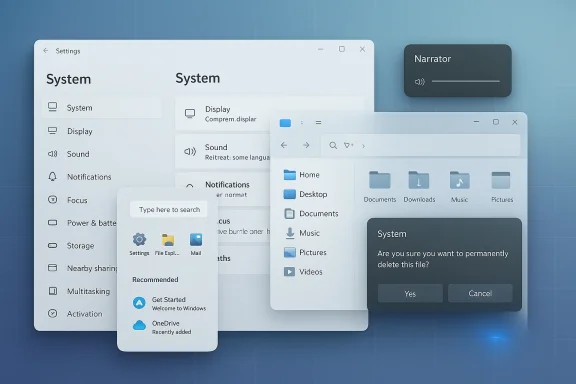 Background
Windows has always lived with a split personality. On one side is Microsoft’s modern design language, which evolved through Windows 10 and was sharpened again in Windows 11 with rounded corners, centered taskbar elements, and a heavier emphasis on visual consistency. On the other side sits a deep stack of legacy UI, administrative tools, and compatibility layers that date back years or even decades. The result is a familiar Windows complaint: the shell looks modern, but plenty of the surrounding experience still feels assembled from different eras.That tension is not new, but it has become more visible as Microsoft has pushed Windows 11 into a more opinionated product. Settings has gradually taken over more control from the classic Control Panel, File Explorer has received a continuous stream of refinements, and the Start menu has been redesigned and then refined again rather than replaced outright. Microsoft’s own support pages show these changes arriving incrementally through preview and non-security updates, which is a strong sign that the company now prefers continuous cleanup over dramatic one-time overhauls.
Accessibility is another important part of the story. Narrator has seen repeated upgrades, including richer image descriptions on Copilot+ PCs and, more recently, support that extends Copilot integration across Windows 11 devices. That is significant because Microsoft increasingly treats accessibility not as a separate lane, but as part of the core operating system experience. In practice, that means the same cleanup work that improves consistency for visual polish can also improve screen reader behavior, dialog structure, and the overall predictability of UI flows.
The corporate angle is just as important. Microsoft has been careful not to break environments still tied to older drivers, management tooling, or workflows that assume the presence of legacy interfaces. The company’s approach to the Control Panel, for example, has been gradual rather than abrupt. That caution reflects the reality of enterprise Windows: stability and predictability often matter more than elegance, and any interface cleanup has to respect long-lived administrative habits.
What Microsoft Appears to Be Cleaning Up
The most interesting part of this reported initiative is not any single feature, but the pattern behind them. Microsoft is apparently targeting the little friction points that make Windows feel uneven: a dialog that ignores dark mode, a settings page with awkward spacing, a search experience that stumbles, or a Start menu interaction that feels slightly slower than it should. These may sound minor in isolation, but they shape day-to-day perception more than headline features do. The operating system either feels cohesive or it does not, and micro-interactions are where that judgment is made.The reported “cleanup phase” also fits Microsoft’s recent update cadence. In the past year, Windows 11 preview releases have repeatedly mentioned design consistency, dark mode fixes, and reliability work in exactly the areas the Ubergizmo report identifies. That suggests the company is not inventing a brand-new direction so much as accelerating a direction already visible in the release notes. In other words, this is less a pivot than a consolidation.
Why this matters now
Windows 11 is no longer being judged as a fresh successor to Windows 10; it is being judged as a mature platform. That shifts expectations. Users now expect the rough edges to disappear, especially from core surfaces like Settings, File Explorer, and system dialogs. If Microsoft wants Windows 11 to feel fully native rather than partially inherited, then these back-end visual and UX refinements are the right place to spend engineering time.- Microsoft is prioritizing coherence over splashy redesigns.
- The emphasis is on removing friction rather than adding novelty.
- Legacy UI cleanup can improve trust as much as visual appeal.
- Incremental refinement reduces the risk of destabilizing enterprise deployments.
Settings: The Quiet Center of Gravity
Settings has become the central control surface in Windows 11, and that makes it a prime target for cleanup. Microsoft has already been redesigning individual pages and adding new options to match the modern Windows look, including areas such as Accounts and Other users. The reported refresh of several Settings pages therefore feels like an extension of work Microsoft is already shipping, not a sudden change in direction.This matters because Settings now carries a huge amount of user expectation. It is where consumers go to adjust personalization, privacy, devices, and system behavior, and it is also where enterprise admins often validate policy outcomes. A muddled page structure or inconsistent visual hierarchy makes the whole OS feel less polished. If Microsoft improves clarity and layout in these surfaces, it can reduce support burden as well as improve discoverability.
The enterprise angle
For enterprise users, a better Settings app is not merely aesthetic. It affects help desk time, onboarding speed, and the ability to guide employees through troubleshooting without resorting to legacy tools. When Microsoft makes Settings more coherent, it also makes Windows easier to standardize at scale. That is a subtle but valuable productivity gain.The consumer angle
For consumers, the gain is simpler: Windows becomes easier to understand. A cleaner layout and more obvious information hierarchy reduce the feeling that the system is asking users to translate between design eras. That small confidence boost matters more than many feature launches because it influences every single session with the OS.- More intuitive layout improves discoverability.
- Consistent typography and spacing reduce confusion.
- Better Settings pages can lower support friction.
- A unified design language helps Windows feel more modern.
Dark Mode Consistency Is Now a Core Quality Issue
Dark mode used to be treated as a visual preference. In Windows 11, it has become a basic quality benchmark. Microsoft has already been shipping improvements to File Explorer dialogs such as copy, move, delete, replace, and error prompts so that dark mode looks consistent instead of snapping back to a bright, legacy appearance. That alone shows how much attention this issue has received in recent servicing cycles.The reason this matters is simple: mixed-theme interfaces are jarring. They interrupt flow, make the OS feel unfinished, and undermine confidence in the product’s visual system. If Microsoft continues to push dark mode support deeper into system dialogs, it will not just be chasing aesthetics; it will be removing a constant reminder that some pieces of Windows still belong to another era.
Why dark mode cleanup is harder than it looks
Dark mode consistency sounds trivial, but it is one of those deceptively hard platform tasks. Windows has to coordinate themes across shell elements, dialogs, context menus, and third-party integrations, all while preserving legibility and accessibility. Every old code path that fails to honor the current theme creates another visible crack in the experience.A cleaner dark mode also has a strategic benefit. It helps Microsoft signal that Windows 11 is no longer an experimental UI layer sitting on top of a legacy system. Instead, it becomes a platform where modern design choices are expected to apply everywhere. That perception will matter even more if Microsoft wants businesses and creators to treat Windows as a premium desktop environment.
- Dark mode consistency is now a baseline expectation.
- Mixed light/dark dialogs make Windows feel incomplete.
- The cleanup requires deep platform work, not just theme painting.
- Better consistency improves both usability and brand perception.
Narrator, Copilot, and Accessibility as a First-Class Surface
Microsoft’s accessibility work has become inseparable from its AI strategy, and the reported Narrator update fits that pattern neatly. Microsoft has already said Narrator now works with Copilot on all Windows 11 devices, while Copilot+ PCs get richer image description features and other AI-assisted accessibility enhancements. That means accessibility is no longer being treated as a separate set of tools bolted onto the desktop; it is becoming part of the intelligence layer of the OS.This is an important competitive signal. By linking accessibility and AI, Microsoft is attempting to make Windows feel more capable without forcing users into a steep learning curve. If Narrator can better understand the UI and coordinate with Copilot, then users with different interaction needs may get a more fluid experience across more devices. That is the sort of quiet platform advantage that can compound over time.
Why the accessibility story is bigger than compliance
Accessibility is often framed as a legal or compliance requirement, but Microsoft’s execution suggests something broader. Better screen reading, richer descriptions, and smoother integration with Copilot can make the OS more usable for everyone, especially in complex workflows. The same improvements that help users who rely on assistive technologies can also reduce friction for people navigating dense interfaces, onboarding new features, or searching for settings.The broader market implication is that Windows may use accessibility as a proving ground for AI-enhanced user assistance. If Microsoft can make Narrator and Copilot feel genuinely useful together, then it has a model for future interface assistance that goes beyond traditional screen readers. That would be a meaningful differentiator, especially in enterprise environments where productivity and inclusivity often go hand in hand.
- Narrator is becoming more tightly integrated with Copilot.
- Accessibility enhancements are increasingly part of Microsoft’s AI narrative.
- Better assistive tooling can benefit mainstream users too.
- A more capable Narrator strengthens Windows as an enterprise platform.
File Explorer and Start Menu: The Everyday Surfaces Matter Most
File Explorer and the Start menu are not flashy components, but they are among the most important surfaces in Windows. Microsoft’s recent updates have already focused on improving File Explorer search, reliability, context menu behavior, and dark mode dialogs, while Start menu changes have emphasized gradual rollout and reliability rather than radical redesign. That makes the reported priority on performance tuning feel very plausible.This is exactly where Microsoft should be concentrating. Users interact with File Explorer constantly, and even a small slowdown or visual inconsistency becomes noticeable because it happens so often. The Start menu has a different role, but it is just as important: it shapes the opening moments of every Windows session. If Microsoft can make these experiences faster and more dependable, the rest of the OS benefits indirectly.
Reliability is a feature
There is a tendency to treat reliability work as invisible, but on Windows it is one of the most valuable forms of product improvement. Search issues, tab glitches, context menu oddities, and sluggish navigation all contribute to the perception that Windows is still carrying too much historical baggage. When Microsoft resolves those problems, users notice the absence of friction even if they cannot name the specific fix.The Start menu story is similar. Microsoft has been rolling out redesigns gradually, which suggests it understands how disruptive a sudden change could be. That caution is wise because the Start menu is one of the most culturally loaded parts of Windows. Any improvements must balance familiarity with modern design, and any performance issue will be felt immediately.
- File Explorer improvements affect daily productivity immediately.
- Start menu tuning influences user trust from the first click.
- Reliability work is often more valuable than visible novelty.
- Gradual rollouts reduce the risk of breaking established habits.
The Long Goodbye to Legacy Components
One of the most striking claims in the report is that Microsoft is phasing out components dating back to Windows 8 or earlier, while keeping Control Panel around for now. That sounds like a classic Microsoft compromise: retire what it can, preserve what it must. The reality is that old UI and legacy drivers are often entangled with enterprise workflows, and an abrupt removal would create much more pain than benefit.The deeper significance is that Microsoft appears to be aiming for a genuinely native Windows 11 design language rather than a layered one. That is a long-term ambition, not a short-term product tweak. It implies a sustained investment in eliminating technical debt across shell components, settings pages, dialogs, and tooling that users see every day.
Why legacy removal must be cautious
Windows enterprise deployments still depend on older conventions more than Microsoft would like. Some organizations rely on scripts, driver stacks, or management workflows that were built around older interfaces and assumptions. If Microsoft moves too quickly, it risks breaking not just preferences but operations. That is why the gradual, cautious approach is the only realistic one.At the same time, keeping old components forever has costs. It slows design consistency, increases maintenance complexity, and makes Windows feel less coherent to new users. Microsoft is trying to find the narrow path between modernization and compatibility, and that is one of the defining challenges of the Windows 11 era.
- Legacy removal improves maintainability over time.
- Compatibility concerns explain the slow pace.
- Control Panel remains because many workflows still depend on it.
- The cleanup is as much about architecture as aesthetics.
Enterprise Stability Versus Consumer Polish
Microsoft’s challenge is not just technical; it is political inside the product. Consumer users want visual consistency, modern UI, and fewer odd transitions between old and new surfaces. Enterprises want stability, predictable management behavior, and enough legacy compatibility to avoid disruption. A good Windows roadmap has to satisfy both, but those goals can conflict more often than Microsoft likes to admit.That is why the reported emphasis on incremental tuning is smart. A rushed redesign of Settings or the Start menu could look modern yet still create trouble for managed environments. By contrast, targeted cleanup in dark mode dialogs, Narrator behavior, and File Explorer reliability can improve the experience without forcing IT departments into emergency remediation. That is how you modernize Windows without breaking Windows.
Consumer expectations have changed
Consumers now live in an ecosystem where many apps and platforms are visually coherent by default. Windows can no longer rely on its breadth alone; it has to feel polished in the same places people touch repeatedly. This is especially true for laptops, hybrid devices, and Copilot+ hardware, where Windows is presented as a premium experience rather than just a compatibility layer.The good news for Microsoft is that consumers are far more forgiving of gradual change than enterprise administrators are. If the company continues to ship refinements quietly through Insider and preview channels, it can gather feedback, avoid dramatic regressions, and improve the shell piece by piece. That is the most sustainable way to rebuild trust in the Windows interface.
- Enterprises need stability more than novelty.
- Consumers reward polish and consistency.
- Incremental rollout is safer than a major UI break.
- Preview channels let Microsoft test without forcing adoption.
How This Fits Microsoft’s Broader Windows Strategy
The reported interface cleanup is not happening in isolation. Microsoft has been steadily expanding the role of Copilot across Windows, adding AI-assisted actions in Settings and File Explorer, and improving the OS with repeated reliability updates. The pattern suggests a two-track strategy: make Windows smarter while also making it feel more coherent and less fragmented.That combination is strategic. AI features generate attention, but interface quality determines whether users keep trusting the platform. If Microsoft wants Copilot to feel like a natural part of Windows instead of a separate layer, then the surrounding UI has to be clean, predictable, and visually aligned. Otherwise the intelligence layer sits on top of an experience that still feels unfinished.
The competitive angle
Apple and Google both benefit when their ecosystems feel unified. Microsoft knows that Windows cannot compete on hardware simplicity alone, so it has to compete on software coherence and enterprise flexibility. A cleaner Windows 11 gives Microsoft a better story against macOS in design polish and against ChromeOS in manageability, even if the underlying platforms remain very different.The real win would be reducing the number of moments where Windows feels like a historical artifact. Every time Microsoft removes one of those moments, it raises the perceived quality of the entire platform. That is why these kinds of refinements matter more than their size suggests.
- AI and UI cleanup are now part of the same strategy.
- Windows needs coherence to support premium positioning.
- Competitors benefit when their ecosystems feel unified.
- Small UX wins can meaningfully improve brand perception.
Strengths and Opportunities
The reported Windows 11 cleanup effort has several clear strengths. It targets visible friction, it aligns with changes Microsoft is already shipping, and it supports both consumer polish and enterprise stability. Most importantly, it addresses the parts of Windows people notice every day rather than chasing novelty for its own sake.- Improves cohesion across core Windows surfaces.
- Reduces the visual mismatch between old and new UI.
- Strengthens dark mode as a platform-wide expectation.
- Supports accessibility through better Narrator and Copilot integration.
- Helps File Explorer feel faster and more dependable.
- Gives Microsoft a cleaner premium story for Windows 11.
- Lowers support friction for both consumers and IT teams.
Risks and Concerns
The biggest risk is that cleanup work can accidentally expose how much legacy architecture is still underneath Windows. If Microsoft removes or hides old interfaces too aggressively, it may create confusion for enterprise users who still depend on them. If it moves too slowly, users will continue to see the same inconsistencies and conclude that Windows will never fully converge on one design language.- Legacy removal can disrupt established enterprise workflows.
- Incremental changes may feel too slow for consumer expectations.
- Partial dark mode support can still look unfinished.
- AI-linked accessibility changes need to remain dependable.
- Performance tuning can regress if not carefully tested.
- Too many preview-only features can fragment expectations.
- Aesthetic cleanup without deep reliability gains would feel cosmetic.
Looking Ahead
What to watch next is not whether Microsoft can make Windows 11 prettier in one big move. The real question is whether it can keep chipping away at the seams until the seams stop mattering. The strongest signal will be preview builds that continue to mention consistency, native dark mode handling, Settings redesigns, and reliability improvements in the same breath.The other key test will be enterprise reaction. If Microsoft can modernize the interface while preserving the administrative and compatibility expectations that large organizations depend on, it will have achieved something more valuable than a cosmetic update. It will have made Windows 11 feel finished without sacrificing the flexibility that made Windows dominant in the first place.
- More dark mode fixes in system dialogs.
- Additional Settings page redesigns and clarifications.
- Further File Explorer search and reliability improvements.
- Continued Start menu tuning with gradual rollout.
- More Narrator and Copilot integration across Windows 11.
- Ongoing retirement of legacy UI where compatibility allows.
- Careful handling of Control Panel and enterprise dependencies.
Source: Ubergizmo Microsoft Details Upcoming Interface Refinements For Windows 11
