

Microsoft’s latest Copilot packaging shift is a small change on the surface, but it speaks volumes about where Windows 11 and Microsoft 365 are headed. According to current Microsoft documentation, the company is still describing the Microsoft 365 Copilot app as something that can be installed automatically on Windows devices with commercial Microsoft 365 desktop apps, while also giving administrators an opt-out path and explicitly excluding the European Economic Area from that automatic installation behavior. That means the real story is not just whether the app is preinstalled, but how Microsoft is trying to balance distribution, consent, and control as Copilot becomes more deeply woven into the Windows and Microsoft 365 experience.
Microsoft’s Copilot strategy has evolved quickly from a Windows feature into a broader identity layer for its productivity stack. In September 2023, the company first framed Copilot as an “everyday AI companion” that would span Windows 11, the browser, and Microsoft 365, with the goal of making AI feel like a native part of the platform rather than an add-on. That initial launch set the tone: Copilot was not meant to be a single app, but a set of entry points tied together by Microsoft’s cloud services and licensing model.
By early 2025, Microsoft was already renaming the old Microsoft 365 (Office) app to the Microsoft 365 Copilot app across web, mobile, and Windows. Microsoft Support says the new name and icon began rolling out on January 15, 2025, and that office.com and microsoft365.com would redirect to the newer cloud.microsoft destination. In other words, the company has been moving from a classic productivity suite brand toward a Copilot-centered product family.
That rebrand matters because it changes how users perceive the software before they even open it. The old Office app was primarily a launcher and account hub; the new Copilot-named app suggests something more dynamic, more AI-driven, and more central to daily workflows. Microsoft is clearly betting that the Copilot name carries more strategic weight than “Office,” especially as the company pushes AI features into Word, Excel, Outlook, Teams, and the Windows shell.
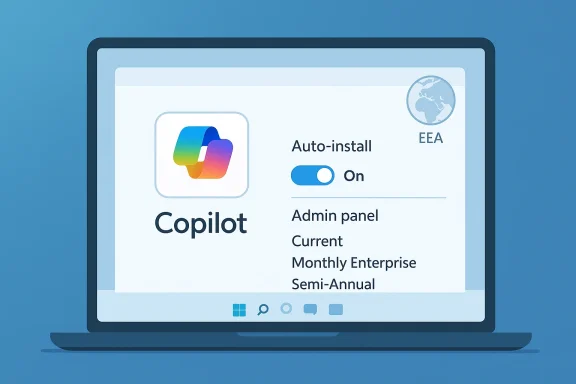
The distribution model has also become more aggressive over time. Microsoft Learn documentation now says Windows devices with commercial Microsoft 365 desktop apps automatically install the Microsoft 365 Copilot app when they meet the right version requirements, though administrators can disable the behavior through the Microsoft 365 Apps admin center. Microsoft further notes that the app is not automatically installed for customers in the EEA, which is a reminder that regional regulation and privacy expectations can shape product rollout.
All of this sets the stage for the PC Guide report that Microsoft will no longer auto-install the app on Windows 11 machines. Even if that headline reflects a rollout change rather than a permanent policy reversal, it lands in a broader context: Microsoft has been pushing Copilot everywhere, then selectively easing off when customers, admins, or regulators make the friction too obvious. That tension between ubiquity and user control is now one of the defining themes of Windows 11.
The automation, however, is constrained by policy. Admins can disable the behavior in the Microsoft 365 Apps admin center, and Microsoft calls out that customers on the Semi-Annual Enterprise Channel do not automatically receive the app. That detail matters because it shows Microsoft is not forcing the same release cadence on conservative enterprise environments that prefer slower, more controlled change.
The apparent softening of auto-install behavior on Windows 11, if that is indeed what Microsoft is doing in the specific case covered by PC Guide, would fit a familiar pattern. Microsoft often tests how far it can go with default-on distribution, then adjusts when the backlash or administrative complexity becomes too visible. That is especially true for products that blend productivity, identity, and AI in ways that are harder to categorize than a traditional app.
But consumer trust is fragile when apps arrive automatically. Many Windows users have long memories of unwanted trials, duplicate shortcuts, and forced entry points, so any perceived overreach quickly becomes part of the story. In that sense, reducing automatic installation pressure may be as much about preserving goodwill as it is about reducing support tickets.
It also reduces confusion around product naming. Microsoft now has the standalone Microsoft Copilot consumer app, the Microsoft 365 Copilot app, and Copilot experiences embedded inside Office apps and Windows features. Fewer automatic installs means fewer chances for users to confuse one Copilot surface with another, which is not a trivial issue in a brand family this crowded.
There is also an architectural reason for caution. Microsoft says the app can install in the background and update automatically through the Microsoft Store or its own updater, which means IT teams may need to account for two channels of change. That can complicate change control, especially in environments that restrict Store access or that rely on packaging tools like Intune, Configuration Manager, or third-party deployment platforms.
That channel split is a classic Microsoft compromise. It lets the company move quickly in modern update rings while still giving larger enterprises a slower lane. In practical terms, it means the Copilot app story is not just about Windows 11 itself; it is also about the cadence of Microsoft 365 servicing, which can have very different effects depending on the organization’s update strategy.
Microsoft has also been careful to separate consumer and enterprise usage. The Microsoft Copilot app is positioned as a consumer-facing companion, while Microsoft 365 Copilot is the work and school layer. The more Microsoft can keep those experiences distinct, the less confusion there is around sign-in, licensing, and data boundaries.
What changes more is the user’s sense of agency. Microsoft can still promote Copilot through taskbar pins, Office entry points, and browser redirects, but the company has to decide how much of that should be opt-in versus default-on. In a market where AI fatigue is real, that decision can shape adoption just as much as product capability.
For competitors, any reduction in Microsoft’s auto-install pressure could be a small opening. It may not change the fact that Microsoft owns the OS and the productivity suite, but it could give alternative AI tools a bit more room in organizations that are wary of bundled defaults. The more procurement and IT teams feel they are choosing Copilot deliberately, the less Microsoft can rely on inertia.
That means the strategic question is not whether Microsoft can get users to see Copilot. It can. The question is whether it can do so without creating the impression that every Microsoft product is being converted into an AI upsell funnel. That perception problem is much harder to solve than a packaging problem.
That market-by-market approach also complicates support. If a Windows 11 device in North America gets the app automatically while one in the EEA does not, Microsoft and its customers must document different expected behaviors. That creates an operational burden, but it also reflects a more mature understanding of regional compliance reality.
That is why any change to automatic installation should be read as more than a technical tweak. It is part of a broader adaptation to a world where regulators, admins, and users are all asking the same question: who decides when AI becomes part of the desktop? Microsoft’s answer appears to be “we will, but with more exceptions than before.”
That matters because AI features are especially sensitive to first impressions. If a user perceives Copilot as intrusive before they ever use it, they may never discover the legitimate benefits it offers, such as workflow acceleration, search assistance, or easier navigation of Microsoft 365 services. A gentler rollout can therefore improve long-term adoption, even if it slows short-term reach.
This matters beyond Copilot. It will likely influence how Microsoft handles future AI tooling inside Windows and Microsoft 365. If the company learns that too much automation triggers resistance, it may become more selective about when an app should be silently deployed versus merely recommended.
The company’s documentation around auto-install, admin opt-out, and channel behavior suggests it is trying to thread that needle. In effect, Microsoft is saying that Windows 11 can be AI-first without being fully coercive. That is a difficult line to maintain, but it is probably the right one.
That future has advantages, but it also raises expectations. If Microsoft wants users to accept more AI in Windows 11, it will need to show restraint when the market pushes back. Reducing automatic installs is one way to do that without slowing the broader Copilot roadmap.
The other thing to watch is how Microsoft communicates these changes. If users and admins are left to infer policy from app behavior, confusion will follow. If the company clearly explains where Copilot appears, why it appears, and how it can be managed, then it can keep pushing the product forward without turning every rollout into a trust issue.
Source: PC Guide Microsoft will no longer auto install the 365 Copilot app on your Windows 11 machine
 Background
Microsoft’s Copilot strategy has evolved quickly from a Windows feature into a broader identity layer for its productivity stack. In September 2023, the company first framed Copilot as an “everyday AI companion” that would span Windows 11, the browser, and Microsoft 365, with the goal of making AI feel like a native part of the platform rather than an add-on. That initial launch set the tone: Copilot was not meant to be a single app, but a set of entry points tied together by Microsoft’s cloud services and licensing model.By early 2025, Microsoft was already renaming the old Microsoft 365 (Office) app to the Microsoft 365 Copilot app across web, mobile, and Windows. Microsoft Support says the new name and icon began rolling out on January 15, 2025, and that office.com and microsoft365.com would redirect to the newer cloud.microsoft destination. In other words, the company has been moving from a classic productivity suite brand toward a Copilot-centered product family.
That rebrand matters because it changes how users perceive the software before they even open it. The old Office app was primarily a launcher and account hub; the new Copilot-named app suggests something more dynamic, more AI-driven, and more central to daily workflows. Microsoft is clearly betting that the Copilot name carries more strategic weight than “Office,” especially as the company pushes AI features into Word, Excel, Outlook, Teams, and the Windows shell.
The distribution model has also become more aggressive over time. Microsoft Learn documentation now says Windows devices with commercial Microsoft 365 desktop apps automatically install the Microsoft 365 Copilot app when they meet the right version requirements, though administrators can disable the behavior through the Microsoft 365 Apps admin center. Microsoft further notes that the app is not automatically installed for customers in the EEA, which is a reminder that regional regulation and privacy expectations can shape product rollout.
All of this sets the stage for the PC Guide report that Microsoft will no longer auto-install the app on Windows 11 machines. Even if that headline reflects a rollout change rather than a permanent policy reversal, it lands in a broader context: Microsoft has been pushing Copilot everywhere, then selectively easing off when customers, admins, or regulators make the friction too obvious. That tension between ubiquity and user control is now one of the defining themes of Windows 11.
The Distribution Shift
The most important thing to understand is that Microsoft has not abandoned Copilot distribution; it has refined it. Current Microsoft documentation still says the app can be installed automatically on Windows devices with Microsoft 365 desktop apps, and that the install happens in the background without interrupting the user. At the same time, Microsoft has provided explicit admin controls to opt out of automatic installation, which suggests the company knows that one-size-fits-all deployment is not ideal for every environment.What Microsoft Is Doing
From an enterprise standpoint, Microsoft is treating the Copilot app like a managed component of the Microsoft 365 ecosystem rather than a separate consumer download. That makes sense if the app is meant to serve as a front door to work content, subscriptions, and AI features tied to Microsoft accounts and Entra identities. It also gives Microsoft a cleaner way to align the Windows experience with licensing, support, and telemetry.The automation, however, is constrained by policy. Admins can disable the behavior in the Microsoft 365 Apps admin center, and Microsoft calls out that customers on the Semi-Annual Enterprise Channel do not automatically receive the app. That detail matters because it shows Microsoft is not forcing the same release cadence on conservative enterprise environments that prefer slower, more controlled change.
Why the Change Matters
A preinstalled app is never just an installation decision; it is a market-access decision. For Microsoft, the Copilot app is a strategic landing zone, a place where users are nudged toward documents, chat, and AI workflows without first having to search the Store or visit a website. For users and IT teams, though, automatic installation can feel like feature pressure, especially when the app appears on systems where it is not immediately needed.The apparent softening of auto-install behavior on Windows 11, if that is indeed what Microsoft is doing in the specific case covered by PC Guide, would fit a familiar pattern. Microsoft often tests how far it can go with default-on distribution, then adjusts when the backlash or administrative complexity becomes too visible. That is especially true for products that blend productivity, identity, and AI in ways that are harder to categorize than a traditional app.
Consumer Impact
For consumers, the big issue is not technical complexity but surprise. Users generally tolerate preinstalled system apps when they look and behave like obvious utilities, but Copilot sits in a more sensitive category because it has a strong AI branding and a cloud-service footprint. If the app arrives uninvited, some people will see convenience; others will see another attempt to push AI into every workflow.Convenience Versus Intrusion
There is a real convenience argument here. If a user already relies on Microsoft 365 for files, email, and web-based productivity, a ready-made Copilot app can shorten the path to the tools they are likely to use anyway. Microsoft’s own description of the app as available across Windows, mobile, and browser reinforces the idea that it is meant to be an always-available companion.But consumer trust is fragile when apps arrive automatically. Many Windows users have long memories of unwanted trials, duplicate shortcuts, and forced entry points, so any perceived overreach quickly becomes part of the story. In that sense, reducing automatic installation pressure may be as much about preserving goodwill as it is about reducing support tickets.
What Users Will Notice
Most end users will not read admin documentation, of course; they will notice the result on the desktop. The practical outcome is that fewer people should be surprised by an extra Copilot-branded app appearing after updates or app servicing cycles, especially if Microsoft is indeed narrowing the default behavior for Windows 11. That kind of change can feel minor to engineers and major to people who simply want a stable machine.It also reduces confusion around product naming. Microsoft now has the standalone Microsoft Copilot consumer app, the Microsoft 365 Copilot app, and Copilot experiences embedded inside Office apps and Windows features. Fewer automatic installs means fewer chances for users to confuse one Copilot surface with another, which is not a trivial issue in a brand family this crowded.
Enterprise and IT Administration
For IT departments, the change is more than cosmetic. Automatic software deployment is only welcome when it aligns with licensing, security policy, and support workflows, and Copilot touches all three. Microsoft’s current documentation makes clear that admins can opt out of automatic installation, which is essential when organizations need to stage rollouts, test compatibility, or keep a tightly controlled software inventory.Control, Governance, and Rollout
The fact that Microsoft exposes an opt-out switch in the Microsoft 365 Apps admin center is a signal that it knows enterprises are not a monolith. Some organizations want Copilot as soon as possible because they are investing in AI adoption and training; others want it blocked until governance, data protection, and legal review are complete. The app’s automatic installation logic sits right at that fault line.There is also an architectural reason for caution. Microsoft says the app can install in the background and update automatically through the Microsoft Store or its own updater, which means IT teams may need to account for two channels of change. That can complicate change control, especially in environments that restrict Store access or that rely on packaging tools like Intune, Configuration Manager, or third-party deployment platforms.
Channel Differences Matter
Microsoft’s versioning guidance is equally important. The automatic install is tied to Microsoft 365 Apps version 2511 or later, and Microsoft says that version rolled out to the Current Channel in early December 2025 and to the Monthly Enterprise Channel in January 2026. Devices on the Semi-Annual Enterprise Channel do not automatically install the app, which gives enterprises a built-in buffer if they want slower adoption.That channel split is a classic Microsoft compromise. It lets the company move quickly in modern update rings while still giving larger enterprises a slower lane. In practical terms, it means the Copilot app story is not just about Windows 11 itself; it is also about the cadence of Microsoft 365 servicing, which can have very different effects depending on the organization’s update strategy.
Microsoft’s Copilot Strategy
Copilot is no longer just a feature. It is a product family, a naming system, and arguably a platform strategy. Microsoft’s branding now links Windows, the web, and Microsoft 365 under one AI umbrella, and that umbrella is designed to make the company’s software look more integrated than the competition’s.The Brand Unification Play
The rebrand from Office to Microsoft 365 Copilot was not a simple rename. It effectively signaled that the AI assistant is now the headline feature, while the document suite underneath becomes the delivery mechanism. That helps Microsoft position itself against Google Workspace, standalone AI assistants, and third-party productivity tools that are trying to own the same daily workflow.Microsoft has also been careful to separate consumer and enterprise usage. The Microsoft Copilot app is positioned as a consumer-facing companion, while Microsoft 365 Copilot is the work and school layer. The more Microsoft can keep those experiences distinct, the less confusion there is around sign-in, licensing, and data boundaries.
Windows as a Launchpad
Windows 11 remains the company’s most valuable distribution surface because it puts Copilot directly in front of the user. Microsoft’s 2023 messaging made it clear that Copilot would begin rolling out as part of Windows 11’s free update cycle, which means the operating system is still a primary way to normalize the AI assistant experience. Removing or limiting auto-installation does not change that strategy; it simply changes one of the delivery mechanisms.What changes more is the user’s sense of agency. Microsoft can still promote Copilot through taskbar pins, Office entry points, and browser redirects, but the company has to decide how much of that should be opt-in versus default-on. In a market where AI fatigue is real, that decision can shape adoption just as much as product capability.
Competitive Implications
Microsoft is not making this move in a vacuum. Every major software vendor is trying to place an AI assistant inside its ecosystem, and the competitive advantage often comes down to distribution rather than raw model quality. By adjusting how aggressively the Microsoft 365 Copilot app lands on Windows 11 machines, Microsoft is balancing reach against resentment.The Battle for Default Access
Default access is enormously valuable because it reduces the number of steps between intent and usage. If the app is already there, users can try it; if it is not, many will never seek it out. That is why automatic installation has become such a strategic tool across the tech industry, from browsers to AI assistants to mobile app ecosystems.For competitors, any reduction in Microsoft’s auto-install pressure could be a small opening. It may not change the fact that Microsoft owns the OS and the productivity suite, but it could give alternative AI tools a bit more room in organizations that are wary of bundled defaults. The more procurement and IT teams feel they are choosing Copilot deliberately, the less Microsoft can rely on inertia.
Ecosystem Pressure
Still, Microsoft has a structural advantage few rivals can match. It controls the operating system, the desktop suite, the browser, and an increasingly unified cloud identity layer. Even if the company relaxes one automatic install path, it still has multiple other ways to surface Copilot in daily workflows, from Microsoft 365 prompts to browser-based access at m365.cloud.microsoft.That means the strategic question is not whether Microsoft can get users to see Copilot. It can. The question is whether it can do so without creating the impression that every Microsoft product is being converted into an AI upsell funnel. That perception problem is much harder to solve than a packaging problem.
Regional and Regulatory Pressure
The EEA exception is one of the most revealing details in Microsoft’s current documentation. Microsoft explicitly says automatic installation of the Microsoft 365 Copilot app to devices with Microsoft 365 Apps is not enabled for customers in the European Economic Area, which strongly suggests that legal and regulatory expectations are shaping product rollout decisions.Why Geography Matters
This is a reminder that global software rarely ships with one universal policy. In Europe, data governance, consent, and competition concerns tend to influence how aggressively a vendor can default users into new experiences. Microsoft’s selective approach here suggests that what works in one market may be too sensitive in another.That market-by-market approach also complicates support. If a Windows 11 device in North America gets the app automatically while one in the EEA does not, Microsoft and its customers must document different expected behaviors. That creates an operational burden, but it also reflects a more mature understanding of regional compliance reality.
Policy as Product Design
The important lesson is that policy is now part of the product experience. Microsoft cannot separate deployment decisions from privacy expectations, especially when AI features touch work files, identity systems, and cloud-connected services. The company’s documentation around the app’s availability, deployment, and sign-in behavior shows that it has already internalized this reality.That is why any change to automatic installation should be read as more than a technical tweak. It is part of a broader adaptation to a world where regulators, admins, and users are all asking the same question: who decides when AI becomes part of the desktop? Microsoft’s answer appears to be “we will, but with more exceptions than before.”
User Experience and Product Design
The Microsoft 365 Copilot app sits at the intersection of launcher, portal, and assistant. That is a tricky design space because it has to feel useful immediately, yet not so aggressive that it alienates users who simply want to open a document or find a file. Microsoft’s shift toward more deliberate installation behavior suggests it is still calibrating that balance.App Fatigue Is Real
Windows users are already navigating a dense software environment that includes system apps, Store apps, browser prompts, and overlapping Microsoft account experiences. Adding another auto-installed app, even one with strong productivity features, can contribute to what might be called interface fatigue. The problem is not only clutter; it is the feeling that the OS is increasingly curated by product strategy rather than user intent.That matters because AI features are especially sensitive to first impressions. If a user perceives Copilot as intrusive before they ever use it, they may never discover the legitimate benefits it offers, such as workflow acceleration, search assistance, or easier navigation of Microsoft 365 services. A gentler rollout can therefore improve long-term adoption, even if it slows short-term reach.
The New Default Philosophy
Microsoft seems to be moving toward a more nuanced default philosophy: surface Copilot prominently, but do not necessarily force the app onto every device in every situation. That is a pragmatic response to the market, because modern users do not mind powerful defaults so long as they can be overridden. The company’s admin controls, region-specific exclusions, and channel-based rollout model all point in that direction.This matters beyond Copilot. It will likely influence how Microsoft handles future AI tooling inside Windows and Microsoft 365. If the company learns that too much automation triggers resistance, it may become more selective about when an app should be silently deployed versus merely recommended.
What This Means for Windows 11
Windows 11 continues to evolve into a service platform where Microsoft can influence the user journey through updates, web redirects, pinned experiences, and integrated apps. The Copilot story is just one of the most visible examples of that broader shift. Whether the app is installed automatically, pinned to the taskbar, or surfaced through Microsoft 365, the direction of travel is the same: deeper AI integration.System-Level Integration
From Microsoft’s perspective, Windows 11 is the ideal place to introduce AI because it is the operating system most people use all day. That gives Microsoft a chance to normalize Copilot as part of routine work rather than as a separate destination. But system-level integration is only successful when users feel they still have control over the desktop.The company’s documentation around auto-install, admin opt-out, and channel behavior suggests it is trying to thread that needle. In effect, Microsoft is saying that Windows 11 can be AI-first without being fully coercive. That is a difficult line to maintain, but it is probably the right one.
The Bigger Windows Narrative
The larger Windows narrative is that the platform is increasingly a gateway to cloud services, subscriptions, and AI capabilities rather than just a local desktop OS. Copilot is the most obvious example, but not the only one. This means every packaging choice is also a message about how Microsoft sees the future of Windows: less as a static product, more as a continuously updated service layer.That future has advantages, but it also raises expectations. If Microsoft wants users to accept more AI in Windows 11, it will need to show restraint when the market pushes back. Reducing automatic installs is one way to do that without slowing the broader Copilot roadmap.
Strengths and Opportunities
Microsoft’s Copilot app strategy still has real strengths, even if the company is adjusting how aggressively it distributes the software. The biggest opportunity is that Microsoft can combine OS-level visibility with productivity-app relevance in a way no competitor can easily match. If the company gets the balance right, Copilot becomes less of a separate app and more of an ambient layer across Windows and Microsoft 365.- Broader discoverability across Windows 11, Microsoft 365, and the web.
- Stronger AI branding thanks to the unified Copilot name.
- Enterprise admin controls that let organizations manage rollout responsibly.
- Cross-device continuity through Windows, browser, mobile, and cloud.
- Reduced user confusion if the app is surfaced more selectively.
- Better regulatory fit in regions where default installation is sensitive.
- Potentially higher adoption quality because users who install or launch it do so more intentionally.
Risks and Concerns
The main risk is that Microsoft can still overplay its hand. Even when the company offers admin controls and regional exceptions, users and IT departments may interpret aggressive Copilot placement as pushy or confusing. In a market already flooded with AI branding, too much visibility can become a liability rather than an advantage.- User resistance if the app feels forced rather than helpful.
- Admin burden from having to manage another default app.
- Brand confusion between Microsoft Copilot and Microsoft 365 Copilot.
- Support complexity across different channels and regions.
- Privacy and compliance scrutiny in regulated markets.
- AI fatigue if users feel every Microsoft surface is being turned into a Copilot prompt.
- Adoption backlash if deployment changes are not communicated clearly.
Looking Ahead
The next phase of this story will be less about a single headline and more about whether Microsoft keeps refining Copilot’s footprint across Windows 11. If the company truly is reducing automatic installation in some scenarios, it may be testing a more sustainable distribution model: prominent, but less intrusive. That would align with the way Microsoft has already segmented consumer, enterprise, and regional behavior in its documentation.The other thing to watch is how Microsoft communicates these changes. If users and admins are left to infer policy from app behavior, confusion will follow. If the company clearly explains where Copilot appears, why it appears, and how it can be managed, then it can keep pushing the product forward without turning every rollout into a trust issue.
- Windows 11 update behavior around Microsoft 365 Copilot installation.
- Admin center controls and whether Microsoft changes defaults again.
- EEA policy differences and whether they expand to other regions.
- Channel-based rollout timing for Current, Monthly Enterprise, and Semi-Annual Enterprise.
- Consumer branding clarity between Copilot app variants.
- Future taskbar and shell integration across Windows 11 devices.
Source: PC Guide Microsoft will no longer auto install the 365 Copilot app on your Windows 11 machine
