

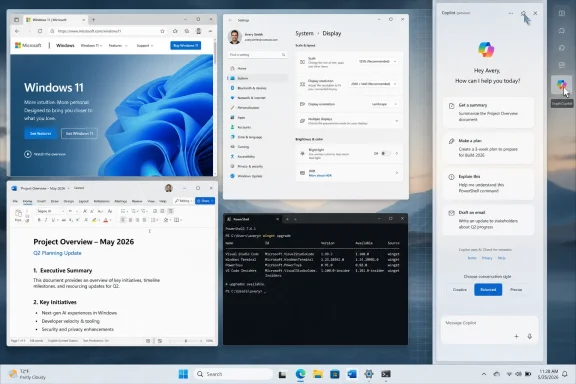
Microsoft is testing a restored docked Copilot sidebar for Windows 11 in late May 2026, giving the AI assistant an optional mode that pins it to the side of the desktop and resizes open windows instead of floating over them. The change sounds small, almost cosmetic, until you remember how much of Windows is really a negotiation over space, attention, and defaults. Microsoft is no longer merely asking whether Copilot should be in Windows; it is testing how much of the desktop Copilot is allowed to occupy. That makes the docked sidebar less a nostalgic return than a fresh attempt to make AI feel like part of the operating system’s furniture.
The first version of Copilot in Windows 11 arrived with a blunt promise: the AI assistant would sit at the edge of the desktop, ready to answer questions, adjust settings, and eventually mediate more of the operating system. It was not subtle. It was a sidebar, a button, a brand mark, and a thesis about where Microsoft thought personal computing was headed.
Then Microsoft backed away from that model. The old Copilot in Windows sidebar gave way to a more conventional app-like experience, and enterprise documentation framed the change as part of a broader shift toward Microsoft 365 Copilot Chat and a lighter prompt experience tied to the Copilot key or keyboard shortcut. The assistant became less of a Windows pane and more of a service you opened.
The new docking option complicates that retreat. According to reports from gHacks and others, Copilot can once again be placed at the edge of the screen, with Windows resizing the desktop work area so that other applications make room. That is the important distinction: this is not just a window that happens to be tall and narrow. It is a window that asks the shell to treat it as something adjacent to your work, not merely another app competing with it.
That distinction matters because Microsoft has been trying to square two incompatible reactions to Copilot. Users dislike feeling ambushed by AI buttons in every corner of the interface, but Microsoft wants Copilot to be visible enough that people actually use it. Docking is the compromise: less pushy than a floating overlay, more persistent than an app buried in Alt-Tab.
That makes the docked Copilot closer in spirit to the taskbar than to a normal app window. The taskbar claims space because the system treats it as infrastructure. A snapped window uses space because the user chose a layout. A docked assistant sits somewhere between those models, and that in-between state is where the controversy lives.
If Copilot floats, it is easy to dismiss as clutter. If Copilot docks, it becomes a participant in layout management. It can remain visible while you write, browse, troubleshoot, or compare documents, and the operating system behaves as though its presence is legitimate enough to reorganize the workspace.
This is why the feature may feel more consequential to power users than to casual users. A person with one browser window and a 27-inch monitor may see a harmless convenience. Someone managing terminals, virtual machines, documentation, Teams, Outlook, and remote sessions may see a new claimant on pixels that were already scarce.
Windows users tend to tolerate ambitious features when they are discoverable and reversible. They rebel when those features feel like advertising campaigns wearing system chrome. The difference between a tool and an intrusion is often one default, one toggle, or one immovable button.
The docked Copilot experiment appears designed to avoid the worst version of that mistake. If the mode requires deliberate activation and can be dismissed cleanly, it gives Microsoft room to study behavior without making every desktop look like a Copilot demo booth. If it becomes the default posture for new devices or gets tied too tightly to taskbar prompts, the same feature will read very differently.
That is the pattern Microsoft keeps running into with AI in Windows. The company is not simply shipping capabilities; it is testing users’ tolerance for ambient assistance. Every entry point is also a referendum.
The old Copilot sidebar fit that tradition, but it arrived before Microsoft had a stable story for what Copilot in Windows was supposed to do. Was it a web chatbot? A settings helper? A bridge to Microsoft 365? A local AI agent? A search replacement? The interface suggested permanence, while the feature set often felt provisional.
That mismatch helped make the original sidebar vulnerable. A docked panel that can explain a setting, summarize a page, or draft text is useful. A docked panel that mostly routes users to web answers and brand experiences feels like sponsored whitespace.
The new version arrives in a different context. Microsoft has spent the last two years turning Copilot from a single product name into a family of services, apps, agents, and hardware affordances. The docked sidebar is not just returning to the desktop; it is returning after the Copilot stack has become more complicated.
Microsoft’s enterprise guidance has described a streamlined prompt experience and a path into the full Microsoft 365 Copilot app. That makes sense for managed environments, especially where Microsoft wants the assistant to respect work identity, enterprise data protection, and administrator policy. But for consumer Windows, a prompt box alone risks feeling ephemeral.
A docked mode gives the key and taskbar entry points a more satisfying endpoint. Press the key, ask something, expand into a persistent side panel, keep working. That is a plausible workflow, and it maps neatly onto Microsoft’s ambition to make AI assistance continuous rather than episodic.
The risk is that continuity can become pressure. If every keyboard, taskbar, app ribbon, and browser sidebar points toward Copilot, then the docked panel is not merely a convenience. It is the place where all those nudges converge.
The docked sidebar might look like a contradiction: Microsoft says it is reducing Copilot clutter, then restores one of Copilot’s most visually prominent forms. But the two moves can also be read as part of the same cleanup campaign. Microsoft may be trying to remove scattered AI buttons from individual apps while concentrating Copilot into fewer, more coherent surfaces.
That would be a more defensible strategy. A single optional docked assistant is easier to understand than half a dozen app-specific icons whose capabilities vary wildly. It gives users one place to go for AI help, and it gives administrators one more obvious thing to govern.
Still, users will judge the implementation, not the theory. If Copilot is less present in Notepad but more insistent on the desktop, the net feeling may still be that Windows is being reoriented around Microsoft’s AI business. Consolidation is only a reduction if the remaining surface behaves with restraint.
Enterprise Windows environments are built on predictability. Administrators care whether a feature can be disabled, whether it respects account boundaries, whether it leaks context into consumer services, and whether it changes workflows that users rely on. A docked assistant that resizes windows touches the visible behavior of the desktop, even if it does not alter underlying security boundaries.
The key enterprise question is whether the feature is governed like a serious Windows component or shipped like a consumer engagement experiment. Microsoft has already provided administrative paths for managing Copilot app deployment and hardware-key behavior in commercial contexts. A docked desktop mode will need the same level of policy clarity if it moves beyond testing.
There is also a support burden hiding in the UI. When a user says, “my apps moved,” the answer may be Copilot. When screen-sharing sessions look different, the answer may be Copilot. When a training document assumes full-width windows, the answer may again be Copilot. Small shell features have a way of becoming help desk tickets when they roll out unevenly.
A floating assistant feels temporary. A docked assistant feels present. That presence can be reassuring if the user asked for help and understands the boundaries. It can be unnerving if the assistant appears to sit beside everything the user does, even when it is not actively reading the screen.
Microsoft will need to be precise about the distinction. A panel being visible is not the same as a panel having access to all visible content. But the average user does not parse UI architecture that way. If Copilot is parked next to a bank statement, medical portal, password manager, or corporate document, perception becomes part of the privacy experience.
This is especially true because AI assistants are judged by a different standard than traditional utilities. Users expect a clipboard manager or taskbar to be passive. They expect an AI assistant to infer, summarize, and act. Once Copilot is visually integrated with the work area, Microsoft has to earn trust not just through permissions, but through restraint.
Copilot docking borrows that language but changes the premise. Snap arranges apps the user already chose to open. A docked assistant is a specialized companion that Microsoft wants users to keep nearby. The layout mechanism may be similar, but the business logic is different.
That does not make the feature bad. In fact, if Microsoft implements it with the discipline of Snap, it could be one of the more acceptable ways to integrate Copilot. Let the user decide the edge, the width, the persistence, and the dismissal behavior. Make it obvious when the assistant is docked versus merely snapped. Remember the arrangement across sessions only when the user asks.
The danger is that Microsoft treats Snap as permission to normalize Copilot’s presence. Users like layout tools because they expand control. They dislike promotional UI because it narrows control. Docked Copilot will live or die on which side of that line it lands.
That is why Microsoft keeps struggling to place Copilot. If Copilot is an app, it is too easy to ignore. If it is part of every app, it becomes noise. If it is part of the shell, it becomes controversial. There is no neutral location for an assistant that wants to help everywhere.
Docking is an attempt to make the agent spatially legible. It says: here is the assistant, here is your work, and both can coexist. That is a cleaner metaphor than sprinkling Copilot icons across every toolbar.
But the metaphor only works if Copilot becomes genuinely useful across contexts. A docked assistant that can help troubleshoot Windows errors, explain settings, summarize documents, manage calendar friction, and respect enterprise boundaries has a case for permanence. A docked assistant that mostly answers generic web prompts is just another panel.
That is valuable to Microsoft because Copilot adoption is not just a technical deployment problem. It is a habit problem. Companies can buy licenses, deploy apps, and pin taskbar icons, but they cannot force employees to incorporate AI into daily work unless the workflow is convenient and credible.
A docked assistant is one way to reduce friction. It keeps the chat surface visible while the user works in Word, Excel, Edge, Teams, line-of-business apps, or remote desktops. It also turns Copilot into something closer to a shared workspace tool than a destination.
Yet enterprise buyers will also be the least forgiving audience. They will ask what data is used, which tenant identity is active, how consumer and work experiences are separated, how the feature is disabled, and whether it behaves consistently across Windows 11 versions. Microsoft cannot rely on novelty there. It has to deliver administrative calm.
Windows users already know how to search the Start menu, snap windows, open a browser, ask a search engine, right-click a file, or message a colleague. Copilot has to earn a place among those gestures. A docked panel is a bid to become part of the choreography.
The best version of this future is mundane. A user keeps Copilot docked while fixing a driver issue, comparing two settings pages, rewriting an email, or translating an error message. The assistant is there, useful, and dismissible. Nobody writes a think piece because the feature has become boring in the good way.
The worst version is also easy to imagine. Copilot opens too often, takes too much space, confuses work and consumer contexts, and becomes another thing power users disable after installation. Microsoft has lived this cycle before with widgets, recommendations, Edge prompts, and Start menu experiments. Windows users have long memories for features that behave like campaigns.
The docked sidebar is a revealing test because it is both modest and symbolic. Technically, it is a layout option. Strategically, it is a claim that Copilot deserves reserved space on the desktop. Those two truths will collide in user reaction.
Restraint would mean making the feature easy to discover but easier to ignore. It would mean honoring user choices across updates. It would mean not using the docked panel as a billboard for unrelated Copilot upsells. It would mean giving administrators clean controls before the feature becomes broadly visible in managed environments.
Ambition without restraint would produce the opposite: a panel that keeps returning, a taskbar that keeps pointing, and settings that keep changing names as Microsoft chases engagement. Users do not need to be anti-AI to reject that. They only need to be pro-desktop.
 Microsoft Reopens the Door It Closed Last Year
The first version of Copilot in Windows 11 arrived with a blunt promise: the AI assistant would sit at the edge of the desktop, ready to answer questions, adjust settings, and eventually mediate more of the operating system. It was not subtle. It was a sidebar, a button, a brand mark, and a thesis about where Microsoft thought personal computing was headed.Then Microsoft backed away from that model. The old Copilot in Windows sidebar gave way to a more conventional app-like experience, and enterprise documentation framed the change as part of a broader shift toward Microsoft 365 Copilot Chat and a lighter prompt experience tied to the Copilot key or keyboard shortcut. The assistant became less of a Windows pane and more of a service you opened.
The new docking option complicates that retreat. According to reports from gHacks and others, Copilot can once again be placed at the edge of the screen, with Windows resizing the desktop work area so that other applications make room. That is the important distinction: this is not just a window that happens to be tall and narrow. It is a window that asks the shell to treat it as something adjacent to your work, not merely another app competing with it.
That distinction matters because Microsoft has been trying to square two incompatible reactions to Copilot. Users dislike feeling ambushed by AI buttons in every corner of the interface, but Microsoft wants Copilot to be visible enough that people actually use it. Docking is the compromise: less pushy than a floating overlay, more persistent than an app buried in Alt-Tab.
The Desktop Resize Is the Product Decision
The headline feature is not that Copilot can sit on the side. Windows users have been placing chat apps, terminals, file managers, and browser windows along screen edges for decades. The real feature is that Windows can shrink the usable desktop area around Copilot, moving other windows out of the way.That makes the docked Copilot closer in spirit to the taskbar than to a normal app window. The taskbar claims space because the system treats it as infrastructure. A snapped window uses space because the user chose a layout. A docked assistant sits somewhere between those models, and that in-between state is where the controversy lives.
If Copilot floats, it is easy to dismiss as clutter. If Copilot docks, it becomes a participant in layout management. It can remain visible while you write, browse, troubleshoot, or compare documents, and the operating system behaves as though its presence is legitimate enough to reorganize the workspace.
This is why the feature may feel more consequential to power users than to casual users. A person with one browser window and a 27-inch monitor may see a harmless convenience. Someone managing terminals, virtual machines, documentation, Teams, Outlook, and remote sessions may see a new claimant on pixels that were already scarce.
Optional Is Doing a Lot of Work
The reports so far describe the docking mode as optional, and that word is carrying most of the political weight. Microsoft has learned, sometimes painfully, that AI features land differently when users feel they are being invited rather than drafted. The recent Copilot backlash was not only about AI; it was about placement.Windows users tend to tolerate ambitious features when they are discoverable and reversible. They rebel when those features feel like advertising campaigns wearing system chrome. The difference between a tool and an intrusion is often one default, one toggle, or one immovable button.
The docked Copilot experiment appears designed to avoid the worst version of that mistake. If the mode requires deliberate activation and can be dismissed cleanly, it gives Microsoft room to study behavior without making every desktop look like a Copilot demo booth. If it becomes the default posture for new devices or gets tied too tightly to taskbar prompts, the same feature will read very differently.
That is the pattern Microsoft keeps running into with AI in Windows. The company is not simply shipping capabilities; it is testing users’ tolerance for ambient assistance. Every entry point is also a referendum.
A Sidebar Is Old Windows Language for a New AI Bet
There is a reason the restored sidebar feels familiar. Windows has a long history of edge-resident UI, from the taskbar to Charms to Widgets to notification panels and snapped apps. Microsoft keeps returning to the edge of the screen because edges promise availability without full interruption.The old Copilot sidebar fit that tradition, but it arrived before Microsoft had a stable story for what Copilot in Windows was supposed to do. Was it a web chatbot? A settings helper? A bridge to Microsoft 365? A local AI agent? A search replacement? The interface suggested permanence, while the feature set often felt provisional.
That mismatch helped make the original sidebar vulnerable. A docked panel that can explain a setting, summarize a page, or draft text is useful. A docked panel that mostly routes users to web answers and brand experiences feels like sponsored whitespace.
The new version arrives in a different context. Microsoft has spent the last two years turning Copilot from a single product name into a family of services, apps, agents, and hardware affordances. The docked sidebar is not just returning to the desktop; it is returning after the Copilot stack has become more complicated.
The Copilot Key Needed a Destination
The hardware Copilot key was always an unusually physical bet on a software habit. Microsoft and its PC partners carved a new key into keyboards before the everyday Copilot workflow had fully settled. That created a basic UX problem: when users press the key, what should happen?Microsoft’s enterprise guidance has described a streamlined prompt experience and a path into the full Microsoft 365 Copilot app. That makes sense for managed environments, especially where Microsoft wants the assistant to respect work identity, enterprise data protection, and administrator policy. But for consumer Windows, a prompt box alone risks feeling ephemeral.
A docked mode gives the key and taskbar entry points a more satisfying endpoint. Press the key, ask something, expand into a persistent side panel, keep working. That is a plausible workflow, and it maps neatly onto Microsoft’s ambition to make AI assistance continuous rather than episodic.
The risk is that continuity can become pressure. If every keyboard, taskbar, app ribbon, and browser sidebar points toward Copilot, then the docked panel is not merely a convenience. It is the place where all those nudges converge.
Microsoft Is Trying to Undo AI Bloat Without Undoing AI
The timing is awkward for a reason. Microsoft has recently been walking back some Copilot branding and entry points in Windows 11 apps, a move widely interpreted as an admission that the company had overreached. Users complained about Copilot appearing in too many places, often without enough practical value to justify the attention tax.The docked sidebar might look like a contradiction: Microsoft says it is reducing Copilot clutter, then restores one of Copilot’s most visually prominent forms. But the two moves can also be read as part of the same cleanup campaign. Microsoft may be trying to remove scattered AI buttons from individual apps while concentrating Copilot into fewer, more coherent surfaces.
That would be a more defensible strategy. A single optional docked assistant is easier to understand than half a dozen app-specific icons whose capabilities vary wildly. It gives users one place to go for AI help, and it gives administrators one more obvious thing to govern.
Still, users will judge the implementation, not the theory. If Copilot is less present in Notepad but more insistent on the desktop, the net feeling may still be that Windows is being reoriented around Microsoft’s AI business. Consolidation is only a reduction if the remaining surface behaves with restraint.
IT Departments Will See a Shell Change, Not a Chatbot Change
For home users, a docked Copilot panel is a question of taste and usefulness. For IT administrators, it is a shell integration that may affect training, support, policy, screenshots, help desk scripts, and user expectations. That puts it in a different category from a web app update.Enterprise Windows environments are built on predictability. Administrators care whether a feature can be disabled, whether it respects account boundaries, whether it leaks context into consumer services, and whether it changes workflows that users rely on. A docked assistant that resizes windows touches the visible behavior of the desktop, even if it does not alter underlying security boundaries.
The key enterprise question is whether the feature is governed like a serious Windows component or shipped like a consumer engagement experiment. Microsoft has already provided administrative paths for managing Copilot app deployment and hardware-key behavior in commercial contexts. A docked desktop mode will need the same level of policy clarity if it moves beyond testing.
There is also a support burden hiding in the UI. When a user says, “my apps moved,” the answer may be Copilot. When screen-sharing sessions look different, the answer may be Copilot. When a training document assumes full-width windows, the answer may again be Copilot. Small shell features have a way of becoming help desk tickets when they roll out unevenly.
The Privacy Debate Moves From Data to Line of Sight
Copilot’s most sensitive Windows debates have often centered on what the assistant can see. Features such as Copilot Vision and the broader Copilot+ PC push have sharpened user concern around screen context, screenshots, local AI processing, cloud services, and consent. Docking does not necessarily change those data flows, but it changes the emotional geometry of the desktop.A floating assistant feels temporary. A docked assistant feels present. That presence can be reassuring if the user asked for help and understands the boundaries. It can be unnerving if the assistant appears to sit beside everything the user does, even when it is not actively reading the screen.
Microsoft will need to be precise about the distinction. A panel being visible is not the same as a panel having access to all visible content. But the average user does not parse UI architecture that way. If Copilot is parked next to a bank statement, medical portal, password manager, or corporate document, perception becomes part of the privacy experience.
This is especially true because AI assistants are judged by a different standard than traditional utilities. Users expect a clipboard manager or taskbar to be passive. They expect an AI assistant to infer, summarize, and act. Once Copilot is visually integrated with the work area, Microsoft has to earn trust not just through permissions, but through restraint.
The Snap Comparison Helps, but Only So Much
Some early descriptions compare the docked Copilot behavior to Snap layouts, and the comparison is useful up to a point. Snap is one of Windows 11’s best productivity features because it helps users impose order on the desktop. It is predictable, visible, and user-directed.Copilot docking borrows that language but changes the premise. Snap arranges apps the user already chose to open. A docked assistant is a specialized companion that Microsoft wants users to keep nearby. The layout mechanism may be similar, but the business logic is different.
That does not make the feature bad. In fact, if Microsoft implements it with the discipline of Snap, it could be one of the more acceptable ways to integrate Copilot. Let the user decide the edge, the width, the persistence, and the dismissal behavior. Make it obvious when the assistant is docked versus merely snapped. Remember the arrangement across sessions only when the user asks.
The danger is that Microsoft treats Snap as permission to normalize Copilot’s presence. Users like layout tools because they expand control. They dislike promotional UI because it narrows control. Docked Copilot will live or die on which side of that line it lands.
Windows Is Becoming a Negotiation Between Apps and Agents
The docked sidebar also hints at a broader shift in Windows design. For decades, the desktop has been organized around applications: windows, icons, taskbar buttons, file associations, and notifications. AI assistants introduce another actor into that model: the agent that sits across apps rather than inside one.That is why Microsoft keeps struggling to place Copilot. If Copilot is an app, it is too easy to ignore. If it is part of every app, it becomes noise. If it is part of the shell, it becomes controversial. There is no neutral location for an assistant that wants to help everywhere.
Docking is an attempt to make the agent spatially legible. It says: here is the assistant, here is your work, and both can coexist. That is a cleaner metaphor than sprinkling Copilot icons across every toolbar.
But the metaphor only works if Copilot becomes genuinely useful across contexts. A docked assistant that can help troubleshoot Windows errors, explain settings, summarize documents, manage calendar friction, and respect enterprise boundaries has a case for permanence. A docked assistant that mostly answers generic web prompts is just another panel.
The Consumer Desktop Is the Test Bed for the Enterprise Pitch
Microsoft often uses consumer Windows as a proving ground for interaction patterns that later matter commercially. The docked sidebar may follow that path. If users accept Copilot as a persistent desktop companion at home, the enterprise pitch becomes easier: the assistant is not another app to train people on, but a familiar layer of the Windows experience.That is valuable to Microsoft because Copilot adoption is not just a technical deployment problem. It is a habit problem. Companies can buy licenses, deploy apps, and pin taskbar icons, but they cannot force employees to incorporate AI into daily work unless the workflow is convenient and credible.
A docked assistant is one way to reduce friction. It keeps the chat surface visible while the user works in Word, Excel, Edge, Teams, line-of-business apps, or remote desktops. It also turns Copilot into something closer to a shared workspace tool than a destination.
Yet enterprise buyers will also be the least forgiving audience. They will ask what data is used, which tenant identity is active, how consumer and work experiences are separated, how the feature is disabled, and whether it behaves consistently across Windows 11 versions. Microsoft cannot rely on novelty there. It has to deliver administrative calm.
The Real Competition Is Not ChatGPT, but Muscle Memory
It is tempting to view every Copilot change as part of Microsoft’s competition with OpenAI’s ChatGPT, Google’s Gemini, Anthropic’s Claude, or whatever assistant happens to be climbing the charts this quarter. That is true at the service level. At the Windows level, the deeper competitor is muscle memory.Windows users already know how to search the Start menu, snap windows, open a browser, ask a search engine, right-click a file, or message a colleague. Copilot has to earn a place among those gestures. A docked panel is a bid to become part of the choreography.
The best version of this future is mundane. A user keeps Copilot docked while fixing a driver issue, comparing two settings pages, rewriting an email, or translating an error message. The assistant is there, useful, and dismissible. Nobody writes a think piece because the feature has become boring in the good way.
The worst version is also easy to imagine. Copilot opens too often, takes too much space, confuses work and consumer contexts, and becomes another thing power users disable after installation. Microsoft has lived this cycle before with widgets, recommendations, Edge prompts, and Start menu experiments. Windows users have long memories for features that behave like campaigns.
The Feature’s Success Depends on Restraint, Not Ambition
Microsoft’s ambition for Copilot is not in doubt. The company has reorganized products, branding, hardware, cloud services, and developer platforms around AI assistance. The question is whether Windows can absorb that ambition without making the desktop feel less like the user’s workspace.The docked sidebar is a revealing test because it is both modest and symbolic. Technically, it is a layout option. Strategically, it is a claim that Copilot deserves reserved space on the desktop. Those two truths will collide in user reaction.
Restraint would mean making the feature easy to discover but easier to ignore. It would mean honoring user choices across updates. It would mean not using the docked panel as a billboard for unrelated Copilot upsells. It would mean giving administrators clean controls before the feature becomes broadly visible in managed environments.
Ambition without restraint would produce the opposite: a panel that keeps returning, a taskbar that keeps pointing, and settings that keep changing names as Microsoft chases engagement. Users do not need to be anti-AI to reject that. They only need to be pro-desktop.
The Docked Panel Tells Us Where Windows Is Heading
The concrete lessons from this experiment are less about one sidebar than about Microsoft’s evolving model for AI on the PC. Copilot is being shaped into something that can be invoked, pinned, expanded, governed, and eventually woven through the operating system. The docked mode gives that strategy a visible outline.- Microsoft is testing a docked Copilot mode that can reserve space at the side of the Windows 11 desktop and shift other open windows out of the way.
- The feature appears to be optional in current testing, which is crucial because user resistance to Copilot has centered as much on forced placement as on AI itself.
- The return of a sidebar does not simply reverse Microsoft’s earlier retreat; it reframes Copilot as a more deliberate desktop companion rather than scattered app-level branding.
- Administrators should watch for policy controls, deployment behavior, and account-boundary documentation before treating the feature as enterprise-ready.
- The privacy argument will depend less on the panel’s shape than on what Copilot can access, when it can access it, and how clearly Windows communicates that to users.
- The feature will succeed only if it behaves like a productivity tool the user controls, not like an engagement surface Microsoft controls.
References
- Primary source: gHacks
Published: Thu, 28 May 2026 07:06:28 GMT

Microsoft Adds Docking Option to Windows 11 Copilot That Resizes the Desktop to Make Room - gHacks Tech News
Microsoft is rolling out a new docking option for Windows 11 Copilot that pins it to the screen edge and resizes other apps to fit, echoing the original 2024 sidebar design. www.ghacks.net
- Independent coverage: Let's Data Science
Published: Thu, 28 May 2026 07:06:28 GMT
Microsoft Restores Docked Copilot Sidebar in Windows 11
Windows Latest reports that Microsoft is testing a docked **Copilot** sidebar in **Windows 11** that can pin the assistant to the left or right screen edge and automatically resize other open apps to make room. Multiple outlets, including Ghacks and Digital Trends, say the default Copilot still... letsdatascience.com
- Related coverage: windowslatest.com

Microsoft confirms Ask Copilot is coming to the Windows 11 taskbar in mid-2026
Footnotes in a new Microsoft e-book confirm Ask Copilot and Click to Do are launching in mid-2026 for enterprise "Frontier Firms." www.windowslatest.com
- Official source: learn.microsoft.com

CoPilot interface roll back - Microsoft Q&A
Hello. I have some users in China who are having a lot of trouble using the chat feature in copilot. When prompted, Copilot says the following as to why chat was changed. What you’re seeing is due to a recent interface update/feature change in…learn.microsoft.com - Related coverage: windowscentral.com
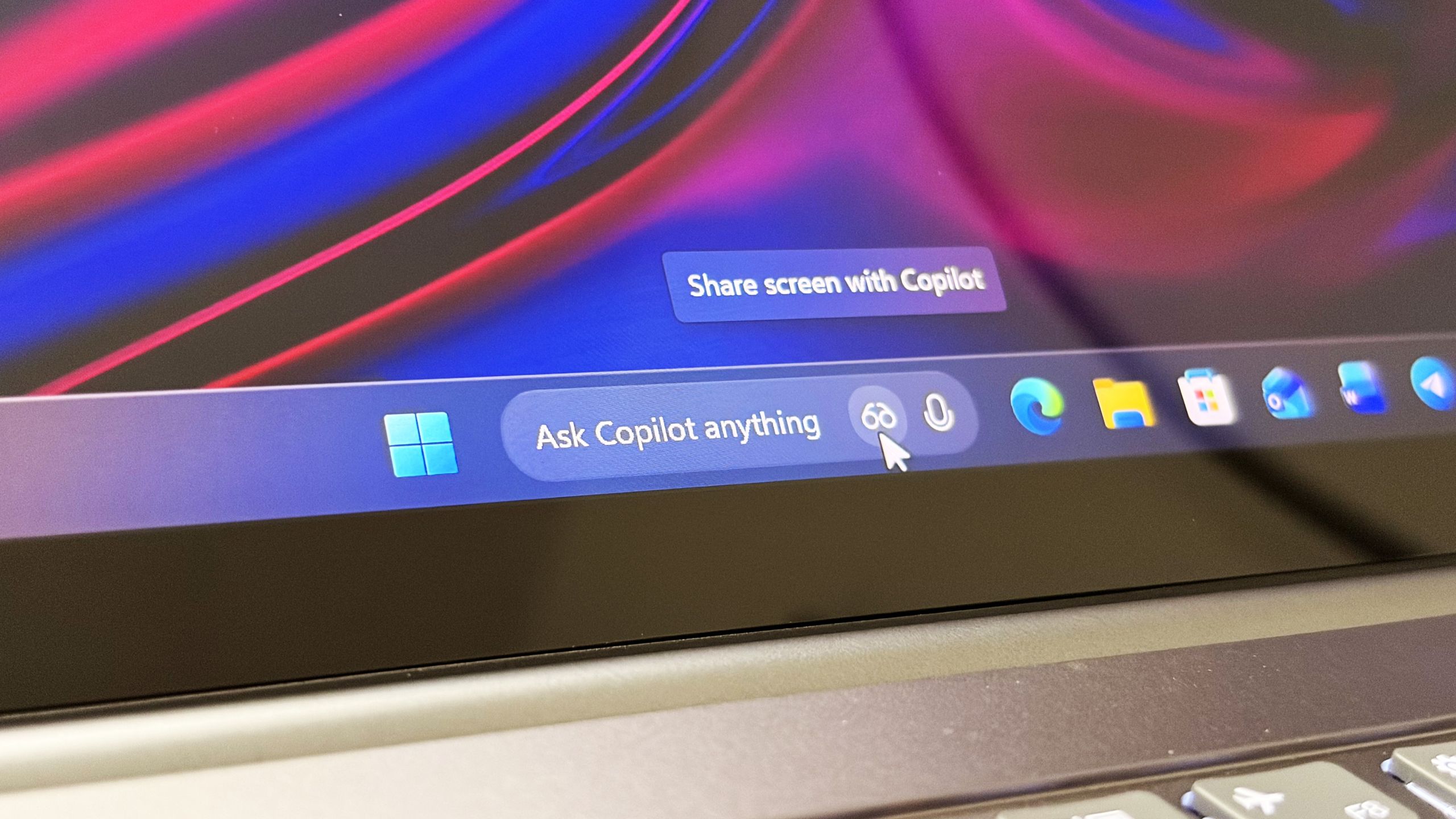
Microsoft confirms Ask Copilot is still coming to Windows 11's Taskbar this summer
First announced last year, a new document has confirmed that Microsoft's upcoming "Ask Copilot" feature for Windows 11's Taskbar is arriving mid-2026. www.windowscentral.com
- Related coverage: windowsreport.com
- Related coverage: techspot.com
- Related coverage: techcrunch.com

Microsoft rolls back some of its Copilot AI bloat on Windows | TechCrunch
The company is reducing Copilot entry points on Windows, starting with Photos, Widgets, Notepad, and other apps. techcrunch.com
- Related coverage: techradar.com
- Official source: blogs.windows.com

Microsoft Copilot improvements for Windows 11
Microsoft Copilot is your everyday AI companion. As we continue to innovate with Windows, we’re delighted to introduce some useful new features to our Copilot Preview1 for Windows 11. These new capabilities build on the introduction of blogs.windows.com
- Official source: download.microsoft.com
- Official source: news.microsoft.com
- Related coverage: pcgamer.com
- Official source: microsoft.com
- Official source: adoption.microsoft.com
- Official source: cdn-dynmedia-1.microsoft.com