

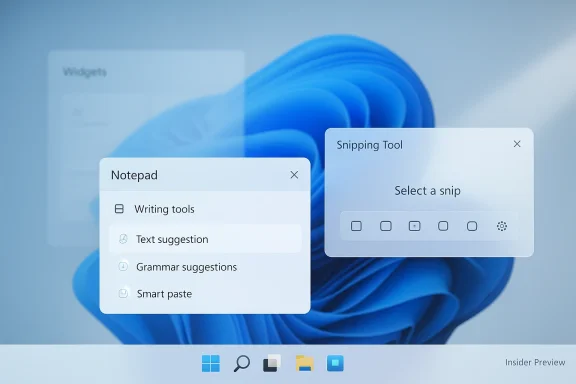
Microsoft is not removing Copilot from Windows 11 so much as admitting that it overreached with where and how often it showed up. The latest Insider build changes are aimed at reducing unnecessary Copilot entry points in apps such as Notepad, Snipping Tool, Photos, and Widgets, while preserving the underlying AI features in a less intrusive form. That is a meaningful shift for a company that spent much of the last year making Copilot feel like a permanent fixture of the desktop experience. The new direction suggests a recalibration: AI remains central to Microsoft’s Windows story, but the company is now trying to make it feel more contextual and less promotional.
Windows has always been more than an operating system. For Microsoft, it is the main interface between the company and hundreds of millions of people, which makes every shell change feel bigger than a simple product tweak. The Copilot push was always intended as a platform-level strategy, not just an assistant feature, and that is why its presence spread so aggressively across Windows 11. Microsoft wanted Copilot to feel ambient, available, and normal, even in tools that were historically valued for being fast, quiet, and minimal. That ambition made sense in a keynote; in daily use, it often felt like clutter.
The problem was not that users rejected AI outright. It was that Microsoft kept surfacing AI in places where people were trying to complete simple tasks. Notepad is supposed to be immediate. Snipping Tool is supposed to get out of the way. Photos should help with image viewing and editing without becoming a chatbot showcase. Widgets are supposed to be glanceable. When Copilot buttons appeared in all of those places, many users saw the same pattern: a useful feature being turned into a branding exercise.
That tension has been building for years, but it became more visible as Microsoft tied Windows 11 more closely to its wider AI agenda. The company pushed Copilot into the operating system, into inbox apps, into marketing, and even into hardware messaging through Copilot+ PCs. At the same time, it kept facing complaints that Windows 11 had become busier, more rigid, and more opinionated than its users wanted. The latest rollback is best understood against that backdrop: not a retreat from AI, but an attempt to make Windows feel less like an AI showroom.
Another important piece of context is trust. Microsoft’s AI ambitions have repeatedly collided with privacy and control concerns, especially around features like Recall. Even when the feature in question is not controversial, users tend to read Copilot changes through that lens. That means a “less visible” Copilot can be interpreted in two very different ways: either as a smarter design decision or as an overdue correction to a pushy rollout. Both interpretations are fair, which is why this story matters beyond the handful of apps involved.
The same logic applies to Snipping Tool, where the original Copilot button could feel like an interruption in a workflow built around speed. Screen capture is often a quick, transactional task. Adding a second decision layer in the middle of that flow makes the tool feel heavier than it should. A cleaner capture experience is not a cosmetic win; it is a workflow win.
The broader implication is that Microsoft has moved from a Copilot everywhere mindset to a Copilot where it fits posture. That is a subtle but important product discipline shift. It means the company is no longer treating ubiquity as automatically desirable. Instead, it is acknowledging that the quality of a feature’s placement can matter more than the number of places it appears.
Snipping Tool raises the same issue in a different form. Screen capture is a utility task, and utility tasks are judged on friction. If the user has to mentally process whether to engage Copilot before finishing a screenshot, the tool has already become less useful. Removing that interruption is the kind of change that users may barely notice consciously, but they will absolutely feel in their workflow.
Widgets and Photos are a little different, but the underlying principle is the same. Widgets should be a glanceable dashboard, not a persistent sales pitch. Photos can benefit from AI-assisted search or editing, but it should not feel like every image opens with a Copilot invitation. The more Microsoft preserves the task-focused nature of these apps, the more likely users are to treat AI as a helper rather than an intrusion.
That is why the rollback may actually strengthen Copilot over time. A more selective deployment can make the assistant feel earned rather than automatic. In product terms, restraint can be a feature. Microsoft is effectively betting that users will respond better to AI that appears at the right moment than AI that is everywhere all the time.
Microsoft has already signaled in other areas that Copilot distribution is a governance issue. Support and admin controls around Microsoft 365 Copilot and related experiences show that the company understands enterprise customers want options, not surprises. This Windows 11 adjustment fits the same pattern: keep the underlying capability, but make the visual and behavioral footprint less disruptive.
The enterprise implication is broader than just AI. If Microsoft can demonstrate that it is willing to reduce friction in Windows 11, it improves the platform’s case as a managed desktop. A calmer shell, fewer interruptions, and more deliberate feature placement all help the OS feel less like a moving target. That is especially important at a time when organizations are already asking employees to absorb other changes in security, updates, and device management.
The timing also matters because Windows 10 support ended on October 14, 2025. That created a new reality: Microsoft can no longer rely on the “wait for the next version” escape hatch to absorb dissatisfaction. Windows 11 now has to justify itself on its own merits. If it feels less intrusive, less cluttered, and more predictable, it becomes easier to defend. If it feels like a billboard for Microsoft’s AI ambitions, it becomes harder to sell.
The move is therefore strategic. It is not just about cleaning up a few app toolbars. It is about rebuilding patience. Microsoft knows that if it wants people to accept Windows 11 as the default desktop, it must offer more than branding and more than AI slogans. It has to deliver a calmer operating system.
There is a subtle advantage in Microsoft’s new posture. By reducing unnecessary entry points, the company can argue that it is being more thoughtful than rivals about where AI belongs. That may not be as flashy as “AI everywhere,” but it is more sustainable. In consumer software, restraint often wins long-term trust more effectively than spectacle.
It also helps Microsoft avoid the trap of making Copilot feel like a branding layer instead of a workflow layer. If the assistant appears only when it can truly improve the task, it becomes more competitive, not less. The future of assistant software is likely to be less about volume and more about relevance. Microsoft’s latest move suggests it has started to understand that.
This is also a better fit for the way people actually use lightweight Windows tools. Not every task needs a conversation. Many tasks just need to be completed cleanly and quickly. If Microsoft can preserve that feeling while still offering AI when it is genuinely useful, it will have found a much stronger design balance.
There is an upside for discoverability too, paradoxically. When Copilot is not shouting from every app surface, the moments when it does appear can feel more meaningful. That may improve actual usage because users are less likely to dismiss the feature as clutter. In other words, fewer invitations can lead to better invitations.
There is also a risk that this looks like a retreat to people who bought into the original Copilot vision. Microsoft has spent a lot of time telling the market that AI is central to Windows, and it cannot now make the feature feel marginal. The challenge is to scale back the noise without making the platform appear uncertain about its own direction.
Another thing to watch is how Microsoft communicates the change. Users are more likely to embrace a quieter Copilot if the company explains the philosophy behind it clearly. That means talking about context, usefulness, and reducing friction—not just shipping smaller buttons and calling it a day. The message has to be that Windows is becoming more respectful of attention, not just less enthusiastic about one brand name.
Finally, it will be worth watching whether the change becomes a broader template for Microsoft’s AI product design. If Copilot is to remain a flagship across Windows, Microsoft 365, and its hardware ecosystem, it needs to feel like an assistant people can trust, not one that interrupts them. The company is now closer to that goal than it was a month ago, but the next few Insider releases will show whether the shift is real discipline or just a temporary course correction.
Source: Trusted Reviews Microsoft is removing Copilot from a bunch of apps
 Background
Windows has always been more than an operating system. For Microsoft, it is the main interface between the company and hundreds of millions of people, which makes every shell change feel bigger than a simple product tweak. The Copilot push was always intended as a platform-level strategy, not just an assistant feature, and that is why its presence spread so aggressively across Windows 11. Microsoft wanted Copilot to feel ambient, available, and normal, even in tools that were historically valued for being fast, quiet, and minimal. That ambition made sense in a keynote; in daily use, it often felt like clutter.The problem was not that users rejected AI outright. It was that Microsoft kept surfacing AI in places where people were trying to complete simple tasks. Notepad is supposed to be immediate. Snipping Tool is supposed to get out of the way. Photos should help with image viewing and editing without becoming a chatbot showcase. Widgets are supposed to be glanceable. When Copilot buttons appeared in all of those places, many users saw the same pattern: a useful feature being turned into a branding exercise.
That tension has been building for years, but it became more visible as Microsoft tied Windows 11 more closely to its wider AI agenda. The company pushed Copilot into the operating system, into inbox apps, into marketing, and even into hardware messaging through Copilot+ PCs. At the same time, it kept facing complaints that Windows 11 had become busier, more rigid, and more opinionated than its users wanted. The latest rollback is best understood against that backdrop: not a retreat from AI, but an attempt to make Windows feel less like an AI showroom.
Another important piece of context is trust. Microsoft’s AI ambitions have repeatedly collided with privacy and control concerns, especially around features like Recall. Even when the feature in question is not controversial, users tend to read Copilot changes through that lens. That means a “less visible” Copilot can be interpreted in two very different ways: either as a smarter design decision or as an overdue correction to a pushy rollout. Both interpretations are fair, which is why this story matters beyond the handful of apps involved.
What Microsoft Is Actually Changing
The immediate change is simple: Microsoft is removing or reducing the most prominent Copilot buttons from select Windows 11 inbox apps. In Notepad, the old Copilot icon is being replaced by a more discreet Writing tools menu that still unlocks the same AI-assisted capabilities. In Snipping Tool, the Copilot button no longer appears in the capture flow, which makes the tool feel more focused on its core job of grabbing, marking up, and moving on. Microsoft’s own Insider messaging frames this as reducing unnecessary entry points rather than eliminating the AI features themselves.Less branding, same capability
That distinction is crucial. Microsoft is not saying the AI features were wrong; it is saying the presentation was wrong for certain workflows. The writing tools in Notepad still exist, but they are no longer front-loaded with a Copilot label that turns a lightweight app into an AI billboard. That small design shift matters because it preserves utility while reducing visual friction. It also signals that Microsoft has finally noticed that a useful feature can become annoying if it is advertised too aggressively.The same logic applies to Snipping Tool, where the original Copilot button could feel like an interruption in a workflow built around speed. Screen capture is often a quick, transactional task. Adding a second decision layer in the middle of that flow makes the tool feel heavier than it should. A cleaner capture experience is not a cosmetic win; it is a workflow win.
Why “entry points” matter
Microsoft’s phrase “reduce unnecessary Copilot entry points” may sound like corporate varnish, but it reveals the company’s real problem. An entry point is not just a button; it is a decision about where the assistant belongs in the user journey. If Microsoft places Copilot everywhere, it creates visual noise and decision fatigue. If it places Copilot only where users are likely to benefit, the assistant feels intentional instead of forced. That is a better fit for desktop software, where predictability matters as much as capability.The broader implication is that Microsoft has moved from a Copilot everywhere mindset to a Copilot where it fits posture. That is a subtle but important product discipline shift. It means the company is no longer treating ubiquity as automatically desirable. Instead, it is acknowledging that the quality of a feature’s placement can matter more than the number of places it appears.
Why Windows Users Pushed Back
Windows users have long been unusually sensitive to interface clutter because the operating system is the place where work happens, not a disposable app that can be uninstalled if it gets annoying. That makes every extra prompt, button, and recommendation feel cumulative. One Copilot icon may be tolerable. A Copilot icon in Notepad, another in Snipping Tool, another in Widgets, and more elsewhere starts to feel like the platform is trying to sell a strategy rather than serve a task.Simple tools should stay simple
Notepad is the clearest example. Its value has always been speed, clarity, and a near-total lack of ceremony. Users do not open it because they want a generative assistant; they open it because they need a note, fast. When Microsoft wrapped AI features in a Copilot-first visual treatment, it risked changing the emotional contract of the app. The new Writing tools approach keeps the AI available while respecting the app’s original identity.Snipping Tool raises the same issue in a different form. Screen capture is a utility task, and utility tasks are judged on friction. If the user has to mentally process whether to engage Copilot before finishing a screenshot, the tool has already become less useful. Removing that interruption is the kind of change that users may barely notice consciously, but they will absolutely feel in their workflow.
Widgets and Photos are a little different, but the underlying principle is the same. Widgets should be a glanceable dashboard, not a persistent sales pitch. Photos can benefit from AI-assisted search or editing, but it should not feel like every image opens with a Copilot invitation. The more Microsoft preserves the task-focused nature of these apps, the more likely users are to treat AI as a helper rather than an intrusion.
The branding problem
There is also a brand risk here. If Copilot appears too often and in the wrong contexts, users stop associating it with assistance and start associating it with clutter. That is a dangerous outcome for a feature Microsoft wants to position as a unifying AI layer across Windows, Microsoft 365, Edge, and the web. Once a brand becomes synonymous with interruption, every new integration starts from a weaker trust position.That is why the rollback may actually strengthen Copilot over time. A more selective deployment can make the assistant feel earned rather than automatic. In product terms, restraint can be a feature. Microsoft is effectively betting that users will respond better to AI that appears at the right moment than AI that is everywhere all the time.
The Enterprise Angle
The consumer reaction matters, but the enterprise reaction may matter more. IT departments care deeply about predictability, policy control, and user experience stability. They do not want a desktop platform that surprises employees with new AI surfaces in core tools without a clear governance story. The more visible Copilot becomes, the more enterprises ask who controls it, how it is managed, and whether it can be standardized across fleets.Governance beats novelty
This is where Microsoft’s shift starts to look smart rather than simply cautious. Enterprises are often open to AI, but only when it can be governed. A hidden or de-emphasized Copilot entry point is less likely to trigger administrative pushback than an always-on prompt that appears in a common inbox app. That does not mean IT leaders are satisfied; it means the change reduces one more source of friction in rollout planning.Microsoft has already signaled in other areas that Copilot distribution is a governance issue. Support and admin controls around Microsoft 365 Copilot and related experiences show that the company understands enterprise customers want options, not surprises. This Windows 11 adjustment fits the same pattern: keep the underlying capability, but make the visual and behavioral footprint less disruptive.
The enterprise implication is broader than just AI. If Microsoft can demonstrate that it is willing to reduce friction in Windows 11, it improves the platform’s case as a managed desktop. A calmer shell, fewer interruptions, and more deliberate feature placement all help the OS feel less like a moving target. That is especially important at a time when organizations are already asking employees to absorb other changes in security, updates, and device management.
User trust and rollout discipline
There is a practical lesson here about rollout discipline. Enterprise adoption of new features is rarely blocked by the feature itself; it is blocked by the uncertainty surrounding it. If Microsoft can show restraint in its consumer-facing apps, it creates a better argument that Copilot can be deployed responsibly elsewhere. That is a small but important trust dividend.A Response to Windows 11 Fatigue
Microsoft’s timing is notable because Windows 11 has been carrying a lot of user frustration for a long time. Complaints about reduced customization, awkward update behavior, and a shell that sometimes feels more prescriptive than flexible have become part of the platform’s reputation. The Copilot backlash was never isolated; it arrived on top of broader dissatisfaction with how Windows 11 has been evolving.More than just an AI issue
That is why the Copilot rollback should not be read as a standalone AI story. It is part of a larger Windows reset that also includes more attention to reliability, user control, and less intrusive experiences. When Microsoft says it wants Windows 11 to feel more intentional, that is code for a broader product correction. The company appears to understand that feature density alone is not a win if the desktop feels noisier than its predecessor.The timing also matters because Windows 10 support ended on October 14, 2025. That created a new reality: Microsoft can no longer rely on the “wait for the next version” escape hatch to absorb dissatisfaction. Windows 11 now has to justify itself on its own merits. If it feels less intrusive, less cluttered, and more predictable, it becomes easier to defend. If it feels like a billboard for Microsoft’s AI ambitions, it becomes harder to sell.
The move is therefore strategic. It is not just about cleaning up a few app toolbars. It is about rebuilding patience. Microsoft knows that if it wants people to accept Windows 11 as the default desktop, it must offer more than branding and more than AI slogans. It has to deliver a calmer operating system.
The role of feedback
Microsoft’s language around these changes suggests it has finally internalized a basic lesson: feedback is not just about feature requests, it is about where features should not go. That sounds obvious, but it is easy for platform teams to miss when they are trying to grow engagement with a flagship capability. The market response has made the point unmistakable. Users are not asking Microsoft to stop shipping AI; they are asking it to stop over-signaling AI in places that do not need it.Competitive Implications
This change also has competitive significance. Microsoft is not operating in a vacuum; Apple and Google are shaping user expectations about how AI should appear in consumer software, while Microsoft is trying to thread a more difficult needle at the operating-system layer. It has to serve consumers, creators, gamers, schools, and enterprises at the same time, which makes heavy-handed AI surfacing a risky move.Copilot versus competing AI strategies
Apple has generally been more conservative about turning its desktop environment into a live AI billboard, while Google’s AI push is powerful but more service-centric than OS-centric. Microsoft’s challenge is different because Windows is not just an app ecosystem; it is the shell itself. That means any misstep is immediately felt as friction in the daily interface, not just as a feature misfire.There is a subtle advantage in Microsoft’s new posture. By reducing unnecessary entry points, the company can argue that it is being more thoughtful than rivals about where AI belongs. That may not be as flashy as “AI everywhere,” but it is more sustainable. In consumer software, restraint often wins long-term trust more effectively than spectacle.
It also helps Microsoft avoid the trap of making Copilot feel like a branding layer instead of a workflow layer. If the assistant appears only when it can truly improve the task, it becomes more competitive, not less. The future of assistant software is likely to be less about volume and more about relevance. Microsoft’s latest move suggests it has started to understand that.
What rivals should notice
The real lesson for competitors is that AI distribution strategy matters as much as model quality. You can ship a powerful assistant and still lose goodwill if it intrudes at the wrong time. Microsoft’s decision to trim back visible Copilot surfaces in low-friction apps is a reminder that user experience is the battlefield, not just model capability.How the Design Shift Changes Everyday Use
For most people, this will not feel like a dramatic new feature announcement. It will feel like a small reduction in noise. That is exactly why it matters. Desktop satisfaction is built from dozens of tiny moments where the OS either gets out of the way or gets in the way, and Microsoft seems to have concluded that Copilot was doing too much of the latter in certain contexts.Cleaner workflows, less hesitation
In Notepad, the benefit is obvious: users still get access to AI writing tools, but the app no longer signals that it expects an AI interaction every time it opens. In Snipping Tool, the user gets a capture-first experience instead of a capture-plus-prompt experience. Those are small adjustments, but they reduce cognitive load in places where speed matters more than novelty.This is also a better fit for the way people actually use lightweight Windows tools. Not every task needs a conversation. Many tasks just need to be completed cleanly and quickly. If Microsoft can preserve that feeling while still offering AI when it is genuinely useful, it will have found a much stronger design balance.
There is an upside for discoverability too, paradoxically. When Copilot is not shouting from every app surface, the moments when it does appear can feel more meaningful. That may improve actual usage because users are less likely to dismiss the feature as clutter. In other words, fewer invitations can lead to better invitations.
The importance of context
Context is now the defining issue. A feature can be technically valuable and still be misplaced. Microsoft’s latest move is a sign that it understands the difference between a capability and a placement strategy. In Windows, that distinction is everything.Strengths and Opportunities
The strongest thing Microsoft can do here is show restraint without looking defensive. By removing unnecessary Copilot entry points while keeping the features available, the company preserves its AI roadmap and improves the user experience at the same time. That creates room for a broader Windows 11 story built around calmness, control, and usefulness rather than constant promotion.- Better UX in everyday tools without stripping out useful AI functions.
- Lower visual clutter in apps that should stay lightweight.
- Improved trust among users who felt Windows 11 had become too pushy.
- Stronger enterprise positioning because less intrusive features are easier to govern.
- A more coherent Copilot brand if the assistant appears only where it genuinely helps.
- Potential goodwill boost for Windows 11 at a time when the platform needs it most.
- A smarter AI narrative that emphasizes relevance over raw visibility.
Risks and Concerns
The biggest risk is that Microsoft could end up with a confusing middle ground. If Copilot is reduced in some places but still aggressively promoted in others, users may see the company as inconsistent rather than thoughtful. That would weaken the very trust Microsoft is trying to rebuild.There is also a risk that this looks like a retreat to people who bought into the original Copilot vision. Microsoft has spent a lot of time telling the market that AI is central to Windows, and it cannot now make the feature feel marginal. The challenge is to scale back the noise without making the platform appear uncertain about its own direction.
- Mixed messaging if Microsoft keeps some AI surfaces loud while quieting others.
- Perception of retreat among users and investors who expect a strong AI push.
- Feature fragmentation if users cannot tell where Copilot belongs.
- Enterprise skepticism if governance remains unclear despite cosmetic changes.
- False confidence if Microsoft treats UI trimming as a substitute for deeper fixes.
- Brand dilution if Copilot continues to appear in too many unrelated contexts.
- Unfinished trust repair if other Windows annoyances remain untouched.
What to Watch Next
The immediate question is whether Microsoft applies the same restraint to other parts of Windows 11. The company has already shown that it can pull back on AI visibility in the inbox apps; the real test is whether that thinking extends to the broader shell, update flow, and taskbar experience. If the answer is yes, this becomes part of a larger usability reset rather than a one-off cleanup.Another thing to watch is how Microsoft communicates the change. Users are more likely to embrace a quieter Copilot if the company explains the philosophy behind it clearly. That means talking about context, usefulness, and reducing friction—not just shipping smaller buttons and calling it a day. The message has to be that Windows is becoming more respectful of attention, not just less enthusiastic about one brand name.
Finally, it will be worth watching whether the change becomes a broader template for Microsoft’s AI product design. If Copilot is to remain a flagship across Windows, Microsoft 365, and its hardware ecosystem, it needs to feel like an assistant people can trust, not one that interrupts them. The company is now closer to that goal than it was a month ago, but the next few Insider releases will show whether the shift is real discipline or just a temporary course correction.
- Whether Microsoft trims more Copilot surfaces across Windows 11.
- Whether Notepad, Photos, and Widgets keep their quieter AI treatment.
- Whether enterprise controls become clearer and easier to standardize.
- Whether Microsoft extends the same logic to File Explorer and other shell components.
- Whether the company frames Copilot as contextual assistance rather than ambient promotion.
Source: Trusted Reviews Microsoft is removing Copilot from a bunch of apps
