

Microsoft’s long, messy dark mode story on Windows 11 is finally getting a more honest public explanation, and that matters almost as much as the feature work itself. According to recent reporting and Microsoft’s own release notes, the company is continuing to expand dark mode into legacy interfaces across File Explorer and other older system dialogs, but there is still no firm timeline for Regedit and similar holdouts. That combination of visible progress and explicit uncertainty is unusual for Windows, and it offers a clearer picture of how Microsoft is trying to modernize the shell without breaking decades of compatibility. It also shows why dark mode remains one of the most symbolic quality-of-life issues in Windows 11: it is not just about aesthetics, but about whether the platform feels coherent.
Windows 11’s dark mode problem is not that Microsoft never shipped one. The issue is that the feature arrived in pieces, and then lingered in that half-finished state for years. Microsoft introduced dark theme support in Windows 10’s Anniversary Update era, then extended it unevenly across first-party apps and shell surfaces, leaving a long tail of Win32 dialogs and legacy control panels that still ignored the user’s theme choice. That history is why users keep calling Windows dark mode “unfinished” even when the company can point to meaningful improvements.
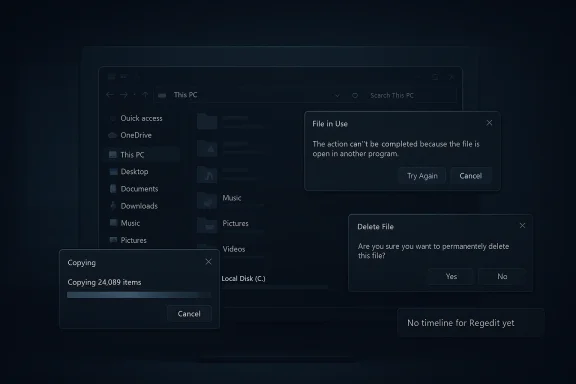
The current wave of progress is different because it targets the shell surfaces people actually see every day. Microsoft has recently updated dark mode in File Explorer for key actions such as copy, move, delete, and error handling, and the company’s latest release notes now describe a more consistent dark mode experience across those dialogs. The February 2026 preview documentation says File Explorer’s key actions, progress bars, chart views, and multiple confirmation and error dialogs were refreshed to align with the dark theme, which is a much broader change than the early Windows 11 styling work.
That said, the work remains incomplete. Even after the recent updates, legacy surfaces like file properties, folder options, Regedit, Run, Device Manager, and Disk Management still represent the rough edges of Windows 11’s theme system. Microsoft has improved the most visible File Explorer paths, but the operating system still exposes seams where old UI frameworks and newer Fluent design language collide. That mismatch is what makes the unfinished feeling so persistent: users can see the progress, but they can also see exactly where it stops.
There is also a broader strategic context. Microsoft has been trying to reframe Windows 11 as a platform with more polish, better defaults, and fewer surprises, especially after years of criticism over inconsistent shell behavior, clutter, and intrusive updates. Dark mode is therefore not a cosmetic side project; it is part of Microsoft’s effort to restore trust in the OS as a modern desktop environment. If the shell looks deliberate, users are more likely to believe the rest of the platform is deliberate too.
That emotional reaction helps explain why Microsoft’s new transparency matters. Marcus Ash’s comments on X, as reported by Windows Central, confirmed that the company is still improving the tools and techniques needed to spread dark theme deeper into Windows, especially in legacy panels and dialogs. He also made clear that there is no timeline to commit to yet for Regedit, which is exactly the sort of caution users rarely get from Microsoft on shell work.
The practical takeaway is simple: dark mode has become a litmus test for whether Windows 11 feels finished. Microsoft knows that, which is why it is now treating the problem as a platform engineering issue rather than a set of cosmetic patches. That is a better approach, but it is also a slower one.
That candidness is rare enough to stand out. It suggests Microsoft understands the reputational cost of overpromising on UI consistency, especially after repeated cycles where preview builds tease improvements that arrive late, incomplete, or with side effects. Users may prefer an exact ship date, but honesty about uncertainty is better than marketing certainty that later collapses.
The recent updates are not trivial. Microsoft’s release notes now say File Explorer offers a more consistent dark mode experience, with key actions such as copy, move, and delete dialogs updated in both default and expanded views. Progress bars and chart views also now align with the dark theme, and confirmation dialogs for actions like skip, override, and file selection have been refreshed. Those are the kinds of details that users notice every day, even if they would not list them first in a feature request.
There is also a user-experience nuance here. A shell can look almost complete while still failing in the exact moments that matter most, such as file operations and confirmation prompts. Those transient windows may be open for only seconds, but they are where trust is won or lost. A consistent File Explorer makes Windows feel more predictable, while a single glaring white dialog can undo that impression instantly.
That is why the dark mode rollout has taken so long. It is easy to theme the surfaces that already obey modern design frameworks, but much harder to retrofit old code paths that were never designed to inherit the same palette logic. The result is a platform that can look modern in one corner and stubbornly old in the next.
There is also a trust dimension. Enterprises tend to be suspicious of half-finished UI changes because they suggest churn without payoff. If Microsoft wants IT departments to accept more fluid Windows servicing, it helps to show that the basics—like theming, clarity, and consistency—are under control. Dark mode consistency is therefore a subtle but real confidence signal.
The flash also became a social-media bug, which accelerated the perception that Microsoft had fumbled the rollout. Once screenshots and clips start circulating, the problem becomes narrative as much as technical. In Windows, perception matters because users do not experience patch notes—they experience interruptions.
The lesson is that dark mode work is not simply about painting a UI dark. It requires careful orchestration of load states, transitions, and fallback frames so the system never briefly reverts to the wrong visual state. That is a much harder engineering problem than adding a theme toggle, and Microsoft’s recent history proves it.
That is especially important now because Windows 11 is no longer just shipping shell changes for aesthetics. It is also serving as the platform for a broader redesign of user interaction, including AI features, Copilot+ experiences, and ongoing shell consolidation. The more fragmented the theme system remains, the harder it becomes to present that future as coherent.
The opportunity here extends beyond dark mode. A cleaner theming pipeline can improve accessibility, make shell behavior more predictable, and reduce the number of “special case” interfaces that complicate support. It also gives Microsoft a better story for future Windows design changes: less exception handling, more system-wide consistency.
Consumers also tend to encounter dark mode as part of a larger lifestyle choice. Many users enable it to reduce glare at night, improve comfort in dim rooms, or simply because they prefer darker interfaces. When Windows fails to honor that preference in common dialogs, it makes the OS feel less attentive to user intent.
There is also a convenience factor. Fewer bright flashes, fewer theme mismatches, and fewer visual interruptions make the system easier on the eyes. Even if a user cannot articulate the improvement technically, they will often feel it immediately.
The other thing to watch is whether Microsoft keeps communicating with unusual clarity. Marcus Ash’s comments are important not because they announce a finished feature, but because they reveal the company is treating theme consistency as a genuine engineering roadmap rather than a side quest. If that culture holds, Windows 11 may become less about isolated feature drops and more about cumulative refinement.
Source: Windows Central Microsoft provides much needed update on Windows 11's dark mode progress
 Background
Windows 11’s dark mode problem is not that Microsoft never shipped one. The issue is that the feature arrived in pieces, and then lingered in that half-finished state for years. Microsoft introduced dark theme support in Windows 10’s Anniversary Update era, then extended it unevenly across first-party apps and shell surfaces, leaving a long tail of Win32 dialogs and legacy control panels that still ignored the user’s theme choice. That history is why users keep calling Windows dark mode “unfinished” even when the company can point to meaningful improvements.The current wave of progress is different because it targets the shell surfaces people actually see every day. Microsoft has recently updated dark mode in File Explorer for key actions such as copy, move, delete, and error handling, and the company’s latest release notes now describe a more consistent dark mode experience across those dialogs. The February 2026 preview documentation says File Explorer’s key actions, progress bars, chart views, and multiple confirmation and error dialogs were refreshed to align with the dark theme, which is a much broader change than the early Windows 11 styling work.
That said, the work remains incomplete. Even after the recent updates, legacy surfaces like file properties, folder options, Regedit, Run, Device Manager, and Disk Management still represent the rough edges of Windows 11’s theme system. Microsoft has improved the most visible File Explorer paths, but the operating system still exposes seams where old UI frameworks and newer Fluent design language collide. That mismatch is what makes the unfinished feeling so persistent: users can see the progress, but they can also see exactly where it stops.
There is also a broader strategic context. Microsoft has been trying to reframe Windows 11 as a platform with more polish, better defaults, and fewer surprises, especially after years of criticism over inconsistent shell behavior, clutter, and intrusive updates. Dark mode is therefore not a cosmetic side project; it is part of Microsoft’s effort to restore trust in the OS as a modern desktop environment. If the shell looks deliberate, users are more likely to believe the rest of the platform is deliberate too.
Why dark mode became a proxy for Windows quality
Dark mode has become a shorthand for Windows quality because it touches nearly everything people do with the desktop. It is visible in file operations, system dialogs, setup flows, and management tools, which means any inconsistency feels bigger than it would in a single app. When a user sees a bright white copy dialog in the middle of an otherwise dark system, the impression is not merely “a UI bug”; it is the OS forgot its own rules.That emotional reaction helps explain why Microsoft’s new transparency matters. Marcus Ash’s comments on X, as reported by Windows Central, confirmed that the company is still improving the tools and techniques needed to spread dark theme deeper into Windows, especially in legacy panels and dialogs. He also made clear that there is no timeline to commit to yet for Regedit, which is exactly the sort of caution users rarely get from Microsoft on shell work.
The practical takeaway is simple: dark mode has become a litmus test for whether Windows 11 feels finished. Microsoft knows that, which is why it is now treating the problem as a platform engineering issue rather than a set of cosmetic patches. That is a better approach, but it is also a slower one.
What Microsoft Actually Said
The most important part of this story is not just that Microsoft is working on dark mode, but that it is finally saying so in plain terms. According to Windows Central’s reporting, Marcus Ash said Microsoft is “pushing” its tools and techniques so dark theme can reach more areas of Windows, and that the company will keep improving consistency as legacy panels and dialogs are modernized. That is a notable shift from vague internal optimism to public acknowledgement of a long-running UI debt.The Regedit question
Regedit is the canary in the coal mine for dark mode completeness because it sits squarely in the category of older, power-user-first Windows tooling. Ash’s comment that there is no timeline for Regedit is significant precisely because it avoids the usual false confidence users have learned to ignore. In other words, Microsoft is not pretending this is a small fix or a near-term guarantee.That candidness is rare enough to stand out. It suggests Microsoft understands the reputational cost of overpromising on UI consistency, especially after repeated cycles where preview builds tease improvements that arrive late, incomplete, or with side effects. Users may prefer an exact ship date, but honesty about uncertainty is better than marketing certainty that later collapses.
Why this matters to power users
Power users care about Regedit and similar surfaces because these are the places where Windows identity is most visible. If Microsoft cannot theme its own built-in admin tools consistently, it reinforces the perception that Windows 11 is a modern skin on top of old machinery. That perception is not entirely unfair, but it is also not immutable if Microsoft keeps filling in the gaps.- Regedit is emblematic of the remaining legacy UI debt.
- Legacy dialogs are where dark mode consistency is easiest to judge.
- Transparency from Microsoft makes the roadmap feel more credible.
- No timeline is frustrating, but it is still a real commitment to continue.
- Tooling improvements matter because they speed future UI modernization.
File Explorer Is the Front Line
If Windows 11 dark mode has a battleground, it is File Explorer. Explorer is one of the most frequently used components of the OS, and it also contains a tangle of legacy windows, menus, dialogs, and shell surfaces that have long resisted consistent theming. That is why Microsoft has been focusing there first: fixing Explorer gets the biggest visible win for the least ambiguity.The recent updates are not trivial. Microsoft’s release notes now say File Explorer offers a more consistent dark mode experience, with key actions such as copy, move, and delete dialogs updated in both default and expanded views. Progress bars and chart views also now align with the dark theme, and confirmation dialogs for actions like skip, override, and file selection have been refreshed. Those are the kinds of details that users notice every day, even if they would not list them first in a feature request.
The remaining gaps
Even with those improvements, Microsoft has not finished the job. Reports and feature coverage still point to missing dark mode support in file properties, folder options, archive extraction workflows, and other older Explorer-adjacent surfaces. That matters because a dark system is only as convincing as its weakest dialog, and Explorer still has plenty of weak spots.There is also a user-experience nuance here. A shell can look almost complete while still failing in the exact moments that matter most, such as file operations and confirmation prompts. Those transient windows may be open for only seconds, but they are where trust is won or lost. A consistent File Explorer makes Windows feel more predictable, while a single glaring white dialog can undo that impression instantly.
Why Explorer improvements punch above their weight
Explorer is the OS’s working surface, not just a settings page. When Microsoft themes Explorer correctly, it improves the daily rhythm of Windows in a way that is disproportionate to the code change itself. That is why even small dark-mode wins in Explorer have become headline material among enthusiasts.- Copy dialogs are now a flagship example of the improvement.
- Delete prompts are finally matching the rest of the shell.
- Progress indicators help unify visual language.
- Error dialogs reduce the jarring light-to-dark contrast.
- Properties and archive tools remain the most visible holdouts.
Legacy UI, Legacy Pain
The phrase “legacy UI” sounds dry until you remember how much of Windows still depends on it. Device Manager, Disk Management, Run, Regedit, and a dozen old control-panel descendants are not decorative features; they are core administration tools. If they look detached from the rest of the desktop, users read that as evidence that Windows is still fundamentally split between eras.Why older system panels are hard to theme
Microsoft’s challenge is technical as much as visual. Windows is a layered platform with decades of compatibility obligations, and many system dialogs were not built with theme flexibility as a first-class requirement. Microsoft’s own documentation for app theming notes that the company is working to broaden dark mode support without breaking existing applications, which is the core balancing act here: change enough to modernize, but not so much that established behaviors break.That is why the dark mode rollout has taken so long. It is easy to theme the surfaces that already obey modern design frameworks, but much harder to retrofit old code paths that were never designed to inherit the same palette logic. The result is a platform that can look modern in one corner and stubbornly old in the next.
The enterprise angle
Enterprise admins notice these gaps for different reasons than consumers do. In business environments, legacy dialogs are often used more frequently, not less, because they are part of troubleshooting, deployment, and device management. A polished dark mode may seem cosmetic from the outside, but in practice it reduces visual friction for people who spend long hours inside administrative tools.There is also a trust dimension. Enterprises tend to be suspicious of half-finished UI changes because they suggest churn without payoff. If Microsoft wants IT departments to accept more fluid Windows servicing, it helps to show that the basics—like theming, clarity, and consistency—are under control. Dark mode consistency is therefore a subtle but real confidence signal.
Why Regedit is such a symbolic holdout
Regedit is not the most used tool in Windows, but it is one of the most symbolic. It represents the old Windows mentality of exposing deep system control through a stark, utilitarian interface. If Microsoft themes Regedit properly, it will feel like a visible acknowledgment that even the grittiest corners of Windows deserve the same design treatment as the rest of the OS.- Device Manager remains a key legacy holdout.
- Disk Management still carries older visual assumptions.
- Run is tiny but high frequency, making inconsistency obvious.
- Regedit carries symbolic weight for enthusiasts and admins.
- Archive extraction and properties dialogs are daily-use pain points.
The White Flash Problem
If the dark mode discussion has a cautionary tale, it is the infamous File Explorer white flash. Recent preview updates that expanded dark mode coverage also triggered visible regressions for some users, including a sudden bright flash when Explorer opens or changes state. Microsoft later documented the behavior as a known issue in preview notes, which made the problem even more notable because it landed in the same updates meant to improve consistency.Why the bug mattered so much
This kind of bug is disproportionately irritating because it attacks the premise of dark mode itself. Dark mode is supposed to reduce visual strain, create continuity, and make the operating system feel calm; a flash of white does the opposite. Even if the effect is brief, it is hard to ignore, and that makes the issue feel worse than many technically more serious bugs.The flash also became a social-media bug, which accelerated the perception that Microsoft had fumbled the rollout. Once screenshots and clips start circulating, the problem becomes narrative as much as technical. In Windows, perception matters because users do not experience patch notes—they experience interruptions.
Microsoft’s response strategy
Microsoft did the right thing by acknowledging the issue in release notes and then continuing to fix it in Insider builds. That is not glamorous, but it is a healthier pattern than pretending the regression does not exist. The company’s more recent preview documentation says the dark mode experience in File Explorer is now more consistent, suggesting the white-flash issue has been addressed or at least substantially reduced in the latest testing rings.The lesson is that dark mode work is not simply about painting a UI dark. It requires careful orchestration of load states, transitions, and fallback frames so the system never briefly reverts to the wrong visual state. That is a much harder engineering problem than adding a theme toggle, and Microsoft’s recent history proves it.
What users should take from it
Users should not assume every dark mode improvement is automatically stable just because it is welcome. These are legacy surfaces, often touched by compatibility-sensitive code, and preview builds exist precisely because Microsoft needs time to find regressions like this. The good news is that the company appears to be learning quickly from the feedback loop.- The bug exposed how fragile theme transitions can be.
- Known issues matter because they signal Microsoft is tracking the problem.
- Insider builds remain the best place to validate fixes.
- Consistency is more valuable than isolated dark windows.
- Visual polish can still be derailed by transition glitches.
Tooling Is the Real Story
The most consequential part of this update may be the least visible one: Microsoft is improving the tools and techniques that let it spread dark mode across Windows more efficiently. That matters because one-off theming fixes do not scale well across an OS with enormous legacy depth. A better internal pipeline for theme support is what turns dark mode from a patchwork into a platform capability.Why internal tooling matters more than one more dialog
Every new surface Microsoft themes manually costs engineering attention, QA effort, and compatibility validation. If the company can improve the framework that generates or inherits those UI states, then each subsequent dark-mode rollout becomes cheaper and faster. In other words, tooling is a force multiplier, not just an internal convenience.That is especially important now because Windows 11 is no longer just shipping shell changes for aesthetics. It is also serving as the platform for a broader redesign of user interaction, including AI features, Copilot+ experiences, and ongoing shell consolidation. The more fragmented the theme system remains, the harder it becomes to present that future as coherent.
A better foundation for future UI work
Microsoft’s own developer guidance says the company is trying to broaden Dark mode support for Win32 apps without breaking existing software, which is a reminder that modern Windows still depends heavily on older app models. That is why a strong theme framework can help not only Microsoft’s inbox components, but also third-party desktop software that wants to blend in more cleanly.The opportunity here extends beyond dark mode. A cleaner theming pipeline can improve accessibility, make shell behavior more predictable, and reduce the number of “special case” interfaces that complicate support. It also gives Microsoft a better story for future Windows design changes: less exception handling, more system-wide consistency.
The Windows 11 identity question
Windows 11 has spent much of its life trying to answer a simple question: is it a new system, or just a refreshed one? Dark mode consistency may sound minor, but it helps answer that question in Microsoft’s favor. A system that looks unified at the UI level feels more modern, and a modern-feeling OS is easier to trust.- Tooling improvements reduce the cost of future dark mode work.
- Win32 compatibility remains the central engineering challenge.
- Theme consistency supports accessibility and polish.
- Shell coherence improves the credibility of Windows 11.
- Future UI changes will be easier if the framework is stronger.
Consumer Impact
For consumers, the biggest benefit of a more complete dark mode is psychological as much as practical. A consistently themed OS feels calmer, more premium, and less like it was assembled from mismatched parts. That may not sound like a productivity metric, but it absolutely affects how people experience Windows every day.Consumers also tend to encounter dark mode as part of a larger lifestyle choice. Many users enable it to reduce glare at night, improve comfort in dim rooms, or simply because they prefer darker interfaces. When Windows fails to honor that preference in common dialogs, it makes the OS feel less attentive to user intent.
The emotional side of consistency
A polished dark mode signals that Microsoft cares about the details in mundane tasks, not just headline features. That matters because the average user spends far more time dragging files, opening dialogs, and confirming prompts than they do reading launch blogs. The everyday moments are where design quality becomes visible.There is also a convenience factor. Fewer bright flashes, fewer theme mismatches, and fewer visual interruptions make the system easier on the eyes. Even if a user cannot articulate the improvement technically, they will often feel it immediately.
What consumers should expect next
The likely near-term path is incremental rather than dramatic. Microsoft will probably continue filling in File Explorer first, then extend the same theming logic to adjacent legacy dialogs and system tools. That is not exciting in a keynote sense, but it is exactly how real platform cleanup usually happens.- Fewer white flashes in everyday file tasks.
- More coherent dialogs across Explorer and system tools.
- Better night-time usability for people who prefer dark UI.
- A more premium feel without changing core workflows.
- Gradual expansion into other legacy panels and tools.
Strengths and Opportunities
Microsoft’s renewed dark mode push has real upside because it attacks one of Windows 11’s most persistent credibility problems. The biggest opportunity is not simply to make the OS darker; it is to make the shell feel finished, which has been one of the loudest criticisms from enthusiasts and power users. If the company sustains the current pace, it can turn a long-standing complaint into a visible example of responsiveness.- Improved consistency across File Explorer and system dialogs.
- Better first impressions for new Windows 11 users.
- Reduced visual friction in frequent file-management tasks.
- Stronger trust among enthusiasts who follow shell polish closely.
- Clearer roadmap signaling from Microsoft leadership.
- A scalable tooling foundation for future UI modernization.
- Potential enterprise goodwill if older admin tools follow suit.
Risks and Concerns
The biggest risk is partial execution. Microsoft has a long history of shipping promising UI changes that arrive unevenly, leave edge cases behind, or produce odd regressions in the process. Dark mode is especially vulnerable to that problem because it depends on transition states and legacy surfaces that are easy to overlook during validation.- Incomplete rollout could leave users with a patchwork experience.
- Legacy regressions may appear in obscure but important dialogs.
- Too much caution could slow visible progress and frustrate users.
- Overpromising on timelines would damage trust again.
- Enterprise hesitancy may rise if preview behavior remains unstable.
- Accessibility tradeoffs could emerge if contrast handling is poor.
- Brand fatigue may set in if Windows keeps fixing the same issue slowly.
Looking Ahead
The next phase of this story will depend on execution in preview builds and how far Microsoft is willing to push dark mode into the last pockets of legacy UI. File Explorer appears to be the current focal point, but the real test will be whether Microsoft can extend the same quality standard to properties dialogs, system panels, and other older management tools. That is where the operating system’s unfinished feel either fades or persists.The other thing to watch is whether Microsoft keeps communicating with unusual clarity. Marcus Ash’s comments are important not because they announce a finished feature, but because they reveal the company is treating theme consistency as a genuine engineering roadmap rather than a side quest. If that culture holds, Windows 11 may become less about isolated feature drops and more about cumulative refinement.
What to watch next
- Further File Explorer dialogs gaining dark mode support.
- Regedit progress or at least more explicit status updates.
- Legacy panel modernization beyond Explorer and shell popups.
- Preview build notes for regressions or fixes tied to theming.
- Tooling improvements that hint at faster rollout velocity.
Source: Windows Central Microsoft provides much needed update on Windows 11's dark mode progress
