

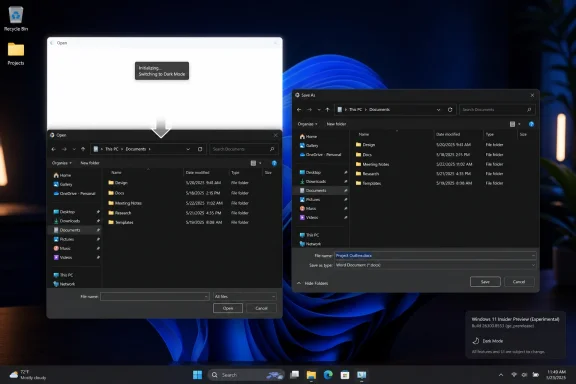
Microsoft has added a hidden Windows 11 fix in Insider Experimental Build 26300.8553, released May 29, 2026, that targets the bright white flash seen in File Open and Save As dialogs when Dark Mode is enabled, but the change is not yet rolling out publicly.
That one sentence sounds almost comically small beside the usual Windows roadmap: Copilot integrations, Start menu redesigns, AI search, Recall, Arm PCs, and the endless choreography of channels and build numbers. But this is exactly the sort of defect that explains why Windows 11’s polish still feels uneven five years into its life. The white flash is not a missing feature; it is a reminder that the operating system still contains old seams Microsoft has spent years trying to hide.
The File Open and Save As dialogs are among the most ordinary surfaces in Windows, which is why they matter. They appear inside productivity apps, creative tools, browsers, IDEs, compression utilities, installers, and almost every program that asks the user to choose a file. If a system-wide Dark Mode still produces a burst of white light at that moment, the operating system is effectively breaking its own promise in one of the most repeated workflows on the PC.
That promise is simple: choose a theme once, and the system should respect it everywhere. Windows 11 has grown much better at this than early Windows 10 ever was, but it remains a patchwork of modern WinUI surfaces, older Win32 plumbing, Control Panel leftovers, shell components, and third-party application frameworks. The result is a Dark Mode that often looks finished until the user hits a legacy edge.
The newly discovered feature flag, reportedly named
That also makes it a useful signal. Windows 11’s future is not only about the features Microsoft announces on stage. It is also about whether the company can keep sanding down the old surfaces that make a modern operating system feel unfinished.
That distinction is important because Windows Insider builds often contain more than Microsoft says they contain. Feature flags, staged rollouts, dormant code paths, A/B testing hooks, and disabled experiments are part of the normal machinery now. The build that lands on an Insider PC is not a single uniform product; it is a container full of switches, some visible, some gradual, some hidden, and some never meant to ship.
Build 26300.8553 is a particularly good example of that model. On the surface, Microsoft is giving users more control over the Start menu, including size options, visibility controls for sections, and privacy-minded account presentation changes. Underneath, watchers have found evidence of a smaller visual fix that addresses something Microsoft did not put in the changelog.
That mismatch should not be read as scandalous. It is how Windows development works in 2026. But it does mean users should treat the white-flash fix as promising rather than guaranteed. Hidden does not mean imminent, and present in a build does not mean committed to general availability.
Windows is not macOS, where Apple can more aggressively reshape platform conventions and expect developers to follow. Windows remains the operating system of old line-of-business tools, specialized hardware utilities, government procurement cycles, engineering apps, medical systems, games, plug-ins, and bespoke enterprise software. A common dialog that misbehaves visually is annoying; a common dialog that breaks compatibility is a crisis.
That is why so many Windows visual improvements arrive unevenly. Microsoft can repaint the obvious rooms, but the hallways and service corridors are harder. Dark Mode in File Explorer can improve, the context menu can be modernized, Settings can absorb more Control Panel pages, and Notepad can become a modern app — yet a file picker can still betray the age of the house with a flash of white.
The white flash is probably not one bug in the way users imagine a bug. It is likely a timing and rendering problem: a dialog initializes, a default light surface appears, theme-aware styling catches up, and the user sees the transition. Fixing that may require changing when the surface is painted, how it inherits theme state, or how the shell avoids showing an intermediate frame.
That is why the fix is more interesting than its size suggests. If Microsoft has isolated the issue enough to give it a named internal feature flag, it suggests the company is no longer merely accepting the visual defect as an unavoidable legacy artifact.
For those users, a sudden bright flash is not just ugly. It is physically jarring. It breaks concentration, makes the system feel inconsistent, and can turn a routine action into a small but repeated annoyance. The damage is cumulative precisely because File Open and Save As dialogs appear so often.
This is where Microsoft’s design language has sometimes lagged behind its accessibility rhetoric. Windows 11 talks fluently about focus, calm, personalization, and inclusive design. But users judge those values not by marketing language but by what happens when they open a PDF at midnight or save a project file from an image editor.
A fully credible Dark Mode requires more than black backgrounds in the obvious places. It requires the operating system to avoid surprise brightness, respect contrast choices, and handle transitions without visual shocks. The white-flash fix is therefore a quality-of-life change with accessibility implications, even if it is not branded as an accessibility feature.
It also matters for professional perception. In an enterprise setting, polish is not superficial. A system that flickers between eras feels less coherent, and less coherence often translates into less trust. Windows does not need to look fashionable to satisfy administrators, but it does need to feel predictable.
The white flash belongs to a category of bug that is easy to dismiss in triage and hard to ignore in daily life. It does not corrupt data. It does not crash the shell. It does not break authentication, networking, printing, or storage. It just reminds the user, again and again, that some part of the interface loaded in the wrong visual state before correcting itself.
These are the millisecond bugs that define perceived quality. A late animation, a janky menu, a mismatched corner radius, a context menu that appears in the wrong style, a theme transition that flashes white — none is catastrophic alone. Together, they determine whether an operating system feels engineered or assembled.
Microsoft has spent much of the Windows 11 era trying to close that gap. The company has modernized Notepad, Paint, Snipping Tool, File Explorer tabs, the Settings app, window snapping, system tray behavior, and parts of the taskbar. It has also repeatedly revisited Start, because Start is both a product surface and a political object in Windows design.
But the file dialog flash is different. It is not a glamorous surface. It is not a monetizable entry point. It is one of the quiet utility layers that makes the OS feel like itself. Fixing it suggests Microsoft understands that a mature platform wins credibility not only by adding capabilities but by removing friction.
This model has obvious advantages. Microsoft can reduce blast radius, compare behavior across cohorts, and avoid pushing unfinished features to every Insider at once. It also lets the company test whether a fix creates regressions in obscure configurations, particularly in something as widely used as file dialogs.
But the model also creates confusion. A user may install Build 26300.8553 and not see a change that another person has identified in the same build. A release note may omit a hidden feature. A third-party tool may reveal an internal name that sounds definitive even though the experience is dormant. The build number alone no longer answers the question, “Do I have this?”
That is especially true in the Experimental channel, where Microsoft explicitly reserves the right to test ideas that may change, disappear, or never ship. The channel formerly associated with Dev is now part of a shifting Insider structure, and users need to read build information with more caution than they did in the old ring-based era.
For enthusiasts, hidden features are part of the fun. For administrators, they are a reminder that preview builds are not deployment roadmaps. A disabled flag is a clue, not a commitment.
The contrast with the white-flash fix is telling. Start menu customization is easy to explain and easy to screenshot. It speaks to user agency, personalization, and Windows 11’s ongoing attempt to recover from the shock of moving away from the Windows 10 Start model. A file dialog rendering fix, by comparison, is hard to market because its ideal state is invisibility.
Yet invisibility is exactly what makes it valuable. The best operating-system polish often disappears into the background. You do not celebrate the absence of a white flash every time you save a file; you simply stop being interrupted by it.
This is one of the tensions in Microsoft’s Windows strategy. The company needs big narrative features to sell momentum, especially now that AI dominates executive messaging. But Windows users often want the opposite: fewer interruptions, fewer half-modern surfaces, fewer inconsistent controls, fewer surprises after updates, and fewer places where the operating system seems to argue with itself.
The hidden dialog fix sits squarely in that second category. It is not a platform vision. It is housekeeping. But Windows needs housekeeping as badly as it needs vision.
That is why Windows 11 has often looked like two operating systems wearing the same coat. Open a modern Settings page and the system looks refined. Dig into an older dialog and the illusion breaks. The problem is not merely that older UI exists; it is that older UI often appears at moments when the user expects the modern shell to remain in control.
The File Open and Save As dialogs are a perfect trap. Users encounter them from modern apps, classic apps, browsers, and development tools alike. The surrounding application may be beautifully themed, but the common dialog is supplied by the platform. If it flashes white, the user blames Windows even if the app triggered the surface.
This is one reason Microsoft cannot solve Dark Mode solely by telling developers to update their apps. Some of the most important pieces are platform responsibilities. A consistent Windows theme depends on Microsoft fixing the shared infrastructure that applications rely on.
That is what makes the newly spotted flag encouraging. It appears to target the common experience rather than a single app. If the fix works broadly, it could remove a defect from countless workflows without requiring every software vendor to do anything.
When organizations move users to Windows 11, they often face resistance from people who do not care about kernel architecture or feature enablement packages. They care that familiar workflows changed, that the taskbar behaves differently, that Start feels less useful, or that the interface seems less predictable. Small irritations become part of the migration story.
A white flash in a common dialog is not going to derail a deployment. But it joins a larger pile of “why does Windows still do that?” moments that shape user sentiment. Reducing those moments helps IT teams because fewer annoyances mean fewer complaints, fewer workarounds, and less pressure to customize the OS into submission.
For accessibility-minded organizations, the issue is more direct. Light sensitivity is real, and workplace software should not casually produce bright flashes during routine operations. Even if the fix is not formally categorized as accessibility work, its effect may support users who depend on darker visual environments.
There is also a credibility issue for Microsoft. Windows 11 is marketed as a modern, secure, AI-ready platform. That pitch is easier to accept when the basics feel cared for. A platform that wants to host the future should not still be startling users with a white dialog frame from the past.
In this case, the reporting around Feature ID 61372722 gives users an early look at a fix Microsoft has not publicly framed. That early look should be handled carefully. Hidden features can be experimental, incomplete, region-limited, channel-specific, or dependent on other code paths. They can also change names or disappear.
Still, these discoveries often prove meaningful. Microsoft’s public Windows messaging tends to favor coherent narratives, while the actual builds reveal hundreds of incremental decisions. The gap between those two views is where enthusiasts live.
There is a healthy tension here. Microsoft benefits from controlled rollout discipline, but the Windows community benefits from transparency. When a long-standing annoyance is finally addressed, even quietly, users want to know. The company does not need to turn every fix into a campaign, but it should recognize that polish work earns goodwill.
That goodwill is especially valuable because Windows enthusiasts have long memories. They remember years of mismatched menus, half-migrated settings, inconsistent context menus, and theme gaps. A small fix can carry symbolic weight when it touches a complaint that users have repeated for years.
Even Insiders on the relevant build may not get the fix unless Microsoft enables it for their machines. Windows feature rollout is now governed by flighting, server-side controls, staged enablement, and channel policy. A build can contain a feature without exposing it.
There is also the possibility that the fix will require more testing than a casual observer expects. File dialogs are ubiquitous and sensitive. A change that prevents a white flash must not delay dialog creation, break theming in high-contrast scenarios, interfere with third-party shell extensions, or create regressions in older applications.
Microsoft may also choose to ship the fix only after validating it against other visual changes. Dark Mode rendering is rarely isolated. The company may be coordinating this with broader shell work, File Explorer refinements, or framework-level changes that do not have obvious user-facing labels.
So the right response is cautious optimism. The fix appears real enough to take seriously, but not public enough to treat as delivered. Users should wait for Microsoft to enable it through Insider rollout or mention it in future release notes before assuming it is part of the stable Windows experience.
The white flash in File Open and Save As dialogs is one of those unfinished transitions. It is not the future of Windows, but it is a residue of the past that interrupts the present. Fixing it is not dramatic, but it is aligned with the work Windows 11 still needs.
The same build that contains this hidden fix also advances Start menu customization, which tells a parallel story. Microsoft initially shipped Windows 11 with a more opinionated Start experience, then gradually walked toward giving users more control. The company is learning, sometimes slowly, that refinement is not weakness.
That lesson applies broadly. A mature Windows 11 should not merely add features; it should make old compromises less visible. It should reduce the number of places where users feel the operating system is unfinished. It should let Dark Mode be dark, let settings be coherent, let common dialogs behave predictably, and let administrators understand what is changing before users do.
This is not as exciting as a new AI assistant, but it may be more important for daily trust. Windows remains the environment where millions of people do their actual work. The fewer times it distracts them from that work, the better.
For users tracking the change, the practical read is straightforward:
That one sentence sounds almost comically small beside the usual Windows roadmap: Copilot integrations, Start menu redesigns, AI search, Recall, Arm PCs, and the endless choreography of channels and build numbers. But this is exactly the sort of defect that explains why Windows 11’s polish still feels uneven five years into its life. The white flash is not a missing feature; it is a reminder that the operating system still contains old seams Microsoft has spent years trying to hide.
 A Tiny Flash Exposes a Very Large Windows Problem
The File Open and Save As dialogs are among the most ordinary surfaces in Windows, which is why they matter. They appear inside productivity apps, creative tools, browsers, IDEs, compression utilities, installers, and almost every program that asks the user to choose a file. If a system-wide Dark Mode still produces a burst of white light at that moment, the operating system is effectively breaking its own promise in one of the most repeated workflows on the PC.That promise is simple: choose a theme once, and the system should respect it everywhere. Windows 11 has grown much better at this than early Windows 10 ever was, but it remains a patchwork of modern WinUI surfaces, older Win32 plumbing, Control Panel leftovers, shell components, and third-party application frameworks. The result is a Dark Mode that often looks finished until the user hits a legacy edge.
The newly discovered feature flag, reportedly named
WhiteFlashOnFileOpenSaveDialog and tracked internally as Feature ID 61372722, appears aimed at one of those edges. It is not advertised in Microsoft’s public release notes for Build 26300.8553, and that matters. This is not a headline feature Microsoft is selling; it is plumbing work, the kind of fix users only notice because something irritating finally stops happening.That also makes it a useful signal. Windows 11’s future is not only about the features Microsoft announces on stage. It is also about whether the company can keep sanding down the old surfaces that make a modern operating system feel unfinished.
Build 26300.8553 Is Already a Polish Build in Disguise
Officially, Build 26300.8553 is best understood as an Experimental channel release tied to Windows 11 version 25H2 through an enablement-package model. Microsoft’s public notes emphasize Start menu personalization, substring-based Windows Search improvements, taskbar refinements for alternate positions, and a fix around Reset this PC. The Dark Mode dialog flash fix is not listed among those public changes.That distinction is important because Windows Insider builds often contain more than Microsoft says they contain. Feature flags, staged rollouts, dormant code paths, A/B testing hooks, and disabled experiments are part of the normal machinery now. The build that lands on an Insider PC is not a single uniform product; it is a container full of switches, some visible, some gradual, some hidden, and some never meant to ship.
Build 26300.8553 is a particularly good example of that model. On the surface, Microsoft is giving users more control over the Start menu, including size options, visibility controls for sections, and privacy-minded account presentation changes. Underneath, watchers have found evidence of a smaller visual fix that addresses something Microsoft did not put in the changelog.
That mismatch should not be read as scandalous. It is how Windows development works in 2026. But it does mean users should treat the white-flash fix as promising rather than guaranteed. Hidden does not mean imminent, and present in a build does not mean committed to general availability.
The File Dialog Is Where Windows History Keeps Leaking Through
The reason this problem has survived for so long is not that Microsoft forgot dark colors exist. It is that the Windows file picker sits at the intersection of old application compatibility, shell behavior, theme rendering, and third-party app expectations. The common file dialog has to work across decades of software habits, and that obligation makes it much harder to modernize than a Settings page or a new inbox app.Windows is not macOS, where Apple can more aggressively reshape platform conventions and expect developers to follow. Windows remains the operating system of old line-of-business tools, specialized hardware utilities, government procurement cycles, engineering apps, medical systems, games, plug-ins, and bespoke enterprise software. A common dialog that misbehaves visually is annoying; a common dialog that breaks compatibility is a crisis.
That is why so many Windows visual improvements arrive unevenly. Microsoft can repaint the obvious rooms, but the hallways and service corridors are harder. Dark Mode in File Explorer can improve, the context menu can be modernized, Settings can absorb more Control Panel pages, and Notepad can become a modern app — yet a file picker can still betray the age of the house with a flash of white.
The white flash is probably not one bug in the way users imagine a bug. It is likely a timing and rendering problem: a dialog initializes, a default light surface appears, theme-aware styling catches up, and the user sees the transition. Fixing that may require changing when the surface is painted, how it inherits theme state, or how the shell avoids showing an intermediate frame.
That is why the fix is more interesting than its size suggests. If Microsoft has isolated the issue enough to give it a named internal feature flag, it suggests the company is no longer merely accepting the visual defect as an unavoidable legacy artifact.
Dark Mode Has Become an Accessibility Expectation, Not a Fashion Setting
It is tempting to reduce this story to aesthetics. After all, the complaint is about a white flash in a dialog box. But Dark Mode has moved beyond taste, especially for people who work late, use multiple monitors, sit in dim rooms, suffer from light sensitivity, or spend hours in document and code workflows.For those users, a sudden bright flash is not just ugly. It is physically jarring. It breaks concentration, makes the system feel inconsistent, and can turn a routine action into a small but repeated annoyance. The damage is cumulative precisely because File Open and Save As dialogs appear so often.
This is where Microsoft’s design language has sometimes lagged behind its accessibility rhetoric. Windows 11 talks fluently about focus, calm, personalization, and inclusive design. But users judge those values not by marketing language but by what happens when they open a PDF at midnight or save a project file from an image editor.
A fully credible Dark Mode requires more than black backgrounds in the obvious places. It requires the operating system to avoid surprise brightness, respect contrast choices, and handle transitions without visual shocks. The white-flash fix is therefore a quality-of-life change with accessibility implications, even if it is not branded as an accessibility feature.
It also matters for professional perception. In an enterprise setting, polish is not superficial. A system that flickers between eras feels less coherent, and less coherence often translates into less trust. Windows does not need to look fashionable to satisfy administrators, but it does need to feel predictable.
Microsoft Is Learning That Users Notice the Millisecond Bugs
Windows users have always tolerated a certain amount of visual weirdness because Windows historically prioritized compatibility, configurability, and hardware breadth over pristine consistency. That bargain still holds. But the tolerance level has changed, because the PC now competes with phones, tablets, web apps, and modern desktop environments that condition users to expect smoother transitions.The white flash belongs to a category of bug that is easy to dismiss in triage and hard to ignore in daily life. It does not corrupt data. It does not crash the shell. It does not break authentication, networking, printing, or storage. It just reminds the user, again and again, that some part of the interface loaded in the wrong visual state before correcting itself.
These are the millisecond bugs that define perceived quality. A late animation, a janky menu, a mismatched corner radius, a context menu that appears in the wrong style, a theme transition that flashes white — none is catastrophic alone. Together, they determine whether an operating system feels engineered or assembled.
Microsoft has spent much of the Windows 11 era trying to close that gap. The company has modernized Notepad, Paint, Snipping Tool, File Explorer tabs, the Settings app, window snapping, system tray behavior, and parts of the taskbar. It has also repeatedly revisited Start, because Start is both a product surface and a political object in Windows design.
But the file dialog flash is different. It is not a glamorous surface. It is not a monetizable entry point. It is one of the quiet utility layers that makes the OS feel like itself. Fixing it suggests Microsoft understands that a mature platform wins credibility not only by adding capabilities but by removing friction.
The Hidden Flag Tells Us How Windows Now Ships
The presence of Feature ID 61372722 also tells a familiar story about modern Windows delivery. Users no longer receive the operating system as a monolithic package in which every feature is either present or absent. Instead, Microsoft ships code early, disables it by default, turns it on for subsets of machines, monitors feedback, and gradually ramps availability.This model has obvious advantages. Microsoft can reduce blast radius, compare behavior across cohorts, and avoid pushing unfinished features to every Insider at once. It also lets the company test whether a fix creates regressions in obscure configurations, particularly in something as widely used as file dialogs.
But the model also creates confusion. A user may install Build 26300.8553 and not see a change that another person has identified in the same build. A release note may omit a hidden feature. A third-party tool may reveal an internal name that sounds definitive even though the experience is dormant. The build number alone no longer answers the question, “Do I have this?”
That is especially true in the Experimental channel, where Microsoft explicitly reserves the right to test ideas that may change, disappear, or never ship. The channel formerly associated with Dev is now part of a shifting Insider structure, and users need to read build information with more caution than they did in the old ring-based era.
For enthusiasts, hidden features are part of the fun. For administrators, they are a reminder that preview builds are not deployment roadmaps. A disabled flag is a clue, not a commitment.
The Start Menu Got the Notes, the Dialog Fix Got the Whisper
The public face of Build 26300.8553 is the Start menu. Microsoft is adding more ways to tailor Start, including size choices and section-level visibility controls, after years of complaints that Windows 11’s Start experience was too rigid. That is the change most users will recognize immediately.The contrast with the white-flash fix is telling. Start menu customization is easy to explain and easy to screenshot. It speaks to user agency, personalization, and Windows 11’s ongoing attempt to recover from the shock of moving away from the Windows 10 Start model. A file dialog rendering fix, by comparison, is hard to market because its ideal state is invisibility.
Yet invisibility is exactly what makes it valuable. The best operating-system polish often disappears into the background. You do not celebrate the absence of a white flash every time you save a file; you simply stop being interrupted by it.
This is one of the tensions in Microsoft’s Windows strategy. The company needs big narrative features to sell momentum, especially now that AI dominates executive messaging. But Windows users often want the opposite: fewer interruptions, fewer half-modern surfaces, fewer inconsistent controls, fewer surprises after updates, and fewer places where the operating system seems to argue with itself.
The hidden dialog fix sits squarely in that second category. It is not a platform vision. It is housekeeping. But Windows needs housekeeping as badly as it needs vision.
The Fix Also Shows Why Dark Mode Took So Long to Mature
Dark Mode sounds simple until you try to apply it to a platform as old and extensible as Windows. A modern app can define a palette, follow a theme token system, and update surfaces predictably. Windows must coordinate shell components, classic controls, app compatibility, high-contrast modes, registry-era assumptions, third-party frameworks, and software that may never be updated again.That is why Windows 11 has often looked like two operating systems wearing the same coat. Open a modern Settings page and the system looks refined. Dig into an older dialog and the illusion breaks. The problem is not merely that older UI exists; it is that older UI often appears at moments when the user expects the modern shell to remain in control.
The File Open and Save As dialogs are a perfect trap. Users encounter them from modern apps, classic apps, browsers, and development tools alike. The surrounding application may be beautifully themed, but the common dialog is supplied by the platform. If it flashes white, the user blames Windows even if the app triggered the surface.
This is one reason Microsoft cannot solve Dark Mode solely by telling developers to update their apps. Some of the most important pieces are platform responsibilities. A consistent Windows theme depends on Microsoft fixing the shared infrastructure that applications rely on.
That is what makes the newly spotted flag encouraging. It appears to target the common experience rather than a single app. If the fix works broadly, it could remove a defect from countless workflows without requiring every software vendor to do anything.
The Enterprise Angle Is Boring, Which Means It Matters
Enterprise IT departments are unlikely to file emergency tickets over a Dark Mode flash in Save As. They have more urgent concerns: patch reliability, identity, endpoint security, driver compatibility, application packaging, compliance, and user training. But visual consistency still matters in managed environments because it affects support perception and adoption friction.When organizations move users to Windows 11, they often face resistance from people who do not care about kernel architecture or feature enablement packages. They care that familiar workflows changed, that the taskbar behaves differently, that Start feels less useful, or that the interface seems less predictable. Small irritations become part of the migration story.
A white flash in a common dialog is not going to derail a deployment. But it joins a larger pile of “why does Windows still do that?” moments that shape user sentiment. Reducing those moments helps IT teams because fewer annoyances mean fewer complaints, fewer workarounds, and less pressure to customize the OS into submission.
For accessibility-minded organizations, the issue is more direct. Light sensitivity is real, and workplace software should not casually produce bright flashes during routine operations. Even if the fix is not formally categorized as accessibility work, its effect may support users who depend on darker visual environments.
There is also a credibility issue for Microsoft. Windows 11 is marketed as a modern, secure, AI-ready platform. That pitch is easier to accept when the basics feel cared for. A platform that wants to host the future should not still be startling users with a white dialog frame from the past.
Enthusiast Discovery Keeps Microsoft Honest
The discovery of hidden Windows features has become its own cottage industry. Independent watchers inspect builds, compare feature stores, test disabled IDs, and surface changes long before Microsoft documents them. This ecosystem can be messy, but it performs a useful function: it reveals the direction of Windows development between official blog posts.In this case, the reporting around Feature ID 61372722 gives users an early look at a fix Microsoft has not publicly framed. That early look should be handled carefully. Hidden features can be experimental, incomplete, region-limited, channel-specific, or dependent on other code paths. They can also change names or disappear.
Still, these discoveries often prove meaningful. Microsoft’s public Windows messaging tends to favor coherent narratives, while the actual builds reveal hundreds of incremental decisions. The gap between those two views is where enthusiasts live.
There is a healthy tension here. Microsoft benefits from controlled rollout discipline, but the Windows community benefits from transparency. When a long-standing annoyance is finally addressed, even quietly, users want to know. The company does not need to turn every fix into a campaign, but it should recognize that polish work earns goodwill.
That goodwill is especially valuable because Windows enthusiasts have long memories. They remember years of mismatched menus, half-migrated settings, inconsistent context menus, and theme gaps. A small fix can carry symbolic weight when it touches a complaint that users have repeated for years.
The Rollout May Be Slower Than the Applause
The most important practical point is that ordinary users should not expect this fix to appear immediately just because it exists in Build 26300.8553. The feature is reportedly disabled, not rolling out publicly, and absent from Microsoft’s visible release notes. That means most users will not see a change today.Even Insiders on the relevant build may not get the fix unless Microsoft enables it for their machines. Windows feature rollout is now governed by flighting, server-side controls, staged enablement, and channel policy. A build can contain a feature without exposing it.
There is also the possibility that the fix will require more testing than a casual observer expects. File dialogs are ubiquitous and sensitive. A change that prevents a white flash must not delay dialog creation, break theming in high-contrast scenarios, interfere with third-party shell extensions, or create regressions in older applications.
Microsoft may also choose to ship the fix only after validating it against other visual changes. Dark Mode rendering is rarely isolated. The company may be coordinating this with broader shell work, File Explorer refinements, or framework-level changes that do not have obvious user-facing labels.
So the right response is cautious optimism. The fix appears real enough to take seriously, but not public enough to treat as delivered. Users should wait for Microsoft to enable it through Insider rollout or mention it in future release notes before assuming it is part of the stable Windows experience.
The Bigger Story Is Windows 11’s Slow Reconciliation With Its Past
Windows 11 has always been a negotiation between modern ambition and historical obligation. Microsoft wants a cleaner, calmer, more secure, more cloud-connected, more AI-capable operating system. Users want that too, provided it does not trample muscle memory, break workflows, or expose unfinished transitions.The white flash in File Open and Save As dialogs is one of those unfinished transitions. It is not the future of Windows, but it is a residue of the past that interrupts the present. Fixing it is not dramatic, but it is aligned with the work Windows 11 still needs.
The same build that contains this hidden fix also advances Start menu customization, which tells a parallel story. Microsoft initially shipped Windows 11 with a more opinionated Start experience, then gradually walked toward giving users more control. The company is learning, sometimes slowly, that refinement is not weakness.
That lesson applies broadly. A mature Windows 11 should not merely add features; it should make old compromises less visible. It should reduce the number of places where users feel the operating system is unfinished. It should let Dark Mode be dark, let settings be coherent, let common dialogs behave predictably, and let administrators understand what is changing before users do.
This is not as exciting as a new AI assistant, but it may be more important for daily trust. Windows remains the environment where millions of people do their actual work. The fewer times it distracts them from that work, the better.
The Dark Mode Flash Fix Is Small Enough to Ship and Big Enough to Matter
The most concrete lesson from Build 26300.8553 is that Microsoft appears to be addressing a specific, long-running visual defect in a widely used Windows surface. That does not guarantee timing, and it does not mean the fix is production-ready. But it does suggest the company is still investing in the unglamorous parts of Windows 11 that shape how the OS feels hour by hour.For users tracking the change, the practical read is straightforward:
- Build 26300.8553 was released to the Experimental channel on May 29, 2026, and is not a general availability Windows release.
- The public release notes focus on Start menu customization, improved search behavior, taskbar polish, and a Reset this PC fix.
- The Dark Mode file dialog change is reportedly present as a hidden feature under ID 61372722 and is not yet enabled for normal rollout.
- The fix targets the bright white flash that can appear when File Open and Save As dialogs initialize while the system is using Dark Mode.
- Users should treat the discovery as a sign of active testing rather than proof that the fix will arrive in the next stable cumulative update.
- If Microsoft ships it broadly, the change will be most noticeable precisely because the dialog will stop drawing attention to itself.
References
- Primary source: thewincentral.com
Published: 2026-06-01T17:30:37.392097
Loading…
thewincentral.com - Official source: learn.microsoft.com

Windows 11 Insider Experimental Preview Build 26300.8553 - Windows Insider Program
Release notes for Windows 11 Insider Experimental Preview Build 26300.8553learn.microsoft.com - Related coverage: notebookcheck.net

Windows 11 Insider Build 26300.8553 finally lets you customize the Start menu
Windows 11 Insider Preview Build 26300.8553 brings a modular Start menu with Small, Large, and Automatic size presets and new privacy tools to the Experimental channel. www.notebookcheck.net
- Official source: blogs.windows.com
Loading…
blogs.windows.com - Related coverage: notebookcheck.org
Loading…
www.notebookcheck.org - Related coverage: notebookcheck.info
Loading…
www.notebookcheck.info
- Related coverage: fdaytalk.com

Windows 11 Finally Lets You Resize the Start Menu
Windows 11 build 26300.8553 adds a modular Start menu with section toggles, resize options, and profile hiding. See every change in the May 2026 Insider builds. www.fdaytalk.com
- Related coverage: windowscentral.com
Loading…
www.windowscentral.com - Related coverage: windowsforum.com

Windows 11 Insider Build 26300.8553 Adds Highly Configurable Start Menu Controls
Microsoft released Windows 11 Insider Preview Build 26300.8553 on May 29, 2026, bringing a redesigned, highly configurable Start menu to the Experimental channel, while Beta Build 26220.8544 shipped alongside it without the same Start customization controls for now. The change matters because... windowsforum.com
- Related coverage: notebookcheck-tr.com
Loading…
www.notebookcheck-tr.com - Related coverage: windowsreport.com
Loading…
windowsreport.com